
This document will continue to evolve as existing sections change and new information is added. All updates appear in the following table:
| Date | Product | Feature | Notes |
|---|---|---|---|
| 29 JUL 2022 | Created initial document. |
 HAVE AN IDEA?
We’re here and we’re listening. If you have a suggestion on how to make our cloud services even better then go ahead and tell us. There are several ways to submit your ideas, for example, through the Ideas Lab on Oracle Customer Connect. Wherever you see this icon after the feature name it means we delivered one of your ideas.
GIVE US FEEDBACK
We welcome your comments and suggestions to improve the content. Please send us your feedback at oracle_aiapps_doc_feedback_grp@oracle.com.
DISCLAIMER
The information contained in this document may include statements about Oracle’s product development plans. Many factors can materially affect Oracle’s product development plans and the nature and timing of future product releases. Accordingly, this Information is provided to you solely for information only, is not a commitment to deliver any material, code, or functionality, and should not be relied upon in making purchasing decisions. The development, release, and timing of any features or functionality described remains at the sole discretion of Oracle.
This information may not be incorporated into any contractual agreement with Oracle or its subsidiaries or affiliates. Oracle specifically disclaims any liability with respect to this information. Refer to the Legal Notices and Terms of Use for further information.
Column Definitions:
Report = New or modified, Oracle-delivered, ready to run reports.
UI or Process-Based: Small Scale = These UI or process-based features are typically comprised of minor field, validation, or program changes. Therefore, the potential impact to users is minimal.
UI or Process-Based: Larger Scale* = These UI or process-based features have more complex designs. Therefore, the potential impact to users is higher.
Features Delivered Disabled = Action is needed BEFORE these features can be used by END USERS. These features are delivered disabled and you choose if and when to enable them. For example, a) new or expanded BI subject areas need to first be incorporated into reports, b) Integration is required to utilize new web services, or c) features must be assigned to user roles before they can be accessed.
| Ready for Use by End Users Reports plus Small Scale UI or Process-Based new features will have minimal user impact after an update. Therefore, customer acceptance testing should focus on the Larger Scale UI or Process-Based* new features. |
Customer Must Take Action before Use by End Users Not disruptive as action is required to make these features ready to use. As you selectively choose to leverage, you set your test and roll out timing. |
|||||
|---|---|---|---|---|---|---|
| Feature |
Report |
UI or |
UI or |
|
||
Oracle AI Apps for Talent Management
Adaptive Intelligence for Talent Management
Leverage the careers recommended to you on your Explore Careers page and plan your career path. These recommendations are based on artificial intelligence (AI) and machine-learning algorithms. You see the most relevant recommendations based on your talent profile ordered by the recommendation strength. Ensure that you have updated your talent profile information to view relevant recommendations.

Career Recommendations on Explore Careers Page
Select one of the recommended careers to view more details about that career. You can also search for other careers.
As managers you can view the recommended careers for your team members and accordingly assign appropriate development goals for them. By doing this, you improve your team morale and employee retention.

Recommended Roles on Team Member’s Explore Careers Page
Administrators can limit the number of recommendations that you can see on the Explore Careers page using the ORA_HRD_AI_BEST_CAREER_RECOMMENDATIONS_LIMIT profile option. The maximum value that your administrator can specify for this profile option is 50.
Plan your career path by viewing careers that you can move into. Enhance the career development of your team members by identifying the best career options for them.
Steps to Enable
Your Oracle Cloud administrator and implementation user need to activate AI apps, ingest data, and set the appropriate profile options. Refer to the Activating Oracle AI Apps for HCM Cloud (Doc ID 2826501.1) document available on My Oracle Support for instructions related to this.
Tips And Considerations
AI recommendations are based on employee talent profiles. To view appropriate recommendations, HR specialists need to ensure that job model profiles and person profiles are set up and employees are associated with a job.
Key Resources
For more information on the following please see the following guides in the Oracle Help Center:
- Setting up model profiles and person profiles in the Using Enhanced Talent Profiles guide
- Using Artificial Intelligence applications, refer to the Using Artificial Intelligence for Talent Management guide
As HR specialists and managers, you can view artificial intelligence (AI) recommended candidates to add to succession plans. The recommendations are based on artificial intelligence machine learning and web-scale data.
In the Add menu of the Candidates section, select the Recommended Candidates option to view the recommended candidates for the succession plan. The candidates recommended are not more than 2 levels below the role of the succession plan. The recommendations are based on the model profile for the job associated with the succession plan and are arranged in order of the recommendation strength. You can further filter the recommendations by selecting specific business units, grades, and locations.

Recommended Candidates Page
Expand the candidate row to view these additional details:
- Business unit
- Department
- Grade
- Location
Click a recommended candidate’s name to view the candidate's spotlight Succession page for more information about the candidate.
Select the candidates that you want to add to the succession plan and click Add. You can see these candidates in the Candidates section of the succession plan. Note that if the selected worker is already a candidate in the succession plan, they won’t be added to the plan again.
Leverage the power of AI and enhance your succession planning by adding the most suitable candidates to your succession plans.
Steps to Enable
Your Oracle Cloud administrator and implementation user need to activate AI apps, ingest data, and set the appropriate profile options. Refer to the Activating Oracle AI Apps for HCM Cloud (Doc ID 2826501.1) document available on My Oracle Support for instructions related to this.
Tips And Considerations
-
AI recommendations are based on employee talent profiles. To view appropriate recommendations, HR specialists need to ensure that job model profiles and person profiles are set up and employees are associated with a job.
-
Your administrators can hide the option to add AI recommended candidates using Transaction Design Studio.
- If your administrator has enabled the option to add AI recommended candidates, then you can’t see the option to add Best-Fit candidates.
- You can see recommended candidates based on the candidate security defined for you.
- Even if a recommended candidate has multiple assignments, the person is listed only once on the Recommended Candidates page.
- If you change the job or position or incumbent of a succession plan, any recommended candidates that are already added as candidates will remain as candidates until you manually remove them from the succession plan.
Key Resources
For more information refer to the Oracle Help Center about:
- Setting up model profiles and person profiles, refer to the Using Enhanced Talent Profiles guide
- Using Artificial Intelligence applications, refer to the Using Artificial Intelligence for Talent Management guide
Enable employees to align with business and career development needs through adaptive and continuous management of skills in the employee Skills Center, the manager Team Skills Center, and the use of Skills Advisor across Oracle HCM.
Employee Skills Center
You can:
- Add skills to your profile or a coworker’s profile in the following ways:
- Choose a skill from the system-generated suggestions.
- Enter the skill name. As you start typing, system automatically starts suggesting the skills matching the text you entered. You can't enter duplicate skills in the profile.
- Endorse a coworker for:
- A new skill from the system-generated suggestions.
- A skill on their profile whether it's an existing skill or a skill to develop.
- Enable skill levels for Skills Center to indicate the proficiency for a skill.
- Request an endorsement from your coworkers for any of the skills you already have. You can select endorsers from the system-generated suggestions for that skill.

Skills Center
Manager Team Skills Center
You can assign core skills to team members reporting to you at any levels of hierarchy for development and meeting the organizational objectives. This helps you to assess the progress and help in case there are any gaps. When adding a core skill:
- You can leverage type-ahead suggestions presented to you by the system when you start typing in a skill.
- You may pick a skill that's already a role skill, thereby creating your own skill criteria for your team.
- You can optionally choose skill levels when assigning core skills, if skill levels are available in the system.
- Your team’s skill achievement will be shown in relation to the core skill level requirement you have specified.
In addition to the core skills you can also view the role and other skills that your team already has or is developing. This could provide a valuable view into skills that are available in your organization for new product and organizational growth opportunities.

Team Skills Center
Skills Advisor for Candidates
When Skills Advisor for Candidates is set up, candidates can use the suggested skills for a specific job and their experience. It helps candidates to quickly select the relevant skills and add details.
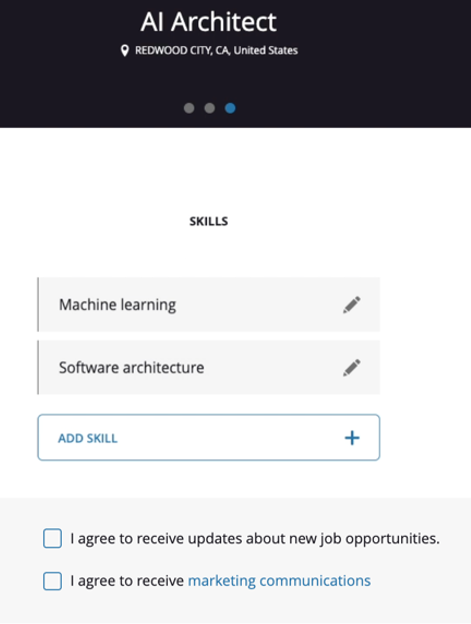
Skills in the Candidate Experience
Skills Advisor for Job Requisitions
When Skills Advisor for Job Requisitions is set up, recruiters can add required skills for a job requisition using suggested skills, there by enhancing the richness of the job description.

Skills in a Job Requisition
Skills Advisor for Job Profiles
- Enables employees to add skills that they have and skills they want to develop as part of their career development.
- Suggests skills that will strengthen a candidate’s job application.
- Helps hiring managers add relevant skills when authoring job requisitions.

Job Profiles
Skills Advisor for Gigs
- Provides AI recommendations for skills that are related to gig titles and descriptions, which you can then add as you create gigs.
- Helps attract gig seekers who are interested in those relevant skills so that they can apply to a gig, grow their skill set, or further develop and attain skills they'd like to have.
- Utilizes location and skills as part of a matching algorithm to recommend gigs for the employees through the Opportunity Marketplace dashboard.
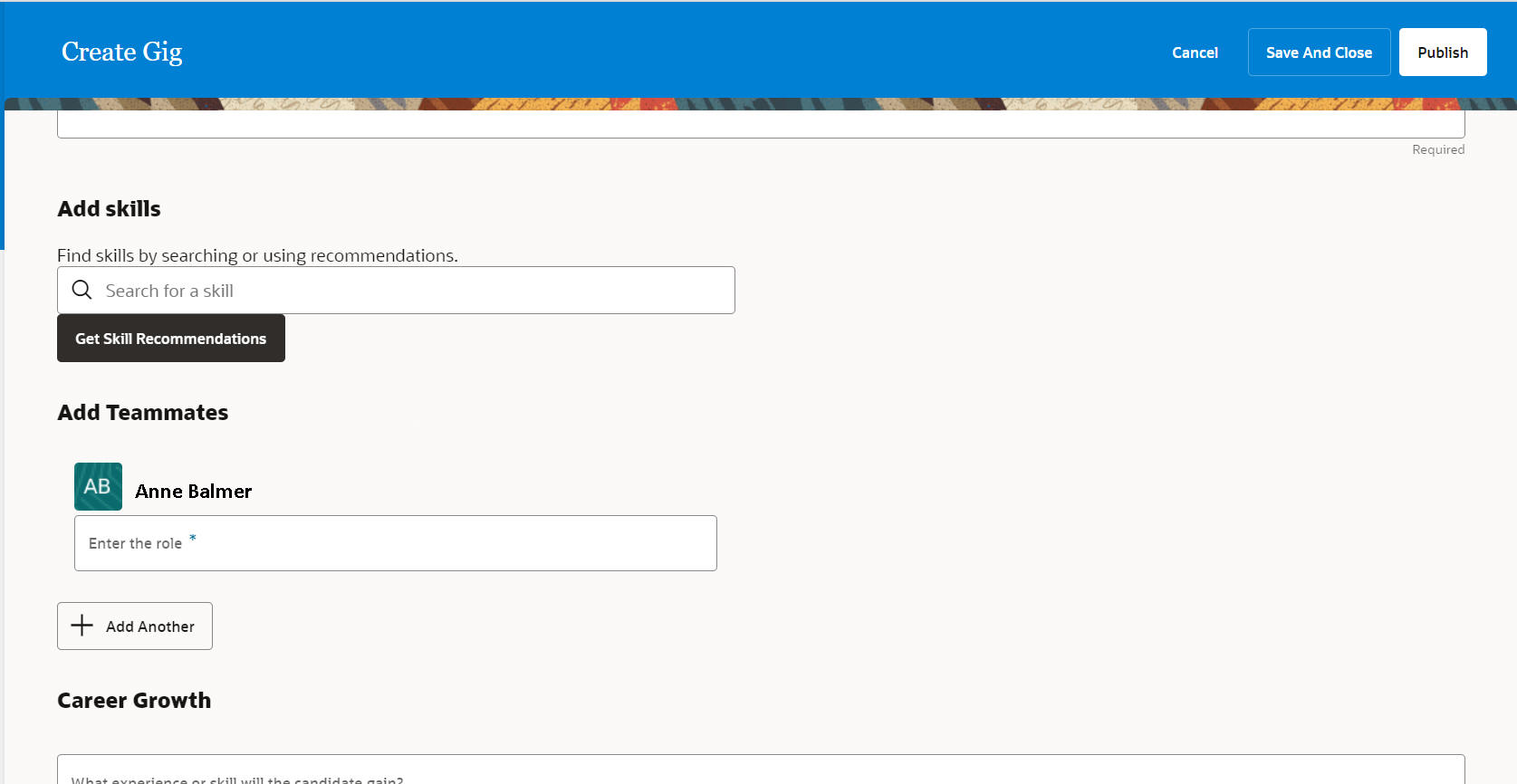
Get Skill Recommendations
Dynamic Skills helps organizations continuously detect, manage, and grow the skills that fuel their talent supply chain, driving business agility, transformation, and growth.
Steps to Enable
For details on implementing Oracle AI Apps for HCM and Dynamic Skills, and setting up products using AI Apps and Dynamic Skills, refer to the Implementing Oracle AI Apps for HCM and Dynamic Skills technical brief available on My Oracle Support (Document ID 2826501.1).
Tips And Considerations
Oracle Dynamic Skills is a separately sold product.
To use Dynamic Skills, your organization must meet the following criteria:
- The HCM environment must NOT be on Break Glass.
- The HCM environment must NOT be on a government pod.
- The HCM environment must NOT be on a EURA pod.
- The HCM environment must NOT be a DRCC (Dedicated Region Cloud @Customer) environment.
- The HCM environment must use English only for the operation language (no mixed language implementations).
For best results, it is strongly recommended to also meet these criteria:
- The Core HR and Talent Management environment should be live in production for at least 12 months or have prior production data for Talent Profile of at least 12 months to benefit from high quality recommendations.
- The Recruiting environment (if applicable) should be live in production for at least 6 months or have prior production data of at least 6 months to benefit from high quality recommendations.
Key Resources
For details on Skills Center and Skill Advisor features, refer to these technical briefs available on My Oracle Support.
- Skills Center technical brief on My Oracle Support (Document ID 2882763.1)
- Opportunity Marketplace for Gigs technical brief on My Oracle Support (Document ID 2834538.1).
.