
This document will continue to evolve as existing sections change and new information is added. All updates appear in the following table:
| Date | Product | Feature | Notes |
|---|---|---|---|
| 06 APR 2022 | Created initial document. |
 HAVE AN IDEA?
We’re here and we’re listening. If you have a suggestion on how to make our cloud services even better then go ahead and tell us. There are several ways to submit your ideas, for example, through the Ideas Lab on Oracle Customer Connect. Wherever you see this icon after the feature name it means we delivered one of your ideas.
GIVE US FEEDBACK
We welcome your comments and suggestions to improve the content. Please send us your feedback at oracle_fusion_applications_help_ww_grp@oracle.com.
DISCLAIMER
The information contained in this document may include statements about Oracle’s product development plans. Many factors can materially affect Oracle’s product development plans and the nature and timing of future product releases. Accordingly, this Information is provided to you solely for information only, is not a commitment to deliver any material, code, or functionality, and should not be relied upon in making purchasing decisions. The development, release, and timing of any features or functionality described remains at the sole discretion of Oracle.
This information may not be incorporated into any contractual agreement with Oracle or its subsidiaries or affiliates. Oracle specifically disclaims any liability with respect to this information. Refer to the Legal Notices and Terms of Use for further information.
Column Definitions:
Report = New or modified, Oracle-delivered, ready to run reports.
UI or Process-Based: Small Scale = These UI or process-based features are typically comprised of minor field, validation, or program changes. Therefore, the potential impact to users is minimal.
UI or Process-Based: Larger Scale* = These UI or process-based features have more complex designs. Therefore, the potential impact to users is higher.
Features Delivered Disabled = Action is needed BEFORE these features can be used by END USERS. These features are delivered disabled and you choose if and when to enable them. For example, a) new or expanded BI subject areas need to first be incorporated into reports, b) Integration is required to utilize new web services, or c) features must be assigned to user roles before they can be accessed.
| Ready for Use by End Users Reports plus Small Scale UI or Process-Based new features will have minimal user impact after an update. Therefore, customer acceptance testing should focus on the Larger Scale UI or Process-Based* new features. |
Customer Must Take Action before Use by End Users Not disruptive as action is required to make these features ready to use. As you selectively choose to leverage, you set your test and roll out timing. |
|||||
|---|---|---|---|---|---|---|
| Feature |
Report |
UI or |
UI or |
|
||
With this Commerce publishing update, you now have visibility into what has been published in the last week and which users were responsible for making those changes.
Capability highlights
- Provides an audit trail of changes on the storefront.
- Retrieve information on worksets published within the last 7 days.
- Obtain detailed information on all items changed in a workset.
- Filter results by author, asset type, change type.
Example use case
- You can use these endpoints to find specific information about what changes were published to the storefront, as well as when and by whom. Results can be filtered to look for specific changes. For example, you could look for changes only by a specific author or only items that were deleted.
Publishing History APIs
- GET /ccadmin/v1/publishingHistory
Provides a list of publishes from the last 7 days, including who initiated the publish, the date/timestamp of start and end of publish, and the number of changes in each.
- GET /ccadmin/v1/publishingHistory/{id}
Provides information about a specific publishing event (a workset or a full publish of all worksets).
- GET /ccadmin/v1/publishingHistory/{id}/changes
Provides detailed information about a specific publishing event (workset or a full publish of all worksets). For each item, who changed it and when, and the type of change (create, update, delete).
Details about publishingHistory/{id}/changes
- Shows the times an item was changed since last published to the storefront. Does not include complete history of all changes over time made to that item.
- Changes do not include property-level information. For example, there is information that Product XYZ was changed by an author with timestamp, but not what specific property changes that author made, such as editing a name or description.
- Changes correspond to the “primary” assets represented in the change list in the Administration UI. For example, if a user edits the translation of a product, the product will be the item that shows as changed.
- Changes that are rolled up into the “Catalog Config” item in the Administration UI are returned as individual items. For example, if a user creates a new product type, the product type change item will be returned by the API, not a Catalog Config change item.
- Increased productivity due to visibility into what users have published in the last week
- Beneficial for troubleshooting changes that were published to the storefront erroneously
Steps to Enable
You don't need to do anything to enable this feature.
Tips And Considerations
- Note: This is an API only feature
- The endpoint only returns information on successful publishes, not failures.
- Does not include changes made by Direct Price Edit or Direct Catalog Edit.
This document will continue to evolve as existing sections change and new information is added. All updates appear in the following table:
| Date | Product | Feature | Notes |
|---|---|---|---|
| 06 APR 2022 | Created initial document. |
HAVE AN IDEA?
We’re here and we’re listening. If you have a suggestion on how to make our cloud services even better then go ahead and tell us. There are several ways to submit your ideas, for example, through the Ideas Lab on Oracle Customer Connect. Wherever you see this icon after the feature name it means we delivered one of your ideas.
GIVE US FEEDBACK
We welcome your comments and suggestions to improve the content. Please send us your feedback at oracle_fusion_applications_help_ww_grp@oracle.com.
DISCLAIMER
The information contained in this document may include statements about Oracle’s product development plans. Many factors can materially affect Oracle’s product development plans and the nature and timing of future product releases. Accordingly, this Information is provided to you solely for information only, is not a commitment to deliver any material, code, or functionality, and should not be relied upon in making purchasing decisions. The development, release, and timing of any features or functionality described remains at the sole discretion of Oracle.
This information may not be incorporated into any contractual agreement with Oracle or its subsidiaries or affiliates. Oracle specifically disclaims any liability with respect to this information. Refer to the Legal Notices and Terms of Use for further information.
Column Definitions:
Report = New or modified, Oracle-delivered, ready to run reports.
UI or Process-Based: Small Scale = These UI or process-based features are typically comprised of minor field, validation, or program changes. Therefore, the potential impact to users is minimal.
UI or Process-Based: Larger Scale* = These UI or process-based features have more complex designs. Therefore, the potential impact to users is higher.
Features Delivered Disabled = Action is needed BEFORE these features can be used by END USERS. These features are delivered disabled and you choose if and when to enable them. For example, a) new or expanded BI subject areas need to first be incorporated into reports, b) Integration is required to utilize new web services, or c) features must be assigned to user roles before they can be accessed.
| Ready for Use by End Users Reports plus Small Scale UI or Process-Based new features will have minimal user impact after an update. Therefore, customer acceptance testing should focus on the Larger Scale UI or Process-Based* new features. |
Customer Must Take Action before Use by End Users Not disruptive as action is required to make these features ready to use. As you selectively choose to leverage, you set your test and roll out timing. |
|||||
|---|---|---|---|---|---|---|
| Feature |
Report |
UI or |
UI or |
|
||
With the release of this new Commerce Audiences feature, you can recognize key recurring events, such as the anniversary of a customer’s registration or first purchase to create a more personalized relationship with each customer by commemorating these events and presenting relevant content and offers around these anniversaries.
Capability highlights
- Identify events with an anniversary today, this week, this month, or within a specified number of days.
- Present content and offers based on annual events, for example, a birthday or anniversary of first purchase.
- Define audiences based on proximity to recurring events.
The new audience rule types handle anniversaries of annual events. They do not handle events that recur at other frequencies. An event must have occurred at least one year ago to be included in an anniversary of event rule. A rule like “anniversary of registration date is this month” will include people who registered in this month during any prior year. It will not include people who registered during the current month.
The new audience rule types are available for use in the Oracle Commerce Admin UI, as well as exposed through the existing audience creation Admin API. There are no new storefront APIs for this feature. The existing audience membership evaluation API works with the new audience rule types.
Example use case
New audience rules allow you to define audiences based on any date property in the customer profile and to include people for whom the anniversary of some annual event occurs this week, this month, or within a specified number of days. For example, an audience rule can identify shoppers whose birthday is today, within the current month, or those whose annual rewards program expiration date is within the next ten days.
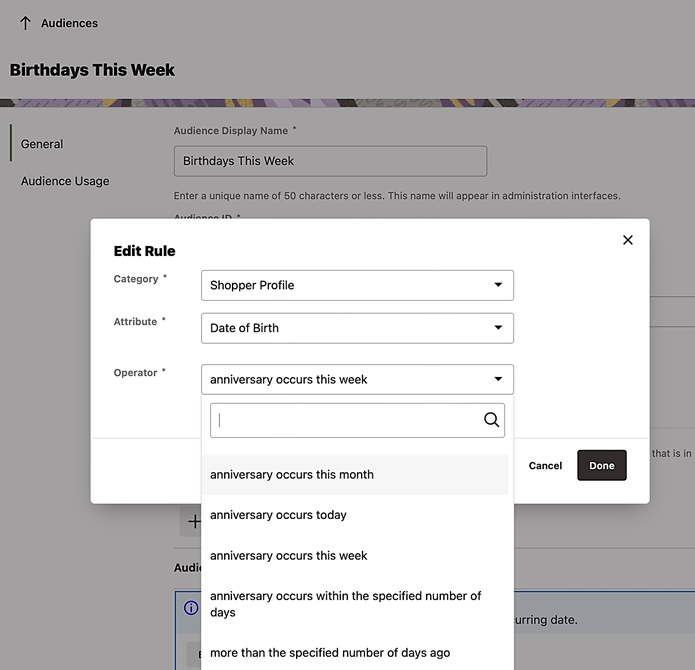
Commemorating important shopper anniversaries and recognizing the impending expiration of annual programs, such as a customer rewards program provides an opportunity to re-engage and increase customer loyalty.
Steps to Enable
You don't need to do anything to enable this feature.
Tips And Considerations
Anniversary of Event rules can be combined with other rules to create more complex audiences, for example, customers located in the UK whose birthday is this week and who have not made a purchase in the past year.
This document will continue to evolve as existing sections change and new information is added. All updates appear in the following table:
| Date | Product | Feature | Notes |
|---|---|---|---|
| 25 FEB 2022 | Created initial document. |
HAVE AN IDEA?
We’re here and we’re listening. If you have a suggestion on how to make our cloud services even better then go ahead and tell us. There are several ways to submit your ideas, for example, through the Ideas Lab on Oracle Customer Connect. Wherever you see this icon after the feature name it means we delivered one of your ideas.
GIVE US FEEDBACK
We welcome your comments and suggestions to improve the content. Please send us your feedback at oracle_fusion_applications_help_ww_grp@oracle.com.
DISCLAIMER
The information contained in this document may include statements about Oracle’s product development plans. Many factors can materially affect Oracle’s product development plans and the nature and timing of future product releases. Accordingly, this Information is provided to you solely for information only, is not a commitment to deliver any material, code, or functionality, and should not be relied upon in making purchasing decisions. The development, release, and timing of any features or functionality described remains at the sole discretion of Oracle.
This information may not be incorporated into any contractual agreement with Oracle or its subsidiaries or affiliates. Oracle specifically disclaims any liability with respect to this information. Refer to the Legal Notices and Terms of Use for further information.
Column Definitions:
Report = New or modified, Oracle-delivered, ready to run reports.
UI or Process-Based: Small Scale = These UI or process-based features are typically comprised of minor field, validation, or program changes. Therefore, the potential impact to users is minimal.
UI or Process-Based: Larger Scale* = These UI or process-based features have more complex designs. Therefore, the potential impact to users is higher.
Features Delivered Disabled = Action is needed BEFORE these features can be used by END USERS. These features are delivered disabled and you choose if and when to enable them. For example, a) new or expanded BI subject areas need to first be incorporated into reports, b) Integration is required to utilize new web services, or c) features must be assigned to user roles before they can be accessed.
| Ready for Use by End Users Reports plus Small Scale UI or Process-Based new features will have minimal user impact after an update. Therefore, customer acceptance testing should focus on the Larger Scale UI or Process-Based* new features. |
Customer Must Take Action before Use by End Users Not disruptive as action is required to make these features ready to use. As you selectively choose to leverage, you set your test and roll out timing. |
|||||
|---|---|---|---|---|---|---|
| Feature |
Report |
UI or |
UI or |
|
||
New Text Property on Saved Credit Cards
With this Commerce release, we’ve added a new long text property, additionalInfo, to saved credit cards. You can use this property to store any desired text data. This property can facilitate integrations with external systems, for example you can store an external system’s ID for the card.
Capability highlights
We’ve added:
- Admin API support for reading and updating additionalInfo
- Admin API support for filtering the list of a profile’s cards by an additionalInfo value
- For example, given a shopper’s profile ID and an additionalInfo value, an external system can retrieve the nickname and expiration date of the associated card.
- Agent and Storefront API support for reading additionalInfo
To read a card’s additionalInfo via Admin API:
Request Type: GET
Request URL:
<admin_host>/ccadmin/v1/profiles/{profile_id}/creditCards/{card_id}
To update a card’s additionalInfo via Admin API:
Request Type: PUT
Request URL: <admin_host>/ccadmin/v1/profiles/{profile_id}/creditCards/{card_id}
Request Body: {"additionalInfo": “xxxxxxx"}
To filter a profile’s cards by an additionalInfo value via Admin API:
Request Type: GET
Request URL: <admin_host>/ccadmin/v1/profiles/{profile_id}/creditCards?additionalInfo=xxxxxxx
To read a card’s additionalInfo via Storefront API:
Request Type: GET
Request URL: <store_host>/ccstoreui/v1/profiles/current/creditCards/{card_id}
To read a card’s additionalInfo via Agent API:
Request Type: GET
Request URL: <agent_host>/ccagent/v1/profiles/{profile_id}/creditCards/{card_id}
This property can facilitate integrations with external systems providing flexibility for your custom use of saved credit cards.
Steps to Enable
You don't need to do anything to enable this feature.
Tips And Considerations
- As a reminder: Commerce does not store a credit card’s number. Instead, for PCI compliance, Commerce stores a reusable token created by the payment processor.
- An external system that uses its own ID to identify a credit card can use the Commerce Administration API to retrieve the card’s nickname and expiration date to display in its own UI.
- You cannot update this property using Storefront or Agent APIs
This document will continue to evolve as existing sections change and new information is added. All updates appear in the following table:
| Date | Product | Feature | Notes |
|---|---|---|---|
| 04 MAR 2022 | Created initial document. |
HAVE AN IDEA?
We’re here and we’re listening. If you have a suggestion on how to make our cloud services even better then go ahead and tell us. There are several ways to submit your ideas, for example, through the Ideas Lab on Oracle Customer Connect. Wherever you see this icon after the feature name it means we delivered one of your ideas.
GIVE US FEEDBACK
We welcome your comments and suggestions to improve the content. Please send us your feedback at oracle_fusion_applications_help_ww_grp@oracle.com.
DISCLAIMER
The information contained in this document may include statements about Oracle’s product development plans. Many factors can materially affect Oracle’s product development plans and the nature and timing of future product releases. Accordingly, this Information is provided to you solely for information only, is not a commitment to deliver any material, code, or functionality, and should not be relied upon in making purchasing decisions. The development, release, and timing of any features or functionality described remains at the sole discretion of Oracle.
This information may not be incorporated into any contractual agreement with Oracle or its subsidiaries or affiliates. Oracle specifically disclaims any liability with respect to this information. Refer to the Legal Notices and Terms of Use for further information.
Column Definitions:
Report = New or modified, Oracle-delivered, ready to run reports.
UI or Process-Based: Small Scale = These UI or process-based features are typically comprised of minor field, validation, or program changes. Therefore, the potential impact to users is minimal.
UI or Process-Based: Larger Scale* = These UI or process-based features have more complex designs. Therefore, the potential impact to users is higher.
Features Delivered Disabled = Action is needed BEFORE these features can be used by END USERS. These features are delivered disabled and you choose if and when to enable them. For example, a) new or expanded BI subject areas need to first be incorporated into reports, b) Integration is required to utilize new web services, or c) features must be assigned to user roles before they can be accessed.
| Ready for Use by End Users Reports plus Small Scale UI or Process-Based new features will have minimal user impact after an update. Therefore, customer acceptance testing should focus on the Larger Scale UI or Process-Based* new features. |
Customer Must Take Action before Use by End Users Not disruptive as action is required to make these features ready to use. As you selectively choose to leverage, you set your test and roll out timing. |
|||||
|---|---|---|---|---|---|---|
| Feature |
Report |
UI or |
UI or |
|
||
This Commerce Open Storefront Framework (OSF) release includes major library updates, such as React 16 to 17, and therefore considered a major new release of OSF.
Continuing to stay up to date with the latest OSF upgrade is important. As major upgrades may have potential backwards incompatibility impact, we are highlighting this release and the importance of testing.
Major library updates
The following are major library updates. We strongly encourage thorough testing after applying the OSF upgrade and to update OSF first in your lower or non-production environment(s).
- React 17
- Jest 26
- ESLint 8
To upgrade to this release, significant refactoring of your application code is not expected. However, you are strongly encouraged to:
- Review the release notes for the 3 major library updates
- At a minimum, run a full regression test of your OSF application to catch any potential issues with the library updates. A thorough testing of the upgrade is strongly recommended
- Oracle Commerce 22A revision 3 (22.1.3) is the minimum Oracle Commerce release required to implement OSF 3.0.
Capability highlights
- Significantly reduced OSF application build times with esbuild bundler
- This is an experimental tool that we encourage storefront developers to try and continue to recommend rollup for production build + deploy
- Out-of-the-box (OOTB) widget for promotional upsell messaging
- Ability to tag the widget with one or more promotional messages, including Not Qualified, Partially Qualified and Success messages
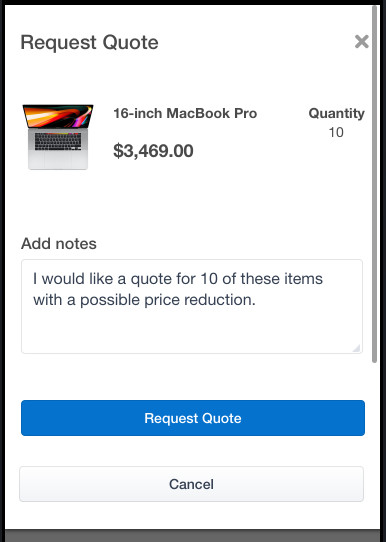
- OOTB widgets and flows for CPQ Request Quote
- New 'Request Quote Button' widget available to cart and checkout layouts
- Flow for requesting the quote, adding notes to the quote, placing the order for modified or unmodified quotes
- When placing the quoted order, shopper cannot modify cart.
Example use case
Developers can use the update commands in the OSF Command-line Interface (CLI). For the new widgets, those are available from the registry.
As a major OSF release, keeping up with new functionality is essential to benefit from important library updates, reduced OSF application build times, and new OOTB (out-of-the-box) widget functionality.
Steps to Enable
You don't need to do anything to enable this feature.
Tips And Considerations
Refer to the Oracle Commerce product documentation Developing Open Storefront Framework Applications for details on upgrading your version of OSF to a newer version.
Store Extension Promotion APIs
In this Commerce release, we’ve added Admin APIs for promotions to the Store API set to allow them to be called securely at storefront scale. Merchants can use the APIs to allow their Server-Side Extensions and integrations access to promotion data that you may not want exposed directly to the shopper.
Capability highlights
- Call using Application Keys
- Added APIs previously only available as part of the Admin API to the Store API set to allow them to be called securely at storefront scale:
- /ccapp/v1/promotions/getPromotion/[ID]
- /ccapp/v1/promotions/listPromotions
- Replace calls to /ccadmin/v1 with these new APIs
GET
http://admin.example.com/ccdmin/v1/getPromotion/12345
from an extension should change to
GET
http://store.example.com/ccapp/v1/getPromotion/12345
Login using an Application Key can now be done using /ccapp/v1/login
Example use case:
Merchants can use this update to allow their Server-Side Extensions and integrations access to promotion data that you may not want exposed directly to the shopper.
For example, you might want to show a description of a promotion in a web content widget. You can use a server-side extension with the application key to call the /ccapp/getPromotion/{ID} to get the value of the description property of the promotion and then display it in the widget. Other information on the promotion you wouldn’t want to expose to the shopper, may be ID or priority
Example use case:
Merchants can use this update to allow their Server-Side Extensions and integrations access to promotion data that you may not want exposed directly to the shopper. For example, you might want to show a description of a promotion in a web content widget. You can use a server-side extension with the application key to call the /ccapp/getPromotion/{ID} to get the value of the description property of the promotion and then display it in the widget. Other information on the promotion you would not want to expose to the shopper may be ID or priority.
Secure, scalable access to promotions endpoints from the storefront leading to greater stability and manageability of sites.
Steps to Enable
You don't need to do anything to enable this feature.
Tips And Considerations
These new Store Extension APIs can be used by store integrations and Server-Side Extensions. However, these APIs should not be used for widgets as that would publicly expose the Application Key.
This document will continue to evolve as existing sections change and new information is added. All updates appear in the following table:
| Date | Product | Feature | Notes |
|---|---|---|---|
| 12 JAN 2022 | Created initial document. |
HAVE AN IDEA?
We’re here and we’re listening. If you have a suggestion on how to make our cloud services even better then go ahead and tell us. There are several ways to submit your ideas, for example, through the Ideas Lab on Oracle Customer Connect. Wherever you see this icon after the feature name it means we delivered one of your ideas.
GIVE US FEEDBACK
We welcome your comments and suggestions to improve the content. Please send us your feedback at oracle_fusion_applications_help_ww_grp@oracle.com.
DISCLAIMER
The information contained in this document may include statements about Oracle’s product development plans. Many factors can materially affect Oracle’s product development plans and the nature and timing of future product releases. Accordingly, this Information is provided to you solely for information only, is not a commitment to deliver any material, code, or functionality, and should not be relied upon in making purchasing decisions. The development, release, and timing of any features or functionality described remains at the sole discretion of Oracle.
This information may not be incorporated into any contractual agreement with Oracle or its subsidiaries or affiliates. Oracle specifically disclaims any liability with respect to this information. Refer to the Legal Notices and Terms of Use for further information.
Column Definitions:
Report = New or modified, Oracle-delivered, ready to run reports.
UI or Process-Based: Small Scale = These UI or process-based features are typically comprised of minor field, validation, or program changes. Therefore, the potential impact to users is minimal.
UI or Process-Based: Larger Scale* = These UI or process-based features have more complex designs. Therefore, the potential impact to users is higher.
Features Delivered Disabled = Action is needed BEFORE these features can be used by END USERS. These features are delivered disabled and you choose if and when to enable them. For example, a) new or expanded BI subject areas need to first be incorporated into reports, b) Integration is required to utilize new web services, or c) features must be assigned to user roles before they can be accessed.
| Ready for Use by End Users Reports plus Small Scale UI or Process-Based new features will have minimal user impact after an update. Therefore, customer acceptance testing should focus on the Larger Scale UI or Process-Based* new features. |
Customer Must Take Action before Use by End Users Not disruptive as action is required to make these features ready to use. As you selectively choose to leverage, you set your test and roll out timing. |
|||||
|---|---|---|---|---|---|---|
| Feature |
Report |
UI or |
UI or |
|
||
Improvements to Access Control for Registered Applications (API only) |
||||||
Improvements to Access Control for Registered Applications (API only)
This Commerce release introduces improvements to access control for registered external applications.
A registered application is an external application that is registered in the Settings > Web APIs > Registered Applications area of the Commerce Administration Interface (Admin UI). Registering automatically generates an application ID identifying the application internally and an application key used to authenticate the application. Once authenticated, a registered application can access Commerce functionality via REST APIs.
With this release, there are now three types of registered applications:
- Custom application
- Commerce internal application
- Commerce integration application
You can create, update, and delete custom applications –not the other types.
Capability highlights
- You can use APIs to view and manage the set of roles assigned to a registered application.
- You can restrict a registered application to accessing only specific endpoints (for a small, selected set of endpoints).
- Registered applications that are predefined and provided by Oracle are protected - you cannot update or delete them.
- There are two new privileges introduced that provide backward compatibility.
With this release, the privileges within an application's roles are checked when the application tries to access Commerce functionality. You now can control which roles are assigned to a registered application. A set of "endpoint privileges" lets you restrict a registered application to access only specific endpoints. Note: An application cannot have a role containing the Administrator privilege.
New: Role management for registered applications
- To assign a role containing the Administrator privilege to a registered application, you must add the Administrator privilege to a role that is assigned to a registered application.
- Managing an application’s roles is currently API-only functionality.
- You can now use APIs to:
- View the roles assigned to a registered application
- Assign roles to a custom registered application
- Unassign roles from a custom registered application
Example use case:
To create the application "My Application" with a custom role whose ID is customRole1, you would POST to /ccadmin/v1/applicationIds as follows:
{
"name": "My Application",
"type": "application",
"roles": [ "customRole1"
]
}
New: Endpoint privileges
- Endpoint privilege is a new type of privilege that confers access to a specific endpoint.
- Like other privileges, cannot be given to a user or a registered application directly, only via a role.
- Useful when a registered application needs to have access that is limited in a precise way to only certain specific endpoints.
- If an endpoint has an associated endpoint privilege:
- With the endpoint privilege, a user or registered application can access the endpoint - no other privilege is required.
- Without the endpoint privilege, a user or registered application is subject to the usual access control rules.
- If access to the endpoint requires a different privilege, the user or application needs that other privilege to gain access.
- You cannot create an endpoint privilege.
- You can add an endpoint privilege to a custom role, assign that role to a registered application, and remove other roles from the application, thereby limiting the scope of its access.
- Endpoint privileges are currently available for these Admin endpoints:
- Bulk export*: POST /ccadmin/v1/exportProcess
- Get export status: GET /ccadmin/v1/exportProcess/{token}
- Abort export: POST /ccadmin/v1/exportProcess/{token}/abort
- Get shopper type properties: GET /ccadmin/v1/shopperTypes/{id}
- Get item type properties: GET /ccadmin/v1/itemTypes/{id}
- List promotions: GET /ccadmin/v1/promotions
- List sites: GET /ccadmin/v1/sites
NOTE: When a bulk export of profiles is done with access conferred by the endpoint privilege, the export omits PCI (credit card) data. Therefore, endpoint privilege for bulk export is useful if you need an export of profiles for PCI compliance.
You can use registered applications with more confidence. This update introduces a more granular access control for registered applications. An application's access can now be limited to specific functionality.
Steps to Enable
You don't need to do anything to enable this feature.
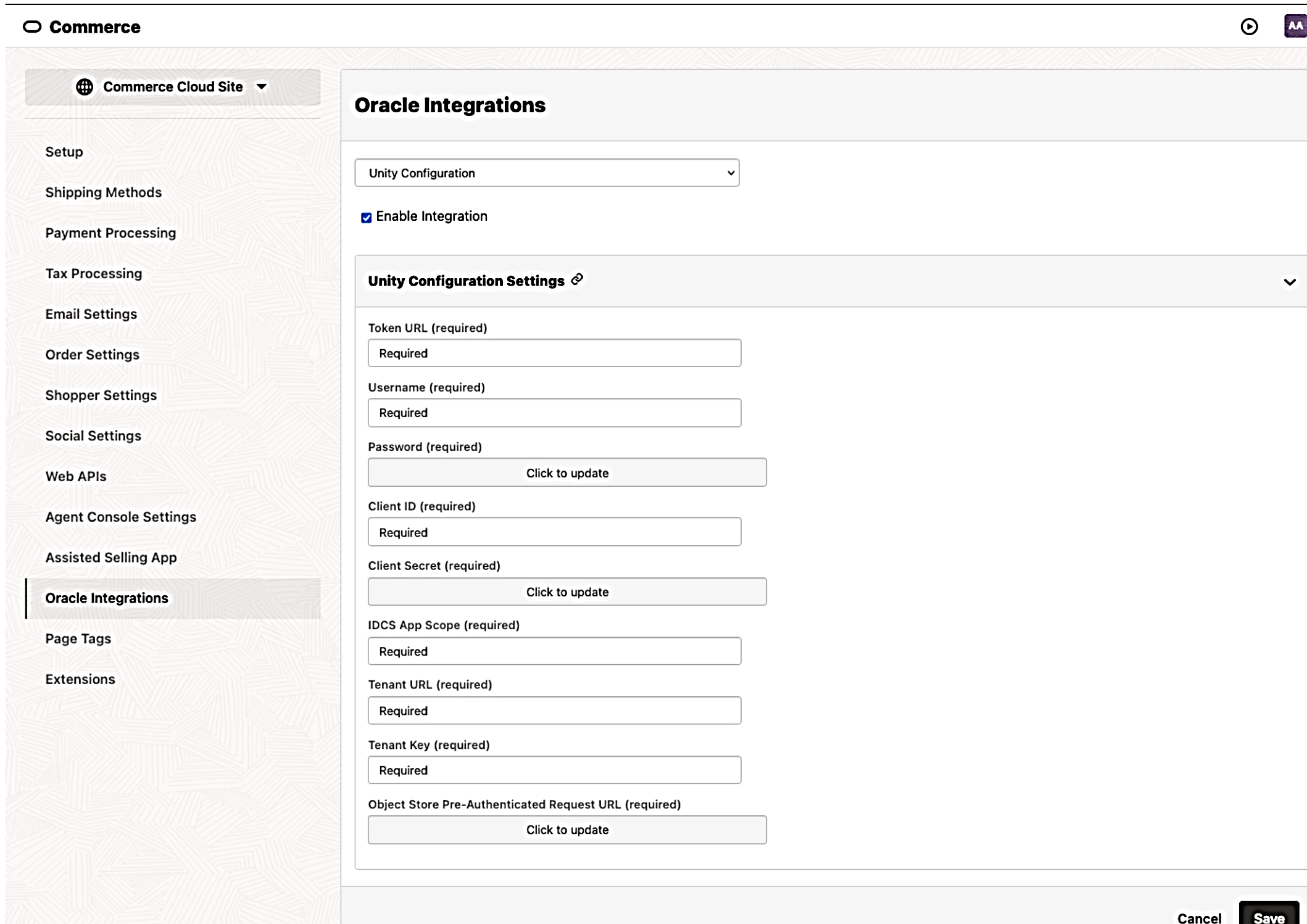
This Oracle Commerce update enables merchants to more accurately personalize shopper experiences based on the integration with Oracle Unity’s derived data elements. You can now use enriched attributes from Unity’s multiple data sources that include not only extended profile attributes but a host of intelligent and behavioral attributes. These attributes can be used to provide a personalized shopping experience to customers on their storefront.
Capability highlights
- Ability to enable Unity Integration and Unity attribute selection
- Enrich the Commerce shopper profiles and accounts with Unity data. This data is persisted into profile and account properties and can be used anywhere that profiles and accounts are exposed.
- Commerce to Unity synchronization: Incremental synchronization is automated for profiles.
- Unity to Commerce synchronization: Using the Customer360 API, user profile and account attributes are synchronized from Unity at the start of the shopper session and on login.
Example use case
This example illustrates how merchants would use enriched attributes from their 1st, 2nd, and 3rd party data to provide a personalized shopping experience to customers on their Oracle Commerce storefront.
- To accomplish this, use the consolidated customer profile data in Commerce to create an audience definition.
- Next, build an audience using Audience Builder.
- Use attributes available under the Account category, such as:
- Average order value at the account level
- Lifetime value of the account
- Number of open service requests with the account
- Total amount spent with the company across all channels
- Use attributes available under the Account category, such as:
- This newly created audience can be used in different areas within Commerce such as audience rules, promotions, and content variation slots to drive personalization.
The storefront users, upon log in, will see a range of products, offers and promotions personalized in the context of their organization based on their data in systems used by Unity including machine learning (ML) algorithms.
APIs and endpoints
The new API endpoint is the /enrichmentMaps endpoint, a Commerce Admin endpoint used to set up the mapping between Unity profile/account attributes and Commerce profile/account properties.
Merchants can more accurately personalize shopper experiences including cold start personalization for shoppers not known to the merchant on the storefront but known to Unity
Steps to Enable
You don't need to do anything to enable this feature.
Tips And Considerations
- Using the Integration with Oracle Unity feature applies to Commerce customers with a Unity subscription
- Unity supports list-of-string attributes in profiles and accounts. Since this is not currently supported in Commerce, syncing this data is not possible.
Limit Use of Promotions with Coupons
With this Commerce enhancement, you can now limit the number of times a shopper can receive a promotion. This feature is designed to work with promotions granted by coupons and is for registered shoppers only.
Capability highlights
- Allows users to restrict promotions that use coupons to registered shoppers only.
- Allows users to specify if a promotion can be granted more than once.
- Provides the ability to determine how many times a registered shopper can receive a promotion per grant.
Example use case
- Provide a promotion with one coupon code for all shoppers but allow only one use by each shopper (registered only)
How to specify limits on promotions with coupons in Commerce Administration UI
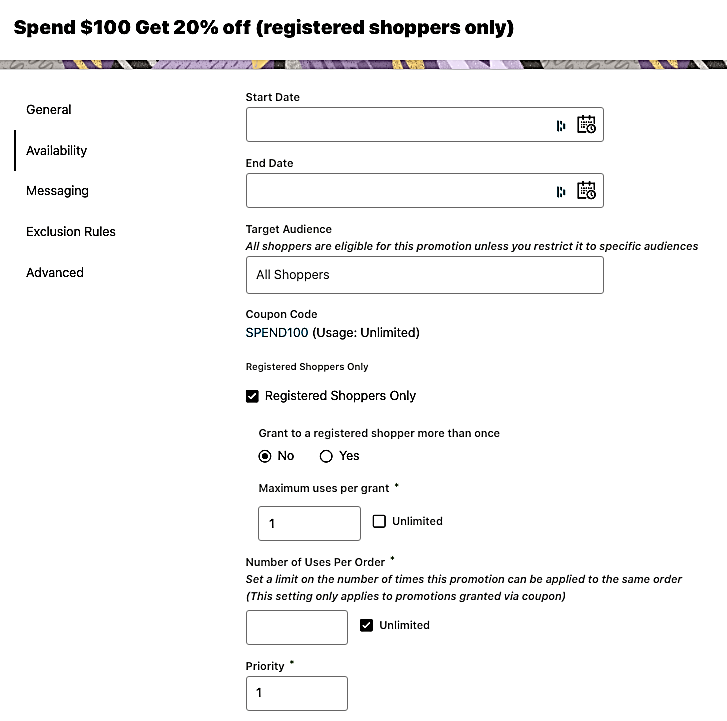
When you add a coupon to a promotion in the Administration UI, the following properties are available:
- Registered shoppers only: checkbox
- Grant to a registered shopper more than once: yes/no
- Maximum uses per grant: specify a number or unlimited
How to specify limits on promotions with coupons via API
- giveToAnonymousProfiles (Boolean): This property is used to specify whether or not only registered shoppers are eligible for the promotion. Set to TRUE by default, which allows anonymous shoppers to receive the promotion. FALSE restricts the promotion to only registered shoppers.
- allowMultiple (Boolean): This property controls whether or not a promotion can be granted to the same individual shopper more than once. Set to TRUE by default. Setting this property to FALSE means that even if a shopper has multiple valid coupon codes for the promotion, they cannot be granted it again.
- Uses (integer): This property specifies the number of times an individual shopper can receive the promotion per grant. Set to 1 by default. This property can be set to any positive integer; setting it to -1 or 0 equates to unlimited use.
How shoppers are informed of promotion limits on the storefront
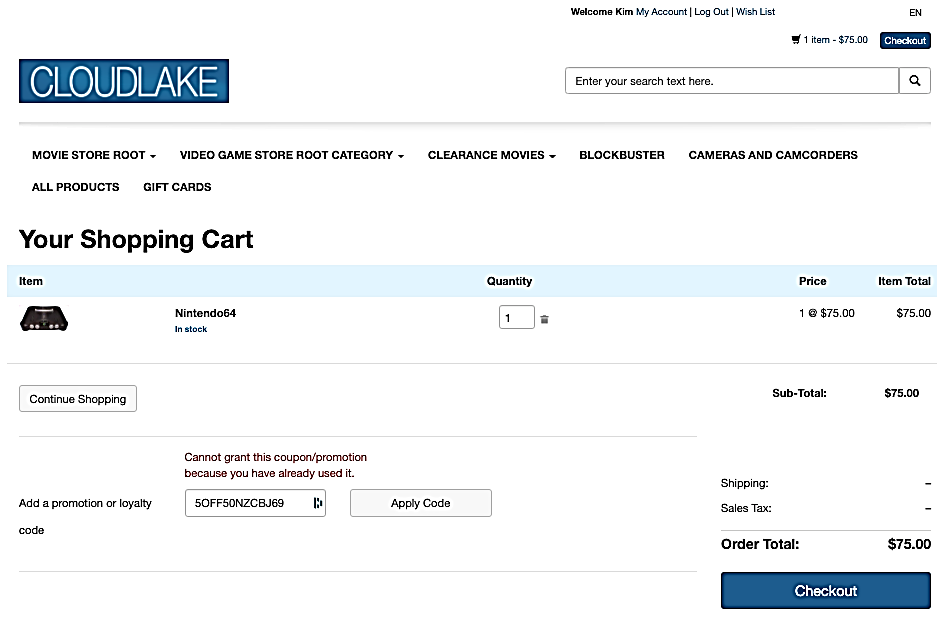
Reduces lost revenue by preventing shoppers from reusing coupon codes to receive the same promotion more than once.
Steps to Enable
You don't need to do anything to enable this feature.
Tips And Considerations
- Applies to promotions with coupons, not global promotions.
- Available for promotions limited to registered shoppers
This Oracle Commerce update provides improved collaboration for Commerce users in situations when other users’ actions can affect their work. Our new Save Conflicts feature detects when multiple users in our Admin UI have been working on the same item and gives a warning to help users avoid conflicts.
Capability highlights
- Gives the user information before they save and overwrite another user’s changes.
- Prevents errors when multiple team members are working on the same items.
This feature is included in the Commerce Administration UI and in endpoints that save items in Admin.
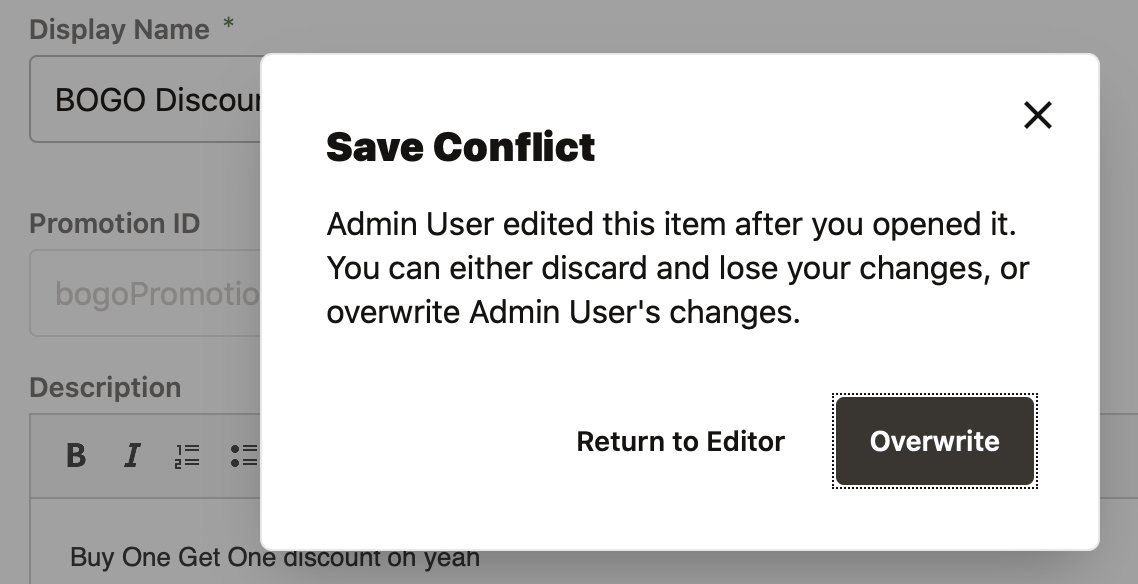
All users benefit from this feature when editing and saving items which contributes to better team collaboration and an improved user experience.
Steps to Enable
You don't need to do anything to enable this feature.
Tips And Considerations
- This feature does not present the user with the specific property conflicts and allow the ability to merge them.
- In cases where multiple users are editing the same item, a user sees the conflict modal with the last user’s name.