
This document will continue to evolve as existing sections change and new information is added. All updates appear in the following table:
| Date | Product | Feature | Notes |
|---|---|---|---|
| 29 JUN 2022 | Created initial document. |
 HAVE AN IDEA?
We’re here and we’re listening. If you have a suggestion on how to make our cloud services even better then go ahead and tell us. There are several ways to submit your ideas, for example, through the Ideas Lab on Oracle Customer Connect. Wherever you see this icon after the feature name it means we delivered one of your ideas.
GIVE US FEEDBACK
We welcome your comments and suggestions to improve the content. Please send us your feedback at oracle_fusion_applications_help_ww_grp@oracle.com.
DISCLAIMER
The information contained in this document may include statements about Oracle’s product development plans. Many factors can materially affect Oracle’s product development plans and the nature and timing of future product releases. Accordingly, this Information is provided to you solely for information only, is not a commitment to deliver any material, code, or functionality, and should not be relied upon in making purchasing decisions. The development, release, and timing of any features or functionality described remains at the sole discretion of Oracle.
This information may not be incorporated into any contractual agreement with Oracle or its subsidiaries or affiliates. Oracle specifically disclaims any liability with respect to this information. Refer to the Legal Notices and Terms of Use for further information.
Column Definitions:
Report = New or modified, Oracle-delivered, ready to run reports.
UI or Process-Based: Small Scale = These UI or process-based features are typically comprised of minor field, validation, or program changes. Therefore, the potential impact to users is minimal.
UI or Process-Based: Larger Scale* = These UI or process-based features have more complex designs. Therefore, the potential impact to users is higher.
Features Delivered Disabled = Action is needed BEFORE these features can be used by END USERS. These features are delivered disabled and you choose if and when to enable them. For example, a) new or expanded BI subject areas need to first be incorporated into reports, b) Integration is required to utilize new web services, or c) features must be assigned to user roles before they can be accessed.
| Ready for Use by End Users Reports plus Small Scale UI or Process-Based new features will have minimal user impact after an update. Therefore, customer acceptance testing should focus on the Larger Scale UI or Process-Based* new features. |
Customer Must Take Action before Use by End Users Not disruptive as action is required to make these features ready to use. As you selectively choose to leverage, you set your test and roll out timing. |
|||||
|---|---|---|---|---|---|---|
| Feature |
Report |
UI or |
UI or |
|
||
Oracle Commerce merchants can now use Oracle Maxymiser to define and execute A/B tests on their Commerce site. With this Commerce integration, merchants can test different customer experiences side-by-side to determine how they affect visitor behavior.
To enable this integration, you must have active licenses for both Oracle Commerce and Oracle Maxymiser.
Capability highlights
- Create tests that span multiple regions of a page and multiple pages across the site
- Test widget layouts as well as different content and presentation
- Test alternative business functionality on the page
- Measure and compare business outcomes including new customer registration, orders and revenue, product, and category views
You can test rich storefront experiences created in Design Studio, using the tools and techniques you already know for both Storefront Classic and Open Storefront Framework (OSF). Key reporting metrics are captured automatically giving you can access to view reports and compare results in Maxymiser, showing you at-a-glance, which experience generated the best business results.
Example use cases
The use cases for A/B testing are numerous, ranging from testing the text, color, or font in a single call to action all the way to testing complete end-to-end experiences and alternative business functionality presented through different widgets.
A few examples:
- Test whether labeling a link “Learn more” or “Why is this important?” generates more clickthroughs to the loyalty program marketing page.
- Test whether a hero image of one person in a swimsuit at the pool generates more swimsuit product views than a hero image of a family in swimsuits at the beach.
- Offer one group a coupon code for a 10% discount and another group a coupon for a 20% discount with appropriate messaging and banners for each promotion and see which experience generates more sales and more revenue. (The higher discount could generate more sales but less revenue because of the larger discount.)
- Show one group widgets implementing a single page checkout flow and another group widgets implementing a multi-page checkout flow and see which one generates a higher conversion rate
Creating server campaigns in Maxymiser
Elements and Variants: The characteristics and behaviors that will be varied to determine the best effect on the Action/Goals
Actions: The ‘Actions’ that are tracked and measured through the execution of the campaign to determine a ‘Winner’
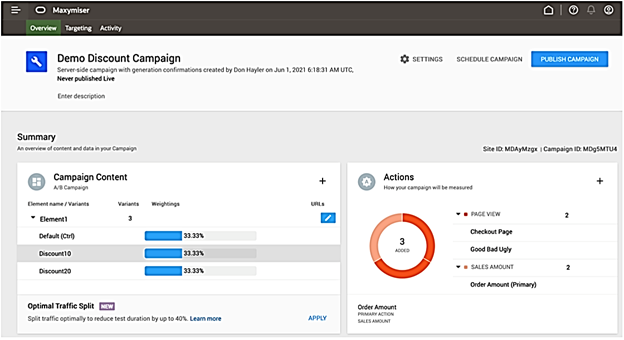
Working with Maxymiser campaigns in Commerce
Once you enable the Maxymiser integration, a new Maxymiser Campaigns tab appears in the Marketing section of the Commerce Administration UI.
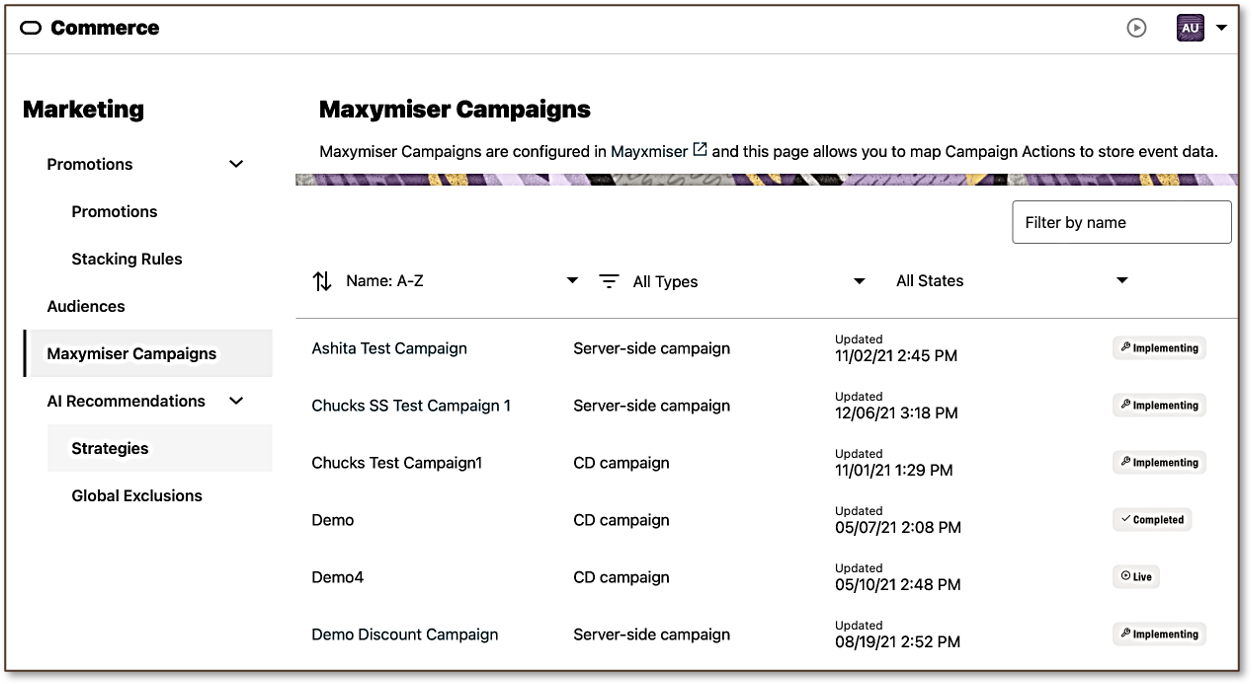
Test full end-to-end experiences, not just individual elements of one page and easily measure and report on key outcomes of each experience
Steps to Enable
You don't need to do anything to enable this feature.
Tips And Considerations
- You can use landing pages and page view actions to track custom application actions such as form submission by having the action take the visitor to a specific landing page on successful completion.
- You can use Maxymiser’s Targeting settings on your test to limit it to a specific percentage of your customers – for example, apply this test to a random 10% of customers – to limit potential performance impact on your site.
The initial release of the integration includes the following restrictions that will be addressed in future updates:
- Commerce always includes all orders from each variant in reports. Currently, you cannot analyze and compare only orders that contain swimsuits, for example, to see whether a particular experience is better at driving swimsuit sales rather than better at driving overall sales.
- Tracking and reporting on custom applications actions is not yet supported.
- Tests are currently limited to testing content and sets of widgets. You cannot test promotions, search curation rules, or other non-content elements of your web site.
- Tests currently apply to all visitors to your site. You cannot currently restrict a test to members of an audience such as, logged in users or people who have not yet made their first purchase on your site.
NOTE: To enable this integration, you must have active licenses for both Oracle Commerce and Oracle Maxymiser.
This document will continue to evolve as existing sections change and new information is added. All updates appear in the following table:
| Date | Product | Feature | Notes |
|---|---|---|---|
| 06 APR 2022 | Created initial document. |
HAVE AN IDEA?
We’re here and we’re listening. If you have a suggestion on how to make our cloud services even better then go ahead and tell us. There are several ways to submit your ideas, for example, through the Ideas Lab on Oracle Customer Connect. Wherever you see this icon after the feature name it means we delivered one of your ideas.
GIVE US FEEDBACK
We welcome your comments and suggestions to improve the content. Please send us your feedback at oracle_fusion_applications_help_ww_grp@oracle.com.
DISCLAIMER
The information contained in this document may include statements about Oracle’s product development plans. Many factors can materially affect Oracle’s product development plans and the nature and timing of future product releases. Accordingly, this Information is provided to you solely for information only, is not a commitment to deliver any material, code, or functionality, and should not be relied upon in making purchasing decisions. The development, release, and timing of any features or functionality described remains at the sole discretion of Oracle.
This information may not be incorporated into any contractual agreement with Oracle or its subsidiaries or affiliates. Oracle specifically disclaims any liability with respect to this information. Refer to the Legal Notices and Terms of Use for further information.
Column Definitions:
Report = New or modified, Oracle-delivered, ready to run reports.
UI or Process-Based: Small Scale = These UI or process-based features are typically comprised of minor field, validation, or program changes. Therefore, the potential impact to users is minimal.
UI or Process-Based: Larger Scale* = These UI or process-based features have more complex designs. Therefore, the potential impact to users is higher.
Features Delivered Disabled = Action is needed BEFORE these features can be used by END USERS. These features are delivered disabled and you choose if and when to enable them. For example, a) new or expanded BI subject areas need to first be incorporated into reports, b) Integration is required to utilize new web services, or c) features must be assigned to user roles before they can be accessed.
| Ready for Use by End Users Reports plus Small Scale UI or Process-Based new features will have minimal user impact after an update. Therefore, customer acceptance testing should focus on the Larger Scale UI or Process-Based* new features. |
Customer Must Take Action before Use by End Users Not disruptive as action is required to make these features ready to use. As you selectively choose to leverage, you set your test and roll out timing. |
|||||
|---|---|---|---|---|---|---|
| Feature |
Report |
UI or |
UI or |
|
||
Recommendations API for Headless
With this release, you can now include AI-driven personalized product recommendations in all of your applications – native mobile apps, headless web apps built with other front-end frameworks, and IoT applications as well. (Oracle Commerce automated product recommendations have previously only been available to web applications built using Open Storefront Framework (OSF) or Storefront Classic.)
Capability highlights
- Track shopper behavior to inform recommendations.
- Generate personalized one-to-one recommendations for every shopper in real time.
- Use out-of-the-box and custom recommendation strategies .
- Simple, efficient API to track behavior and fetch recommendations in a single network call.
- Offers shoppers an opportunity to discover new products they would not have found on their own.
The Recommendations API consists of a single endpoint, /pr/v4/sessions/click. A POST to this API sends behavior tracking information (e.g. page views, product views, search terms, cart contents, recommendation clickthroughs) to the recommendation server and simultaneously retrieves one or more groups of product recommendations based on the request payload.
A new storefront API, /ccstore/v1/merchant/production-Recommendations provides metadata about the Recommendations endpoint, including the host name, port, and protocol to use when invoking it and the tenant id to provide when making calls to the API.
Example use case
The use cases are the same as for recommendations on web sites. Headless applications can now present relevant product recommendations throughout the user experience.
Headless and mobile applications can use AI-driven product recommendations to increase conversion rate and raise average order value.
Steps to Enable
You don't need to do anything to enable this feature.
Tips And Considerations
All recommendations functionality available in Storefront Classic or OSF is also available through the API.
Store Extension Promotion APIs
In this Commerce release, we’ve added Admin APIs for promotions to the Store API set to allow them to be called securely at storefront scale. Merchants can use the APIs to allow their Server-Side Extensions and integrations access to promotion data that you may not want exposed directly to the shopper.
Capability highlights
- Call using Application Keys
- Added APIs previously only available as part of the Admin API to the Store API set to allow them to be called securely at storefront scale:
- /ccapp/v1/promotions/getPromotion/[ID]
- /ccapp/v1/promotions/listPromotions
- Replace calls to /ccadmin/v1 with these new APIs
GET
http://admin.example.com/ccdmin/v1/getPromotion/12345
from an extension should change to
GET
http://store.example.com/ccapp/v1/getPromotion/12345
Login using an Application Key can now be done using /ccapp/v1/login
Example use case:
Merchants can use this update to allow their Server-Side Extensions and integrations access to promotion data that you may not want exposed directly to the shopper.
For example, you might want to show a description of a promotion in a web content widget. You can use a server-side extension with the application key to call the /ccapp/getPromotion/{ID} to get the value of the description property of the promotion and then display it in the widget. Other information on the promotion you wouldn’t want to expose to the shopper, may be ID or priority
Example use case:
Merchants can use this update to allow their Server-Side Extensions and integrations access to promotion data that you may not want exposed directly to the shopper. For example, you might want to show a description of a promotion in a web content widget. You can use a server-side extension with the application key to call the /ccapp/getPromotion/{ID} to get the value of the description property of the promotion and then display it in the widget. Other information on the promotion you would not want to expose to the shopper may be ID or priority.
Secure, scalable access to promotions endpoints from the storefront leading to greater stability and manageability of sites.
Steps to Enable
You don't need to do anything to enable this feature.
Tips And Considerations
These new Store Extension APIs can be used by store integrations and Server-Side Extensions. However, these APIs should not be used for widgets as that would publicly expose the Application Key.
This Commerce Open Storefront Framework (OSF) release includes major library updates, such as React 16 to 17, and therefore considered a major new release of OSF.
Continuing to stay up to date with the latest OSF upgrade is important. As major upgrades may have potential backwards incompatibility impact, we are highlighting this release and the importance of testing.
Major library updates
The following are major library updates. We strongly encourage thorough testing after applying the OSF upgrade and to update OSF first in your lower or non-production environment(s).
- React 17
- Jest 26
- ESLint 8
To upgrade to this release, significant refactoring of your application code is not expected. However, you are strongly encouraged to:
- Review the release notes for the 3 major library updates
- At a minimum, run a full regression test of your OSF application to catch any potential issues with the library updates. A thorough testing of the upgrade is strongly recommended
- Oracle Commerce 22A revision 3 (22.1.3) is the minimum Oracle Commerce release required to implement OSF 3.0.
Capability highlights
- Significantly reduced OSF application build times with esbuild bundler
- This is an experimental tool that we encourage storefront developers to try and continue to recommend rollup for production build + deploy
- Out-of-the-box (OOTB) widget for promotional upsell messaging
- Ability to tag the widget with one or more promotional messages, including Not Qualified, Partially Qualified and Success messages
- OOTB widgets and flows for CPQ Request Quote
- New 'Request Quote Button' widget available to cart and checkout layouts
- Flow for requesting the quote, adding notes to the quote, placing the order for modified or unmodified quotes
- When placing the quoted order, shopper cannot modify cart.
Example use case
Developers can use the update commands in the OSF Command-line Interface (CLI). For the new widgets, those are available from the registry.
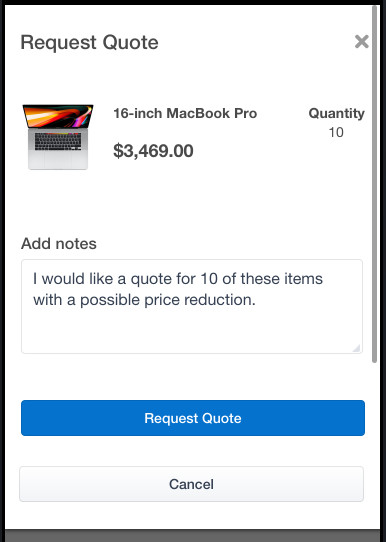
As a major OSF release, keeping up with new functionality is essential to benefit from important library updates, reduced OSF application build times, and new OOTB (out-of-the-box) widget functionality.
Steps to Enable
You don't need to do anything to enable this feature.
Tips And Considerations
Refer to the Oracle Commerce product documentation Developing Open Storefront Framework Applications for details on upgrading your version of OSF to a newer version.
New Text Property on Saved Credit Cards
With this Commerce release, we’ve added a new long text property, additionalInfo, to saved credit cards. You can use this property to store any desired text data. This property can facilitate integrations with external systems, for example you can store an external system’s ID for the card.
Capability highlights
We’ve added:
- Admin API support for reading and updating additionalInfo
- Admin API support for filtering the list of a profile’s cards by an additionalInfo value
- For example, given a shopper’s profile ID and an additionalInfo value, an external system can retrieve the nickname and expiration date of the associated card.
- Agent and Storefront API support for reading additionalInfo
To read a card’s additionalInfo via Admin API:
Request Type: GET
Request URL:
<admin_host>/ccadmin/v1/profiles/{profile_id}/creditCards/{card_id}
To update a card’s additionalInfo via Admin API:
Request Type: PUT
Request URL: <admin_host>/ccadmin/v1/profiles/{profile_id}/creditCards/{card_id}
Request Body: {"additionalInfo": “xxxxxxx"}
To filter a profile’s cards by an additionalInfo value via Admin API:
Request Type: GET
Request URL: <admin_host>/ccadmin/v1/profiles/{profile_id}/creditCards?additionalInfo=xxxxxxx
To read a card’s additionalInfo via Storefront API:
Request Type: GET
Request URL: <store_host>/ccstoreui/v1/profiles/current/creditCards/{card_id}
To read a card’s additionalInfo via Agent API:
Request Type: GET
Request URL: <agent_host>/ccagent/v1/profiles/{profile_id}/creditCards/{card_id}
This property can facilitate integrations with external systems providing flexibility for your custom use of saved credit cards.
Steps to Enable
You don't need to do anything to enable this feature.
Tips And Considerations
- As a reminder: Commerce does not store a credit card’s number. Instead, for PCI compliance, Commerce stores a reusable token created by the payment processor.
- An external system that uses its own ID to identify a credit card can use the Commerce Administration API to retrieve the card’s nickname and expiration date to display in its own UI.
- You cannot update this property using Storefront or Agent APIs
With the release of this new Commerce Audiences feature, you can recognize key recurring events, such as the anniversary of a customer’s registration or first purchase to create a more personalized relationship with each customer by commemorating these events and presenting relevant content and offers around these anniversaries.
Capability highlights
- Identify events with an anniversary today, this week, this month, or within a specified number of days.
- Present content and offers based on annual events, for example, a birthday or anniversary of first purchase.
- Define audiences based on proximity to recurring events.
The new audience rule types handle anniversaries of annual events. They do not handle events that recur at other frequencies. An event must have occurred at least one year ago to be included in an anniversary of event rule. A rule like “anniversary of registration date is this month” will include people who registered in this month during any prior year. It will not include people who registered during the current month.
The new audience rule types are available for use in the Oracle Commerce Admin UI, as well as exposed through the existing audience creation Admin API. There are no new storefront APIs for this feature. The existing audience membership evaluation API works with the new audience rule types.
Example use case
New audience rules allow you to define audiences based on any date property in the customer profile and to include people for whom the anniversary of some annual event occurs this week, this month, or within a specified number of days. For example, an audience rule can identify shoppers whose birthday is today, within the current month, or those whose annual rewards program expiration date is within the next ten days.
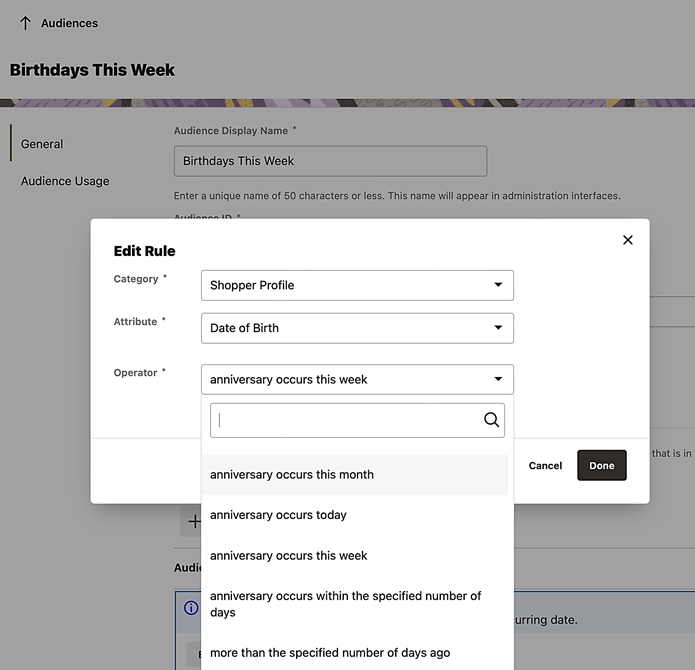
Commemorating important shopper anniversaries and recognizing the impending expiration of annual programs, such as a customer rewards program provides an opportunity to re-engage and increase customer loyalty.
Steps to Enable
You don't need to do anything to enable this feature.
Tips And Considerations
Anniversary of Event rules can be combined with other rules to create more complex audiences, for example, customers located in the UK whose birthday is this week and who have not made a purchase in the past year.
With this Commerce publishing update, you now have visibility into what has been published in the last week and which users were responsible for making those changes.
Capability highlights
- Provides an audit trail of changes on the storefront.
- Retrieve information on worksets published within the last 7 days.
- Obtain detailed information on all items changed in a workset.
- Filter results by author, asset type, change type.
Example use case
- You can use these endpoints to find specific information about what changes were published to the storefront, as well as when and by whom. Results can be filtered to look for specific changes. For example, you could look for changes only by a specific author or only items that were deleted.
Publishing History APIs
- GET /ccadmin/v1/publishingHistory
Provides a list of publishes from the last 7 days, including who initiated the publish, the date/timestamp of start and end of publish, and the number of changes in each.
- GET /ccadmin/v1/publishingHistory/{id}
Provides information about a specific publishing event (a workset or a full publish of all worksets).
- GET /ccadmin/v1/publishingHistory/{id}/changes
Provides detailed information about a specific publishing event (workset or a full publish of all worksets). For each item, who changed it and when, and the type of change (create, update, delete).
Details about publishingHistory/{id}/changes
- Shows the times an item was changed since last published to the storefront. Does not include complete history of all changes over time made to that item.
- Changes do not include property-level information. For example, there is information that Product XYZ was changed by an author with timestamp, but not what specific property changes that author made, such as editing a name or description.
- Changes correspond to the “primary” assets represented in the change list in the Administration UI. For example, if a user edits the translation of a product, the product will be the item that shows as changed.
- Changes that are rolled up into the “Catalog Config” item in the Administration UI are returned as individual items. For example, if a user creates a new product type, the product type change item will be returned by the API, not a Catalog Config change item.
- Increased productivity due to visibility into what users have published in the last week
- Beneficial for troubleshooting changes that were published to the storefront erroneously
Steps to Enable
You don't need to do anything to enable this feature.
Tips And Considerations
- Note: This is an API only feature
- The endpoint only returns information on successful publishes, not failures.
- Does not include changes made by Direct Price Edit or Direct Catalog Edit.