
This document will continue to evolve as existing sections change and new information is added. All updates appear in the following table:
| Date | Module | Feature | Notes |
|---|---|---|---|
| 28 JUL 2023 | Web Chat for B2C Service Support for 23.06 Client | Updated document. Revised feature information. | |
| 16 JUN 2023 | Created initial document. |
 HAVE AN IDEA?
We’re here and we’re listening. If you have a suggestion on how to make our cloud services even better then go ahead and tell us. There are several ways to submit your ideas, for example, through the Ideas Lab on Oracle Customer Connect. Wherever you see this icon after the feature name it means we delivered one of your ideas.
GIVE US FEEDBACK
We welcome your comments and suggestions to improve the content. Please send us your feedback at oracle_fusion_applications_help_ww_grp@oracle.com.
DISCLAIMER
The information contained in this document may include statements about Oracle’s product development plans. Many factors can materially affect Oracle’s product development plans and the nature and timing of future product releases. Accordingly, this Information is provided to you solely for information only, is not a commitment to deliver any material, code, or functionality, and should not be relied upon in making purchasing decisions. The development, release, and timing of any features or functionality described remains at the sole discretion of Oracle.
This information may not be incorporated into any contractual agreement with Oracle or its subsidiaries or affiliates. Oracle specifically disclaims any liability with respect to this information. Refer to the Legal Notices and Terms of Use for further information.
Column Definitions:
Report = New or modified, Oracle-delivered, ready to run reports.
UI or Process-Based: Small Scale = These UI or process-based features are typically comprised of minor field, validation, or program changes. Therefore, the potential impact to users is minimal.
UI or Process-Based: Larger Scale* = These UI or process-based features have more complex designs. Therefore, the potential impact to users is higher.
Features Delivered Disabled = Action is needed BEFORE these features can be used by END USERS. These features are delivered disabled and you choose if and when to enable them. For example, a) new or expanded BI subject areas need to first be incorporated into reports, b) Integration is required to utilize new web services, or c) features must be assigned to user roles before they can be accessed.
| Ready for Use by End Users Reports plus Small Scale UI or Process-Based new features will have minimal user impact after an update. Therefore, customer acceptance testing should focus on the Larger Scale UI or Process-Based* new features. |
Customer Must Take Action before Use by End Users Not disruptive as action is required to make these features ready to use. As you selectively choose to leverage, you set your test and roll out timing. |
|||||
|---|---|---|---|---|---|---|
| Feature |
Report |
UI or |
UI or |
|
||
Oracle Messaging Is Available in the Configuration Assistant |
||||||
A reputation for excellent customer service can differentiate the brand and drive revenue. Oracle Digital Customer Service helps organizations earn that reputation by transforming online web service into a highly interactive customer experience.
Web Chat for B2C Service Support for 23.06 Client
What's New
- Bi-directional file sharing with B2C agent - Web Chat For Service can now send and receive files to and from a B2C live agent.
- Support for multi-level categories in Drop-down list in pre-launch form - Drop-down fields in the pre-launch form can now use a tree like structure to allow a categorized list being put in the drop-down field.
- Client greetings - You can now configure agent and bot client greetings to overwrite the server-side ones.
- End conversation custom message - When a conversation ends you can now show a custom message that can optionally include a link or an iframe, the main usage for the link or iframe is to offer a survey.
- Dynamically reset the preLaunchFormFields setting - It is possible now to reset the pre-launch form after having initiated the widget.
- Off the record support for B2C - An "off the record" button can be shown at the chat header for the user to start chatting off the record.
- Sensitive information masking - Messages containing sensitive information (credit card and social security numbers) can be detected and sent off the record to the server.
What's Improved
- Color customization - Better support for customizing colors, fields and buttons.
- End conversation flow - With the introduction of the "End conversation custom message" feature, the messages and actions have been improved when a conversation ends.
Business Enablement:
- Improved end-user and agent experience during chat interaction with file sharing and preview of the file directly in the Web Chat client by the end-user.
- Multi-level product or category selection from the pre-launch form will optimize routing logic so that the chat interaction is handled by a skilled agent or bot.
- Clear identification in the greeting message whether the end-user is being helped by a human agent or a bot.
- The web chat client can be fully branded to comply with your corporate identity.
- Possibility to offer a link or a survey at the end of the chat conversation to e.g., send a promotion or measure success.
- Provide secure chat interactions to indicate and mask sensitive data.
Steps to Enable
If Engagement Engine has not been enabled on your site, please submit a Service Request (SR).
See Getting Started Guide for Engagement Engine for steps needed in Engagement Engine to get this feature working.
Tips And Considerations
The Web Chat for Service 23.06 client and new features are available via the Engagement Engine Editor.
Key Resources
- Once Engagement Engine has been enabled, see the Oracle Engagement Engine Cloud Service Documentation for complete steps for configuring, testing, deploying, and best practices for Engagement Engine.
- See Chapter: Integrating Engagement Engine with Web Chat for Service.
Access Requirements
If Engagement Engine has not been enabled on your site, please submit a Service Request.
Oracle Messaging Is Available in the Configuration Assistant
Oracle Messaging, a key component of Oracle Service, can now be enabled for all Oracle B2C Service Chat customers through the Configuration Assistant.
With Oracle Messaging you can use the live chat functionality within Oracle Service to provide customer service through social and messaging channels. Your customers can use their favorite messaging apps to initiate conversations with service agents and receive prompt, targeted responses to their inquiries. Pictures, videos, and emojis are all supported. Once an agent accepts a messaging request, it is displayed on the agent desktop. Here, the agent can improve the speed and quality of responses to the customer by accessing productivity tools, such as comprehensive knowledgebase and Standard Text. Oracle Messaging currently provides native integration for Facebook Messenger, WeChat, and SMS.
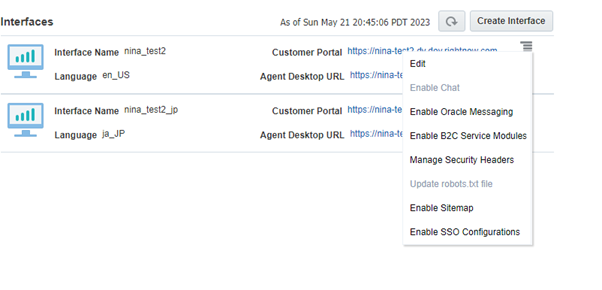
Enable Oracle Messaging Within Configuration Assistant
Administration Optimization: Gives administrators an easier way to improve operational efficiency
Steps to Enable
When logged into Configuration Assistant:
- On the main page, find the B2C Service site for which you want to enable Oracle Messaging
- Click on the site name
- Click on Interfaces
- Find the interface for which you want to enable Oracle Messaging
- Click the Interface Operations icon, represented by three vertical dots, and select Enable Oracle Messaging from the drop-down list
- Click Yes, and then click OK in the confirmation window
What to do next:
- Keep checking Operation Status in the Notifications section at the top to until the status changes to “Success”
- After Oracle Messaging is successfully enabled on an interface, additional setup tasks are required on the B2C Service site
Tips And Considerations
- Oracle Messaging is available for B2C Service customers with a valid Chat subscription
- You can enable Chat for a B2C Service site from the Site Operations drop-down list on any of the site's interface pages
- Please refer to Oracle Messaging documentation for details on how to further configure the Oracle Messaging service, documentation for Oracle Messaging is located in Answer ID 5168: Documentation for Oracle B2C Service Products
Access Requirements
- Chat Administrators must have access to Configuration Assistant