


This document will continue to evolve as existing sections change and new information is added. All updates appear in the following table:
| Date | Feature | Notes |
|---|---|---|
| 20 SEP 2019 | Created initial document. |
This guide outlines the information you need to know about new or improved functionality in Oracle Service Cloud Agent Browser UI September 2019 and describes any tasks you might need to perform for the update. Each section includes a brief description of the feature, the steps you need to take to enable to begin using the feature, any tips or considerations that you should keep in mind, and the resources available to help you.
For a listing of hardware and software requirements for Oracle products, log in to our support site and access Answer ID 31.
GIVE US FEEDBACK
We welcome your comments and suggestions to improve the content. Please send us your feedback.
Column Definitions:
Report = New or modified, Oracle-delivered, ready to run reports.
UI or Process-Based: Small Scale = These UI or process-based features are typically comprised of minor field, validation, or program changes. Therefore, the potential impact to users is minimal.
UI or Process-Based: Larger Scale* = These UI or process-based features have more complex designs. Therefore, the potential impact to users is higher.
Customer Action Required = You MUST take action before these features can be used by END USERS. These features are delivered disabled and you choose if and when to enable them. For example, a) new or expanded BI subject areas need to first be incorporated into reports, b) Integration is required to utilize new web services, or c) features must be assigned to user roles before they can be accessed.
| Ready for Use by End Users Reports plus Small Scale UI or Process-Based new features will have minimal user impact after an update. Therefore, customer acceptance testing should focus on the Larger Scale UI or Process-Based* new features. |
Customer Must Take Action before Use by End Users Not disruptive as action is required to make these features ready to use. As you selectively choose to leverage, you set your test and roll out timing. |
|||||
|---|---|---|---|---|---|---|
| Feature |
Report |
UI or |
UI or |
Customer Action Required |
||
The Opportunity Workspace is now supported in the Agent Browser UI.
In order to access the Opportunity WS the Sales Module must be enabled. To enable, contact your Oracle account manager.
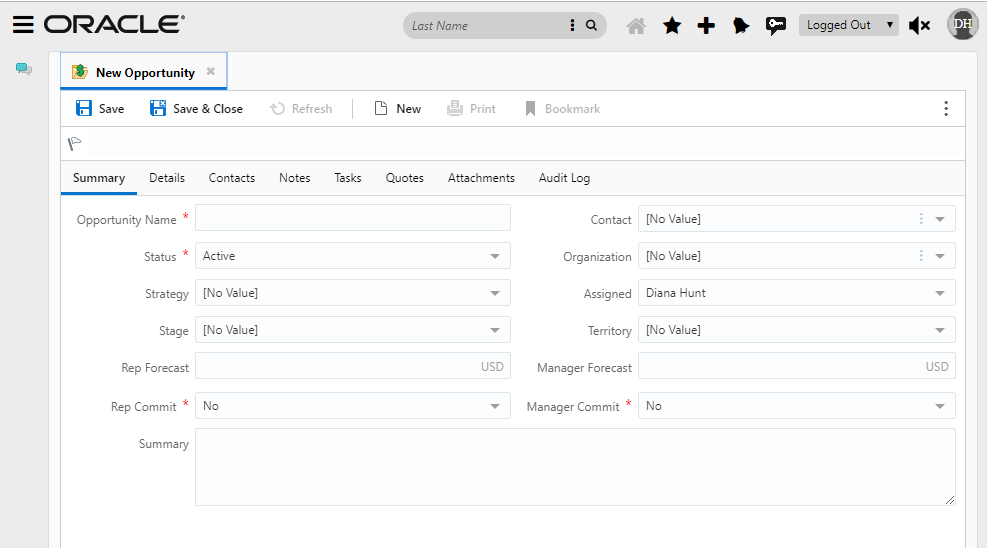
Opportunity WS
Steps to Enable
- Sales Module needs to be enabled. If not enabled contact your Oracle account manager.
- Opportunity Permissions for Agent
- Create/edit an Opportunity WS for Agent Browser UI.
NOTE: if there is not a specific Workspace for Agent Browser it will default to the Opportunity Workspace definition for .NET
Tips And Considerations
Quotes are not supported in Agent Browser UI, therefore; not supported in the Opportunity WS in Agent Browser UI.
Other items not supported in Opportunity WS in Agent Browser UI:
- Contact Roles
- Appointments
- Proofing
- Territory Field
- Exchange Rate on Forecast fields
Key Resources
- See KB Answer 10147 for a list of Supported/Unsupported Opportunity Features in BUI.
Your organization may collect statistics on the amount of time agents spend solving incidents so that management can plan for better use of staff time. These statistics can also identify products or issues that are causing similar customer questions, allowing answers to be added to the knowledge base to reduce the amount of time agents must spend on them.
The Time Billed tab is where you enter the amount of time you spend on an incident. It also lets you see details about the amount of time other agents spent on the incident. Depending on how your administrator has configured your application, you may be required to enter time billed every time you edit an incident or before you can set an incident status to Solved.
Steps to Enable
The Time Billed relationship item is available when creating incident workspaces. The Time Billed relationship item will now render and function in Agent Browser UI in addition to .NET.
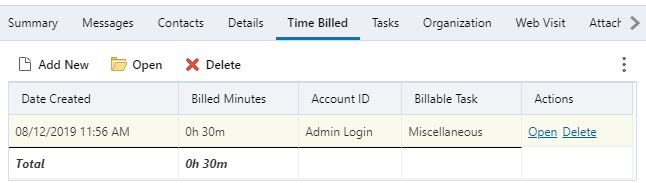
Time Billed Relationship Item In Agent Browser UI
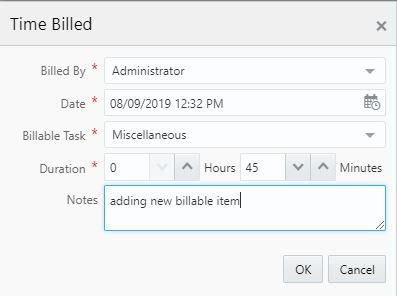
Adding New Time Billed Record
Tips And Considerations
Note that the options for 'Hide Report Commands', 'Hide Options Button', and 'Show Row Count' are not yet supported in Agent Browser UI.
Key Resources
Create Contact from Search Filters
Agent Browser UI users who search for a contact record can quickly create a new record if the appropriate contact is not found. An option to 'add new' will be available, and when selected, will create a new contact record with the search filters entered into the associated contact record fields.
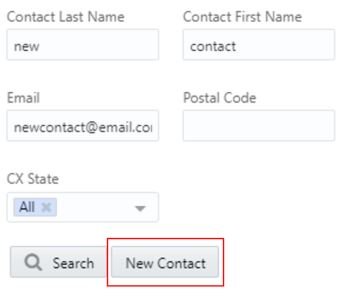
Contact Search Dialog
Steps to Enable
You don't need to do anything to enable this feature.
Tips And Considerations
The feature only pertains to the creation of contact records when searching for contacts from other workspaces like incidents, organizations, and custom objects for example.