
This document will continue to evolve as existing sections change and new information is added. All updates appear in the following table:
| Date | Product | Feature | Notes |
|---|---|---|---|
| 14 AUG 2020 | Search | Machine Learning for Search | Updated document. Revised feature information. |
| 31 JUL 2020 | Created initial document. |
This guide outlines the information you need to know about new or improved functionality in Oracle CX Commerce and describes any tasks you might need to perform for the update. Each section includes a brief description of the feature, the steps you need to take to enable or begin using the feature, any tips or considerations that you should keep in mind, and the resources available to help you.
GIVE US FEEDBACK
We welcome your comments and suggestions to improve the content. Please send us your feedback at oracle_fusion_applications_help_ww_grp@oracle.com. Please indicate you are inquiring or providing feedback regarding the Oracle CX Commerce What’s New for 20B Revision 12 (20.2.12) in the body or title of the email.
Column Definitions:
Features Delivered Enabled
Report = New or modified, Oracle-delivered, ready to run reports.
UI or Process-Based: Small Scale = These UI or process-based features are typically comprised of minor field, validation, or program changes. Therefore, the potential impact to users is minimal.
UI or Process-Based: Larger Scale* = These UI or process-based features have more complex designs. Therefore, the potential impact to users is higher.
Features Delivered Disabled = Action is needed BEFORE these features can be used by END USERS. These features are delivered disabled and you choose if and when to enable them. For example, a) new or expanded BI subject areas need to first be incorporated into reports, b) Integration is required to utilize new web services, or c) features must be assigned to user roles before they can be accessed.
| Ready for Use by End Users Reports plus Small Scale UI or Process-Based new features will have minimal user impact after an update. Therefore, customer acceptance testing should focus on the Larger Scale UI or Process-Based* new features. |
Action is Needed BEFORE Use by End Users Not disruptive as action is required to make these features ready to use. As you selectively choose to leverage, you set your test and roll out timing. |
|||||
|---|---|---|---|---|---|---|
| Feature |
Report |
UI or |
UI or |
|
||
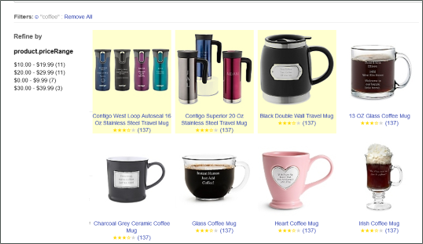
With this release, CX Commerce Search now utilizes machine learning and decision science to determine the optimal results to present to the shopper, improving the relevance of the shopping experience and increasing the likelihood of conversion. The keyword search results are calculated using a combination of factors, including shopper behavior, shopper purchasing history, trend analysis, and view data.
This new feature works in harmony with dynamic curation and search relevancy. Manually boosted products take precedence followed by products identified by machine learning, with all remaining products ordered by relevancy and dynamic curation criteria.
This feature only takes effect for keyword search results and any subsequent navigation. It will not take effect on pages that only contain navigation results.
To use this feature:
As this feature changes the order of results displayed on the site, it is not enabled by default.
Steps to Enable
To enable the feature, simply call the API endpoint “/gsadmin/v1/cloud/configuration/services/internal-keywords” and change the property “boostDisabled” from “true" to “false”.
Note that it will not take effect until the nightly process has completed.
Tips And Considerations
- The products to promote are calculated in a nightly process, and this process must run after being enabled.
- To identify when products have been promoted, you can access your site using the Preview environment and inspect the underlying ccstore/v1/search endpoint call. Promoted products will include an additional property of “DGraph.RankLabel.bstratify.merch.”
- To disable this feature, set “boostDisabled” to “true”, then DELETE all previously generated rules in /gsadmin/v1/cloud/content/system/rankingRules/internal-keywords.
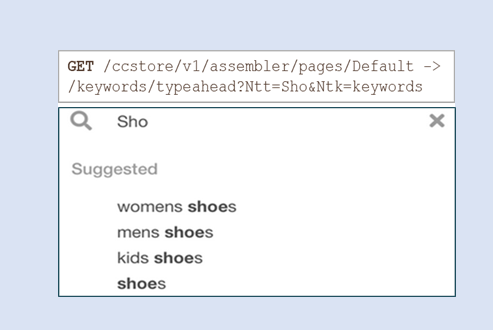
The CX Commerce storefront’s pre-integrated feature set includes search autosuggest, also known as “type-ahead,” which presents products that match the characters entered by the shopper.
With this release, you can now utilize an alternative autosuggest pattern and present matching searches that are popular on your site, making it more likely for shoppers to find what they are looking for more quickly and improving the shopping experience. For example, if a shopper enters “blu,” you can show “Bluetooth speaker,” “blue dress,” “blusher,” and “Bluetooth headphones.” The automatically generated suggestions can also be supplemented with manually created suggestions.
Capability highlights
- Search autosuggest provides intelligent suggestions to shoppers as they type.
- The suggestions are automatically generated based on analysis of your live server traffic.
- Popular suggestions are presented based on pattern matching and then ordered based on a relative “keyword.score.” This property is calculated using several factors, including search popularity.
- Processing is predominantly handled server-side, ensuring an extremely fast response which is important for autosuggest as latency has a significant impact.
This is an API-only feature. A custom widget will be required to parse the JSON response and display the suggestions.
Steps to Enable
Review the REST service definition in the REST API guides, available from the Oracle Help Center > your apps service area of interest > REST API. If you're new to Oracle's REST services you may want to begin with the Quick Start section.
To implement, follow the steps outlined in the documentation, including:
- Use the Attributes API to ensure keyword.searchable, keyword.terms, and keyword.score are correctly configured.
- Update the keywords searchable field ranking to ensure keyword.searchable is indexed.
- As an option, add your own custom keywords and – if required – set up associated keyword redirects.
- Once an index is run (this can be manually invoked by calling POST /ccadmin/v1/search/index { “op”: “baseline” }), suggestions can be returned by calling: GET /ccstore/v1/assembler/pages/Default/keywords/typeahead?Ntk=keywords&Ntt=<characters>
Tips And Considerations
The auto-populated searches can’t be changed, however additional searches can be updated using the “keywords” data store.
This document will continue to evolve as existing sections change and new information is added. All updates appear in the following table:
| Date | Product | Feature | Notes |
|---|---|---|---|
| 09 JUL 2020 | Created initial document. |
This guide outlines the information you need to know about new or improved functionality in Oracle CX Commerce and describes any tasks you might need to perform for the update. Each section includes a brief description of the feature, the steps you need to take to enable or begin using the feature, any tips or considerations that you should keep in mind, and the resources available to help you.
GIVE US FEEDBACK
We welcome your comments and suggestions to improve the content. Please send us your feedback at oracle_fusion_applications_help_ww_grp@oracle.com. Please indicate you are inquiring or providing feedback regarding the Oracle CX Commerce What’s New for 20B Revision 9 (20.2.9) in the body or title of the email.
Column Definitions:
Features Delivered Enabled
Report = New or modified, Oracle-delivered, ready to run reports.
UI or Process-Based: Small Scale = These UI or process-based features are typically comprised of minor field, validation, or program changes. Therefore, the potential impact to users is minimal.
UI or Process-Based: Larger Scale* = These UI or process-based features have more complex designs. Therefore, the potential impact to users is higher.
Features Delivered Disabled = Action is needed BEFORE these features can be used by END USERS. These features are delivered disabled and you choose if and when to enable them. For example, a) new or expanded BI subject areas need to first be incorporated into reports, b) Integration is required to utilize new web services, or c) features must be assigned to user roles before they can be accessed.
| Ready for Use by End Users Reports plus Small Scale UI or Process-Based new features will have minimal user impact after an update. Therefore, customer acceptance testing should focus on the Larger Scale UI or Process-Based* new features. |
Action is Needed BEFORE Use by End Users Not disruptive as action is required to make these features ready to use. As you selectively choose to leverage, you set your test and roll out timing. |
|||||
|---|---|---|---|---|---|---|
| Feature |
Report |
UI or |
UI or |
|
||
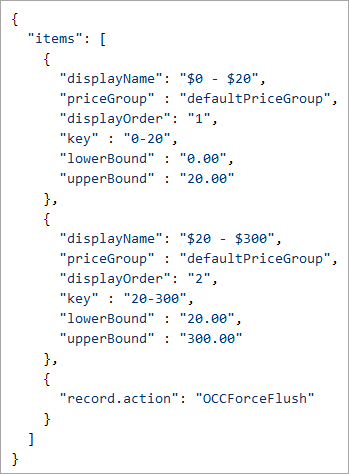
CX Commerce search now provides developers the ability to enhance the user experience by customizing faceted navigation. The Facet Management API enables developers to manually order facet values, add metadata to facet values and create custom price range values. The feature also supports custom price navigation requirements.
The following examples describe the capabilities made possible with this feature:
- With facet values such as sizes small / medium / large that should be ordered manually rather than dynamically, you can now sequence them using the API.
- To associate swatch imagery with color values, custom metadata can be added to the values.
- If the out-of-the-box price ranges are not suitable, you can create custom price range values
- e.g. $0-10, $11-25, $26-$50, $51-$100, $101-200.
NOTE: Changes to facet values require an index to view results, therefore need to be published to take effect.
Intended for more technical users, there are a series of steps involved when using this feature.
- For manually ordering facet values
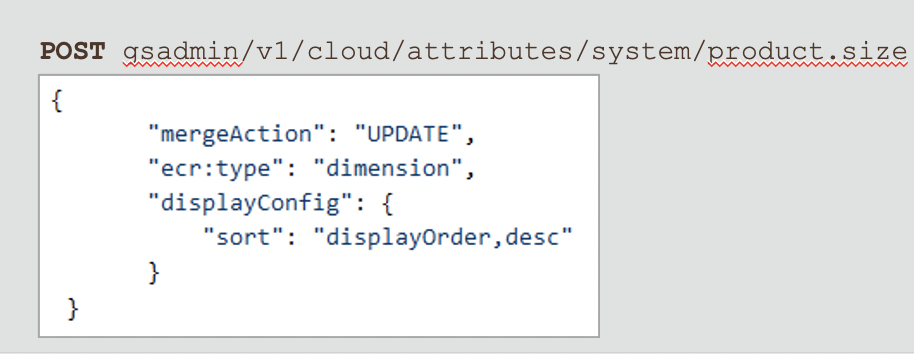
- Specify in /gsadmin/v1/cloud/attributes/system/<facet-name> the new sort configuration, for example "sort": "displayOrder,desc;displayName,asc“ - to define that the facet is ordered by display order, and any undefined values are ordered alphabetically.
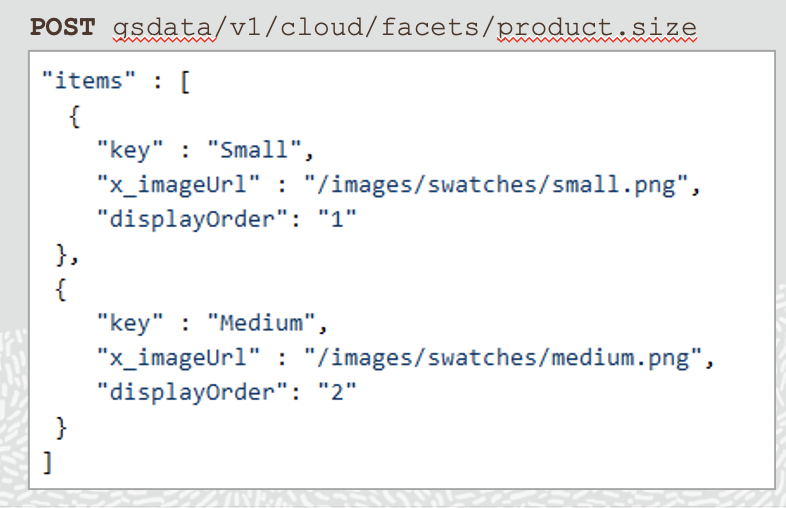
- Use /gsdata/v1/cloud/facets/<facet-name> to list the values that should be ordered, along with their relative “displayOrder” property (with 1 being first).
- If you want to retrieve a list of all values for a facet, you can call GET /gsadmin/v1/cloud/dimvals/<facet name>/children.
- For adding metadata
- Use /gsdata/v1/cloud/facets/<facet-name> to add new key/value pairs – use a prefix of x_ as a naming convention for the keys to avoid conflicting with existing system keys, for example “x_swatchImage”: “/images/swatches/red.png”.
- If you want to retrieve a list of all values for a facet, you can call GET /gsadmin/v1/cloud/dimvals/<facet name>/children.
- For creating custom price ranges
- Create a new facet in /gsadmin/v1/cloud/attributes/system/, for example POST /gsadmin/v1/cloud/attributes/system/custom.priceRange (custom.priceRange is just an example in this case).
- Define the ranges for this value using /gsdata/v1/cloud/facets/custom.priceRange.
The Facet Management API feature is currently API only.
Steps to Enable
Review the REST service definition in the REST API guides, available from the Oracle Help Center > your apps service area of interest > REST API. If you're new to Oracle's REST services you may want to begin with the Quick Start section.
Tips And Considerations
- For manual ordering, you can choose a secondary sort (e.g. “alphabetical”) for any values that are not explicitly listed.
- For manual ordering and adding metadata, if the values intended for customization are not known, you can use the separate “dimval” REST API service to get a master list.
- For custom price ranges, only one price group can be mapped to a custom price range.
This document will continue to evolve as existing sections change and new information is added. All updates appear in the following table:
| Date | Product | Feature | Notes |
|---|---|---|---|
| 29 JUN 2020 | Created initial document. |
This guide outlines the information you need to know about new or improved functionality in Oracle CX Commerce and describes any tasks you might need to perform for the update. Each section includes a brief description of the feature, the steps you need to take to enable or begin using the feature, any tips or considerations that you should keep in mind, and the resources available to help you.
GIVE US FEEDBACK
We welcome your comments and suggestions to improve the content. Please send us your feedback at oracle_fusion_applications_help_ww_grp@oracle.com. Please indicate you are inquiring or providing feedback regarding the Oracle CX Commerce What’s New for 20B Revision 7 (20.2.7) in the body or title of the email.
Column Definitions:
Features Delivered Enabled
Report = New or modified, Oracle-delivered, ready to run reports.
UI or Process-Based: Small Scale = These UI or process-based features are typically comprised of minor field, validation, or program changes. Therefore, the potential impact to users is minimal.
UI or Process-Based: Larger Scale* = These UI or process-based features have more complex designs. Therefore, the potential impact to users is higher.
Features Delivered Disabled = Action is needed BEFORE these features can be used by END USERS. These features are delivered disabled and you choose if and when to enable them. For example, a) new or expanded BI subject areas need to first be incorporated into reports, b) Integration is required to utilize new web services, or c) features must be assigned to user roles before they can be accessed.
| Ready for Use by End Users Reports plus Small Scale UI or Process-Based new features will have minimal user impact after an update. Therefore, customer acceptance testing should focus on the Larger Scale UI or Process-Based* new features. |
Action is Needed BEFORE Use by End Users Not disruptive as action is required to make these features ready to use. As you selectively choose to leverage, you set your test and roll out timing. |
|||||
|---|---|---|---|---|---|---|
| Feature |
Report |
UI or |
UI or |
|
||
Supporting Custom Property for Rich Text Fragments
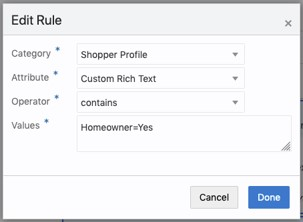
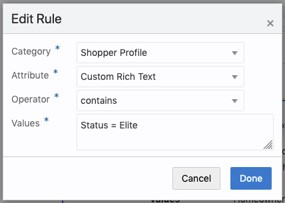
With this new feature, merchants can now create Audience rules from shopper and account profile data when the customer information is provided in a lengthy XML string (e.g. through SAML response).
The fields provided in CX Commerce may not be enough to hold the XML strings sent to the merchant from an external system, like a third party loyalty, marketing, or SAML identity provider. Storing in a custom RichText property on the profile allows merchants to create rules to ensure a consistent personalized experience.
Key benefits
- Behaves just like any other text property
- New properties are created via Shopper Types API; properties are available in CX Commerce Audiences UI.
- Supports both B2C and B2B.
To use this feature:
- Create the new Rich Text Profile property via the Shopper Types API for either Shopper Profile (B2C) or for Account (B2B).
- Ensure, as you would for any custom property, that the audienceVisibility property is set to ‘all’ for Shopper Profile properties and to ‘B2B’ for Account properties.
- The audienceVisibility attribute determines whether a property appears as a choice in the Attributes field of the CX Commerce Audience UI.
- The newly created property is then available within the CX Commerce Audiences UI under either Shopper Profile or Account.
- Define rules as you generally would for any text properties, where you are matching on a value within the property.
- Complete the customary steps for building and using Audiences to vary content.
Steps to Enable
You don't need to do anything to enable this feature.
This document will continue to evolve as existing sections change and new information is added. All updates appear in the following table:
| Date | Product | Feature | Notes |
|---|---|---|---|
| 19 JUN 2020 |
Created initial document. |
This guide outlines the information you need to know about new or improved functionality in Oracle CX Commerce and describes any tasks you might need to perform for the update. Each section includes a brief description of the feature, the steps you need to take to enable or begin using the feature, any tips or considerations that you should keep in mind, and the resources available to help you.
GIVE US FEEDBACK
We welcome your comments and suggestions to improve the content. Please send us your feedback at oracle_fusion_applications_help_ww_grp@oracle.com. Please indicate you are inquiring or providing feedback regarding the Oracle CX Commerce What’s New for 20B Revision 6 (20.2.6) in the body or title of the email.
Column Definitions:
Features Delivered Enabled
Report = New or modified, Oracle-delivered, ready to run reports.
UI or Process-Based: Small Scale = These UI or process-based features are typically comprised of minor field, validation, or program changes. Therefore, the potential impact to users is minimal.
UI or Process-Based: Larger Scale* = These UI or process-based features have more complex designs. Therefore, the potential impact to users is higher.
Features Delivered Disabled = Action is needed BEFORE these features can be used by END USERS. These features are delivered disabled and you choose if and when to enable them. For example, a) new or expanded BI subject areas need to first be incorporated into reports, b) Integration is required to utilize new web services, or c) features must be assigned to user roles before they can be accessed.
| Ready for Use by End Users Reports plus Small Scale UI or Process-Based new features will have minimal user impact after an update. Therefore, customer acceptance testing should focus on the Larger Scale UI or Process-Based* new features. |
Action is Needed BEFORE Use by End Users Not disruptive as action is required to make these features ready to use. As you selectively choose to leverage, you set your test and roll out timing. |
|||||
|---|---|---|---|---|---|---|
| Feature |
Report |
UI or |
UI or |
|
||
Bulk Import of Prices (Prices Plug-In)
With the release of our new Prices Plug-in, merchants now have the capability to bulk import prices for products and SKUs from an external system. Existing price list groups can be updated with the latest prices from an external system as well. This is designed for instances when prices need to be imported frequently from an external source.
Product prices can be bulk exported from CX Commerce by using the Q parameters of the Plug-in to export.
- Capability highlights
- Supports JSON and CSV formats.
- Can be triggered using the bulk APIs of CX Commerce.
- All CRUD operations supported.
This feature does not replace any of the existing price upload capabilities in the Admin UI.
Steps to Enable
You don't need to do anything to enable this feature.
Tips And Considerations
The plug-in cannot be used to create a price list group, as it must have previously been set up in CX Commerce.
Access path: http:///ccadminui/v1/importProcess [Plug in Name: Prices]
This document will continue to evolve as existing sections change and new information is added. All updates appear in the following table:
| Date | Feature | Notes |
|---|---|---|
| 29 MAY 2020 | Created initial document. |
This guide outlines the information you need to know about new or improved functionality in Oracle CX Commerce and describes any tasks you might need to perform for the update. Each section includes a brief description of the feature, the steps you need to take to enable or begin using the feature, any tips or considerations that you should keep in mind, and the resources available to help you.
GIVE US FEEDBACK
We welcome your comments and suggestions to improve the content. Please send us your feedback at oracle_fusion_applications_help_ww_grp@oracle.com. Please indicate you are inquiring or providing feedback regarding the Oracle CX Commerce What’s New for 20B Revision 2 (20.2.2) in the body or title of the email.
Column Definitions:
Features Delivered Enabled
Report = New or modified, Oracle-delivered, ready to run reports.
UI or Process-Based: Small Scale = These UI or process-based features are typically comprised of minor field, validation, or program changes. Therefore, the potential impact to users is minimal.
UI or Process-Based: Larger Scale* = These UI or process-based features have more complex designs. Therefore, the potential impact to users is higher.
Features Delivered Disabled = Action is needed BEFORE these features can be used by END USERS. These features are delivered disabled and you choose if and when to enable them. For example, a) new or expanded BI subject areas need to first be incorporated into reports, b) Integration is required to utilize new web services, or c) features must be assigned to user roles before they can be accessed.
| Ready for Use by End Users Reports plus Small Scale UI or Process-Based new features will have minimal user impact after an update. Therefore, customer acceptance testing should focus on the Larger Scale UI or Process-Based* new features. |
Action is Needed BEFORE Use by End Users Not disruptive as action is required to make these features ready to use. As you selectively choose to leverage, you set your test and roll out timing. |
|||||
|---|---|---|---|---|---|---|
| Feature |
Report |
UI or |
UI or |
|
||
New Property in Order Payload: orderDiscountInfos
A new property, orderDiscountInfos, has been added to the Storefront, Admin, and Webhook order payloads and provides a list of the order promotions and discount values that apply to each cart item. This makes order-based promotions performance more accurate and easier to understand.
Capability highlights:
- The value of orderDiscountShare is proportionately weighted across the entire order.
- The new orderDiscountInfos property shows the contribution of each order promotion to the orderDiscountShare value.
- The response contains an entry at the item level for each item in the order.
- The orderDiscountInfos property is returned along with the promotion id and any coupon codes used to grant the promotion.
Key benefits
- Provides more granular details about the discounts that have been applied.
- Can be used for reporting purposes as well as sent to downstream systems (e.g. financial systems).
- The order discount values are proportionate at each item level.
Steps to Enable
You don't need to do anything to enable this feature.
New Property in Order Payload: itemDiscountInfos
A new property, itemDiscountInfos, has been added to the order payload providing a list of the item promotions and discount values applied to cart items. The property has been added to the Admin order and SubmitOrder webhook payloads. This makes item-based promotions performance more accurate and easier to understand.
Capability highlights:
- A new property itemDiscountInfos is added to the Admin.getOrder response and SubmitOrder webhook response.
- The response contains an entry at the item level for each item in the order.
- The itemDiscountInfos is returned along with the promotion id and any coupon codes used to grant the promotion.
Key benefits:
- The information is now presented in an easily consumable format.
- Provides more granular details about the discounts have been applied.
- Can be used for reporting as well as sent to downstream systems (e.g. financial systems).
Steps to Enable
You don't need to do anything to enable this feature.
This document will continue to evolve as existing sections change and new information is added. All updates appear in the following table:
| Date | Feature | Notes |
|---|---|---|
| 22 MAY 2020 | Created initial document. |
This guide outlines the information you need to know about new or improved functionality in Oracle CX Commerce and describes any tasks you might need to perform for the update. Each section includes a brief description of the feature, the steps you need to take to enable or begin using the feature, any tips or considerations that you should keep in mind, and the resources available to help you.
GIVE US FEEDBACK
We welcome your comments and suggestions to improve the content. Please send us your feedback at oracle_fusion_applications_help_ww_grp@oracle.com. Please indicate you are inquiring or providing feedback regarding the Oracle CX Commerce What’s New for 20B Revision 1 (20.2.1) in the body or title of the email.
Column Definitions:
Features Delivered Enabled
Report = New or modified, Oracle-delivered, ready to run reports.
UI or Process-Based: Small Scale = These UI or process-based features are typically comprised of minor field, validation, or program changes. Therefore, the potential impact to users is minimal.
UI or Process-Based: Larger Scale* = These UI or process-based features have more complex designs. Therefore, the potential impact to users is higher.
Features Delivered Disabled = Action is needed BEFORE these features can be used by END USERS. These features are delivered disabled and you choose if and when to enable them. For example, a) new or expanded BI subject areas need to first be incorporated into reports, b) Integration is required to utilize new web services, or c) features must be assigned to user roles before they can be accessed.
| Ready for Use by End Users Reports plus Small Scale UI or Process-Based new features will have minimal user impact after an update. Therefore, customer acceptance testing should focus on the Larger Scale UI or Process-Based* new features. |
Action is Needed BEFORE Use by End Users Not disruptive as action is required to make these features ready to use. As you selectively choose to leverage, you set your test and roll out timing. |
|||||
|---|---|---|---|---|---|---|
| Feature |
Report |
UI or |
UI or |
|
||
With this release, merchandisers now have access to new and improved tools for managing and re-ordering products within collections in addition to performing operations on multiple products at one time. Products designated as inactive are now visible at a glance.
Capability highlights
- After selecting one or more products, merchandisers can link to single or multiple collections and select preference for viewing.
- A gear menu has been added to each row in list view and enhanced in the product listing toolbar.
- Merchandisers can reorder multiple products within a collection using drag/drop in list view.
- An inactive badge has been added to the product tile.
Steps to Enable
You don't need to do anything to enable this feature.
With this release, merchants can leverage new Store Extension APIs that have been added to the Store API set, previously only available on Admin. Server-Side Extensions and other integrations can use these APIs to support shopper experiences at scale.
The following new Store Extension REST APIs are now available:
- /ccapp/v1/profiles
- /ccapp/v1/organizations
- /ccapp/v1/organizationRequests
- /ccapp/v1/orders
These new Store Extension APIs allow server-side extensions (SSEs) and integrations to access profile or order data that a merchant doesn’t want exposed directly to the shopper, such as sensitive information on the profile that shouldn’t be seen or edited by the shopper or information on the order that is used for validation.
These new APIs at /ccapp replace calls to /ccadmin/ and offer greater scalability and performance. We strongly recommend changing your endpoints to use these new Store Extension APIs, if you are using the Admin version of these APIs today.
Capability highlights
- Added APIs previously only available as part of the Admin API to the Store API set so they can be called at storefront scale
- New REST API on the Store servers: /ccapp/v1/profiles, /organizations, /organizationRequests, and /orders in this first phase
- Authentication using AppID remains the same, so use the same application key.
Steps to Enable
Review the REST service definition in the REST API guides, available from the Oracle Help Center > your apps service area of interest > REST API. If you're new to Oracle's REST services you may want to begin with the Quick Start section.
Tips And Considerations
These new Store Extension APIs should not be used for widgets, since that would publicly expose the application key.
Key Resources
Review the more detailed FAQ on using these new Storefront Extension APIs in the Oracle CX Commerce forum of Customer Connect.
This document will continue to evolve as existing sections change and new information is added. All updates appear in the following table:
| Date | Feature | Notes |
|---|---|---|
| 15 MAY 2020 | Created initial document. |
This guide outlines the information you need to know about new or improved functionality in Oracle CX Commerce 20B Update and describes any tasks you might need to perform for the update. Each section includes a brief description of the feature, the steps you need to take to enable or begin using the feature, any tips or considerations that you should keep in mind, and the resources available to help you.
GIVE US FEEDBACK
We welcome your comments and suggestions to improve the content. Please send us your feedback at oracle_fusion_applications_help_ww_grp@oracle.com. Please indicate you are inquiring or providing feedback regarding the Oracle CX Commerce What’s New for 20B Update in the body or title of the email.
Column Definitions:
Features Delivered Enabled
Report = New or modified, Oracle-delivered, ready to run reports.
UI or Process-Based: Small Scale = These UI or process-based features are typically comprised of minor field, validation, or program changes. Therefore, the potential impact to users is minimal.
UI or Process-Based: Larger Scale* = These UI or process-based features have more complex designs. Therefore, the potential impact to users is higher.
Features Delivered Disabled = Action is needed BEFORE these features can be used by END USERS. These features are delivered disabled and you choose if and when to enable them. For example, a) new or expanded BI subject areas need to first be incorporated into reports, b) Integration is required to utilize new web services, or c) features must be assigned to user roles before they can be accessed.
| Ready for Use by End Users Reports plus Small Scale UI or Process-Based new features will have minimal user impact after an update. Therefore, customer acceptance testing should focus on the Larger Scale UI or Process-Based* new features. |
Action is Needed BEFORE Use by End Users Not disruptive as action is required to make these features ready to use. As you selectively choose to leverage, you set your test and roll out timing. |
|||||
|---|---|---|---|---|---|---|
| Feature |
Report |
UI or |
UI or |
|
||
Visitor Type: Differentiating between Recognized and Authenticated Shoppers |
||||||
Calculate Tax Refunds Based on Date of Original Order
This feature is used to calculate tax refund amounts for returns and exchanges using the order submit date instead of the current date. Tax refund amounts can now be calculated more accurately based on the actual tax rate charged for an item. The date of the original order can be used to calculate tax refunds for returns and exchanges. This ensures that the tax refund amount corresponds to the actual tax amount charged instead of a potentially different current rate.
A new merchant setting – useOrderSubmittedDateForTax – has been introduced to control this behavior.
- The setting is enabled for new customer implementations and disabled by default for existing customers.
- The setting applies to all sites.
- The setting can be updated using the Admin merchantSettings endpoint.
- The setting affects tax calculation for out-of-the-box Avalara and Vertex integrations as well as custom tax integrations implemented using the External Tax Webhook.
For example:
An order is placed on June 15 for $100.00 with $5.00 in tax (5% tax).
The order is then returned on July 4 which happens to be a tax-free holiday.
- If useOrder SubmittedDateForTax is enabled, then $5.00 in tax will be refunded.
- If useOrderSubmittedDateForTax is disabled, then $0 for tax will be refunded since July 4 is a tax-free day.
When useOrderSubmittedDateForTax setting is enabled, the native Avalara and Vertex integrations will ensure that the original submit date is sent to the tax processors and the tax rate on the submit date is used to calculate refund amounts.
Custom tax integrations implemented using the External Tax Webhook must check the value of the property in the request payload and calculate tax accordingly.
Steps to Enable
New customer implementations will default to using the date of the original order for tax refund calculations rather than the current date. Existing customers must enable the useOrderSubmittedDateForTax setting using the Admin merchantSettings endpoint.
With this release, CX Commerce provides functionality that allows the shoppers to initiate cancellations, returns or exchanges on orders placed through their account. This feature builds on the previously introduced concept of cancel in-flight, the process of cancelling an order after it has been submitted to fulfilment.
Capability Highlights:
- Cancels orders when items have passed the ‘point of no return’ in fulfillment.
- Automatically generates return requests and service terminations.
- Executes cancel/return/terminate as required for each element of a configured item.
In the Admin settings, merchants can enable the Extended Remorse Period, specifying the number of days from the date of submission during which orders can be cancelled. Unlike with Remorse Period, there will be no delay in the order process and orders will be sent to fulfillment immediately on submission.
Within the extended remorse period, shoppers can choose to cancel the order and the system will automatically evaluate:
- Goods and services within the order that can be cancelled by passing the instruction downstream. These are items that have not passed the point of no return in the fulfillment process.
- Goods that must be returned and refunded
- Goods that must be refunded
- Upfront payment for services that must be refunded
- Services that have already been installed (fulfillment complete) that must be terminated
Merchants can have both Remorse Period and Extended Remorse Period enabled. For example, if a merchant knows that order cancellations occur within 6 hours of confirmation, the merchant can implement a 6-hour remorse period and a 30-day extended remorse period. This would ensure that the order will not actually be submitted to fulfillment for 6 hours enabling a simple cancel operation for most cancelled orders and the more complex cancel in-flight operation may only be required in a small number of cases.
Steps to Enable
To implement this feature merchants will be required to download and install some new and some updated Server Side Extensions:
- New - Terminate Order App
- New - Terminate Order Lib
- Update - Validate Cancel App - Store (provided as part of phase 1)
- Update - Validate Cancel App - Agent (provided as part of phase 1)
- Update - Validate Cancel Lib
- Update - Order Qualification Pipeline
Additionally, to implement, merchants can use the pre-built Order Details Cancel widget.
With this release, when a shopper purchases a non-shippable item such as a download or warranty, the item will now automatically be assigned to a virtual shipping group thereby ensuring no shipping charges are applied to the purchase at checkout time. This new feature provides for a flexible structure for selling services, allowing merchants to decide how and when shoppers pay for shipping for physical items.
The ability to assign items to the virtual shipping group and assign each item in a configuration hierarchy to a shipping group enables CX Commerce to implement the new ‘Cancel In-flight Order’ feature.
Capability Highlights:
- Automatically assign items to the correct shipping group
- For example, a merchant selling communications bundles may choose to incorporate the cost of shipping a handset or router in the overall monthly charge.
- Sell configured items as a package
- When a shopper purchases a configured item that is ‘sold as package’ this means that the item will be purchased, shipped, returned and exchanged as a single item.
- Assign shipping groups to sub-items.
- For example, when a shopper purchases a telecommunications multi-play bundle, separate shipping groups may be required:
- Handset (office – priority mail)
- Router (home – standard mail)
- Set top box (vacation house – standard mail)
- For example, when a shopper purchases a telecommunications multi-play bundle, separate shipping groups may be required:
The adjustments to tax calculation and shipping charge calculations work out-of-the-box.
Steps to Enable
You don't need to do anything to enable this feature.
Tips And Considerations
To implement the assignment of shipping groups at the sub item level, customers will be required to build their own ‘Shipping Options Sub-item Widget.’
Pay an Order with Points and Currency (API Only)
With the latest release, merchants using our generic loyalty framework may now offer product redemption in loyalty points (points as a pricelist group) with payment for the full order in points or a mix of points and monetary currency. This allows shoppers to pay in a mix of loyalty points and currency or monetary currency by itself, so that they do not have to limit what they buy based solely on their available points. Loyalty shopper cards can also now be used.
Merchants may launch a separate site to offer products to be sold in points only, with taxes and shipping payment separated by points or currency.
Capability Highlights:
- Allows the shopper to pay for an order with loyalty points and currency.
- An order can be priced in points or currency.
- Shipping and taxes can be handled separately.
- Enables integration with payment gateways and loyalty engines in parallel.
Steps to Enable
Review the REST service definition in the REST API guides, available from the Oracle Help Center > your apps service area of interest > REST API. If you're new to Oracle's REST services you may want to begin with the Quick Start section.
The feature is available to everyone. There is a requirement for the merchant to integrate with a loyalty engine. This is an API only feature with no out-of-the-box widgets included.
Tips And Considerations
- The configuration to offer mix of points and currency is at a site level.
- Products cannot be offered in a mix of points and currency. The price remains in one currency.
Dynamic Content allows merchants to display relevant content based on shopper behavior (via navigation location and search), allowing merchants to capture and focus the shopper’s attention, convey a message specific to shopper intent, and direct the shopper to a desired location.
For example, a merchant may want to display collection-specific seasonal images on collection pages, or may want shoppers who search for a trending product to see a banner inviting them to go to a landing page featuring the latest promotional deals.
Capability highlights:
- Display an image from the Media Library along with the product listing when the shopper enters specific search terms or navigates to a specific collection page
- Display promotional images targeted to specific searches or collections
- Make the image a clickable link taking the shopper to a relevant landing page
- Preview the results of your rule
To use the feature, two key steps must be completed. One is to create a Dynamic Content rule. The other is to create a custom widget to display the content and place the widget on the Search Results and/or Collection layouts – including the Agent layout.
A Dynamic Content rule applies to a collection page regardless of whether the page is driven from the catalog or from search. As with other rules in the Search area, a Dynamic Content rule takes effect in Production after the next publish occurs.
Steps to Enable
You don't need to do anything to enable this feature.
Tips And Considerations
The feature supports one image per rule and the same image will be displayed regardless of locale. Different images for different locales are not currently supported.
New in Search Administration is the ability to create site-specific rules. This feature allows the merchant to tailor the results for a given search term or collection to meet different requirements on different sites.
Capability highlights:
- Create a Dynamic Curation, Facet Ordering, or Dynamic Content rule that applies to one or more specific sites.
- Use rule editor to select one more sites, or select “Global.”
- By default, a rule is global (applies to all sites).
- Tailor the results for a given search term or collection to meet different requirements on different sites.
- Define a rule for all destinations on a specific site.
- Filter each list view by site.
- See when and by whom a rule was last edited.
The key benefit of this feature is that it allows merchants to refine their product listings to support the business goals of specific sites. The feature addresses situations where, for example, different sites have different sales goals, marketing approaches, or target audiences.
Steps to Enable
You don't need to do anything to enable this feature.
Tips And Considerations
You cannot preview a site-specific rule with one click from Search Admin. To preview a site-specific rule, use the Preview button on the toolbar to preview by the desired site and enter the search term or navigate to the collection.
Merchants can now define specific prices for particular products and SKUs, while the rest of the prices are inherited from its parent price list group. This allows them to define the relationship between price list groups and customer-specific prices at the child price list level, as well as define price list groups that are applicable for a specific purpose (e.g. pricing for select promotional products, special pricing for a particular customer or multiple accounts). Not only does this provide increased flexibility and targeting, but it helps improve maintenance and management of price list groups.
This feature is useful in a number of instances, for example, where:
- A merchant has negotiated special pricing for a subset of products in a price group to accommodate a particular B2B customer account (or multiple accounts) and wants that special pricing to override the default pricing. The products with negotiated prices can be defined in a new child price list and associated to the base price list, eliminating the need to define prices for every customer separately.
- Regional sites need to have pricing of select items be different from their parent. This new feature allows special child price list groups to be created that still keep the parent relationship with the base price list group.
- A merchant wants to define a price list group that has prices applicable only for a select group of promotional products during a promotion period. This can now be done by defining a child price list group and associating it to the parent. Once the promotion is over, the merchant can remove the associated child price list group.
With the release of the Price Group Inheritance feature, changes can be done directly in the new price group, resulting in faster pricing calls, faster publishing and search, and improved performance.
This feature is applicable for both consumer-based (B2C) and account-based environments (B2B).
Steps to Enable
You don't need to do anything to enable this feature.
Tips And Considerations
Time-based pricing, defining the effective dates for Price List Groups, is not yet available. Merchants should track the dates manually and assign to Price List Groups accordingly.
Item Back in Stock Event Webhook
Back in stock notifications were previously available, but now, merchants can leverage our new Item Back in Stock event webhook to customize their website when notifying shoppers that an item they are interested in has come back into stock. This webhook allows the back in stock notification to be sent by an external system.
Merchants would first customize their storefront to allow shoppers to opt in to a notification when an out of stock item comes back into stock (e.g. updating the product detail page with an email capture box and a message, such as “notify me when this item comes back into stock”). This list of subscriptions can be tracked externally — through an email service provider, for example, or whatever system owns subscription preferences.
Merchants would then enable and listen for Item Back in Stock events. Each event will contain a list of items that have come back into stock. Merchants can then cross reference the list of items that are back in stock with the list of subscriptions, and notify shoppers using email, text, or another method of choice. Sending the notification would be a customization using external systems.
The Item Back in Stock event webhook fires whenever a previously out of stock item comes “back into stock.” An item is “back in stock” when inventory is added using admin UI, admin inventory API, csv import, or bulk import.
To implement this feature, merchants can notify shoppers when items are back in stock by:
- Customizing the storefront to allow shoppers to choose “notify me when this item comes back into stock”.
- Tracking the list of subscriptions externally.
- Listening for the Item Back in Stock event webhook.
- Implementing a service to notify subscribed shoppers when their item of interest is back in stock.
Steps to Enable
The new webhook can be enabled in the Oracle CX Commerce Admin and the end to end process developed as a customization.
Tips And Considerations
NOTE: This feature provides the webhook only, so that a back in stock notification can be sent by an external system. Does not include the user experience for shoppers to opt in to notifications, ability to track the list of shopper subscriptions, or the ability to send the email itself.
Support for /ccstore Context Root
Previously, wish lists only supported /ccstoreui API. We now support /ccstore context root, particularly useful for implementing CX Commerce wish lists using a headless approach where our out-of-the-box Storefront is not the client. When a JWT token created by the /ccstore REST API is sent to the wish list (SWM) server, verification will be successful.
Steps to Enable
You don't need to do anything to enable this feature.
Behavorial Audiences: Current Session Page Views
With this release, powerful new Behavioral Audience rules can now be used to drive improved personalized experiences for shoppers. Merchants can build audience rules based on a shopper’s current session page views to collection or product pages and combine those with other criteria. This is useful for providing a more contextual experience for shoppers in terms of the content, promotions, and tests they see, as well as contributing to driving increased conversions and sales.
Behavioral Audiences are an important part of Commerce personalization strategies and while they are powerful on their own, they are even more effective when used in conjunction with the other audience and personalization capabilities available in CX Commerce.
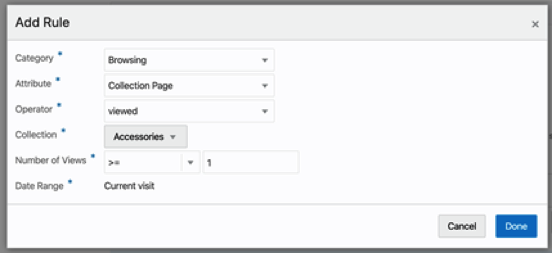
We currently support product and collection page views from a shopper’s current session and specifically the following behavioral audience types:
- Collection name (e.g. Collection name contains “Men's”)
- Product name (e.g. Product Name starts with “Running”)
- Collection page (e.g. Collection is “Accessories”)
- Product page (e.g. Product is “Trail Men's Running Shorts”)
- Product criteria (e.g. x products in “[camera brand name]”, “Cameras” collection, and “Camera” product type)
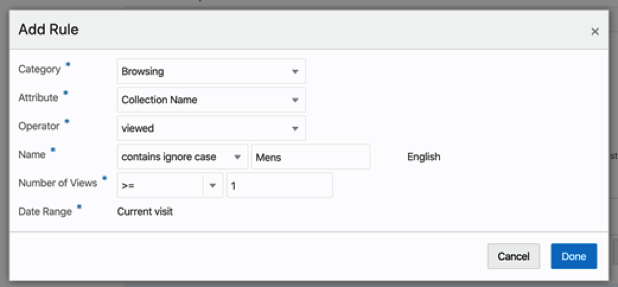
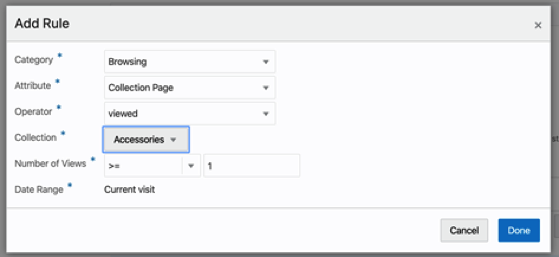
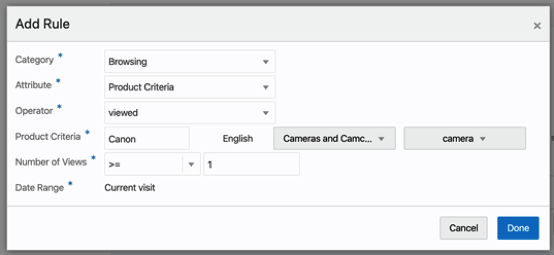
Examples of how you can use Behavioral Audiences effectively:
- Create a rule that shows products a shopper has shown clear interest in (e.g. viewed a specific product page over three times in the current session) and show in a different part of the shopping experience (e.g. cart page).
- Highlight a specific brand on a collection page when a shopper has shown clear brand preference (e.g. viewed three or more products in a specific brand) or, going even further, offer a promotion or highlight items on sale from a particular brand where a shopper has shown clear brand preference.
- Promote a specific collection or merchandise particular products based on a shopper showing interest in a particular one.
- Present targeted content, offer, bundle, or promotion on products a shopper has shown clear interest in based on product criteria (e.g. viewed four or more products in a bestselling camera brand, the "Cameras" collection, and “camera” product type.
Steps to Enable
You don't need to do anything to enable this feature.
Tips And Considerations
NOTE: Only product and collection page views from the current session are currently supported.
With the latest reporting update, it’s now possible for merchants to create individual user accounts so they can set their own customized filter values in each report. Merchants can maintain the reporting filter values commonly used across sessions (e.g. selected site, date range, currency), making the reports easier to use and more applicable to how an individual typically wants to see the data.
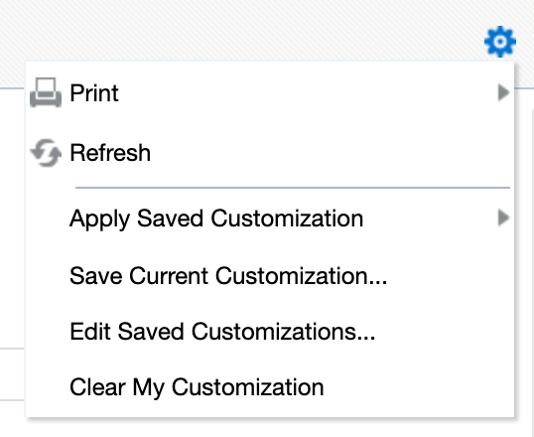
The reports are available by clicking the cog icon in the top right corner of the Reporting home page.
Key benefits
- Maintain the reporting filter values commonly used across sessions (e.g. selected site, date range, currency).
- Save time by setting up reports based on specific requirements.
- Save multiple customization sets and select the applicable report as needed.
This feature is useful when, for example:
- A merchant requires a sales report to run daily at 8:00 am with the prior day’s results delivered to an email inbox.
- A merchant wants to update locale within the Commerce reports to ensure that the dates are in the preferred format.
Steps to Enable
You don't need to do anything to enable this feature.
Regional Address Format Flexibility
With this release, merchants can now customize address formats to be country-specific and define Address Types to categorize addresses, such as shipping and billing. Merchants can associate the custom address with a specific country or countries so that it is used only on storefronts (and administration and agent interfaces) with that locale.
Key benefits
- Merchants can make use of flexible custom address formats, including country-specific addresses.
- Endpoints are available for countries and region/states.
- Merchants can define custom/enhanced validations for address fields.
- Merchants can mark address fields as mandatory or non-mandatory based on their usage.
The following examples further describe the flexibility and benefits made possible with this feature:
- Merchants are now able to set up addresses with multiple, country specific formats to be used on all transaction pages (e.g. orders, checkout). For example: A United States bill-to address and multiple ship-to addresses, each with a country-specific format -- United Kingdom, Singapore, and France -- are now able to be supported.
- Merchants and administrators can create a new dynamic property as a drop-down type with ability to upload values for the list (e.g. region drop-down with APAC and EMEA as values).
- Merchants can mark address fields as mandatory or non-mandatory per their usage.
For example, zip code can be marked non-mandatory for countries where they are not required.
NOTE:
- Country field cannot be relaxed from mandatory validation
- Country specific format is not applicable to Administration UI
Steps to Enable
You don't need to do anything to enable this feature.
Tips And Considerations
Before custom addresses can be created, the server-side extension must be downloaded from the CX Commerce administration server.
Visitor Type: Differentiating between Recognized and Authenticated Shoppers
With this release, merchants can now personalize their sites for registered shoppers who are currently logged in (authenticated) separately from registered shoppers who have previously registered on the site, but are not currently logged in (recognized). Being able to distinguish between authenticated and recognized shoppers allows for targeting content, promotions, and offers based on whether a shopper is actively logged in or just “soft-logged-in.”
Extending visitor type in our commerce personalization capabilities to differentiate between registered shoppers who are actively logged in or not allows CX Commerce Audience rules to be built to target anonymous shoppers, registered and authenticated shoppers, and registered and recognized shoppers.
A key benefit of this feature is the ability to show differentiated content to authenticated or recognized shoppers, ensuring that personalized content is displayed solely to authenticated shoppers. This is important, for example, if personalizing based on order or account data, and critical for certain industries, such as banking or finance.
This functionality applies to both B2C and B2B shoppers and is turned on by default. It can be turned off at the site level via API.
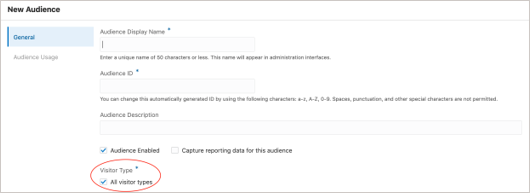
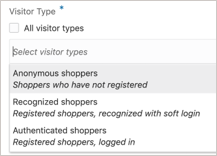
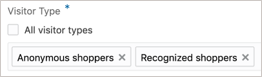
Steps to Enable
You don't need to do anything to enable this feature.
Tips And Considerations
A “recognized” shopper (i.e. one who is “soft-logged-in”) visitor type, meaning a shopper who has registered, but is not currently logged in, also applies to a shopper who has not formally logged out. Soft login applies for thirteen months after the shopper’s last login, after which it will no longer apply.
For specific Audience-related functionality:
- Shopper profile order-related Lifetime values will not be updated based on the soft login visit; shopper login is required.
- Shopper profile visit-related Lifetime values will be updated based on the soft login visit. The update will be in accordance with existing rules applied to logged-in shoppers.