
This document will continue to evolve as existing sections change and new information is added. All updates appear in the following table:
| Date | Product | Feature | Notes |
|---|---|---|---|
| 13 APR 2021 | Created initial document. |
This guide outlines the information you need to know about new or improved functionality in this update.
GIVE US FEEDBACK
We welcome your comments and suggestions to improve the content. Please send us your feedback at oracle_fusion_applications_help_ww_grp@oracle.com. Please indicate you are inquiring or providing feedback regarding the Oracle CX Commerce What’s New for 21A Revision 10 (21.1.10) in the body or title of the email.
Column Definitions:
Report = New or modified, Oracle-delivered, ready to run reports.
UI or Process-Based: Small Scale = These UI or process-based features are typically comprised of minor field, validation, or program changes. Therefore, the potential impact to users is minimal.
UI or Process-Based: Larger Scale* = These UI or process-based features have more complex designs. Therefore, the potential impact to users is higher.
Features Delivered Disabled = Action is needed BEFORE these features can be used by END USERS. These features are delivered disabled and you choose if and when to enable them. For example, a) new or expanded BI subject areas need to first be incorporated into reports, b) Integration is required to utilize new web services, or c) features must be assigned to user roles before they can be accessed.
| Ready for Use by End Users Reports plus Small Scale UI or Process-Based new features will have minimal user impact after an update. Therefore, customer acceptance testing should focus on the Larger Scale UI or Process-Based* new features. |
Customer Must Take Action before Use by End Users Not disruptive as action is required to make these features ready to use. As you selectively choose to leverage, you set your test and roll out timing. |
|||||
|---|---|---|---|---|---|---|
| Feature |
Report |
UI or |
UI or |
|
||
Shipping Method Update - External ID Property (API only)
With this new enhancement, you can now store an ID generated from a third-party shipping system allowing you to map shipping methods easily across systems.
Capability highlights
- Allows users to store the ID from an external shipping system on a Commerce shipping method.
- External ID is included in the shipping method information in the external shipping webhook and added to docShippingAdminEndpoints swagger.
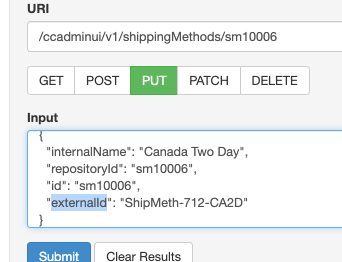
Including an external ID as another identifier to an existing shipping method contributes to a more efficient shipping process.
Steps to Enable
Review the REST service definition in the REST API guides, available from the Oracle Help Center > your apps service area of interest > REST API. If you're new to Oracle's REST services you may want to begin with the Quick Start section.
Tips And Considerations
This feature is API only and available via admin/shippingMethods. The property cannot be set via the Settings > Shipping Methods UI and is, therefore, not displayed in the UI.
Shipping Method Update - Internal Name Property (API only)
The internal ID enhancement allows merchants to have multiple shipping methods with the same display name for shoppers and identify them internally when managing promotions.
Capability highlights
- Users can create multiple shipping methods with the same display name on the storefront to be used in different contexts.
- When creating shipping promotions, a user can easily differentiate shipping methods even though they have the same external display name.
- Internal names are automatically displayed in the Shipping Method editor in Shipping Discount promotions editor.
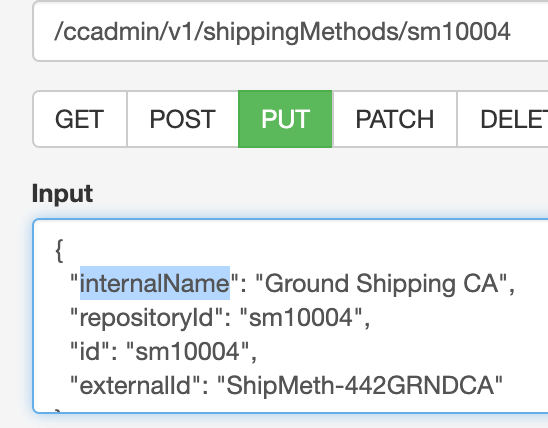
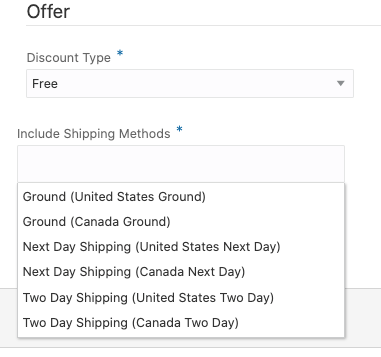
Makes it easier for merchants to identify the correct shipping methods to add to shipping promotions.
Steps to Enable
Review the REST service definition in the REST API guides, available from the Oracle Help Center > your apps service area of interest > REST API. If you're new to Oracle's REST services you may want to begin with the Quick Start section.
Tips And Considerations
This feature is API only. This property cannot be set via the Settings > Shipping Methods UI and is not currently displayed in the UI.
Wish List Support in Open Storefront Framework
With this release, Commerce customers using Open Storefront Framework (OSF) can more easily implement wish list functionality similar to what is available in Storefront Classic. They now have access to out-of-the-box wish list widgets to create and manage multiple wish lists, add, edit, and delete wish list items, move products from one wish list to another, and add to cart from any wish list. You can invite friends to be a part of a wish list, make comments on items in a wish list, and share products and gift ideas.
Support for out-of-the-box wish list components has been added along with additions to our JS API for wish list creation and management functions. The new OSF widgets can be pulled from the npm registry and added to your OSF application. These widgets can then be extended
Capability highlights
Wish list features in OSF include the ability to:
- Create, edit, and delete wish lists with different privacy settings (Private, Shared, or Group).
- Add items from the product detail page to a new or existing wish list.
- Move items from a wish list to the cart or from the cart to a wish list.
- Move items from one wish list to another.
- Edit or delete wish list items.
- Add comments to wish list items.
- Share wish lists with your family and friends and invite friends to a wish list.
Key benefits
- The OSF wish list widgets make use of the Commerce wish list service and interface with the corresponding Social Wish Lists APIs.
Example use case
The merchant will add the OSF wish list components to the relevant page layouts and deploy these changes with an update to their OSF application.
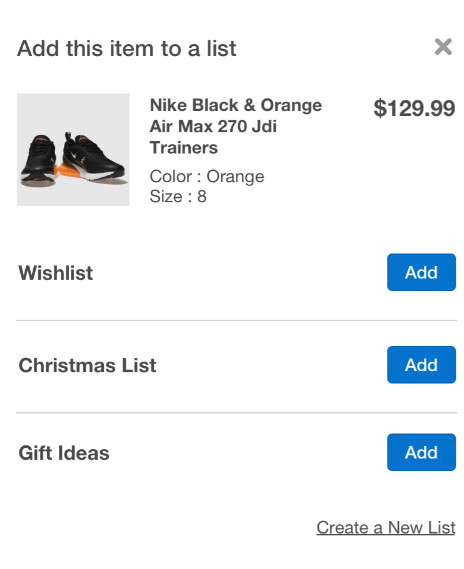
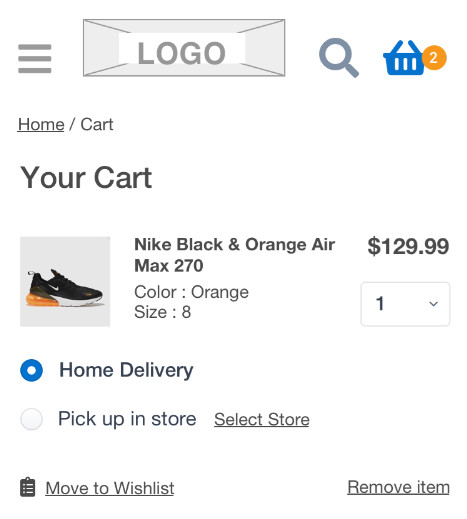
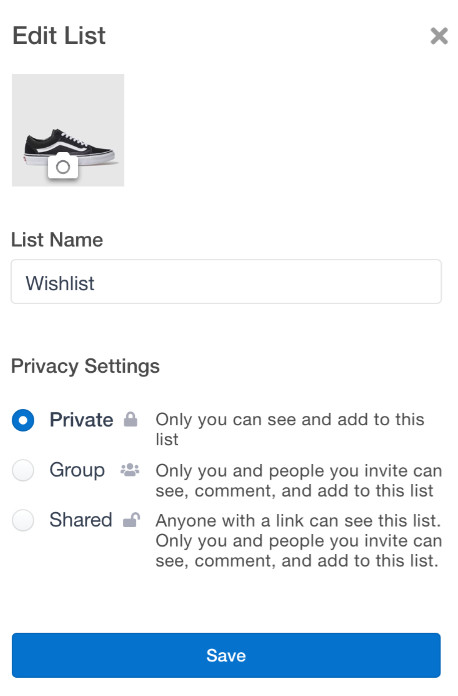
- Creating a wish list of products to purchase later and sharing your list and gift ideas helps drive additional product sales and conversions, and also provides important information on purchase intent and product and category interest.
Steps to Enable
You don't need to do anything to enable this feature.
Tips And Considerations
- Developers must add the wish list components to their OSF package and corresponding layouts and deploy these changes.
- The out-of-the-box wish list update does not currently support adding products to wish lists from the product listing page (PLP), sharing via Facebook, Pinterest, or Twitter, or receiving automatic price change notifications on a product in a wish list. It also does not show item availability (stock status) in the default wish list UI. However, these can all be done custom.
- The out-of-the-box OSF wish list implementation also does not currently allow the wish list owner to manage wish list settings.
This document will continue to evolve as existing sections change and new information is added. All updates appear in the following table:
| Date | Product | Feature | Notes |
|---|---|---|---|
| 24 MAR 2021 | Created initial document. |
This guide outlines the information you need to know about new or improved functionality in this update.
GIVE US FEEDBACK
We welcome your comments and suggestions to improve the content. Please send us your feedback at oracle_fusion_applications_help_ww_grp@oracle.com. Please indicate you are inquiring or providing feedback regarding the Oracle CX Commerce What’s New for 21A Revision 10 (21.1.10) in the body or title of the email.
Column Definitions:
Report = New or modified, Oracle-delivered, ready to run reports.
UI or Process-Based: Small Scale = These UI or process-based features are typically comprised of minor field, validation, or program changes. Therefore, the potential impact to users is minimal.
UI or Process-Based: Larger Scale* = These UI or process-based features have more complex designs. Therefore, the potential impact to users is higher.
Features Delivered Disabled = Action is needed BEFORE these features can be used by END USERS. These features are delivered disabled and you choose if and when to enable them. For example, a) new or expanded BI subject areas need to first be incorporated into reports, b) Integration is required to utilize new web services, or c) features must be assigned to user roles before they can be accessed.
| Ready for Use by End Users Reports plus Small Scale UI or Process-Based new features will have minimal user impact after an update. Therefore, customer acceptance testing should focus on the Larger Scale UI or Process-Based* new features. |
Customer Must Take Action before Use by End Users Not disruptive as action is required to make these features ready to use. As you selectively choose to leverage, you set your test and roll out timing. |
|||||
|---|---|---|---|---|---|---|
| Feature |
Report |
UI or |
UI or |
|
||
Improved Server-Side Extension Logger Access & Terminology Updates |
||||||
Improved Server-Side Extension Logger Access & Terminology Updates
With this Commerce revision, we’ve introduced an enhancement to server-side extension (SSE) logger access in addition to a terminology change in the SSE “package.json” file.
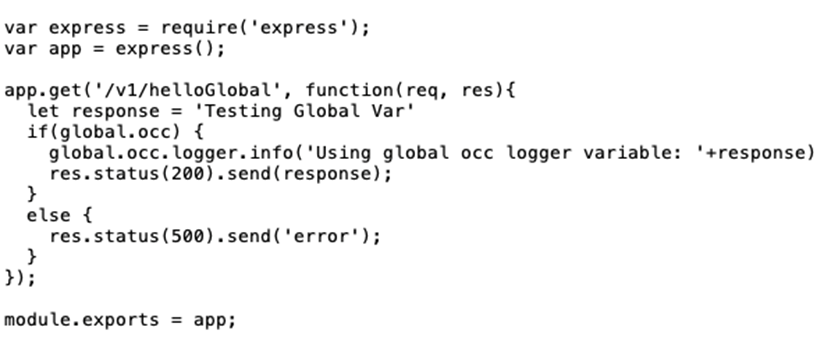
The logger access update provides easier access to the framework-supplied logger. When writing new code or updating an existing SSE, use the new variable “global.occ.logger”.
CAPABILITY HIGHLIGHTS
- Now easily available as the global “global.occ.logger” variable.
- The built-in logger integrates properly with the SSE log retrieval APIs
- No change has been made to the logging APIs. The change is in how to access the logger.
EXAMPLE USE CASE
It is a best practice to check for the “global.occ.logger” variable, as shown in the following example:
TERMINOLOGY CHANGE
In an effort to modernize and clarify terms used in Oracle products and services, “whitelistUrls” in the SSE “package.json” file, has been replaced by “allowedUrls”. This name is clear and directly related to the URLs allowed to be called by SSE. When switching to allowedUrls, it is recommended to rename whitelistUrls to allowedUrls in-place.
While “whitelistUrls” will be supported for the foreseeable future, the update to “allowedUrls” should be made when making changes to or developing new server-side extensions.
Use of the built-in logger is straightforward and eliminates conflicting logging libraries as a source of SSE issues in production.
Steps to Enable
You don't need to do anything to enable this feature.
Headless Personalization APIs (API only)
This Commerce update introduces new APIs that allow headless applications to establish a visit context for each shopper when evaluating audience membership. These APIs allow merchants to use the full range of personalization audiences when building, for example, native OS or custom web applications, voice assistants, social commerce plug-ins, and chatbots.
Commerce supports querying for audience membership from headless applications through a REST API. Audiences based on visit attributes, such as entry page or UTM parameters, were previously unavailable for headless applications as there was no way for the application to specify values for those attributes.
Capability highlights
- Your headless application can now use audiences based on visit characteristics, such as entry page, UTM parameters, and geolocation.
- Developers now have easy-to-use tools to assist in instrumenting a headless integration to support Audiences.
Easily supports using Audiences to personalize a headless implementation, for example, a native OS or custom web application.
Steps to Enable
Review the REST service definition in the REST API guides, available from the Oracle Help Center > your apps service area of interest > REST API. If you're new to Oracle's REST services you may want to begin with the Quick Start section.
Tips And Considerations
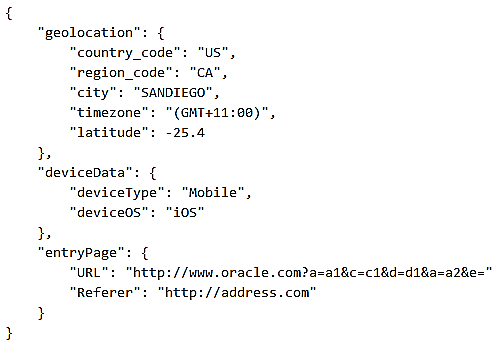
The endpoints listed below are for audience conditions that require information on the current session that would normally be provided via the out-of-the-box Oracle Commerce Storefront. Non-contextual conditions, for example, those on the Shopper Profile, are automatically managed by the system without requiring any additional endpoint calls.
PUT audienceContext/currentSession
This document will continue to evolve as existing sections change and new information is added. All updates appear in the following table:
| Date | Product | Feature | Notes |
|---|---|---|---|
| 17 MAR 2021 | Created initial document. |
This guide outlines the information you need to know about new or improved functionality in this update.
GIVE US FEEDBACK
We welcome your comments and suggestions to improve the content. Please send us your feedback at oracle_fusion_applications_help_ww_grp@oracle.com. Please indicate you are inquiring or providing feedback regarding the Oracle CX Commerce What’s New for 21A Revision 9 (21.1.9) in the body or title of the email.
Column Definitions:
Report = New or modified, Oracle-delivered, ready to run reports.
UI or Process-Based: Small Scale = These UI or process-based features are typically comprised of minor field, validation, or program changes. Therefore, the potential impact to users is minimal.
UI or Process-Based: Larger Scale* = These UI or process-based features have more complex designs. Therefore, the potential impact to users is higher.
Features Delivered Disabled = Action is needed BEFORE these features can be used by END USERS. These features are delivered disabled and you choose if and when to enable them. For example, a) new or expanded BI subject areas need to first be incorporated into reports, b) Integration is required to utilize new web services, or c) features must be assigned to user roles before they can be accessed.
| Ready for Use by End Users Reports plus Small Scale UI or Process-Based new features will have minimal user impact after an update. Therefore, customer acceptance testing should focus on the Larger Scale UI or Process-Based* new features. |
Customer Must Take Action before Use by End Users Not disruptive as action is required to make these features ready to use. As you selectively choose to leverage, you set your test and roll out timing. |
|||||
|---|---|---|---|---|---|---|
| Feature |
Report |
UI or |
UI or |
|
||
This Commerce update provides enhancements that allow you to control a business user’s access to specific catalogs and price groups. This can help prevent unauthorized updates of products and prices.
This type of access control can be especially helpful if you have multiple sites managed by separate teams, where each site has its own catalog and price group, or if you have teams dedicated to managing the catalogs and price groups of different accounts.
With this release, API support is provided for creating security criteria for catalogs and price groups, and for adding privileges and security criteria to roles.
Introducing new concepts:
- Each predefined role (e.g. Catalog, Design, Marketing, Administrator) is now a container for a privilege with the same name and effect
- A privilege provides access to functionality, such as an area of UI or the ability to perform certain actions
- Capabilities are now conferred by the privileges within roles, not the roles themselves
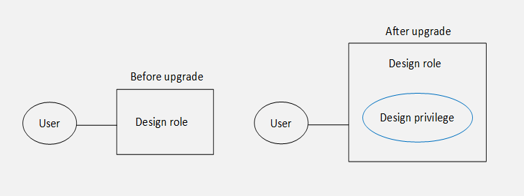
- You can create roles with multiple privileges
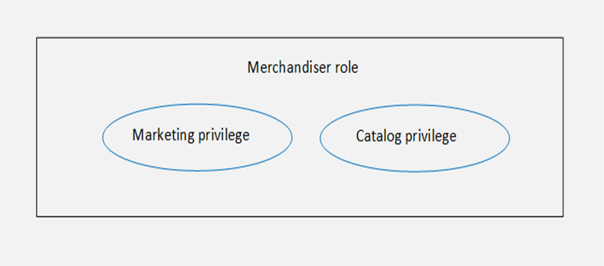
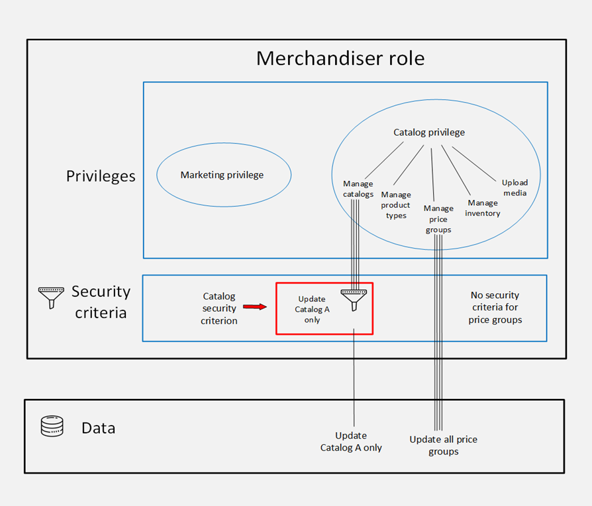
- A role can also contain security criteria that restrict a user’s access to specific catalogs or price groups
- Security criteria can be thought of as filters that narrow the data a user can access via privileges
- No change to read access – it remains unrestricted
- A user with the merchandiser role shown here can:
- Read all catalogs and price groups.
- Update any price group.
- Update Catalog A only – no other catalogs.
CAPABILITY HIGHLIGHTS
- Create security criteria for catalogs and price groups (via API)
- Add privileges and security criteria to roles (via API)
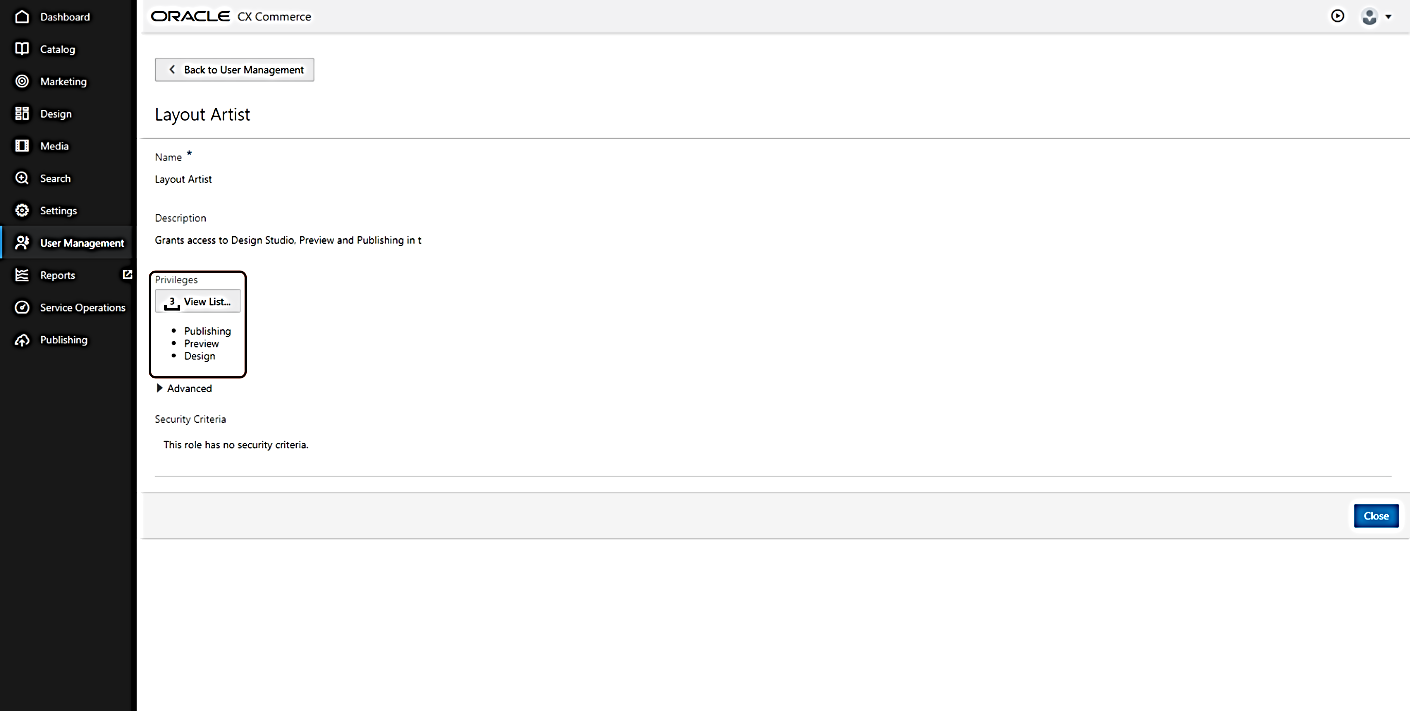
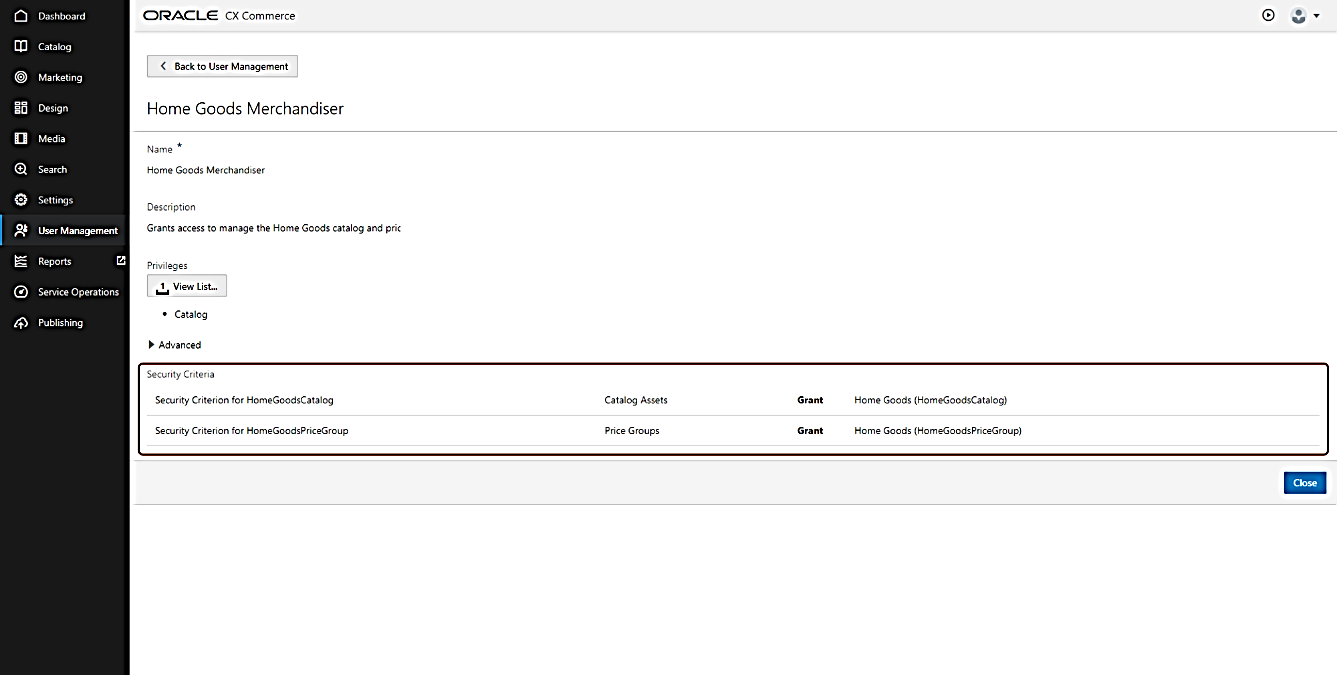
- View the contents of roles in a new User Management UI:
- UI is accessed from the left-hand navigation panel
- Replaces the Settings > Access Control UI
- Requires the Administrator privilege
- Catalogs and price groups display as read-only for users lacking permission to update
EXAMPLE USE CASE
- StyleOracle is a national brand with two sites:
- StyleOracle Home Goods
- StyleOracle Fashion
- One team of layout artists manages the design and user experience for both sites
- Each site has a dedicated team that manages its products and pricing
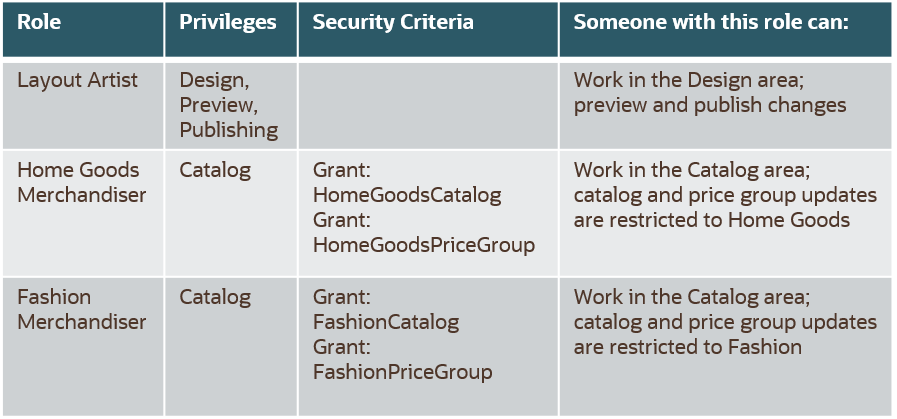
The administrator creates the three roles as seen in the table below. The Layout Artist role needs the Design, Preview, and Publishing privileges. Each of the two Merchandiser roles has the Catalog privilege, one catalog security criterion, and one price group security criterion, narrowing the user’s access down to the catalog and price group for Home Goods or Fashion.
- Manage business user roles more efficiently
- Create custom roles that align with the task’s users perform
- Change role contents as responsibilities evolve
Steps to Enable
Review the REST service definition in the REST API guides, available from the Oracle Help Center > your apps service area of interest > REST API. If you're new to Oracle's REST services you may want to begin with the Quick Start section.
Creating custom roles via API is existing Commerce functionality. New APIs have been developed to support this enhancement. The original access rights are now called "generic access rights." Privileges are a type of access right. If a role contains generic access rights, you can now see them in the User Management UI.
Relevant APIs for Access Control include:
- createAdminRole
- createAdminSecurityCriterion (New)
- listAdminSecurityCriteriaResources (New)
- listAdminAccessRights
- createAdminProfile
Refer to these Commerce API resources posted in Customer Connect for implementation details:
Understanding and Implementing Role-based Access Control
- Understanding Role-based Access Control for Oracle Commerce Business Users
- How to Implement Role-based Access Control for Oracle Commerce Business Users
Tips And Considerations
- The enhancements introduced with this release do not change the existing functionality related to access rights:
- Access rights were introduced to help merchants address General Data Protection Regulation (GDPR) requirements
- No action is needed upon upgrade
- Users retain the same roles that they had prior to the upgrade – each predefined role now contains a privilege.
- The “All Commerce Cloud” “role” (name for a set of individual roles), no longer exists. Any user who had been assigned “All Commerce Cloud” now has the equivalent individual roles.
- Users’ access to data does not change unless they are given security criteria (via a role)
- Privileges or security criteria cannot be assigned directly to a user:
- Place criteria in a role, and then assign the role to the user
- Predefined roles are protected
- You cannot add or remove privileges
- You cannot delete the role
This document will continue to evolve as existing sections change and new information is added. All updates appear in the following table:
| Date | Product | Feature | Notes |
|---|---|---|---|
| 11 MAR 2021 | Created initial document. |
This guide outlines the information you need to know about new or improved functionality in this update.
GIVE US FEEDBACK
We welcome your comments and suggestions to improve the content. Please send us your feedback at oracle_fusion_applications_help_ww_grp@oracle.com. Please indicate you are inquiring or providing feedback regarding the Oracle CX Commerce What’s New for 21A Revision 8 (21.1.8) in the body or title of the email.
Column Definitions:
Report = New or modified, Oracle-delivered, ready to run reports.
UI or Process-Based: Small Scale = These UI or process-based features are typically comprised of minor field, validation, or program changes. Therefore, the potential impact to users is minimal.
UI or Process-Based: Larger Scale* = These UI or process-based features have more complex designs. Therefore, the potential impact to users is higher.
Features Delivered Disabled = Action is needed BEFORE these features can be used by END USERS. These features are delivered disabled and you choose if and when to enable them. For example, a) new or expanded BI subject areas need to first be incorporated into reports, b) Integration is required to utilize new web services, or c) features must be assigned to user roles before they can be accessed.
| Ready for Use by End Users Reports plus Small Scale UI or Process-Based new features will have minimal user impact after an update. Therefore, customer acceptance testing should focus on the Larger Scale UI or Process-Based* new features. |
Customer Must Take Action before Use by End Users Not disruptive as action is required to make these features ready to use. As you selectively choose to leverage, you set your test and roll out timing. |
|||||
|---|---|---|---|---|---|---|
| Feature |
Report |
UI or |
UI or |
|
||
Enhancement to Robust Order Capture
This CX Commerce update provides an enhancement to the Robust Order Capture feature released in 20D Revision 4. Robust Order Capture reduces rare occurrences of orders where the payment has been authorized, but not successfully submitted.
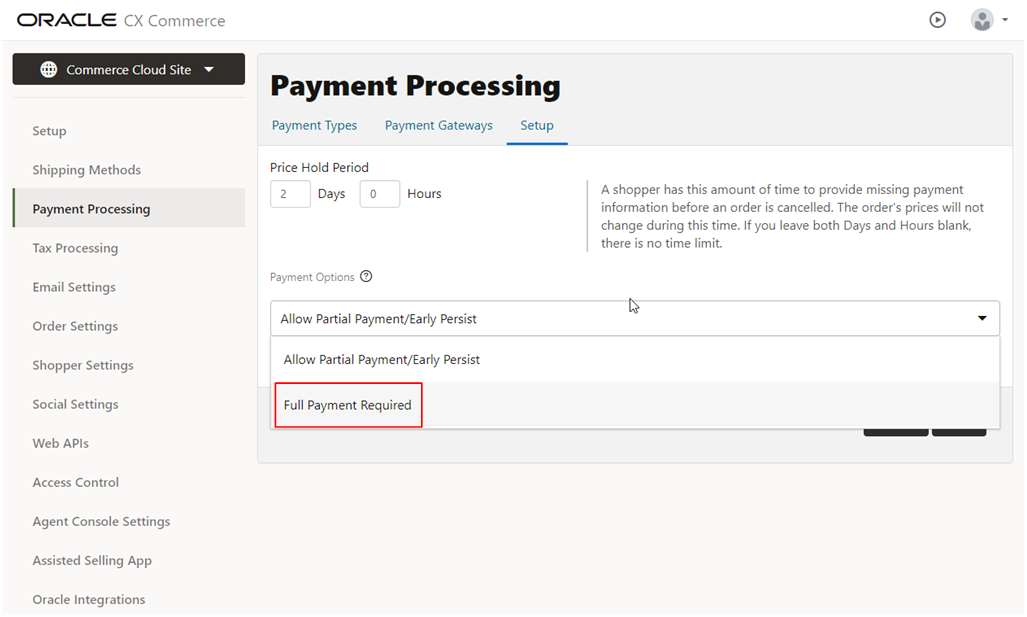
This new enhancement addresses a specific incident that may happen when the “Full Payment Required” setting is configured, and a shopper attempts to remove the last item from the cart.
In this case, the order is no longer deleted and saved with a status of FAILED. With the FAILED order status available, merchants and agents can help with a timely resolution.
Capability highlights
- An order is no longer deleted if a shopper tries to remove the last item from the cart and the order is now saved in ‘failed’ state.
- Merchant has access to details of the failed order.
- The order can be viewed in Order History and in the Agent Console to aid investigation.
- Shopper also has a record of the order.
- Prevents the deletion of orders in the specific, rare payment scenario where payment has been authorized, but not successfully submitted, providing the shopper with opportunity for assistance, resolution, and a positive shopping experience.
Steps to Enable
You don't need to do anything to enable this feature.
Tips And Considerations
If, for some reason, Commerce does not receive a response regarding an authorization during the payment process, the order remains in an INCOMPLETE state. This state allows the shopper to update the cart (e.g. add or remove items).
Updates during this time can cause discrepancies between the contents of the cart and what has been paid for. If the contents of the cart have been changed, the recommended resolution is to select the “Allow Partial Payment/Early Persist” option. This option is selected by default for new customers
This document will continue to evolve as existing sections change and new information is added. All updates appear in the following table:
| Date | Product | Feature | Notes |
|---|---|---|---|
| 11 MAR 2021 | Created initial document. |
This guide outlines the information you need to know about new or improved functionality in this update.
GIVE US FEEDBACK
We welcome your comments and suggestions to improve the content. Please send us your feedback at oracle_fusion_applications_help_ww_grp@oracle.com. Please indicate you are inquiring or providing feedback regarding the Oracle CX Commerce What’s New for 21A Revision 7 (21.1.7) in the body or title of the email.
Column Definitions:
Report = New or modified, Oracle-delivered, ready to run reports.
UI or Process-Based: Small Scale = These UI or process-based features are typically comprised of minor field, validation, or program changes. Therefore, the potential impact to users is minimal.
UI or Process-Based: Larger Scale* = These UI or process-based features have more complex designs. Therefore, the potential impact to users is higher.
Features Delivered Disabled = Action is needed BEFORE these features can be used by END USERS. These features are delivered disabled and you choose if and when to enable them. For example, a) new or expanded BI subject areas need to first be incorporated into reports, b) Integration is required to utilize new web services, or c) features must be assigned to user roles before they can be accessed.
| Ready for Use by End Users Reports plus Small Scale UI or Process-Based new features will have minimal user impact after an update. Therefore, customer acceptance testing should focus on the Larger Scale UI or Process-Based* new features. |
Customer Must Take Action before Use by End Users Not disruptive as action is required to make these features ready to use. As you selectively choose to leverage, you set your test and roll out timing. |
|||||
|---|---|---|---|---|---|---|
| Feature |
Report |
UI or |
UI or |
|
||
Large Webhook Payload Reduction
This Commerce update allows developers to better integrate with systems that have payload size limits and provides a defined fallback mechanism when there are large quantities of data objects.
There are situations that result in webhook payloads having a very large number of items, thus very large payloads. This can present a problem for downstream systems and middleware platforms. With this feature, customers and integrators have options for handling the large payloads by either reducing or limiting them. This prevents unexpected problems and errors later when operational.
Capability highlights
- Allows the configuration of a maximum number of items to be sent in the payload (for certain webhooks) and truncates after that amount. Payload indicates that data was truncated.
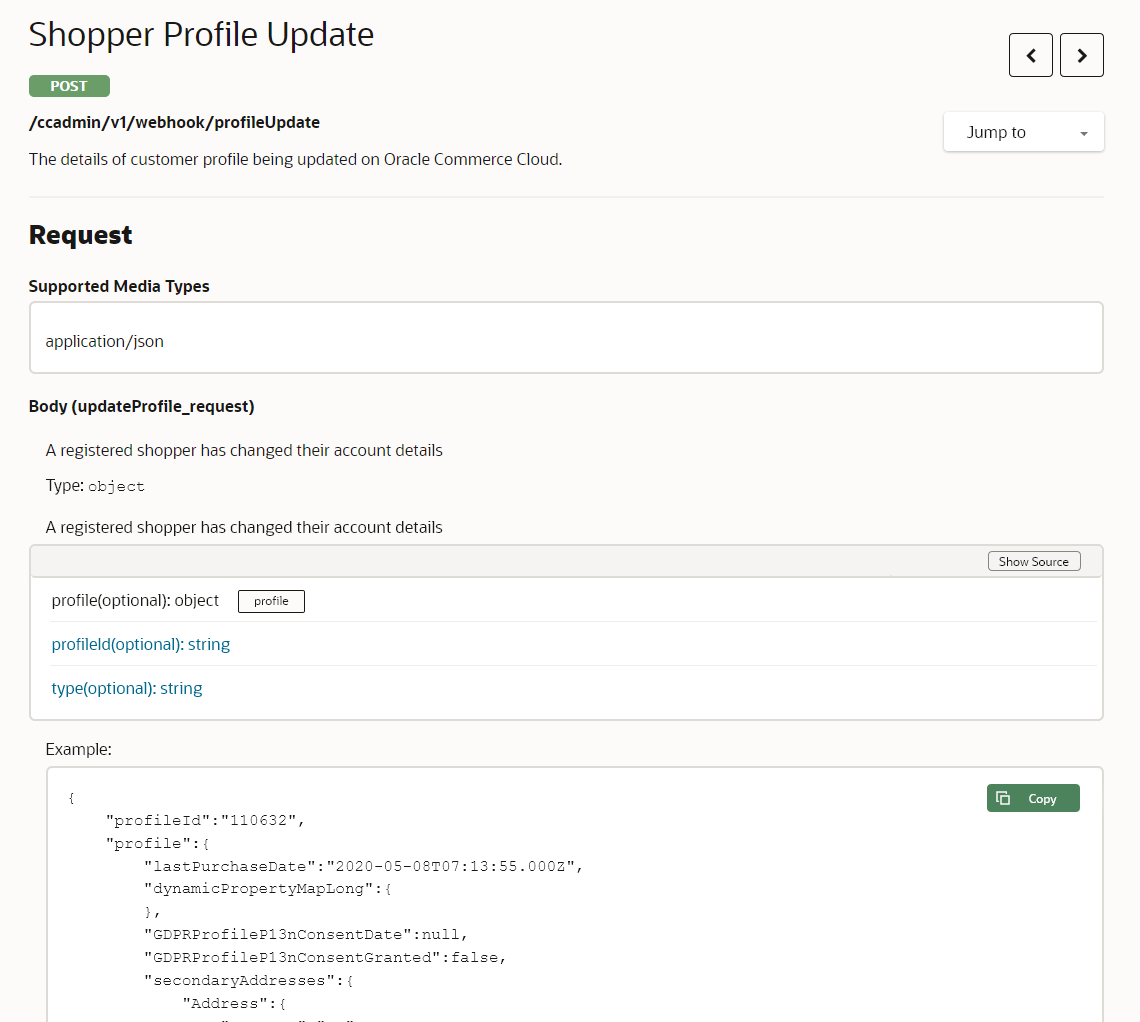
- For example, Shopper Profile update can now be limited to 100 shipping addresses sent via webhook.
- Profile and account update webhooks can send deltas (changes) only for certain properties. This information will be included in product documentation in the Extending Oracle CX Commerce for 21B guide.
Example Use Case
A B2B merchant requests that their customers (e.g. distributors) enter orders with the address of every end user customer. For some accounts, this may result in ten thousand shipping addresses. Every subsequent update sends all account information, including the addresses, producing a significant amount of data. With this update:
- The merchants can plan for a considerable number of shipping addresses, by configuring Commerce to only send the changes.
- If one of the customer accounts adds a new end user address to a new order, Commerce sends only the core account data and the one new address, thus greatly reducing the size of the data.
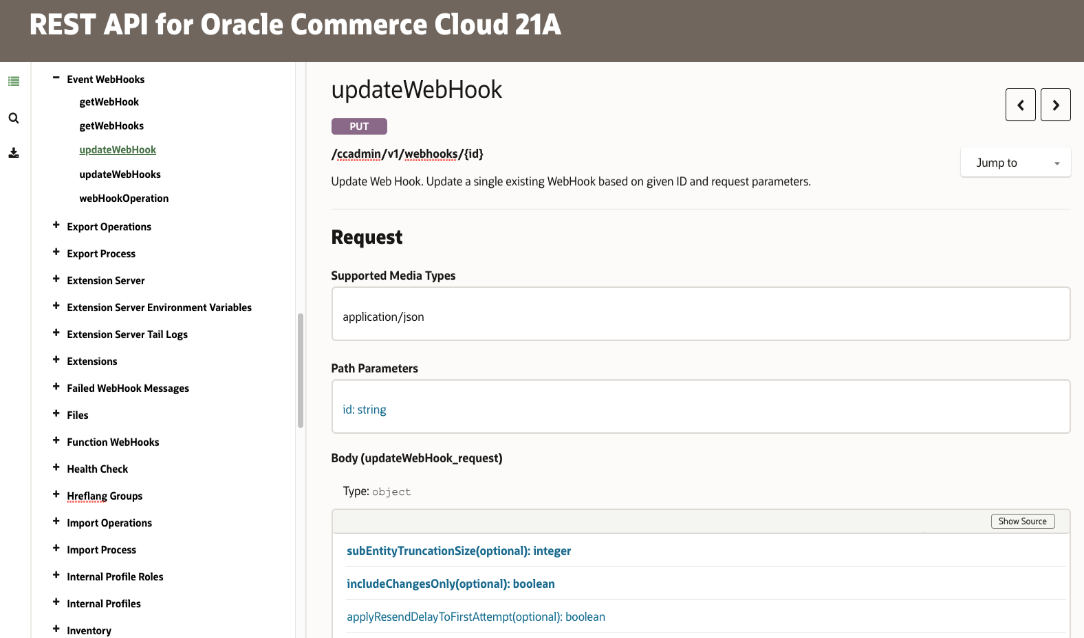
Simplifies integrations by providing tools to reduce the size of large webhook payloads.
Steps to Enable
You don't need to do anything to enable this feature.
Tips And Considerations
- The feature is limited to a series of defined webhooks and properties. The properties will be included in product documentation in the Extending Oracle CX Commerce for 21B guide.
- The feature is available for all customers, although it requires configuration via REST calls. The default configurations will work as the system does today.
- The receiving system should be coded to check for indication that the data has been truncated. If that occurs, it should call back to Commerce to retrieve data as needed.
California Consumer Privacy Act (CCPA) Support (API Only)
This Commerce feature is designed to address the California Consumer Privacy Act of 2018 (CCPA), giving consumers more control over the personal information that businesses collect about them. This landmark law secures new privacy rights for California consumers, including:
- The right to know about the personal information a business collects about them and how it is used and shared
- The right to delete personal information collected from them (with some exceptions)
- The right to opt-out of the sale of their personal information
- The right to non-discrimination for exercising their CCPA rights
The update enables a merchant to request an extract of all clickstream data for an individual shopper to package in an encrypted format that can be provided to the consumer.
CCPA rights apply only to consumers/shoppers who are residents of California.
Capability highlights
- Provides an Agent API (Agent PersonalDataReport) that can initiate a request to generate a snapshot of all clickstream data for a specific shopper.
- This will generate an encrypted file on file storage that can then be sent to the shopper.
- Categories of data extracted include pages visited, products viewed, search terms entered, and products added to cart or purchased.
- Provides added support for extracting clickstream data for an individual if they were to request it as part of their rights under CCPA.
- Existing APIs can already be used to extract profile and order information.
- The API information is available in the Oracle Commerce Help Center REST API documentation.
- Ensures compliance with CCPA which has similar requirements to General Data Protection Regulation (GDPR), a regulation in EU law.
- As part of the ‘right to know’ requirement, users have the right to request to see data stored about them.
Steps to Enable
Review the REST service definition in the REST API guides, available from the Oracle Help Center > your apps service area of interest > REST API. If you're new to Oracle's REST services you may want to begin with the Quick Start section.
The API needs to be called to initiate a request for this data. If required, Agent UI could be customized to provide an action button to call this API.
The Agent PersonalDataReport endpoints allow an initial request to be made using a post request and a subsequent get request to return a link to the generated output file.
-----
POST /requests/
The postbody contains the following inputs:
- Shopper external ID - Shopper ID whose data is being requested
- Length of time (12 months default)
- Agent login ID
The response will be the following:
- Request ID generated for this request by the API
- Download link = null at first
- Decryption key = null at first
- Request status (pending, delivered, or deleted) = pending at first
- Report Timestamp = null at first
- Record Timestamp = request creation timestamp
- Agent ID = Who created this request – the same as the input
GET /requests/{id}
The URL contains the following:
- Request ID (returned by the above PUT /request/ request)
The response will be the following if there is a request record with the matching requested ID within the last 24 months. If there isn’t, null will be returned.
- Request ID (the same as the input. Included for consistency)
- Download link = null at first or after deletion. Public web link if the report is available.
- Decryption key = null at first or after deletion. Random key used (along with agent ID) to encrypt the report if the report is available.
- Request status (pending, delivered, or deleted) = pending at first. Delivered if the report is available. Deleted if the report is deleted.
- Report Timestamp = null at first or after deletion. The creation timestamp of the report if the report is available.
- Record Timestamp = request creation timestamp
- Agent ID = Who created this request
GET /requests/
No input parameters for this request.
The response will be a list of all requests for the tenant created within the last 24 months. Each request contains the information listed above for GET /request/ request.
Tips And Considerations
For more information: Read the FAQ on Preparing your CX Commerce Site for the CCPA available via Customer Connect: FAQ: Preparing Your CX Commerce Site for CCPA.
This document will continue to evolve as existing sections change and new information is added. All updates appear in the following table:
| Date | Product | Feature | Notes |
|---|---|---|---|
| 22 FEB 2021 | Created initial document. |
This guide outlines the information you need to know about new or improved functionality in this update.
GIVE US FEEDBACK
We welcome your comments and suggestions to improve the content. Please send us your feedback at oracle_fusion_applications_help_ww_grp@oracle.com. Please indicate you are inquiring or providing feedback regarding the Oracle CX Commerce What’s New for 21A Revision 3 (21.1.3) in the body or title of the email.
Column Definitions:
Report = New or modified, Oracle-delivered, ready to run reports.
UI or Process-Based: Small Scale = These UI or process-based features are typically comprised of minor field, validation, or program changes. Therefore, the potential impact to users is minimal.
UI or Process-Based: Larger Scale* = These UI or process-based features have more complex designs. Therefore, the potential impact to users is higher.
Features Delivered Disabled = Action is needed BEFORE these features can be used by END USERS. These features are delivered disabled and you choose if and when to enable them. For example, a) new or expanded BI subject areas need to first be incorporated into reports, b) Integration is required to utilize new web services, or c) features must be assigned to user roles before they can be accessed.
| Ready for Use by End Users Reports plus Small Scale UI or Process-Based new features will have minimal user impact after an update. Therefore, customer acceptance testing should focus on the Larger Scale UI or Process-Based* new features. |
Customer Must Take Action before Use by End Users Not disruptive as action is required to make these features ready to use. As you selectively choose to leverage, you set your test and roll out timing. |
|||||
|---|---|---|---|---|---|---|
| Feature |
Report |
UI or |
UI or |
|
||
AI Recommendation Strategies and Global Exclusions
With this release, CX Commerce allows merchandisers to create complex recommendation rules or strategies that can be managed efficiently across widgets on different page layouts and harness the power of the Commerce Recommendations engine right in the Administration UI without the need for custom rule set up and testing by a development team.
Product recommendations are generated by an AI-powered learning engine. Strategies and Global Exclusions work in harmony with this engine to provide granular control over the merchandising experience.
For both Strategies and Global Exclusions, there is now the concept of context which allows merchandisers to decide whether a Brand or Collection that is being included or excluded should be dynamically inferred from the current page (this is based on page location).
Capability highlights
- Create custom Strategies by allowing combinations of existing prebuilt strategies (e.g. Top Sellers, Browsed Together, Purchased Together, Manually Related, Most Recently Viewed), as well as ability to define which products are/aren’t recommended based on collection, brand, price type and limit the number of products returned by each to create a broad variety of recommendations to connect with the customer.
- Create Global Exclusions by allowing limits on which products can be returned in recommendations with a great deal of flexibility. Multiple Global Exclusion lists can be configured, and these lists can define exclusions based on the same criteria as Custom Strategies (e.g. collection, brand, price type).
Example use cases
- You want to create a dynamic cross-sell on the Product Detail Page that focuses on brand affinity. A recommendations strategy can be created with the following groups and conditions:
- Group 1 – Brand = same as context, Collection = not same as context, Number of Products = 4
- Group 2 – Brand = same as context, Purchased Together, Number of Products = 4
- Group 3 – Brand = same as context, Browsed Together, Number of Products = 4
This will result in up to four products being recommended that have the same brand but belong to a different collection. Next, up to four products will be recommended that are the same brand and frequently purchased together. Finally, the remaining products will be those that are browsed together (but not necessarily purchased together), and of the same brand.
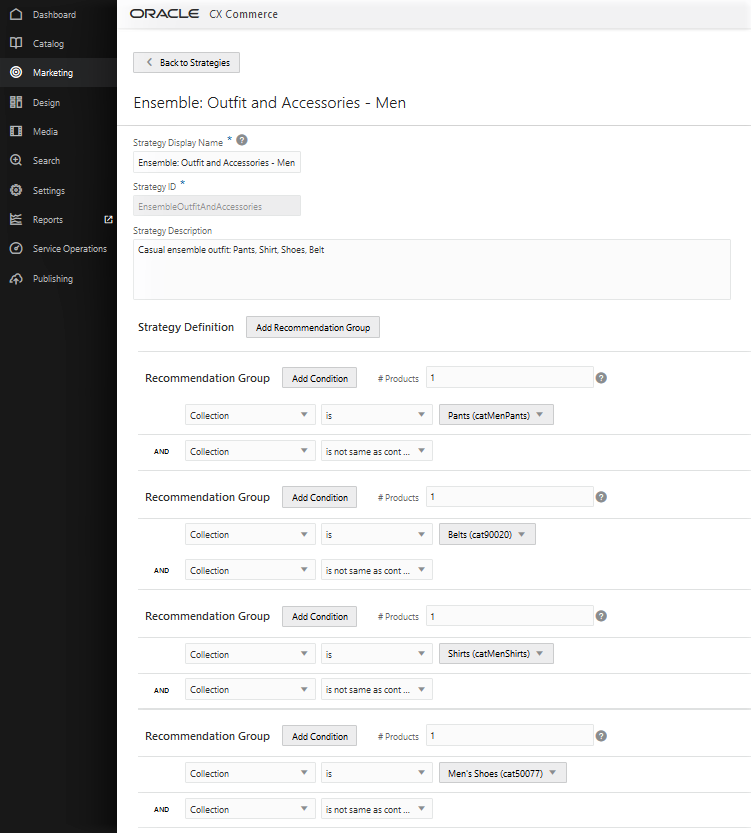
- You want to recommend an outfit when the shopper is viewing any apparel product. A custom recommendations strategy can dynamically generate an outfit recommendation that automatically promotes products from complementary collections.
Add a strategy with the following groups and conditions:
- Group 1 – Collection = Men’s Tops, Collection = not same as context, Number of Products = 1
- Group 2 – Collection = Men’s Pants, Collection = not same as context, Number of Products = 1
- Group 3 – Collection = Men’s Shoes, Collection = not same as context, Number of Products = 1
- Group 4 – Collection = Men’s Belts, Collection = not same as context, Number of Products = 1
Next, create a custom product layout, define the Product Type as Men’s Apparel and Men’s Footwear, and add the new recommendations strategy.
Now, when the shopper is on any men’s apparel or footwear product, recommendations will be from the complementary collections, and thanks to the Collection = not same as context condition the current collection will be automatically excluded. Consider going one step further, and combining with the Brand Affinity strategy above, so complementary products from the same brand are preferred!
- Occasionally, you may want to exclude products from being recommended at all. For example, you have a contractual obligation not to promote a certain brand – you can easily achieve this by adding a brand condition to the Global Exclusions list. Alternatively, you may wish to avoid recommending products that are on sale – you can do so by using the condition of “Price Type” is “Sale Price”. Finally, there may be product collections that are restricted – these can be excluded using the collection condition.
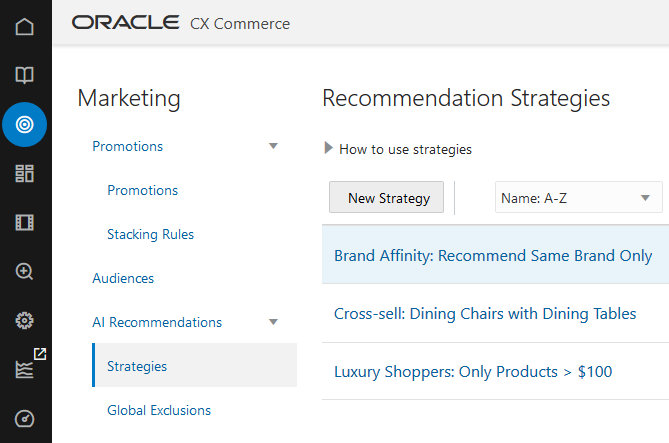
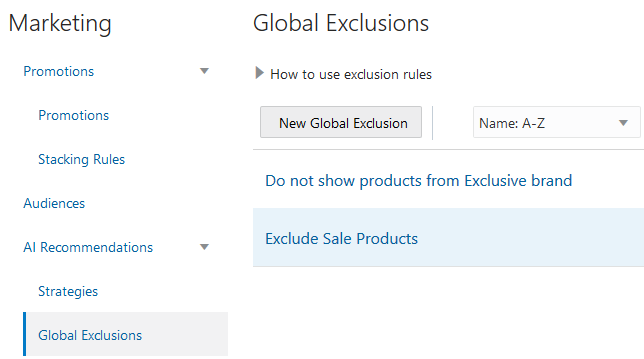
The following shows AI Recommendations Strategy Rule Builder with a custom strategy of “Ensemble: Outfit and Accessories – Men”:
This following shows the AI Recommendations Strategy in effect on a Product Detail Page:
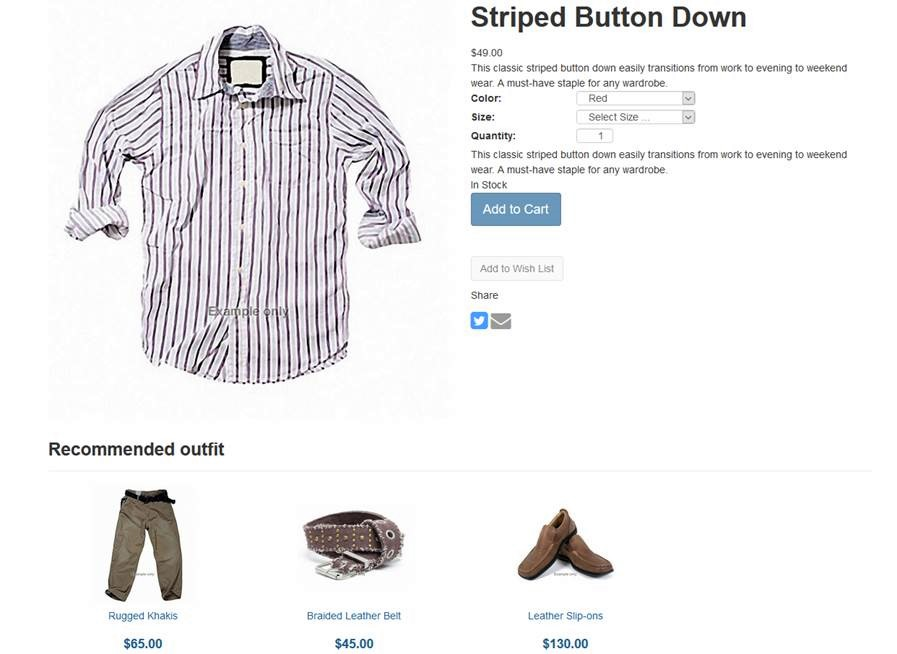
Enhances the customer experience and allows for better alignment with your merchandising strategy.
Steps to Enable
You don't need to do anything to enable this feature.
Tips And Considerations
If you want to target or exclude a specific set of products that are not grouped in an existing collection: create a non-navigable collection in the catalog, add the products to this collection and use that as the collection condition in your strategy or global exclusion rule.
This document will continue to evolve as existing sections change and new information is added. All updates appear in the following table:
| Date | Product | Feature | Notes |
|---|---|---|---|
| 29 JAN 2021 | Created initial document. |
This guide outlines the information you need to know about new or improved functionality in this update.
GIVE US FEEDBACK
We welcome your comments and suggestions to improve the content. Please send us your feedback at oracle_fusion_applications_help_ww_grp@oracle.com. Please indicate you are inquiring or providing feedback regarding the Oracle CX Commerce What’s New for 21A Revision 2 (21.1.2) in the body or title of the email.
Column Definitions:
Report = New or modified, Oracle-delivered, ready to run reports.
UI or Process-Based: Small Scale = These UI or process-based features are typically comprised of minor field, validation, or program changes. Therefore, the potential impact to users is minimal.
UI or Process-Based: Larger Scale* = These UI or process-based features have more complex designs. Therefore, the potential impact to users is higher.
Features Delivered Disabled = Action is needed BEFORE these features can be used by END USERS. These features are delivered disabled and you choose if and when to enable them. For example, a) new or expanded BI subject areas need to first be incorporated into reports, b) Integration is required to utilize new web services, or c) features must be assigned to user roles before they can be accessed.
| Ready for Use by End Users Reports plus Small Scale UI or Process-Based new features will have minimal user impact after an update. Therefore, customer acceptance testing should focus on the Larger Scale UI or Process-Based* new features. |
Customer Must Take Action before Use by End Users Not disruptive as action is required to make these features ready to use. As you selectively choose to leverage, you set your test and roll out timing. |
|||||
|---|---|---|---|---|---|---|
| Feature |
Report |
UI or |
UI or |
|
||
Integration with Oracle Product Hub
The CX Commerce integration with Oracle Product Hub Cloud, an enterprise-class product master data management software delivered via cloud, allows customers to import centrally managed products, SKUs, images and price lists into the Commerce application.
In this scenario, product and SKU data is managed in Oracle Product Hub and imported into Commerce, making Product Hub the only source of products and SKUs for Commerce. The integration syncs them to Commerce and makes them available on the storefront.
Capability highlights
-
- Ability to import products identified in Product Hub to be published in Commerce.
- Ability to associate collections created in Commerce to the products.
- Ability to synch products created / updated in Product Hub with Commerce.
- Ability to upload images from Product Hub to Commerce and associate them with products.
- Ability to import products identified in Product Hub to be published in Commerce.
Key benefits
- Merchants maintain a central system for products, catalog and SKUs.
- Merchants gain the advantage of maintaining updates to single source.
- Merchants can display products on storefront from Product Hub.
Integration with a central system for master data provides a consistent experience for managing catalogs, products, and SKUs across applications.
For CX Commerce customers with large catalogs, a substantial number of products and complex operations, integration with a master data application (or PIM) such as Product Hub is key to effectively and efficiently manage their business.
Steps to Enable
You don't need to do anything to enable this feature.
Tips And Considerations
- Appropriate rules must be set in Product Hub to conform data to Commerce requirements. The Product Hub item number is mapped to Commerce Product ID and SKU ID. While Item Number in Product Hub can include spaces and have a maximum length of 256 characters, Commerce IDs do not support spaces and can have a maximum length of 165 characters. Additionally, the Item Number must not be modified in Product Hub.
- By default, Commerce list prices are mapped to Product Hub's purchase list prices. It is recommended to create an Extensible Flexfield (EFF) attribute for sale list price and override the mapping.
- Product Hub exported XML does not include translations. If required, the data must currently be exported per locale.
Key Resources
Integration flows for this integration are available in the Oracle Cloud Marketplace: https://cloudmarketplace.oracle.com/marketplace/product/commerce
Integration with Customer Data Management
The CX Commerce integration with Oracle Customer Data Management (CDM) a cloud-based application for managing organizations and contacts, enables customers to import centrally managed records for accounts, customers and profiles into Commerce, providing a single source for all customer data. Using Oracle Integration Cloud (OIC), the integration is flexible and extensible to meet custom flows between CDM and Commerce.
Capability highlights
- Synchronize in bulk or individually contacts and profiles that have been created or updated in Commerce to CDM in real time. Additionally, you can associate contacts to an account during the synchronization process.
- Synchronize in bulk or individually accounts that have been created or updated in Commerce to CDM in real time.
- Maintain and synchronize account hierarchy across the systems.
- Dynamic attributes created on either system can be mapped using the OIC integration.
- Customer records can be displayed in the storefront from CDM.
Consolidation of shopper profiles, business accounts, and contacts into a single data source increases operational effectiveness and overall customer experience.
Steps to Enable
You don't need to do anything to enable this feature.
Tips And Considerations
- Oracle Customer Data Management (CDM) is also known as Oracle Engagement Cloud (OEC).
- We recommend configuring CDM to store U.S. states using the abbreviated state format, such as “CA” for California or “VT” for Vermont, since Commerce stores the state values in the abbreviated format.
- When exporting data from CDM, the limit of a CSV file is 50,000 records. Should your export file contain more than 50,000 records, it will be divided into multiple files, however these files will not be converted. To prevent this from occurring, the export should not exceed 50,000 records at a time.
- Emails sent for changes made in CDM are not automatically triggered in Commerce. However, this can be customized in OIC by passing an additional parameter to the bulk import plugin.
- For a contact with more than one account relationship, and “no account” marked as default, CDM will consider the first account as the default account.
Key Resources
Integration flows for this integration are available in the Oracle Cloud Marketplace: https://cloudmarketplace.oracle.com/marketplace/product/commerce
Catalogs with Optional Collections
This new CX Commerce feature extends the current independent catalog model to support products that are directly linked to the catalog and not in collections. A business user can directly link a product to a catalog via the Administration UI, API, .csv import/export, or bulk import/export API and add those products to a collection in the catalog after importing into CX Commerce.
Capability highlights
- Search for products that are directly linked to a catalog via the custom search product modal.
- Ability to see/edit which catalogs the product is directly linked to from within the membership tab of the product editor.
- Ability to filter the list exported to excel by products that are directly linked to the selected catalog via the export dialog.
- Extends the current independent catalog model to that it can support products that are directly linked to the catalog and *not* in collections.
Example use cases
- Support for catalogs with optional collections allows for the creation of catalogs with or without collections or a hybrid combination (e.g. some products can be assigned directly to a catalog while other products are members of collections within the catalog).
- Products directly associated with the catalog and not within collections are accessible through text search or a custom menu/taxonomy structure with custom links. This is beneficial for those who want their storefront driven entirely by search.
- You may directly link a product to a catalog via import and add that product to a collection within the catalog..
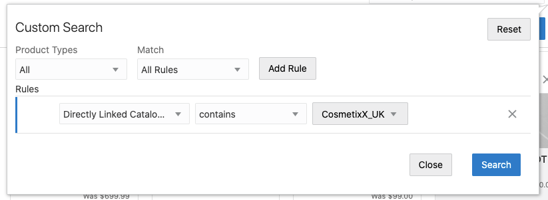
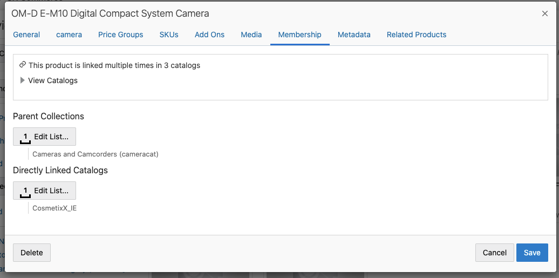
- Performance gains for customers who do not want the overhead of manually assigning products to collections.
- Reduces the time required to curate catalogs; products do not have to be added to collections to show up on the storefront.
- Offers efficiency by accelerating migration and deployment of large catalogs.
Steps to Enable
You don't need to do anything to enable this feature.
Tips And Considerations
- Out-of-the-box (OOTB) support for creating a custom megamenu on the storefront is not available. Should you decide to use this feature for an entirely search driven storefront, a custom megamenu/taxonomy structure with custom links must be built.
- Catalogs with optional collections support filtered views. (Filtered view is a view of an independent base catalog.). However, you cannot link a product directly to a filtered view.
- A product linked directly to the base independent catalog may not be in any collections in the base.
- You can create a filtered view based on an independent catalog and show/hide the product. The product does not need to be in a collection to show up in a filtered view, but must be in the independent base catalog.
- If using the default collection for products setting and opting to directly link products to a catalog, the products will be directly assigned to the catalog in addition to being added to the default collection for products.
This document will continue to evolve as existing sections change and new information is added. All updates appear in the following table:
| Date | Product | Feature | Notes |
|---|---|---|---|
| 29 JAN 2021 | Created initial document. |
This guide outlines the information you need to know about new or improved functionality in this update.
GIVE US FEEDBACK
We welcome your comments and suggestions to improve the content. Please send us your feedback at oracle_fusion_applications_help_ww_grp@oracle.com. Please indicate you are inquiring or providing feedback regarding the Oracle CX Commerce What’s New for 21A Revision 1 (21.1.1) in the body or title of the email.
Column Definitions:
Report = New or modified, Oracle-delivered, ready to run reports.
UI or Process-Based: Small Scale = These UI or process-based features are typically comprised of minor field, validation, or program changes. Therefore, the potential impact to users is minimal.
UI or Process-Based: Larger Scale* = These UI or process-based features have more complex designs. Therefore, the potential impact to users is higher.
Features Delivered Disabled = Action is needed BEFORE these features can be used by END USERS. These features are delivered disabled and you choose if and when to enable them. For example, a) new or expanded BI subject areas need to first be incorporated into reports, b) Integration is required to utilize new web services, or c) features must be assigned to user roles before they can be accessed.
| Ready for Use by End Users Reports plus Small Scale UI or Process-Based new features will have minimal user impact after an update. Therefore, customer acceptance testing should focus on the Larger Scale UI or Process-Based* new features. |
Customer Must Take Action before Use by End Users Not disruptive as action is required to make these features ready to use. As you selectively choose to leverage, you set your test and roll out timing. |
|||||
|---|---|---|---|---|---|---|
| Feature |
Report |
UI or |
UI or |
|
||
This new CX Commerce update allows merchants to build different shopper experiences based on the type of device (mobile vs non-mobile), as well as the operating system being used (iOS, Android, or other). Targeting based on device information applies to creating new audiences as well as extending existing audiences.
Capability highlights
- Create content variation slots that are specific to the type of visitor.
- Target a promotion based on the type of device being used.
- Extends the existing Audience Rule Builder to add additional criteria.
Example use cases
You want to encourage use of your native mobile application from your home page.
- Two audiences can be created; one for iOS operating system, the other for Android operating system.
- In Design Studio, use a content variation slot to display content specifically promoting the specific iOS or Android app that links to the respective Apple or Android application store.
You can also use this new feature to display content, product, or promotions that cater specifically to trends you see in your analytics related to shoppers using particular device types and operating systems.
- For example, if you notice that shoppers on iOS tend to have higher income, prefer certain products or categories, and/or place orders with higher average order value, you can target specific campaigns and present more personalized experiences based on that data. Or, if you notice that mobile shoppers prefer a different path to purchase or have different payment preferences than desktop shoppers, again, you can present a more specific experience to those users to drive conversion.
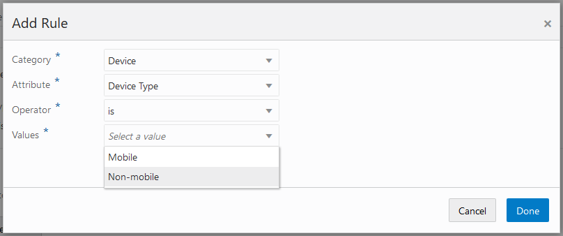
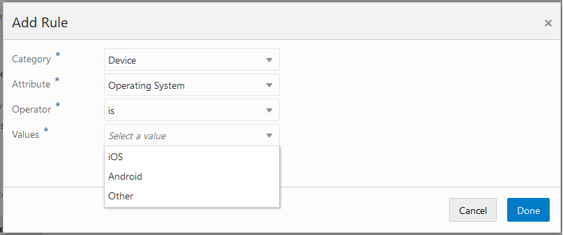
Mobile has become the device of choice for many shoppers. Targeting visitors and shoppers based on device can now be used to drive improved personalized experiences for shoppers
Steps to Enable
You don't need to do anything to enable this feature.
Tips And Considerations
Include content on the page that will only appear for mobile users (or vice versa) using a content slot with an appropriate device type audience.
Anonymous Shopper Personalization
Many visitors to a site do not register as members, although they may be repeat visitors or buyers. This new feature of CX Commerce extends engagement and revenue conditions to these unregistered shoppers. This update expands the current Audiences capability of supporting shoppers that are registered but not logged in.
Capability highlights
Previously, first visit and last visit date were available. This new release extends the conditions to include:
- Engagement: First Purchase Date, Last Purchase Date, Number of Orders
- Revenue: Lifetime Average Order Value, Lifetime Spend, Lifetime Currency Code, Last Purchase Amount
Audiences using these metrics can now target shoppers across the journey, regardless of login status.
Example use cases
- Target shoppers hesitating to make a purchase (defined as shoppers who have visited multiple times, but not placed an order), by creating an audience with conditions of:
- number of visits greater than 5
- number of orders equal to 0
- last visit date less than one week
Use this audience to offer a free shipping promotion to motivate the shopper to purchase.
- Re-engage previously high value shoppers by targeting lifetime spend greater than $1,000 and last purchase date greater than two months by offering a promotional discount.
- Encourage site registration of shoppers by combining these conditions with visitor type equal to “anonymous” and create a content slot to outline the benefits of registration.
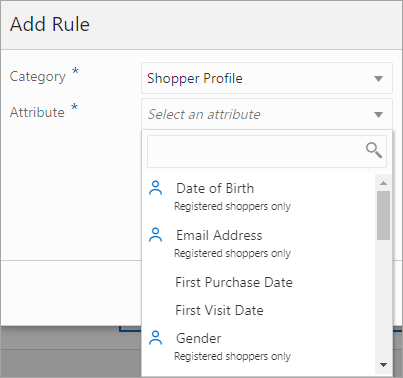
Supports complex audience requirements for engaging customers, improving conversion, and encouraging loyalty.
Steps to Enable
You don't need to do anything to enable this feature.
Tips And Considerations
When a condition in the shopper profile category does not have the “registered shoppers only” icon, it can be used for both registered and anonymous shoppers.
This document will continue to evolve as existing sections change and new information is added. All updates appear in the following table:
| Date | Product | Feature | Notes |
|---|---|---|---|
| 15 JAN 2021 | Created initial document. |
This guide outlines the information you need to know about new or improved functionality in this update.
GIVE US FEEDBACK
We welcome your comments and suggestions to improve the content. Please send us your feedback at oracle_fusion_applications_help_ww_grp@oracle.com. Please indicate you are inquiring or providing feedback regarding the Oracle CX Commerce What’s New for 21A (21.1) in the body or title of the email.
Column Definitions:
Report = New or modified, Oracle-delivered, ready to run reports.
UI or Process-Based: Small Scale = These UI or process-based features are typically comprised of minor field, validation, or program changes. Therefore, the potential impact to users is minimal.
UI or Process-Based: Larger Scale* = These UI or process-based features have more complex designs. Therefore, the potential impact to users is higher.
Features Delivered Disabled = Action is needed BEFORE these features can be used by END USERS. These features are delivered disabled and you choose if and when to enable them. For example, a) new or expanded BI subject areas need to first be incorporated into reports, b) Integration is required to utilize new web services, or c) features must be assigned to user roles before they can be accessed.
| Ready for Use by End Users Reports plus Small Scale UI or Process-Based new features will have minimal user impact after an update. Therefore, customer acceptance testing should focus on the Larger Scale UI or Process-Based* new features. |
Customer Must Take Action before Use by End Users Not disruptive as action is required to make these features ready to use. As you selectively choose to leverage, you set your test and roll out timing. |
|||||
|---|---|---|---|---|---|---|
| Feature |
Report |
UI or |
UI or |
|
||
Enhanced Boost and Bury in the Dynamic Curation UI
With this CX Commerce revision, we’ve introduced an enhancement to the UI for boosting and burying products in a dynamic curation rule. As a reminder, dynamic curation allows you to influence the ordering of search results when the shopper navigates to a category (collection) or enters a search term. You can also create dynamic curation rules. Each rule has a destination (a collection or search terms), a set of criteria for ordering the search results, and an importance level for each criterion. Search uses your prioritization and blends the criteria to generate a sort order.
This new enhancement provides an easier and more efficient way to choose and sequence the products you want to boost or bury. You can view and sequence your boosted or buried products in a light table that is always visible in the rule. For example, if you have a rule that prioritizes products that are newest and most viewed, you can boost specific products to the top of the product listing, and easily sequence them for the most appealing visual experience.
Capability highlights:
- Sequence boosted or buried products using drag and drop in a light table
- Switch to list view to edit sequence numbers
- Select multiple products at a time to boost or bury
- Visualize which products appear “above the fold”
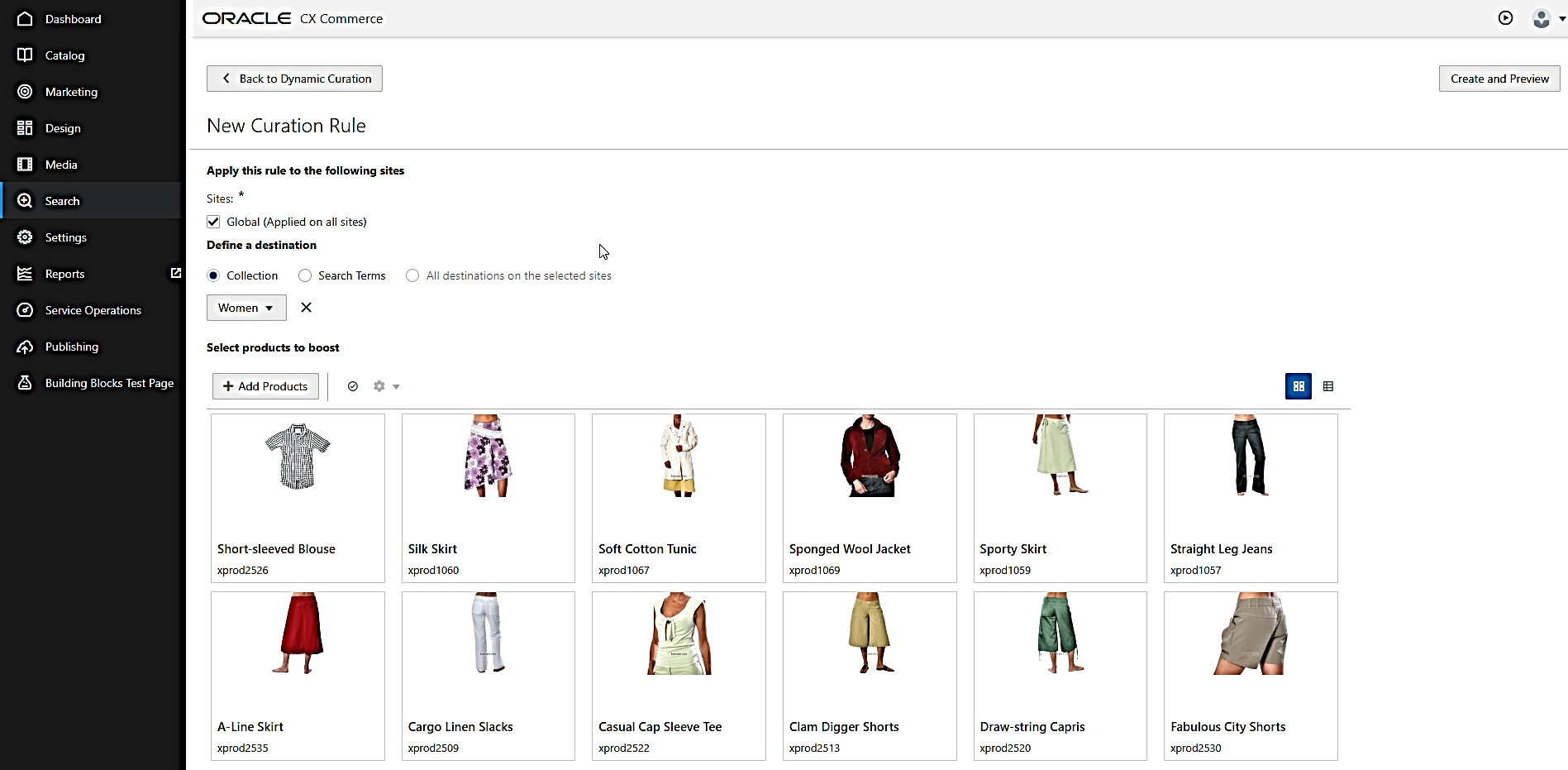
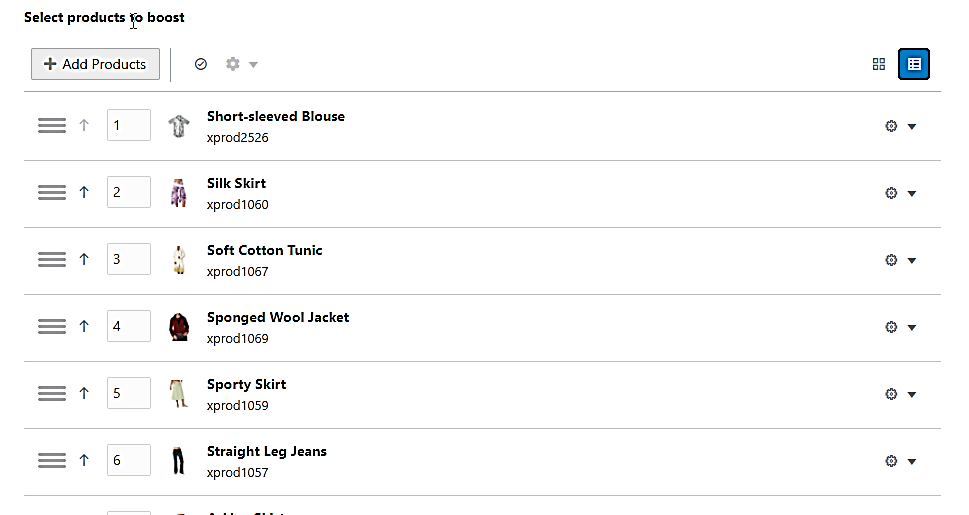
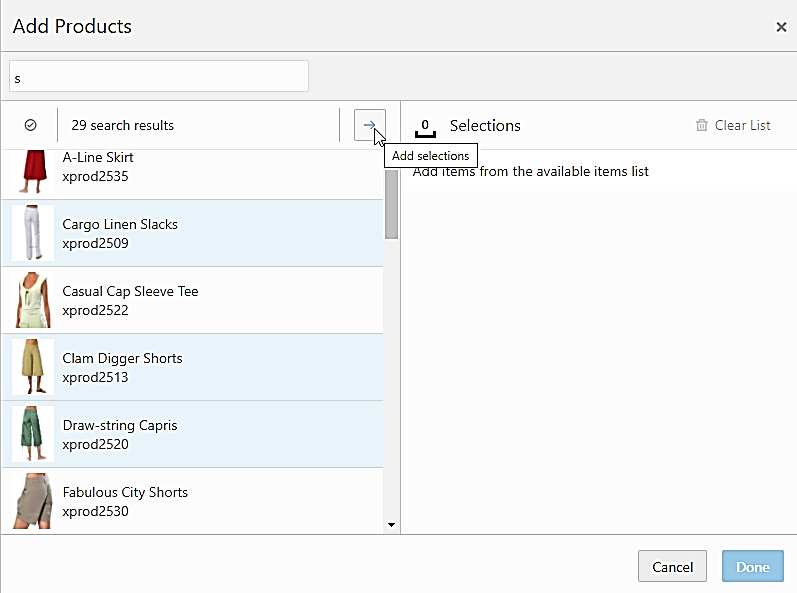
More easily and efficiently curate product listings to align with business goals.
Steps to Enable
You don't need to do anything to enable this feature.
Tips And Considerations
- Dynamic curation rules apply to search-driven collection pages, not collection pages driven from the catalog.
- You can boost up to 200 products and bury up to 200 units.
With this update, all Commerce orders are now placed in pending payment state prior to initiating payment. This ensures that orders are captured, and problems resolved, if there is an error during the payment or order submit process.
Capability highlights:
- When configured to allow partial payments, Commerce places orders in a pending payment state at the start of checkout.
- If payments fail in a way that Commerce does not receive an error, the order will remain in the pending payment state.
- Allows shopper to change or retry payment.
- Prevents further order changes or deletion by purchaser.
- Pending payment orders will be canceled after the defined time period set in the Admin (see screenshot). A record of the order will be visible in our Agent UI.
For example:
- Shopper fills cart and begins checkout process with payment using client-based/web checkout.
- Shopper enters payment information into web checkout window and submits. Payment is authorized.
- Issue arises, such as the response from the payment provider being lost or not received by the client, or browser client crashes, resulting in payment not being sent to the server.
- In this case, the order would remain in Pending Payment state and the shopper would not receive an order confirmation number or order confirm page or email.
- Shopper can see the order in Pending Payment and resubmit with payment again. The merchant can also see the order in this state and take steps to resolve.
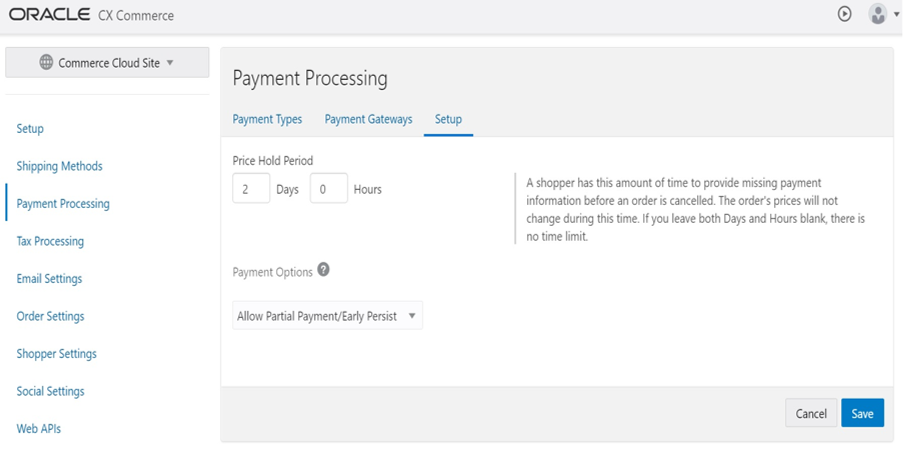
Allows the merchant to respond when payment has been authorized on an order but not successfully submitted and provides an historical record of the transaction causing the authorization.
Steps to Enable
Existing customers need to enable this feature via the CX Commerce Administration UI setting, and order history and checkout widgets need to be updated to handle pending payment state.
Tips And Considerations
- Deploying this feature requires merchants to create a storefront experience for a shopper to resolve declined or failed orders that are in a pending payment state. This could include adding a feature to shopper accounts where a shopper can see order status, including orders in pending status, update their credit card number, and resubmit an order that has not been successfully submitted.
- For new customers, the feature is enabled by default and order history and checkout widgets must handle pending payment state. The feature can be disabled by changing the setting in the Administration UI.
Oracle CX Commerce is excited to launch its latest innovation, our next generation Open Storefront Framework (OSF) exclusively running on Oracle Cloud Infrastructure (OCI). OSF is an evolution of our Storefront that is focused on minimizing coding required, maintaining business level control, leveraging the latest technology frameworks, and providing robust tooling for the modern developer.
Capability highlights:
- Front-end developers can deliver faster, more responsive, and richer user experiences.
- OSF is built with React so developers get to work with technology they know and love, but you also have flexibility and can develop in any front-end library of choice (e.g. React, Angular, Vue) without fear of lock-in.
- Headless without compromise – develop in your preferred front-end technology and still leverage business tooling.
- OSF leverages a fully-featured platform with drag-and-drop experience tools, context-aware preview, personalization, content, merchandising, search, catalog, inventory, A/B testing, reporting, and more.
- The UI layer provides a clean separation between the presentation layer and the state model to support local development and testing.
- Micro (not macro) updates simplify how experiences are assembled and delivered with reusable, granular components to create, swap, and go without writing code.
- Experiment in a low-risk, low-effort way. Easily insert commerce into new buying experiences, plug in new technologies, and test new sites and regions.
- Streamline collaboration by incorporating command line tools in bespoke processes.
- Monitor performance and optimization across development & release cycles.
- Accelerated development through local rendering & testing and CLI tools, providing support for customer/partner CI/CD processes.
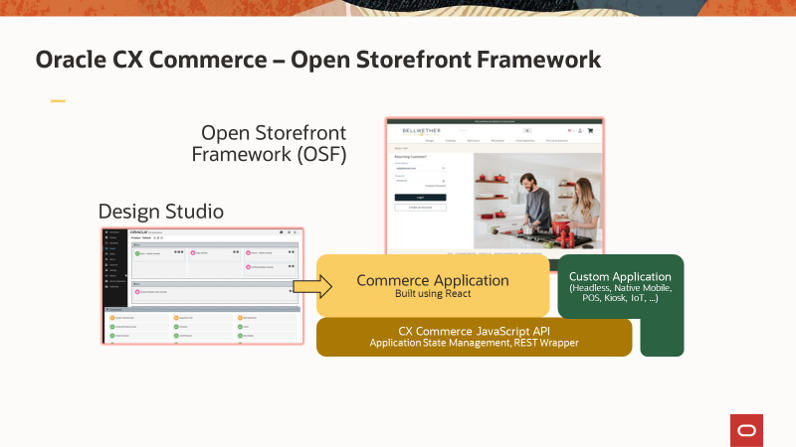
Tools for Business and IT Working in Harmony
- Developers build storefront applications using IDE of their choice in a CLI.
- Core technologies include: node, yarn, and JavaScript.
- Test framework includes functional, quality and performance tests.
- OSF reference storefront developed with React.
- Business users employ Design Studio to create experiences with a full drag-and-drop interface.
- Layout and widget framework deliver dynamic experiences based on unique needs.
- Typical users include front-end designers, merchants, and brand owners.
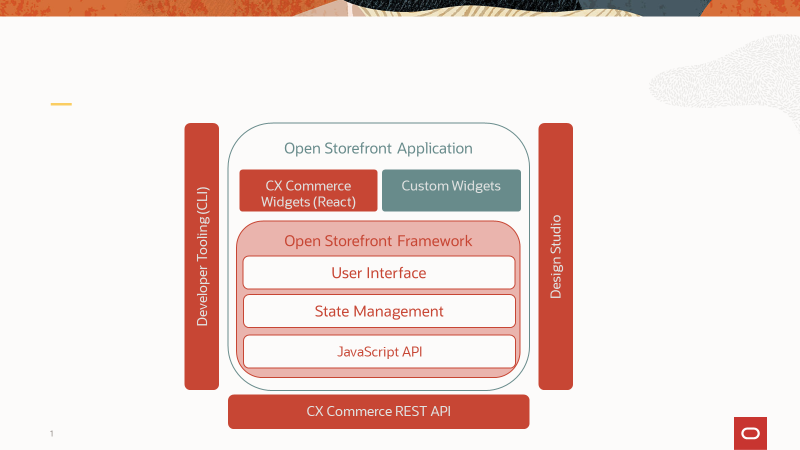
OSF Reference Stores
With the Open Storefront Framework, you are getting a fresh new reference store built in React following mobile-first best practices, the core framework which includes a state management layer, and a JavaScript API which streamlines interacting with the CX Commerce REST API. This all works in conjunction with Design Studio and allows you to extend the reference application to build your own storefront or other needed touchpoint.
The reference stores significantly help to accelerate development and maintain a best practice implementation. Currently, OSF includes a starter store with common and account-based shopping flows as well as a “blank” starter store.
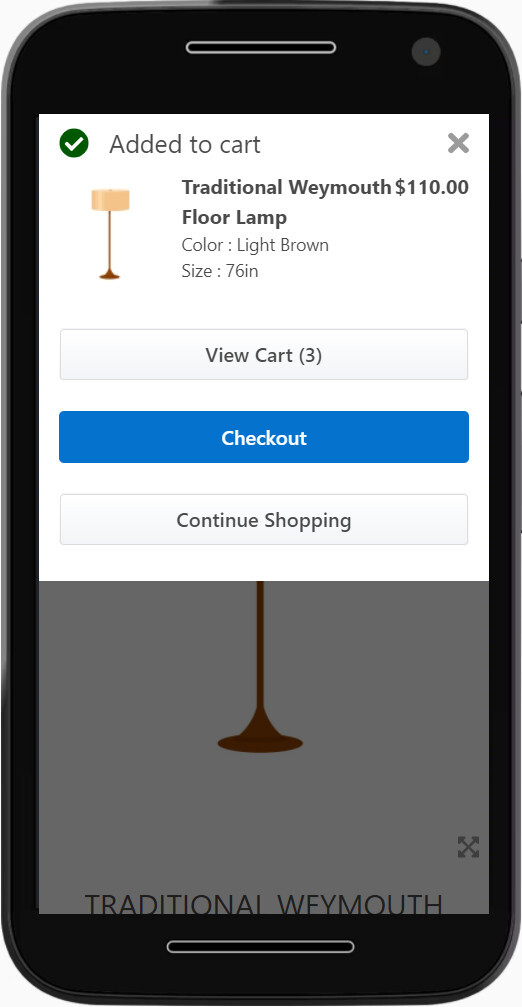
OSF Widgets
OSF includes a large library of React-based page components (widgets), across a wide variety of commerce functionality. With over 120 widgets available out-of-the-box, you will find a common widget for home and landing pages, such as image widgets and widgets used within the header such as the mini-cart and language selectors. For the product listing and search results pages we provide faceted navigation widgets, support for type-ahead and product listing widgets. And of course, we have all the profile, cart and order management widgets you would expect in a commerce experience.
We also provide a large selection of checkout, shipping, address entry and payment widgets.
In addition to a full set of mobile optimized widgets, we have a selection of desktop optimized widgets to optimize the interactions for these widgets when using a desktop device. Last, but not least we have a library of account-based shopping widgets for customers selling to other businesses.
Top Five Differences that Users Will Notice with OSF vs. the Classic Framework
The existing storefront framework for CX Commerce is now called Storefront Classic.
- Developers will have much more control over the behavior of the storefront application including dependencies, how modules are loaded on the storefront, and the page code/structure.
- Developers will be able to do most of their development locally as part of their own continuous integration (CI) and continuous delivery (CD) processes using the new OSF development tools including the ability to deploy and test their own sets of changes without interrupting the work of others.
- While Design Studio no longer contains “elements,” users will notice that widgets are broken into smaller components and grouped into nested “containers” which is a new feature for Design Studio.
- CSS management no longer requires the usage of LESS, nor is Bootstrap used OOTB. However, developers can make use of Bootstrap if they choose to do so and optionally make use of the CSS pre-processor of their choice.
- Storefront pages load much more quickly and are more easily crawlable without the need for a separate HTML snapshot service.
Availability and Migration Options
Newly signed CX Commerce customers are now provisioned in OCI, and they will be automatically provisioned with OSF enabled.
Starting with the initial release of OSF in mid-December, existing customers will have two main migration options available:
- Full Migration: Migrate all existing sites from Storefront Classic (our current CX Commerce framework) to Open Storefront Framework.
All existing sites will switch over at the same time to point to the new OSF application.
- Side by Side: Launch a new site on OSF that runs side by side with the other existing live sites OR migrate one or more existing sites over to OSF, leaving the rest on Classic.
Perfect for launching a new country, brand, or channel site to test out OSF.
Beginning the migration process:
- First, ensure you have migrated your existing CX Commerce instance over to OCI as OSF only runs on OCI.
- Once migrated to OCI, existing customers can then decide at a future date to request to have OSF enabled on their environment. Typically, this would align with a site refresh plan or rollout of a new regional or brand site. Additionally, for now, requests to migrate to OSF will be reviewed by CX Commerce product management.
- Start to develop your OSF application in parallel to your current storefront in your dev / test environments.
- After thorough testing, switch your production site over to using OSF.
OSF will be included in publicly available product documentation and REST API doc starting with 21A in January 2021. Additional OSF enablement content, including FAQ, JS API doc, videos, and more, will be available prior to January 2021 in the CX Commerce Cloud Customer Connect forum.
Steps to Enable
You don't need to do anything to enable this feature.
With this CX Commerce release, merchants can scale to a larger number of catalogs and centrally manage collections and catalog taxonomies across a large range of accounts.
This is advantageous for those that share catalog taxonomies across catalogs but have unique product membership per account.
Capability highlights:
- Offers fine-grained control of account level availability of products.
- No longer the need to recreate hierarchy for each catalog.
- Provides ability to create a filtered view of an existing independent catalog:
- The filtered view will inherit the same taxonomy and products as the independent catalog.
- Ability to show/hide selected product(s) from within the filtered view.
- Ability to associate a filtered view with a site or a contract.
Example use cases for this feature:
- A merchant maintains one master catalog with 100,000 products. As a business with 20,000 accounts, the master is assigned to 14,000 accounts.
The remaining 6,000 accounts require a subset of the products from the master catalog.
To accomplish this, the account manager creates the corresponding filtered views of the master catalog to point to each account. The result is 70% of products set as core products and 30% designated as non-core and specifically tagged by account.
- A beauty and wellness business with locations in Europe and US maintains two master catalogs.
Based on the European master, a filtered view catalog can be created for each of the country stores in Spain, Germany, UK, France and Italy. Likewise, a filtered view catalog can be created for each of the country stores in US, Canada and Mexico.
In Spain, the wellness collection is not offered, there all products from the wellness collection can be hidden. After publishing changes, the wellness collection is no longer displayed on the Spanish site.
In Canada, three products in the nail polish collection are not available for sale due to ingredient restrictions. The merchant can navigate to the nail polish collection in the Canada filtered view and hide the three products not intended for sale.
Upon publishing, the designated nail polish products are no longer showing up in the nail polish collection.
Current limitations:
- The business user does not have the ability to:
- Change the structure of the collection hierarchy from within the filtered view. This must be changed in the base independent catalog.
- Add new products or remove products from the filtered view. All additions and removals must be managed in the base independent catalog.
- The business user cannot move a product from one collection to another collection within the filtered view. This must be done in the base independent catalog.
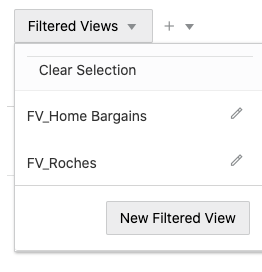
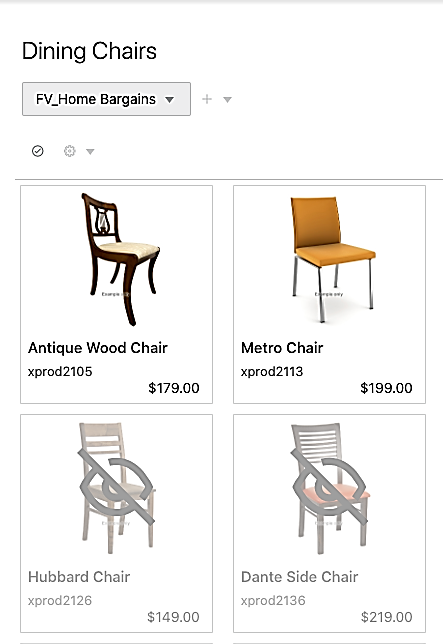
Improves business requirements support for Commerce customers with large catalogs and unique product membership per catalog.
Steps to Enable
You don't need to do anything to enable this feature.
Tips And Considerations
- To see the feature in the Administration UI, an initial filtered view catalog must be created via import or API.
- The CoreProduct property is read-only when there is a catalog header. If you want to make changes to the CoreProduct property via import to ensure that the catalog header is removed.
Longtext Dynamic Property Support for Products/SKUs
This CX Commerce revision provides merchants the ability to create product and sku dynamic properties with type long text which can be used to store a large amount of plain unformatted text, such as content in CSV, JSON, or new line separated list format.
Capability highlights:
- A business user can create a long text dynamic property via Administration UI or API.
- The business user can view and update the values of these dynamic properties on the general or custom product tabs of the product/SKU editor in the catalog Administration UI.
- The new long text property will be a plain text rather than rich text editor.
Leveraging this feature enables improvements such as:
- A business user can add promotional slots to the middle of the Product Details Page with each slot containing information on position within the list of slots, how many columns it occupies, how many rows it occupies, and the content. This can be achieved by storing the configuration in a JSON and entering it into the plain text editor.
- The ability to display up to three promotional content slots on some product pages. Each promotional content can have an image, text, and a link. This can also be achieved by storing the configuration in a JSON and entering it into the plain text editor.
API details for creating a long text dynamic property:
- A dynamic property of type long text can be created for the base product type or custom product types by using POST /ccadminui/v1/productProperties.
- The productTypeId in the request payload will need to be changed to product for base product type OR to the name of the custom product type created for custom product types.
- A dynamic property of type long text can be created for the base SKU type or custom SKU types by using POST /ccadminui/v1/SKUProperties.
- The productTypeId in the request payload will need to be changed to product for base product type OR to the name of the custom product type that they have created for custom product types.
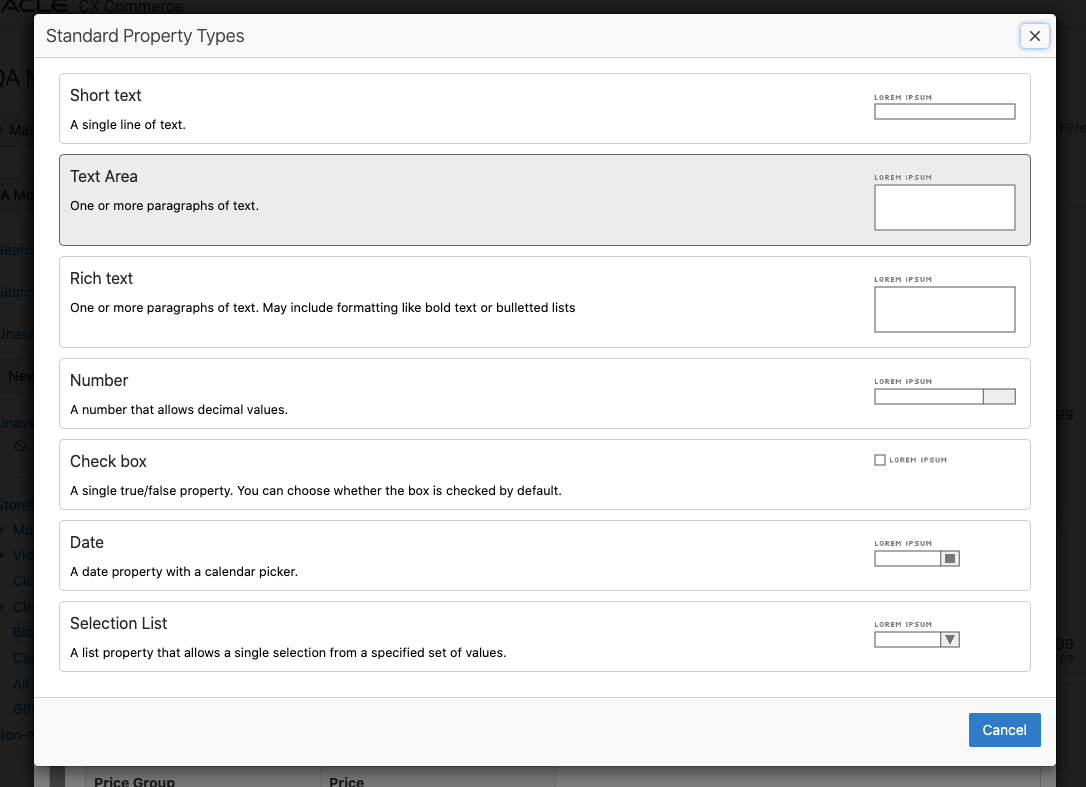
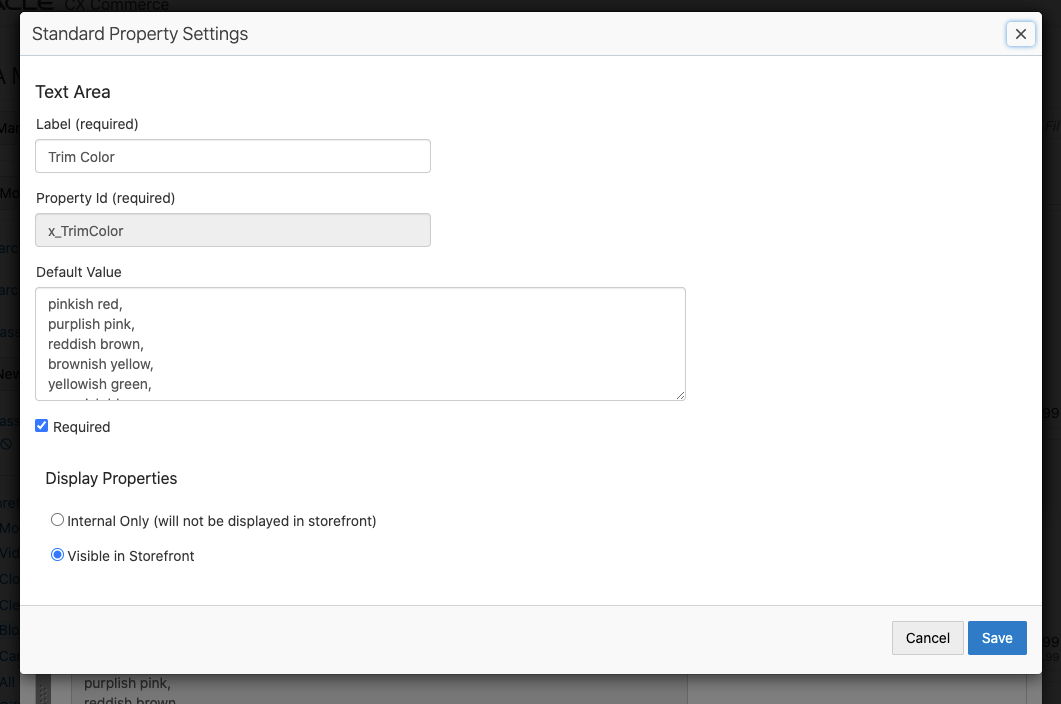
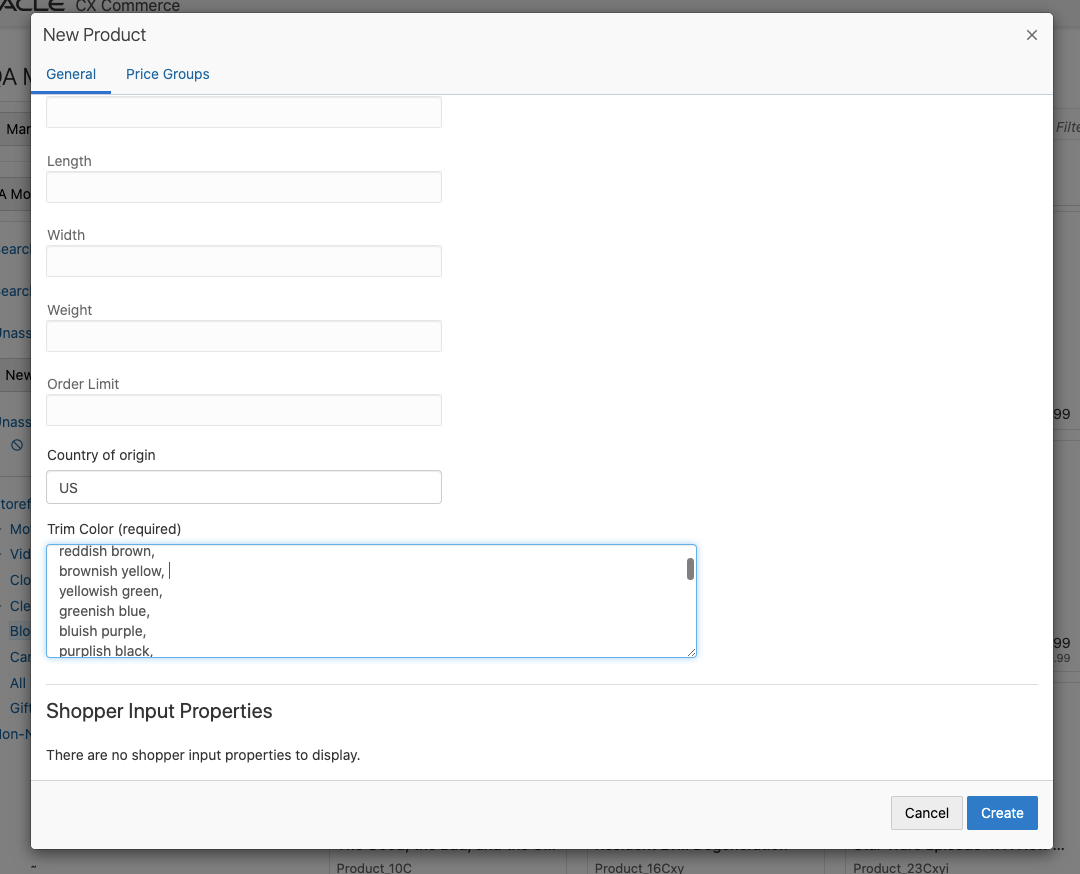
Dynamic properties of long text can be created to add promotional content and media or to apply product-specific styling to product detail pages. Merchants can now enter data used by custom presentations and widgets without being interpreted as HTML.
Steps to Enable
You don't need to do anything to enable this feature.
Tips And Considerations
- The business user can extend product and SKU attributes with dynamic property type long text by using the text area property editor in the product types area within the catalog Administration UI.
- If using the API, the longtext option is used. The new text area property will be a plain text editor rather than rich text editor.
- The business user can view and update dynamic property values on the general tab or custom product tabs of the product/SKU editor in the catalog Administration UI.
With this CX Commerce update, Agents can now respond to shopper issues with a goodwill credit applied to an order when a shopper has experienced difficulties. Appeasements may be required in multiple circumstances – for example, when a shopper is dissatisfied with merchandise purchased, displeased with a delay in delivery, or upon receiving damaged product.
The appeasement may be issued against the cost of the items in the order or against the cost of shipping associated with the order.
Capability highlights:
- Ability for an Agent to create and view appeasements at an order level within Agent Console.
- Issue an appeasement against a submitted or fulfilled order, including multiple appeasements for an order.
- Capture appeasement details such as type, reason, amount, or specific notes.
- Issue appeasement to the original payment method including, promotion, coupon, loyalty points, gift card, store credit, and online payments within Agent Console or to an external payment method.
- Validate appeasement data against external rules engine (via webhook) to process the appeasement refund in an external OMS.
- On submission, webhook will be triggered to pass the appeasement related data.
- Admin API returns an update on status and transactions.
- Retain shoppers following a difficult shopping experience.
- Avoid a return or cancellation on the order.
- Protect shopper interest, shopper loyalty, or brand value.
Steps to Enable
Review the REST service definition in the REST API guides, available from the Oracle Help Center > your apps service area of interest > REST API. If you're new to Oracle's REST services you may want to begin with the Quick Start section.
APIs available for order appeasement capability:
- Appeasements - API to be used for the POST/appeasements createAppeasement - Create an Appeasement. If an Id is provided in the payload and it exists in the system do not proceed or else create an appeasement.
- GET/appeasements listAppeasements - List Appeasements. Get appeasements by the search criteria entered. The search criteria includes appeasement properties and sub-items(appeasementRefunds, profile & order) properties like refund types, amount, first name, email, order state etc. Details are mentioned below in parameter description.
- GET/appeasements/{id} getAppeasement - Get Appeasement. Gets a detailed appeasement information based on the appeasement ID provided.
- DELETE/appeasements/{id} deleteAppeasement - Delete an incomplete appeasement. Delete an incomplete appeasement - Agent one deletes the incomplete but using admin delete endpoint we can delete any appeasement
- PUT/appeasements/{id} updateAppeasement - Updates specified appeasement.
- POST/appeasements/initiate initiateAppeasement - Initiates an Appeasement (Agent only). This endpoint is mainly to validate the order and populate the possible refundTypes.
- POST/appeasements/submit submitAppeasement - Submits an Appeasement (Agent only). Submits an existing appeasement if an Id is provided in the payload. Creates and submits a new appeasement altogether otherwise. Custom properties are supported directly at both appeasement level and each appeasementRefund level.
Appeasement Types: API to get appeasement type by ID and SCIM query.
- GET/appeasementTypes listTypes - List appeasement types based on the search criteria entered.}
- GET/appeasementTypes/{id} getType - Gets an appeasement type based on the ID provided.
- POST /appeasementTypes createType - Create appeasement type (Admin Only). Creates a new appeasement type with the provided type ID else system generated ID, by default.
- PUT /appeasementTypes/{id} updateType - Updates the specified appeasement type (Admin Only).
Reasons: API to get reasons by reason ID and SCIM Query. Reasons on Admin does not support SCIM capability.
- GET/reasons listReasons - List appeasement reasons based on the search criteria entered.
- GET/reasons/{id} getReason - Gets an appeasement reason based on the ID provided.
- POST /reasons createReason - Create Reason (Admin Only). Create the reason of given type with the given data. Valid reason types are appeasementReason, cancelReasons, priceOverrideReasons, returnReasons and returnItemDisposition. eg. /ccadmin/v1/reasons?type=returnItemDisposition
Tips And Considerations
- Out-of-the-box (OOTB) validation restricts an appeasement that is more than the order total.
- Appeasements should be settled externally for appeasements created with external refund type.
- OOTB support pertains to order type appeasements only. If merchants want non-order-based appeasements, the validations and payments should be handled externally.
- OOTB appeasements are limited to fulfilled orders and orders submitted post remorse period.
- Only Agent supervisor role can carry out appeasements.
Incomplete Order Payload Update
A new property, itemDiscountInfos, provides detailed promotion information on each line item in the incomplete order payload. This property can be used in custom widgets to display promotional information on line items in the cart and at checkout; and sent to downstream systems such as external promotions.
This property was added to the shopping cart object and is available in any of the Store APIs or Webhooks that contain the incomplete order payload. Store APIs that contain the shoppingCart object include this information, for example, getOrder, approveOrder, priceOrder.
Capability highlights:
- itemDiscountInfos property has been added to the incomplete order payload.
- For each line item, this property provides a list of the item promotions and their corresponding discount values.
- Information is in an easily consumable format
- Contains the same information that is in order payload.
itemDiscountInfos Example
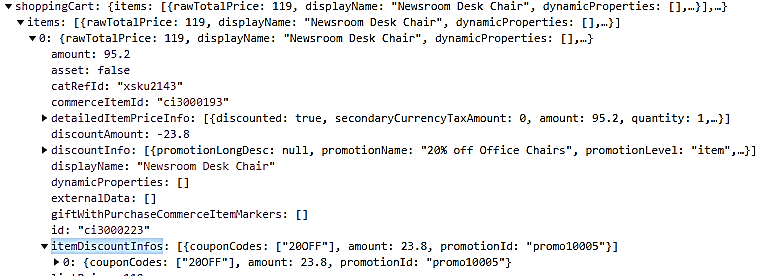
Provides an improved shopping experience by displaying item promotional information in the cart and during checkout.
Steps to Enable
You don't need to do anything to enable this feature.