
This document will continue to evolve as existing sections change and new information is added. All updates appear in the following table:
| Date | Product | Feature | Notes |
|---|---|---|---|
| 08 JUL 2021 | Created initial document. |
This guide outlines the information you need to know about new or improved functionality in this update.
GIVE US FEEDBACK
We welcome your comments and suggestions to improve the content. Please send us your feedback at oracle_fusion_applications_help_ww_grp@oracle.com. Please indicate you are inquiring or providing feedback regarding the Oracle CX Commerce What’s New for 21B Revision 4 (21.2.12) in the body or title of the email.
Column Definitions:
Report = New or modified, Oracle-delivered, ready to run reports.
UI or Process-Based: Small Scale = These UI or process-based features are typically comprised of minor field, validation, or program changes. Therefore, the potential impact to users is minimal.
UI or Process-Based: Larger Scale* = These UI or process-based features have more complex designs. Therefore, the potential impact to users is higher.
Features Delivered Disabled = Action is needed BEFORE these features can be used by END USERS. These features are delivered disabled and you choose if and when to enable them. For example, a) new or expanded BI subject areas need to first be incorporated into reports, b) Integration is required to utilize new web services, or c) features must be assigned to user roles before they can be accessed.
| Ready for Use by End Users Reports plus Small Scale UI or Process-Based new features will have minimal user impact after an update. Therefore, customer acceptance testing should focus on the Larger Scale UI or Process-Based* new features. |
Customer Must Take Action before Use by End Users Not disruptive as action is required to make these features ready to use. As you selectively choose to leverage, you set your test and roll out timing. |
|||||
|---|---|---|---|---|---|---|
| Feature |
Report |
UI or |
UI or |
|
||
This Commerce update introduces a significant enhancement to the publishing functionality with the release of worksets. Worksets are a new way to selectively publish and are designed to provide teams with tools for better collaboration and visibility.
A workset is a container for teams to manage and share their work, allowing you to group items as you create, edit, or delete. You publish the workset instead of selecting items from a large list of changes, providing a more efficient publishing process.
Capability Highlights
-
- Provides visibility into work in progress and any changes made by other users to same items in other worksets.
- Groups changes for publishing as users are working.
- Allows publishing users to easily track and select groups of changes to publish.
General Worksets Concepts
Worksets are a new way to selectively publish.
- All users work in the context of a workset.
- Users publish worksets, instead of selecting items to publish from one list.
- Only users with publishing privileges can create worksets.
- Only users with publishing privileges can publish schedule and publish worksets.
- All users have access to all worksets and can switch between them.
New Workset Concepts for all Users
Changes Tracker
- Users make changes in the context of a workset.
- Users know which workset they are always working in.
- Users know when others have contributed to the workset.
- On login, users are returned to their last open workset or the default workset.
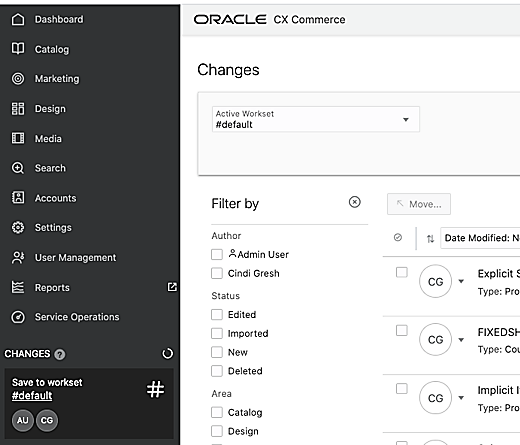
One List of Changes per Workset
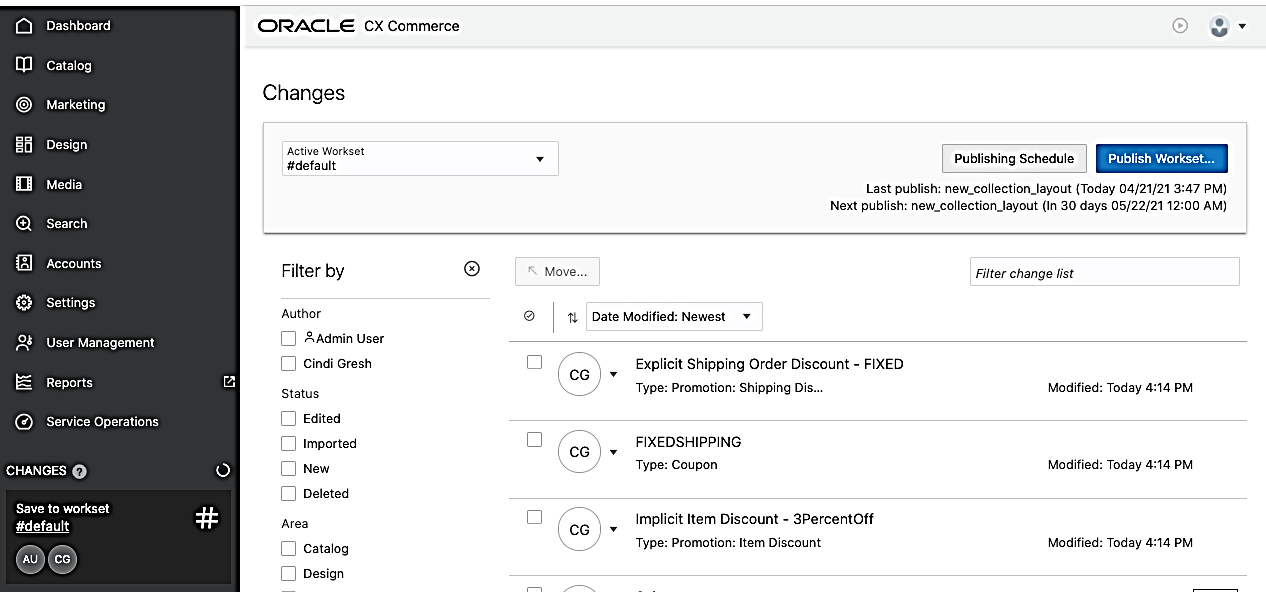
- Access workset list of changes through the tracker on the left navigation menu.
- List of changes shows all the items that will be published together with the workset.
- Tracker shows other users who have contributed to the workset.
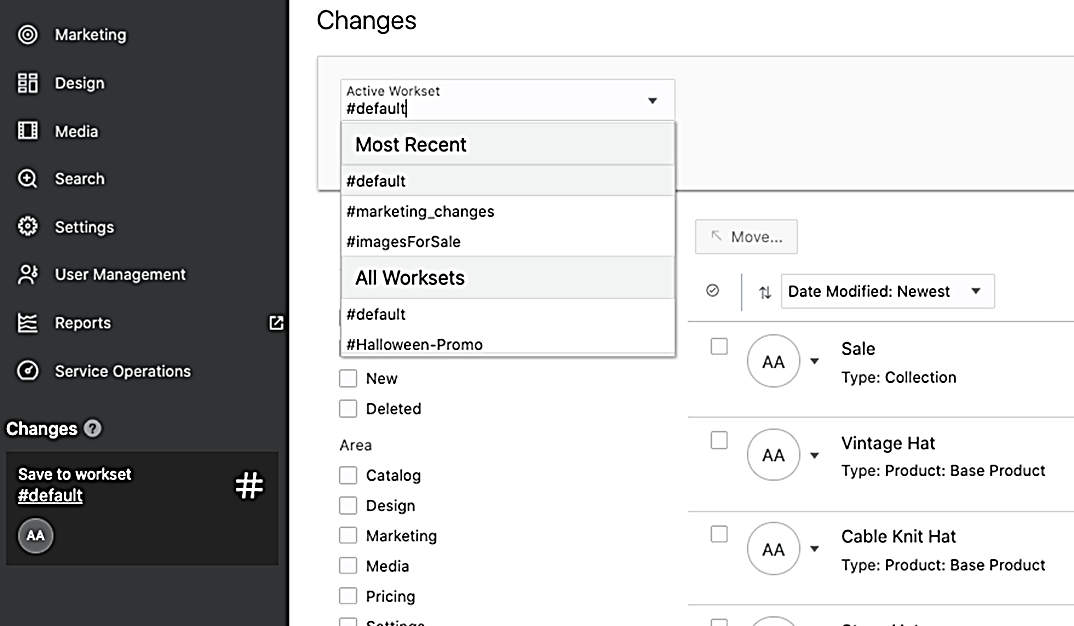
Switching Worksets
- Easily switch between worksets from the list of changes.
- See most recently used worksets.
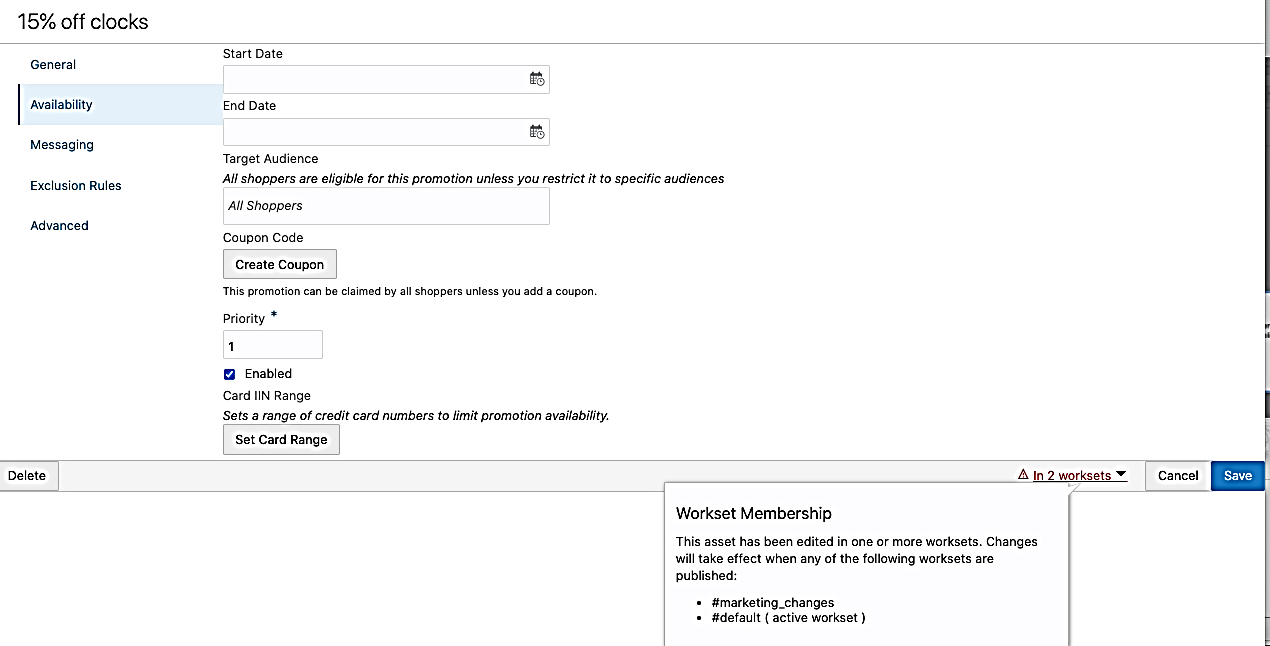
Workset Membership Displayed on Asset Editors
- Users can see if an item is in more than one workset.
- The first workset to publish will push all changes to the item on the storefront.
New Workset Concepts for Users with Publishing Privileges
Select Worksets Instead of Individual Items to Publish
- Publishing users now select a workset to publish, instead of selecting items from a large list.
- Users can move items from one workset to another if they are not ready to be published.
- There is still a dependency review before scheduling or publishing a workset.
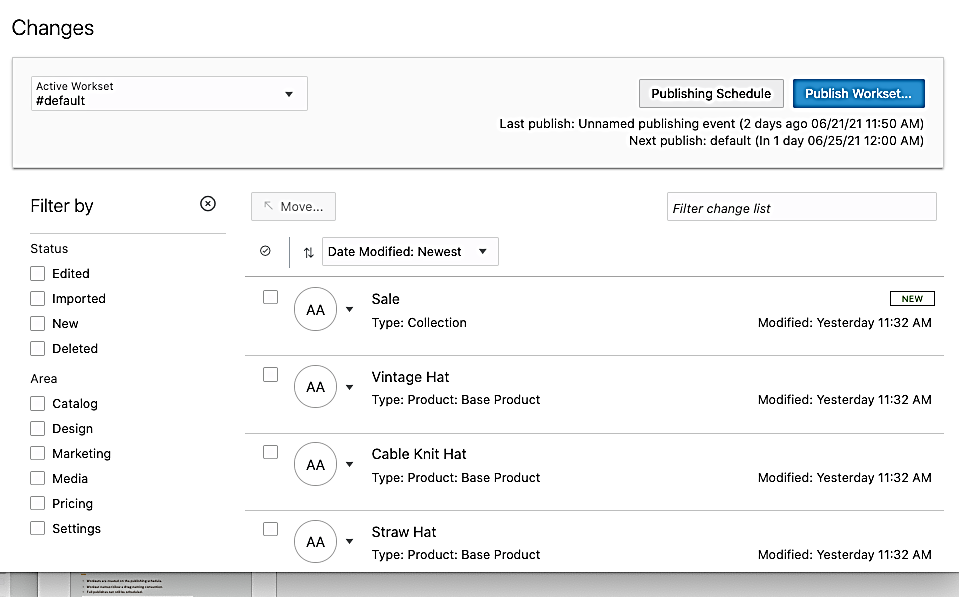
Creating worksets
- Worksets are created on the publishing schedule page.
- Workset names follow a #tag naming convention.
- Full publish can still be scheduled.
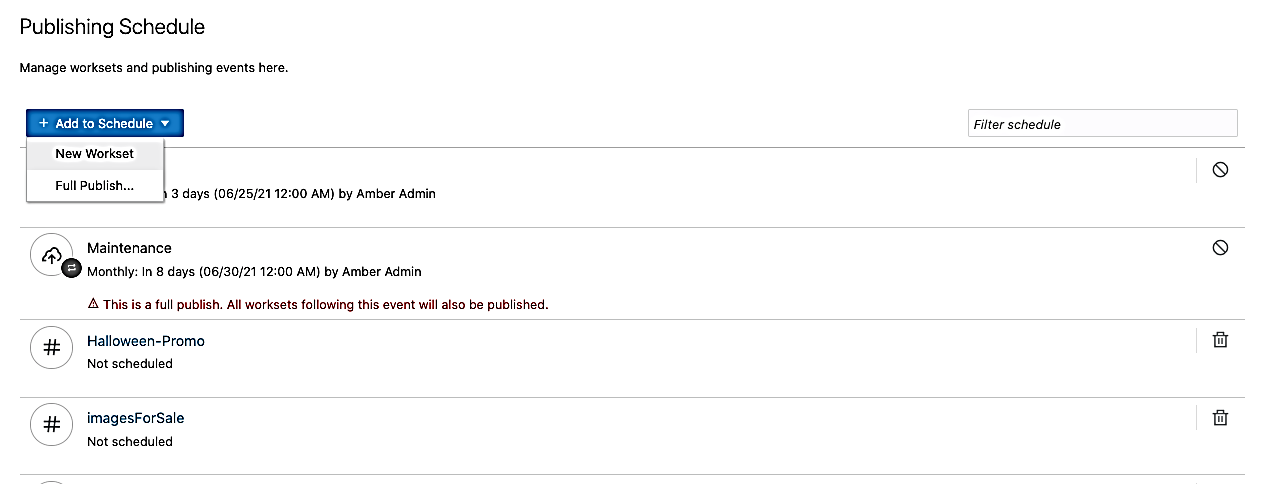
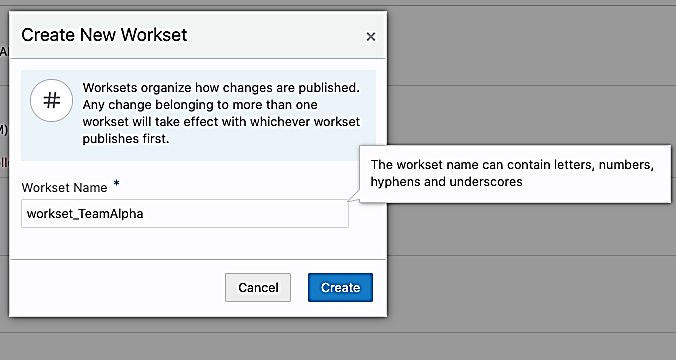
Additional Important Information about Worksets
Upgrade to 21.2.12
-
- When you upgrade and log in, you will be put in the #default workset context.
- Any items that are already in your publishing queue before you upgrade will be put into the #default workset.
#default workset:
-
- There’s always a #default workset. When it is published, another empty #default workset is created.
- All changes made via API will be in a workset. If no workset is specified, they will go into the #default workset.
Workset behavior:
-
- A workset must contain at least one item in order to be scheduled.
- Only users with publishing privileges can schedule worksets.
- Worksets do not persist after publishing.
Publish all:
-
- You can still publish all active changes by scheduling a Full Publish on the publishing schedule. This will publish all changes in all worksets.
Relevant APIs for Worksets include:
- listWorksets
- getWorkset
- createWorkset
- updateWorkset
- deleteWorkset
- getPublishingWorksetDependencies
- assignPublishingChangeList
- publishingChangeAuthors
- publishChangeLists
By making the publishing process more efficient, worksets allows storefront changes to be made in a more opportune manner. This greatly benefits both publishing teams and shoppers.
Steps to Enable
You don't need to do anything to enable this feature.
Tips And Considerations
- Create project or team-specific worksets to group changes more efficiently
- Worksets do not provide change isolation. Dependencies can still exist and affect what gets published together.
This document will continue to evolve as existing sections change and new information is added. All updates appear in the following table:
| Date | Product | Feature | Notes |
|---|---|---|---|
| 02 JUN 2021 | Created initial document. |
This guide outlines the information you need to know about new or improved functionality in this update.
GIVE US FEEDBACK
We welcome your comments and suggestions to improve the content. Please send us your feedback at oracle_fusion_applications_help_ww_grp@oracle.com. Please indicate you are inquiring or providing feedback regarding the Oracle CX Commerce What’s New for 21B Revision 4 (21.2.6) in the body or title of the email.
Column Definitions:
Report = New or modified, Oracle-delivered, ready to run reports.
UI or Process-Based: Small Scale = These UI or process-based features are typically comprised of minor field, validation, or program changes. Therefore, the potential impact to users is minimal.
UI or Process-Based: Larger Scale* = These UI or process-based features have more complex designs. Therefore, the potential impact to users is higher.
Features Delivered Disabled = Action is needed BEFORE these features can be used by END USERS. These features are delivered disabled and you choose if and when to enable them. For example, a) new or expanded BI subject areas need to first be incorporated into reports, b) Integration is required to utilize new web services, or c) features must be assigned to user roles before they can be accessed.
| Ready for Use by End Users Reports plus Small Scale UI or Process-Based new features will have minimal user impact after an update. Therefore, customer acceptance testing should focus on the Larger Scale UI or Process-Based* new features. |
Customer Must Take Action before Use by End Users Not disruptive as action is required to make these features ready to use. As you selectively choose to leverage, you set your test and roll out timing. |
|||||
|---|---|---|---|---|---|---|
| Feature |
Report |
UI or |
UI or |
|
||
Open Storefront Framework (OSF) Configure-Price Components
This Oracle Commerce Open Storefront Framework (OSF) update provides a set of out-of-the-box components used to integrate with Oracle Configure Price Quote (CPQ) in price and configure scenarios.
Capability highlights:
- Support in OSF JS API to interface with the Commerce Server-Side Extension (SSE) that handles orchestration with CPQ Rest API.
- Configure widget for placement on Product Detail Page (PDP) to open configuration dialog.
- Provides UI components for common configuration types:
- Includes selector types - radio buttons, drop-downs, toggles, date/time picker
- Support for CPQ array set selections in a table
- Displays updated pricing based on configuration selections.
- Ability to add configured product to the cart.
- Ability to edit configured product from the cart.
Example use case:
The following image shows a laptop configuration, a characteristic illustration when describing the integration with Oracle CPQ in price and configure scenarios.
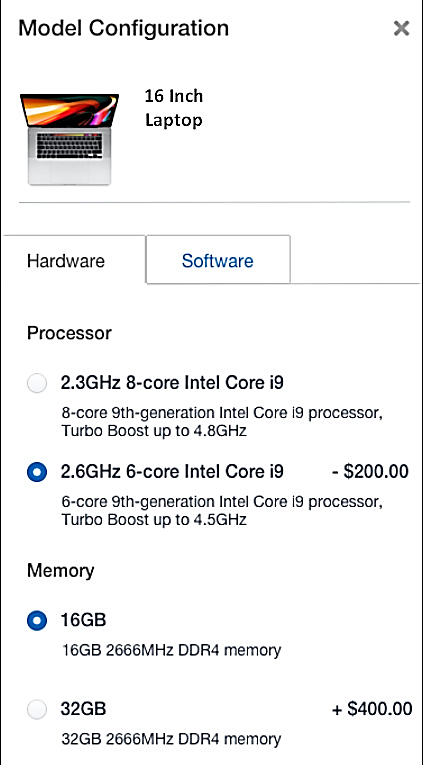
The out-of-the-box components for CPQ configure-price scenarios combined with JS API support in OSF provide a solid foundation for OSF implementations, enabling customers to execute configuration of complex customizable products.
Steps to Enable
You don't need to do anything to enable this feature.
This document will continue to evolve as existing sections change and new information is added. All updates appear in the following table:
| Date | Product | Feature | Notes |
|---|---|---|---|
| 04 MAY 2021 | Created initial document. |
This guide outlines the information you need to know about new or improved functionality in this update.
GIVE US FEEDBACK
We welcome your comments and suggestions to improve the content. Please send us your feedback at oracle_fusion_applications_help_ww_grp@oracle.com. Please indicate you are inquiring or providing feedback regarding the Oracle CX Commerce What’s New for 21B Revision 4 (21.2.4) in the body or title of the email.
Column Definitions:
Report = New or modified, Oracle-delivered, ready to run reports.
UI or Process-Based: Small Scale = These UI or process-based features are typically comprised of minor field, validation, or program changes. Therefore, the potential impact to users is minimal.
UI or Process-Based: Larger Scale* = These UI or process-based features have more complex designs. Therefore, the potential impact to users is higher.
Features Delivered Disabled = Action is needed BEFORE these features can be used by END USERS. These features are delivered disabled and you choose if and when to enable them. For example, a) new or expanded BI subject areas need to first be incorporated into reports, b) Integration is required to utilize new web services, or c) features must be assigned to user roles before they can be accessed.
| Ready for Use by End Users Reports plus Small Scale UI or Process-Based new features will have minimal user impact after an update. Therefore, customer acceptance testing should focus on the Larger Scale UI or Process-Based* new features. |
Customer Must Take Action before Use by End Users Not disruptive as action is required to make these features ready to use. As you selectively choose to leverage, you set your test and roll out timing. |
|||||
|---|---|---|---|---|---|---|
| Feature |
Report |
UI or |
UI or |
|
||
With this new Oracle Commerce feature, you can create custom behavior for individual promotions when the out of the box behavior does not meet your requirements. For example, you can control how promotions are applied at a more granular level and override default behavior regarding how promotions are combined.
Capability highlights:
- Allow items in a cart to receive more than one item discount.
- Specify whether items that are qualifiers for a promotion can be targets for a different promotion.
- Specify whether items can be qualifiers for more than one condition.
- Control whether items already on sale can receive a promotion.
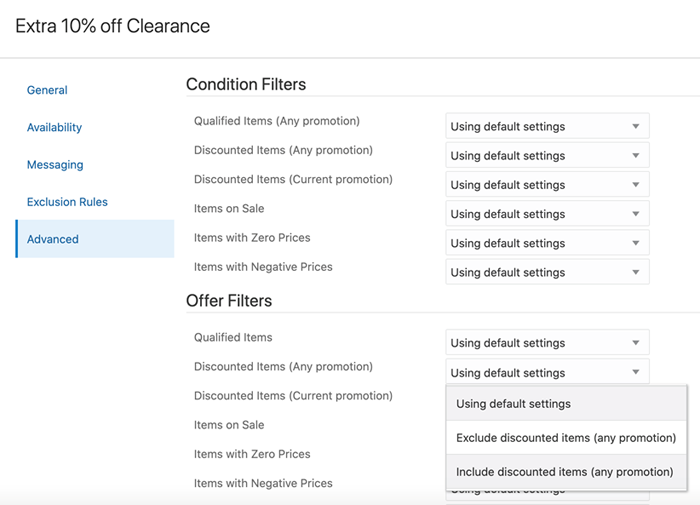
New Advanced Tab on Promotions Editor in Admin UI
Use Case Example:
You want to give an extra 10% off items in the Clearance category and ensure that the promotion applies if:
- An item was already used as a qualifier for another promotion
- An item has already been discounted by another item promotion
You then create the promotion “Extra 10% off Clearance” and set the priority so that it will be evaluated after other promotions.
Use the advanced Offer Filters to set:
- Include qualified items – any items that were a qualifier for a promotion can still receive the Clearance promotion
- Include discounted items (any promotion) – any items that were discounted by another promotion can receive the Clearance promotion.
Based on the advanced filters set, the Clearance promotion was applied to the already discounted Wine Glass and the Shoulder Bag as a qualifier for another promotion.
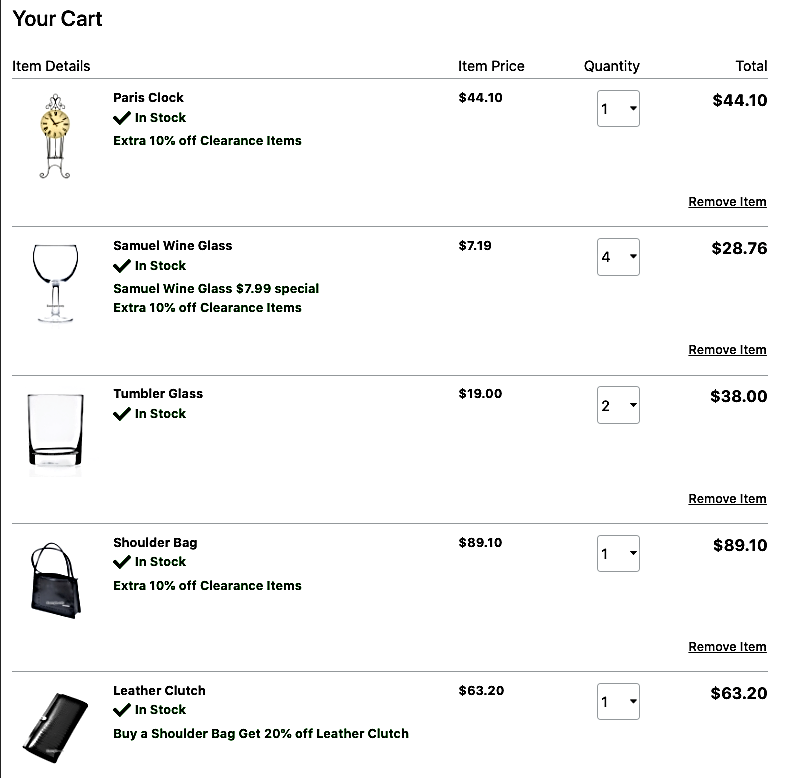
Ability to fine-tune promotion eligibility based on what’s in a shopper’s cart. This enhances the customer experience and brand loyalty.
Steps to Enable
You don't need to do anything to enable this feature.
Tips And Considerations
This feature is available on promotions in the Admin UI and through the ccadmin/v1promotions endpoints: createPromotion, getPromotion, updatePromotion.
This Commerce update introduces an enhancement to the Preview functionality providing a convenient method for previewing future content changes. Prior to this update, you could vary store content and catalog assets by date and time, however, preview only worked on current server time. You can now apply a date and time filter in Preview and view pages as they will be on the designated future date and time.
Capability Highlights
- This filter can be combined with other filters in Preview such as the Audience and Viewport filters.
- The date and time filter allow you to view the following types of content:
- Promotions and promotional content scheduled for a future date and time
- Widgets configured in slots against a future date and time
Use Case Example:
Configure content variation slots with date and time variations and/or create promotions that apply to a future date and time.
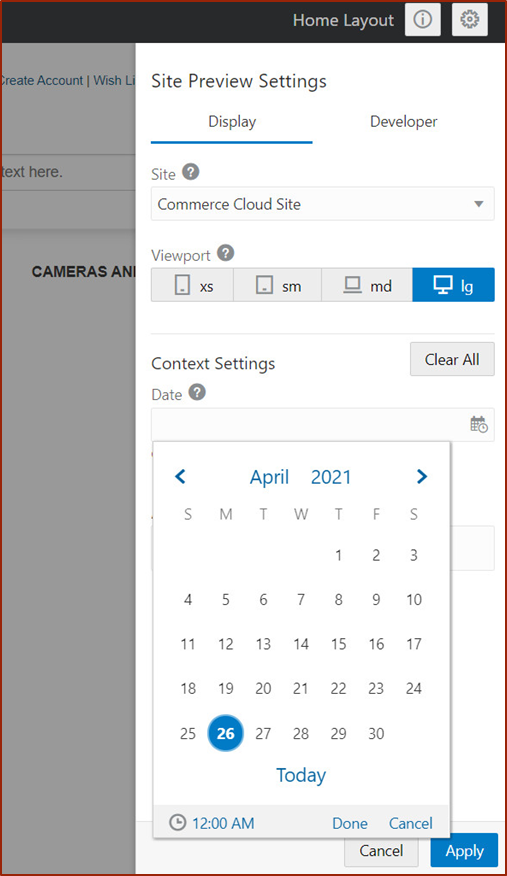
Allows users to apply a date and time filter in Preview and view those date-sensitive changes.
Steps to Enable
You don't need to do anything to enable this feature.
Tips And Considerations
The only objects that can currently be scheduled for future date and time are slots and promotions.
The release of the Commerce Multisite Cart feature enables customers to implement a shared cart strategy across their sites, providing a single seamless cart experience across multiple sites.
For merchants with multiple sites, a merchant can use the feature to share the shopping cart, allowing a shopper to have a single shopping cart across sites. This means that shoppers can add products from multiple sites into a single cart and purchase all products in the same order using a single set of shopper credentials (login name and password).
NOTE: Customers who want to use Multisite Cart must have a storefront built on Open Storefront Framework (OSF).
Capability highlights
- Customers managing multiple sites in a single environment can set up a site group that is configured for cart sharing.
- Applicable for both B2C and B2B customers
- Supports site-specific promotions, as well as promotions that apply to sites that share a cart.
- Agent Console can be customized via API to support Multisite Cart.
- An administrator can easily set up and manage a shared cart via API.
SiteGroups API
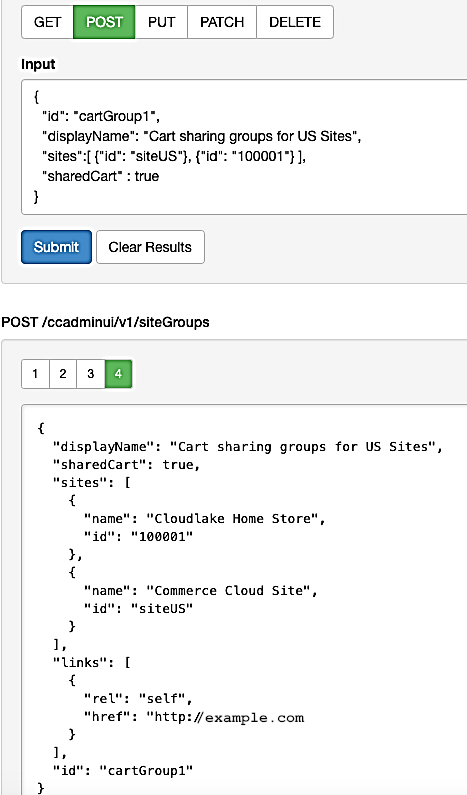
Use the siteGroups API to create a site group and configure it for cart sharing by setting the following properties.
- displayName: name of the site group
- ID: a unique identifier (can be specified; if left null, is auto-generated)
- sites: a list of sites that are included in the group
- sharedCart: set to true to indicate that this site group is to be used for cart sharing
Once the site group is set up, the cart will be shared across the sites.
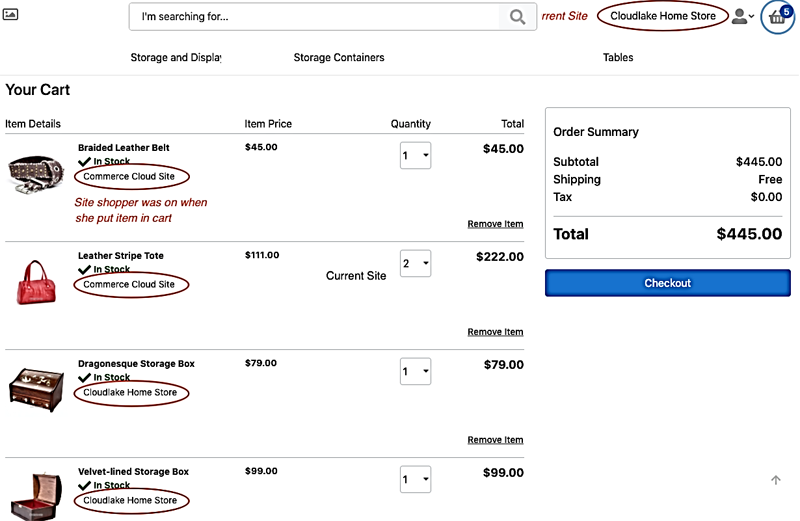
Multisite cart with items from multiple sites
As the shopper changes sites, items can be added to the cart, building one order with items from the different sites. Checkout is done on one site
Orders for Multisite Carts
- When a shopper checks out the shared cart, the order is associated with that checkout site.
- When a shopper views Order History from any site that shares the cart, the shopper will see all orders from all sites in the group.
- The order is associated with the checkout site, but the revenue is allocated across the sites from which items were added to the cart.
- For personalization purposes, the Lifetime Spend and Lifetime Average Order value is distributed across the sites.
Enables customers managing multiple sites in a single instance of Oracle Commerce to implement a shared cart strategy.
Steps to Enable
You don't need to do anything to enable this feature.
Tips And Considerations
Multisite Cart is not supported on Storefront Classic. Customers who want to use Multisite Cart must build their storefronts using Open Storefront Framework (OSF).
Wish lists not yet supported for Multisite Cart.
This document will continue to evolve as existing sections change and new information is added. All updates appear in the following table:
| Date | Product | Feature | Notes |
|---|---|---|---|
| 28 APR 2021 | Created initial document. |
This guide outlines the information you need to know about new or improved functionality in this update.
GIVE US FEEDBACK
We welcome your comments and suggestions to improve the content. Please send us your feedback at oracle_fusion_applications_help_ww_grp@oracle.com. Please indicate you are inquiring or providing feedback regarding the Oracle CX Commerce What’s New for 21B Revision 3 (21.2.3) in the body or title of the email.
Column Definitions:
Report = New or modified, Oracle-delivered, ready to run reports.
UI or Process-Based: Small Scale = These UI or process-based features are typically comprised of minor field, validation, or program changes. Therefore, the potential impact to users is minimal.
UI or Process-Based: Larger Scale* = These UI or process-based features have more complex designs. Therefore, the potential impact to users is higher.
Features Delivered Disabled = Action is needed BEFORE these features can be used by END USERS. These features are delivered disabled and you choose if and when to enable them. For example, a) new or expanded BI subject areas need to first be incorporated into reports, b) Integration is required to utilize new web services, or c) features must be assigned to user roles before they can be accessed.
| Ready for Use by End Users Reports plus Small Scale UI or Process-Based new features will have minimal user impact after an update. Therefore, customer acceptance testing should focus on the Larger Scale UI or Process-Based* new features. |
Customer Must Take Action before Use by End Users Not disruptive as action is required to make these features ready to use. As you selectively choose to leverage, you set your test and roll out timing. |
|||||
|---|---|---|---|---|---|---|
| Feature |
Report |
UI or |
UI or |
|
||
Shipping Method External ID Property Exposed in Admin UI
The Shipping Method External ID Property API feature was delivered in Oracle Commerce 21A revision 11. With this update, you can set the ID from an external shipping system on a shipping method in the Commerce Settings tab of the Administration UI.
Capability highlights
- Allows users to store the ID from an external shipping system on a shipping method created in Oracle Commerce.
- ID can be sent to external pricing and shipping systems.
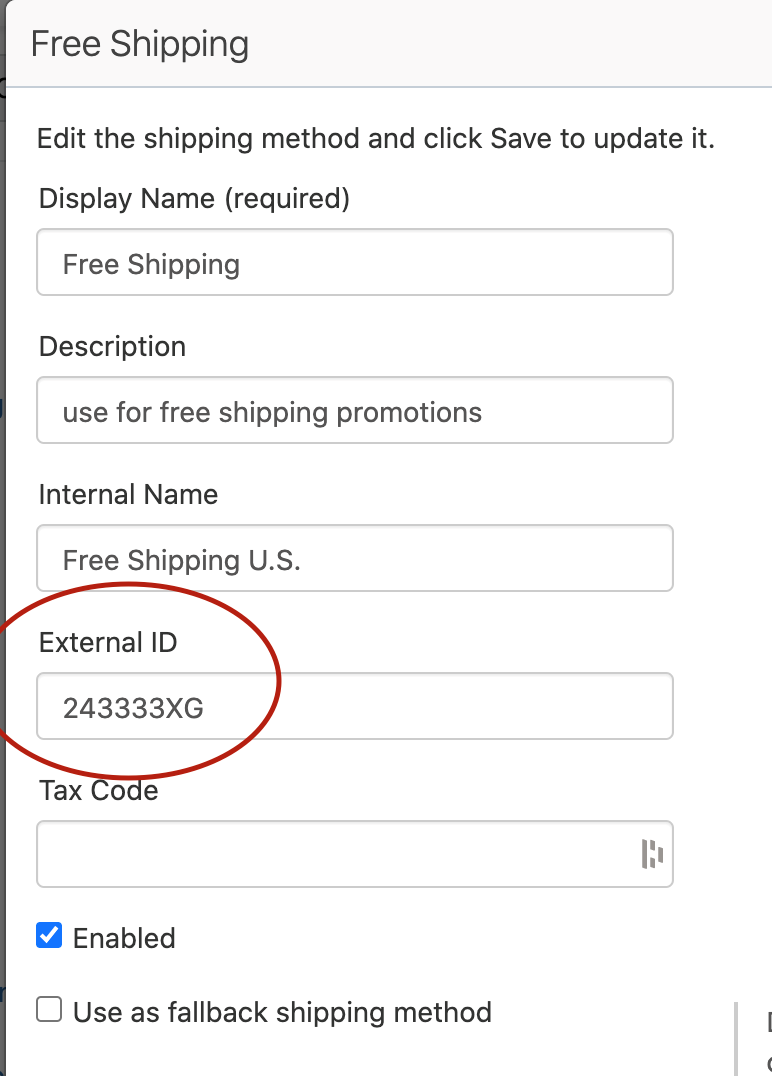
External ID is another identifier you can use to store an ID from an external system.
Steps to Enable
You don't need to do anything to enable this feature.
Tips And Considerations
The API for this feature is available via admin/shippingMethods: createShippingMethod, updateShippingMethod, getShippingMethod, listShippingMethod
It is included in the external shipping webhook request: /ccadmin/v1/webhook/calculateShipping
Shipping Method Internal Name Property Exposed in Admin UI
The Shipping Method Internal Name Property API feature was delivered in Oracle Commerce 21A revision 11. This update allows you to create an identifier on shipping methods that is hidden from shoppers, using the Commerce Administration UI.
The internal ID allows merchants to have multiple shipping methods with the same display name for shoppers but be able to distinguish between internally when managing promotions.
Capability highlights
- Makes it easier for users to identify the correct shipping methods to add to shipping promotions.
- Users can create multiple shipping methods with the same display name on the storefront to be used in different contexts (e.g. you may want to display "Ground Shipping" to shoppers for two different shipping methods, one on the U.S. site and one on the Canadian site).
- Internal names automatically are displayed in the Shipping Method editor in Shipping Discount promotions editor.
Example use case
- When creating shipping promotions, you can easily differentiate shipping methods although they have the same external display name.
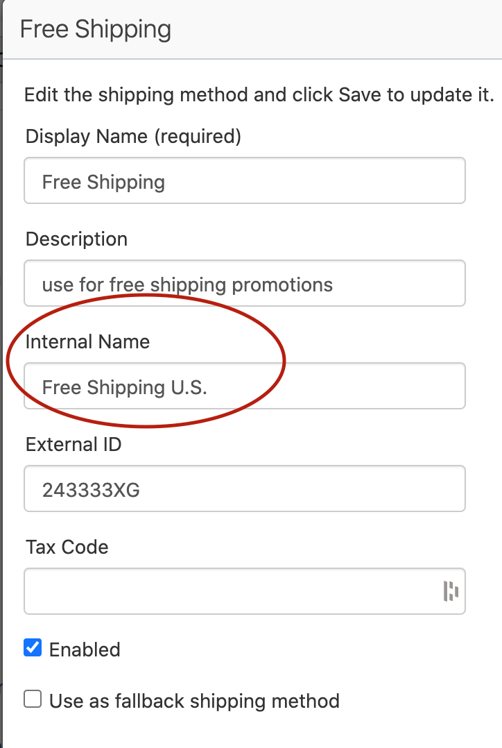
Makes it easier for users to identify the correct shipping methods to add to shipping promotions.
Steps to Enable
You don't need to do anything to enable this feature.
Tips And Considerations
The API for this feature is available via admin/shippingMethods
This document will continue to evolve as existing sections change and new information is added. All updates appear in the following table:
| Date | Product | Feature | Notes |
|---|---|---|---|
| 13 APR 2021 | Created initial document. |
This guide outlines the information you need to know about new or improved functionality in this update.
give us feedback
We welcome your comments and suggestions to improve the content. Please send us your feedback at oracle_fusion_applications_help_ww_grp@oracle.com. Please indicate you are inquiring or providing feedback regarding the Oracle CX Commerce What’s New for 21B in the body or title of the email.
Column Definitions:
Report = New or modified, Oracle-delivered, ready to run reports.
UI or Process-Based: Small Scale = These UI or process-based features are typically comprised of minor field, validation, or program changes. Therefore, the potential impact to users is minimal.
UI or Process-Based: Larger Scale* = These UI or process-based features have more complex designs. Therefore, the potential impact to users is higher.
Features Delivered Disabled = Action is needed BEFORE these features can be used by END USERS. These features are delivered disabled and you choose if and when to enable them. For example, a) new or expanded BI subject areas need to first be incorporated into reports, b) Integration is required to utilize new web services, or c) features must be assigned to user roles before they can be accessed.
| Ready for Use by End Users Reports plus Small Scale UI or Process-Based new features will have minimal user impact after an update. Therefore, customer acceptance testing should focus on the Larger Scale UI or Process-Based* new features. |
Customer Must Take Action before Use by End Users Not disruptive as action is required to make these features ready to use. As you selectively choose to leverage, you set your test and roll out timing. |
|||||
|---|---|---|---|---|---|---|
| Feature |
Report |
UI or |
UI or |
|
||
Improved Server-Side Extension Logger Access & Terminology Updates |
||||||
This new CX Commerce update allows merchants to build different shopper experiences based on the type of device (mobile vs non-mobile), as well as the operating system being used (iOS, Android, or other). Targeting based on device information applies to creating new audiences as well as extending existing audiences.
Capability highlights
- Create content variation slots that are specific to the type of visitor.
- Target a promotion based on the type of device being used.
- Extends the existing Audience Rule Builder to add additional criteria.
Example use cases
You want to encourage use of your native mobile application from your home page.
- Two audiences can be created; one for iOS operating system, the other for Android operating system.
- In Design Studio, use a content variation slot to display content specifically promoting the specific iOS or Android app that links to the respective Apple or Android application store.
You can also use this new feature to display content, product, or promotions that cater specifically to trends you see in your analytics related to shoppers using particular device types and operating systems.
- For example, if you notice that shoppers on iOS tend to have higher income, prefer certain products or categories, and/or place orders with higher average order value, you can target specific campaigns and present more personalized experiences based on that data. Or, if you notice that mobile shoppers prefer a different path to purchase or have different payment preferences than desktop shoppers, again, you can present a more specific experience to those users to drive conversion.
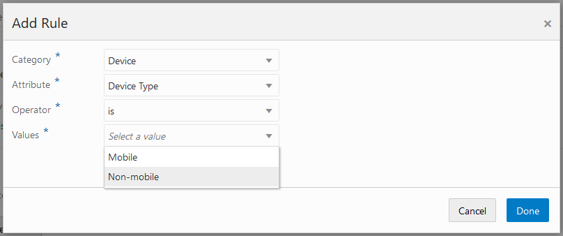
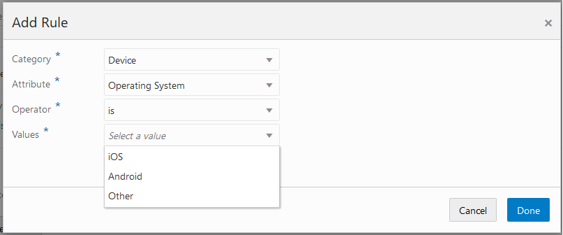
Mobile has become the device of choice for many shoppers. Targeting visitors and shoppers based on device can now be used to drive improved personalized experiences for shoppers
Steps to Enable
You don't need to do anything to enable this feature.
Tips And Considerations
Include content on the page that will only appear for mobile users (or vice versa) using a content slot with an appropriate device type audience.
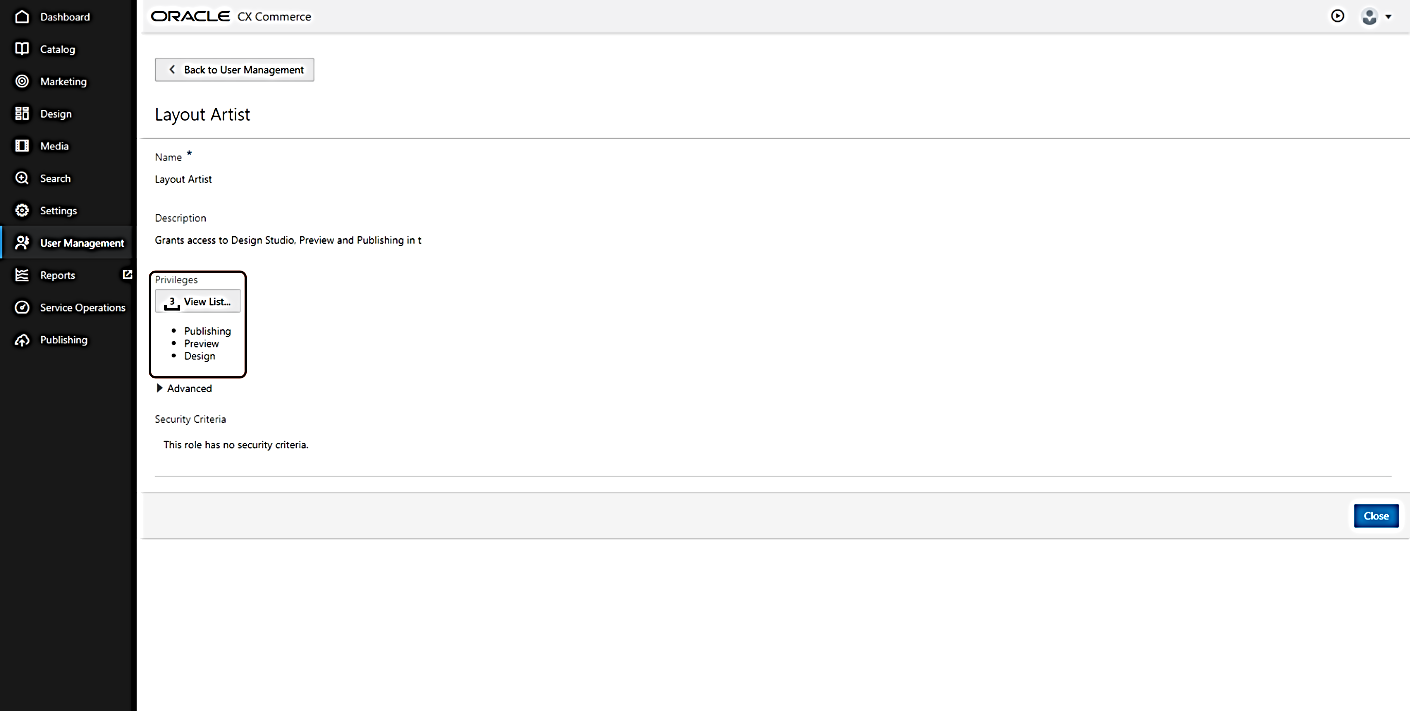
This Commerce update provides enhancements that allow you to control a business user’s access to specific catalogs and price groups. This can help prevent unauthorized updates of products and prices.
This type of access control can be especially helpful if you have multiple sites managed by separate teams, where each site has its own catalog and price group, or if you have teams dedicated to managing the catalogs and price groups of different accounts.
With this release, API support is provided for creating security criteria for catalogs and price groups, and for adding privileges and security criteria to roles.
Introducing new concepts:
- Each predefined role (e.g. Catalog, Design, Marketing, Administrator) is now a container for a privilege with the same name and effect
- A privilege provides access to functionality, such as an area of UI or the ability to perform certain actions
- Capabilities are now conferred by the privileges within roles, not the roles themselves
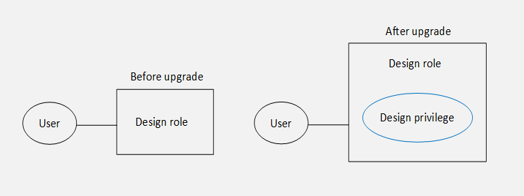
- You can create roles with multiple privileges
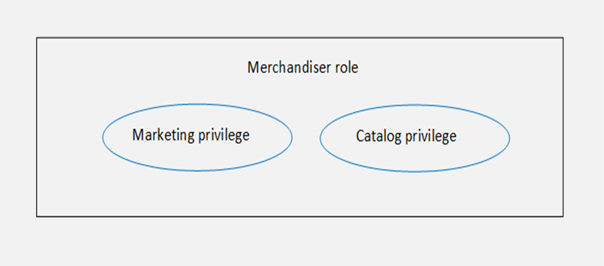
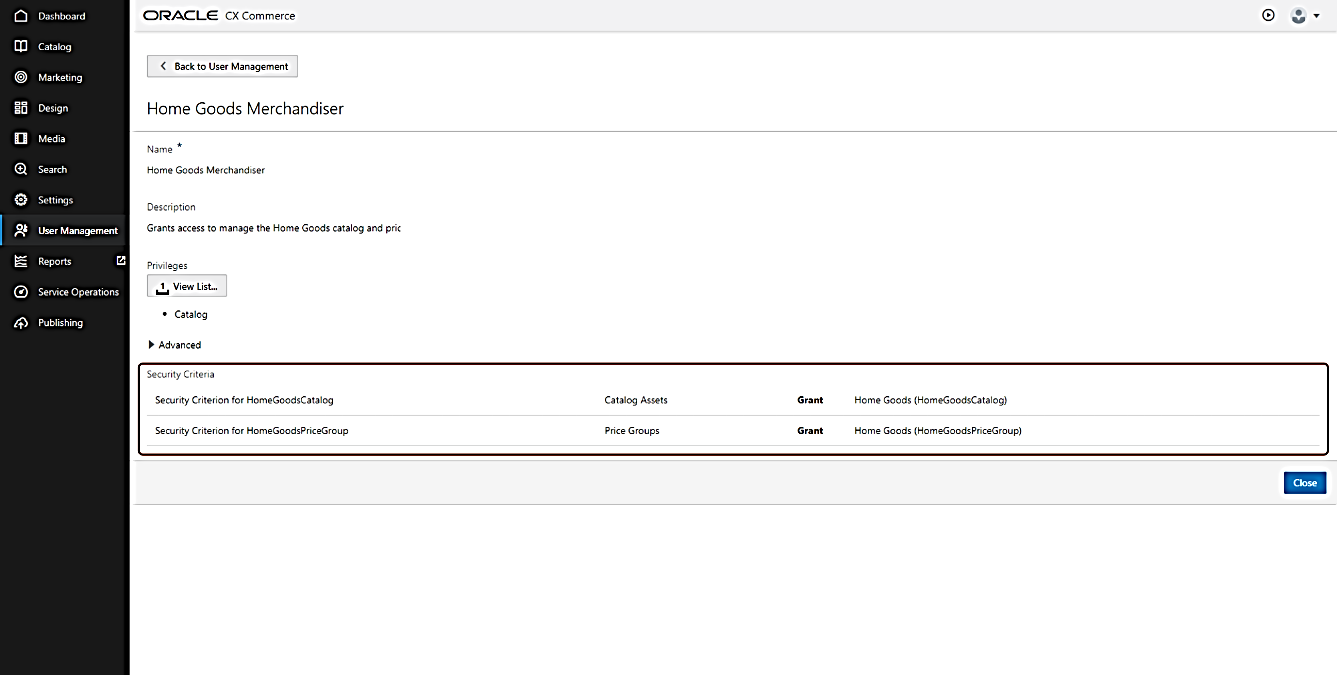
- A role can also contain security criteria that restrict a user’s access to specific catalogs or price groups
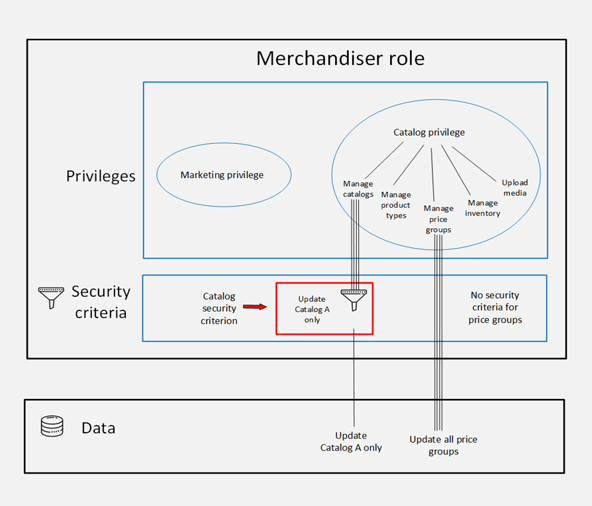
- Security criteria can be thought of as filters that narrow the data a user can access via privileges
- No change to read access – it remains unrestricted
- A user with the merchandiser role shown here can:
- Read all catalogs and price groups.
- Update any price group.
- Update Catalog A only – no other catalogs.
CAPABILITY HIGHLIGHTS
- Create security criteria for catalogs and price groups (via API)
- Add privileges and security criteria to roles (via API)
- View the contents of roles in a new User Management UI:
- UI is accessed from the left-hand navigation panel
- Replaces the Settings > Access Control UI
- Requires the Administrator privilege
- Catalogs and price groups display as read-only for users lacking permission to update
EXAMPLE USE CASE
- StyleOracle is a national brand with two sites:
- StyleOracle Home Goods
- StyleOracle Fashion
- One team of layout artists manages the design and user experience for both sites
- Each site has a dedicated team that manages its products and pricing
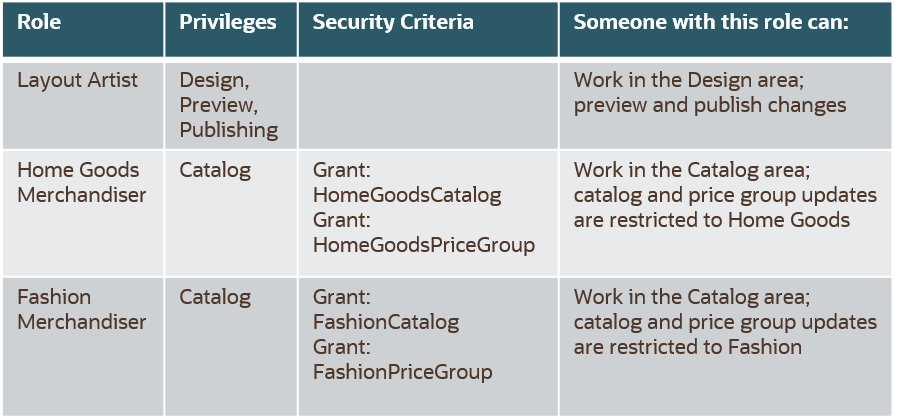
The administrator creates the three roles as seen in the table below. The Layout Artist role needs the Design, Preview, and Publishing privileges. Each of the two Merchandiser roles has the Catalog privilege, one catalog security criterion, and one price group security criterion, narrowing the user’s access down to the catalog and price group for Home Goods or Fashion.
- Manage business user roles more efficiently
- Create custom roles that align with the task’s users perform
- Change role contents as responsibilities evolve
Steps to Enable
Review the REST service definition in the REST API guides, available from the Oracle Help Center > your apps service area of interest > REST API. If you're new to Oracle's REST services you may want to begin with the Quick Start section.
Creating custom roles via API is existing Commerce functionality. New APIs have been developed to support this enhancement. The original access rights are now called "generic access rights." Privileges are a type of access right. If a role contains generic access rights, you can now see them in the User Management UI.
Relevant APIs for Access Control include:
- createAdminRole
- createAdminSecurityCriterion (New)
- listAdminSecurityCriteriaResources (New)
- listAdminAccessRights
- createAdminProfile
Refer to these Commerce API resources posted in Customer Connect for implementation details:
Understanding and Implementing Role-based Access Control
- Understanding Role-based Access Control for Oracle Commerce Business Users
- How to Implement Role-based Access Control for Oracle Commerce Business Users
Tips And Considerations
- The enhancements introduced with this release do not change the existing functionality related to access rights:
- Access rights were introduced to help merchants address General Data Protection Regulation (GDPR) requirements
- No action is needed upon upgrade
- Users retain the same roles that they had prior to the upgrade – each predefined role now contains a privilege.
- The “All Commerce Cloud” “role” (name for a set of individual roles), no longer exists. Any user who had been assigned “All Commerce Cloud” now has the equivalent individual roles.
- Users’ access to data does not change unless they are given security criteria (via a role)
- Privileges or security criteria cannot be assigned directly to a user:
- Place criteria in a role, and then assign the role to the user
- Predefined roles are protected
- You cannot add or remove privileges
- You cannot delete the role
Anonymous Shopper Personalization
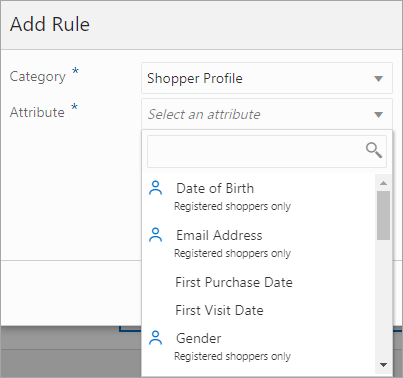
Many visitors to a site do not register as members, although they may be repeat visitors or buyers. This new feature of CX Commerce extends engagement and revenue conditions to these unregistered shoppers. This update expands the current Audiences capability of supporting shoppers that are registered but not logged in.
Capability highlights
Previously, first visit and last visit date were available. This new release extends the conditions to include:
- Engagement: First Purchase Date, Last Purchase Date, Number of Orders
- Revenue: Lifetime Average Order Value, Lifetime Spend, Lifetime Currency Code, Last Purchase Amount
Audiences using these metrics can now target shoppers across the journey, regardless of login status.
Example use cases
- Target shoppers hesitating to make a purchase (defined as shoppers who have visited multiple times, but not placed an order), by creating an audience with conditions of:
- number of visits greater than 5
- number of orders equal to 0
- last visit date less than one week
Use this audience to offer a free shipping promotion to motivate the shopper to purchase.
- Re-engage previously high value shoppers by targeting lifetime spend greater than $1,000 and last purchase date greater than two months by offering a promotional discount.
- Encourage site registration of shoppers by combining these conditions with visitor type equal to “anonymous” and create a content slot to outline the benefits of registration.
Supports complex audience requirements for engaging customers, improving conversion, and encouraging loyalty.
Steps to Enable
You don't need to do anything to enable this feature.
Tips And Considerations
When a condition in the shopper profile category does not have the “registered shoppers only” icon, it can be used for both registered and anonymous shoppers.
Catalogs with Optional Collections
This new CX Commerce feature extends the current independent catalog model to support products that are directly linked to the catalog and not in collections. A business user can directly link a product to a catalog via the Administration UI, API, .csv import/export, or bulk import/export API and add those products to a collection in the catalog after importing into CX Commerce.
Capability highlights
- Search for products that are directly linked to a catalog via the custom search product modal.
- Ability to see/edit which catalogs the product is directly linked to from within the membership tab of the product editor.
- Ability to filter the list exported to excel by products that are directly linked to the selected catalog via the export dialog.
- Extends the current independent catalog model to that it can support products that are directly linked to the catalog and *not* in collections.
Example use cases
- Support for catalogs with optional collections allows for the creation of catalogs with or without collections or a hybrid combination (e.g. some products can be assigned directly to a catalog while other products are members of collections within the catalog).
- Products directly associated with the catalog and not within collections are accessible through text search or a custom menu/taxonomy structure with custom links. This is beneficial for those who want their storefront driven entirely by search.
- You may directly link a product to a catalog via import and add that product to a collection within the catalog..
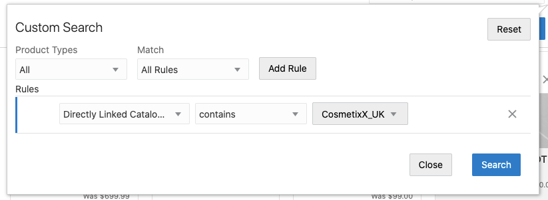
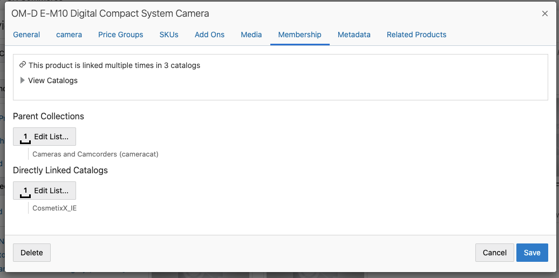
- Performance gains for customers who do not want the overhead of manually assigning products to collections.
- Reduces the time required to curate catalogs; products do not have to be added to collections to show up on the storefront.
- Offers efficiency by accelerating migration and deployment of large catalogs.
Steps to Enable
You don't need to do anything to enable this feature.
Tips And Considerations
- Out-of-the-box (OOTB) support for creating a custom megamenu on the storefront is not available. Should you decide to use this feature for an entirely search driven storefront, a custom megamenu/taxonomy structure with custom links must be built.
- Catalogs with optional collections support filtered views. (Filtered view is a view of an independent base catalog.). However, you cannot link a product directly to a filtered view.
- A product linked directly to the base independent catalog may not be in any collections in the base.
- You can create a filtered view based on an independent catalog and show/hide the product. The product does not need to be in a collection to show up in a filtered view, but must be in the independent base catalog.
- If using the default collection for products setting and opting to directly link products to a catalog, the products will be directly assigned to the catalog in addition to being added to the default collection for products.
Integration with Oracle Product Hub
The CX Commerce integration with Oracle Product Hub Cloud, an enterprise-class product master data management software delivered via cloud, allows customers to import centrally managed products, SKUs, images, and price lists into the Commerce application.
In this scenario, product and SKU data is managed in Oracle Product Hub and imported into Commerce, making Product Hub the only source of products and SKUs for Commerce. The integration syncs them to Commerce and makes them available on the storefront.
Capability highlights
-
- Ability to import products identified in Product Hub to be published in Commerce.
- Ability to associate collections created in Commerce to the products.
- Ability to synch products created / updated in Product Hub with Commerce.
- Ability to upload images from Product Hub to Commerce and associate them with products.
- Ability to import products identified in Product Hub to be published in Commerce.
Key benefits
- Merchants maintain a central system for products, catalog and SKUs.
- Merchants gain the advantage of maintaining updates to single source.
- Merchants can display products on storefront from Product Hub.
Integration with a central system for master data provides a consistent experience for managing catalogs, products, and SKUs across applications.
For CX Commerce customers with large catalogs, a substantial number of products and complex operations, integration with a master data application (or PIM) such as Product Hub is key to effectively and efficiently manage their business.
Steps to Enable
You don't need to do anything to enable this feature.
Tips And Considerations
- Appropriate rules must be set in Product Hub to conform data to Commerce requirements. The Product Hub item number is mapped to Commerce Product ID and SKU ID. While Item Number in Product Hub can include spaces and have a maximum length of 256 characters, Commerce IDs do not support spaces and can have a maximum length of 165 characters. Additionally, the Item Number must not be modified in Product Hub.
- By default, Commerce list prices are mapped to Product Hub's purchase list prices. It is recommended to create an Extensible Flexfield (EFF) attribute for sale list price and override the mapping.
- Product Hub exported XML does not include translations. If required, the data must currently be exported per locale.
Key Resources
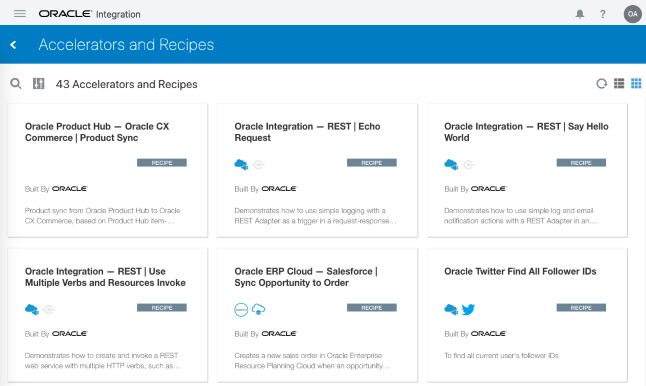
Integration flows for this integration are available in the Oracle Integration Cloud (OIC).
Integration with Customer Data Management
The CX Commerce integration with Oracle Customer Data Management (CDM) a cloud-based application for managing organizations and contacts, enables customers to import centrally managed records for accounts, customers and profiles into Commerce, providing a single source for all customer data. Using Oracle Integration Cloud (OIC), the integration is flexible and extensible to meet custom flows between CDM and Commerce.
Capability highlights
- Synchronize in bulk or individually contacts and profiles that have been created or updated in Commerce to CDM in real time. Additionally, you can associate contacts to an account during the synchronization process.
- Synchronize in bulk or individually accounts that have been created or updated in Commerce to CDM in real time.
- Maintain and synchronize account hierarchy across the systems.
- Dynamic attributes created on either system can be mapped using the OIC integration.
- Customer records can be displayed in the storefront from CDM.
Consolidation of shopper profiles, business accounts, and contacts into a single data source increases operational effectiveness and overall customer experience.
Steps to Enable
You don't need to do anything to enable this feature.
Tips And Considerations
- Oracle Customer Data Management (CDM) is also known as Oracle Engagement Cloud (OEC).
- We recommend configuring CDM to store U.S. states using the abbreviated state format, such as “CA” for California or “VT” for Vermont, since Commerce stores the state values in the abbreviated format.
- When exporting data from CDM, the limit of a CSV file is 50,000 records. Should your export file contain more than 50,000 records, it will be divided into multiple files, however these files will not be converted. To prevent this from occurring, the export should not exceed 50,000 records at a time.
- Emails sent for changes made in CDM are not automatically triggered in Commerce. However, this can be customized in OIC by passing an additional parameter to the bulk import plugin.
- For a contact with more than one account relationship, and “no account” marked as default, CDM will consider the first account as the default account.
Key Resources
Integration flows for this integration are available in the Oracle Cloud Marketplace: https://cloudmarketplace.oracle.com/marketplace/product/commerce
Shipping Method Update - External ID Property (API only)
With this new enhancement, you can now store an ID generated from a third-party shipping system allowing you to map shipping methods easily across systems.
Capability highlights
- Allows users to store the ID from an external shipping system on a Commerce shipping method.
- External ID is included in the shipping method information in the external shipping webhook and added to docShippingAdminEndpoints swagger.
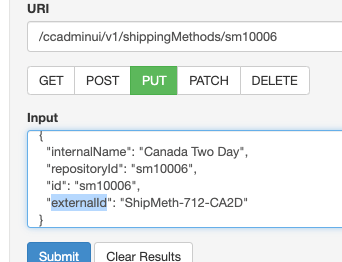
Including an external ID as another identifier to an existing shipping method contributes to a more efficient shipping process.
Steps to Enable
Review the REST service definition in the REST API guides, available from the Oracle Help Center > your apps service area of interest > REST API. If you're new to Oracle's REST services you may want to begin with the Quick Start section.
Tips And Considerations
This feature is API only and available via admin/shippingMethods. The property cannot be set via the Settings > Shipping Methods UI and is, therefore, not displayed in the UI.
AI Recommendation Strategies and Global Exclusions
With this release, CX Commerce allows merchandisers to create complex recommendation rules or strategies that can be managed efficiently across widgets on different page layouts and harness the power of the Commerce Recommendations engine right in the Administration UI without the need for custom rule set up and testing by a development team.
Product recommendations are generated by an AI-powered learning engine. Strategies and Global Exclusions work in harmony with this engine to provide granular control over the merchandising experience.
For both Strategies and Global Exclusions, there is now the concept of context which allows merchandisers to decide whether a Brand or Collection that is being included or excluded should be dynamically inferred from the current page (this is based on page location).
Capability highlights
- Create custom Strategies by allowing combinations of existing prebuilt strategies (e.g. Top Sellers, Browsed Together, Purchased Together, Manually Related, Most Recently Viewed), as well as ability to define which products are/aren’t recommended based on collection, brand, price type and limit the number of products returned by each to create a broad variety of recommendations to connect with the customer.
- Create Global Exclusions by allowing limits on which products can be returned in recommendations with a great deal of flexibility. Multiple Global Exclusion lists can be configured, and these lists can define exclusions based on the same criteria as Custom Strategies (e.g. collection, brand, price type).
Example use cases
- You want to create a dynamic cross-sell on the Product Detail Page that focuses on brand affinity. A recommendations strategy can be created with the following groups and conditions:
- Group 1 – Brand = same as context, Collection = not same as context, Number of Products = 4
- Group 2 – Brand = same as context, Purchased Together, Number of Products = 4
- Group 3 – Brand = same as context, Browsed Together, Number of Products = 4
This will result in up to four products being recommended that have the same brand but belong to a different collection. Next, up to four products will be recommended that are the same brand and frequently purchased together. Finally, the remaining products will be those that are browsed together (but not necessarily purchased together), and of the same brand.
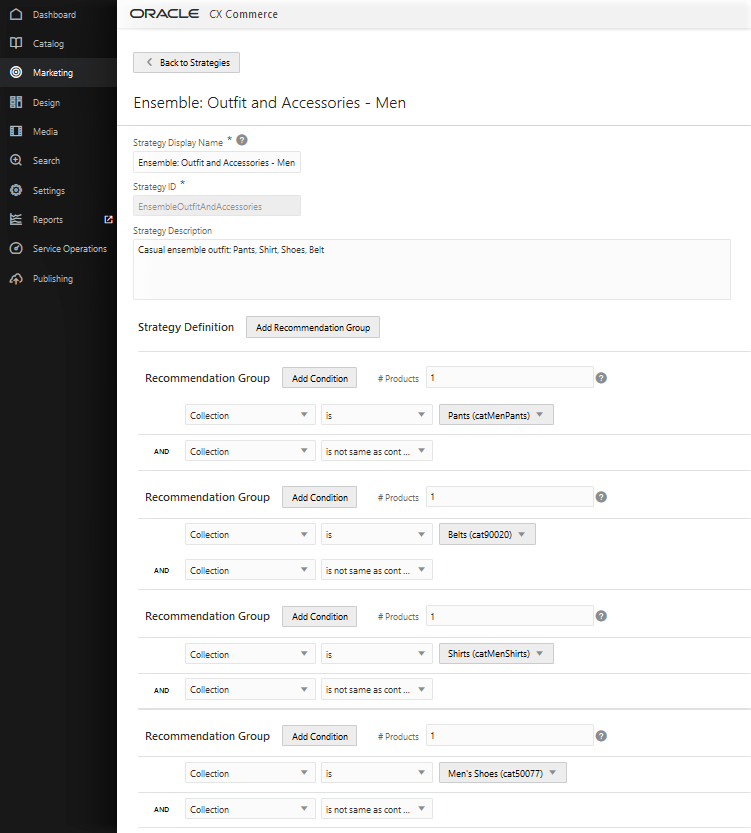
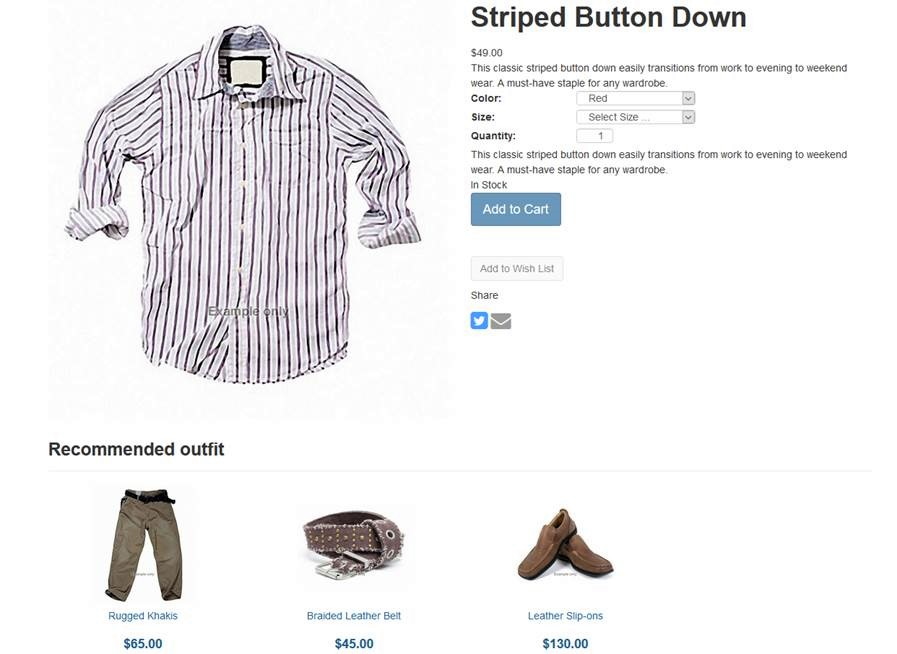
- You want to recommend an outfit when the shopper is viewing any apparel product. A custom recommendations strategy can dynamically generate an outfit recommendation that automatically promotes products from complementary collections.
Add a strategy with the following groups and conditions:
- Group 1 – Collection = Men’s Tops, Collection = not same as context, Number of Products = 1
- Group 2 – Collection = Men’s Pants, Collection = not same as context, Number of Products = 1
- Group 3 – Collection = Men’s Shoes, Collection = not same as context, Number of Products = 1
- Group 4 – Collection = Men’s Belts, Collection = not same as context, Number of Products = 1
Next, create a custom product layout, define the Product Type as Men’s Apparel and Men’s Footwear, and add the new recommendations strategy.
Now, when the shopper is on any men’s apparel or footwear product, recommendations will be from the complementary collections, and thanks to the Collection = not same as context condition the current collection will be automatically excluded. Consider going one step further, and combining with the Brand Affinity strategy above, so complementary products from the same brand are preferred!
- Occasionally, you may want to exclude products from being recommended at all. For example, you have a contractual obligation not to promote a certain brand – you can easily achieve this by adding a brand condition to the Global Exclusions list. Alternatively, you may wish to avoid recommending products that are on sale – you can do so by using the condition of “Price Type” is “Sale Price”. Finally, there may be product collections that are restricted – these can be excluded using the collection condition.
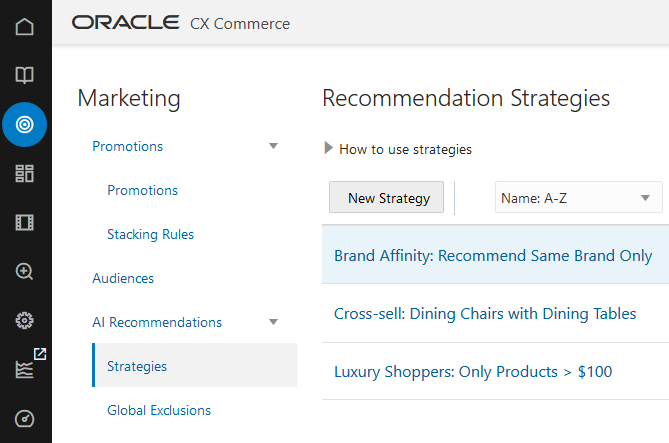
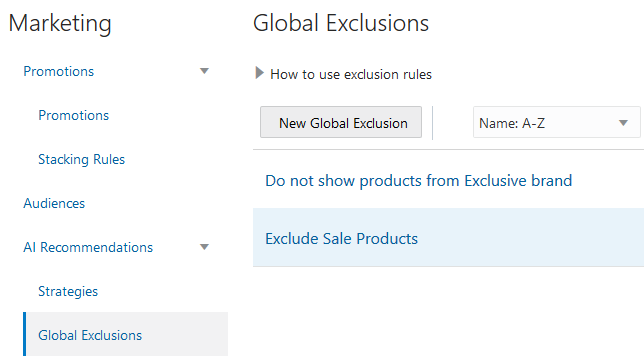
The following shows AI Recommendations Strategy Rule Builder with a custom strategy of “Ensemble: Outfit and Accessories – Men”:
This following shows the AI Recommendations Strategy in effect on a Product Detail Page:
Enhances the customer experience and allows for better alignment with your merchandising strategy.
Steps to Enable
You don't need to do anything to enable this feature.
Tips And Considerations
If you want to target or exclude a specific set of products that are not grouped in an existing collection: create a non-navigable collection in the catalog, add the products to this collection and use that as the collection condition in your strategy or global exclusion rule.
California Consumer Privacy Act (CCPA) Support (API Only)
This Commerce feature is designed to address the California Consumer Privacy Act of 2018 (CCPA), giving consumers more control over the personal information that businesses collect about them. This landmark law secures new privacy rights for California consumers, including:
- The right to know about the personal information a business collects about them and how it is used and shared
- The right to delete personal information collected from them (with some exceptions)
- The right to opt-out of the sale of their personal information
- The right to non-discrimination for exercising their CCPA rights
The update enables a merchant to request an extract of all clickstream data for an individual shopper to package in an encrypted format that can be provided to the consumer.
CCPA rights apply only to consumers/shoppers who are residents of California.
Capability highlights
- Provides an Agent API (Agent PersonalDataReport) that can initiate a request to generate a snapshot of all clickstream data for a specific shopper.
- This will generate an encrypted file on file storage that can then be sent to the shopper.
- Categories of data extracted include pages visited, products viewed, search terms entered, and products added to cart or purchased.
- Provides added support for extracting clickstream data for an individual if they were to request it as part of their rights under CCPA.
- Existing APIs can already be used to extract profile and order information.
- The API information is available in the Oracle Commerce Help Center REST API documentation.
- Ensures compliance with CCPA which has similar requirements to General Data Protection Regulation (GDPR), a regulation in EU law.
- As part of the ‘right to know’ requirement, users have the right to request to see data stored about them.
Steps to Enable
Review the REST service definition in the REST API guides, available from the Oracle Help Center > your apps service area of interest > REST API. If you're new to Oracle's REST services you may want to begin with the Quick Start section.
The API needs to be called to initiate a request for this data. If required, Agent UI could be customized to provide an action button to call this API.
The Agent PersonalDataReport endpoints allow an initial request to be made using a post request and a subsequent get request to return a link to the generated output file.
-----
POST /requests/
The postbody contains the following inputs:
- Shopper external ID - Shopper ID whose data is being requested
- Length of time (12 months default)
- Agent login ID
The response will be the following:
- Request ID generated for this request by the API
- Download link = null at first
- Decryption key = null at first
- Request status (pending, delivered, or deleted) = pending at first
- Report Timestamp = null at first
- Record Timestamp = request creation timestamp
- Agent ID = Who created this request – the same as the input
GET /requests/{id}
The URL contains the following:
- Request ID (returned by the above PUT /request/ request)
The response will be the following if there is a request record with the matching requested ID within the last 24 months. If there isn’t, null will be returned.
- Request ID (the same as the input. Included for consistency)
- Download link = null at first or after deletion. Public web link if the report is available.
- Decryption key = null at first or after deletion. Random key used (along with agent ID) to encrypt the report if the report is available.
- Request status (pending, delivered, or deleted) = pending at first. Delivered if the report is available. Deleted if the report is deleted.
- Report Timestamp = null at first or after deletion. The creation timestamp of the report if the report is available.
- Record Timestamp = request creation timestamp
- Agent ID = Who created this request
GET /requests/
No input parameters for this request.
The response will be a list of all requests for the tenant created within the last 24 months. Each request contains the information listed above for GET /request/ request.
Tips And Considerations
For more information: Read the FAQ on Preparing your CX Commerce Site for the CCPA available via Customer Connect: FAQ: Preparing Your CX Commerce Site for CCPA.
Enhancement to Robust Order Capture
This CX Commerce update provides an enhancement to the Robust Order Capture feature released in 20D Revision 4. Robust Order Capture reduces rare occurrences of orders where the payment has been authorized, but not successfully submitted.
This new enhancement addresses a specific incident that may happen when the “Full Payment Required” setting is configured, and a shopper attempts to remove the last item from the cart.
In this case, the order is no longer deleted and saved with a status of FAILED. With the FAILED order status available, merchants and agents can help with a timely resolution.
Capability highlights
- An order is no longer deleted if a shopper tries to remove the last item from the cart and the order is now saved in ‘failed’ state.
- Merchant has access to details of the failed order.
- The order can be viewed in Order History and in the Agent Console to aid investigation.
- Shopper also has a record of the order.
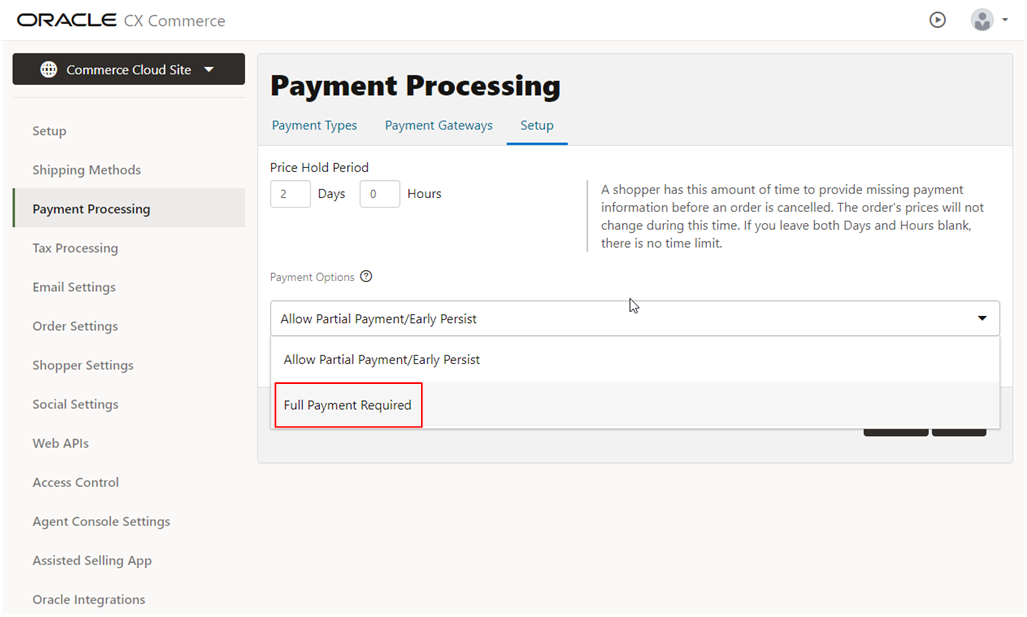
- Prevents the deletion of orders in the specific, rare payment scenario where payment has been authorized, but not successfully submitted, providing the shopper with opportunity for assistance, resolution, and a positive shopping experience.
Steps to Enable
You don't need to do anything to enable this feature.
Tips And Considerations
If, for some reason, Commerce does not receive a response regarding an authorization during the payment process, the order remains in an INCOMPLETE state. This state allows the shopper to update the cart (e.g. add or remove items).
Updates during this time can cause discrepancies between the contents of the cart and what has been paid for. If the contents of the cart have been changed, the recommended resolution is to select the “Allow Partial Payment/Early Persist” option. This option is selected by default for new customers
Headless Personalization APIs (API only)
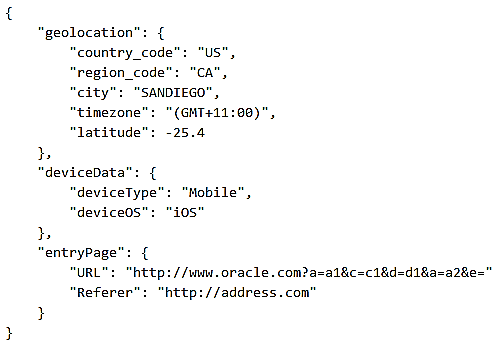
This Commerce update introduces new APIs that allow headless applications to establish a visit context for each shopper when evaluating audience membership. These APIs allow merchants to use the full range of personalization audiences when building, for example, native OS or custom web applications, voice assistants, social commerce plug-ins, and chatbots.
Commerce supports querying for audience membership from headless applications through a REST API. Audiences based on visit attributes, such as entry page or UTM parameters, were previously unavailable for headless applications as there was no way for the application to specify values for those attributes.
Capability highlights
- Your headless application can now use audiences based on visit characteristics, such as entry page, UTM parameters, and geolocation.
- Developers now have easy-to-use tools to assist in instrumenting a headless integration to support Audiences.
Easily supports using Audiences to personalize a headless implementation, for example, a native OS or custom web application.
Steps to Enable
Review the REST service definition in the REST API guides, available from the Oracle Help Center > your apps service area of interest > REST API. If you're new to Oracle's REST services you may want to begin with the Quick Start section.
Tips And Considerations
The endpoints listed below are for audience conditions that require information on the current session that would normally be provided via the out-of-the-box Oracle Commerce Storefront. Non-contextual conditions, for example, those on the Shopper Profile, are automatically managed by the system without requiring any additional endpoint calls.
PUT audienceContext/currentSession
Improved Server-Side Extension Logger Access & Terminology Updates
With this Commerce revision, we’ve introduced an enhancement to server-side extension (SSE) logger access in addition to a terminology change in the SSE “package.json” file.
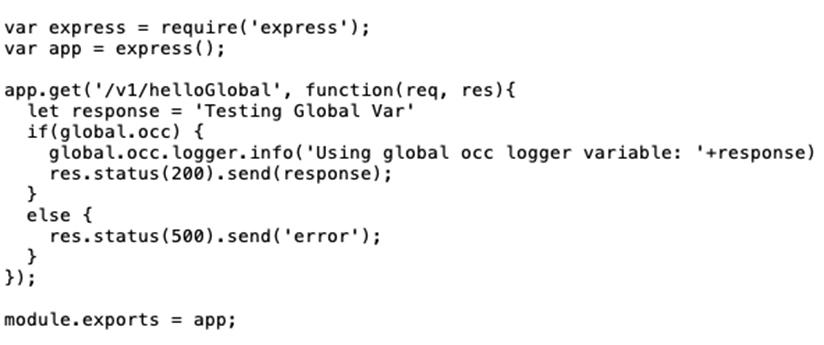
The logger access update provides easier access to the framework-supplied logger. When writing new code or updating an existing SSE, use the new variable “global.occ.logger”.
CAPABILITY HIGHLIGHTS
- Now easily available as the global “global.occ.logger” variable.
- The built-in logger integrates properly with the SSE log retrieval APIs
- No change has been made to the logging APIs. The change is in how to access the logger.
EXAMPLE USE CASE
It is a best practice to check for the “global.occ.logger” variable, as shown in the following example:
TERMINOLOGY CHANGE
In an effort to modernize and clarify terms used in Oracle products and services, “whitelistUrls” in the SSE “package.json” file, has been replaced by “allowedUrls”. This name is clear and directly related to the URLs allowed to be called by SSE. When switching to allowedUrls, it is recommended to rename whitelistUrls to allowedUrls in-place.
While “whitelistUrls” will be supported for the foreseeable future, the update to “allowedUrls” should be made when making changes to or developing new server-side extensions.
Use of the built-in logger is straightforward and eliminates conflicting logging libraries as a source of SSE issues in production.
Steps to Enable
You don't need to do anything to enable this feature.
Shipping Method Update - Internal Name Property (API only)
The internal ID enhancement allows merchants to have multiple shipping methods with the same display name for shoppers and identify them internally when managing promotions.
Capability highlights
- Users can create multiple shipping methods with the same display name on the storefront to be used in different contexts.
- When creating shipping promotions, a user can easily differentiate shipping methods even though they have the same external display name.
- Internal names are automatically displayed in the Shipping Method editor in Shipping Discount promotions editor.
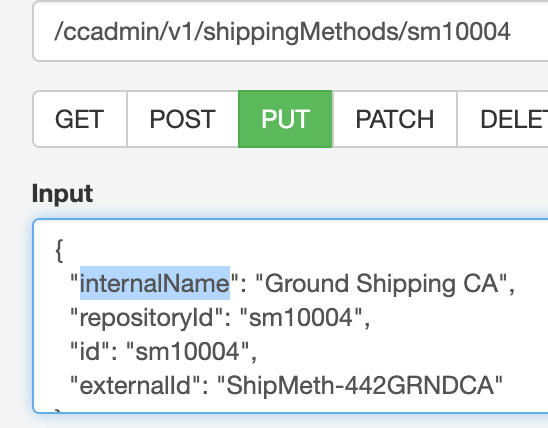
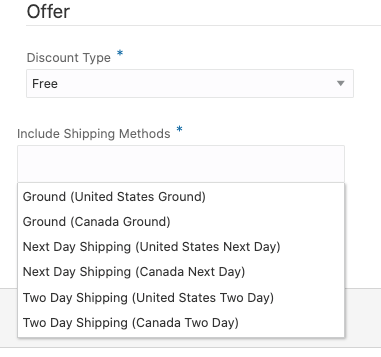
Makes it easier for merchants to identify the correct shipping methods to add to shipping promotions.
Steps to Enable
Review the REST service definition in the REST API guides, available from the Oracle Help Center > your apps service area of interest > REST API. If you're new to Oracle's REST services you may want to begin with the Quick Start section.
Tips And Considerations
This feature is API only. This property cannot be set via the Settings > Shipping Methods UI and is not currently displayed in the UI.
Wish List Support in Open Storefront Framework
With this release, Commerce customers using Open Storefront Framework (OSF) can more easily implement wish list functionality similar to what is available in Storefront Classic. They now have access to out-of-the-box wish list widgets to create and manage multiple wish lists, add, edit, and delete wish list items, move products from one wish list to another, and add to cart from any wish list. You can invite friends to be a part of a wish list, make comments on items in a wish list, and share products and gift ideas.
Support for out-of-the-box wish list components has been added along with additions to our JS API for wish list creation and management functions. The new OSF widgets can be pulled from the npm registry and added to your OSF application. These widgets can then be extended
Capability highlights
Wish list features in OSF include the ability to:
- Create, edit, and delete wish lists with different privacy settings (Private, Shared, or Group).
- Add items from the product detail page to a new or existing wish list.
- Move items from a wish list to the cart or from the cart to a wish list.
- Move items from one wish list to another.
- Edit or delete wish list items.
- Add comments to wish list items.
- Share wish lists with your family and friends and invite friends to a wish list.
Key benefits
- The OSF wish list widgets make use of the Commerce wish list service and interface with the corresponding Social Wish Lists APIs.
Example use case
The merchant will add the OSF wish list components to the relevant page layouts and deploy these changes with an update to their OSF application.
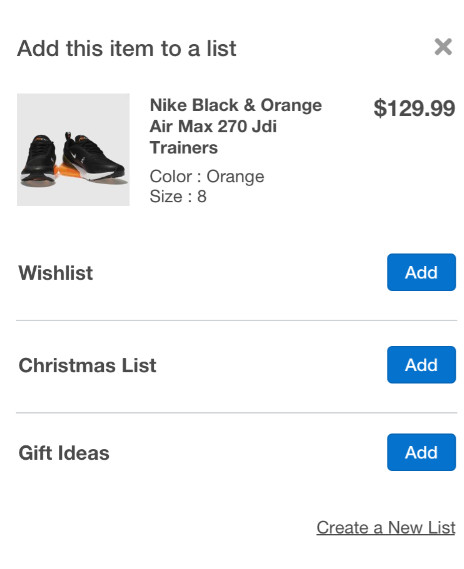
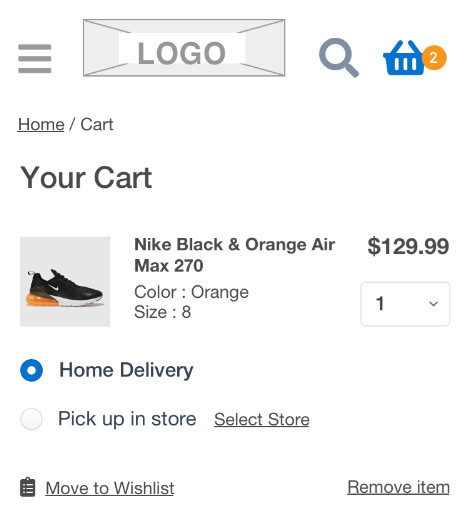
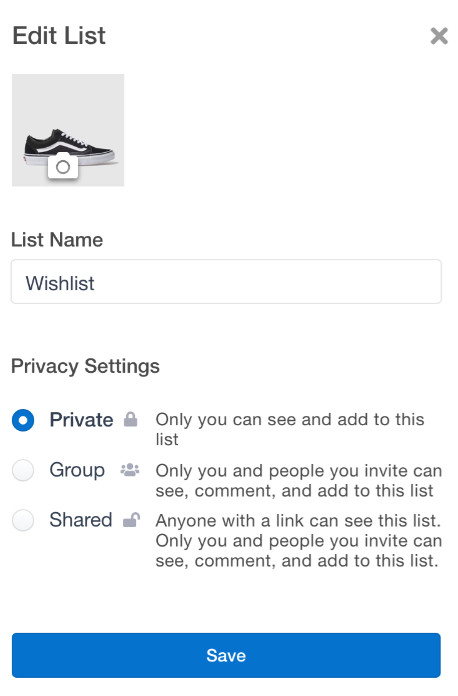
- Creating a wish list of products to purchase later and sharing your list and gift ideas helps drive additional product sales and conversions, and also provides important information on purchase intent and product and category interest.
Steps to Enable
You don't need to do anything to enable this feature.
Tips And Considerations
- Developers must add the wish list components to their OSF package and corresponding layouts and deploy these changes.
- The out-of-the-box wish list update does not currently support adding products to wish lists from the product listing page (PLP), sharing via Facebook, Pinterest, or Twitter, or receiving automatic price change notifications on a product in a wish list. It also does not show item availability (stock status) in the default wish list UI. However, these can all be done custom.
- The out-of-the-box OSF wish list implementation also does not currently allow the wish list owner to manage wish list settings.