
This document will continue to evolve as existing sections change and new information is added. All updates appear in the following table:
| Date | Product | Feature | Notes |
|---|---|---|---|
| 18 JUL 2022 | Created initial document. |
 HAVE AN IDEA?
We’re here and we’re listening. If you have a suggestion on how to make our cloud services even better then go ahead and tell us. There are several ways to submit your ideas, for example, through the Ideas Lab on Oracle Customer Connect. Wherever you see this icon after the feature name it means we delivered one of your ideas.
GIVE US FEEDBACK
We welcome your comments and suggestions to improve the content. Please send us your feedback at oracle_fusion_applications_help_ww_grp@oracle.com.
DISCLAIMER
The information contained in this document may include statements about Oracle’s product development plans. Many factors can materially affect Oracle’s product development plans and the nature and timing of future product releases. Accordingly, this Information is provided to you solely for information only, is not a commitment to deliver any material, code, or functionality, and should not be relied upon in making purchasing decisions. The development, release, and timing of any features or functionality described remains at the sole discretion of Oracle.
This information may not be incorporated into any contractual agreement with Oracle or its subsidiaries or affiliates. Oracle specifically disclaims any liability with respect to this information. Refer to the Legal Notices and Terms of Use for further information.
Column Definitions:
Report = New or modified, Oracle-delivered, ready to run reports.
UI or Process-Based: Small Scale = These UI or process-based features are typically comprised of minor field, validation, or program changes. Therefore, the potential impact to users is minimal.
UI or Process-Based: Larger Scale* = These UI or process-based features have more complex designs. Therefore, the potential impact to users is higher.
Features Delivered Disabled = Action is needed BEFORE these features can be used by END USERS. These features are delivered disabled and you choose if and when to enable them. For example, a) new or expanded BI subject areas need to first be incorporated into reports, b) Integration is required to utilize new web services, or c) features must be assigned to user roles before they can be accessed.
| Ready for Use by End Users Reports plus Small Scale UI or Process-Based new features will have minimal user impact after an update. Therefore, customer acceptance testing should focus on the Larger Scale UI or Process-Based* new features. |
Customer Must Take Action before Use by End Users Not disruptive as action is required to make these features ready to use. As you selectively choose to leverage, you set your test and roll out timing. |
|||||
|---|---|---|---|---|---|---|
| Feature |
Report |
UI or |
UI or |
|
||
Oracle Commerce merchants can now use Oracle Maxymiser to define and execute A/B tests on their Commerce site. With this Commerce integration, merchants can test different customer experiences side-by-side to determine how they affect visitor behavior.
To enable this integration, you must have active licenses for both Oracle Commerce and Oracle Maxymiser.
Capability highlights
- Create tests that span multiple regions of a page and multiple pages across the site
- Test widget layouts as well as different content and presentation
- Test alternative business functionality on the page
- Measure and compare business outcomes including new customer registration, orders and revenue, product, and category views
You can test rich storefront experiences created in Design Studio, using the tools and techniques you already know for both Storefront Classic and Open Storefront Framework (OSF). Key reporting metrics are captured automatically giving you can access to view reports and compare results in Maxymiser, showing you at-a-glance, which experience generated the best business results.
Example use cases
The use cases for A/B testing are numerous, ranging from testing the text, color, or font in a single call to action all the way to testing complete end-to-end experiences and alternative business functionality presented through different widgets.
A few examples:
- Test whether labeling a link “Learn more” or “Why is this important?” generates more clickthroughs to the loyalty program marketing page.
- Test whether a hero image of one person in a swimsuit at the pool generates more swimsuit product views than a hero image of a family in swimsuits at the beach.
- Offer one group a coupon code for a 10% discount and another group a coupon for a 20% discount with appropriate messaging and banners for each promotion and see which experience generates more sales and more revenue. (The higher discount could generate more sales but less revenue because of the larger discount.)
- Show one group widgets implementing a single page checkout flow and another group widgets implementing a multi-page checkout flow and see which one generates a higher conversion rate
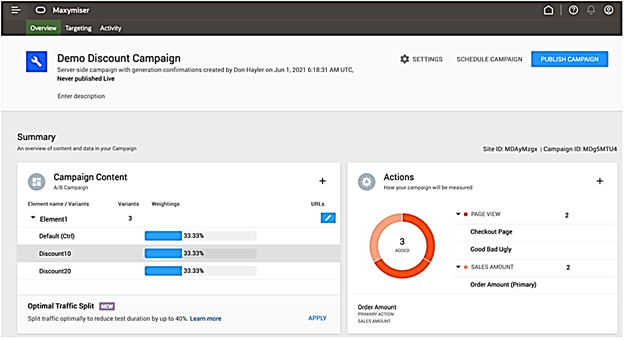
Creating server campaigns in Maxymiser
Elements and Variants: The characteristics and behaviors that will be varied to determine the best effect on the Action/Goals
Actions: The ‘Actions’ that are tracked and measured through the execution of the campaign to determine a ‘Winner’
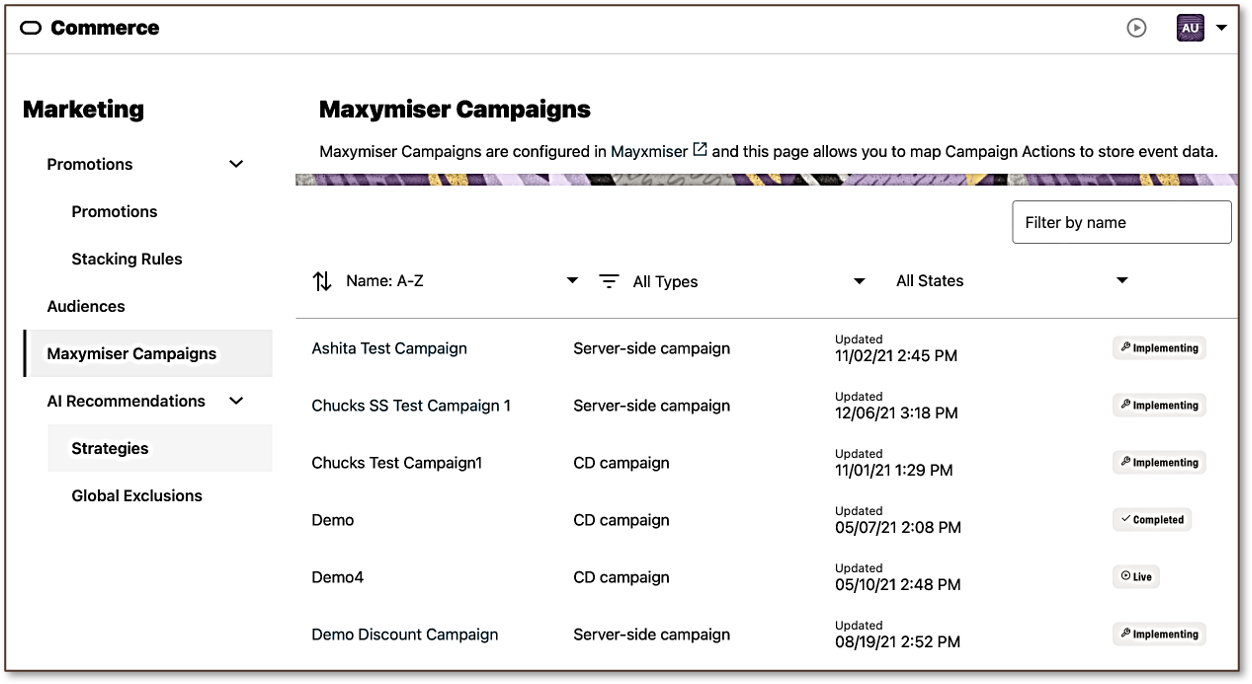
Working with Maxymiser campaigns in Commerce
Once you enable the Maxymiser integration, a new Maxymiser Campaigns tab appears in the Marketing section of the Commerce Administration UI.
Test full end-to-end experiences, not just individual elements of one page and easily measure and report on key outcomes of each experience
Steps to Enable
You don't need to do anything to enable this feature.
Tips And Considerations
- You can use landing pages and page view actions to track custom application actions such as form submission by having the action take the visitor to a specific landing page on successful completion.
- You can use Maxymiser’s Targeting settings on your test to limit it to a specific percentage of your customers – for example, apply this test to a random 10% of customers – to limit potential performance impact on your site.
The initial release of the integration includes the following restrictions that will be addressed in future updates:
- Commerce always includes all orders from each variant in reports. Currently, you cannot analyze and compare only orders that contain swimsuits, for example, to see whether a particular experience is better at driving swimsuit sales rather than better at driving overall sales.
- Tracking and reporting on custom applications actions is not yet supported.
- Tests are currently limited to testing content and sets of widgets. You cannot test promotions, search curation rules, or other non-content elements of your web site.
- Tests currently apply to all visitors to your site. You cannot currently restrict a test to members of an audience such as, logged in users or people who have not yet made their first purchase on your site.
NOTE: To enable this integration, you must have active licenses for both Oracle Commerce and Oracle Maxymiser.