
This document will continue to evolve as existing sections change and new information is added. All updates appear in the following table:
| Date | Module | Feature | Notes |
|---|---|---|---|
| 06 DEC 2022 | Created initial document. |
 HAVE AN IDEA?
We’re here and we’re listening. If you have a suggestion on how to make our cloud services even better then go ahead and tell us. There are several ways to submit your ideas, for example, through the Ideas Lab on Oracle Customer Connect. Wherever you see this icon after the feature name it means we delivered one of your ideas.
GIVE US FEEDBACK
We welcome your comments and suggestions to improve the content. Please send us your feedback at oracle_fusion_applications_help_ww_grp@oracle.com.
DISCLAIMER
The information contained in this document may include statements about Oracle’s product development plans. Many factors can materially affect Oracle’s product development plans and the nature and timing of future product releases. Accordingly, this Information is provided to you solely for information only, is not a commitment to deliver any material, code, or functionality, and should not be relied upon in making purchasing decisions. The development, release, and timing of any features or functionality described remains at the sole discretion of Oracle.
This information may not be incorporated into any contractual agreement with Oracle or its subsidiaries or affiliates. Oracle specifically disclaims any liability with respect to this information. Refer to the Legal Notices and Terms of Use for further information.
Column Definitions:
Report = New or modified, Oracle-delivered, ready to run reports.
UI or Process-Based: Small Scale = These UI or process-based features are typically comprised of minor field, validation, or program changes. Therefore, the potential impact to users is minimal.
UI or Process-Based: Larger Scale* = These UI or process-based features have more complex designs. Therefore, the potential impact to users is higher.
Features Delivered Disabled = Action is needed BEFORE these features can be used by END USERS. These features are delivered disabled and you choose if and when to enable them. For example, a) new or expanded BI subject areas need to first be incorporated into reports, b) Integration is required to utilize new web services, or c) features must be assigned to user roles before they can be accessed.
| Ready for Use by End Users Reports plus Small Scale UI or Process-Based new features will have minimal user impact after an update. Therefore, customer acceptance testing should focus on the Larger Scale UI or Process-Based* new features. |
Customer Must Take Action before Use by End Users Not disruptive as action is required to make these features ready to use. As you selectively choose to leverage, you set your test and roll out timing. |
|||||
|---|---|---|---|---|---|---|
| Feature |
Report |
UI or |
UI or |
|
||
Web Content Widget Support in Classic to OSF Assets Conversion Tool |
||||||
Managing Custom Access for B2B Storefront Users
Use enhanced access control capabilities on Storefront for B2B merchants to manage access easily for multiple users across multiple accounts and reduce the number of roles that need to be created. You can now assign a standard role to a user in the scope of an account. Earlier, standard roles always took effect in a global scope, i.e., regardless of account context. We are also introducing translatable properties for roles and access rights, and categories for storefront organizational roles.
Capability highlights
You can use this feature to:
- Assign all standard roles to/from users in global scope or account scope.
- View the standard roles assigned to a user in the scope of an account.
- Filter the contacts in an account by effective roles, i.e., roles applicable to the user in an account scope.
- Translate names and descriptions for custom roles and access rights.
Role associations
A new property ‘associations’ is added for a Storefront user’s roles. This property indicates how a role is associated to a particular user.
Role Assignment
- Admin - Admin users with Admin privilege or Account Manager privilege can assign/unassign roles to/from B2B storefront users using the new addUserRoles and removeUserRoles APIs.
- Standard Roles – Standard roles are roles with type = role. Admin users can now assign these roles to a B2B storefront user in global scope as well as account scope.
- Account Roles – Account roles are roles with type = organizationalRole, and are defined relative to a particular account only. An account role can be assigned only to a user in the scope of the account that it is related to.
- Storefront - Organization members with Administrator role in an organization can now assign/unassign standard roles to/from organization members using addMemberRoles and removeMemberRoles APIs.
- Standard Roles – Delegated admins in an account can now assign these roles to account members. This assignment will only happen in the scope of the account.
- Account Roles – Both pre-defined as well as custom account roles can be assigned to account members by the delegated admins.
Viewing Role Assignments
- Admin – Admin users can view roles for a B2B storefront user along with the role assignments using the new GET /ccadmin/v1/profiles/{id}/roles API. This will list the detailed properties for the roles assigned to a user. The associations property lists the type of role assignment (global or organization) and the organization, if any, that the role is related to. SCIM search and filtering is supported on this API.
- Storefront – Storefront users can view effective roles for an account member, that is, roles applicable to the user in the current account scope through the getMember API as before. This will now include the standard roles assigned to the user in the scope of that account.
Filtering contacts in an account by effective roles
- Admin – A common use case for merchants is to filter users in an account by the roles that they have in the context of that account. To enable this, we have added 2 query parameters to the listProfiles Admin API – includeRolesForContext and filterUsersWithRoleIds.
- Storefront – For a delegated admin to filter account members who have a particular role in the scope of their account, we have added a query parameter to the listMembers Storefront API – filterUsersWithRoleIds.
Translations for storefront roles and access rights
- Role: ‘name’ and ‘description’ properties of role and organizationalRole items are now translatable. For any existing Storefront roles in the system, the names and descriptions in all locales are set to their current English strings. These can be updated using updateRole APIs on Admin and Storefront.
- Access rights: ‘displayName’ and ‘description’ properties of access rights are now translatable. For any existing Storefront access rights in the system, the names and descriptions in all locales are set to their current English strings. These can be updated using updateAccessRight API on Admin.
This feature helps B2B merchants to manage access easily for multiple users across multiple accounts and reduce the number of roles that need to be created.
Steps to Enable
You don't need to do anything to enable this feature.
Tips And Considerations
These custom roles can be used to customize UIs for different Storefront users who are members of multiple accounts when they are working in the context of any one account.
Multi-Factor Authentication for Storefront Users
Oracle Commerce merchants can now enable Multi-Factor Authentication for Storefront users.
Capability Highlights
- Asks for a Time-based One-Time Password (TOTP) emailed to the user.
- Allows resending TOTP.
- Allows remembering devices on successful authentication.
- Both Storefront Classic and OSF support the feature on Home and Checkout login pages.
- The feature is not site-specific.
This feature protects user data by adding an additional authentication layer. It prevents security breaches that result from brute force attacks and compromised credentials.
Steps to Enable
- Navigate to Commerce Administration UI as an Administrator.
- Click the Settings and then Shopper Settings.
- Enable the “Known device multi-factor authentication” checkbox and Save the changes.
- Click Email Settings in the Settings Section. Enable "MFA Verification Code" template.
Oracle Commerce supports configuration, pricing and quoting via Oracle CPQ Integration. OSF already supports CPQ Integration via Service Side Extensions which is REST API based. As an alternative approach OSF now also supports CPQ Integration via iFrame.
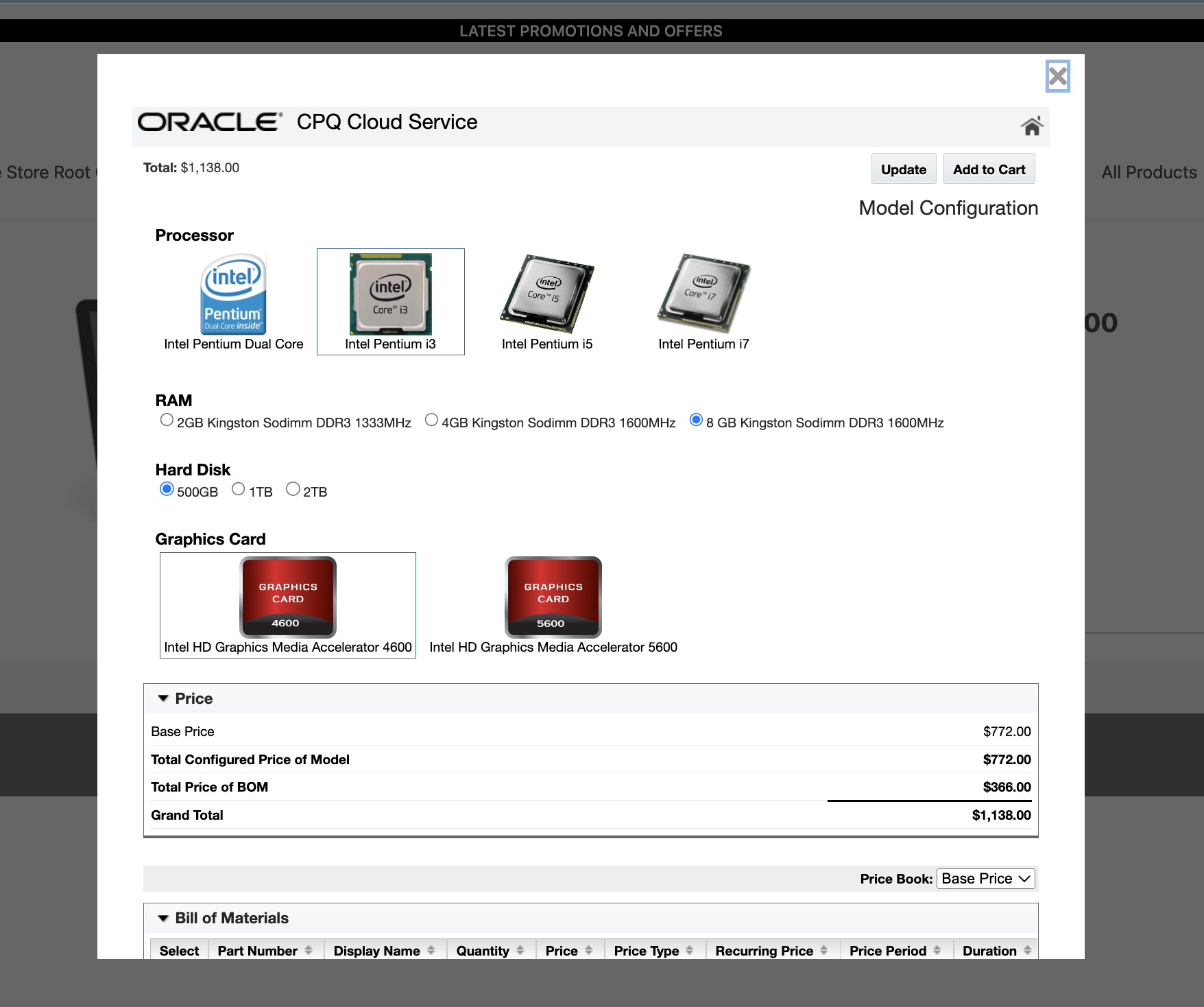
This feature provides an alternative approach to implementation of OSF-CPQ integration giving our merchants an option to use either REST API based integration or iFrame based integration.
Steps to Enable
A new widget ‘CPQConfigurationiFrame’ on Product Page can be added to your OSF application either by simply adding the widget to the page on Design Studio or on your local workspace and then deploying it.
Tips And Considerations
Refer to the Oracle Commerce product documentation Integrate with Oracle CPQ section for details more information.
Web Content Widget Support in Classic to OSF Assets Conversion Tool
Capability Highlights
- Convert Storefront Classic web content widget fragments into OSF widgets along with its text and image contents
- Filter out Agents layouts as they are not required for OSF.
This feature helps convert Storefront Classic web-content widgets to OSF without losing text and image contents there by reducing OSF migration time.
Steps to Enable
You don't need to do anything to enable this feature.
Tips And Considerations
Use the following command to initiate conversion of Classic Assets to OSF: "yarn occ create-app newAppName --fromClassic" where newAppName is the name of the app that is being created.
Capability Highlights
- If your service exceeds its limits during a traffic spike, new shoppers will be redirected to a temporary waiting room page which is the ‘Site Busy’ page.
- The ‘Site Busy’ page contains two components a ‘Text Component’ and an ‘Image component’. Both of these components are configurable from your local OSF workspace. The Site Busy page is hidden in Design Studio.
- Every 15 seconds, the shopper’s browser will check if the site is accepting new shoppers. When new shoppers are again accepted, the browser will redirect back to the original URL the shopper intended to visit.
To prevent traffic from slowing down a website, OCC allows servers to deflect requests. This prevents the servers from becoming overloaded with traffic.
Steps to Enable
To enable this feature you need to log a Service Request (SR).
Tips And Considerations
Refer to the Oracle Commerce product documentation Prevent Site Traffic Slowdowns in Improve Storefront Performance section for details more information.
Generate Webhook Secret Key Using Mac Hash Algorithm
Capability Highlights
Webhook events are signed so that the system receiving the event can verify their authenticity. Starting from 22D release webhook POST requests include an HMAC SHA512 signature in the X-Oracle-CC-WebHook-Signature-SHA512 header. This signature value is calculated using HmacSHA512 secret key.
The MAC hashing algorithm that webhook signatures currently use HmacSHA1 has been deprecated. Hence we are using HmacSHA512.
Steps to Enable
To obtain a secret key or generate a new one:
- Navigate to Commerce Administration UI.
- Click the Settings and then Web APIs.
- In Webhook tab, Click the Webhook that needs to be configured.
- Click Reveal button to see Secret Key (SHA512) value or Reset to generate a new key.
Cybersource Integration uses Rest instead of SOAP Toolkit
Capability Highlights
- OOTB Cybersource integration uses the SOAP toolkit for order cancellation and returns. SOAP libraries are old and not compatible with the latest JVM. Replacing SOAP with REST will eliminate any third-party library maintenance overhead
- No functional changes in Oracle Commerce
- Once all the merchants upgrade to REST, we will remove the SOAP implementation
SOAP libraries are old and not compatible with the latest JVM. Replacing SOAP with REST will eliminate any third-party library maintenance overhead.
Steps to Enable
Merchants must generate new REST keys from the CyberSource Console and configure the same in Oracle Commerce Admin to start using REST integration.