
This document will continue to evolve as existing sections change and new information is added. All updates appear in the following table:
| Date | Module | Feature | Notes |
|---|---|---|---|
| 02 NOV 2023 | Created initial document. |
 HAVE AN IDEA?
We’re here and we’re listening. If you have a suggestion on how to make our cloud services even better then go ahead and tell us. There are several ways to submit your ideas, for example, through the Ideas Lab on Oracle Customer Connect. Wherever you see this icon after the feature name it means we delivered one of your ideas.
GIVE US FEEDBACK
We welcome your comments and suggestions to improve the content. Please send us your feedback at oracle_fusion_applications_help_ww_grp@oracle.com.
DISCLAIMER
The information contained in this document may include statements about Oracle’s product development plans. Many factors can materially affect Oracle’s product development plans and the nature and timing of future product releases. Accordingly, this Information is provided to you solely for information only, is not a commitment to deliver any material, code, or functionality, and should not be relied upon in making purchasing decisions. The development, release, and timing of any features or functionality described remains at the sole discretion of Oracle.
This information may not be incorporated into any contractual agreement with Oracle or its subsidiaries or affiliates. Oracle specifically disclaims any liability with respect to this information. Refer to the Legal Notices and Terms of Use for further information.
Column Definitions:
Report = New or modified, Oracle-delivered, ready to run reports.
UI or Process-Based: Small Scale = These UI or process-based features are typically comprised of minor field, validation, or program changes. Therefore, the potential impact to users is minimal.
UI or Process-Based: Larger Scale* = These UI or process-based features have more complex designs. Therefore, the potential impact to users is higher.
Features Delivered Disabled = Action is needed BEFORE these features can be used by END USERS. These features are delivered disabled and you choose if and when to enable them. For example, a) new or expanded BI subject areas need to first be incorporated into reports, b) Integration is required to utilize new web services, or c) features must be assigned to user roles before they can be accessed.
| Ready for Use by End Users Reports plus Small Scale UI or Process-Based new features will have minimal user impact after an update. Therefore, customer acceptance testing should focus on the Larger Scale UI or Process-Based* new features. |
Customer Must Take Action before Use by End Users Not disruptive as action is required to make these features ready to use. As you selectively choose to leverage, you set your test and roll out timing. |
|||||
|---|---|---|---|---|---|---|
| Feature |
Report |
UI or |
UI or |
|
||
Support for ExternalId in Shipping Methods for Storefront Order APIs and Webhooks |
||||||
Support for externalId in Shipping Methods for Storefront Order APIs and Webhooks
With this release, externalId property of Shipping Methods is returned in relevant Order APIs and Webhooks in Storefront. Please refer to latest REST API documentation for more information.
As externalId for Shipping Methods is available in the Order APIs and Webhooks, there is no longer a need to make an additional API call to retrieve it.
Steps to Enable
You don't need to do anything to enable this feature.
Support for URL Slugs with Direct Catalog Editing
With this release, when direct catalog editing is enabled, your site’s URL patterns can use URL slugs for products and collections. Please refer to Configure URL patterns section of Using Oracle Commerce guide for more information on how to configure URL patterns.
Merchants now have the freedom to use direct catalog editing when URL slugs are in use. All updates to URL patterns and URL slugs will be immediately pushed to production, when direct catalog editing is enabled.
Steps to Enable
You don't need to do anything to enable this feature.
Tips And Considerations
- If direct catalog editing is enabled before upgrading to this release, unpublished changes for URL patterns and URL slugs will be made available automatically on the storefront. You will no longer find them in the publishing queue.
- On the Changes UI of the Commerce Administration application, updates to URL slugs are shown as changes to the corresponding categories and products.
Include Detailed Tax Information for Order Placed Emails
Detailed Tax Information for orders is now available for use in Order Placed emails. The following tax information is now made available within taxPriceInfo object in the data generated for an Order Placed Email:
| Property |
Description |
|---|---|
| currencyCode |
The applicable currency code |
| amount |
The tax total |
| secondaryCurrencyTaxAmount |
The tax total in secondary currency (if applicable) |
| cityTax |
The city tax |
| countryTax |
The country tax |
| countyTax |
The county tax |
| districtTax |
The district tax |
| isTaxIncluded |
Whether tax is included |
| miscTax |
Miscellaneous tax |
| miscTaxInfo |
Miscellaneous tax information in name:value pairs |
| stateTax |
State tax |
| valueAddedTax |
VAT |
As with other order amounts, tax amounts are formatted according to the order locale and the applicable primary or secondary currency code.
The out-of-the-box version of the freemarker templates for the Order Placed email remain unchanged. Merchants need to update the Order Placed email template to take advantage of this change.
Merchants can include tax breakdown in Order Placed emails.
Steps to Enable
- Download the Order Placed email template.
- Customize the html_body.ftl file to include the tax breakdown information and upload this as a custom email template for each site that needs to provide this information in Order Placed emails.
Responsive Image Widget can load different images based on view port sizes. The widget has the following features:
- Merchant can configure a default image which is shown when no additional images are configured for different view-ports.
- Merchants can define image attributes like Alt Text, Title, Link URL.
- Merchant can define breakpoints which determines the image to be used for a certain view port. A maximum of 4 breakpoints can be configured.
- Merchant can configure completely different images for each breakpoint.
- The widget initially loads the image based on the browser’s current view port and lazily loads other images as the viewport changes.
Merchants can easily configure different images to be displayed for different viewports using this widget without the need to use adaptive regions or CSS media queries.
Steps to Enable
- Add the Responsive Image widget from the widget library to a layout of your choice.
- Configure image attributes, breakpoints and images to complete the setup. Please refer to the below screens for more details.
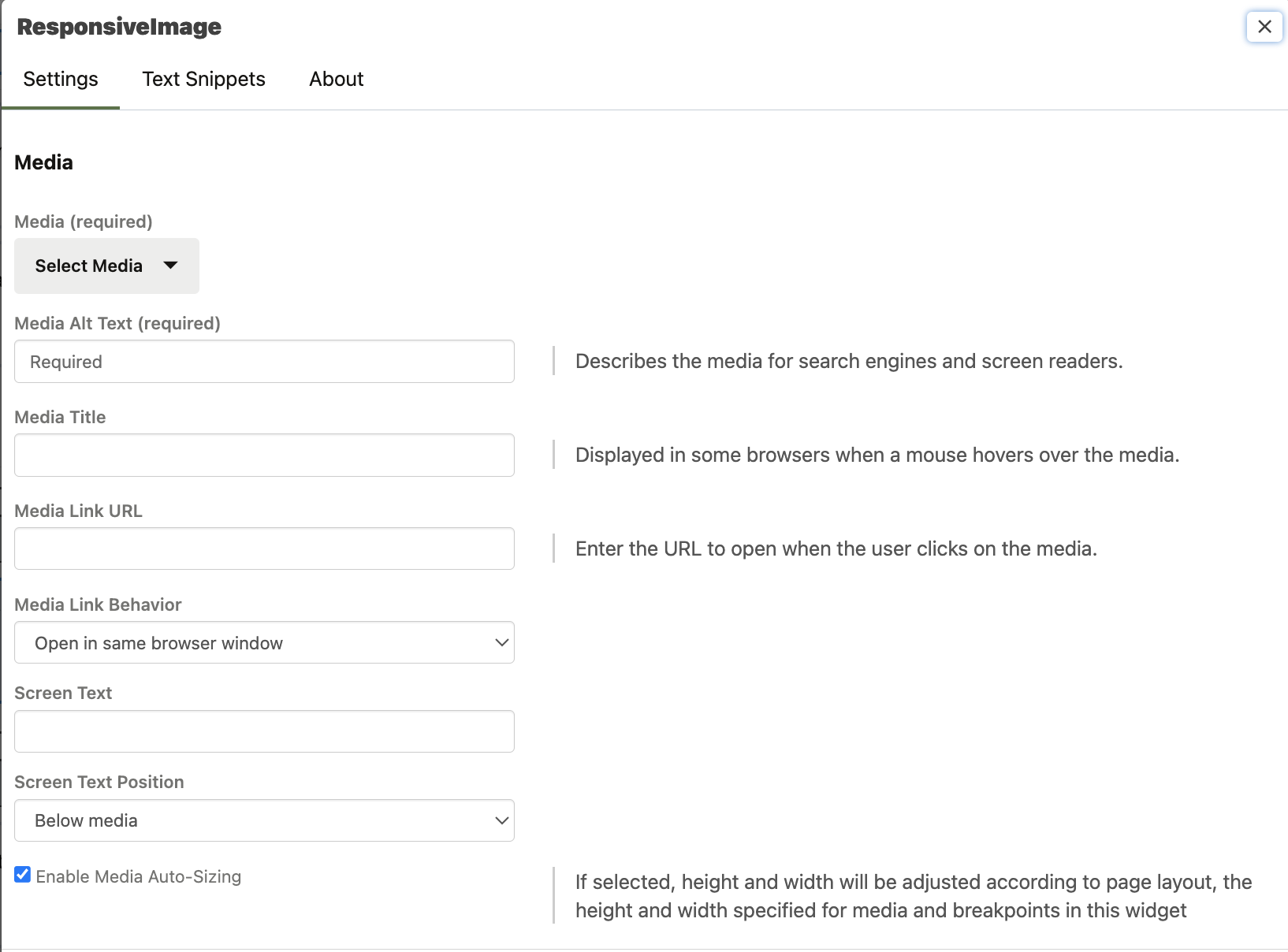
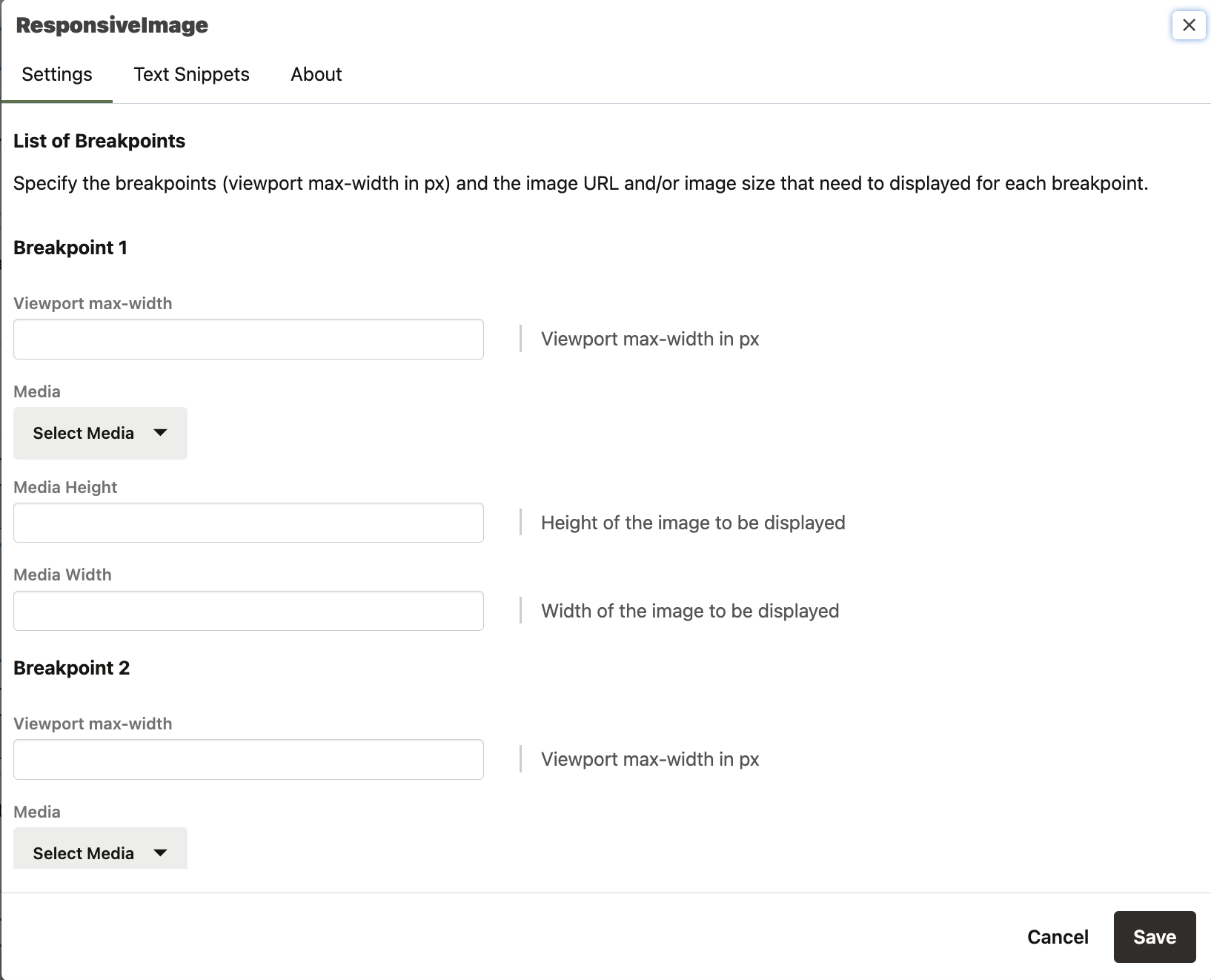
Open Storefront Framework 5.1.0
This Commerce Open Storefront Framework (OSF) release includes new features, bug fixes and minor library updates.
Capability highlights
- New Responsive Image Widget
- Bug fixes
- Library updates
Continuing to stay up to date with the latest OSF versions is important to keep up with new functionality and important library updates
Steps to Enable
You don't need to do anything to enable this feature.
Tips And Considerations
Refer to the Oracle Commerce product documentation Developing Open Storefront Framework Applications for details on upgrading your version of OSF to a newer version.