
- Revision History
- Overview
- Feature Summary
- Configure, Price, Quote
-
- Administration
- Configuration
- Integration
-
- Import Revenue Lines from CX Sales
- Conditional Mapping for Commerce REST Integrations
- Default Configuration Attributes for Import Revenue Lines Integration
- Derive Revenue Category for All Asset-Based Ordering Modifications
- Extensibility for Revenue Category
- Standard CX Sales Revenue Line Import REST Integration
-
- Logs and Utilities
- Parts
- IMPORTANT Actions and Considerations
This document will continue to evolve as existing sections change and new information is added. All updates appear in the following table:
| Date | Feature | Notes |
|---|---|---|
| 17 DEC 2021 | Created initial document. |
Oracle Configure, Price, and Quote (CPQ) enables companies to streamline the entire opportunity-to-quote to-order process, including product selection, configuration, pricing, quoting, ordering, and approval workflows. Oracle CPQ provides a flexible, scalable, enterprise-ready solution ideal for companies of all sizes that sell products and services across direct, indirect, and e-commerce sales channels.
This guide outlines the information you need to know about new or improved functionality in Oracle CPQ 22A.
Security & New Features
We would like to remind you that if your system has modified security structures, you may need to advise your security administrator of new features you would like to implement.
 HAVE AN IDEA?
We’re here and we’re listening. If you have a suggestion on how to make our cloud services even better then go ahead and tell us. There are several ways to submit your ideas, for example, through the Ideas Lab on Oracle Customer Connect. Wherever you see this icon after the feature name it means we delivered one of your ideas.
GIVE US FEEDBACK
We welcome your comments and suggestions to improve the content. Please send us your feedback at cpqcloud_documentation_us_grp@oracle.com.
DISCLAIMER
The information contained in this document may include statements about Oracle’s product development plans. Many factors can materially affect Oracle’s product development plans and the nature and timing of future product releases. Accordingly, this Information is provided to you solely for information only, is not a commitment to deliver any material, code, or functionality, and should not be relied upon in making purchasing decisions. The development, release, and timing of any features or functionality described remains at the sole discretion of Oracle.
This information may not be incorporated into any contractual agreement with Oracle or its subsidiaries or affiliates. Oracle specifically disclaims any liability with respect to this information. Refer to the Legal Notices and Terms of Use for further information.
Column Definitions:
Report = New or modified, Oracle-delivered, ready to run reports.
UI or Process-Based: Small Scale = These UI or process-based features are typically comprised of minor field, validation, or program changes. Therefore, the potential impact to users is minimal.
UI or Process-Based: Larger Scale* = These UI or process-based features have more complex designs. Therefore, the potential impact to users is higher.
Features Delivered Disabled = Action is needed BEFORE these features can be used by END USERS. These features are delivered disabled and you choose if and when to enable them. For example, a) new or expanded BI subject areas need to first be incorporated into reports, b) Integration is required to utilize new web services, or c) features must be assigned to user roles before they can be accessed.
| Ready for Use by End Users Reports plus Small Scale UI or Process-Based new features will have minimal user impact after an update. Therefore, customer acceptance testing should focus on the Larger Scale UI or Process-Based* new features. |
Customer Must Take Action before Use by End Users Not disruptive as action is required to make these features ready to use. As you selectively choose to leverage, you set your test and roll out timing. |
|||||
|---|---|---|---|---|---|---|
| Feature |
Report |
UI or |
UI or |
|
||
Support for Invoking Commerce Actions Directly from a Reconfigured Favorite |
||||||
Support Delimiters for Single Select Menus and Pick Lists BOM Item Mapping |
||||||
Default Configuration Attributes for Import Revenue Lines Integration |
||||||
Derive Revenue Category for All Asset-Based Ordering Modifications |
||||||
The following Administration feature is available in Oracle CPQ 22A.
Support for Invoking Commerce Actions Directly from a Reconfigured Favorite
Oracle CPQ 22A adds the ability to invoke a Commerce Transaction when reconfiguring an item from the Favorites List. The Commerce invocation action will now be visible on the Configuration page when a Favorite is reconfigured. Prior to this feature implementation, users would need to save the reconfigured Favorite and exit Configuration, and then go into Commerce to add the Favorite to a quote.

Sample Favorite Reconfigured From Detail Page with Create Transaction Button
This features saves the user multiple steps when adding a reconfigured Favorite to a new or existing quote.
Steps to Enable
You don't need to do anything to enable this feature.
Tips And Considerations
If you are reconfiguring a Favorite and you invoke a Commerce Transaction instead of saving the Favorite, the changes you made are not saved to that item in the Favorite List.
The following Configuration BOM Mapping feature is available in Oracle CPQ 22A.
Support Delimiters for Single Select Menus and Pick Lists BOM Item Mapping
Oracle CPQ 22A extends the support of delimiters for Single Select Menu (SSM) and Single Select Pick List (SSPL) attributes to allow administrators to map multiple SSM and SSPL menu options to a single BOM Item Mapping table record. Prior to this feature, only the Multi-select Menu attributes had delimiter support.
Administrators can use the ^|^ delimiter to specify the OR operation for multiple SSM or SSPL menu options that are being mapped to the same BOM part in the BOM Item Mapping table. Without this operation, the BOM Item Mapping table would require three records to provide the same functionality.
For example, the monitor19^|^monitor24^|^monitor27 ConfigAttrValue will add the monitorWarranty when a 19 inch Monitor, 24 inch Monitor, or 27 inch Monitor are selected from the extraMonitor Single Select Menu in Configuration.

Without this operation, the BOM Item Mapping table would require three records to provide the same functionality.
The delimiter support for SSMs and SSPLs in the BOM Item Mapping table reduces the number of records required by allowing administrators to use a single record to specify multiple menu options for the same BOM item.
Steps to Enable
You don't need to do anything to enable this feature.
Tips And Considerations
-
Delimiters should only be used to separate multiple SSM and SSPL values that are being mapped to the same BOM part on buyside. For SSM and SSPL values that map to individual BOM parts on buyside, delimiters should not be used in the BOM Item Mapping table.
-
Oracle CPQ only supports the ^|^ delimiter for SSM and SSPL attributes. An error will be generated if the ^|^ delimiter is used with any other attribute type.
-
SSM and SSPL attributes cannot use the "~" delimiter.
The following CX Sales Integration features are available in Oracle CPQ 22A.
Import Revenue Lines from CX Sales
Oracle CPQ 22A expands the REST – Import Commerce integration type to import transaction line level data into CPQ (i.e. Import CX Sales Revenue Lines into a CPQ transaction). Upon creation of a quote, CPQ can import the revenue lines from CX Sales and create corresponding line items in CPQ. CX Sales revenue lines can be product groups or products. CX Sales product group revenue lines are imported as CPQ models and product revenue lines can be imported as CPQ models or parts. The resulting quote lines can then be synchronized into CX Sales and reconciled to the preexisting revenue lines to update price, quantity, and revenue details while retaining sales splits and other attribution on the revenue lines.
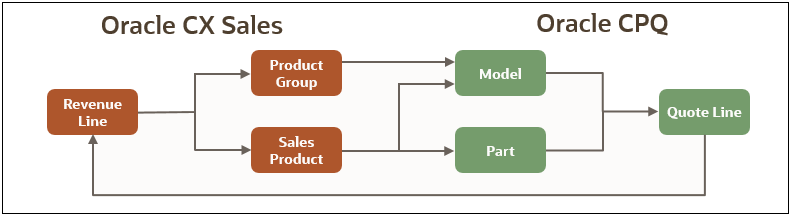
Query Parameters
The enhanced REST – Import Commerce integration also allows administrators to define query parameters for imports. This enables CPQ to filter out revenue lines that are not exposed in the CX Sales UI and to exclude those that instantiate sales splits and revenue schedule entries.

When a CX Sales revenue line is imported as a CPQ model, the transaction line will display the unconfigured model icon indicating that the line requires configuration.
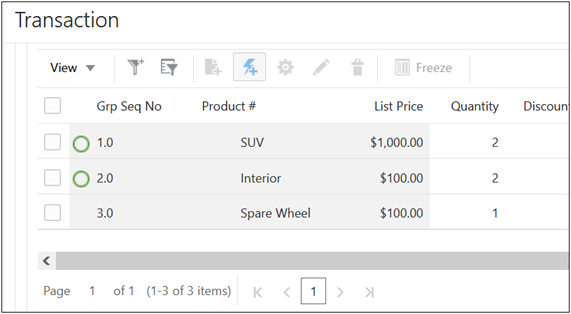
This feature completes the "round trip" integration of transaction and revenue lines for integrations with CX Sales. End users no longer need to re-enter CX Sales revenue lines into the CPQ transaction.
Steps to Enable
-
The Commerce REST Import Revenue Lines integration is provided in the Oracle CPQ 22A CX Sales RefApp image for new sites.
-
A 22A CX Sales RefApp migration package and implementation instructions will be provided on My Oracle Support for existing customers.
Tips And Considerations
-
Some query parameters are managed automatically for batch processing.
-
Entry of limit, offset and totalResults parameters should be avoided as they may disrupt automated batch processing.
-
When multiple query parameters with the same key but different values are used, the first query parameter in the string will be picked up for execution.
Conditional Mapping for Commerce REST Integrations
Beginning in Oracle CPQ 22A administrators can define conditional logic for the import of sub-document Commerce REST integration mappings. Conditional mapping allows the mapping of two source attributes to the same target attribute. When two source attributes are mapped to one target attribute, conditions must be defined to determine which of the source attributes to use. When conditions for the primary source attribute are not met, the secondary (default) mapping will be used.
The predefined response attribute mapping for the REST Import Revenue Lines Integration contains conditional mapping for several attributes. When two source attributes are mapped to the same target attribute, the conditional mapping icon is displayed for both mappings.
To view the attribute mapping for an integration, navigate to: Admin > Process Definition > Integrations, click on the OSC - REST Import Lines integration, and then click Edit.
As shown in the following image, there are four instances where two CX Sales attributes (i.e. source attributes) are mapped to the same CPQ attribute (i.e. target attribute). The mappings with conditional mapping are outlined in blue, and the conditional mapping icon is outlined in red. Since both mapped attributes have the same condition, you can click on either conditional mapping icon to view the conditional mapping for the target attribute.

Edit Conditions Dialog for Conditional Mapping
To access the conditional logic for mapped items, click on the conditional mapping icon. The following image displays the conditional mapping for the CPQ Model Segment Variable Name attribute:
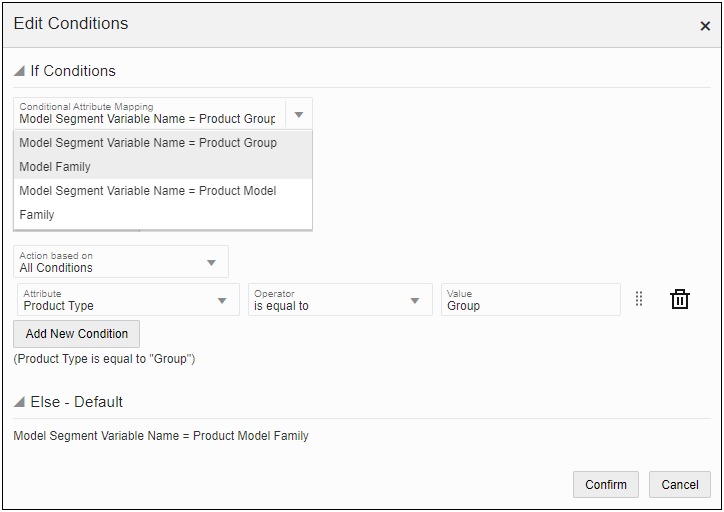
-
Select one of the two attribute mappings from the Conditional Attribute Mapping drop-down. The selected mapping is used when the Condition is satisfied (e.g. Model Segment Variable Name = Product Group Model Family).
-
Action based on: The action can be based on All Conditions, Any Conditions, or Complex Conditions.
-
A "Condition" is defined by selecting the Attribute, Operator, and Value.
-
Attribute: Select a CX Sales attribute for the condition (e.g. Product Type)
-
Operator: Available operators are based on the selected attribute type.
-
Value: Enter a value for the condition
-
-
Click Add New Condition to define additional conditions.
-
The Else – Default is automatically set to attribute mapping that isn't selected for the If Condition.(e.g. Model Segment Variable Name = Product Model Family)
Predefined Conditional Mapping for REST Import Revenue Lines Integration
The following predefined conditional mappings provide the logic to determine if the CPQ attribute should be mapped to the CX Sales product group or product attribute.
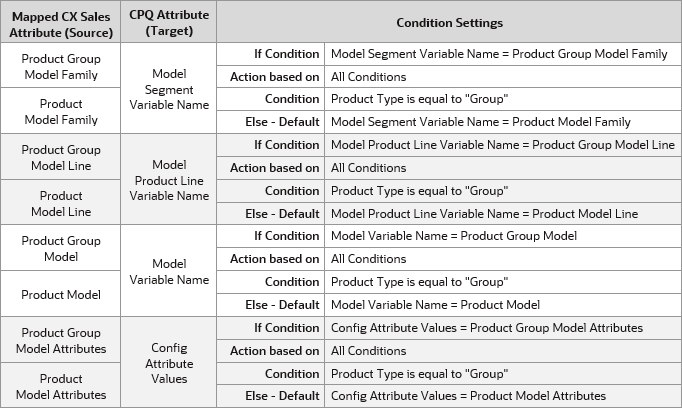
This feature supports the import of revenue lines from Oracle CX Sales to create CPQ quote lines by referencing model attributes from revenue line products or product groups.
Steps to Enable
-
Conditional mappings are only available for Rest Import type integrations where the Document Level is set to Sub Document.
-
Predefined conditional mappings for the REST Import Revenue Lines integration are available with the out-of-the-box CPQ 22A CX Sales RefApp image for new sites.
-
The CPQ 22A Sales RefApp migration package and implementation instructions will be provided on My Oracle Support for existing customers.
Tips And Considerations
You can review all of the new/modified actions, attributes, formulas, library functions, and rules in the CPQ 22A Sales RefApp migration package or in the reference application documentation for new sites with the CPQ 22A CX Sales RefApp image. To access your reference application documentation, refer to CPQ Administration Online Help > Administration > Reference Application - Access Information for Your CPQ Site Reference Application.
Default Configuration Attributes for Import Revenue Lines Integration
Oracle CPQ 22A adds the Config Attribute Values attribute (_config_attr_values) to the Config Attribute Set for Commerce sub-documents.
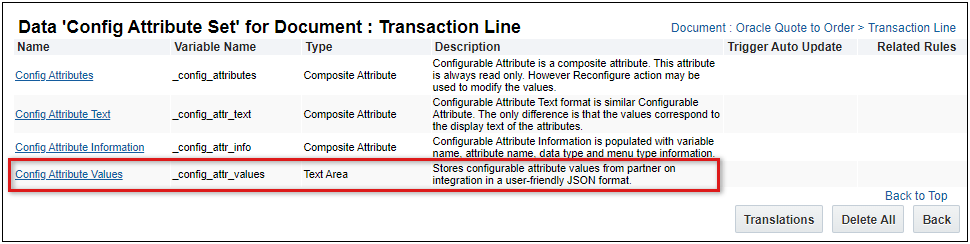
This attribute allows CX Sales to provide default configurable attribute values for imported revenue lines. This supports the mapping of revenue line product groups to different versions of the same CPQ product model. In addition, revenue lines for configurable products can be imported with preset configuration values. The default values are applied in the Configuration UI when a sales user initially configures an imported model-type transaction line.
Configurable attribute values are stored in a JSON name:value pair format.
-
Boolean, Currency, Date, Float, Integer, Text, and Menu attributes with single values are supported.
-
HTML attributes and Menu attributes with more than one item (e.g. 'val1~val2') are not supported.
For example, a sales representative has created an Opportunity for their customer with three revenue lines. The sales representative wants to import those revenue lines into CPQ and populate the default configuration attribute values from CX sales. The revenue lines are an "SUV" model-type item, an "Interior" model-type item, and a "Spare Wheel" part item.
-
The following configuration values are provided for the SUV model.

-
The following default configuration values are provided for the Interior model.

The Config Attribute Values attribute allows CX Sales to provide configuration defaults for CPQ models during the import of CX Sales revenue lines.
Steps to Enable
You don't need to do anything to enable this feature.
Tips And Considerations
IMPORTANT: Use of default configuration attributes should be limited to ten or fewer attributes to assure performance. Only simple configuration attribute data types are supported.
Derive Revenue Category for All Asset-Based Ordering Modifications
The CPQ 22A CX Sales RefApp includes a sub-document Revenue Category formula to derive the revenue category from ABO asset modifications. This functionality supports main and sub-document revenue categories as well as additional customer-defined revenue categories.
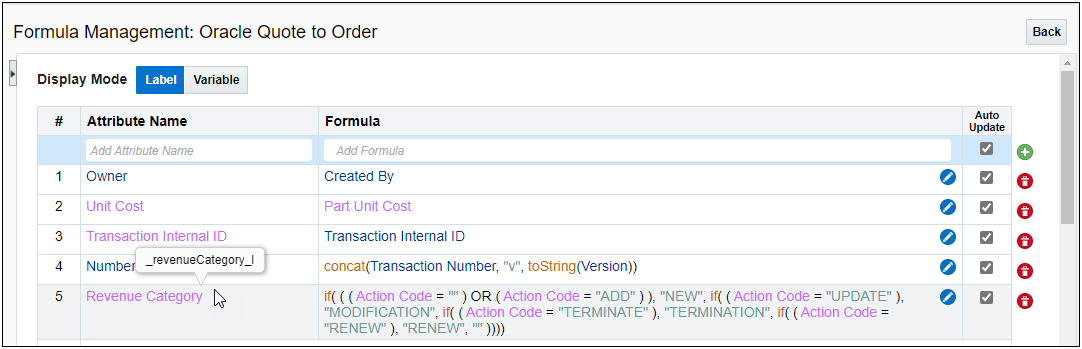
The CPQ 22A CX Sales RefApp provides the out-of-the-box logic to derive the revenue category for all asset modification and subscription amendment use cases.
Steps to Enable
-
The Commerce REST Import Revenue Lines integration is provided in the Oracle CPQ 22A CX Sales RefApp image for new sites.
-
A 22A CX Sales RefApp migration package and implementation instructions will be provided on My Oracle Support for existing customers.
Tips And Considerations
If customers apply the 21D Subscription Management package on a site with the 22A CX Sales RefApp, the formula setting for the revenueCategory_l attribute on save action will be lost. Customers have to manually enable the _revenueCategory_l formula on the save action for the revenueCategory_l attribute after applying the Subscription Management package.
Extensibility for Revenue Category
Oracle CPQ 21C introduced the Revenue Attribute Set for Commerce main and sub-documents. This menu item attribute contained three menu options and was non-editable. Oracle CPQ 22A allows administrators to rename the default options and add, edit, and delete custom revenue category options.
Note: New, Renew, and Expansion menu options are mandatory items and cannot be deleted. If desired, administrators can modify the displayed text for these items, but variable name cannot be changed.
The Oracle CPQ 22A CX Sales RefApp image adds optional Modification and Termination menu options to the Commerce sub-document Revenue Attribute Set.
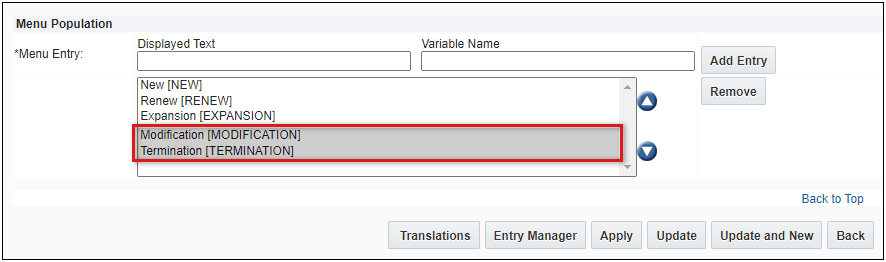
Customers can now add custom revenue category options to support their business requirements.
Steps to Enable
You don't need to do anything to enable this feature.
Standard CX Sales Revenue Line Import REST Integration
Oracle CPQ 22A also expands the reference application to provide predefined sub-document attribute mappings for REST-based integrations. The CPQ 22A Sales RefApp is available in a migration package for existing customers or with the out-of-the-box application for new customers.
Predefined CX Sales Attribute Mappings for Import Revenue Lines Integration
The following table shows the predefined CX Sales attribute mappings for the import revenue lines integration. An asterisk (*) precedes new CX Sales Reference Application attributes. Refer to CPQ Administration Online Help > Integrations > Commerce Integrations > Attribute Mapping Page for additional attribute information.
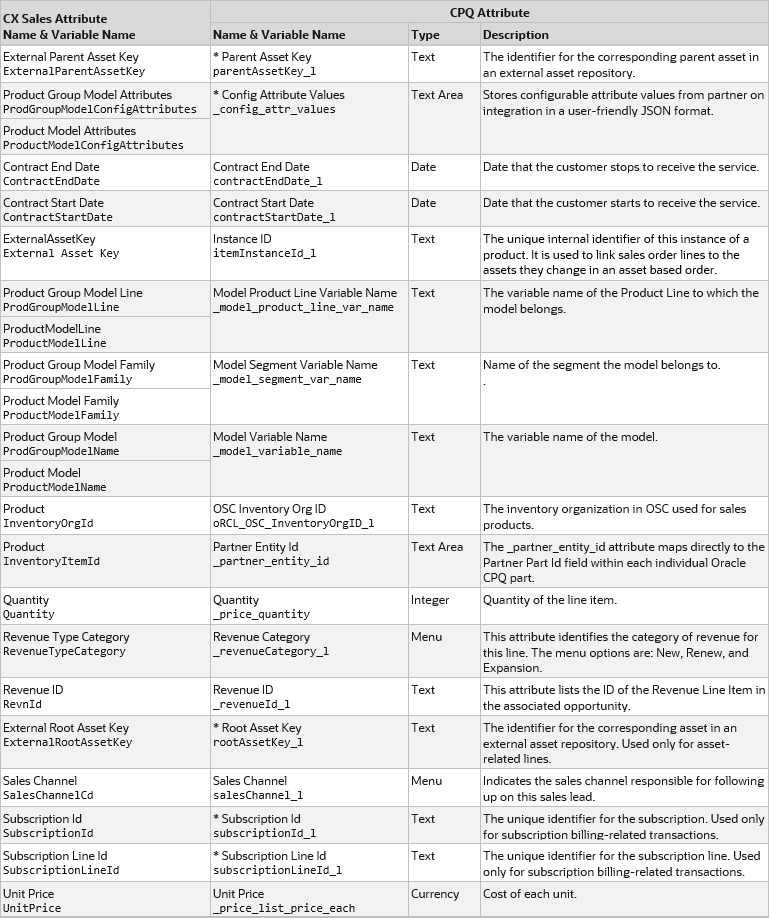
New Predefined CX Sales Attribute Mappings for REST Export Quote Lines
The following table shows the new predefined CX Sales attribute mappings for the export quote lines integration. An asterisk (*) precedes new CX Sales Reference Application attributes. Refer to CPQ Administration Online Help Integrations > Commerce Integrations > Attribute Mapping Page for additional attribute information.

New Predefined CX Sales Attribute Mappings for REST Export Quote
The following table shows the new predefined CX Sales attribute mappings for the export quote integration. An asterisk (*) precedes new CX Sales Reference Application attributes. Refer to CPQ Administration Online Help Integrations > Commerce Integrations > Attribute Mapping Page for additional attribute information.
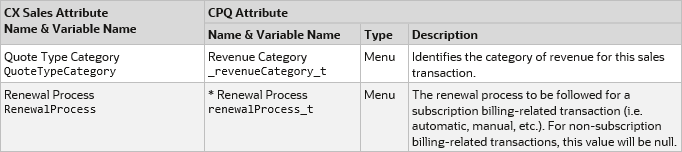
New Predefined CX Sales Attribute Mappings for REST Import Opportunity
The following table shows the new predefined CX Sales attribute mappings for the import opportunity integration. An asterisk (*) precedes new CX Sales Reference Application attributes. Refer to CPQ Administration Online Help Integrations > Commerce Integrations > Attribute Mapping Page for additional attribute information.

With limited implementation set up, customers can create quotes and the two sites can exchange information about quote lines created or updated in Oracle CPQ.
Steps to Enable
-
Predefined CX Sales integrations are provided in the CX Sales Reference Application image for new sites.
-
A CX Sales Reference Application migration package and implementation instructions will be provided on My Oracle Support for existing customers.
The following Logs and Utilities features are available in Oracle CPQ 22A.
Automatic Purge of User Session Records
Upon upgrade to Oracle CPQ 22A, user session log in and log out records are deleted automatically after 180 days from the User Metrics Report. If you would like to modify the time the user log in records persist prior to deleting for your site, submit a Service Request (SR) on My Oracle Support.
Automatically purging the user log in records reduces the storage required for data that you are not actively using.
Steps to Enable
You don't need to do anything to enable this feature.
Truncated Display of Administration Log Records
Oracle CPQ 22A introduces a maximum number of Administration Log records available to display within the Oracle CPQ User Interface. The default value is 1000 records with the records displayed in the order of latest date/timestamp to earliest date/timestamp based on the specified filtering criteria. If after applying date range filters the Administration Log results exceed 1000 records, a message displays indicating that a complete list of the records can be downloaded in a .CSV file. If you would like to modify the default setting of maximum number of records to display, submit a Service Request (SR) on My Oracle Support.
Limiting the number of administrative log records to view in the User Interface assists in ensuring the system is able to respond in a timely manner.
Steps to Enable
You don't need to do anything to enable this feature.
The following Parts features are available in Oracle CPQ 22A.
Increased Number of Part Custom Fields
Oracle CPQ 22A increases the available count of Part Custom Fields from thirty to six hundred. The expanded field count includes: 350 text or menu fields, 200 numeric fields, and 50 fields for the new date/time data type. Previously, only two Multi-Select Menus were allowed and they were stored as number fields. Beginning in Oracle CPQ 22A, Multi-Select Menus are stored as Text/Menu fields and are only limited by the shared 350 Text/Menu field limit.
Oracle CPQ 22A also updates the Parts Custom Field administration page to display the count of available fields instead of listing all available fields at the bottom of the page. The following image displays the new Part Custom Fields page with the remaining Available Fields count.
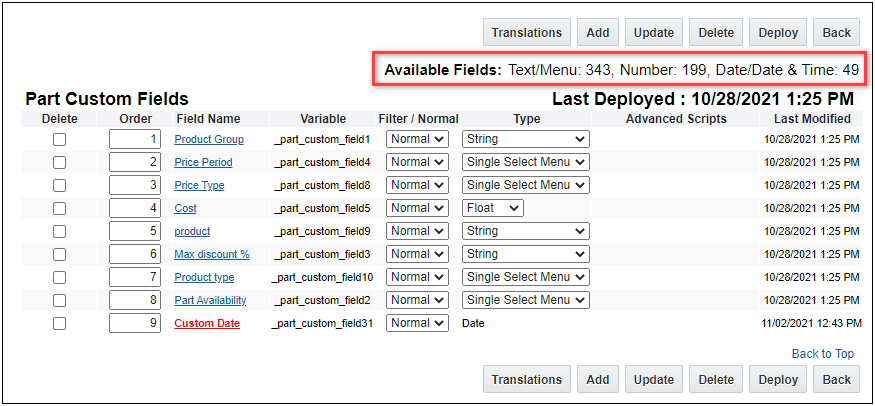
Previously, administrators selected a field to create from the Part Available Fields list. Beginning in Oracle CPQ 22A, custom fields are created by clicking Add.
IMPORTANT: Field Restrictions - Administrators should note the following field restrictions when creating part custom fields:
- A Single Select Menu field type can be changed to String field type, but changing a String field type after you already have data will result in invalid data.
- An Integer field type can be changed to a Float field type, but changing a Float field type to an Integer field type after you already have data will result in invalid data.
- Multi-Select Menu and Date field types cannot be changed to another field type after creation.
Create a Date & Time Part Custom Field
Complete the following procedure to add a Date type part custom field. To add other field types, refer to Oracle CPQ Administration Online Help > Parts > Part Custom Fields.
1. Navigate to the Admin Home Page.
2. Click Parts in the Products section. The Parts Administration page opens.
3. Click Customize Part Fields. The Part Custom Fields page opens.
4. Click Add. The Part Custom Field Editor opens.
5. Enter the Field Name for the part custom field.
6. Select the Required option if the administrator must enter a value into this Part Custom Field when creating new parts.
7. Select Date from the Data Type drop-down menu.

8. (Optional) Enter a Default Value date or click the Calendar icon to select a default date value.
Click Set Time to select the time value.
Note: The date entered in Part Custom Field Editor will use the current user's time zone. The date value retrieved during runtime will be the system time zone, which typically is UTC.
9. (Optional) Select user-side pages that will display this Part Custom Field.
Options include Search Page, Search Results Page, BOM Page, and Detail Page.
10. (Optional) Enter a Page Specific Label to display a custom label.
11. Click Add.
12. To create part filters, select Filter from the Filter/Normal drop-down menu.
13. Click Deploy to activate the custom parts fields and filters.
Oracle CPQ 22A provides a significant increase in the number of part custom fields, including 50 new date fields. This update also makes part custom field administration consistent with other CPQ items.
Steps to Enable
You don't need to do anything to enable this feature.
Tips And Considerations
-
Undeployed part custom field changes will be deployed when a site is upgraded to Oracle CPQ 22A.
-
Administrators can no longer select a field with a specific variable name when creating part custom fields, so they need to coordinate the part custom field creation for multiple sites. You can use the new Migration of Parts Custom Field Definitions, or you need to create part custom fields in the same order for all sites.
-
All 30 part custom fields from the previous release will be selected in the new part attribute set.
-
Previously, new part custom fields were automatically visible on the Recommended Items page. Beginning in Oracle CPQ 22A, new part custom fields are defaulted to "Always Hide" on the Recommended Items Page. To make a part custom field visible, navigate to Admin > Page Templates > Templates for Recommended Items Page and deselect the Always Hide option for the applicable field.
-
Part custom fields that are referenced on the Recommended Items Page cannot be deleted.
-
There is a limit of 60 part custom fields that can be selected and displayed on Search, Search Results, BOM and Detail Pages.
-
Beginning in Oracle CPQ 22A, Date type fields can be referenced in BMQL WHERE clauses.
-
An error will be thrown if a BMQL SELECT statement or WHERE clause reference unused custom fields beyond custom_field30.
-
The BMQL SELECT * function will return custom_field1 through custom_field30 even if they are not used.
Oracle CPQ 22A provides the following new standard part fields:
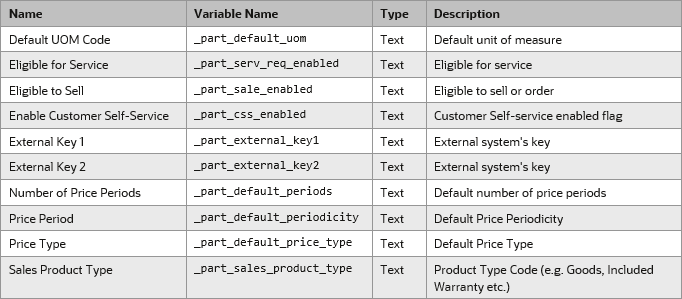
The additional standard part fields are compatible with Oracle CX Sales parts management.
Steps to Enable
You don't need to do anything to enable this feature.
Tips And Considerations
-
The new standard part fields are automatically available for BMQL and the formula query function.
-
Administrators need to explicitly expose these new fields in the following areas:
-
Commerce Part Attribute Set, refer to Manage Commerce Sub-Document Part Set Attributes.
-
Configuration Recommended Items page, administrators can navigate to Admin > Page Templates > Templates for Recommended Items Page and deselect the Always Hide option for the applicable field.
-
Part Associations Page, Part Display Page, and Parts Search Results Page, administrators must add the new standard part fields to an XSL template (the new fields are not available for the Default Template).
-
For instruction to modify XSL templates, refer to Oracle CPQ Administration Online Help > Style & Templates > Page Templates.
-
Equal and Not Equal are the only operators supported when using Price Period, Price Type, Sales Product Type, or Default UOM Code part attributes to create Advanced Filters for rules.
-
The size limit of the standard part number field has been increased to 300 characters. However, if a part number exceeds 255 characters it will appear truncated in Commerce, because the text field limit in Commerce is 255 characters.
-
The values for new standard and custom part fields are not automatically populated in existing transactions.
Manage Attributes for the Part Attribute Set
Beginning in Oracle CPQ 22A, administrators can use the new Manage Part Attributes page to select which standard and custom parts attributes are included in the part attribute set. The part attributes include standard part fields, including the new standard part fields, and deployed Part Custom Fields.
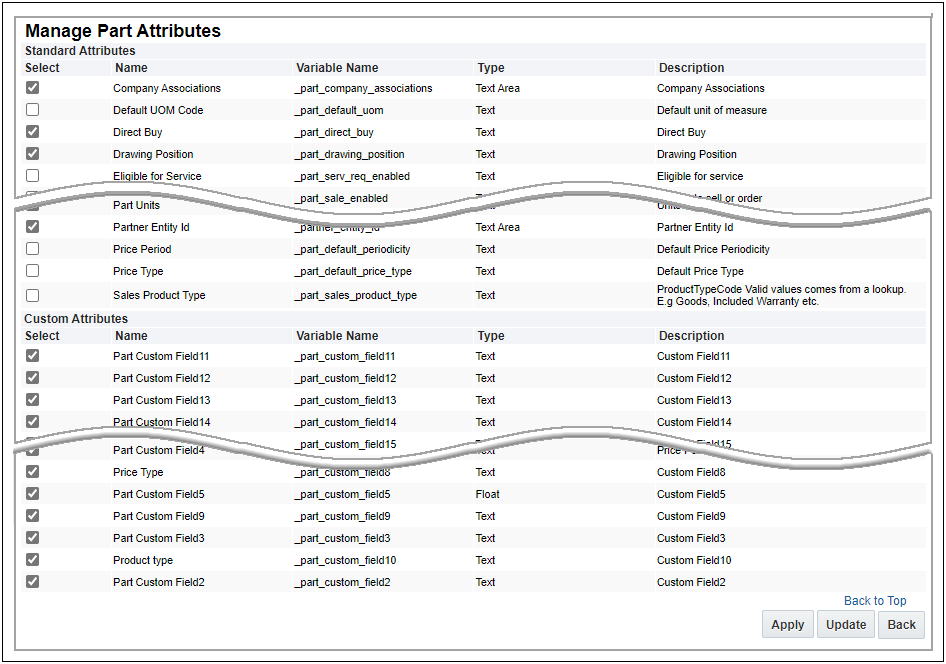
Manage Commerce Part Set Attributes
Complete the following steps to control which standard and custom attributes are included in the Commerce sub-document part attribute set.
1. Navigate to the Admin Home Page.
2. Click Process Definition in the Commerce and Documents section.
3. Select Documents from the applicable commerce process Navigation drop-down, and then click List.
4. Select Attributes from the sub-document Navigation drop-down, and then click List.
5. Click on the Part Attribute Set link.
6. Click Manage Attributes.
7. Check the Select option to include the attribute in the part attribute set, or uncheck the Select option to remove the attribute from the part attribute set.
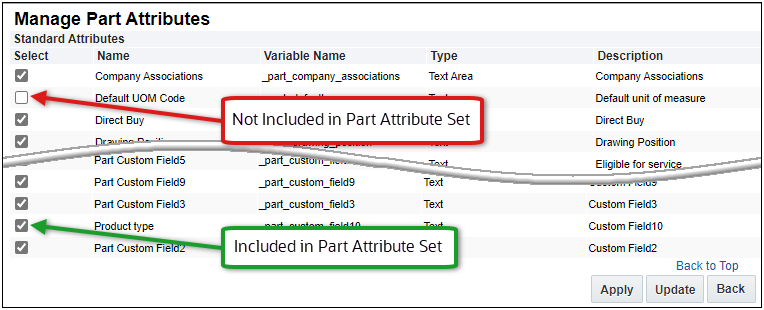
8 Click Apply or Update.
9. Deploy your changes.
The new Manage Part Attributes page provides administrators with the ability to customize which standard and custom part attributes are available in Commerce.
Steps to Enable
You don't need to do anything to enable this feature.
Tips And Considerations
-
All existing attributes in the part attribute set remain when upgrading to Oracle CPQ 22A.
-
To change the order of the attributes in the part attribute set, refer to Oracle CPQ Administration Online Help > Commerce > Attributes & Arrays > Attributes (Reorder Commerce Attributes).
-
If an attribute in the part attribute set is renamed and then removed, the Parts administration name will display for that attribute. The default name for standard part attributes is set by the system. While the default name for custom part attributes is set in Part Custom Fields administration.
-
Attributes that are referenced in Commerce (BML, rules, etc.) cannot be unselected.
-
Attributes that are unselected are removed from the Commerce process.
-
Part Number and Part Display Number attributes cannot be removed from the Part Attribute Set. They are the minimum mandatory attributes for the Part Attribute Set.
Migration of Part Custom Field Definitions
Oracle CPQ 22A adds a new "Part Custom Field" migration category to enable migration of deployed part custom fields. The Migration Center also supports cross dependency for Part Custom Field definitions when migrating a Commerce process with mapped Part Custom Fields.
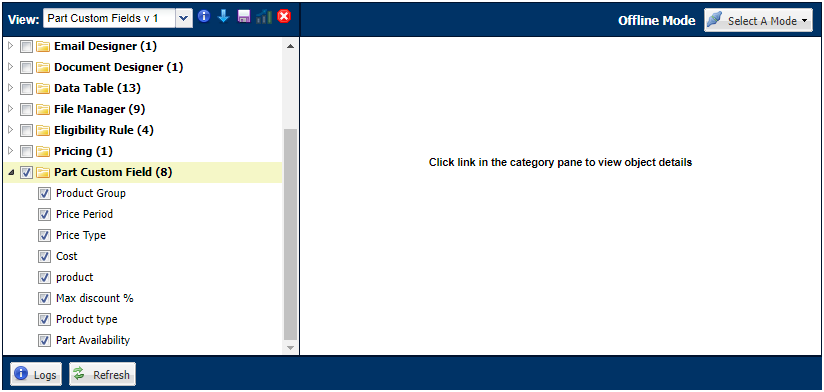
Administrators can now migrate part custom fields instead of recreating the same fields on multiple sites.
Steps to Enable
You don't need to do anything to enable this feature.
Tips And Considerations
-
The variable name is used as the key for migration.
-
Migration will fail if the target site has an existing attribute with same field name but a different variable name.
-
Migration will fail if the source field type is set to value that conflicts with target field type. Refer to Increased Number of Part Custom Fields - Field Restrictions for more information.
-
Migration will not delete target attributes that are not in the source.
IMPORTANT Actions and Considerations
PRE-UPGRADE CONSIDERATIONS
Modifications to Known Functionality
Before upgrading to Oracle CPQ 22A, we recommend you review the modifications to known functionality and plan accordingly.
| Oracle CPQ Feature |
Description |
| JET 10 Support in Oracle CPQ and IE 11 |
Oracle CPQ 22A introduces support for Oracle JET 10. Oracle JET 10 is not certified using Internet Explorer 11 or earlier. Therefore, Oracle CPQ 22A new features may not function properly using the JET User Interface with IE 11. Previous features are expected to continue to function, however Oracle CPQ will not address new issues that arise. If you are using IE 11, you need to complete your own certification testing prior to Oracle CPQ 22A upgrade. For your reference, the following list of known issues exist related to Oracle CPQ JET 10 UI and IE11:
We strongly encourage customers to upgrade to a certified and supported browser version. |
| Parts |
Undeployed part custom field changes will be deployed when a site is upgraded to Oracle CPQ 22A. |
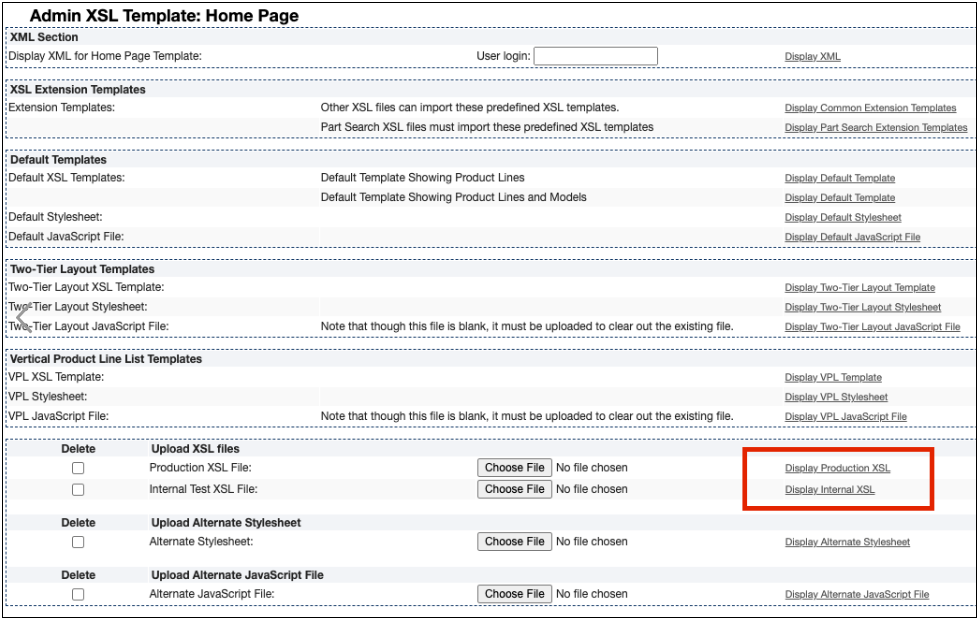
| ExtJS Library Helper | ExtJS is a JavaScript library for building web application pages. Oracle CPQ used this framework for its internal implementation and did not expose this library for customer use. As of Oracle CPQ 22A, we are eliminating this library from our product. If you are using JavaScript for your CPQ implementation and have made any custom references to ExtJS Library functions, you must remove those references from your script. Please follow the below steps to verify the custom usage of EXTJS Library in your CPQ implementation. Step 1 To verify if you are referencing ExtJS Library in your Home XSL Template, follow the instructions below:
<xsl:variable name="gSkinJsCode"> ... </xsl:variable> Step 2
Step 3
Step 4 If you have defined and referenced custom JavaScript from the File Manager, perform the document search with "Ext." to find the ExtJS references. |
| Configuration Page Templates |
This administrative feature was not widely implemented. If you are among the customers that currently have configuration page templates in your environment you need to migrate to standard configuration flows. In Oracle CPQ 21D and later, customers are no longer be able to create and edit the configuration page templates. To learn more about Configuration Flows, refer to the Configuration Flows topic in the Oracle CPQ Administration Online Help. |
| Document Engine |
Document Engine, which is used to created proposals and submissions, is being deprecated. Customers need to recreate their existing DocEngine Templates with the Document Designer. Upon upgrade to Oracle CPQ 21D or later, customers no longer have access to Document Engine administration for the editing of templates. However, customers retain edit access to the raw XSL templates that Document Engine produced. Print actions using templates created with the Document Engine continue to function for end users. To learn more about Document Designer, refer to the Document Designer Overview topic in the Oracle CPQ Administration Online Help. |
Planned Changes to Supported Features
To continually improve our application, Oracle CPQ routinely evaluates product capabilities to identify older features that should be replaced with improved functionality. Supporting outdated features adversely impacts the value that we bring to our customers. This announcement provides information to CPQ administrators and IT professionals to prepare for future updates, including the uptake of provided alternative functionalities. The table below includes planned feature deprecations and their removal release schedule.
What does this mean?
“Deprecated” means the feature is planned for removal in a future Oracle CPQ Update (see End of Life column in the table below). The feature will continue to function for existing users until that time but will not be further enhanced or documented. After removal, the feature will no longer be supported or function.
| Oracle CPQ Feature |
Deprecation Announced |
End of Life and Removal |
Description |
| Oracle CPQ Shopping Cart |
21A |
22B |
The Oracle CPQ shopping cart feature is being deprecated from Legacy Configuration UI. We are working on developing a similar experience for the JET Configuration UI.
|
| Legacy Global Functions |
21C |
22B |
In earlier versions of Oracle CPQ the Legacy Global Functions, also known as Jython scripts, allowed customers to write custom python scripts to use with BML for various types of processing. Due to poor performance, Oracle CPQ ended support for these scripts several years ago. If your Oracle CPQ implementation uses this functionality, we recommend administrators migrate to standard supported functionality (e.g., Util BML Libraries, Commerce BML Libraries, and BMQL). With Oracle CPQ 22B, we will be removing this functionality from the product. To verify if you have Legacy Global Functions enabled in your environment, follow the steps below:
|
| Legacy Commerce UI |
21C |
22C |
In Oracle CPQ 21C, we announced the deprecation of Legacy Commerce Transaction UI. The end of life and removal of this functionality will occur in Oracle CPQ 22C. We introduced JET Responsive UI for Commerce in Oracle CPQ 18C, and after years of evolution and production experience, our customers are experiencing the benefits of the new JET Responsive UI for both Commerce and Configuration. The majority of Oracle CPQ customers have successfully made the complete transition to the JET UI. Moving forward, we are focusing our development efforts on enhancing the JET Responsive UI to improve the overall user experience. We’re announcing these changes to give our customers early visibility and the opportunity to prepare for this update. If your Oracle CPQ implementation still uses Legacy Commerce UI, we encourage you to start preparing for the transition to the JET UI. For more information on enabling JET Commerce UI, visit the Oracle CPQ Administration Online Help JET Transaction UI topic or watch the CPQ JET UI: Best Practices and Customization Video. |
| Legacy Configuration UI |
21C |
22C |
In Oracle CPQ 21C, we announced the deprecation of Legacy Configuration UI. The end of life and removal of this functionality will occur in Oracle CPQ 22C. We introduced JET Responsive UI for Configuration in Oracle CPQ 19B, and after years of evolution and production experience, our customers are experiencing the benefits of the new JET Responsive UI for both Commerce and Configuration. The majority of Oracle CPQ customers have successfully made the complete transition to the JET UI. Moving forward, we are focusing our development efforts on enhancing the JET Responsive UI to improve the overall user experience. We’re announcing these changes to give our customers early visibility and the opportunity to prepare for this update. If your Oracle CPQ implementation still uses Legacy Configuration UI, we encourage you to start preparing for the transition to the JET UI. For more information on enabling JET Configuration UI, visit the Oracle CPQ Administration Online Help JET Configuration UI topic or watch the CPQ JET UI: Best Practices and Customization Video. |
| Legacy Commerce and Configuration Mobile Layouts |
21C |
22C |
In Oracle CPQ 21C, we announced the deprecation of Legacy Commerce and Configuration Mobile Layouts. The end of life and removal of this functionality will occur in Oracle CPQ 22C. Legacy Mobile Layouts were built to provide an adaptive experience for quoting and configuring on mobile devices. The JET Responsive UI provides a clean, streamlined user experience that is fully responsive across desktop, tablet, and phone devices, eliminating the need for the administration of separate UI Layouts for desktop and mobile users. If your Oracle CPQ implementation has legacy mobile layouts enabled, we advise you to make a transition to JET Responsive UI to provide an optimal experience for your end users. For more information on enabling the JET UI responsive experience, refer to the Oracle CPQ Administration Online Help. We’re announcing these changes to give our customers early visibility and the opportunity to prepare for this update. If your Oracle CPQ implementation still uses Legacy Configuration UI, we encourage you to start preparing for the transition to the JET UI. For more information on enabling JET Configuration UI, visit the Oracle CPQ Administration Online Help JET Responsive UI topic. |
| Legacy Rich Text Editor |
21C |
22C |
In Oracle CPQ 21C, we are announced the deprecation of the Legacy Rich Text Editor. The end of life and removal of this functionality will occur in Oracle CPQ 22C. Oracle CPQ occasionally disables old areas of the product that have been replaced by newer and improved versions. As previously announced in CPQ 20C, we introduced a new inline editor for rich-text editable attributes (RTE). The new JET editor includes more text formatting options than the legacy editor. Features include undo/redo, images, links, table tools, and functions with the browser's native spell-check. We are also working on adding user-specific template support to the new editor before retiring the legacy editor from the product. |
| GXT Customer Images and CSS References |
21C |
22C |
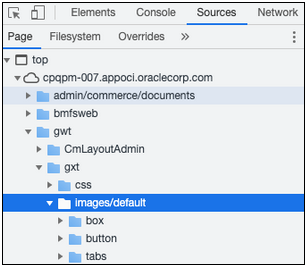
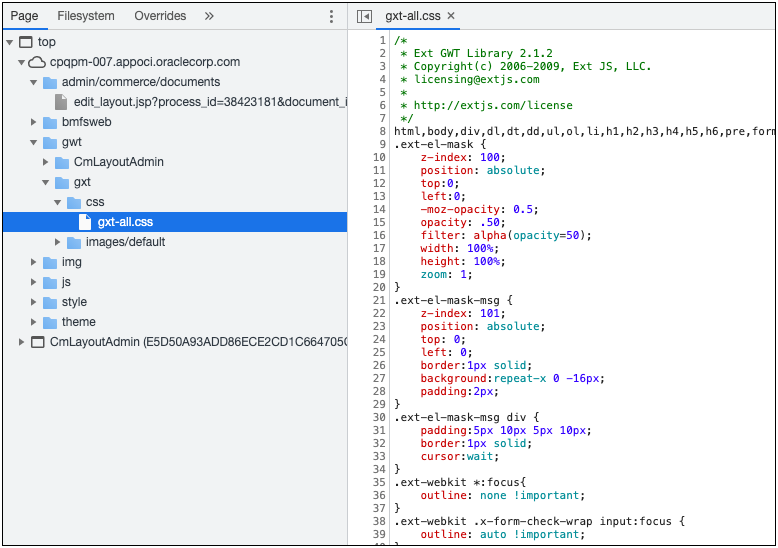
GXT is a Java framework for building web application pages. Oracle CPQ used this framework for its internal implementation and did not expose this for customer use. We are eliminating this framework from our product. If you are referencing images or CSS provided by this framework, we strongly recommend you to remove those references from your implementation. With the Oracle CPQ 22C release, we will be removing this framework from the Oracle CPQ product. GXT Images/Icons References The images used by this framework are likely found under the folder path: "/gwt/gxt/images/default/" Refer to the example below. If you are referencing any image from this folder, remove those references and use the File Manager to manage your customized images.
GXT CSS References The CSS file used by this framework are likely found under this folder path: "/gwt/gxt/css/gxt-all.css". Refer to the example below. If you have customized the above CSS file or referencing any CSS classes from this file, remove those customizations and use Stylesheet Manager to manage your customized CSS.
IMPORTANT: Depending on your speific implementation, the folder may not be exactly in the same path as referenced above. Review the folders to find the images/default folder and gxt-all.css file. |
Custom Javascript
While Oracle CPQ does not endorse or guarantee the use of JavaScript customizations, we recognize that some customers have extended the Oracle CPQ. Customizations may conflict with new Oracle CPQ platform features, data may be corrupted or lost, maintenance and support may be difficult, cross-browser support must be verified, performance may be impaired, and testing is required for each upgrade. Customers should consider carefully the relative benefits of JavaScript customizations in light of the associated risks.
If customers have added custom JavaScript that leverages the Document Object Model (DOM) structure or specific elements, classes or IDs, this customization should be thoroughly tested and may require refactoring.
Oracle CPQ 22A introduces support for JET v10.0.0. Refer to Modifications to Known Behavior for JET 10 and Internet Explorer 11 known behavior differences.
Refer to the following resources for more information:
- Oracle CPQ Administration Online Help > Style & Templates > JavaScript Customizations for JET UIs
- Oracle CPQ JET Configuration and Transaction UI: Refactoring Existing JavaScript Customizations (Doc ID 2490016.1)
- JavaScript Extension Toolkit and JET v10.0.0 Release Notes
Migration
When using Import From Source or Connect To Destination to migrate content, both sites must use the same major update. The migration of content can only occur across minor updates within the same major update.
- "Major update" = Update 22A
- "Minor update" = Update 22A Patch 1
When using Migration Packages, content from 19A and forward can be uploaded to the latest site version.
Resolved Known Issues
For information on bugs fixed in Update 22A, refer to the Oracle CPQ 21D Resolved Known Issues document available on My Oracle Support and the Oracle CPQ Administration Online Help.
Translation
For some system-defined messages and components, strings were removed and others added in Oracle CPQ 22A. If you have created your own implementation-specific translations of system-defined strings, some of these strings may no longer appear. Other strings may appear in English. The strings appearing in English are new and require translation.
Most of these messages and components are on the Administration side of Oracle CPQ, but you should review both your end user and administration pages before deploying your updated installation to confirm that all strings appear in the desired language.
Translation Status
Oracle CPQ supports the consumption of both single and multi-byte character sets. Submit a service request on My Oracle Support to enable your site for a new language.
For the following languages, a translation of the Oracle CPQ user interface is available for both the platform and the reference application:
- Chinese (Simplified) [China]
- Chinese (Traditional) [Taiwan]
- Czech [Czech Republic]
- Danish [Denmark]
- Dutch [Netherlands]
- English
- Finnish [Finland]
- French
- French [Canada]
- German
- Hungarian [Hungary]
- Italian
- Japanese [Japan]
- Korean [South Korea]
- Norwegian (Bokmål) [Norway]
- Polish [Poland]
- Portuguese [Brazil]
- Romanian [Romania]
- Russian [Russia]
- Spanish (Worldwide)
- Swedish [Sweden]
- Turkish [Turkey]
POST-UPGRADE CONSIDERATIONS
Upgrade and test all test instances on Oracle CPQ 22A before upgrading to production.
Customer Upgrade Testing
Customers should actively test new versions applied to non-production environments before a scheduled production upgrade. At minimum, customers should test the lifecycle of a transaction, with the typical actions that sales users perform. These may include but are not limited to: start transaction, new configuration, reconfigure existing configuration, parts search, discounting, printing, revisions, and approvals. Integration points should also be tested. Reviewing the What's New is highly recommended as this practice may indicate additional focus areas for testing.
Customers should also test any customizations made on the environment, especially JavaScript and unsupported integrations. Note that custom JavaScript is the most frequent cause of post-upgrade issues. Custom JavaScript and unsupported integrations are not supported by Oracle Support or Development. In particular, note that an upgrade may introduce changes to the DOM, which could impact use of customer JavaScript and CSS.
While Oracle CPQ does not endorse or guarantee the use of JavaScript customizations, we recognize that some customers have extended Oracle CPQ to support critical use cases. JavaScript API ("CPQJS") includes methods for accessing attributes, actions, and other elements on the JET Configuration and JET Transaction UIs. Customers should consider carefully the relative benefits of JavaScript customizations in light of the associated risks. Customizations may conflict with new Oracle CPQ platform features, data may be corrupted or lost, maintenance and support may be difficult, cross-browser support must be verified, performance may be impaired, and testing is required for each upgrade.
Oracle CPQ does extensive testing as part of the release cycle. Therefore your testing plan efforts should focus on testing customer-specific use cases rather than general tasks such as adding a configuration attribute.
Issues after Upgrade
If a customer experiences issues after the upgrade, there are two different processes depending on if the upgrade is a non-production or production upgrade.
Issues after Non-Production Upgrade
- Log a Service Request (SR) through My Oracle Support.
- The Service Request will be picked up by Customer Support, and assigned to the Point of Contact (POC).
- The Service Request is worked as a standard Customer Support Service Request.
NOTE: In some instances the customer administrator may resolve issues without opening a Customer Support Service Request.
Issues after Production Upgrade
- In most cases, production upgrades go smoothly and the Upgrade Service Request is closed once the upgrade completes.
- The customer is instructed to open a "Severity 1" Service Request in the event that there is a critical issue after the production upgrade that was not identified after the non-production upgrade. Critical issues after upgrade would be considered production site down, 100% of users cannot quote, or other revenue impacting business critical issues.
- Once the "Severity 1" Service Request is created, the on-call team is notified.
- On-call team member(s) will work the Service Request towards resolution.
- On-call team member will then reach out to Oracle Upgrade Specialist who performed the post upgrade validation if needed.
Browser Support
Oracle CPQ supports all browser versions that meet the criteria of the Oracle Software Web Browser Support Policy.
If you experience issues using a supported browser version, open a ticket on My Oracle Support to resolve the issue. If an issue arises when using a supported browser, use a certified browser version until a fix is delivered. Certified browsers are selected based on current market share and are thoroughly tested to work with the current version’s standard functionality.
Certified Browsers
Windows
- Google Chrome 95.x
- Mozilla Firefox 93.x
- Microsoft Edge 95.x
Mobile Devices
- Apple iPad iOS 15.x, Safari browser
- Apple iPhone iOS 15.x, Safari browser
IMPORTANT:
- Internet Explorer browser certification and support was discontinued in Oracle CPQ 21A.
- Compatibility issues with the selected browsers may exist when sites are created with additional JavaScript, alternate CSS, or other custom functionality. Customizations may require add-on work. Contact My Oracle Support to determine the availability of workarounds and minor fixes.
Transport Layer Security Support
Oracle CPQ supports Transport Layer Security (TLS) 1.1 or later. Earlier versions of TLS are not supported.
Salesforce Integration Support
Oracle officially supports version 8.1, 8.2 and 8.3 of the Oracle CPQ Connector for Salesforce. We also continue to support version 7.2 of the legacy Oracle CPQ Commerce Integration.
Training
Please refer to the release documentation for all versions between your current version and the version to which you are upgrading to see all new functionality, resolved known issues, and functional known issues.
Refer to the Oracle CPQ Administration Online Help to become familiar with the new features introduced in Oracle CPQ 22A. For additional help, see My Oracle Support.
Verify any information not explicitly mentioned in this document as supported by the software against the product help for Oracle CPQ 22A.
Additional Information
For more information on Oracle CPQ, visit the Oracle CPQ documentation site.
Disclaimer
The details in this document are provided for high-level informational purposes only and are not intended to function as a specification or to replace the Online Help. Upgrading to a subsequent release may require the re-deployment of Commerce Processes, Configuration, or global function settings. Modifications to integration XSL files or APIs may also be required.