
This document will continue to evolve as existing sections change and new information is added. All updates appear in the following table:
| Date | Product | Feature | Notes |
|---|---|---|---|
| 31 JUL 2020 | Created initial document. |
This guide outlines the information you need to know about new or improved functionality in this update.
Give Us Feedback
We welcome your comments and suggestions to improve the content. Please send us your feedback at omcdocumentation_ca@oracle.com.
Column Definitions:
Features Delivered Enabled
Report = New or modified, Oracle-delivered, ready to run reports.
UI or Process-Based: Small Scale = These UI or process-based features are typically comprised of minor field, validation, or program changes. Therefore, the potential impact to users is minimal.
UI or Process-Based: Larger Scale* = These UI or process-based features have more complex designs. Therefore, the potential impact to users is higher.
Features Delivered Disabled = Action is needed BEFORE these features can be used by END USERS. These features are delivered disabled and you choose if and when to enable them. For example, a) new or expanded BI subject areas need to first be incorporated into reports, b) Integration is required to utilize new web services, or c) features must be assigned to user roles before they can be accessed.
| Ready for Use by End Users Reports plus Small Scale UI or Process-Based new features will have minimal user impact after an update. Therefore, customer acceptance testing should focus on the Larger Scale UI or Process-Based* new features. |
Action is Needed BEFORE Use by End Users Not disruptive as action is required to make these features ready to use. As you selectively choose to leverage, you set your test and roll out timing. |
|||||
|---|---|---|---|---|---|---|
| Feature |
Report |
UI or |
UI or |
|
||
Both the Rewards v2.1 and User Rewards v2.1 API endpoints now support sorting criteria. You can now sort these API responses by point value, start date, or title.
This API enhancement improves the member experience that can be provided out-of-the-box. Adding sorting controls allows members to better navigate the available rewards and facilitates redemption.
Steps to Enable
Review the REST service definition in the REST API guides, available from the Oracle Help Center > your apps service area of interest > REST API. If you're new to Oracle's REST services you may want to begin with the Quick Start section.
Key Resources
Visit our Help Center to learn more about Rewards and User Rewards.
Usable Coupon API - Expired Coupon Filter
The Usable Coupon API endpoint now supports an expiration filter so that only valid coupons are returned in the response.
This enhancement improves the purchase experience of programs leveraging our Usable Coupon API.
Steps to Enable
Review the REST service definition in the REST API guides, available from the Oracle Help Center > your apps service area of interest > REST API. If you're new to Oracle's REST services you may want to begin with the Quick Start section.
Tips And Considerations
The Usable Coupon API is a great way to remind program members that they have offers available. We recommend incorporating it into your e-commerce checkout flow or POS system.
Key Resources
Visit our Help Center to learn more.
User Redemption History API v2.1
The v2.1 User Redemption History endpoint introduces pagination and date filtering.
This is a new endpoint (v2.1) and will not impact the existing User Redemption History API (v2).
These enhancements improve performance and usability.
Steps to Enable
Review the REST service definition in the REST API guides, available from the Oracle Help Center > your apps service area of interest > REST API. If you're new to Oracle's REST services you may want to begin with the Quick Start section.
Tips And Considerations
We recommend updating when possible in order to receive the performance benefits and future enhancements.
Key Resources
Visit our Help Center to learn more.
Program managers are now able to provide full stylesheets for all of the default CrowdTwist widgets.
Default widgets include:
- Forgot Password
- Reset Password
- Verify Email
- Subscribe To Email
- Set Password After Social Disconnect
- Email Unsubscribe
- Additional Information
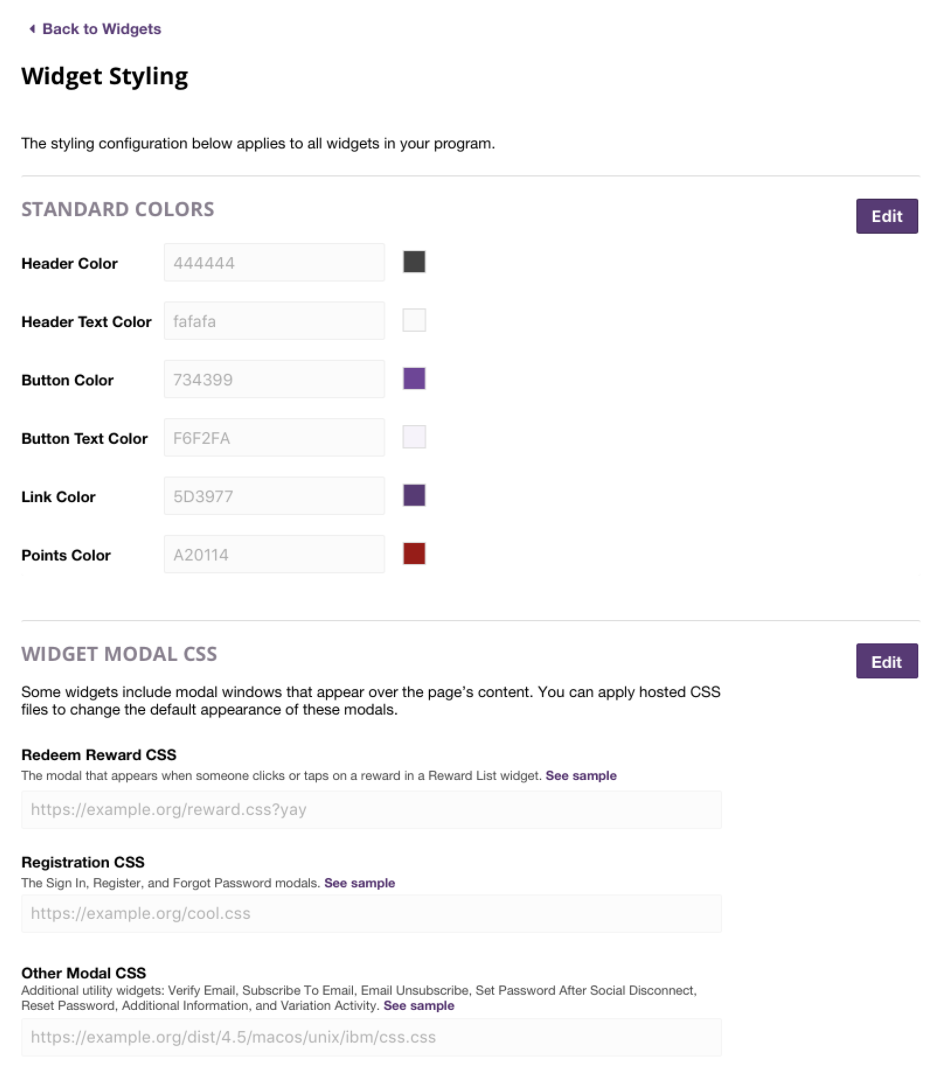
This enhancement improves a program's branding and design capabilities.
Steps to Enable
You don't need to do anything to enable this feature.
Tips And Considerations
Including default widget CSS helps create a unified program look and feel. It can be added at any time.