
| Date | Feature | Notes |
|---|---|---|
| 31 MAY 2019 | Waterfall-Based Segmentation | Updated document. Revised feature information. |
| 27 MAY 2019 | Created initial document. |
This guide outlines the information you need to know about new or improved functionality in this update.
GIVE US FEEDBACK
We welcome your comments and suggestions to improve the content. Please send us your feedback at omcdocumentation_ca@oracle.com.
Column Definitions:
Report = New or modified, Oracle-delivered, ready to run reports.
UI or Process-Based: Small Scale = These UI or process-based features are typically comprised of minor field, validation, or program changes. Therefore, the potential impact to users is minimal.
UI or Process-Based: Larger Scale* = These UI or process-based features have more complex designs. Therefore, the potential impact to users is higher.
Features Delivered Disabled = Action is needed BEFORE these features can be used by END USERS. These features are delivered disabled and you choose if and when to enable them. For example, a) new or expanded BI subject areas need to first be incorporated into reports, b) Integration is required to utilize new web services, or c) features must be assigned to user roles before they can be accessed.
| Ready for Use by End Users Reports plus Small Scale UI or Process-Based new features will have minimal user impact after an update. Therefore, customer acceptance testing should focus on the Larger Scale UI or Process-Based* new features. |
Customer Must Take Action before Use by End Users Not disruptive as action is required to make these features ready to use. As you selectively choose to leverage, you set your test and roll out timing. |
|||||
|---|---|---|---|---|---|---|
| Feature |
Report |
UI or |
UI or |
|
||
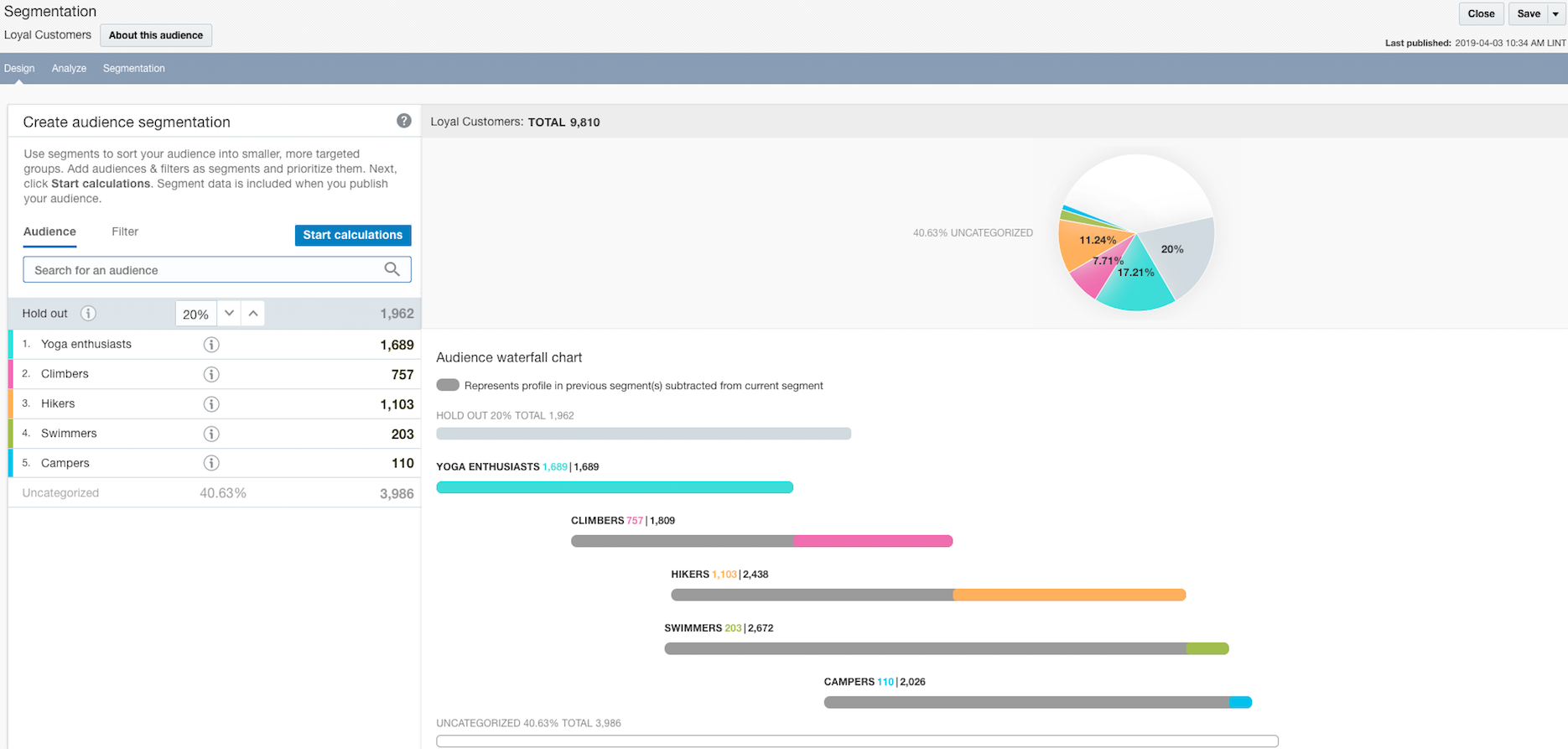
Waterfall-based segmentation is now available. It allows you to create and prioritize segments within an audience. This form of segmentation helps you achieve more relevant targeting within an audience and prevent message fatigue. Segment data is included when the audience is published to Responsys.
Steps to Enable
To enable this feature you need to log a Service Request (SR).
This feature is currently released under our Controlled Availability program. To request access to these features, please log in to My Oracle Support and create a service request.
Tips And Considerations
Before you leverage waterfall-based segmentation:
- Create, publish, and run the audience you want to use for segmentation. If you plan to publish your audience to Responsys, it must be created from the list associated with the Responsys profile list, so that you can use segment data in campaigns. This audience must also have a count greater than zero.
- Prepare the filters and other audiences that you will use to segment the audience. CX Audience uses the logic defined in filters and audiences to create segments of the target audience. Although CX Audience will help you find filters and audiences when it's time to choose one for your segment, we recommend making a list of filters and audiences that you plan to use.
Key Resources
Visit our Help Center to learn more.