
This document will continue to evolve as existing sections change and new information is added. All updates appear in the following table:
| Date | Feature | Notes |
|---|---|---|
| 23 JAN 2020 | Created initial document. |
This document outlines the features in Oracle DataFox and describes any tasks you might need to perform for this service. Each section includes a brief description of the feature, the steps you need to take to enable or begin using the feature, any tips or considerations that you should keep in mind, and the resources available to help you.
Column Definitions:
Features Delivered Enabled
Report = New or modified, Oracle-delivered, ready to run reports.
UI or Process-Based: Small Scale = These UI or process-based features are typically comprised of minor field, validation, or program changes. Therefore, the potential impact to users is minimal.
UI or Process-Based: Larger Scale* = These UI or process-based features have more complex designs. Therefore, the potential impact to users is higher.
Features Delivered Disabled = Action is needed BEFORE these features can be used by END USERS. These features are delivered disabled and you choose if and when to enable them. For example, a) new or expanded BI subject areas need to first be incorporated into reports, b) Integration is required to utilize new web services, or c) features must be assigned to user roles before they can be accessed.
| Ready for Use by End Users Reports plus Small Scale UI or Process-Based new features will have minimal user impact after an update. Therefore, customer acceptance testing should focus on the Larger Scale UI or Process-Based* new features. |
Action is Needed BEFORE Use by End Users Not disruptive as action is required to make these features ready to use. As you selectively choose to leverage, you set your test and roll out timing. |
|||||
|---|---|---|---|---|---|---|
| Feature |
Report |
UI or |
UI or |
|
||
You can now integrate Oracle Eloqua with Oracle DataFox to enrich your contacts with account-level data and account scores. Use Oracle DataFox data to enhance your sales and marketing decisions in Oracle Eloqua. With enriched company-level data and account scores on contacts, you can improve your understanding of customer fit, prioritize quality leads, and personalize outreach. Use company data to enable and support Account Based Marketing strategies.
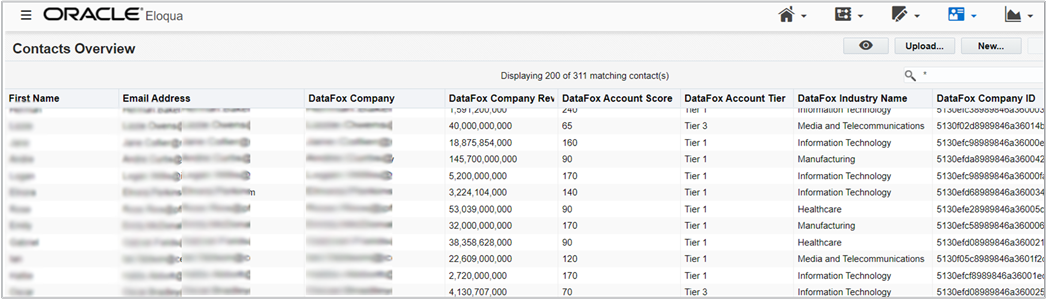
This screenshot illustrates some of the enriched Oracle DataFox data fields listed in Oracle Eloqua, after successful integration.
Steps to Enable
Steps required to integrate are described in Set Up DataFox for Eloqua.
Tips And Considerations
If you use Oracle Eloqua, contact your account manager for information on the Oracle DataFox subscription.
Key Resources