
This document will continue to evolve as existing sections change and new information is added. All updates appear in the following table:
| Date | Feature | Notes |
|---|---|---|
| 02 JUL 2019 | Created initial document. |
This document outlines the features in Oracle DataFox and describes any tasks you might need to perform for this service. Each section includes a brief description of the feature, the steps you need to take to enable or begin using the feature, any tips or considerations that you should keep in mind, and the resources available to help you.
Column Definitions:
Report = New or modified, Oracle-delivered, ready to run reports.
UI or Process-Based: Small Scale = These UI or process-based features are typically comprised of minor field, validation, or program changes. Therefore, the potential impact to users is minimal.
UI or Process-Based: Larger Scale* = These UI or process-based features have more complex designs. Therefore, the potential impact to users is higher.
Features Delivered Disabled = Action is needed BEFORE these features can be used by END USERS. These features are delivered disabled and you choose if and when to enable them. For example, a) new or expanded BI subject areas need to first be incorporated into reports, b) Integration is required to utilize new web services, or c) features must be assigned to user roles before they can be accessed.
| Ready for Use by End Users Reports plus Small Scale UI or Process-Based new features will have minimal user impact after an update. Therefore, customer acceptance testing should focus on the Larger Scale UI or Process-Based* new features. |
Customer Must Take Action before Use by End Users Not disruptive as action is required to make these features ready to use. As you selectively choose to leverage, you set your test and roll out timing. |
|||||
|---|---|---|---|---|---|---|
| Feature |
Report |
UI or |
UI or |
|
||
Analyze Data with Advanced Insights
Identify your ideal customer profile and expand your total addressable market by leveraging data which is unique to the customers. You can now upload a custom list of companies. Analyze unique data points when comparing the custom list to the Oracle DataFox database with more than 3.4 million companies.
Steps to Enable
You don't need to do anything to enable this feature.
Key Resources
You can now filter companies based on industry categories. This enhancement helps you expand your total addressable market and screen a sector. To do so, from your Oracle DataFox account, navigate to the Companies tab, click the Add a Filter button, and click Industry Definition from the Filter Companies dialog box.
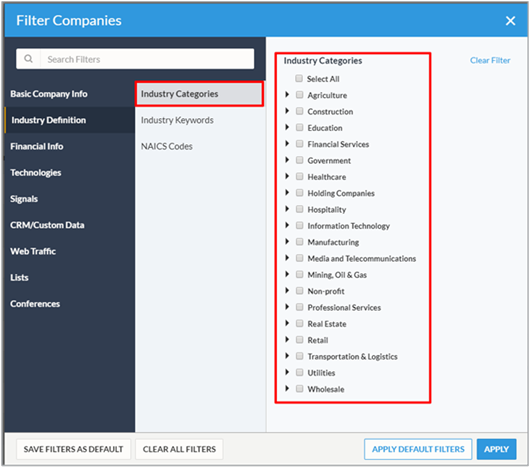
Filter Industry Categories
Steps to Enable
You don't need to do anything to enable this feature.
Key Resources
Enrich Multiple Salesforce Accounts with the Same Company
You can now enrich multiple Salesforce accounts by syncing with the same company profile.
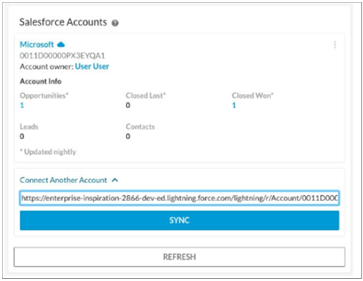
Connect Another Account option
As an admin, you can use the SFDC Sync Account Job to run a job to sync company with primary and secondary accounts.
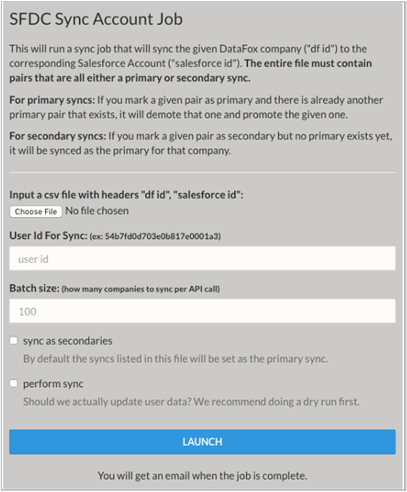
SFDC Sync Account Job
Steps to Enable
You don't need to do anything to enable this feature.
Tips And Considerations
As an admin, you can run a sync job to sync company with primary and secondary accounts in bulk.
Key Resources