


- Revision History
- Enterprise Data Management Cloud, October Update
-
- Features
-
- Financial Consolidation and Close Application Type
- Expressions for Custom Business Logic
- Derived Properties
- Property Transformations in Node Type Converters
- Lookup Sets
- Application Overrides for Property Parameters
- Compare Selected Nodes in Viewpoints
- Audit Transaction History
- Auditor Role
- Improved Node Search Performance
- Retain Relationship Properties During Import
- New Documentation: Troubleshooting Reports and Change Management Process
- Enhancement Request Process Moves to Idea Labs
- Updated Interface for EPM Cloud Help Centers and User Assistance
-
- Upcoming Changes
- Defects Fixed
- Considerations
This document will continue to evolve as existing sections change and new information is added. All updates appear in the following table:
| Date | Feature | Notes |
|---|---|---|
| 26 SEP 2019 | Created initial document. |
Enterprise Data Management Cloud, October Update
This document outlines the upcoming Enterprise Data Management Cloud update.
Oracle will apply the latest monthly updates to your Test environments during the first daily maintenance that occurs at or after 22:00 UTC (15:00 PDT) on Friday, October 4, 2019. Oracle will apply the latest monthly updates to your Production environments during the first daily maintenance that occurs at or after 22:00 UTC (15:00 PDT) on Friday, October 18, 2019.
The Oracle Help Center provides access to updated documentation. The updates will be available in the Help Center on Friday, October 4, 2019. Some of the links to new feature documentation included in this readiness document will not work until after the Oracle Help Center update is complete.
NOTE: Backing up the daily maintenance snapshot and restoring the environment as needed are self-service operations. Oracle recommends that you download the maintenance snapshot every day to a local server.
Please Join Oracle Cloud Customer Connect
Please take a moment to join the Cloud Customer Connect forums for EPM Cloud services. Oracle Cloud Customer Connect is a community gathering place for members to interact and collaborate on common goals and objectives. This is where you will find the latest release information, upcoming events, or answers to use-case questions. Joining takes just a few minutes. Join now!
https://cloud.oracle.com/community
NOTE: The Settings and Actions menu now contains a link to Cloud Customer Connect. To access this link, from the Home page, click the down arrow next to the user name (in the upper right-hand corner of the screen), and select Cloud Customer Connect.
Give Us Documentation Feedback
We welcome your comments and suggestions to improve the content of the What's New document and the product documentation. Please send us your feedback at EPMdoc_ww@oracle.com. In the body or title of the email, state that you are inquiring or providing feedback, and indicate for which EPM Cloud service and the monthly update cycle.
For the latest updates and information about EPM Cloud, follow us on YouTube, Twitter, Facebook, and LinkedIn at Hyperion EPM Info.
Financial Consolidation and Close Application Type
A Financial Consolidation and Close application type is available to manage dimensions and mappings for that Oracle EPM business process in Enterprise Data Management Cloud.
The application type includes:
- Registration of application settings and dimensions for an application
- Financial Consolidation and Close properties and validations
- Import dimensions from connections and files
- Export dimensions to connections and files
Key Resources
- Working with Financial Consolidation and Close Applications in Administering and Working with Oracle Enterprise Data Management Cloud.
Expressions for Custom Business Logic
Expressions are used to define custom business rules for nodes in particular applications. Expressions can be configured for derived properties and property transformations to calculate property values for nodes in viewpoints. Expressions are defined in a graphical manner using a palette and an editor.
An expression is a collection of ordered statements which can be sequential or nested. Statements can be used to evaluate, compare, and manipulate data. Each statement has a type and consists of expression terms and fields. Terms include data objects and operators. Fields consist of attributes and methods for selected objects.
Following is the initial list of available expression terms and fields:
Statements
- If
- Else If
- Else
- Return
- Comment
Objects
- Node
- LookupSet
- String value
- Integer value
- Boolean value
Operators
- AND
- OR
Attributes
- Name
- Node Type
- Dimension
- Parent
- Properties
Methods
- Concat
- Equals
- Find
- IndexOf
- Length
- Not
- Replace
- Substring
Key Resources
- Expressions for Custom Business Logic in Administering and Working with Oracle Enterprise Data Management Cloud
You can use derived properties to calculate a default value for a node property using an expression. Expressions can be configured for properties at the application level. A derived property value can be read-only or overridden with a defined value if the property is configured as editable.
Derived properties are dynamically calculated during the following operations:
- Browsing properties of nodes in a viewpoint
- Comparing properties of nodes in a viewpoint
- Validating properties of nodes in a viewpoint
- Importing properties of nodes in a bound viewpoint
- Exporting properties of nodes in a bound viewpoint
- Downloading properties of nodes in a viewpoint
Derived expressions can initially be used with properties of the String data type.
Key Resources
- Derived Properties in Administering and Working with Oracle Enterprise Data Management Cloud
Property Transformations in Node Type Converters
Property transformations calculate a defined value for a target property in a node type converter when sharing, mapping, or synchronizing data across applications. Transformations are configured for node type converter properties using expressions.
Property transformations are calculated during the following operations:
- Add or insert nodes across viewpoints
- Create request items from compare differences
- Generate subscription requests
Property transformations are initially limited to properties of the String data type.
Key Resources
- Working with Node Type Converters in Administering and Working with Oracle Enterprise Data Management Cloud
You can use Lookup Sets to associate values of one property with the values of another property. Lookup and result values are defined for each application. Lookup Sets can be used in derived properties or property transformations. A lookupSet object and its Find method are used in an expression to perform a lookup operation on an input value and return a result value.
Key Resources
- Working with Lookup Sets in Administering and Working with Oracle Enterprise Data Management Cloud
Application Overrides for Property Parameters
From the Property Inspector, you can configure common and data type parameters for properties. Application owners can use custom settings for their applications instead of using the base parameters for the properties set up during initial application registration.
The following property parameters can be overridden at the application level:
- Editable
- Inheritance
- Case
- Invalid Characters
- Max and Min Length
- Boolean Display Type
- Decimal Places
Key Resources
- Inspecting Properties in Administering and Working with Oracle Enterprise Data Management Cloud
Compare Selected Nodes in Viewpoints
When comparing hierarchy viewpoints, the compare can be filtered to a selected node in each viewpoint.
Run the compare using these additional options:
- Selected Node and Descendants
- Bottom Nodes for Selected Node
Request items created from compare differences can also be filtered to selected nodes.
Key Resources
- Running Viewpoint Comparisons in Administering and Working with Oracle Enterprise Data Management Cloud
You can audit changes made to nodes, properties, and relationships in Enterprise Data Management. Transaction history is recorded when requests are committed. You can view, filter, and download transactions to a file. Users with Data Manager permission or greater can audit transaction history for their applications. A new Auditor role can be provisioned to users who need to perform auditing duties but do not have access to application data.
Key Resources
- Auditing Transaction History in Administering and Working with Oracle Enterprise Data Management Cloud
In Access Control, a new application role, Auditor, is available for users in Oracle Enterprise Data Management. User’s assigned to this role can view audit-related information such as transaction history and requests for changes to data; however, they cannot make changes to data.
Improved Node Search Performance
The node search in a viewpoint has been optimized and offers faster response times and improved scalability for large data sets. The node search now performs a Keyword search instead of the Contains search which was previously available. Partial matches are returned only when a value in the node Name or Description begins with the search text.
Retain Relationship Properties During Import
During dimension import into a bound hierarchy viewpoint, existing property values are retained for hierarchy relationships which are in the import file. This enables property values, which may have been defined for these relationships directly in Enterprise Data Management and do not exist in the import file, to remain in the application.
NOTE: This behavior is only available when the Reset Dimension option is deselected.
Key Resources
- Importing Dimensions in Administering and Working with Oracle Enterprise Data Management Cloud
New Documentation: Troubleshooting Reports and Change Management Process
A new appendix EPM Cloud Change Management Process has been added to Getting Started with Oracle Enterprise Performance Management Cloud for Administrators. Additionally, the following troubleshooting sections are also available:
- Making Financial Reporting Reports More Efficient
- Resolving EPM Automate Issues
- Resolving Login Issues
- Managing Customer Diagnostic Alerts
Enhancement Request Process Moves to Idea Labs
Effective October 1, 2019, Oracle EPM Cloud has moved the Enhancement Request (ER) processes out of My Oracle Support into the Idea Labs within Cloud Customer Connect. This move is part of our ongoing initiative to continuously improve the customer experience and transparency of the enhancement request process and delivery. Idea Labs are feedback forums where Oracle Applications customers can submit ideas, collaborate on solution approaches, vote for their favorite ideas, and see which are being implemented by Oracle.
If a service request (SR) is determined to be a product enhancement, customers can decide if they would like to log this as an Idea in the appropriate Idea Lab (or vote on one that is already established in the Lab). Enhancement requests will no longer be created in My Oracle Support. Having ideas within the Idea Labs allows customers to have further conversations with other Oracle EPM Cloud Customers, Partners, and Product Development. This will deliver more transparency on enhancement suggestions by allowing customers to socialize their ideas and the ability to vote on others. Customers will be able to see the periodic updates on the most voted ideas from the EPM Cloud Development team.
You can also review the EPM FAQ Document regarding this change.
A Customer Connect session was held on September 25, 2019. The Replay of the Customer Connect session is available if you were unable to attend the live broadcast.
Updated Interface for EPM Cloud Help Centers and User Assistance
You now have access to an updated interface for EPM Cloud help centers and user assistance. All of the same functionality is still available. Only the interface has changed.
Predefined Role Names as EPM Cloud Key Words
Starting with an update in the near future, Oracle plans to treat the following predefined role names as EPM Cloud key words, which should not be used in the name of any custom artifacts that you create; for example, as a group name in Access Control.
- Service Administrator
- Power User
- User
- Viewer
- Planner
- System Administrator
- Application Administrator
- Library Administrator
- Reports Administrator
If you have any groups or artifacts named using these keywords, Oracle requests that you rename or delete them; else Oracle will rename them to ensure that there is no impact because of this change. For example, a group named Power User will be renamed as Power User1 without affecting the current role assignments. If you do not want Oracle to automatically rename such groups, you must rename them.
This change is being implemented to address customer feedback. If you have any concerns about this change, please contact Oracle Support.
Key Resources
- Modifying Groups in Administering Access Control for Oracle Enterprise Performance Management Cloud
Removal of Group Export and Import Options from Access Control
In the November 2019 update, Oracle will remove the ability to export and import groups from Access Control. As a result of this change, the Export and Import buttons available in the Manage Groups screen will be removed.
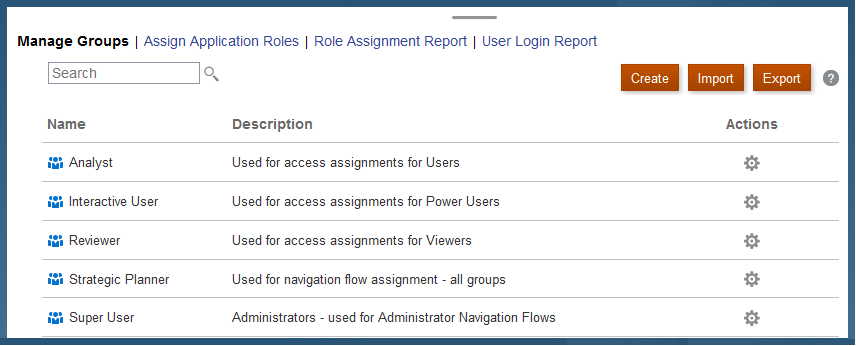
This change is being made because the ability to import and export groups is avalable through Migration and EPM Automate. After this change is made, you will exclusively use Migration for interactive export and import of groups and EPM Automate for automated import and export of groups.
NOTE: Account Reconciliation does not use groups; it uses Teams instead.
If you have any concerns about this change, please contact Oracle Support by raising a service request, which explains your concerns.
Removal of Instance Name from Predefined Role Names
Currently, the predefined role names displayed in the Access Control screens of EPM Cloud environments prefix the instance name to the role name in INSTANCE_NAME ROLE_NAME format. They are also stored in this format in the snapshots, making it difficult to migrate snapshots from one instance to another.
To facilitate the migration of security across EPM Cloud environments, Oracle plans to rename predefined role names displayed within EPM Cloud applications by removing the instance name prefix. For example, if the instance name is Planning1, predefined role names are Planning1 Service Administrator, Planning1 Power User, Planning1 User, and Planning1 Viewer, the new role names will be Service Administrator, Power User, User, and Viewer.
NOTE: This change does not affect how the role names are displayed in the MyServices customer portal.
This change will not have any impact on customers who currently use predefined roles for managing application-level provisioning and access to artifacts. Oracle will ensure that all application role assignments and artifact security assignments are automatically updated after the roles are renamed. This change makes it easy to migrate EPM Cloud artifacts across environments.
This change is being implemented to address customer feedback. If you have any concerns about this change, please contact Oracle Support.
All Business Processes to Support an Identical Set of Predefined Roles
In an upcoming release, Oracle plans to implement a common set of predefined roles for Enterprise Data Management and Narrative Reporting. Other EPM Cloud business processes already use the following predefined roles, which will become the standard set of predefined roles as a result of this change. This update will allow Oracle to address customer issues related to migrating services from current environments to EPM Standard Cloud Service and EPM Enterprise Cloud Service environments.
- Service Administrator
- Power User
- User
- Viewer
This change is automatic; you do not need to update current role assignments. If you have any concerns about this proposed change, please contact Oracle Support by submitting a service request which explains your concerns.
Enterprise Data Management Cloud will support two additional predefined roles, Power User and Viewer.
CAUTION: Do not assign the Power User and Viewer roles to Enterprise Data Management users because these roles do not assign any privileges to users.
Software issues addressed each month will be posted to My Oracle Support.
Default Values for Node, Date, and Timestamp Display with Red Border
Valid default values for node, date, and timestamp properties may display a red border in the property pane indicating that the values are invalid. When this occurs you can still submit the request successfully.
Email Notifications in English
Subscription and workflow email notifications are displayed in English only.
If an approval policy is set up for a user who does not have an email address specified, when that user is invited to approve a request, the email is not sent to that user or to the user who submitted the request. Use Access Control to assign email addresses to users.
After reverting overridden property parameters back to base parameter, the icon next to the parameter indicates that the property is still overridden or overridden values are reverted to blank instead of base values. When this happens, there is no way to change the values back to base values.
Lookup sets cannot be archived