

This document will continue to evolve as existing sections change and new information is added. All updates appear in the following table:
| Date | Feature | Notes |
|---|---|---|
| 15 FEB 2018 | Supported Browsers | Updated document. Delivered feature in 18A.. |
| 09 FEB 2018 | Created initial document. |
This guide outlines the information you need to know about new or improved functionality in Oracle Eloqua's 18A Update.
Release Dates
- February 9, 2018: POD2
- February 16, 2018: POD1, POD3, POD4, POD6, POD7
Release dates above are in local data center time. Learn about recent updates to Oracle Eloqua's release and maintenance schedules in our product notice available here: https://community.oracle.com/docs/DOC-1020354
GIVE US FEEDBACK
We welcome your comments and suggestions to improve the content. Please send us your feedback at omcdocumentation_ca@oracle.com.
| Action Required to Enable Feature |
||||
|---|---|---|---|---|
| Feature |
Automatically Available |
End User Action Required |
Administrator Action Required |
Oracle Service Request Required |
 |
||||
|
||||
|
||||
|
||||
|
||||
|
||||
|
||||
|
||||
|
||||
|
||||
|
||||
|
||||
|
||||
|
||||
|
||||
|
||||
|
||||
|
||||
|
||||
|
||||
Firefox 57 and Chrome 63 are now the preferred browsers for Oracle Eloqua.
Steps to Enable
No steps are required to enable this feature.
Key Resources
For a complete list, please see Supported Environments.
Insight Agents Can Deliver Additional Rows of Data
Insight agents can now deliver up to 1000 rows of data.
Steps to Enable
No steps are required to enable this feature.
Key Resources
Visit our Help Center to learn more.
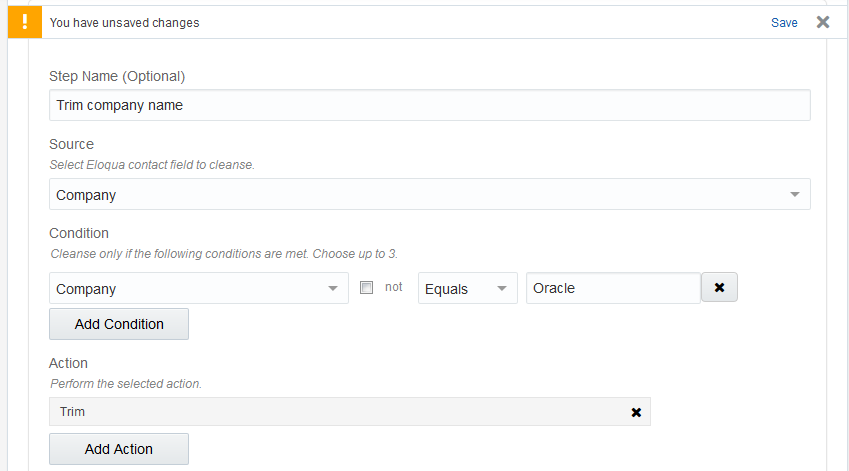
We have simplified the configuration experience for the Contact Washing Machine app. You are now notified of unsaved changes, and no longer need to scroll up to move between the various tabs.
Steps to Enable
No steps are required to enable this feature.
Key Resources
Visit our Help Center to learn more.
You can now add your own connected GoToWebinar app when configuring the app in Oracle Eloqua.
Steps to Enable
No steps are required to enable this feature.
Key Resources
Visit our Help Center to learn more.
A new feature has been added allowing users to configure and submit forms, and manage auto reply messages through WeChat chat sessions.
An enhancement has been made to QR code configuration allowing users to add a QR code name attribute for configuration.
An enhancement has been made to the Landing Page Generator to automatically populate the value of a campaign ID into the mapping field form using a query string parameter.
An enhancement has been made to the WeChat Menu Service Navigator interface.
Steps to Enable
No steps are required to enable this feature.
Key Resources
Visit our Help Center to learn more.
LinkedIn is introducing a simplified authentication protocol for LinkedIn Matched Audiences that requires all customers to re-authenticate their LinkedIn accounts prior to March 30th, 2018. The legacy authentication method will no longer be supported after March 30th which may result in a disruption of service when not re-authenticated.
As a result of the simplified authentication protocol, we have updated the LinkedIn Campaign Manager app configuration. Separate configuration of Lead Gen Forms and Matched Audiences is no longer required.
Steps to Enable
No steps are required to enable this feature.
Key Resources
Learn more by reading our documentation and product notice.
Oracle Sales Cloud Integration App
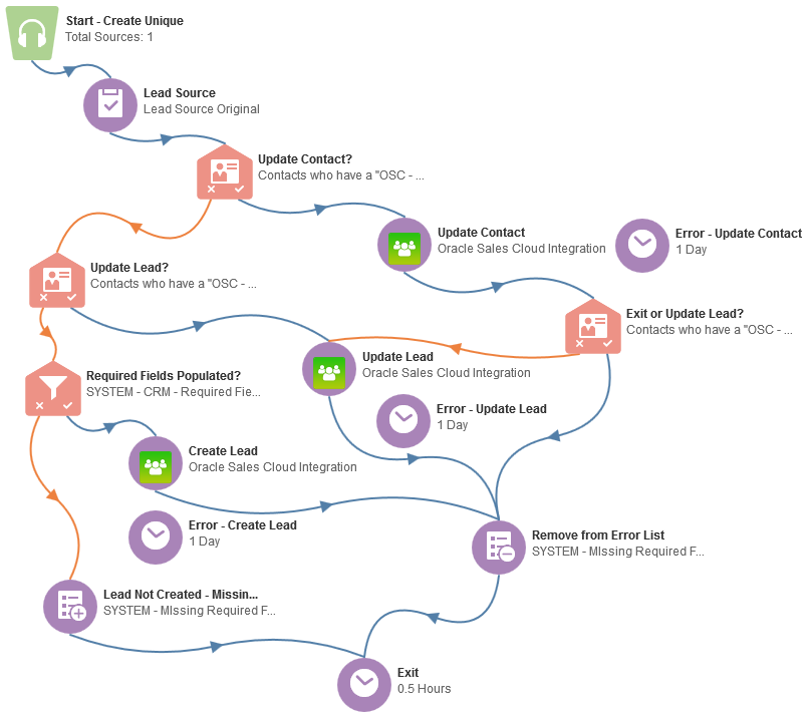
Oracle Sales Cloud Integration app is now generally available. It was previously part of our controlled availability program. This app creates an integration between Oracle Eloqua and Oracle Sales Cloud to send data between the two platforms.
We have made the following enhancements to the Oracle Sales Cloud Integration app:
- Additional error messages are now available for failed actions and imports.
- Campaign actions can now be run on demand.
- Oracle Sales Cloud version R13 is now supported.
Steps to Enable
No steps are required to enable this feature.
Key Resources
Visit our Help Center to learn more.
View the Oracle Sales Cloud Integration app in the Marketplace.
Testing Available for More Apps
Test tabs are now available for Facebook Lead Ads, GoToWebinar, and WebEx audience feeders. Testing your audience feeders allows you to view the outcome of your configuration without collecting contact data.
Steps to Enable
No steps are required to enable this feature.
Key Resources
Visit our Help Center to learn more about testing Facebook Lead Ads, GoToWebinar, and WebEx audience feeders.
Email Design Editor is Generally Available
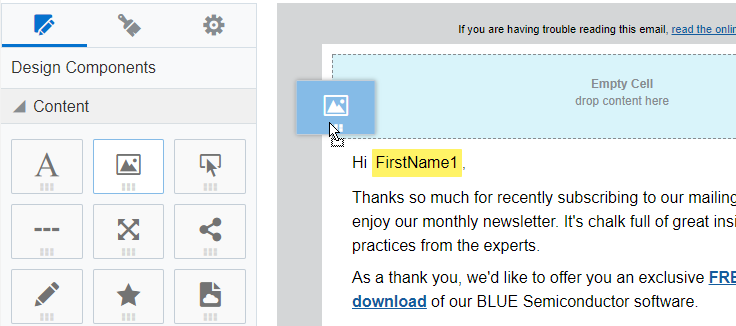
Email Design Editor is now generally available. It was previously part of our controlled availability program. New customers will receive only the new Email Design Editor. Existing customers will be able to access both the Email Design Editor and the Classic Design Editor.
Steps to Enable
No steps are required to enable this feature.
Key Resources
Get a quick overview of the email Design Editor by reading our product notice.
Review detailed user instructions in our Help Center.
Watch our short how-to videos for quick overviews of specific features of the email Design Editor.
Email Design Editor Enhancements
We have made the following enhancements to the Email Design Editor:
- You can now add a custom HTML code to an email.
- For multi-column email layouts, you can now set the background color and borders for an individual column.
- You can now add borders to a button.
- The component library editors now use images on tabs instead of text.
- When searching in the Design Editor (for example, searching for cloud content or a field merge), the user interface clearly identifies when there are no search results.
- Emails from a protected template do not allow you to select rows that you cannot change.
- You can now modify a template's description and link.
- UI updates were made to the text toolbar.
- You can now access the Click-through Visualizer report.
- Links are now tracked by default.
Steps to Enable
No steps are required to enable this feature.
Key Resources
Visit our Help Center to learn more.
Change Landing Page Visibility
You can now change the visibility of a landing page to internal so that it is only visible in Eloqua. This prevents visitors from visiting a page using its URL. Visitors who try to view the page will get an error message as if they typed in an invalid URL.
Steps to Enable
No steps are required to enable this feature.
Key Resources
Visit our Help Center to learn more.
The names of field merges (including dynamic content) are now displayed in the subject line when previewing your Engage email. The information is shown for the first recipient of your email.
Steps to Enable
No steps are required to enable this feature.
Key Resources
Visit our Help Center to learn more.
Changes to Look and Feel of Security Areas
As part of a wider Oracle Marketing Cloud initiative, the Contact Security configuration screens have been updated to match the look and feel of the rest of Oracle Eloqua.
The updated Client Security Configuration user interface is now generally available. This user interface was also updated to match the look and feel of the rest of Oracle Eloqua.
Steps to Enable
No steps are required to enable this feature.
Key Resources
Visit our Help Center to learn more about contact security and client security configuration.
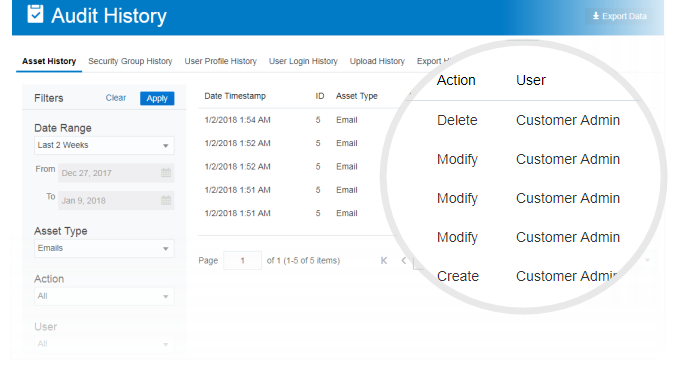
Oracle Eloqua has enhanced audit log reporting. You can now access several audit log reports from the Home menu. With the new audit reports, you can quickly access audit log data from the last 3 months or export up to 25 months of audit log data.
As part of the new audit log reporting, you can now keep a copy of import and export files on your SFTP server.
IMPORTANT: This feature is currently released under our Controlled Availability program. To request access to this feature, please log in to My Oracle Support and create a service request. This feature is available for Standard and Enterprise customers. In order to access this feature, users must be members of the Customer Administrator Security Group.
Steps to Enable
No steps are required to enable this feature.
Key Resources
Visit our Help Center to learn more about auditing in Eloqua and keeping a copy of data import and export files.
Links Generated by Oracle Eloqua Use HTTPS Instead of HTTP
In Oracle Eloqua assets, links generated by Oracle Eloqua now use HTTPS instead of HTTP. Links generated by Eloqua include system links (subscription management links) or links to Eloqua landing pages. The changes do not impact existing assets unless you make a change to the asset. Assets impacted are any asset that you can add a link to - emails, landing pages, and reusable components in the component library (shared content, dynamic content, etc.).
IMPORTANT: This does not impact customers with branded domains as purchased with the Branding and Deliverability packages. If you would like to enable this feature, log in to My Oracle Support and create a service request.
Steps to Enable
No steps are required to enable this feature.
As part of our ongoing security enhancements, Oracle Eloqua is now allowing marketers to override the daily resend limits on the Send Submitter an Email form processing step.
Steps to Enable
No steps are required to enable this feature.
Key Resources
Learn more by visiting the Help Center and reading our product notice.
Web crawler will now crawl pages that return a redirect response (302).
Steps to Enable
No steps are required to enable this feature.
Whitelisting Internal / Private IP Address is Prevented
Oracle Eloqua now prevents you from whitelisting an internal / private IP address. Following RFC 1918, internal IPv4 address ranges include the following:
10.0.0.0 - 10.255.255.255 (10/8 prefix)
172.16.0.0 - 172.31.255.255 (172.16/12 prefix)
192.168.0.0 - 192.168.255.255 (192.168/16 prefix).
Steps to Enable
No steps are required to enable this feature.
Key Resources
Visit our Help Center to learn more.
We've added a new property, resendLimit, to the Application API Form endpoints when there is a FormStepSendEmail within processingSteps. This property controls the amount of times a form will attempt to resend an email. Learn more in our product notice.
Resolved an issue with the Retrieve visitor data Application API endpoint where V_TimeZone was returned inversed. In example, if the offset was UTC+5, it returned UTC-5.
Resolved an issue in REST 1.0 where creating or updating an account that contained custom account fields would result in the account being created or updated, but without the custom account fields.
Steps to Enable
No steps are required to enable this feature.
Key Resources
For additional information and examples, refer to the changelog.
Resolved an issue where Bulk API activity exports including contact fields were failing when Label-Based Access Control was enabled.
Improved validation for Bulk API activity exports to return a validation error if including contact fields without an Activity root. There was validation missing which allowed field statements to be used in activity exports such as:
{{Contact.Field(<contact_field_name>)}}
This is incorrect, and will now throw a validation error. The correct syntax for using a contact field statement in an activity export is:
{{Activity.Contact.Field(<contact_field_name>)}}
Steps to Enable
No steps are required to enable this feature.
Key Resources
For additional information and examples, refer to the changelog.
---

Copyright © 2018, Oracle and/or its affiliates. All rights reserved.
This document is provided for information purposes only, and the contents hereof are subject to change without notice.This document is not warranted to be error-free, nor subject to any other warranties or conditions, whether expressed orally or implied in law, including implied warranties and conditions of merchantability or fitness for a particular purpose. We specifically disclaim any liability with respect to this document, and no contractual obligations are formed either directly or indirectly by this document. This document may not be reproduced or transmitted in any form or by any means, electronic or mechanical, for any purpose, without our prior written permission.
Oracle and Java are registered trademarks of Oracle and/or its affiliates. Other names may be trademarks of their respective owners.
Intel and Intel Xeon are trademarks or registered trademarks of Intel Corporation.All SPARC trademarks are used under license and are trademarks or registered trademarks of SPARC International, Inc. AMD, Opteron, the AMD logo, and the AMD Opteron logo are trademarks or registered trademarks of Advanced Micro Devices. UNIX is a registered trademark of The Open Group.
