
This document will continue to evolve as existing sections change and new information is added. All updates are logged below, with the most recent updates at the top.
| Date |
What's Changed |
Notes |
|---|---|---|
| 21 FEB 2017 |
Oracle Eloqua Apps Release 230 and Oracle Eloqua Release 486 |
|
| 10 JAN 2017 |
||
| 10 JAN 2017 |
Initial Document Creation |
This guide outlines the information you need to know about new or improved functionality in Oracle Eloqua Q1 2017 Release. Each section includes a brief description of the feature, any tips or considerations that you should keep in mind, and the resources available to help you.
We would like to remind you if your system has modified security structures you may need to advise your security administrator of new features you would like to take advantage of. To assist you Appendix A provides a listing of the new features and the security attributes needed to employ the new features when you have decided to implement them.
We welcome your comments and suggestions to improve the content. Please send us your feedback at omcdocumentation_ca@oracle.com.
You do not need to take any action to receive this upgrade. The upgrade occurs automatically in your instance during the maintenance window.
Some of the new Oracle Eloqua features are automatically available to users after the upgrade and some require action from the user, the company administrator, or Oracle.
The table below offers a quick view of the actions required to enable each of Eloqua’s Q1 FY17 features.
| Action Required to Enable Feature |
||||
|---|---|---|---|---|
| Feature |
Automatically Available |
End User Action Required |
Administrator Action Required |
Oracle Service Request Required |
| Oracle Eloqua: Release 485 |
||||
|
|
||||
|
|
||||
|
|
||||
|
|
||||
|
|
||||
|
|
||||
|
|
||||
|
|
||||
|
|
||||
|
|
||||
|
|
||||
|
|
||||
| Oracle Eloqua Apps: Release 230 |
||||
|
|
||||
|
|
||||
|
|
||||
|
|
||||
|
|
||||
|
|
||||
|
|
||||
| Oracle Eloqua: Release 486 |
||||
|
|
||||
|
|
||||
|
|
||||
|
|
||||
|
|
||||
|
|
||||
|
|
||||
|
|
||||
|
|
||||

Feature updates for the Eloqua 485 release.
Release dates:
- Jan 10, 2017: 11:00pm - 5:00am ET (POD2)
- Jan 13, 2017: 6:00am - 12:00pm ET (POD7)
- Jan 13, 2017: 4:00pm - 10:00pm ET (POD6)
- Jan 15, 2017: 5:00am - 5:00pm ET (POD3)
- Jan 20, 2017: 8:00pm - 2:00am ET (POD4)
- Jan 22, 2017: 5:00am - 5:00pm ET (POD1)
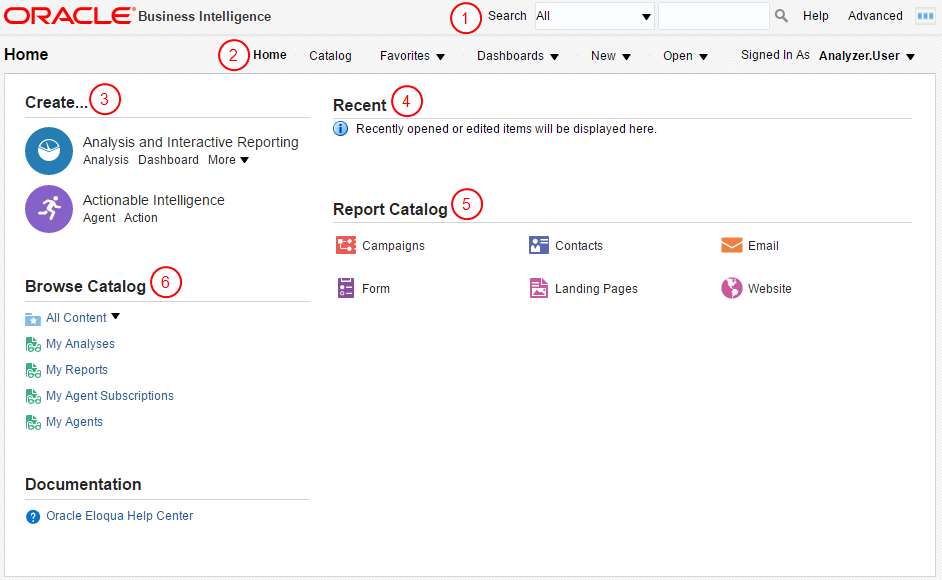
The new Insight home page has been updated to make it easier for you to access the report catalog as well as the online help. Learn more
Important: This feature is currently released under our Controlled Availability program. To request access to this feature, please log in to My Oracle Support and create a service request.
The Campaign Region and Product legend elements can also be used as filters on the Campaign Analysis dashboard. Learn more
Fixed a permission issue in the data import/export area. Learn about data import and export
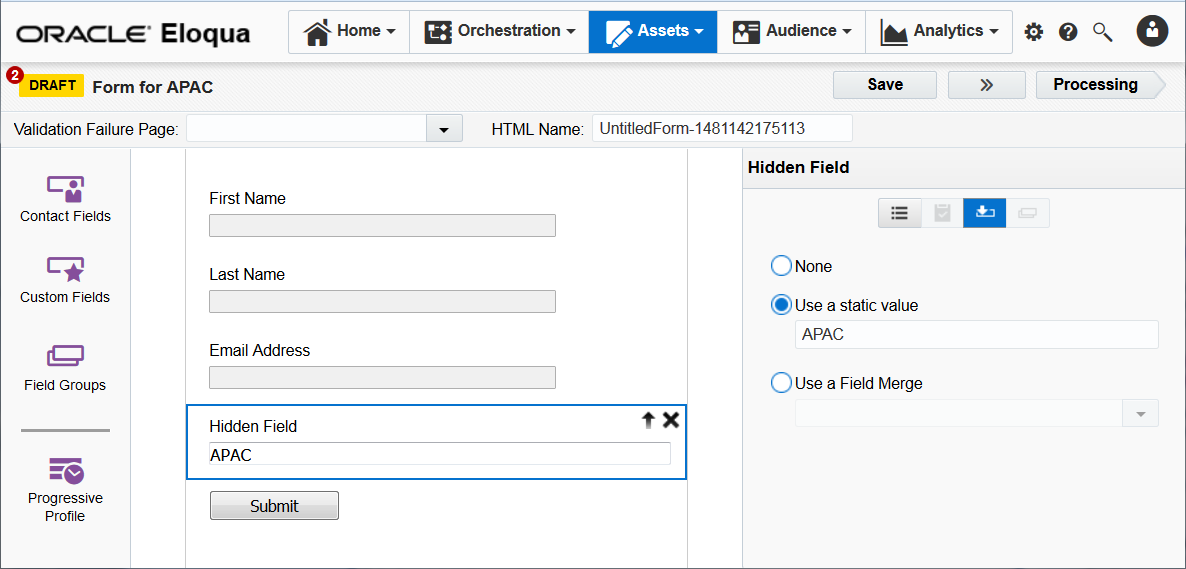
Several changes have been made to integrate the features of the soon to be deprecated Form Pre-population app into Oracle Eloqua. See this video playlist for tips on building forms that achieve the same goals. Learn more
HIPAA Advanced Data Security and Advance Data Privacy Add-on Cloud Services
Performance improvements to sending the welcome email when opting in.
Using the add-ons, you are now able to take advantage of Eloqua's dynamic link tracking features within the Email Access Token Cloud Content service so that Contacts clicking through links generated by this Cloud Content service are linked to the Visitor Profile connecting web activity to the Contact. Along with connecting web activity, the addition of Eloqua’s dynamic link tracking enables personalizing the Set Password page. Learn more
Important: HIPAA Advanced Data Security and Advance Data Privacy Add-on Cloud Services are available for specific trims. Please contact your account representative for more information.
The character limit for vanity URLs has been increased from 90 to 256. Learn more
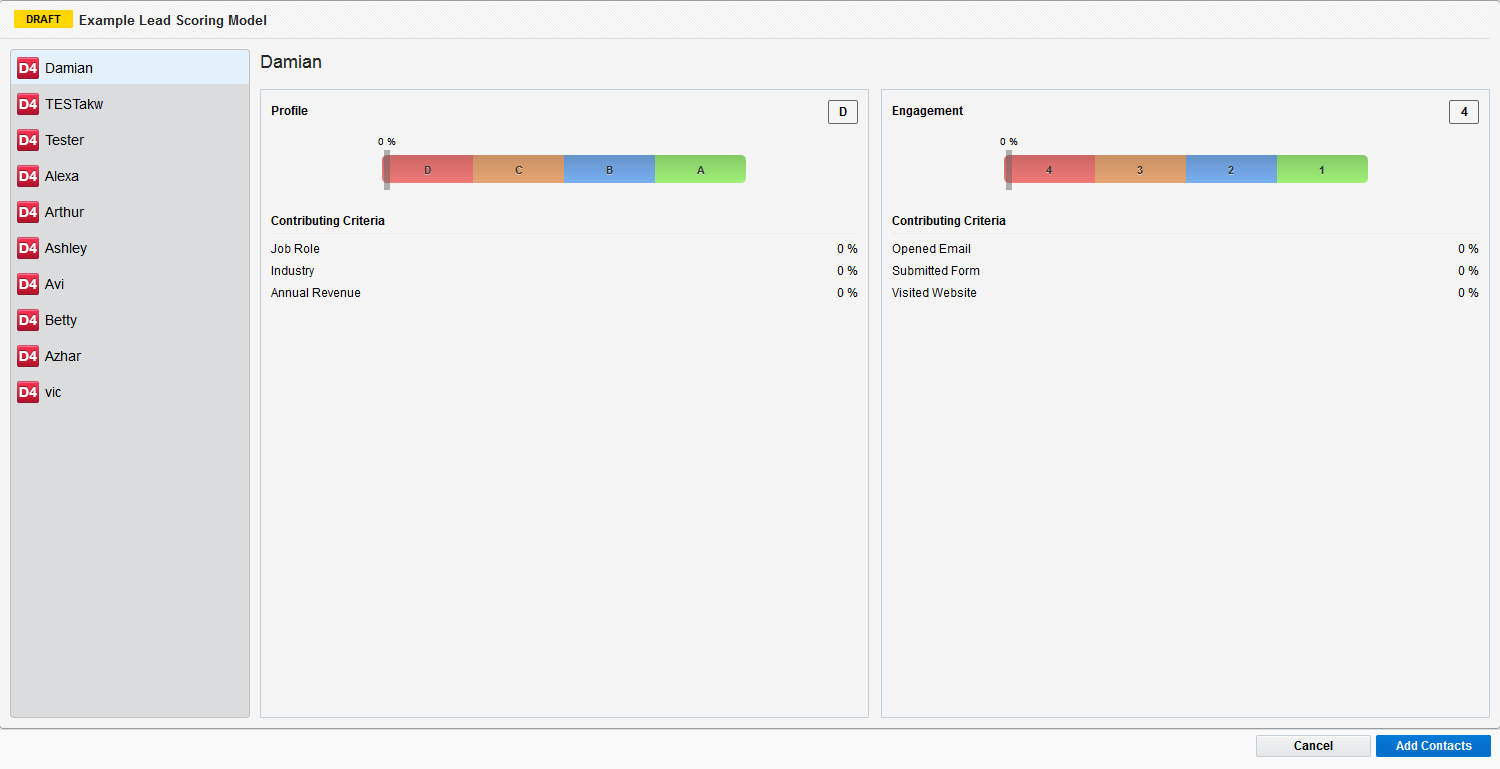
While inside a lead scoring model, you can preview the lead score for up to 10 contacts. Learn more
Lead scoring now also includes external activities. Learn more
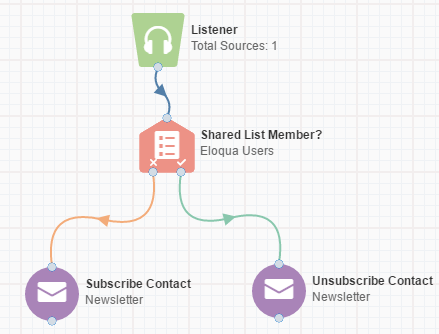
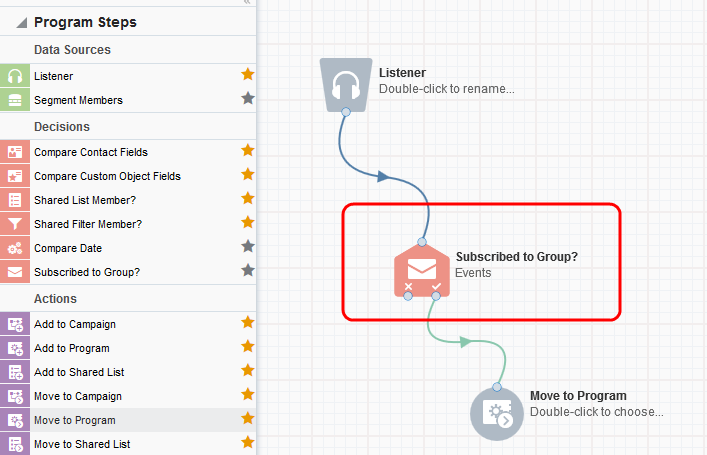
You can now subscribe and unsubscribe contacts to and from certain email groups using program canvas to control the type of communications they receive. Learn more
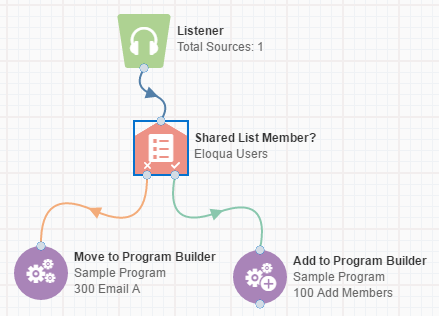
New action steps are available on the program canvas to move and add contacts to program builder. Learn more
There are new default password security settings for new customers:
- By default, users cannot reuse the same password for 183 days.
- By default, users must use 5 other passwords before they can reuse a previous password.
Updates to the Opened Emails from Campaigns & Clicked Emails from Campaign segment criteria result in a faster & more accurate representation of applicable contacts within your segments.
The specific list of segment criteria affected are:
- Opened Emails from Campaigns
- Not Opened Emails from Campaigns
- Clicked Emails from Campaigns
- Not Clicked Emails from Campaigns
Learn more about this change by reviewing our documentation and product notice.
When deleting a filter with a quicklist, the quicklist is also deleted. Learn more
Firefox 47, Chrome 54, and Internet Explorer 11 are the preferred browsers for Eloqua. For a complete list, please see Supported Environments.
Increased the canvas cloud step data retention from 30 days to 90 days.
Events:
- We've added new endpoints to enable importing event registrants. These endpoints were built to replace the same functionality, previously only supported via the SOAP API, which is to be deprecated. Learn more
Authentication:
- Improved the behavior of OAuth in scenarios where simultaneous requests are sent to refresh an access token.
For additional information and examples, refer to the changelog.
Oracle Eloqua Apps: Release 230
Feature updates for the Eloqua Apps 230 release.
Release dates:
- February 3, 2016: 6:00am - 11:00am ET (POD7)
- February 3, 2016: 4:00pm - 9:00pm ET (POD6)
- February 3, 2016: 8:00pm - 1:00am ET (POD1, POD2, POD3, POD4)
General Sales Tools Enhancements
We have made some visual updates to make Engage and Profiler look consistent:
- On the left navigation menu, Contacts has been changed to Profiler, and Emails has been changed to Engage.
- You may find small differences in the sizing of banners, headings, and icons.
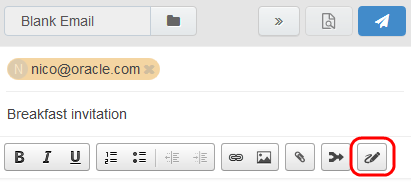
You can insert an Eloqua signature when composing an Engage email. Signatures are created and stored in your Eloqua component library in the Signature Layouts area. They can contain images, field merges, and hyperlinks. Learn more
When sending an email to a new contact, you are prompted to complete all required contact fields. Learn more
When viewing your sent emails, an attachment (paperclip) icon is displayed for emails that contained attachments to make them easy to identify. Learn more
You will no longer be timed out of your Engage sessions so that you don't lose the email draft you've been working on due to inactivity.
NOTE: The responsive version of Engage is currently released under our Controlled Availability program. To request access to this feature, please log in to My Oracle Support and create a service request.
You can copy and paste a contact's details, such as phone number, email address, and so on, when viewing their profile. Highlight the text and use keyboard shortcuts (CTRL+C to copy and CTRL+V to paste). Learn more
We have renamed the Date Decision app to Date app. You will see this new name in your list of installed apps, as well as the campaign canvas and program canvas. Learn more
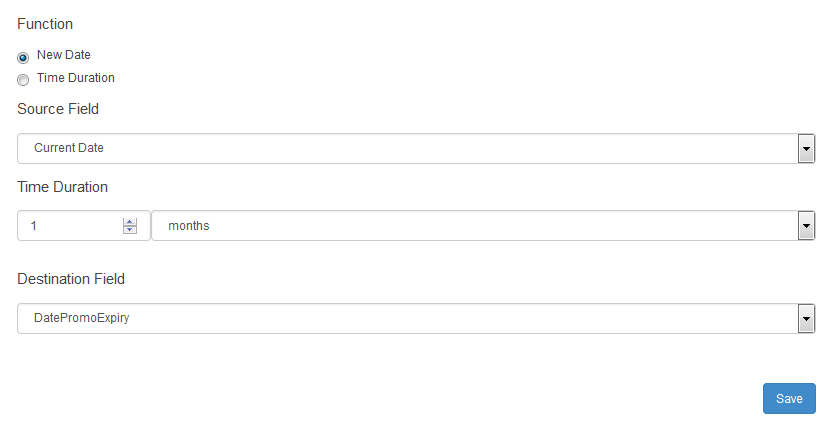
The Date app has a new Date Calculator action service, which you can use to write the results of date operations to contact records, for use in your campaigns and programs. You can calculate the difference between two dates and assign the result to contact field, or add a time interval to a date and assign the new date to a contact field. Learn more
Oracle Sales Cloud Integration App Enhancements
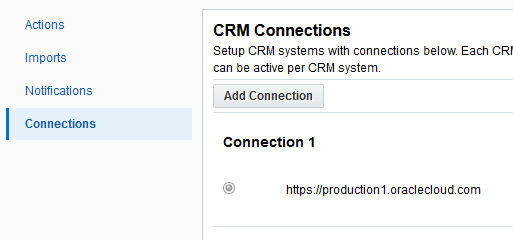
Global Settings on the left navigation bar have been removed and the defaults have been migrated to a connection. We have also made visual and functional changes to how you add, edit, and delete connections and credentials. Learn more
Bidirectional mapping is now available for Actions. You can specify both export field mappings from Eloqua to Oracle Sales Cloud, and import field mappings from Oracle Sales Cloud to Eloqua. Learn more

All reporting data is stored for 3 months. Learn more
NOTE: Oracle Sales Cloud Integration app is currently released under our Controlled Availability program. To request access to this feature, please log in to My Oracle Support and create a service request.
Eloqua-WeChat Integrator Enhancements
A WeChat statistics report is now available, which lets you quickly determine which articles are the most interesting for your followers. Learn more
Customer Service Messages are now available when configuring the WeChat Message Sender on the canvas. Learn more
When adding WeChat Official Accounts, an OpenID Field is now available. Use this field to select an Eloqua contact field to which the OpenID of a WeChat follower should be mapped to. This is used for recording WeChat activity as external activities in Eloqua.
NOTE: The Eloqua-WeChat Integrator app is currently released under our Controlled Availability program. To request access to this feature, please log in to My Oracle Support and create a service request. My Oracle Support will provide an installation URL.
The preferred browsers for Profiler and Engage are now Firefox 47 and Chrome 54. For a complete list, please see our Supported Environments list.
Feature updates for the Eloqua 486 release.
Release dates:
- Feb 21, 2017: 11:00pm - 5:00am ET (POD2)
- Feb 24, 2017: 6:00am - 12:00pm ET (POD7)
- Feb 24, 2017: 4:00pm - 10:00pm ET (POD6)
- Feb 26, 2017: 5:00am - 5:00pm ET (POD3)
- Mar 3, 2017: 8:00pm - 2:00am ET (POD4)
- Mar 5, 2017: 5:00am - 5:00pm ET (POD1)
The zoom warning has been removed from Eloqua.
You can now include account and visitor information in your reports so that you can more effectively measure your marketing efforts.
The Website Visitors by Geography report has been updated to include additional visitor details.
Demo mode can now be enabled in reports by an action permission. Previously, customer administrators were able to create a demo mode.
Four new reports are now available in Insight:
- Sales Email Opens and Website Visits
- Sales Email Template Usage
- Sales Email Overview
- Website Visitors by Webpage
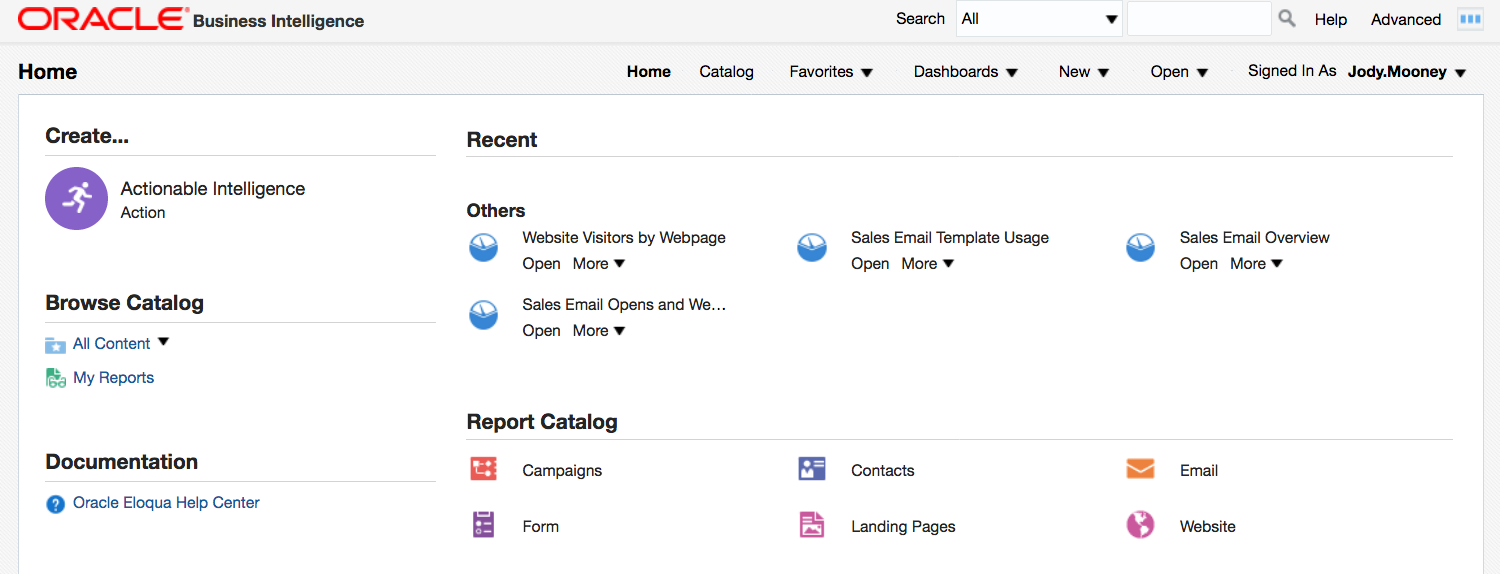
NOTE: Insight is currently released under our Controlled Availability program. To request access to this feature, please log in to My Oracle Support and create a service request.
The approval button is now disabled after a campaign has been approved. Prior to this change it was possible to press the approve button multiple times which could cause approval stages to be set incorrectly. Learn more
A new Subscribed to Group decision step is available on the program canvas. Use this step to evaluate and route contacts based on whether they are subscribed to an email group. Learn more
The All Contact Fields and All Account Fields views are not editable and only have the View and Set Security permissions. Learn more
We have made additional changes to integrate the features of the soon to be deprecated Form Pre-population app into Oracle Eloqua. Picklist values can now be pre-populated using field merge values. Review the product notice and forms documentation for additional information about the changes.
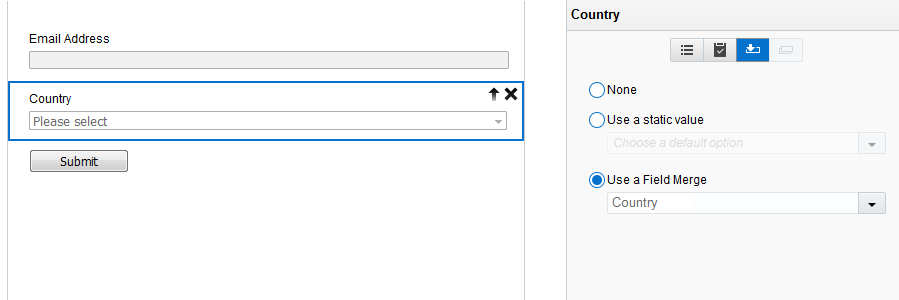
All form submits are now validated. Learn more
Data posted from sandbox landing page form is no longer posted to production site; it points to the sandbox site. Learn more about the replication sandbox.
You can now manage a whitelist of domains allowed to help prevent phishing attacks. Learn more
You are now able to change the security configuration of an active user so that they can only log in via SSO. The Forgot Password link is disabled for SSO only users. A new User Import Field is now available so you can bulk update users to SSO Only. Learn more
Firehose services can now subscribe to program canvas events. This enhancement provides app providers the ability to develop firehose services that receive notifications for the following program canvas events: Created, Updated, Deleted, Draft, Activated, and Paused. Learn more
EloquaService API deprecation is coming on May 1st, 2017. Learn more
For additional information and examples, refer to the changelog.
---

Copyright © 2017, Oracle and/or its affiliates. All rights reserved.
This document is provided for information purposes only, and the contents hereof are subject to change without notice. This document is not warranted to be error-free, nor subject to any other warranties or conditions, whether expressed orally or implied in law, including implied warranties and conditions of merchantability or fitness for a particular purpose. We specifically disclaim any liability with respect to this document, and no contractual obligations are formed either directly or indirectly by this document. This document may not be reproduced or transmitted in any form or by any means, electronic or mechanical, for any purpose, without our prior written permission.
Oracle and Java are registered trademarks of Oracle and/or its affiliates. Other names may be trademarks of their respective owners.
Intel and Intel Xeon are trademarks or registered trademarks of Intel Corporation. All SPARC trademarks are used under license and are trademarks or registered trademarks of SPARC International, Inc. AMD, Opteron, the AMD logo, and the AMD Opteron logo are trademarks or registered trademarks of Advanced Micro Devices. UNIX is a registered trademark of The Open Group.

Rev01