
This document will continue to evolve as existing sections change and new information is added. All updates appear in the following table:
| Date | Product | Feature | Notes |
|---|---|---|---|
| 12 JUL 2021 | Security | Contact Interface Access Changes | Updated document. Delivered feature in update 21B. |
| 14 MAY 2021 | Created initial document. |
This guide outlines the information you need to know about new or improved functionality in this update.
GIVE US FEEDBACK
We welcome your comments and suggestions to improve the content. Please send us your feedback at omcdocumentation_ca@oracle.com.
Column Definitions:
Report = New or modified, Oracle-delivered, ready to run reports.
UI or Process-Based: Small Scale = These UI or process-based features are typically comprised of minor field, validation, or program changes. Therefore, the potential impact to users is minimal.
UI or Process-Based: Larger Scale* = These UI or process-based features have more complex designs. Therefore, the potential impact to users is higher.
Features Delivered Disabled = Action is needed BEFORE these features can be used by END USERS. These features are delivered disabled and you choose if and when to enable them. For example, a) new or expanded BI subject areas need to first be incorporated into reports, b) Integration is required to utilize new web services, or c) features must be assigned to user roles before they can be accessed.
| Ready for Use by End Users Reports plus Small Scale UI or Process-Based new features will have minimal user impact after an update. Therefore, customer acceptance testing should focus on the Larger Scale UI or Process-Based* new features. |
Customer Must Take Action before Use by End Users Not disruptive as action is required to make these features ready to use. As you selectively choose to leverage, you set your test and roll out timing. |
|||||
|---|---|---|---|---|---|---|
| Feature |
Report |
UI or |
UI or |
|
||
Oracle Eloqua’s Advanced Intelligence features use algorithms, data science, and machine learning to help marketers achieve superior business results.
The following features are only available as part of Eloqua’s Advanced Intelligence Add-on:
- Send Time Optimization
- Subject Line Optimization
- Account Intelligence
- Fatigue Analysis
For more information, please read our documentation and contact your account representative.
IMPORTANT: The following features are available as part of the Advanced Intelligence Package add-on that must be ordered for your account. Please contact your account representative or Oracle sales.
The Send Time Optimization Performance chart now displays direct links to the Send Time Optimization Performance by Day of Week report and the Send Time Optimization Performance by Day and Hour Insight reports.
A new Account Engagement Summary report is now available. A new chart is now available on the Account Engagement Overview dashboard: Account by Engagement Score.
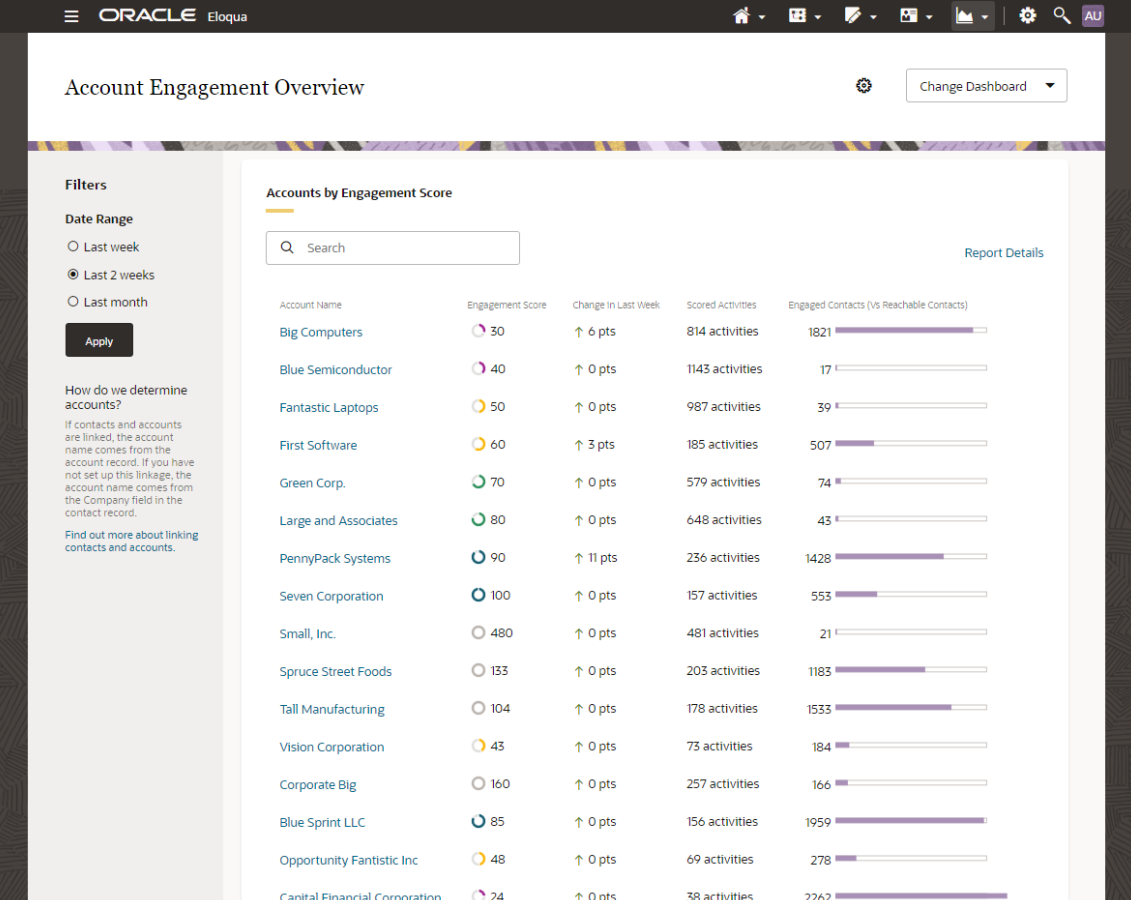
Use this new chart to compare scores across accounts, search for accounts of interest, and drill down to individual Account Performance dashboards.
Steps to Enable
These features are available as part of the Advanced Intelligence Package add-on that must be ordered for your account. Please contact your account representative or Oracle sales.
Key Resources
The following updates have been made to the Fatigue Analysis dashboard:
- The dashboard now displays the last refresh date of the fatigue model.
- There has been an axis change. We have normalized the y-axis to be the same scale. This makes it easier to compare the relative open and send performance across different fatigue levels.

These updates help you:
- Understand your send volumes and how they compare across fatigue levels
- Adjust your send strategy to optimize engagement based on contact fatigue
- View your open rate performance across fatigue levels to inform your send frequency and segmentation strategy
Steps to Enable
These features are available as part of the Advanced Intelligence Package add-on that must be ordered for your account. Please contact your account representative or Oracle sales.
Key Resources
The following Insight dashboards now have the new Redwood theming:
- Closed-loop Reporting
- Email Open by Device
- Email Analysis
- Account Performance
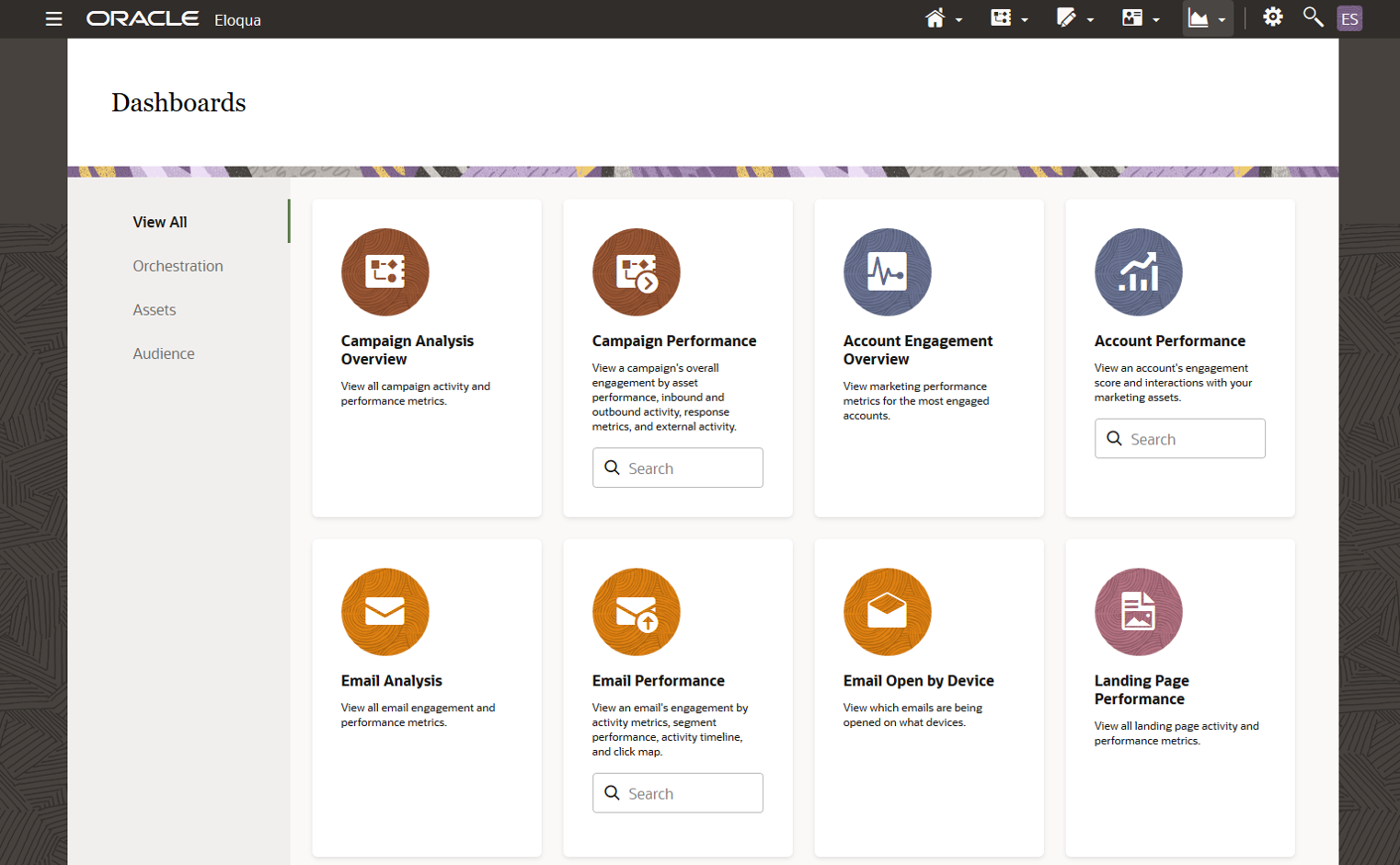
This new design has a cleaner, more modern look and feel and is consistent with other Oracle CX products.
Steps to Enable
You don't need to do anything to enable this feature.
Key Resources
- Closed-loop Reporting dashboard
- Email Open by Device dashboard
- Email Analysis dashboard
- Account Performance dashboard
Detailed Status Messages for Stuck Records
The following new app member status has been added:
- Import Queued by App: App has created an import to update step member's status.
These statuses provide granular, informative, and visible messaging within Eloqua to help bring awareness and insight to the state of records in app steps. This will help you become more aware of what actions Eloqua, and the app, are currently performing.
Steps to Enable
You don't need to do anything to enable this feature.
Key Resources
Multi Image and Application Branded Domains
Eloqua now supports multiple branded domains for application and image links in a single instance. Brands can be selected in email editors.
Selecting a brand will apply the application and image domains configured to the brand within the email.
Steps to Enable
This feature is part of our Controlled Availability program. The Premium Branding and Configuration - Multiple Brands SKU is also required. Please contact your account representative for more information.
Key Resources
A new option to enable spam protection in form settings is now available. It is supported for forms used on Eloqua landing pages and hosted externally.
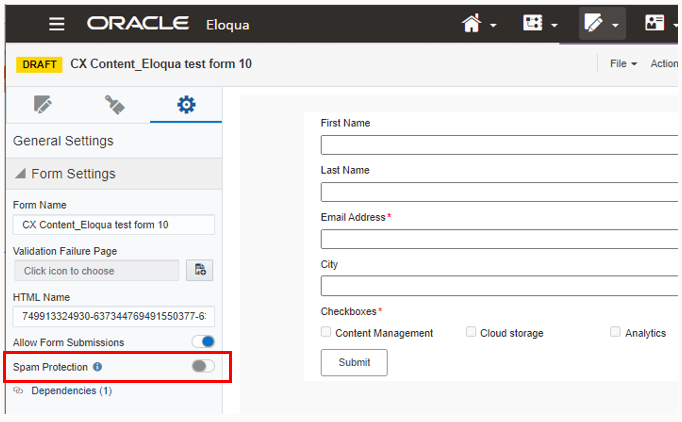
A new Change Form Spam Protection Status action permission is also available to control who can enable and disable spam protection on forms.
Use this feature to add form spam protection to individual forms to help reduce bot spamming.
Steps to Enable
This feature is part of our Controlled Availability program. Please contact your account representative for more information.
Tips And Considerations
Form spam protection includes:
- Timestamp validation: Validates how quickly a form is submitted.
- Hidden Honeypot field: Validation check on field.
- Blind form submission link validation
Key Resources
Chrome 89 and Firefox 87 are the A (Best Choice) browsers for Oracle Eloqua.
These browsers are tested against a comprehensive new feature and regression test suite to provide a good experience with all functionality.
Steps to Enable
You don't need to do anything to enable this feature.
Key Resources
- For a complete list, please see Supported Environments.
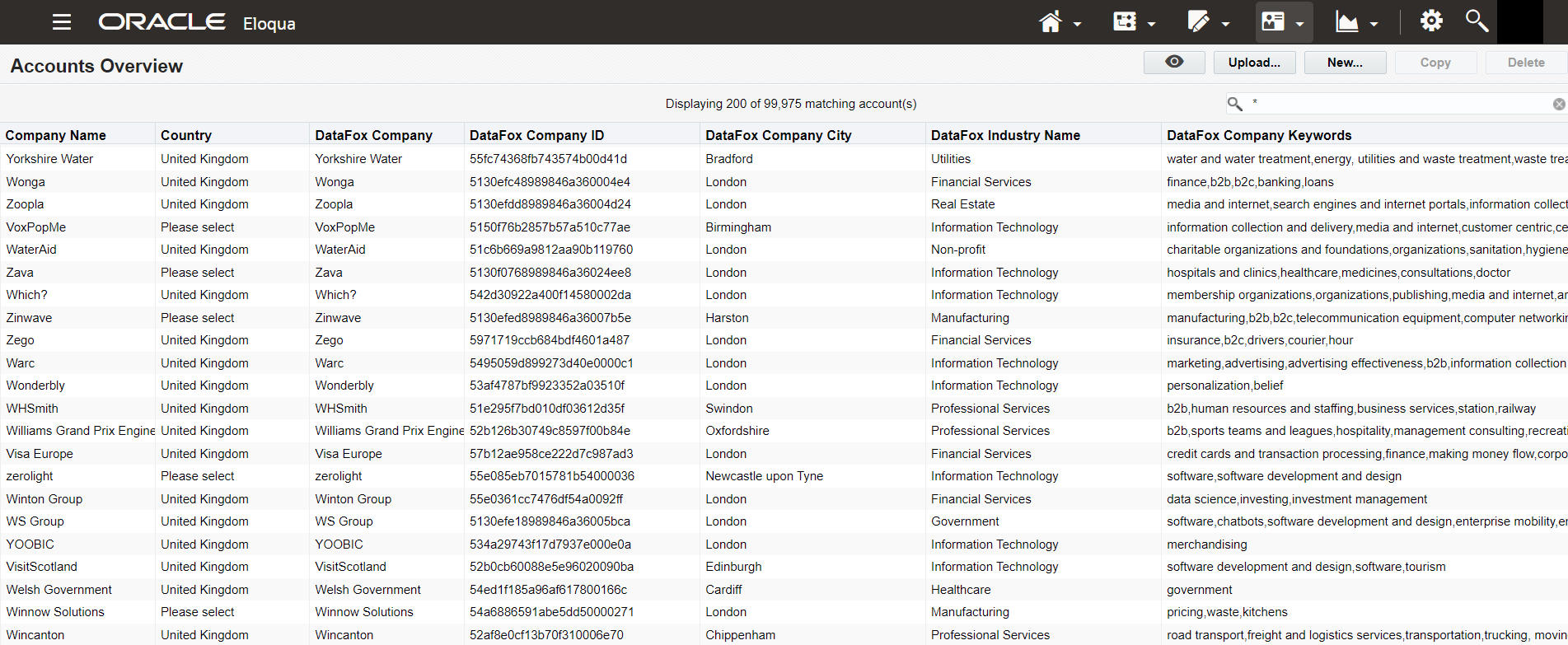
You can now enrich your accounts in Oracle Eloqua with company data and account scores from Oracle DataFox. Use the enriched data from this integration to enhance your sales and marketing decisions. For example, you can improve your understanding of customer fit, prioritize quality leads, and personalize outreach. Enriching accounts is an alternative to the existing option of enriching contacts.
This screenshot shows some of the enriched Oracle DataFox data fields listed in Oracle Eloqua after integration.
Steps to Enable
You must install the DataFox for Eloqua (Account Enrichment) app to integrate with Oracle DataFox. For detailed steps, see Set Up Account Enrichment for Eloqua.
Tips And Considerations
- If you use Oracle Eloqua, contact your account manager for information on the Oracle DataFox subscription.
- You can enrich either contacts or accounts. You can’t enrich both. To decide between using the DataFox for Eloqua (Account Enrichment) app and the DataFox for Eloqua (Contact Enrichment) app, review the important considerations in the topic Considerations for Account vs.Contact Enrichment.
Key Resources
If an email is archived, you will not be able to save or send the email in Engage, even if you have a direct URL to the email.
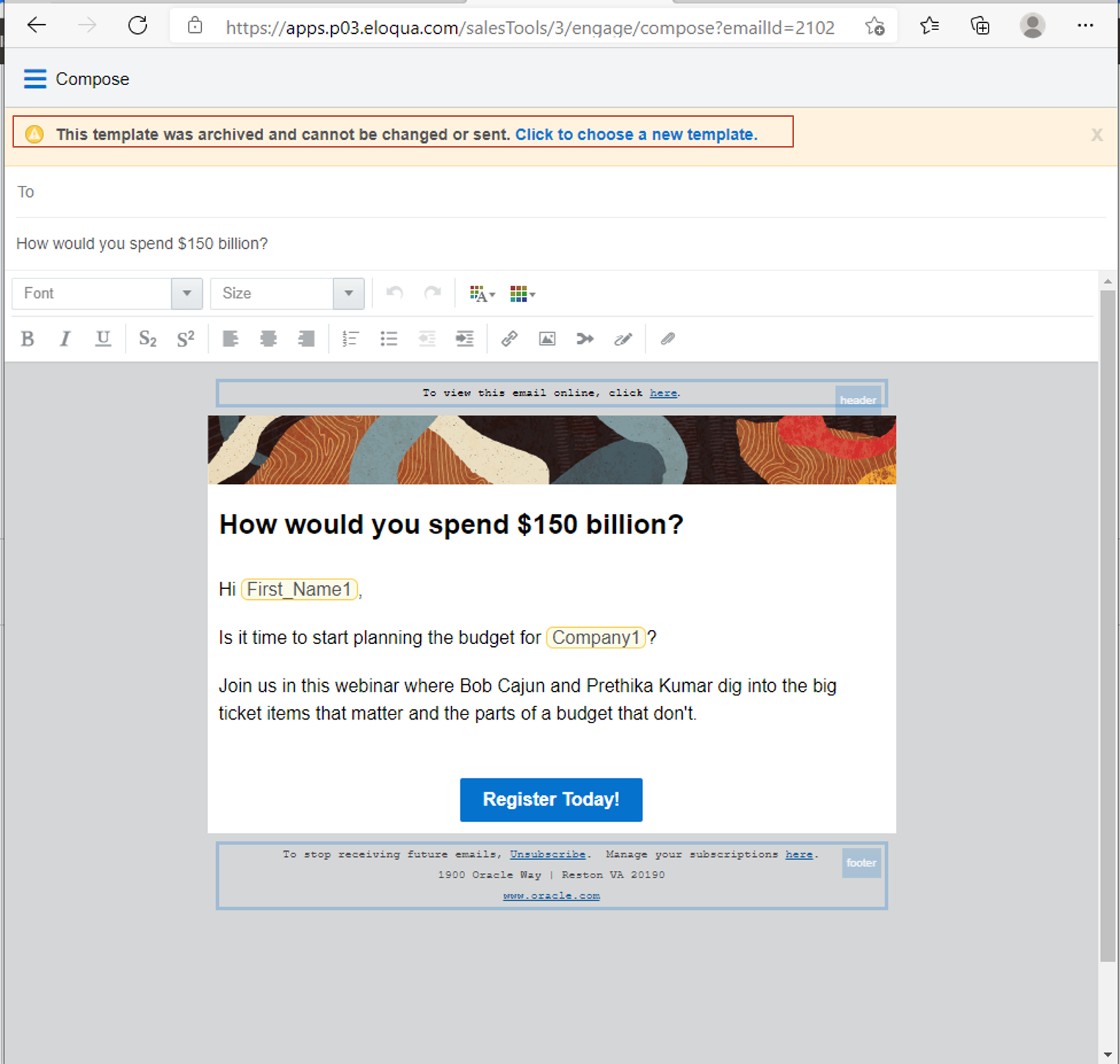
Spring clean your sales email templates by archiving, since archiving hides the template from searches.
This keeps sales users using your most recent templates.
Steps to Enable
You don't need to do anything to enable this feature.
Key Resources
Contact Interface Access Changes
Oracle Eloqua has implemented two changes to Contact Interface Access:
- Within a Segment, a user can access contact information for an individual contact by double-clicking or right-clicking on Open Contact on an individual contact and view the full contact information. Now, Oracle Eloqua has implemented a change so that based on a user’s Contact Interface Access setting, they will no longer see the Open Contact option if they do not have permission to do so.
- Within Simple Campaigns for active and completed modes, a View Participants option is available. When clicked and the Included tab is selected, the full contact view is shown. Now, Oracle Eloqua has implemented a change so that the Include tab will use the default view for that user.
These changes allow an Eloqua Administrator to customize security access to contact information based on different user types.
Steps to Enable
You don't need to do anything to enable this feature.
Key Resources
The License Usage Overview report now includes a column for disabled users and a column for enabled users.
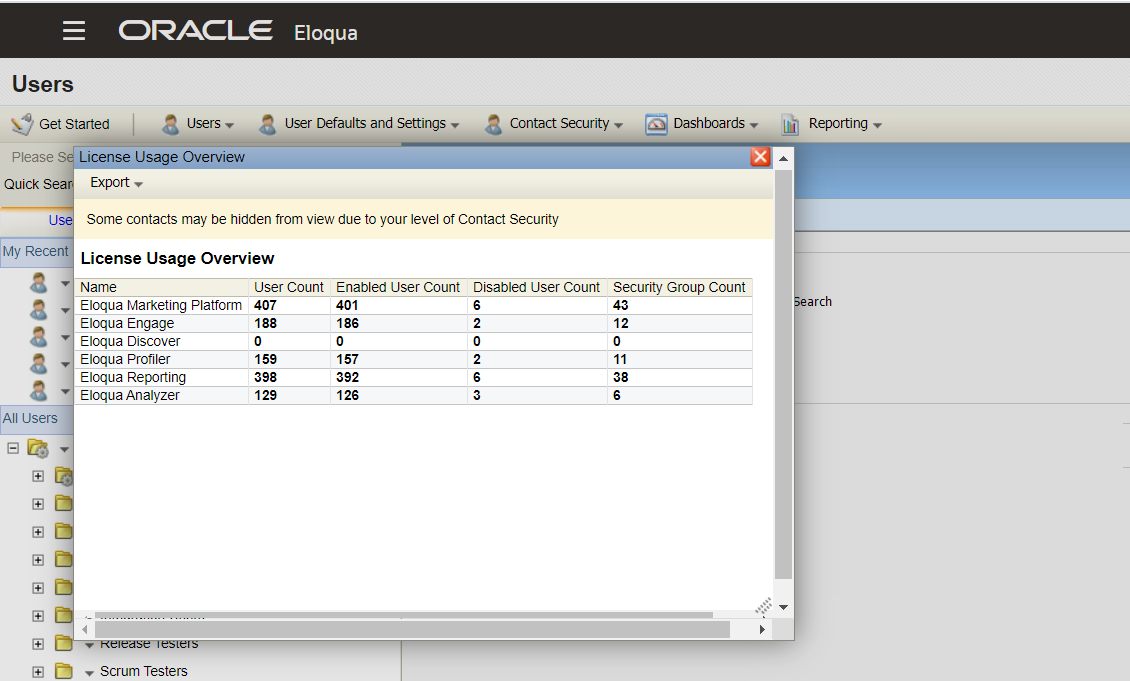
Along with the total user count, you can now distinguish how many of those users are currently enabled or disabled.
Steps to Enable
You don't need to do anything to enable this feature.
Key Resources
Updated Timezone Handling in Filters
When using a segment filter or dynamic content, your timezone will be used for the filter criteria (such as today, tomorrow, yesterday, and so on).
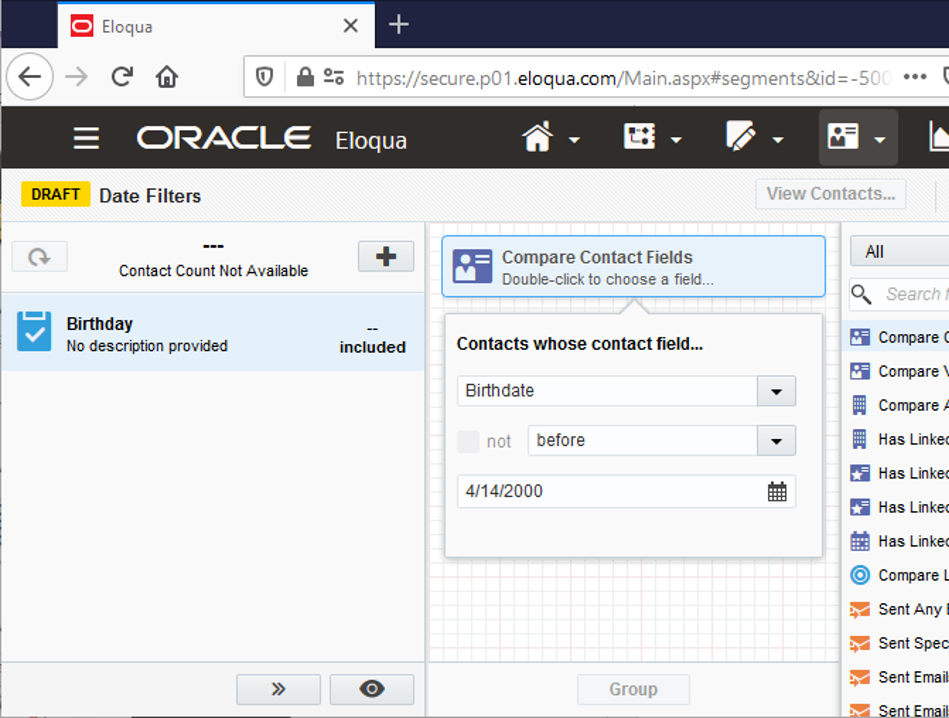
Previously, Eastern timezone was used. This addresses issues with date filter evaluation to provide accurate results for the “local” user based on their own time zone.
Steps to Enable
This feature is GA-Optional for existing customers. To enable this feature you need to log a Service Request (SR).
Newly provisioned instance of Eloqua will have this feature enabled by default.
Key Resources
CampaignId has been added as a URLtemplate parameter to the Content Service Landing Page Notification URL.
CampaignId will be populated with the elqCampaignId query parameter.
Steps to Enable
You don't need to do anything to enable this feature.
Key Resources
The following changes have been made to the Application API:
- The default depth for the Application API Retrieve batch form submission details endpoints has been changed to minimal (previously, the default depth was complete):
- Retrieve batch form submission details by batchCorrelationId
- Retrieve batch form submission details by batchId
- A validation error has been added for the Custom Object endpoints so that an error is returned if the same field is included more than once.
- Updated a value for custom field which is set to uniqueCode on Custom Object will now assign value to uniqueCode for the Custom Object record.
With the arrival of the Eloqua 21C update, asynchronous form processing via API will be available for the Create form data for a single form endpoints. This feature can be enabled for Early Preview with the Eloqua 21B update.
Steps to Enable
You don't need to do anything to enable this feature.
Key Resources
The following changes have been made to the Bulk API:
- Emails sent from the Outlook Plugin are now set to OutlookPlugin EmailSend Type in Bulk API activity exports.
- Bulk API dependencies now appear when there is a Bulk API event definition.
- Added an improved retry strategy to cover a wider variety of failures that can occur during Bulk API export.
These Bulk API updates provide a better developer experience with enhanced tracking for emails activities, improved dependency handling, and improved error handling for exports.
Steps to Enable
You don't need to do anything to enable this feature.
Key Resources