
This document will continue to evolve as existing sections change and new information is added. All updates appear in the following table:
| Date | Module | Feature | Notes |
|---|---|---|---|
| 04 NOV 2022 | Marketing-Level | Additional Schemes Support for Redirect Links | Updated document. Revised feature information. |
| 26 AUG 2022 | Created initial document. |
 HAVE AN IDEA?
We’re here and we’re listening. If you have a suggestion on how to make our cloud services even better then go ahead and tell us. There are several ways to submit your ideas, for example, through the Ideas Lab on Topliners. Wherever you see this icon after the feature name it means we delivered one of your ideas.
GIVE US FEEDBACK
We welcome your comments and suggestions to improve the content. Please send us your feedback at omcdocumentation_ca@oracle.com.
DISCLAIMER
The information contained in this document may include statements about Oracle’s product development plans. Many factors can materially affect Oracle’s product development plans and the nature and timing of future product releases. Accordingly, this Information is provided to you solely for information only, is not a commitment to deliver any material, code, or functionality, and should not be relied upon in making purchasing decisions. The development, release, and timing of any features or functionality described remains at the sole discretion of Oracle.
This information may not be incorporated into any contractual agreement with Oracle or its subsidiaries or affiliates. Oracle specifically disclaims any liability with respect to this information. Refer to the Legal Notices and Terms of Use for further information.
Column Definitions:
Report = New or modified, Oracle-delivered, ready to run reports.
UI or Process-Based: Small Scale = These UI or process-based features are typically comprised of minor field, validation, or program changes. Therefore, the potential impact to users is minimal.
UI or Process-Based: Larger Scale* = These UI or process-based features have more complex designs. Therefore, the potential impact to users is higher.
Features Delivered Disabled = Action is needed BEFORE these features can be used by END USERS. These features are delivered disabled and you choose if and when to enable them. For example, a) new or expanded BI subject areas need to first be incorporated into reports, b) Integration is required to utilize new web services, or c) features must be assigned to user roles before they can be accessed.
| Ready for Use by End Users Reports plus Small Scale UI or Process-Based new features will have minimal user impact after an update. Therefore, customer acceptance testing should focus on the Larger Scale UI or Process-Based* new features. |
Customer Must Take Action before Use by End Users Not disruptive as action is required to make these features ready to use. As you selectively choose to leverage, you set your test and roll out timing. |
|||||
|---|---|---|---|---|---|---|
| Feature |
Report |
UI or |
UI or |
|
||
Salesforce Integration App Updates
The following Salesforce app updates have been made:
- The app automatically truncates the Campaign name to avoid unnecessary data sync errors.
- You can now use the "LastSuccessfulUpload" literal in the Salesforce Object Query Language (SOQL) query. If specified, the app will replace it with the timestamp of the last successful upload.
These enhancements enable an easier migration from the Salesforce Native Integration to the Salesforce Integration app.
Steps to Enable
You don't need to do anything to enable this feature.
Key Resources
Oracle Fusion Analytics Warehouse
Alongside the 22C Eloqua release, the Oracle Fusion Analytics Cloud August release (22R2) includes a pre-built native integration with Eloqua. Fusion Analytics provides analytics for Oracle Cloud applications like ERP, HCM, and CX applications like CX Sales and now Eloqua. The native integration extracts and loads campaign data directly from the Eloqua Insight data warehouse. It also offers prebuilt KPIs, metrics, reports for Eloqua campaign analysis.
You will be able to build custom visualizations using Oracle Analytics, analyze data across Oracle applications, and even add your own external data sources.
Steps to Enable
Make the feature accessible by assigning or updating privileges and/or job roles. Details are provided in the Role section below.
If you’re interested in learning for about the Eloqua integration with Fusion Analytics, speak to your account representative.
Key Resources
Role And Privileges
If you’re interested in learning for about the Eloqua integration with Fusion Analytics, speak to your account rep..
Auto Open and Auto Click Reporting
As a marketer, gain the ability to pull Auto Opens and Auto Clicks into email and campaign reports.
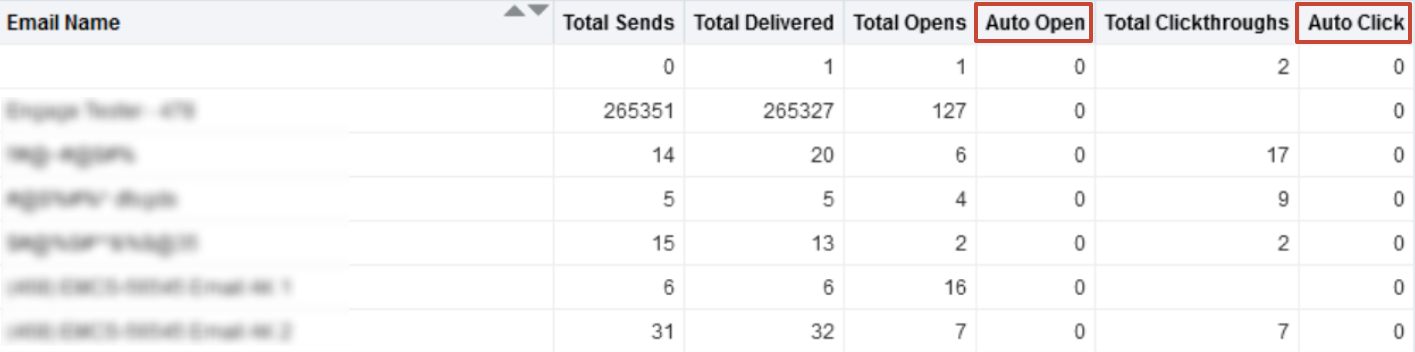
We are adding Auto Opens and Auto Clicks to the following subject areas:
- Campaign Activity by Activity Date
- Campaign Analysis
- Email Activity
- Email Analysis by Send Date
This release brings enhancements that extend the reporting capabilities of Auto Open and Auto Click activities. Auto Opens and Auto Clicks capture activities detected as being auto generated by scanning or privacy tools, including Apple Mail privacy protection changes Apple introduced with iOS15. With the 22C release of Eloqua, we are providing more flexibility to combine auto clicks and auto opens with additional subject areas.
Steps to Enable
You don't need to do anything to enable this feature.
Key Resources
‘Custom’ and ‘Help’ Keyword Types for SMS
Custom and Help types of keywords are now available for your SMS campaign assets, in addition to Opt-In and Opt-Out types already available.
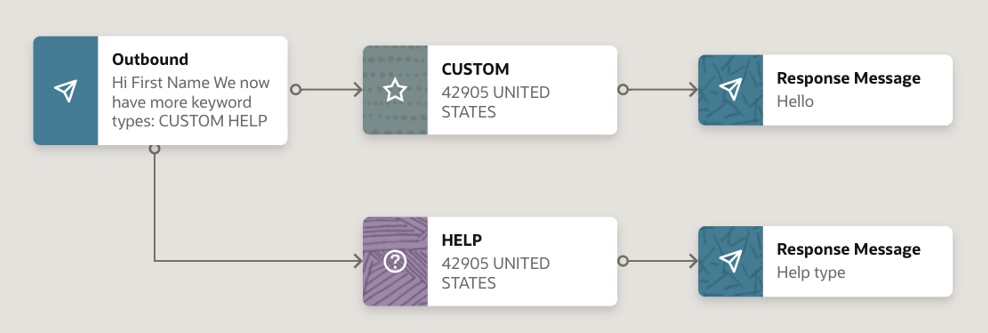
Use Custom and Help keyword types in the editor, and manage them in the setup options.
Unlike Opt-In keywords that opt a phone number in and Opt-Out keywords that opt a phone number out, Custom and Help types do not perform any system action and can be used for pure marketing orchestration setup.
Custom keyboard allows you to interact with your customer base via SMS content, while the help keyword offers an intuitive way for the customer to receive assistance or clarification.
Steps to Enable
- SMS is available as an add-on capability for Oracle Eloqua. Please contact your account manager for additional information and pricing.
- No additional steps are required for customers that are already enabled for SMS.
Key Resources
DLT Template Guidance on Editor for SMS
When creating SMS messages for India, Distributed Ledger Technology (DLT) templates can now be selected for both outbound and response messages.
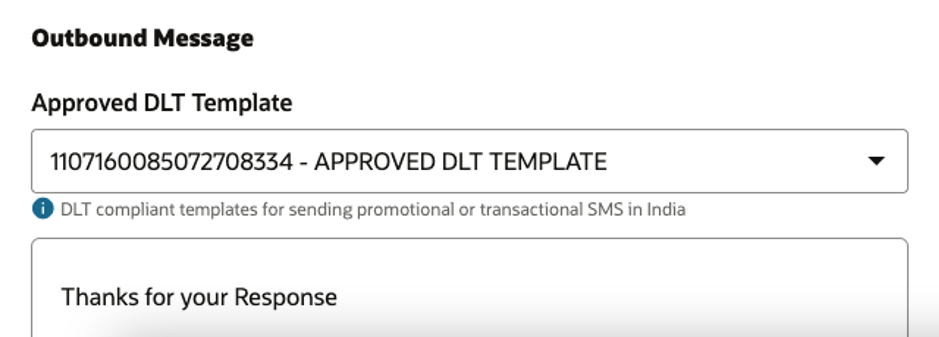
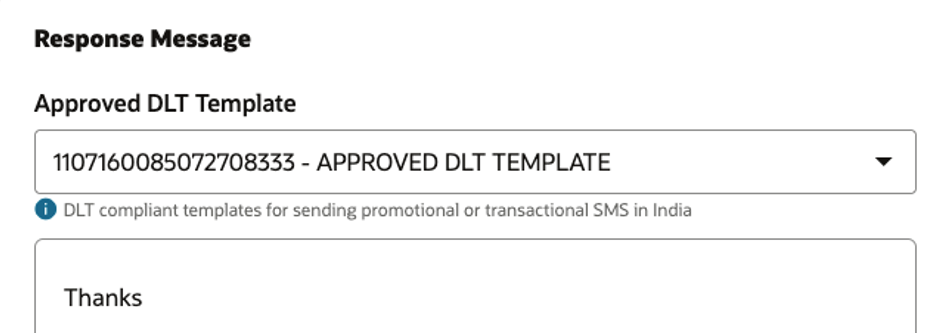
The intuitive user interface lets you easily select an approved DLT template for your SMS messages for India.
Steps to Enable
- SMS is available as an add-on capability for Oracle Eloqua. Please contact your account manager for additional information and pricing.
- No additional steps are required for customers that are already enabled for SMS.
Key Resources
Folders are now available in the SMS asset area.
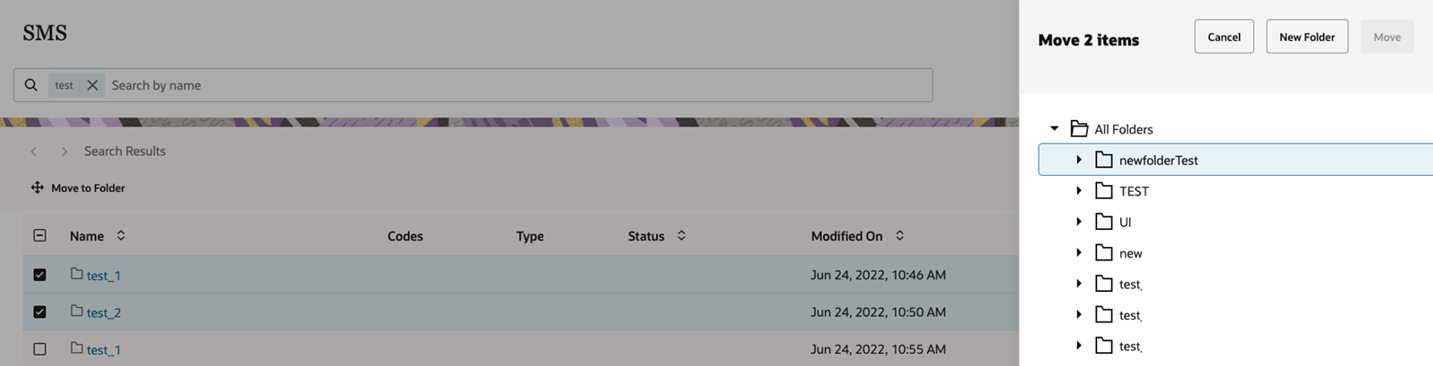
Select one or more files or folders, and use the Move button to place them in the desired folder.
Use folders and subfolders to better organize your SMS assets.
Steps to Enable
- SMS is available as an add-on capability for Oracle Eloqua. Please contact your account manager for additional information and pricing.
- No additional steps are required for customers that are already enabled for SMS.
Key Resources
With the Eloqua 22C release, Eloqua will being enforcing a 25-month data retention policy for form submission data within Eloqua Insight. Form submission data is the raw form data captured when a user submits a form. This change applies to Insight only and it does not impact form metrics (activities and rates). This means that, after Eloqua 22C arrives, you will only be able to report on 25 months' worth of form submission data in Insight.
Form submission activities and form metrics found in additional subject areas will not be impacted by this change. Examples of form activities and metrics include: Total Form Submissions, Form Submission Rate, and Total Form Fields. Here's an example of a Form Submission Data report in Insight:
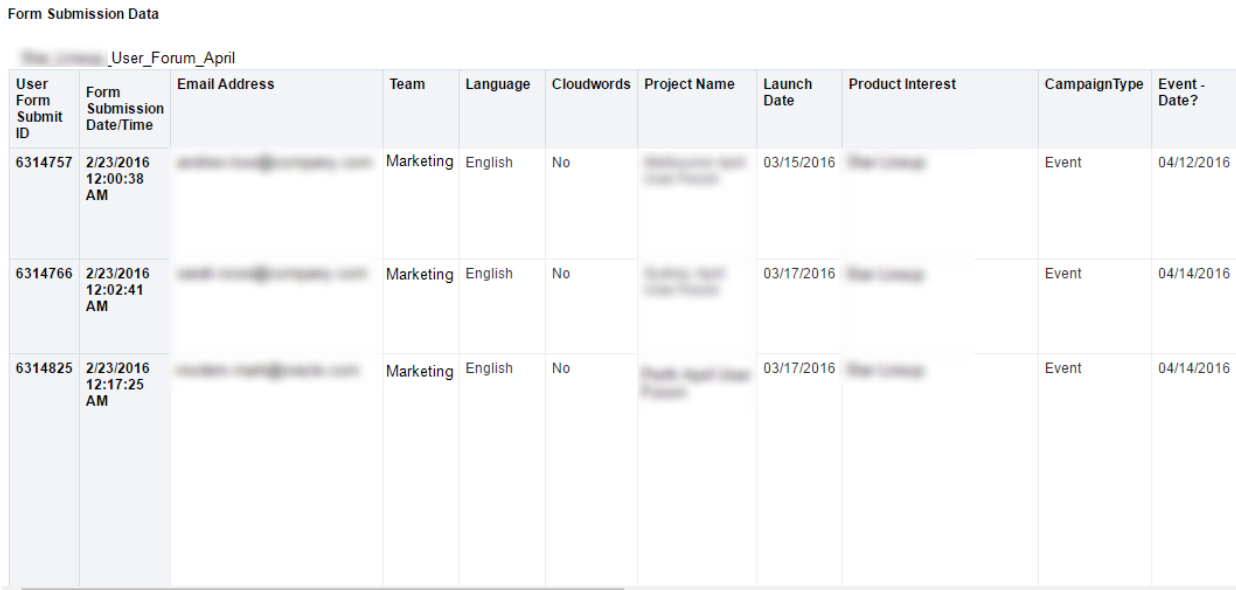
This new retention to Insight form submission data will help us continue to meet the performance demands across our entire platform, provide consistency for data retention applied to activity data, and help reduce the time of our scheduled maintenance windows.
Steps to Enable
You don't need to do anything to enable this feature.
Tips And Considerations
This change applies to Insight only. It does not impact form metrics (activities and rates).
Key Resources
SHA-256 Hash identifier fields (SHA-256 Hashed Email, SHA-256 Hashed Mobile Phone, SHA-256 Hashed Business Phone) is now generally available and has been enabled for all customers.
In order to continue to provide the best experience to our customers, Oracle Eloqua is refocusing the hash identification feature to better align with industry standards and trends for marketing and advertising campaigns.
Steps to Enable
You don't need to do anything to enable this feature.
Tips And Considerations
REMINDER: As of 22C, MD5 hash contact fields (MD5 Hashed Email, MD5 Hashed Mobile Phone, MD5 Hashed Business Phone) will no longer be supported for customers who have enabled the Hash Identifier feature or are using the BlueKai (DMP) Data Activation app. See Product Notice: Sunset of the MD5 Hash Identifier Fields [Aug 2022]
CRM Campaign Id Change Detection
Currently, when CRM Campaign Sync is enabled and a new campaign is created in Eloqua, this campaign will be immediately synced to CRM. However, the CRM Campaign ID field value on Campaign Canvas is not updated automatically. As a result, if users save or verify the campaign, the value of CRM Campaign ID can be overwritten. With Eloqua 22C, the Campaign Canvas will now detect if there has been a change to the CRM Campaign ID, and if not, no value will be sent for CRM Campaign ID.
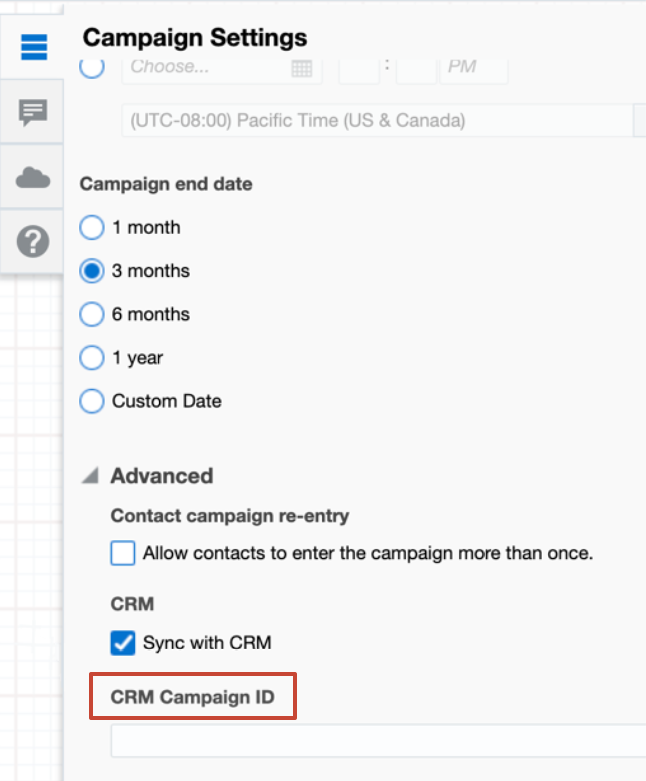
This change will prevent overwriting the CRM Campaign ID value set by the CRM integration.
Steps to Enable
You don't need to do anything to enable this feature.
Key Resources
Ahead of an upcoming Microsoft Outlook add-in release, a new license type has been introduced in Eloqua related to Outlook add-in. With this new license, administrators will be able to manage access to the Eloqua Sales Tools add-in for Microsoft Outlook. When the Outlook add-in updates with our CX Apps Release in November 2022 release, Outlook add-in users must have both the Engage license and the Outlook add-in license to use the Outlook add-in.
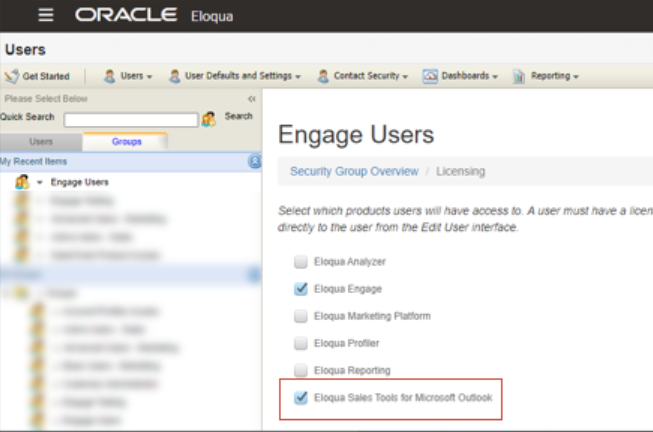
IMPORTANT: Outlook add-in license settings will not be enforced until the Outlook add-in releases.
You can now manage whether Engage users can use the Eloqua Sales Tools for Microsoft Outlook add-in.
Steps to Enable
Make the feature accessible by assigning or updating privileges and/or job roles. Details are provided in the Role section below.
Tips And Considerations
- In the Eloqua 22C release, a one-time update to all security groups that have an Engage license enabled will also enable the Outlook add-in license.
- The new license will not be enforced until the Outlook add-in updates. The Outlook add-in update is expected to be delivered as part of our CX Apps Release in November 2022.
Key Resources
Role And Privileges
- Eloqua administrator follows existing flow to manage licenses.
- Ahead of the Outlook add-in release, to disable add-in use, update the license settings by security group or user.
As a marketer you can now create an end-to-end report for SMS campaigns, where you can report on email and SMS activity.
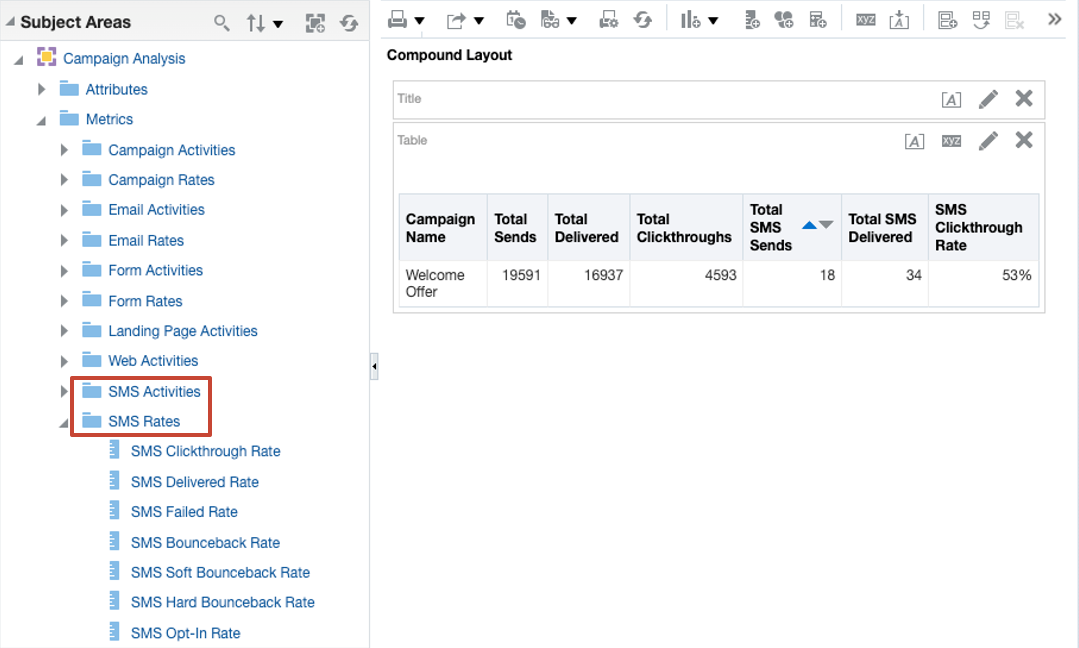
SMS activities and rates were added to the following subject areas:
- Campaign Activity by Activity Date
- Campaign Analysis
This change allows you to gain better insight into campaigns that include email and SMS activities.
Steps to Enable
You don't need to do anything to enable this feature.
Tips And Considerations
You must have a subscription to the SMS Add-on to take advantage of this feature. Contact your Account Manager if you'd like to learn more about Eloqua's SMS feature.
Key Resources
Virtual Mail Transfer/Transport Agent (Virtual MTA) Name is now available as a reporting attribute in the Email Send subject area of Insight reporting.
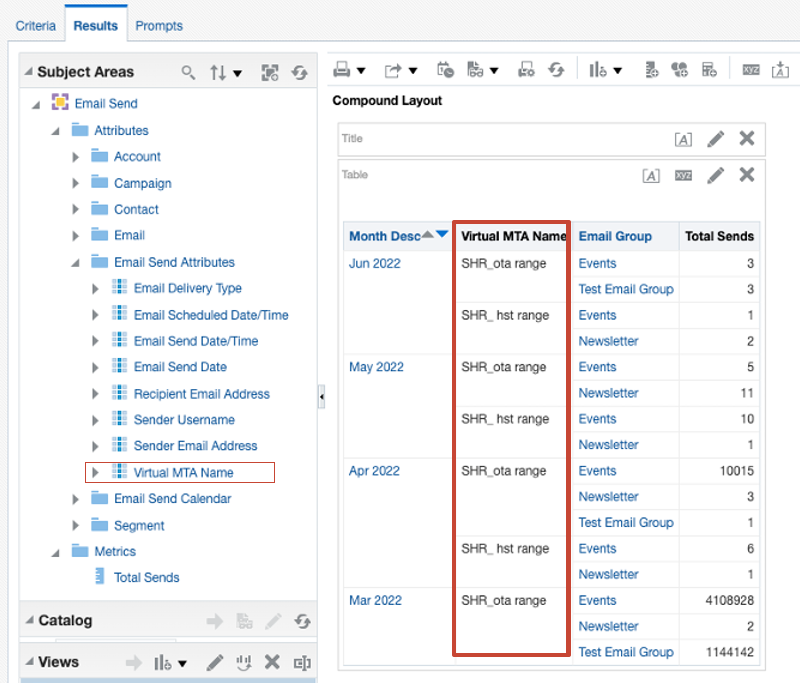
Virtual MTAs provide more granular control over your email sending options, including auto routing, and mail relay configurations.
This change in Eloqua 22C enables you to effectively aggregate results by Virtual MTA Name into your reports, to better understand performance for each record.
Steps to Enable
Make the feature accessible by assigning or updating privileges and/or job roles. Details are provided in the Role section below.
The premium VMT package is required to use this feature. Please speak with your Account Manager for more information.
Key Resources
Role And Privileges
Although this option appears for all customers by default, only customers who have the Premium Branding and Deliverability package will be able to take advantage of this functionality. Options for this section are setup during the Premium Branding and Deliverability package provisioning process. If you are not sure what Virutal MTA should be selected, contact your Eloqua administrator.
Additional Schemes Support for Redirect Links
Redirect links now support additional schemes for customers who use non-standard schemes. In addition to the standard http and https schemes, we now support the following non-standard schemes for redirect URLs:
- mailto
- tel
- ftp
All the above schemes can be tracked if the link is marked track=true.
This change simplifies the work of customers who use non-standard schemes. The newly supported schemes can now be tracked and will be clickable without the need for additional custom code.
Steps to Enable
You don't need to do anything to enable this feature.
With Eloqua's 22C, there is a new search parameter isCertificateProvisioned to the Retrieve a list of microsites endpoint. Set isCertificateProvisioned to “true” to filter on microsites that have a certificate provisioned for at least one of your domains. If isCertificateProvisioned is not included in request all microsites will be returned.
Enhancements to Eloqua APIs provide more security for users.
Steps to Enable
Review the REST service definition in the REST API guides, available from the Oracle Help Center > your apps service area of interest > REST API. If you're new to Oracle's REST services you may want to begin with the Quick Start section.
The Oracle Eloqua Bulk API has the following update:
- We have added new opportunity fields Owner and PrimaryCampaignID for bulk API import. You can retrieve these new opportunity fields using the API endpoint: GET/API/Bulk/2.0/opportunities/fields.
Oracle has added more flexibility with the Bulk API.
Steps to Enable
You don't need to do anything to enable this feature.
Key Resources