Update 24B
Revision History
This document will continue to evolve as existing sections change and new information is added. All updates appear in the following table:
| Date | Module | Feature | Notes |
|---|---|---|---|
| 17 MAY 2024 | Apps | LinkedIn Campaign Manager App Enhancement | Updated document. Revised feature information. |
| 17 MAY 2024 | Engage | Microsoft Outlook Add-in Update | Updated document. Feature delivered in update 24B. |
| 15 APR 2024 | Created initial document. |
The table includes a chronological listing of document changes.
Overview
 HAVE AN IDEA?
We’re here and we’re listening. If you have a suggestion on how to make our cloud services even better then go ahead and tell us. There are several ways to submit your ideas, for example, through the Marketing Ideas Lab on Oracle Customer Connect. Wherever you see this icon after the feature name it means we delivered one of your ideas.
GIVE US FEEDBACK
We welcome your comments and suggestions to improve the content. Please send us your feedback at oracle_fusion_applications_help_ww_grp@oracle.com.
DISCLAIMER
The information contained in this document may include statements about Oracle’s product development plans. Many factors can materially affect Oracle’s product development plans and the nature and timing of future product releases. Accordingly, this Information is provided to you solely for information only, is not a commitment to deliver any material, code, or functionality, and should not be relied upon in making purchasing decisions. The development, release, and timing of any features or functionality described remains at the sole discretion of Oracle.
This information may not be incorporated into any contractual agreement with Oracle or its subsidiaries or affiliates. Oracle specifically disclaims any liability with respect to this information. Refer to the Legal Notices and Terms of Use for further information.
Feature Summary
Column Definitions:
Features Delivered Enabled
Report = New or modified, Oracle-delivered, ready to run reports.
UI or Process-Based: Small Scale = These UI or process-based features are typically comprised of minor field, validation, or program changes. Therefore, the potential impact to users is minimal.
UI or Process-Based: Larger Scale* = These UI or process-based features have more complex designs. Therefore, the potential impact to users is higher.
Features Delivered Disabled = Action is needed BEFORE these features can be used by END USERS. These features are delivered disabled and you choose if and when to enable them. For example, a) new or expanded BI subject areas need to first be incorporated into reports, b) Integration is required to utilize new web services, or c) features must be assigned to user roles before they can be accessed.
| Ready for Use by End Users Reports plus Small Scale UI or Process-Based new features will have minimal user impact after an update. Therefore, customer acceptance testing should focus on the Larger Scale UI or Process-Based* new features. |
Action is Needed BEFORE Use by End Users Not disruptive as action is required to make these features ready to use. As you selectively choose to leverage, you set your test and roll out timing. |
|||||
|---|---|---|---|---|---|---|
| Feature |
Report |
UI or |
UI or |
|
||
Bulk API: New validation error if attempting to delete data when sync in progress |
||||||
Eloqua Marketing Automation
User Experience
Eloqua's Redwood Experience
Explore Eloqua's Redwood Experience
Redwood is the name of Oracle's next generation user experience. With 24B, we have added Simple Campaign guided process to our Redwood Experience in Eloqua.
Enhancements also included with 24B:
-
Contacts page: New grid display to maximize display area and improve performance
-
Campaign launcher:
-
Search enhancements to support filtering by status, type, and date
-
Create a new folder in the context of moving objects
-
As a reminder, these areas are already available in our Redwood Experience as they were added in previous releases:
-
Redwood Experience switch directly within the Eloqua platform is now available to all users!
-
Redwood already available in these functional areas:
- My Eloqua
- Contacts, Accounts
- Campaign Launcher
- Campaign Settings
- External Activity Setup
- External Activities Upload
- Fields and Views, and Tracked Fields
- Hyperlinks Manager
- Microsite and Email Group Setup
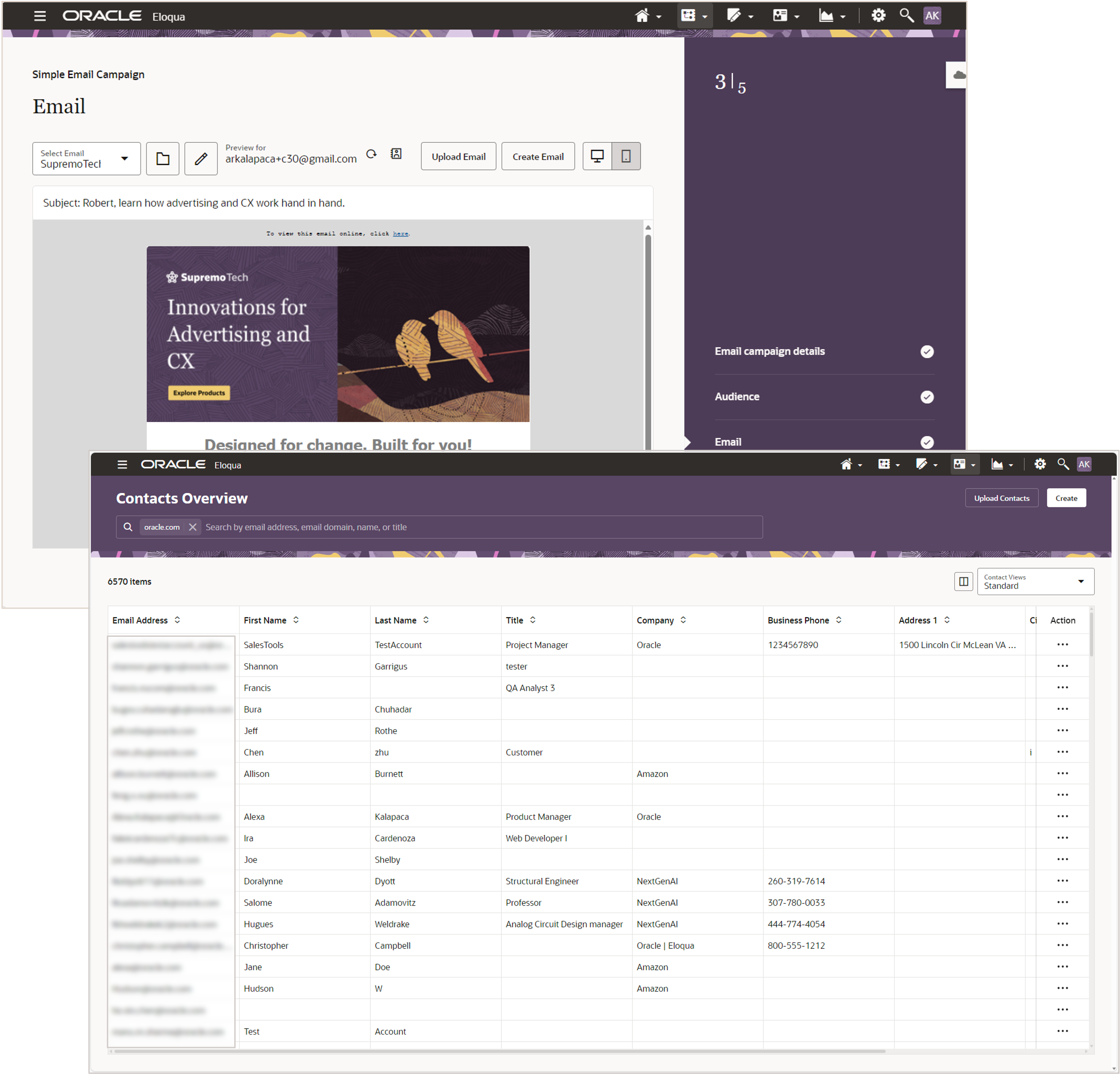
Simple Email Campaigns and Contacts Overview
Steps to Enable
You don't need to do anything to enable this feature.
Administration
Updated Process for Uploading SSL Certificates
- Customers no longer need to open support requests when uploading SSL certificates for microsite and application domains (not yet available for image domains)
- Certificate installed automatically to speed up the process, removing manual steps by both the customer and support
- Messaging within Eloqua has been updated to highlight this new process
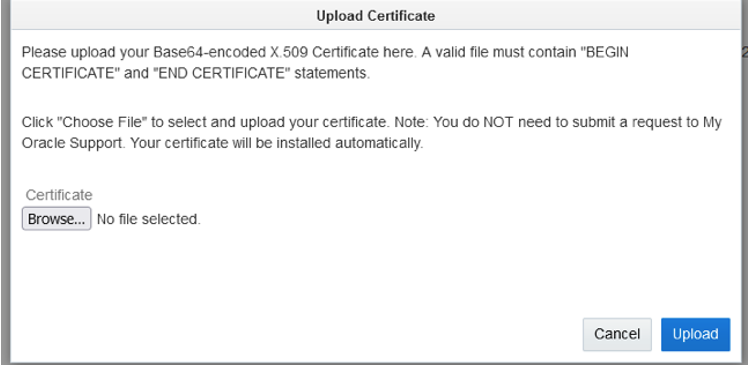
Upload Certificate
Streamlined process to upload new SSL certificates.
Steps to Enable
You don't need to do anything to enable this feature.
Advanced Intelligence
Generative AI: Content Generation
Generate engaging text content powered by AI. Ability to generate text recommendations using text input prompts. Create new variations based on existing text content.
Available on following editors:
- Landing Page
- SMS
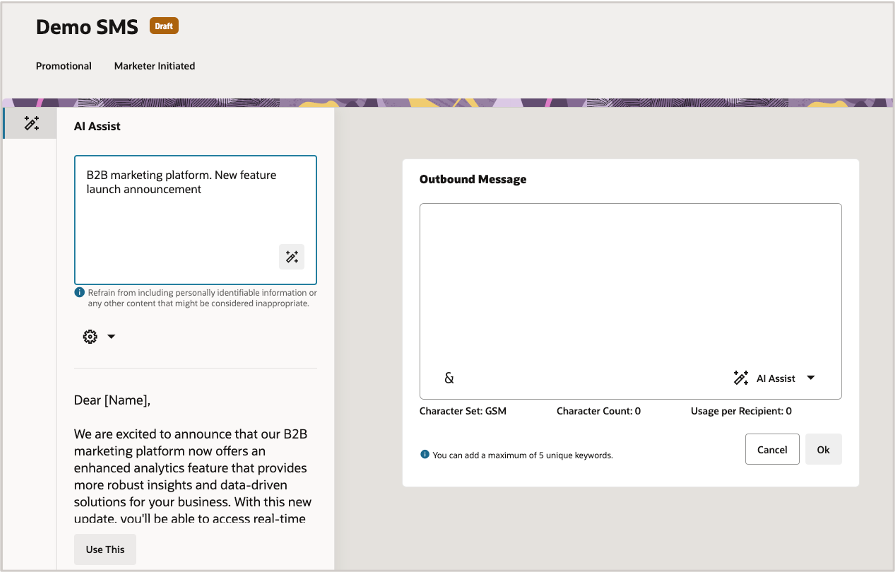
Sample AI Assist View
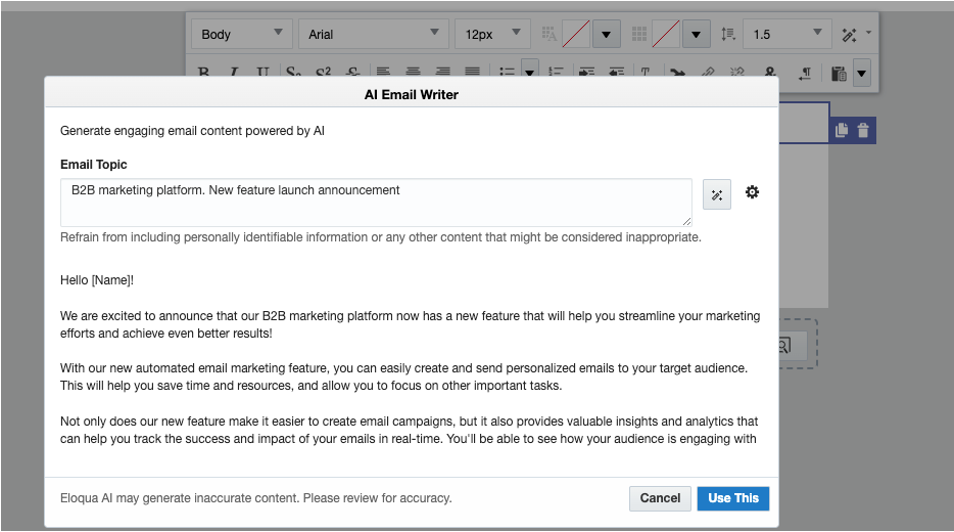
Sample Editor View
Reducing the time and cognitive load on marketers. Freeing up time to focus on higher value activities.
Steps to Enable
NOTE: Invite-only Controlled Availability release with 24B.
Tips And Considerations
Note: Expected to be rolled out to all AI SKU customers by 24C (Aug 2024)
Key Resources
- Oracle Eloqua Help Center: Advanced Intelligence Add-on
Access Requirements
- Requires the Oracle Advanced Intelligence Add-on SKU for Eloqua
- Requires the Oracle Eloqua SMS Add-on for SMS areas/editor
- Invite-only CA release with 24B.
Apps
Oracle’s Zoom App for Eloqua
Enhancement for the Oracle's Zoom App for Eloqua include:
- Support for numeric, date, and static fields.
- Attended and Registered Decision Steps to check whether Contacts attended or registered for the Zoom webinar (follow-up emails)
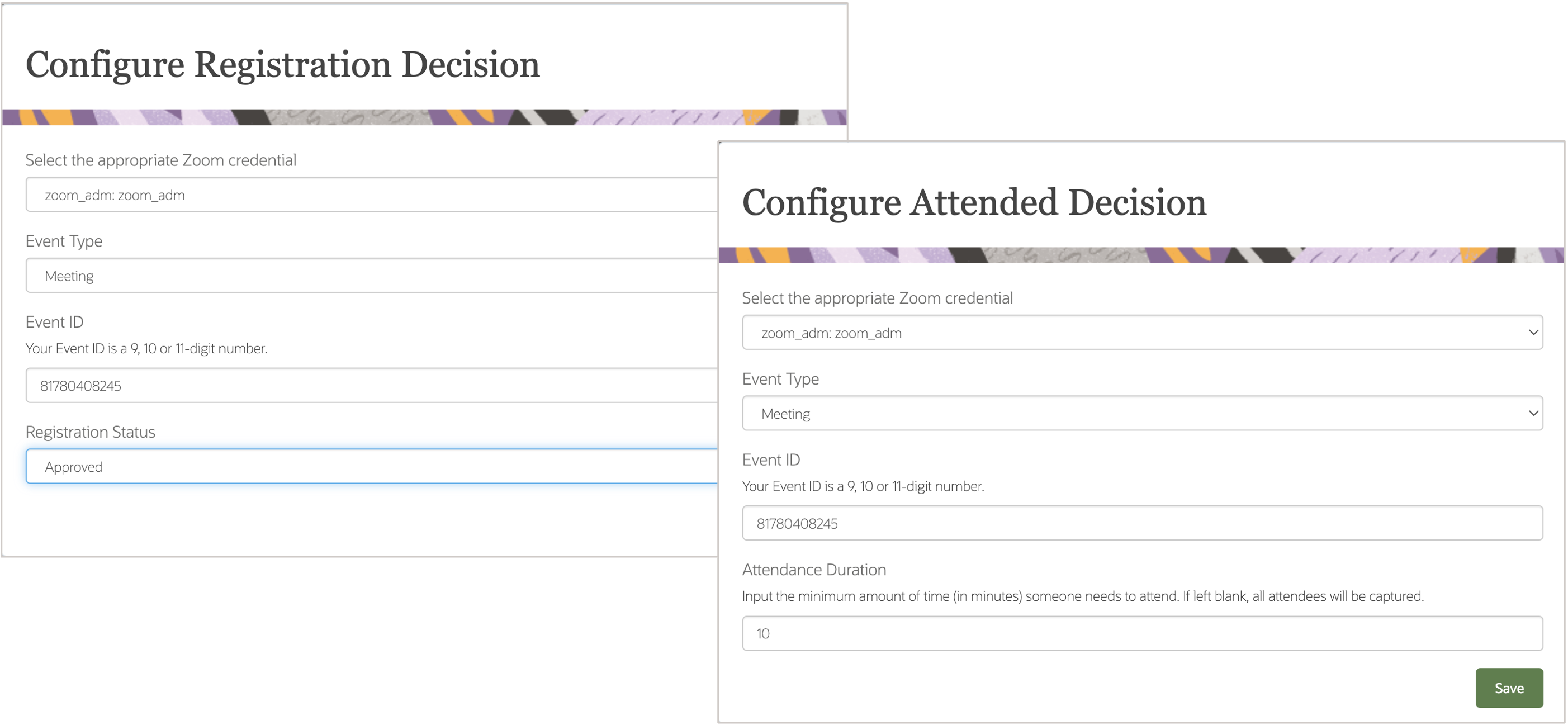
Sample Registration and Attended Decision Steps
Steps to Enable
You don't need to do anything to enable this feature.
Tips And Considerations
- Became generally available as of February 2024
- Supports Zoom Webinars and Meetings
Key Resources
- Learn more about Oracle's Zoom App for Eloqua
Access Requirements
NOTE: Also requires Zoom subscription
Guided Campaigns App for Eloqua
- App Language Localization
- Aligns with Eloqua apps and Sales Tools supported languages
- Usability enhancements:
- Define Campaign name on tactic creation
- Allow user to set Opportunity Qualification program defaults
- Additional helper text through the application
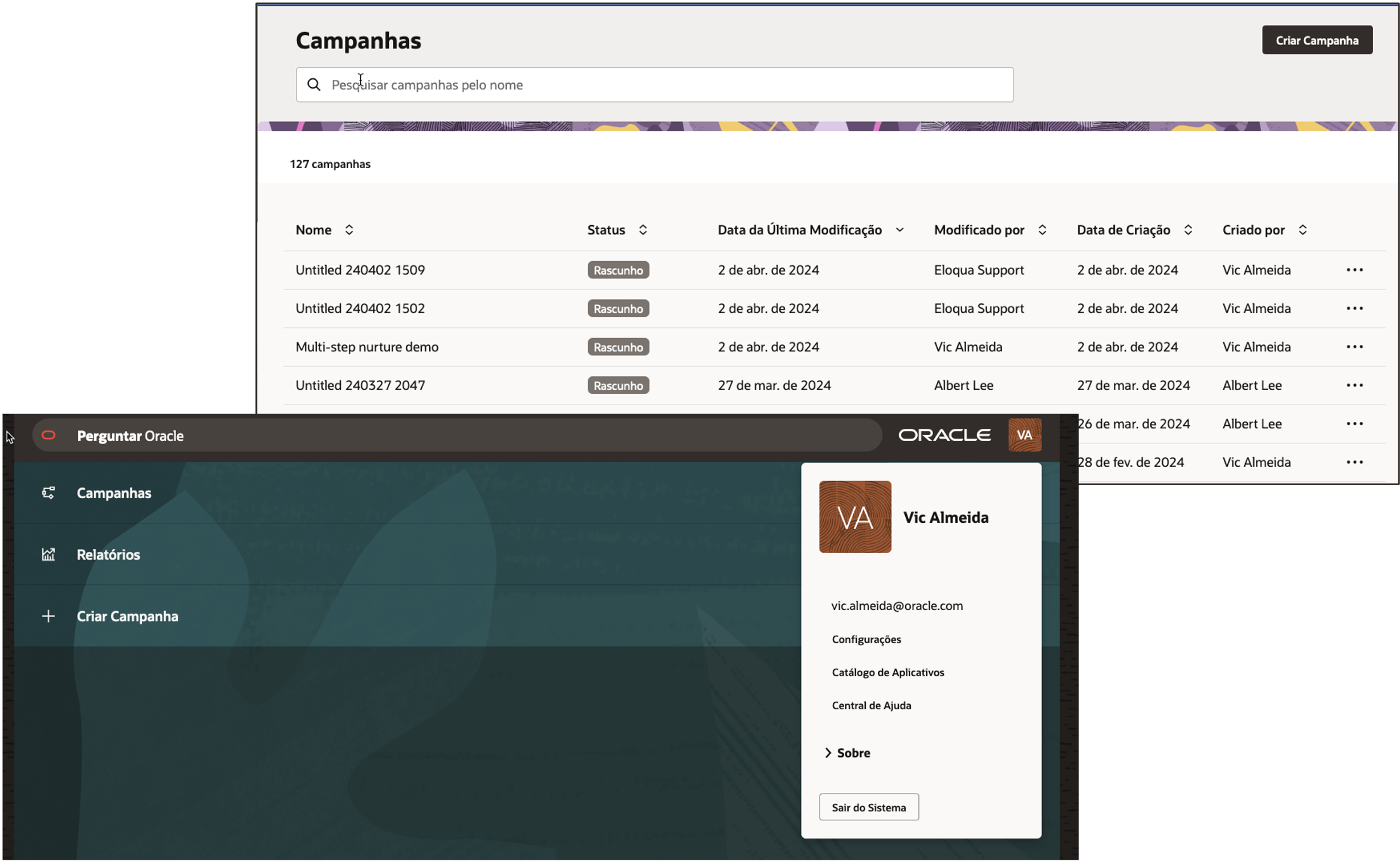
Preview of Guided Campaigns UI in non-english language
Steps to Enable
NOTE: A subscription for the Fusion Marketing Guided Campaigns app for Eloqua is required. Please contact your account manager for more information.
Tips And Considerations
- Arrives as part of our April Apps Release (April 19, 2024)
Key Resources
- Oracle Eloqua Help Center: Eloqua's Guided Campaigns Add-on
- Oracle Eloqua Help Center: Supported Languages
LinkedIn Campaign Manager App Enhancement
Company Matching Action Service
- Send company information from Eloqua contacts directly from the Oracle Eloqua campaign canvas to LinkedIn
- Match against LinkedIn Companies using company name and website domains from Eloqua contact
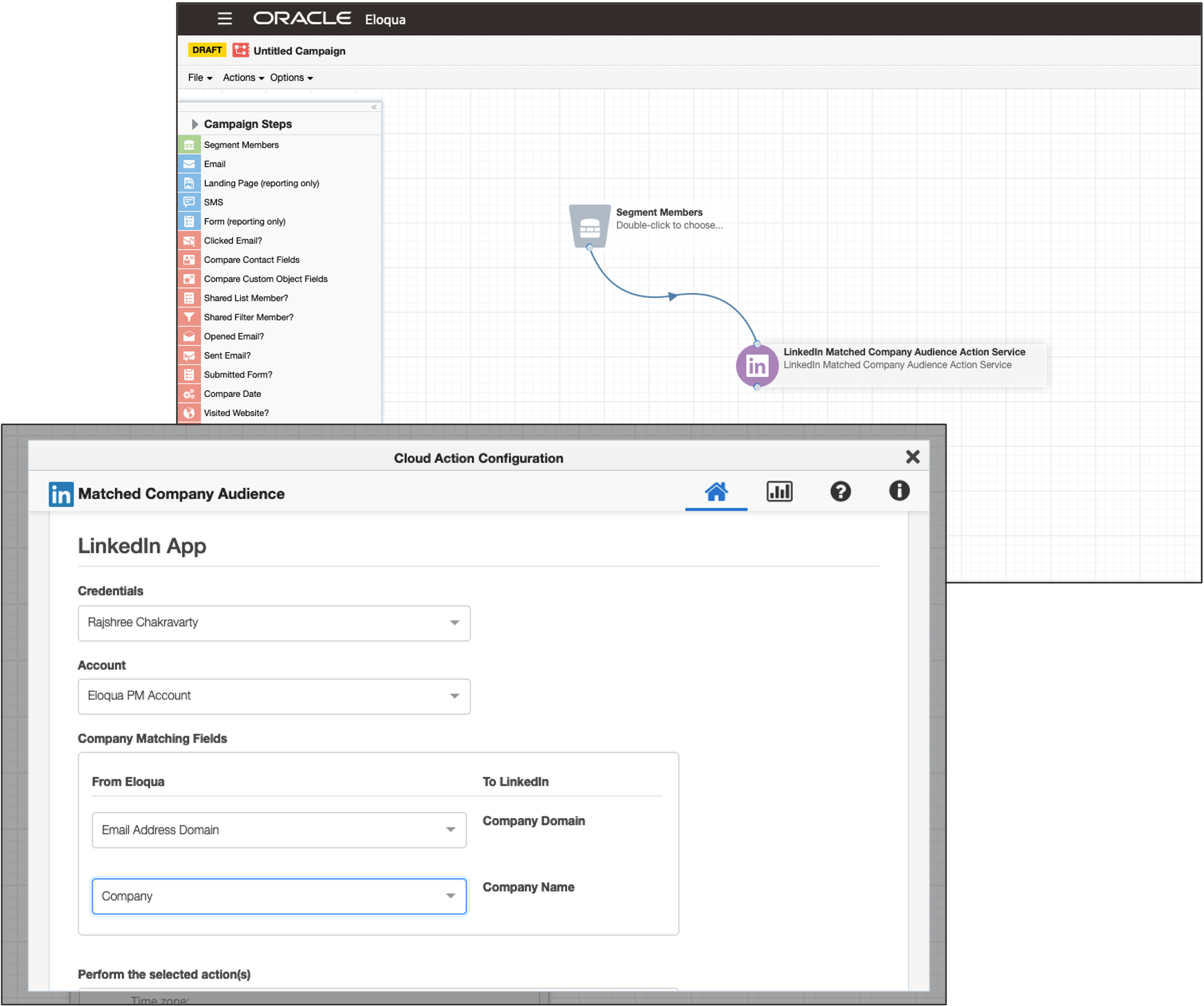
Matched Company Audience
Steps to Enable
To enable this feature you need to log a Service Request (SR).
Note: The Company Matching Action service is in controlled availability. Please log an SR with Oracle Support to have the feature enabled.
Key Resources
- Oracle Eloqua Help Center: LinkedIn Campaign Manager App
Campaigns
Split Decision Step Enhancement
Audience split decision step splits contacts down different paths by percentages. With 24B it has been updated to provide more random outputs.
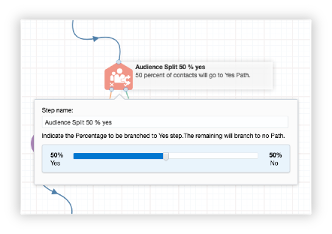
Audience Split Decision Step
Steps to Enable
You don't need to do anything to enable this feature.
Key Resources
- Oracle Eloqua Help Center: Decisions Steps
Developer Changelog
Reporting API is now Generally Available!
Access Eloqua Insight data using the new Reporting API, now generally available to all customers.
- RESTful API build using the widely OData protocol
- Programmatically extract reporting data directly from the Insight data-warehouse
- Consume a rich set of data with built in business logic derived from Insight subject areas
- Supports data lake/data ware house integrations
- Provides native connections through standard interfaces (i.e Excel)
- Seamlessly integrate the Reporting API to consume data into data lakes/warehouses and ODATA connectors, facilitating streamlined data management.
Steps to Enable
You don't need to do anything to enable this feature.
Bulk API: New validation error if attempting to delete data when sync in progress
New validation error if attempting to delete data when sync in progress. When attempting to delete data when there is an associated sync in progress, we will return a“409 There was a conflict.” validation response.
Steps to Enable
You don't need to do anything to enable this feature.
Tips And Considerations
-
Impacts all Bulk API delete data endpoints
Key Resources
- See product notice for additional details: Eloqua Bulk API – New validation error if attempting to delete data when sync in progress [May 2024]
-
View changes for Eloqua's APIs including, new features, significant recent changes, and platform notices, on the Eloqua Developer Changelog.
Application API: Contact Activity - New Campaign ID field
- CampaignId is added to fieldValues for SMS activities for the Contact Activity Application API 2.0 endpoint:
GET /api/REST/2.0/data/activities/contact/{id}/{type}
- This will return the Campaign ID of the Eloqua Campaign linked to the SMS activity
- CampaignId is returned for the following activities:
- SMS Send
- SMS Delivery
- SMS ClickThrough
- SMS Reply
- SMS Bounceback
- SMS Fail
Steps to Enable
You don't need to do anything to enable this feature.
Key Resources
-
See product notice for details: Eloqua Application API 2.0 - New “CampaignId” field for SMS activities added to Retrieve a list of Activities Endpoint [May 2024]
-
View changes for Eloqua's APIs including, new features, significant recent changes, and platform notices, on the Eloqua Developer Changelog.
Engage
Microsoft Outlook Add-in Update
Oracle Eloqua Sales Tools for Microsoft Outlook add-in was updated to address an issue where the plugin was duplicating text in the body of an outlook email.
If your IT department wants to manage the release, a mass deployment is required before the release contact support for details on mass deployment.
Steps to Enable
You don't need to do anything to enable this feature.
Access Requirements
Note: Arrives with the 24.04 Apps release (April 19, 2024)
Forms
View User Permissions
- Users will now be able to properly view form processing steps within the form when they have view permission to the form, without the need to give those users edit permissions
- This will not allow any users who do not have view permissions to view the form, this will only allow users who have already been given view permission see the form configuration without the risk of modifying the form
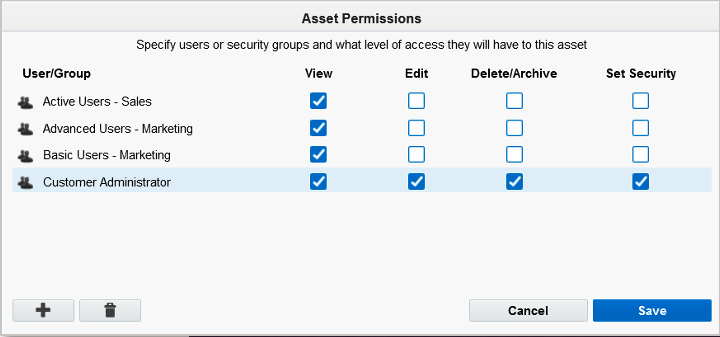
Sample Asset Permissions View
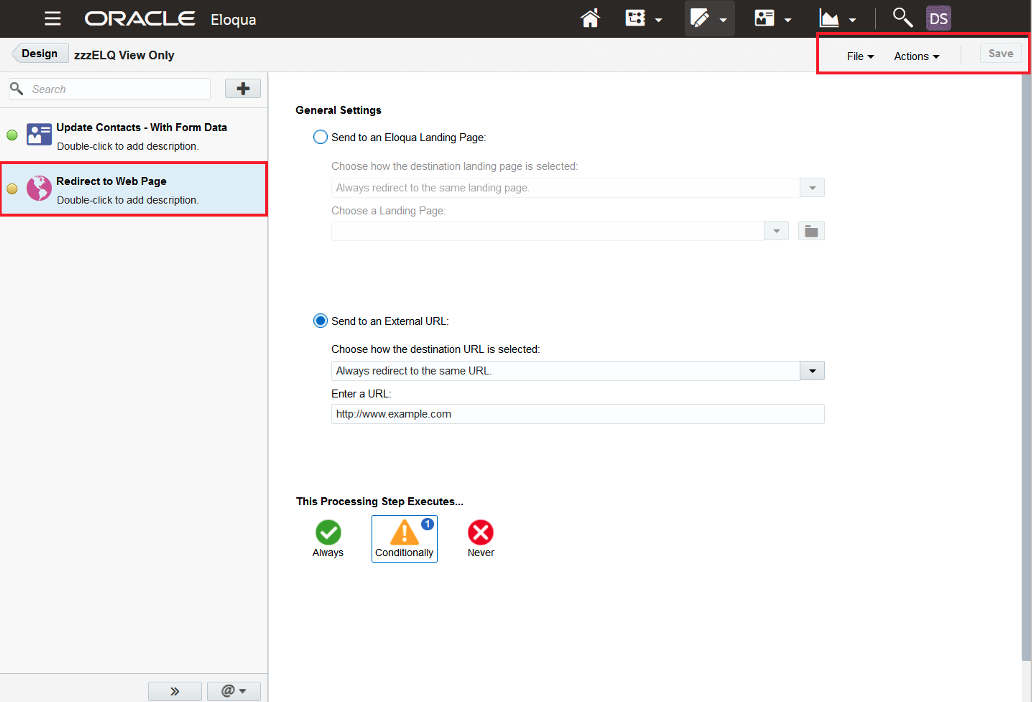
Form Processing Step
Steps to Enable
You don't need to do anything to enable this feature.
Form Spam Protection: Resubmit
- A new option has been added to Form Spam Data within the form area in Eloqua
- If there is a submission that was flagged as spam that should have been a valid submission, right clicking that submission will allow users to mark it as not spam
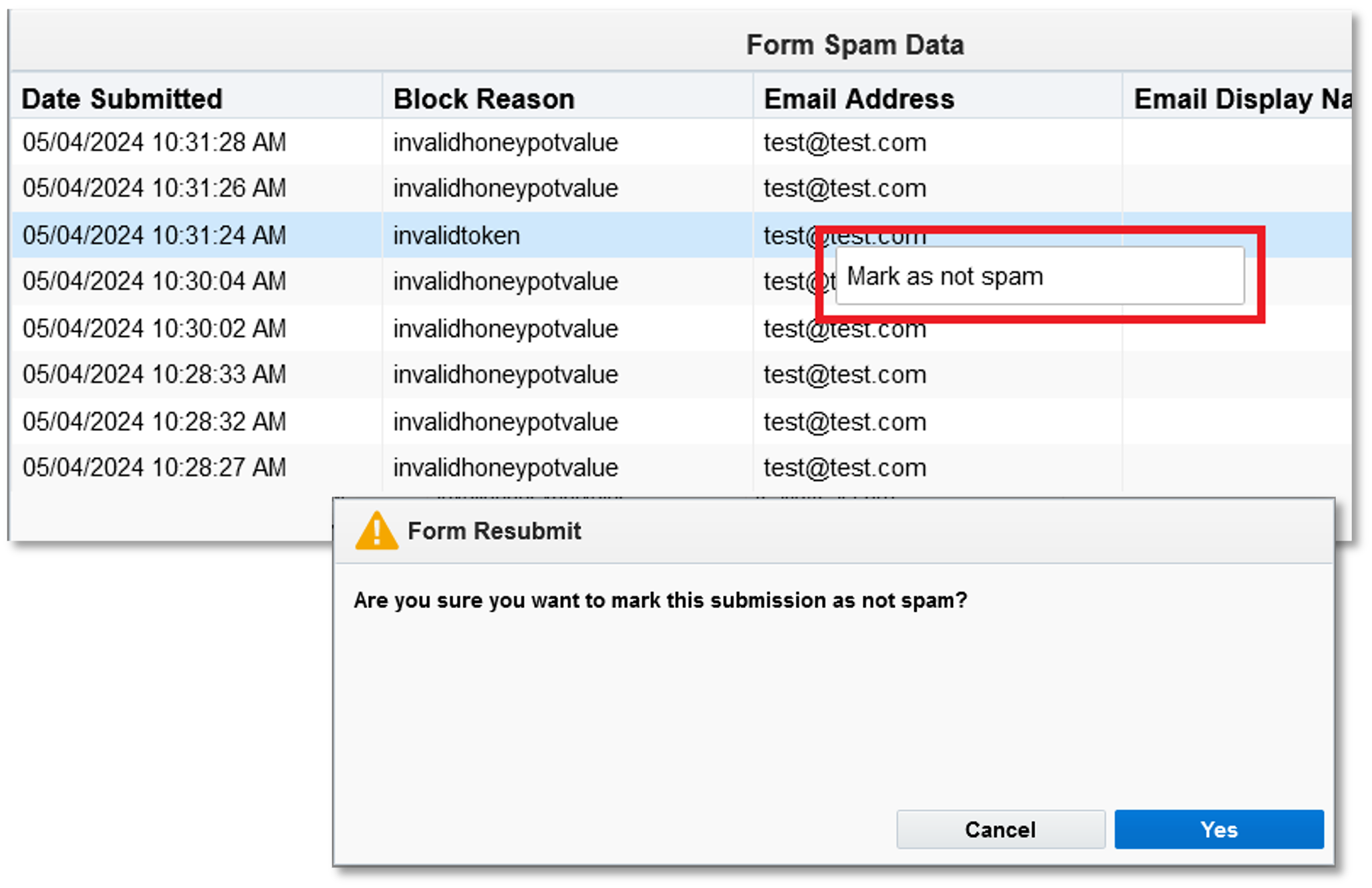
Mark as not spam
More flexibility to adjust submissions inadvertently marked as spam
Steps to Enable
You don't need to do anything to enable this feature.
Tips And Considerations
- Resubmitting the submission as not spam will trigger the processing steps using the data collected for that submission
- The submission will check field validation to avoid resubmitting data if required fields or invalid data would have blocked it
- Only submissions marked as spam after 24B is released will be able to be resubmitted using this User Interface.
Key Resources
- Oracle Eloqua Help Center: Form Spam Protection Overview
Access Requirements
NOTE: Available for all customers, Form Spam Protection is an optional GA (general availability) feature. If you do not already have it enabled, please contact Oracle Support and they will it enable it for you.
Integrations
Salesforce App Enhancements
Campaigns Exports > Sync Eloqua Campaign Metrics to Salesforce for reporting and attribution purposes
- Daily scheduled exports to Salesforce Campaign object that can also be triggered on demand
- Utilizes Eloqua Reporting APIs
- Supported metrics:
- Email Activities
- Form Activity
- Web Activity
- Can be filtered based on the Campaign attributes
- Includes operational reports
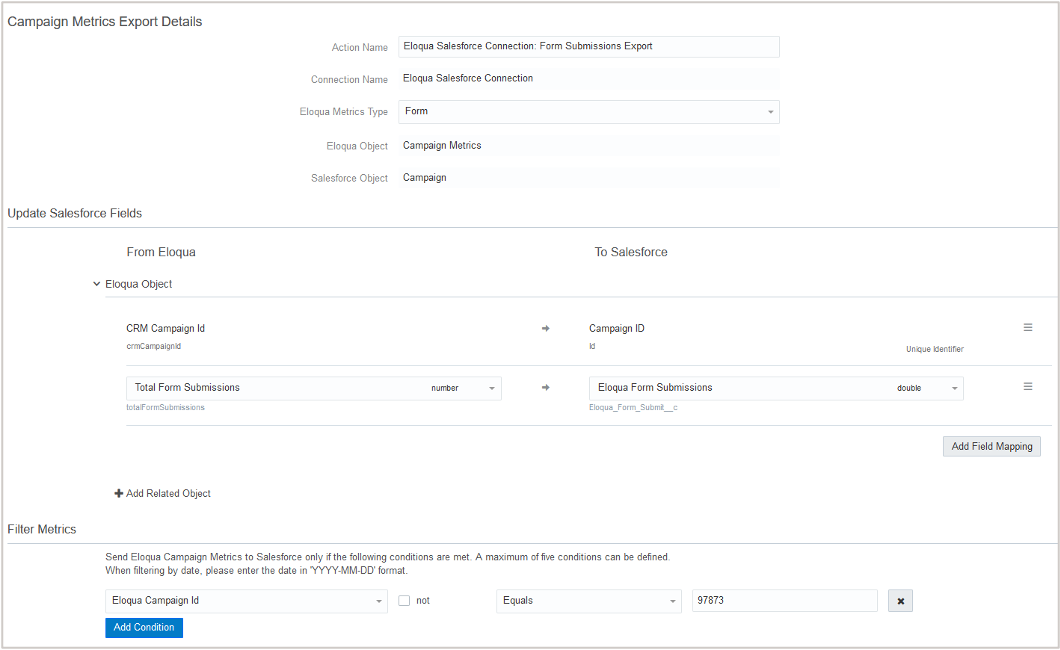
Campaign Exports
Marketing Activities Exports > External Activity Type
- Export external activities to automatically create tasks in Salesforce
- Includes all common activity sync capabilities, such as filters and operational reports
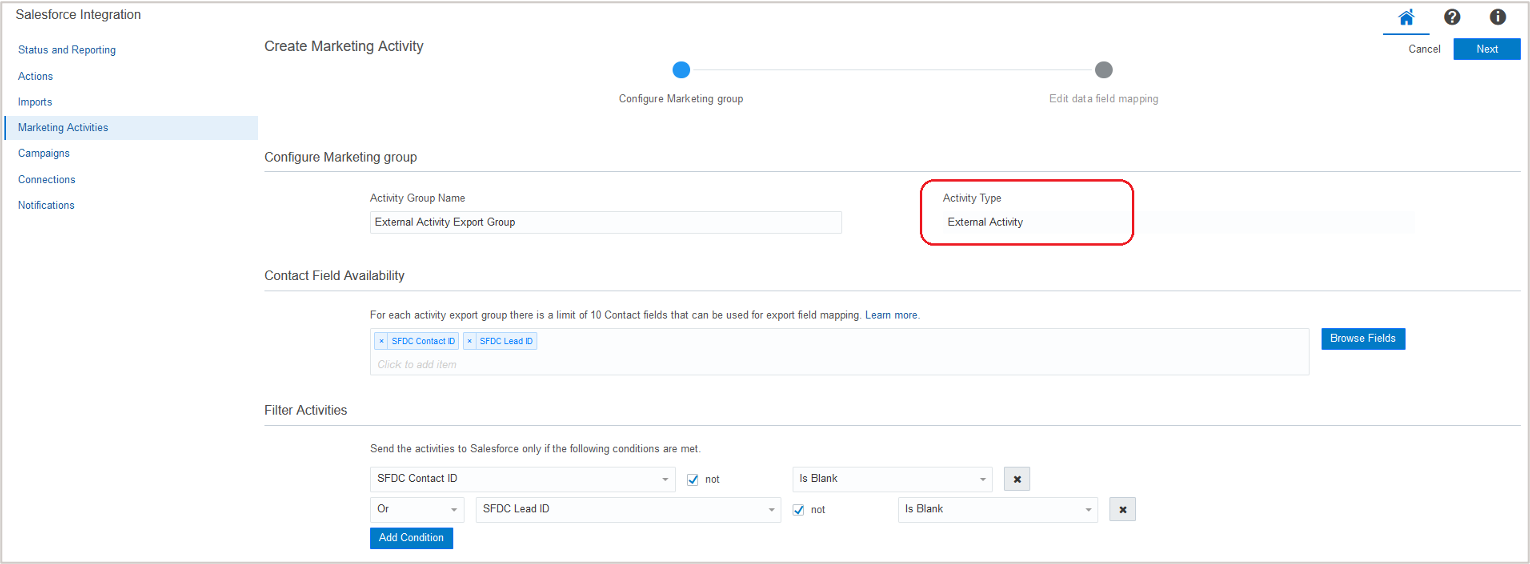
Marketing Activities Export
Imports > Support of Salesforce Polymorphic fields
Controlled Availability. Request access by submitting an SR with Oracle Support
- Polymorphic relationships are a Salesforce Object Query Language (SOQL) feature that allows querying data from different types of objects using a single field
- For example, you can use the polymorphic field OwnerId to query the owner of any record, whether it is a user, a queue, or a group
- In this example, if a custom field is added only to the User object, then a special handler must be added to the SOQL query to account for both situations (the owner being a queue versus a user versus a group)
- The Salesforce App is now able to adjust underlying SOQL queries to account for this scenario automatically
- Currently supported polymorphic fields:
- Lead.OwnerId
- CampaignMember.LeadOrContactOwnerId
- Case.OwnerId
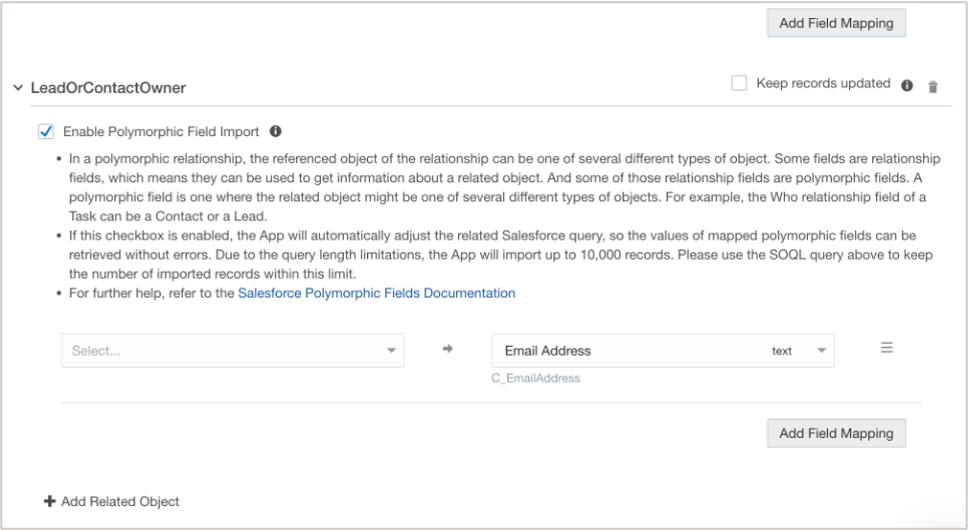
Enable Polymorphic FIeld Import
Evolving the Salesforce App to meet your business requirements.
Steps to Enable
You don't need to do anything to enable this feature.
Tips And Considerations
Key Resources
- Oracle Help Center: Learn more about the Salesforce Integration App
Oracle Sales App Enhancements
Action > Upsert Action
- Create or update 2nd-level CX Sales object records
- Similar to other Action types, can be used in Programs or Campaigns
- For example, it can be used to add Product details to the related Sales Lead in CRM
- Uses CX Sales Bulk Upload process
App Configuration for Oracle Sales Integration
Steps to Enable
You don't need to do anything to enable this feature.
Key Resources
- Oracle Eloqua Help Center: Learn more about the Oracle Sales App Integration
Landing Pages
Microsite Management
- Ability to unlink Landing Pages from microsites
- Helps to enable Automated Certificate Management, by removing old microsites with invalid DNS configurations
- The Unlink microsite landing page dependencies action permission can be added to any security group to allow users of that group to perform this action
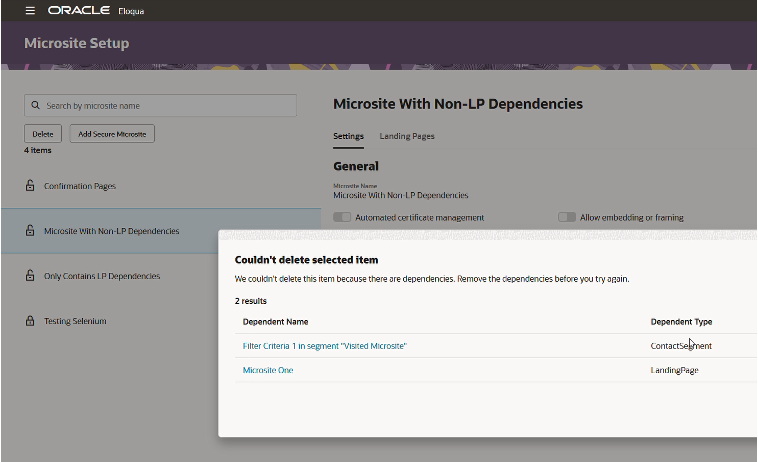
Microsite Setup
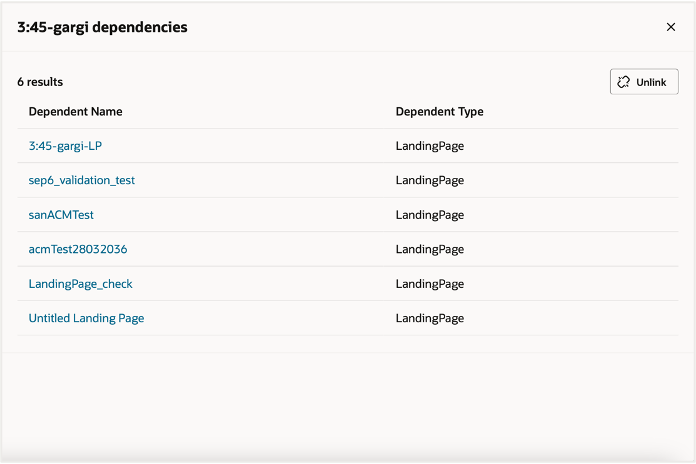
Dependencies
Makes it easier to cleanup and delete old microsites with many dependencies.
Steps to Enable
You don't need to do anything to enable this feature.
Key Resources
- Oracle Eloqua Help Center: Microsites
Segments
Segment Filters: Custom Object Created/Modified On
Updates to to the segment functionality with 24B includes:
- Two new options have been added to the segment filters:
- “Has Linked Contact in Custom Object” and
- “Has Linked Account in Custom Object”
- Filter criteria has been split to Custom Field Conditions and System Field Conditions
- New options in System Field Conditions will allow the filter to target Last Modified on and Created on of the linked custom object records within the criteria
These will be combined with the filter criteria of the Custom Field Condition to allow for granular targeting of recent records, excluding of aging records, or pinpointing other dates related to the custom objects.
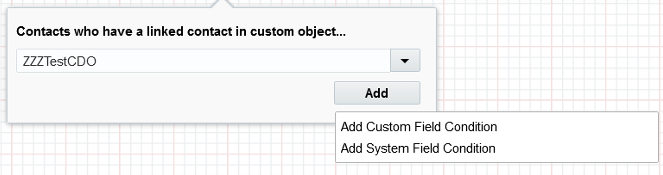
Add Custom Field Condition
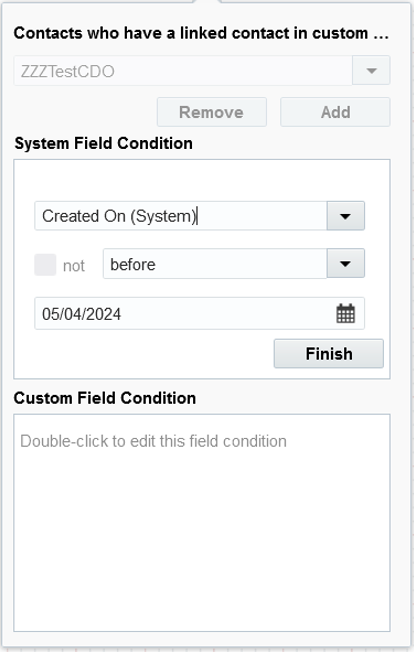
Using Custom Field Condition
Allows for more granular targeting in the creation of segments.
Steps to Enable
You don't need to do anything to enable this feature.
View User Permissions
- Users will now be able to properly view segment filter criteria in the segment if they have the correct view permission to the segment without the need of that user to edit the segment
- This will not allow any users who do not have view permissions to view the segment, this will only allow users who have already been given view permission see the full segment without the risk of modifying the segment
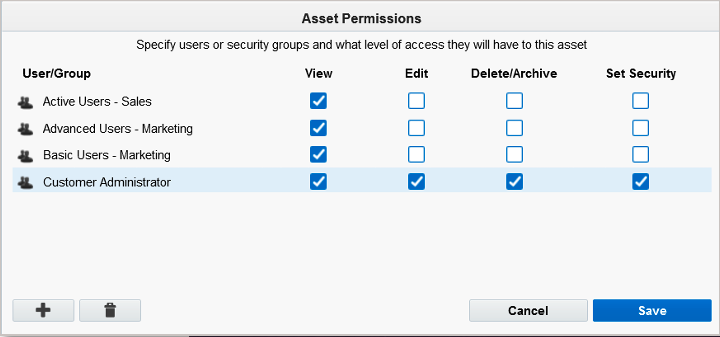
Asset Permissions
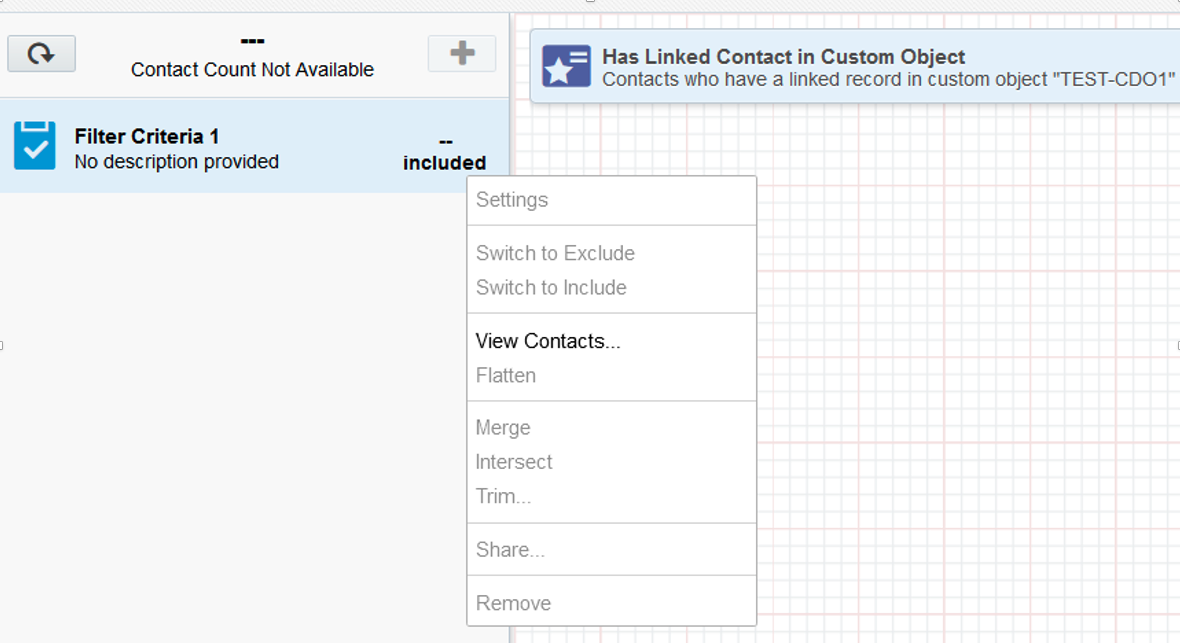
Sample Preview of View with Appropriate Permissions
Steps to Enable
You don't need to do anything to enable this feature.