
- Revision History
- Overview
- Feature Summary
- Enterprise Performance Management
-
- EPM Common
-
- Updates to the EPM Cloud Operations Guide
- EPM Automate Updates
- Updates to Information in the Activity Report
- REST API Parameter to List Longest Running Jobs While Exporting the Job Console
- New Version of Oracle Smart View for Office
- Ribbon Button Context Support in Smart View (Mac and Browser)
- URL Attachment Support in Smart View (Mac and Browser)
- Saving Office Documents to EPM Cloud in Smart View
- Reports Integration with Smart View in Oracle Smart View for Office (Mac and Browser)
- Reports Integration with Smart View in Oracle Smart View for Office in the Cloud EPM Platform
- Updated EPM Books Extension for Smart View
- Flex Forms - Support for Flexible Dimensions on Columns
- Support Substitution Variable Functions for Both Books and Bursting
- Row/Column Indicators for Formula, Text, and Note Segments in Report Grids
- Retain Ad-Hoc Forms on Redeployment in Supplemental Data Manager
- New Category Mapping Option in Data Integration
- New Update Applications Option in Data Integration
- New Before Extract Event to Invoke Business Rule in Data Integration
-
- Account Reconciliation
- Enterprise Data Management
-
- New Videos
- Locations for Node Data Type Properties in Expressions
- Additional Methods for String Lists in Expressions
- Copy Viewpoint Extracts
- Enhanced Template Import Results
- Exclude Implicit Shares for Node Locations in Expressions
- Expressions Using Inherited and Derived Properties for Node Data Type Properties
- Get Parents for Node Locations in Expressions
- IsEmpty Method for String, List, and Memo Data Types in Expressions
- Previous and Next Sibling for Node Object in Expressions
- Resize Table Columns on List Pages
- Reverse Method for Node Collections in Expressions
- Save and Load Expressions Using Files
- Shared Member Before Base Member Validation for EPM Cloud Applications
- Template Import Preview
- Update Existing Applications During Template Import
- Work with Hierarchies from Same Viewpoint on Separate Tabs
-
- Financial Consolidation and Close
-
- New Videos
- Enhanced Enterprise Journals
- Enhanced Metadata Validation for Solve Order and Data Source
- Consolidation Operator on Account and View Members
- Substitution Variables for Application Currency
- Performance Substitution Variables
- Support for Loading Parent Input, Contribution Input, and Translated Currency Input Journals to Financial Consolidation and Close
-
- Narrative Reporting
-
- Introduction of Quick Start Checklists for EPM Cloud Narrative Reporting
- Ability to Mark a Report Package Final
- Inline Grid Entry of Notes in Reports
- Rest API to Retrieve Bursting Definitions Artifact
- Open Doclets in Smart View from Narrative Reporting Web
- Updated Narrative Reporting Extension for Smart View
-
- Planning
- Profitability and Cost Management
- Tax Reporting
- IMPORTANT Actions and Considerations
This document will continue to evolve as existing sections change and new information is added. All updates appear in the following table:
| Date | Product | Feature | Notes |
|---|---|---|---|
| 07 DEC 2021 | Narrative Reporting | Introduction of Quick Start Checklists for EPM Cloud Narrative Reporting | Updated document. Delivered feature in Dec 2021. |
| 30 NOV 2021 | Account Reconciliation | Global Time Zone Setting | Updated document. Delivered feature in Dec 2021. |
| 30 NOV 2021 | Financial Consolidation and Close | Support for Loading Parent Input, Contribution Input, and Translated Currency Input Journals to Financial Consolidation and Close | Updated document. Moved feature from EPM Common section. |
| 24 NOV 2021 | Created initial document. |
 HAVE AN IDEA?
We’re here and we’re listening. If you have a suggestion on how to make our cloud services even better then go ahead and tell us. There are several ways to submit your ideas, for example, through the Ideas Lab on Oracle Cloud Customer Connect. Wherever you see this icon after the feature name it means we delivered one of your ideas.
GIVE US FEEDBACK
We welcome your comments and suggestions to improve the content. Please send us your feedback at EPMdoc_ww@oracle.com.
DISCLAIMER
The information contained in this document may include statements about Oracle’s product development plans. Many factors can materially affect Oracle’s product development plans and the nature and timing of future product releases. Accordingly, this Information is provided to you solely for information only, is not a commitment to deliver any material, code, or functionality, and should not be relied upon in making purchasing decisions. The development, release, and timing of any features or functionality described remains at the sole discretion of Oracle.
This information may not be incorporated into any contractual agreement with Oracle or its subsidiaries or affiliates. Oracle specifically disclaims any liability with respect to this information. Refer to the Legal Notices and Terms of Use for further information.
Column Definitions:
Report = New or modified, Oracle-delivered, ready to run reports.
UI or Process-Based: Small Scale = These UI or process-based features are typically comprised of minor field, validation, or program changes. Therefore, the potential impact to users is minimal.
UI or Process-Based: Larger Scale* = These UI or process-based features have more complex designs. Therefore, the potential impact to users is higher.
Features Delivered Disabled = Action is needed BEFORE these features can be used by END USERS. These features are delivered disabled and you choose if and when to enable them. For example, a) new or expanded BI subject areas need to first be incorporated into reports, b) Integration is required to utilize new web services, or c) features must be assigned to user roles before they can be accessed.
Enterprise Performance Management
Test Environments: Oracle will apply this monthly update during the first daily maintenance that occurs at or after 22:00 UTC on Friday, December 3, 2021.
Production Environments: Oracle will apply this monthly update during the first daily maintenance that occurs at or after 22:00 UTC on Friday, December 17, 2021.
The monthly update will not be applied to any environment for which this monthly update is requested to be skipped using the EPM Automate skipUpdate command or service request to Oracle.
NOTE: Backing up the daily maintenance snapshot and restoring the environment as needed are self-service operations. Oracle strongly recommends that you download the maintenance snapshot every day to a local server.
The Oracle Help Center provides access to updated documentation. The updates will be available in the Help Center on Friday, December 3, 2021.
NOTE: Some of the links to new feature documentation included in this readiness document will not work until after the Oracle Help Center update is complete.
Documentation Updates Available One Week After Readiness Documents
Updated documentation is published on the Oracle Help Center on the first Friday of each month, coinciding with the monthly updates to Test environments. Because there is a one week lag between the publishing of the readiness documents (What's New and New Feature Summary) and Oracle Help Center updates, some links included in the readiness documents will not work until the Oracle Help Center update is complete.
https://docs.oracle.com/en/cloud/saas/epm-cloud/index.html
Fixed Issues and Considerations
Software issues addressed each month and considerations will be posted to My Oracle Support.
NOTE: Fixed issues for EPM Cloud Common components (Smart View for Office, EPM Automate, REST API, Migration, Access Control, Data Management/Data Integration, Reports, Financial Reporting, and Calculation Manager) are available in a separate document on the My Oracle Support “Release Highlights” page.
This provides visibility into EPM Cloud release contents.
Please Join Oracle Cloud Customer Connect
Please take a moment to join the Cloud Customer Connect forums for EPM Cloud services. Oracle Cloud Customer Connect is a community gathering place for members to interact and collaborate on common goals and objectives. This is where you will find the latest release information, upcoming events, or answers to use-case questions. Joining takes just a few minutes. Join now!
https://cloud.oracle.com/community
NOTE: The Settings and Actions menu now contains a link to Cloud Customer Connect. To access this link, from the Home page, click the down arrow next to the user name (in the upper right-hand corner of the screen), and select Cloud Customer Connect.
Give Us Documentation Feedback
We welcome your comments and suggestions to improve the content of the What's New document and the product documentation.
Please take our quick survey or send us your feedback at EPMdoc_ww@oracle.com. In the body or title of the email, state that you are inquiring or providing feedback, and indicate for which EPM Cloud service and the monthly update cycle.
Follow EPM Cloud on YouTube, Twitter, Facebook, and LinkedIn.
These are great resources for the latest updates and information about EPM Cloud.
Updates to the EPM Cloud Operations Guide
New topics and updates are available in the EPM Cloud Operations Guide.
Applies to: Account Reconciliation, Enterprise Data Management, Financial Consolidation and Close, Narrative Reporting, Planning, Planning Modules, Profitability and Cost Management, Tax Reporting
New information includes:
- Managing Your Service Requests. This new topic contains information on managing service requests, including the escalation process.
- Preventing Daily Maintenance from Terminating Database Refresh and Cube Restructures. This new topic explains how to defer the daily maintenance process so that it does not terminate long-running in-progress database refreshes and cube restructures.
- Enrolling in the Implementation Success Program. This topic has been updated with templates that you can use to create Application Design Documents for Planning and Planning Modules business processes.
Business Benefits: Information in the EPM Cloud Operations Guide helps you troubleshoot issues and report issues and requests to Oracle.
Key Resources
A new version of EPM Automate is now available. This version introduces the deployTaskManagerTemplate, enableQueryTracking, and executeAggregationProcess commands. Additionally, this version includes updates to the exportLibraryArtifact, exportQueryResults, and importLibraryArtifact commands.
Applies to: Account Reconciliation, Enterprise Data Management, Financial Consolidation and Close, Narrative Reporting, Planning, Planning Modules, Profitability and Cost Management, Tax Reporting
deployTaskManagerTemplate Command
Deploys Financial Consolidation and Close and Tax Reporting tasks from a Task Manager template into a task schedule ensuring consistent execution of repetitive business processes.
enableQueryTracking Command
Enables query tracking on ASO cubes to start capturing user data retrieval patterns (queries).
executeAggregationProcess Command
Initiates the aggregation process, optionally using query tracking statistics, to improve the performance of ASO cubes. This is an important step in optimizing ASO cubes.
Updates to the exportLibraryArtifact Command
The exportLibraryArtifact command has been enhanced to accept the optional exportFormat=Native|File|LCM parameter, which allows you to specify a format for the output file created while exporting Narrative Reporting library artifacts.
Updates to the exportQueryResults Command
The exportQueryResult command has been updated to accept the optional dataFormat=NATIVE|COLUMNAR parameter, which allows you to format the resulting data in Essbase native format or order it in columns for easy interpretation and import into other applications.
Updates to the importLibraryArtifact Command
The importLibraryArtifact command has been enhanced to accept the optional importFormat=Native|File parameter, which allows you to specify the format of the file that is used to import library artifacts into Narrative Reporting.
Business Benefit: The new commands facilitate the remote administration of EPM Cloud environments. Updates to the exportLibraryArtifact, exportQueryResults, and importLibraryArtifact commands allow you to specify formatting options for import and export operations.
Key Resources
- Working with EPM Automate for Oracle Enterprise Performance Management Cloud:
Updates to Information in the Activity Report
The Top 10 Essbase Queries by Total Duration table and the Top 10 Essbase Queries by Execution table in the Activity Report have been enhanced to list the Essbase cube against which each query was run.
Applies to: Financial Consolidation and Close, Planning, Planning Modules, Tax Reporting

Updated Top 10 Essbase Queries by Total Duration Table

Updated Top 10 Essbase Queries by Execution Table
Business Benefit: Listing cube names in these tables helps you understand how Essbase queries affect the cube performance.
Key Resources
- Using Activity Reports and Access Logs to Monitor Usage in Getting Started with Oracle Enterprise Performance Management Cloud for Administrators.
REST API Parameter to List Longest Running Jobs While Exporting the Job Console
When using REST APIs to export the job console, you can now use the new topCountDuration parameter to list the longest running jobs.
Applies to: Financial Consolidation and Close, Planning, Planning Modules, Tax Reporting
Business Benefit: Using this parameter helps you identify which jobs take the longest to complete, for example, the top 10 longest running jobs.
Key Resources
- Export Job Console in REST API for Oracle Enterprise Performance Management Cloud
Role Information
- Service Administrators
New Version of Oracle Smart View for Office
Oracle Smart View for Office version 21.200 will be available later in December 2021.
Applies to: Account Reconciliation, Financial Consolidation and Close, Narrative Reporting, Planning, Planning Modules, Profitability and Cost Management, Tax Reporting
The following new features are included:
- Export/import reports to Smart View Excel in EPM Cloud platform
- Ability to edit rows or columns in flex forms
- Support for task lists to open flex forms
- Save documents to the EPM Cloud library
- Improved connection error reporting for HsGet functions
Business Benefit: This version includes new features and fixed defects.
Steps to Enable
Download and install Smart View. See Downloading and Installing Clients in Getting Started with Oracle Enterprise Performance Management Cloud.
Key Resources
Documentation updates will be available when 21.200 is generally available.
- Working with Oracle Smart View for Office
- Developing Applications for Oracle Smart View for Office
- Oracle Smart View for Office Readme
Ribbon Button Context Support in Smart View (Mac and Browser)
In Oracle Smart View for Office (Mac and Browser), ribbon buttons are now enabled according to the context of the sheet.
Applies to: Financial Consolidation and Close, Planning, Planning Modules, Tax Reporting
With ribbon button context, users can more easily focus on the applicable commands depending on the context of the sheet. For example, when a form is launched, the ribbon buttons applicable to a form are enabled. Commands applicable to all contexts, such as the Home button or Options button, remain enabled in any context; for example, in an ad hoc sheet or in a sheet containing a form.
Administrators: In the Create Manifest File page, all pre-selected buttons in "Available menu items" must remain checked in order for the enabling and disabling of buttons in context to work properly. You may optionally select the Build Functions button and Dimension Editor buttons.
Business Benefit: With ribbon buttons in Smart View (Mac and Browser) enabled according to sheet context, users can more easily focus on the applicable commands for the current sheet.
Steps to Enable
To use the ribbon button context feature in Smart View (Mac and Browser), Service Administrators must create and deploy a new manifest file:
- In the Create Manifest File, page, ensure that the pre-selected ribbon buttons remain selected.
- Optionally, select the Build Functions button or the Dimension Editor group buttons, as you require.
- Make any other selections (for example, define an ID, add app domains, configure languages, or change the Add-in name) as you require.
- Deploy the manifest file to Smart View (Mac and Browser) users.
Tips And Considerations
- Do not uncheck any of the pre-selected buttons in "Available menu buttons." All pre-selected buttons must remain checked.
- You may add the Build Functions button and Dimension Editor option buttons, as needed, and still retain the button context functionality.
Key Resources
- Deploying and Administering Oracle Smart View for Office (Mac and Browser):
URL Attachment Support in Smart View (Mac and Browser)
You can now attach URLs to data cells in forms and ad hoc grids in Oracle Smart View for Office (Mac and Browser).
Applies to: Financial Consolidation and Close, Planning, Planning Modules, Tax Reporting
Previously, only file attachments were supported.
To attach a URL, select a data cell, then choose the Cell Actions button in the ribbon; in the dialog, select the Attachments tab. Attach URLs that link to relevant sites to provide more information on your data.
Each data cell can contain multiple URLs or files attached by one or more users. Depending on the permission level assigned to you by the administrator, you may be able to do any of the following in a data cell:
- Attach URLs
- Attach files
- View the files and URLs that you and other users have attached
- Edit and delete files and URLs that you have attached. You cannot edit or delete files or URLs attached by other users.
Cells that contain attachments can be associated with a cell style so that they are easily recognized.
Business Benefit: With support for attaching URLs, as well as files, to cells in ad hoc grids or forms in Smart View (Mac and Browser), you can provide supplemental information for data.
Steps to Enable
To use the enhanced Attachments feature in Smart View (Mac and Browser) to attach URLs and files, Service Administrators must create and deploy a new manifest file:
- Create a new manifest file or reuse an existing manifest file.
- In the Create Manifest File page, ensuring that the Cell Actions menu button in the Cell Actions group is selected..
- Make any other selections and modifications in the Create Manifest File page, as you require.
- Deploy the manifest file to Smart View (Mac and Browser) users.
Tips And Considerations
- In order for other users to launch any URLs that you attach, the users must have permission to access the URLs.
- When attaching files:
- Each file you attach must have a unique file name, whether you are attaching files to the same cell or to different cells in a range.
- In order for other users to see files that you attach, the files must be selected from a location that is accessible to other users, such as a shared network location.
Key Resources
- Deploying and Administering Oracle Smart View for Office (Mac and Browser):
- Working with Oracle Smart View for Office (Mac and Browser)
Saving Office Documents to EPM Cloud in Smart View
In Oracle Smart View for Office, you now have the ability to save Microsoft Office documents (Word, Excel, and PowerPoint files) to the Oracle Enterprise Performance Management Cloud Library.
Applies to: Financial Consolidation and Close, Planning, Planning Modules, Tax Reporting
Users often share Office documents by emailing them or saving them to an internal location. Storing files in the EPM Cloud Library gives users a new option for saving files in a central location and facilitates sharing documents with other users. Users can also download saved files from the library.
This feature requires:
- EPM Cloud 21.12 or later
- Smart View 21.200 or later
Business Benefit: Storing files in the EPM Cloud Library gives users an option for saving files in a central location and facilitates sharing documents with other users.
Key Resources
- "Saving Office Documents to EPM Cloud in Smart View" in Working with Oracle Smart View for Office
Reports Integration with Smart View in Oracle Smart View for Office (Mac and Browser)
You can now import Reports to Oracle Smart View for Office as fully formatted reports or ad hoc grids.
Applies to: Financial Consolidation and Close, Planning, Planning Modules, Tax Reporting
If prompts are included in the report, you specify the prompts upon import. Once imported, you can:
- Change the POV and refresh the report data, as needed
- Edit the prompts
- Generate an ad hoc grid from the report, and then perform further ad hoc operations for the purpose of data analysis
Importing a Report as a fully formatted report in Smart View allows you to quickly and easily have a refreshable report that you can save.
Business Benefit: Provides a highly upgraded, user-friendly, robust report development framework along with an enriched report viewer experience.
Steps to Enable
To use the new reporting capability in Smart View (Mac and Browser), Service Administrators must create and deploy a new manifest file:
- Create a new manifest file by enabling the Reports category.
- Deploy the manifest file to Smart View (Mac and Browser) users.
Key Resources
- "Importing and Working with Fully Formatted Management Reports and Importing Reports as Ad Hoc Queries" in Working with Oracle Smart View for Office (Mac and Browser)
Reports Integration with Smart View in Oracle Smart View for Office in the Cloud EPM Platform
In Smart View, you can now export Cloud EPM Platform Reports to Excel (fully formatted) from the web and import Reports (fully formatted and ad hoc) into Smart View Excel, change the POV and refresh the report data as needed, and Edit the prompts. If prompts are included in the report, you specify the prompts upon import.
Applies to: Financial Consolidation and Close, Planning, Planning Modules, Tax Reporting
Once imported, you can:
- Change the POV and refresh the imported report data, as needed
- Edit the prompts, where applicable
- Generate an ad hoc grid from the report, and then perform further ad hoc operations for the purpose of data analysis
Importing a Report as a fully formatted report in Smart View, allows you to quickly and easily have a refreshable report that you can save.
This feature requires:
- EPM Cloud 21.12 or later
- Smart View 21.200 or later
Business Benefit: Importing a Report as a fully formatted report in Smart View allows you to quickly and easily have a refreshable report that you can save and distribute in an Excel file. In addition, importing a Report as an ad hoc allows further interaction with and analyzing data from a report in Excel.
Key Resources
- When Smart View release 21.200 is available, see the "Reports" chapter in Working with Oracle Smart View for Office
Updated EPM Books Extension for Smart View
An updated EPM Books extension for Oracle Smart View for Office is now available to download and install. This update includes general improvements and bug fixes.
Applies to: Financial Consolidation and Close, Narrative Reporting, Planning, Planning Modules, Tax Reporting
Business Benefit: Downloading and installing the latest EPM Books extension for Smart View gives you access to the latest features, improvements, and bug fixes.
Key Resources
- Installing the EPM Books Extension in Working with Oracle Smart View for Office
Flex Forms - Support for Flexible Dimensions on Columns
Flex forms now support flexible dimensions on columns, in addition to rows.
Applies to: Financial Consolidation and Close, Planning, Planning Modules, Tax Reporting
Enabling forms to be flexed provides flexibility to row and column management in Oracle Smart View for Office. Previously, only row dimensions could be defined as flexible.
Flexible forms retain regular form properties and features, such as running Business Rules (including Groovy rules) attached to the form, Smart Push enabled on the form, right-click action menus, and validation rules. Using flex forms, you can rearrange row and column members and sort or move rows and columns. You can also open a flex form in ad hoc mode and use ad hoc analysis to modify the grid layout and submit data.
In the web interface, during form definition, administrators select the "Enable flex form for rows" and the "Enable flex form for columns" options under Smart View Options in the Layout tab to enable flex form-specific features. One or both options can be selected.
Note: Flex forms are used only in Smart View and not in the EPM Cloud web interface.
This feature requires:
- EPM Cloud 21.12 or later
- Smart View 21.200 or later
Business Benefit: Flex forms combine the benefits of forms, such as running Business Rules (including Groovy rules) attached to a form, Smart Push, and right-click action menus, with the ability to use native Excel features such as cut, copy, paste, sort, or filter, giving users the flexibility of working with member combinations not present on the form.
Steps to Enable
A Service Administrator performs these steps from the EPM Cloud web interface:
- From the Navigator, under Create and Manage, click Forms.
- Select an existing form to edit or, in the Form and Ad Hoc Grid Management page, click the Actions drop-down menu and click Create Simple form.
- In the form definition page, under Smart View Options in the Layout tab, select the Enable flex form for rows and Enable flex form for columns check boxes, as you require. You may select one or both of these options.
- Optionally, for individual rows or columns, in Dimension Properties, enable the Flex beyond form definition option, as you require.
Key Resources
- Administering Planning:
- Flex Forms in Working with Oracle Smart View for Office
Support Substitution Variable Functions for Both Books and Bursting
You can now select substitution variables in the member selector for both Books and Bursting. These substitution variables are defined in Reports for specific members that change regularly. For example, you can use the variable CurrMonth to represent the current month (Jan), and now you can insert it as a member selection in a Report, Books, or Bursting Definition.
Applies to: Financial Consolidation and Close, Narrative Reporting, Planning, Planning Modules, Tax Reporting
Business Benefit: Using substitution variables provides a centralized point of maintenance for POV selections when executing Books and Bursting Definitions.
Key Resources
- Designing with Reports for Oracle Enterprise Performance Management Cloud:
Row/Column Indicators for Formula, Text, and Note Segments in Report Grids
With the introduction of the Note rows and columns for the inline grid entry of Notes, new row and column segment indicators have been added for Text, Formula, and Note Segments to distinguish between the segment types more easily.

Row/Column Indicators for Formula, Text, and Note Segments
Applies to: Financial Consolidation and Close, Narrative Reporting, Planning, Planning Modules, Tax Reporting
Business Benefit: Enhances report designer usability to distinguish between the segment types.
Retain Ad-Hoc Forms on Redeployment in Supplemental Data Manager
Supplemental Data Manager is now enhanced with the option to retain ad-hoc forms during redeployment. This feature will be available for users that are service administrators as well as power users. Based on the selection during the process of redeployment, the ad-hoc forms are either retained or deleted.
Applies To: Financial Consolidation and Close, Tax Reporting
Business Benefit: This feature helps users work on ad-hoc forms with more ease as any data entered on the existing form will be retained.
Key Resources
-
Deploying a Form Template to a Data Collection Period in Administering Financial Consolidation and Close
New Category Mapping Option in Data Integration
You can now define category mappings in Data Integration. Category mappings enable you to categorize and map source system data to a target Scenario dimension member.
Applies to: Account Reconciliation, Financial Consolidation and Close, Planning, Planning Modules, Tax Reporting
The Category Mapping option is available on the Actions drop-down on the Data Integration home page for administrators only.
On the Category Mapping page, you can create and manage category mappings, including:
- Global Mapping
- Application Mapping
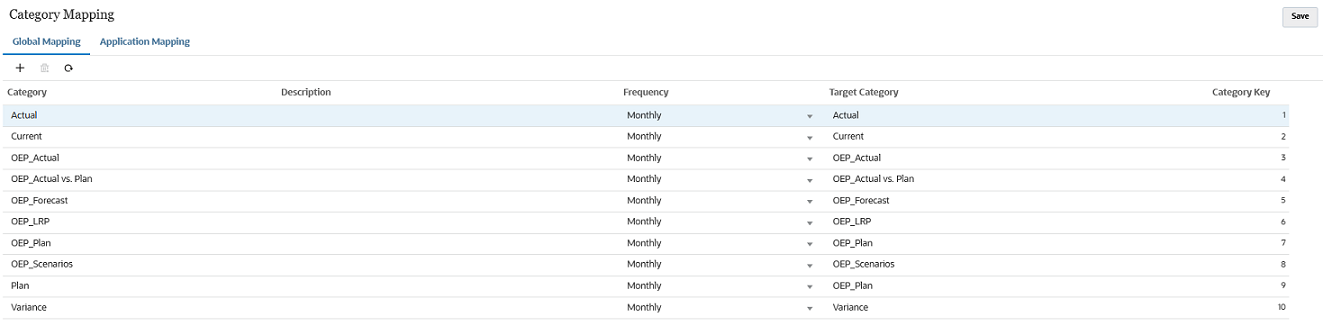
Category Mapping Page
Business Benefit: You can define various categories based on your business and statutory requirements.
Key Resources
- Defining Category Mappings in Administering Data Integration for Oracle Enterprise Performance Management Cloud
New Update Applications Option in Data Integration
Data Integration now includes an Update Application option that enable you to reinitialize Oracle ERP Cloud and Netsuite applications. When you reinitialize an application, the source system fetches all new additions such as ledgers, chart of accounts, and so on.
Applies to: Account Reconciliation, Financial Consolidation and Close, Planning, Planning Modules, Tax Reporting
The Update Application option can be accessed from the Application Actions menu.
When the option is launched, you can select the connection type, connection, filters, and other values such as the Budgetary Control option (for Oracle ERP Cloud applications).

Update Applications Page
Business Benefit: The Update Applications feature enables you to get the most up-to-date information from Oracle ERP Cloud or Netsuite data sources.
Key Resources
- Updating Applications in Administering Data Integration for Oracle Enterprise Performance Management Cloud
New Before Extract Event to Invoke Business Rule in Data Integration
A new Before Extract event enables you to run a business rule before data is extracted from the source application. The Before Extract event is available when registering business rules in independent mode.
Applies to: Planning, Planning Modules
Business Benefit: Customers who want to run a calculation such as aggregating data or copying from BSO to ASO can use the Before Extract event before extracting data for data synchronization or data export.
Key Resources
Administering Data Integration for Oracle Enterprise Performance Management Cloud:
Speed up Manual Adjustment Creation by Allowing Use of Default Adjustment Types Without Review
This feature allows an Administrator to configure the Skip Review for Match With Adjustments check box on the Edit Rule dialog so that the manual match would use the default Adjustment Type. This speeds the process up by removing any prompt for review or for users to enter or adjust any data in the attributes of the adjustment since the adjustment is created immediately using the information in the default Adjustment Type.
Business Benefit: This optional feature allows customers with a high volume of manual adjustments that usually use only one adjustment type to reduce the time it takes to create them.
Key Resources
-
Setting Up Default Adjustment and Support Values in Setting Up and Configuring Account Reconciliation
Allow Date with Time Parameter When Executing Reports for Account Reconciliation Using REST API or EPM Automate
An additional option for the Date with Time parameter has been added. This is available when providing the parameters for execution of Reconciliation Compliance and Transaction Matching reports using REST API or EPM Automate.
Business Benefit: There are times that a company may need to use the date with time instead of just the year, month and day. This gives customers more flexibility when using the Date with Time parameter.
Key Resources
- Generate Report for Account Reconciliation Using REST API in REST API for Oracle Enterprise Performance Management Cloud
- Generating Predefined Reports in Reconciliation Compliance in Administering Account Reconciliation
- Generating Predefined Reports in Transaction Matching in Administering Account Reconciliation
- Generating a Custom Report in Administering Account Reconciliation
A global time zone setting has been added to Account Reconciliation. The default setting will remain as UTC, however this global setting allows the service administrator to choose a different time zone. Reconciliations are considered late if they are not closed by midnight of the selected time zone.
Business Benefit: Companies can now choose their preferred time zone which controls when reconciliations are considered late.
Key Resources
- Setting Up Due Dates in Setting Up and Configuring Account Reconciliation
The following new videos are available.
Getting Started with Enterprise Data Management Cloud for Users
This overview shows browsers, requesters, and data managers where to find and perform the basic functions of their roles in Enterprise Data Management Cloud. You learn how to navigate the user interface, access help documentation, browse data in views and viewpoints, where to create requests to change data, and view request details. You also learn how requests are processed through an approval workflow, and how subscriptions automatically generate requests. Finally, you learn where to validate viewpoints, access data transactions on the Audit page, and manage the synchronization of dimensions with external applications.
Getting Started with Enterprise Data Management Cloud for Owners
This overview shows application owners where to find and perform the basic functions of their roles in Enterprise Data Management Cloud. This video covers the basics of Enterprise Data Management applications and their application objects, and touches on the following tasks for owners: registering applications, managing views and viewpoints, granting data permissions, creating policies, managing data integrity, managing dimensions, managing data chain objects, managing properties, and managing lookup sets.
Getting Started with Enterprise Data Management Cloud for Service Administrators
This overview shows service administrators where to find and perform the basic functions of their roles in Enterprise Data Management Cloud. You learn the tools available to service administrators for managing users, groups, and user roles; creating system and artifact backups; cloning environments; managing daily maintenance; working with application templates; customizing environment look and feel; creating global connections; and recreating the service. You also learn how to use built-in system reports, download EPM Automate, access Cloud Customer Connect and Oracle Support web sites, provide feedback to Oracle, and view information about your subscription.
Business Benefit: Videos provide overviews and step-by-step instructions to help you perform your related business activities.
Locations for Node Data Type Properties in Expressions
Locations are available for Node data type properties in an expression to access relationship level information for an associated node in a different hierarchy node set. This allows you to access parent relationships, relationship level properties, and inherited property values from each location of an associated node in a related hierarchy set.
Business Benefit: In certain situations, expressions need to access relationship based information for associated nodes from other hierarchy node sets.
Key Resources
- Node Data Type Property in Administering and Working with Oracle Enterprise Data Management Cloud
Additional Methods for String Lists in Expressions
New expression methods are available to evaluate and manipulate lists of string values.The following methods are now available for String List data types in an expression:
- IndexOf - returns the position of a string in a list of strings
- Intersect - compares two string lists and returns the values which exist in both lists
- Reverse - returns a list of strings in the reverse order
Business Benefit: Some business rules need to identify the position of a value in an ordered list, determine common values between two lists, or evaluate a list of values in the opposite order. For example, a custom validation which checks whether a value is the first item in a list, or if a List property contains multiple specified values.
Key Resources
- List and String List Data Type in Administering and Working with Oracle Enterprise Data Management Cloud
Viewpoint extracts for a dimension can be copied to create a new extract using the same settings as the original extract. Once an extract has been copied, you can modify the configuration of the new extract as required.
Business Benefit: Copying an extract reduces the time and effort to create multiple extracts which are very similar but with a few minor differences. An example is two extracts which produce the same output format but use different filters.
Key Resources
- Creating Extracts in Administering and Working with Oracle Enterprise Data Management Cloud
Enhanced Template Import Results
The results of a template import process have been enhanced to identify the objects imported from the template, indicate which were successful, and determine any warnings/errors that occurred during import. The template import results can be filtered to only objects which have a Success, Warning, and/or Error status if necessary.
Business Benefit: Administrators want to understand which template objects were successfully imported, which were partially imported with warnings, and which objects were skipped due to an error.
Key Resources
- Previewing Template Imports and Reviewing Import Results in Administering and Working with Oracle Enterprise Data Management Cloud
Exclude Implicit Shares for Node Locations in Expressions
The Locations and BoundLocations collections for the Node object provides an optional argument to exclude implicitly shared nodes from the returned list of node instances. When the Exclude Implicit Shares argument is set to True, only node instances under unique parents are returned. Duplicate instances of a node under the same parent are excluded from the returned list.
Business Benefit: In some situations, it is necessary to evaluate or return only node locations under unique parents rather than all locations of a node in a viewpoint. For example, a node may exist in 3 locations in a viewpoint but has the same parent in all of them.
Key Resources
- Node Data Type in Administering and Working with Oracle Enterprise Data Management Cloud
Expressions Using Inherited and Derived Properties for Node Data Type Properties
Inherited and derived properties are now accessible for associated nodes specified in Node data type properties using an expression. This allows expressions to reference inherited and derived values for related nodes in different node sets.
Business Benefit: Some expressions need to access properties of referenced nodes in different node sets which may have inherited or derived values. For example, a custom validation which checks an inherited Region property for a Sales Representative node associated with a Customer node.
Key Resources
- Node Data Type Property in Administering and Working with Oracle Enterprise Data Management Cloud
Get Parents for Node Locations in Expressions
The Locations collection for the Node object in an expression includes parent information for each location of a node in a hierarchy node set. This enables you to identify the parent for each location as well as access other information from a specific node location such as relationship and inherited properties.
Business Benefit: For business logic which uses the locations of a node in a hierarchy node set, sometimes it is necessary to evaluate or return the parent of each node instance. An example is a derived property which returns all immediate parents for a given node in a viewpoint.
Key Resources
- Node Data Type in Administering and Working with Oracle Enterprise Data Management Cloud
IsEmpty Method for String, List, and Memo Data Types in Expressions
An IsEmpty method is available for String, List, and Memo data types in an expression to determine whether a value is null or a defined blank value. This single method can perform both checks rather than needing to do separate checks for null and blank values.
Business Benefit: In some cases, it is necessary to determine whether a property or computed value is null or an empty string. For example, a custom validation which evaluates whether a property has a value or not.
Key Resources
- Administering and Working with Oracle Enterprise Data Management Cloud
Previous and Next Sibling for Node Object in Expressions
The Node object in an expression offers additional methods to provide access to previous and next sibling information for a node in a hierarchy viewpoint. The PreviousSibing method returns the sibling node before the current node under a given parent. The NextSibling method returns the sibling node after the current node under the same parent.
Business Benefit: Some business rules need to identify or evaluate adjacent siblings to a node in a hierarchy. An example is a derived property which returns the previous sibling of the current node to identify its relative position in a sibling list.
Key Resources
- Node Data Type in Administering and Working with Oracle Enterprise Data Management Cloud
Resize Table Columns on List Pages
Columns can be manually resized in tables displayed on listing pages in the Enterprise Data Management user interface. You can individually expand or reduce the width of displayed columns in a table to better view information based on a particular screen size. Column size can be adjusted by dragging the table header grid lines or specifying a numerical width.
Business Benefit: In smaller browser windows, it may be desirable to resize displayed columns in order to view values whose length exceeds the default width.
Reverse Method for Node Collections in Expressions
A Reverse method is available for node collections in expressions to reverse the order of nodes returned from those collections. The following node collections allow use of the Reverse method:
- AllAncestors
- Ancestors
- BoundAncestors
- BoundLocations
- Children
- Locations
- Siblings
Business Benefit: Some expressions need to evaluate or return nodes in the reverse order to produce the proper result. Examples include checking a list of ancestors from the bottom to the top or finding the last sibling under a given parent.
Key Resources
- Node List Data Type in Administering and Working with Oracle Enterprise Data Management Cloud
Save and Load Expressions Using Files
An expression can be saved to a file and loaded from a file in the expression builder. These operations are available for all types of expressions including derived properties, property transformations, custom validations, subscription filters, policy filters, and extract filters. Only expression files generated by the system can be loaded. Manually created files are not supported.
Business Benefit: In some cases, individual expressions need to be transferred from one Enterprise Data Management environment to another.
Key Resources
- Saving and Loading Expressions from a File in Administering and Working with Oracle Enterprise Data Management Cloud
Shared Member Before Base Member Validation for EPM Cloud Applications
A Shared Member Before Base Member validation is available for Planning, Planning Modules, and Financial Consolidation and Close application dimensions to ensure that nodes which are marked as shared members are located after base members in a hierarchy viewpoint. This validation can be enabled or disabled at the dimension level for applications of these types.
Business Benefit: Nodes which are setup as shared members should not be located before their base members in a dimension of a Planning or Financial Consolidation and Close application.
Key Resources
- Administering and Working with Oracle Enterprise Data Management Cloud
A template file can be previewed prior to import into a target Enterprise Data Management environment. You can identify the artifacts in the template as well as determine which are new, modified, unchanged, or will be skipped by the import process. Artifacts marked as skipped include error messages indicating problems to be resolved before or after the template import.
Business Benefit: Administrators want to preview the contents of a template file, understand what changes are expected when the template is imported, and resolve any issues which are identified by the import process to ensure a successful migration across environments.
Key Resources
- Previewing Template Imports and Reviewing Import Results in Administering and Working with Oracle Enterprise Data Management Cloud
Update Existing Applications During Template Import
Existing applications and their related artifacts can be updated during a template import process. This enables objects created or updated for an application in a source environment to be migrated to a target environment where the application already exists. The template import process will create objects which do not already exist and modify existing objects for the target application.
Updates can be processed for both objects within the selected application as well as global objects used by the application. Objects archived or deleted in the source environment will not be removed from the target environment.
Business Benefit: Ongoing metadata changes to an application may need to be transferred to a different environment where the application already exists. For example, a new property is added to a node type and needs to be migrated from a Test environment to a Production environment.
Key Resources
- Updating an Existing Application using a Template in Administering and Working with Oracle Enterprise Data Management Cloud
Work with Hierarchies from Same Viewpoint on Separate Tabs
You can work with multiple hierarchies from the same viewpoint on separate tabs in a view. Use the Open in New Tab menu item for a viewpoint to display a temporary, duplicate instance of the viewpoint on a separate tab. The two viewpoint tabs can then be selected for side-by-side display or used in a comparison process. Drag-and-drop nodes across viewpoint instances to resolve differences between hierarchies in the same viewpoint. You can remove duplicate viewpoint tabs once they are no longer needed, or they will be automatically removed when the view is closed.
Business Benefit: Multiple hierarchies in the same viewpoint may need to be compared or reconciled to ensure alignment and data integrity across different business structures.
Key Resources
- Using Duplicate Viewpoint Tabs in Administering and Working with Oracle Enterprise Data Management Cloud
Financial Consolidation and Close
Two new videos are available.
Enterprise Journals provides a streamlined, centralized way to manage manual journal entries across the Oracle EPM Cloud platform. In this overview, you learn what Enterprise Journals is, how it resolves common journal entry challenges, its key capabilities, and how it is configured, managed, and deployed.
Working with Enterprise Journals
Enterprise Journals is an EPM platform tool used for the preparation, approval, and posting of manual journal entries to the general ledgers of both Oracle and Non-Oracle ERP systems. In this tutorial, you learn the tasks performed by preparers, who prepare, validate, and submit journals for approval after including all required header and line-item details, and approvers, who may approve or reject the submitted journals from the preparer, and then submit journals for posting.
Business Benefit: Videos provide 3-5 minute overviews and step-by step instructions to perform tasks and achieve an outcome.
The Enterprise Journals have been enhanced with several new features like retaining ad-hoc journals on redeployment and allowing preparers of ad-hoc journals to override approvers and approver levels.
- Retain ad-hoc journals on re-deployment: The option to retain ad-hoc journals during redeployment will now be available for service administrators as well as power users. Based on the selection during the process of redeployment, the ad-hoc journals are either retained or deleted.
- Allow preparers of ad-hoc journals to override approvers and approval levels: The Enterprise Journals preparers can now configure the approval levels while creating ad-hoc journals as well as reassigning approvers during the course of the data collection process. Users now have the option to select the number of approval levels and assign the approvers accordingly.
Business Benefit: These new capabilities helps users to work on ad-hoc journals with more ease.
Key Resources
- Deploying an Enterprise Journal Template in Administering Financial Consolidation and Close
- Creating Ad-Hoc Enterprise Journals in Working with Financial Consolidation and Close
- Managing Enterprise Journals System Settings in Administering Financial Consolidation and Close
- Setting Approver Level Overrides in Administering Financial Consolidation and Close
Enhanced Metadata Validation for Solve Order and Data Source
The Metadata Validation process now checks for the correct solve order for the Account dimension when you are using the Dense Sparse Optimization option with Period and Movement as Dense dimensions. When you add a new member or create a new application, you must set the Account dimension Solve Order to 58 for all custom Parent accounts with the storage type of Dynamic Calc.
In addition, the validation process checks and displays an error message for shared member instances of the “FCCS_No Data Source” member. Shared instances for this member are not allowed.
Business Benefit: The metadata validation error alerts you to errors with the solve order settings and with shared instances for the No Data Source member.
Key Resources
-
Metadata Validation Messages in Administering Financial Consolidation and Close Cloud
Consolidation Operator on Account and View Members
The Consolidation Operator for Label Only dimension members must be Never. This has been set correctly for seeded Account and View Label Only members. If you create any custom Label Only Members, be sure to set the Consolidation Operator to Never.
In addition, the Consolidation Operator is now set to Never for all the system members in the Account dimension under FCCS_System Account, Exchange Rates, and FCCS_Drivers.
Business Benefit: Setting the Consolidation Operator correctly for these Account and View members ensures that the members will aggregate to parent members properly.
Key Resources
-
Consolidation Operator in Administering Financial Consolidation and Close Cloud
Substitution Variables for Application Currency
When you create a multi-currency application, substitution variables are now added for the currency that you select as the application currency.
For example, if you select EUR as the application currency, the system adds these substitution variables:
ApplicationCurrency: EUR
ApplicationCurrencyFrom: From_EUR
ApplicationCurrencyReporting: EUR_Reporting
You can view the substitution variables by selecting Tools, then Variables, then Substitution Variables, and they are available to use wherever substitution variables are allowed.
Business Benefit: The substitution variables allow you to see what the default currency is after the application is created.
Key Resources
-
Currency Dimension in Administering Financial Consolidation and Close Cloud
Performance Substitution Variables
The OptimizeConcurrency, OluRatesLoad, OptimizePelimCalculation and EnablePelimNewLogic substitution variables can be enabled to improve performance.
- OptimizeConcurrency = True
This substitution variable improves concurrency of the consolidation process by executing some of the calculations at the very beginning or at the end. The degree of improvement depends on the entity structure of a given customer. Customers with deeper entity hierarchies will benefit the most.
- OLURatesLoad = True
This substitution variable improves refresh database performance. The more scenarios, currencies and rate accounts in an application, the more noticeable the improvement will be. Please note, in previous months, this variable was incorrectly capitalized; OLURatesLoad is correct.
- OptimizePelimCalculation = True
This substitution variable improves Partner Eliminations (PElim) performance. If there is a consolidation performance degradation when deploying a user-created “Partner Eliminations Configurable Consolidation Rule” that has an account re-direction, adding this variable can provide significant performance improvement.
- EnablePelimNewLogic = True
If you are using Partner Eliminations (PElim) logic in your configurable consolidation rules and are experiencing performance degradation as a result, you can use a new substitution variable named EnablePelimNewLogic to improve performance. Add this variable and set the value to True.
Please note that if you are using PELIM where the entity and partner are the same member, your data values may change.
NOTE: The degree of performance improvement varies widely across different applications as it is purely driven by the application design and data distribution.
Business Benefit: These substitution variables help in improving performance.
Key Resources
-
Creating and Assigning Values to Substitution Variables in Administering Financial Consolidation and Close
Support for Loading Parent Input, Contribution Input, and Translated Currency Input Journals to Financial Consolidation and Close
In Data Management and Data Integration, Parent Input, Contribution Input, and Translated Currency Input journals can be loaded to Financial Consolidation and Close.
Applies to: Financial Consolidation and Close
Business Benefit: This feature enables customers to create and post journals to different currencies other than the entity currency.
Key Resources
- Defining Locations in Administering Data Management for Oracle Enterprise Performance Management Cloud
- Selecting Location Attributes in Administering Data Integration for Oracle Enterprise Performance Management Cloud
Introduction of Quick Start Checklists for EPM Cloud Narrative Reporting
Wondering how to start using EPM Cloud Narrative Reporting? Use these checklists on your first day. Follow the steps to do initial tasks like set up your environment, log in, enter data, analyze forms and use reports. Use the Implement Narrative Reporting checklist to create the business process and application. The checklists are organized by predefined roles for Service Administrators, Power Users, Users, and Viewers.
Narrative Reporting Quick Start Checklists
Business Benefit: These quick start checklists help you learn how to speed up your first day using EPM Cloud Narrative Reporting.
Ability to Mark a Report Package Final
The Report Package Owner (RPO) can now mark their Report Package as Final, indicating no additional report updates are required. It’s similar to the Sign-Off phase, but you neither need a sign-off instance nor final approval needed from anyone.
NOTE: Before marking the Report Package as Final, you need to verify these steps:
- All doclets must be checked in.
- Both Author and Review phases must be complete.
Business Benefit: This feature enables the Report Package Owner (RPO) to lock a Report Package and stop any further updates to the Report Package contents.
Key Resources
- Managing the Sign Off Phase in Creating and Managing Report Packages for Narrative Reporting
Inline Grid Entry of Notes in Reports
Inline grid entry of Notes, via a Note column or row, provides POV-based commentary to be entered and displayed directly in the grid while previewing a report in HTML.
The Note will be displayed in the Note cell, entered into the system and, like any other Note, can be displayable in a text box using the Notes text function.
Using either cell formatting or conditional formatting, you can restrict or allow Note entry in cells using the “Allow Note Entry” property. For example, for a Note column associated with a Variance % member selection, you can use conditional formatting to only enable Note entry in rows where the Variance % is greater than 10% or less than -10%.
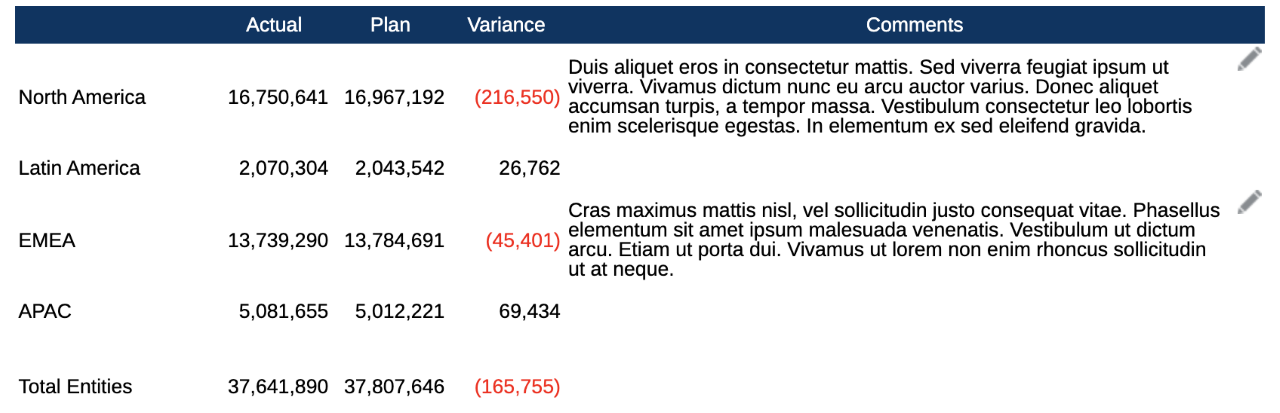
Report Grid Information
Business Benefit: This feature provides structured POV-based commentary to be entered and displayed in the grid.
Steps to Enable
To enable inline Grid entry of Notes:
- Insert a Note row or column into the grid.
- Select members for the Note row or column.
- Optionally set the “Allow Note Entry” property in formatting or conditional formatting.
- Select an existing Note Template or create a new one to associate with the inserted Note Segment.
- Set properties for a new Note Template.
Key Resources
- Designing with Reports for Oracle Enterprise Performance Management Cloud:
- Working with Notes
- About Notes
- Setting up the Inline grid entry of Notes
- Inserting a Note column or row
- Selecting Members for the Note Row or Column
- Setting the Allow Note Entry Property
- Selecting an Existing Note Template or Create a New One
- Managing Note Templates for Inline Grid Entry
- Working With Rows and Columns in Grids
- Working with Reports for Oracle Enterprise Performance Management Cloud
Rest API to Retrieve Bursting Definitions Artifact
For Integrated Business Process, a new REST API has been added to retrieve all the Bursting Definition details.
Business Benefit: This feature helps you retrieve all the bursting definitions via a REST API command.
Key Resources
Open Doclets in Smart View from Narrative Reporting Web
You can now open doclets directly in Oracle Smart View for Office from Narrative Reporting web.
Using the new Open in Smart View command, accessible from the Act on Content menu for a selected doclet, you can launch the doclet into Smart View, without first downloading the doclet. The doclet status, checked in or checked out, is retained when the doclet is opened in Smart View. Depending on the Microsoft Office type of the doclet--Excel, Word, or PowerPoint--the doclet is opened in the appropriate Office application.
For example, in Narrative Reporting web, click the Doclet actions button next to a Word-based doclet name. Then select Act on Content, and then Open in Smart View. The doclet is launched in Smart View for Word. If the doclet was previously checked out, then the checked-out status is carried to Smart View. In the Narrative Reporting ribbon in Smart View, you would see that the Cancel Checkout button is shown and enabled, and the Upload and Check In buttons are also enabled. After authoring the doclet in Word, you may continue with the upload and checkin from the Narrative Reporting ribbon in Smart View.
This feature requires:
- Narrative Reporting 21.12 or later
- Smart View 21.100 or later
- Narrative Reporting extension 21.12 or later
Business Benefit: This feature enables you to open the doclet directly within Oracle Smart View for Office.
Steps to Enable
To use the Open in Smart View command in Narrative Reporting web:
- Install Smart View
- Set up a connection to Narrative Reporting
- Install the Narrative Reporting extension
These steps are described in Setting Up Narrative Reporting in Smart View.
Tips And Considerations
- Use Narrative Reporting and the Open in Smart View command from your default browser.
- Office does not need to be running in order for the doclet to launch in the correct Office application.
Key Resources
- Working with Oracle Smart View for Office:
- Opening Doclets in Smart View in Authoring and Approving Doclets for Narrative Reporting
Updated Narrative Reporting Extension for Smart View
An updated Narrative Reporting Extension for Oracle Smart View for Office is now available to download and install. This update includes general improvements and bug fixes.
Business Benefit: Downloading and installing the latest Narrative Reporting extension for Smart View gives you access to the latest features, improvements, and bug fixes.
Key Resources
- Installing the Narrative Reporting Extension in Working with Oracle Smart View for Office
A new Video Series for Budget Revisions and Oracle ERP Cloud Budgetary Control Integration is now available. This video series provides over 20 minutes of detailed instruction on the various aspects of setting up integration between these two services.
Setting Up Oracle ERP Cloud Budgetary Control for EPM Integration
Learn how to enable Budgetary Control for a ledger or project and define Control Budgets for EPM Planning Financials integration.
Setting Up Budget Revisions for Oracle ERP Cloud Budgetary Control Integration
Learn how to set up budget revisions for Oracle ERP Cloud Budgetary Control Integration. Tasks include enabling Financials with Budget Revisions, performing configuration tasks for Financials, importing metadata, adding entries to the Control Budget Name Smart List, and assigning access permissions to rules.
Integrating Budget Revisions with Budgetary Control PART 1
Learn how to set up data integration requirements between Budget Revisions in Oracle EPM Planning Financials and Oracle ERP Cloud Budgetary Control Integration. Tasks include registering connections, data sources, and applications.
Integrating Budget Revisions with Budgetary Control PART 2
Learn how to set up data integration requirements between Budget Revisions in Oracle EPM Planning Financials and Oracle ERP Cloud Budgetary Control Integration. Tasks include creating integrations, mapping dimensions, and defining its options, and creating EPM connections.
Business Benefit: Videos provide 3-5 minute overviews and step-by step instructions to perform tasks and achieve an outcome.
Copy Versions Functionality Is Restricted to Service Administrators Only
We've restricted the 'Copy Versions' functionality in Planning to be available only to Service Administrators.
'Copy Versions' in Planning is no longer available to Power Users and Users. We've removed all references to 'Copy Versions' in the non-admin Planning user interface and documentation.
In Smart View, the 'Copy Versions' command is no longer available to Power Users and Users.
Business Benefit: By restricting ‘Copy Versions’ in Planning to Service Administrators only, we reduce the risk of undesired changes to data by non-administrator users.
Key Resources
-
Copying Versions of Data in Administering Planning
Workforce Performance Enhancements
All Workforce rules and some member formulas have been updated with changes to enhance performance. There are no functional changes but the logic has been updated to leverage performance gains in the underlying technology. Any Workforce rule or member that is unmodified will automatically receive these performance enhancements. Any modified Workforce rule or member will remain as-is without these performance enhancements. Oracle recommends restoring these artifacts to their current state to uptake these performance enhancements and reapplying your modifications to the updated logic, if necessary.
Additionally, a new rule, Calculate Employee Compensation for All Data (or Calculate Job Compensation for All Data in a Job only model) allows administrators and power users to calculate compensation for all data within their scope.
Business Benefit: Updated rules optimize Workforce performance.
Key Resources
- Updating Workforce Artifacts in Administering Planning Modules
Model Data Maps Option in Model View Listing Page
Data movement between Strategic Modeling models is currently supported through data maps. However, only users with the Administrator role can access it. With this enhancement, users with the Modeler role can create and run data maps that use Strategic Modeling models as both a source and target.
A new option, ‘Model Data Maps,’ is added to the model Actions menu and can be accessed by clicking on the ellipsis icon for the model in the Model view listing page.
Business Benefit: Modelers can move data between models without needing Administrators to set up the data maps.
Key Resources
- Setting Up Model Access Permissions in Administering Planning Modules
Groovy rules now provide a way to retrieve Machine Learning (ML) Models deployed to an application and predict values using those ML models for a specified set of inputs.
The following methods have been added to the Application object to check for the existence of and retrieve one or more ML Models:
- public boolean hasMlModel(String path, String modelName)
- public boolean hasMlModel(String fullyQualifiedModelName)
- public MlModel getMlModel(String path, String modelName)
- public MlModel getMlModel(String fullyQualifiedModelName)
- public List<MlModel> getMlModels()
A new class MlModel has been added with the following method that can be called to predict the values for a set of inputs:
- public Object[] predict(Object... input)
Applies to: Any application that has access to Groovy and ML Models
Business Benefit: Using Groovy business rules allows you to automate these tasks.
An ML model enables data-driven forecasting using robust predictive modeling techniques. This puts the benefits of machine learning and the power of data science into the hands of business users, enhancing the planning and forecasting process and leading to better business decisions. Data-driven forecasting helps planners to generate more accurate, fact-based forecasts and reduces time spent on forecast generation.
Steps to Enable
You don't need to do anything to enable this feature.
Tips And Considerations
To get a quick introduction to Groovy business rules, watch the Learning Groovy in EPM Cloud video.
Key Resources
- Bring Your Own ML: About Machine Learning Model Import in Administering Planning
- Learning Groovy in EPM Cloud video
- Creating a Groovy Business Rule in Designing with Calculation Manager for Oracle Enterprise Performance Management Cloud
- Introduction to Groovy Business Rules
- Groovy Tutorials
- EPM Cloud Groovy Rules Java API Reference
Role Information
- Calculation Manager Business Rule Designer
Profitability and Cost Management
New Provide Feedback Option in Job Library
A new option in the Job Library allows you to select one or more jobs, run a Supplemental Diagnostics job, and submit feedback for Oracle Support. In addition to the standard content provided in Supplemental Diagnostics, for each calculation job selected, the Execution Statistics Report for that job is included in the feedback, along with the Program Documentation report for the POV used to calculate the job.
Business Benefit: When reporting an issue related to jobs (especially calculation jobs) this new function provides a more efficient way to communicate diagnostic information to Oracle Support.
Key Resources
- Viewing the Job Library in Administering Profitability and Cost Management
Level 0 Export of Cube Data in Columnar Format
The exportQueryResults EPM Automate command and corresponding REST API now support exporting Level-0 cube data in columnar format. The data can be filtered by level 0 members across multiple dimensions.
Business Benefit: The new columnar data format is easily readable and can be used to migrate data to other systems. It also supports export of larger volumes of data, while still offering some filter capability, e.g. to export data just for a given POV.
Key Resources
- exportQueryResults in Working with EPM Automate for Oracle Enterprise Performance Management Cloud
- Export Query Results in REST API for Oracle Enterprise Performance Management Cloud
Enhancing Tax Automation Rules
Users can now save tax automation rules with multiple domiciles present in rows or columns using Tax Automation Save with Multiple Domiciles business rule. Users can rearrange tax automation by domicile form, keeping domiciles in rows or columns and attach this business rule on form Save.
Business Benefit: This new capability enables the users to easily save tax automation rules by domicile.
Key Resources
-
Managing Tax Automation Rules for Multiple Domicile in Administering Tax Reporting
Automating Net Operating Loss (NOL)/Credits
Tax Reporting now provides Net Operating Loss (NOL)/Credit automation feature which enables you to configure the rules defining how the system should automatically defer, utilize, or expire tax losses and book the corresponding offset amounts.
The following Tax loss/credit forms are modified to show automated columns:
- Tax Losses
- Tax Losses Regional
- Tax Credits
- Tax Credits Regional
Business Benefit: This new feature helps user’s to automatically defer, utilize and expire tax losses and credits.
Key Resources
- Enabling Application Features in Administering Tax Reporting
- Working with Net Operating Loss (NOL)/Credits in Administering Tax Reporting
IMPORTANT Actions and Considerations
One-Week Lag Between Readiness Documents Live and Help Center Live
Because Oracle readiness documents (What's New and New Feature Summary) are live one week before the monthly update is applied to Test environments, some links to documentation included in the readiness documents will not work until after the Oracle Help Center update is complete when the monthly update is applied to Test environments.
EPM COMMON
Long Label Names will be Truncated at Runtime on Horizontal Tabs
Starting with the February 2022 update (22.02), label names on horizontal tabs will display up to 30 characters at runtime. Hovering your cursor over the tab will reveal the entire label.
Applies to: Account Reconciliation, Financial Consolidation and Close, Narrative Reporting, Planning, Planning Modules, Profitability and Cost Management, Profitability and Cost Management Plus, Tax Reporting
Only Secured URLs in Logo and Background Images
Starting with the November 2021 update (21.11), only secured URLs are supported within the Logo Image and Background Image settings in the Appearance page in EPM Cloud.
Applies to: Financial Consolidation and Close, Planning, Planning Modules, Tax Reporting
Use the Export URLs Feature to Replace Direct URLs
In the March 2021 update (21.03), Oracle released a feature called Export URLs that exports EPM Cloud URLs to a CSV file which then provides the unique URLs for each card, tab, or sub-tab within a connected EPM Cloud business process. These cards, tabs, or subtabs can contain forms, dashboards, or infolets within them. The Export URLs feature should be used in place of any direct URL pointers that customers might be using to link to EPM forms, dashboards, or infolets. The direct URL feature to forms, dashboards, or infolets are no longer supported starting with the November 2021 update (21.11). See Using Direct URLs to Integrate Connected Environments in Administering Planning.
Applies to: Financial Consolidation and Close, Planning, Planning Modules, Tax Reporting
"Data Maps" Chapter Moved to the Administering Data Integration Guide
Starting with this update (December 21.12), we've moved the "Data Maps" chapter in Administering Planning to the Administering Data Integration guide. This chapter describes how to use data maps to move data, comments, attachments, and supporting detail from source cubes and Smart Lists to reporting cubes to consolidate data.
Applies to: Financial Consolidation and Close, Planning, Planning Modules, Tax Reporting
Loaner Program for Cloud Infrastructure Generation 2 Testing and OCI Migration Assistance Early Adopter Program
Oracle EPM Cloud is now live on Oracle Cloud Infrastructure (OCI) Gen 2 environments. If you are interested in testing your application performance on an OCI environment, open a service request following the process at https://docs.oracle.com/en/cloud/saas/enterprise-performance-management-common/tsepm/op_procs_loaner_envs.html and request for a loaner environment in an OCI data center for a duration of 30 days with the business justification as “Want to test application performance in an OCI Gen 2 data center”.
After you have performed the testing, submit Provide Feedback from the loaner environment. Create a service request using the normal support process, if you have any issues or feedback for the OCI environment. For more information, see What is a Gen 2 Cloud?
Additionally, Oracle has instituted a program to assist a limited number of early adopters on Oracle Cloud Classic to migrate to OCI. For more information, see Oracle Cloud Classic to Oracle Cloud Infrastructure (OCI) Migration Assistance Program for Early Adopters.
Applies to: Financial Consolidation and Close, Planning, Planning Modules, Tax Reporting
Change to Reports REST API and EPM Automate to Allow for Null Date
In an upcoming release, not passing a value for a Date parameter will be considered as NULL value while passing a value such as “Current_Date” will be substituted as the current date.
In the current release, not passing the value by default turns into the current date.
The change will be in the following topics for REST API topics:
- Generate Report for Account Reconciliation
- Generate Report for Financial Consolidation and Close and Tax Reporting
The change will affect the following report APIs for EPM Automate:
Applies to: Account Reconciliation, Financial Consolidation and Close, Tax Reporting
Removing Dimensions Before Rebasing a Financial Consolidation and Close or Tax Reporting EPM Digital Assistant Skill
If you want to rebase your Financial Consolidation and Close or Tax Reporting skill to use the November release of EPM Digital Assistant, note that you must first remove some dimensions before rebasing.
- Financial Consolidation and Close dimensions to be removed before rebasing: Scenario, Years, Period, Entity, Account, Currency, View, Consolidation, Data Source, Multi-GAAP, Intercompany and Movement
- Tax Reporting skill dimensions to be removed before rebasing: Cube, Scenario, Years, Period, Entity, Account, Currency, View, Consolidation, Data Source, Multi-GAAP, Intercompany, Movement and Jurisdiction
Applies to: Financial Consolidation and Close, Tax Reporting
See Removing a Consolidation and Close or Tax Reporting Custom Dimension from an Extended Skill in Getting Started with the Digital Assistant for Oracle Cloud Enterprise Performance Management.
SMART VIEW
Strategic Modeling with Smart View Requires Smart View Version 21.100
Starting with the November 2021 update (21.11), Strategic Modeling requires Smart View Client version 21.100 or higher in order to support necessary improvements when using Strategic Modeling with Smart View. To download and install Smart View, see Downloading and Installing Clients in Getting Started with Oracle Enterprise Performance Management Cloud.
Crystal Ball for EPM Extension in Smart View
The Crystal Ball for EPM extension in Smart View that allows users to define a Crystal Ball model using EPM Cloud grids to perform simulations using Crystal Ball in Smart View will not be supported or available for installation starting from the January 2022 update (22.01).
Smart View Add-on Installation for Task Manager and Supplemental Data Manager
In a future update, the installation of Smart View add-ons for Task Manager and Supplemental Data Manager will change. At that time, users of the Smart View add-ons will need to uninstall and re-install their add-ons to take advantage of the latest features and fixes.
PLANNING MODULES
Strategic Modeling Terminology Change
In a future update, the Consolidation feature in Strategic Modeling will be renamed Scenario Rollup.
Removal of Strategic Workforce Planning from EPM Cloud Workforce Planning
In a future update, the Strategic Workforce Planning (SWP) enablement option will be removed for all EPM Cloud Planning Modules (Standard and Enterprise) and Enterprise Planning applications that have not already enabled this feature in the Workforce Module. Customers who have already enabled this feature will see no change in their existing applications with this feature already enabled. No new applications will support this feature after this change.
Strategic Workforce Planning functionality is provided in the Strategic Workforce Planning Cloud Service (SWPCS) product, which contains robust SWP functionality that is not available in the existing EPM Cloud Planning Workforce module feature. SWPCS is an Oracle Human Capital Management (HCM) product built on EPM technology. For more information about SWPCS, please refer to the Strategic Workforce Planning information on www.oracle.com.
If you have any concerns about this change, please contact Oracle Support.
NARRATIVE REPORTING
Removal of EPMCTRL Transfer Utility
In a future update, the EPMCTRL Transfer Utility will be removed. Customers should use EPM Automate, which includes all the commands currently available in the EPMCTRL Transfer Utility, going forward. For more information, see Backing Up and Restoring an Environment in Getting Started with Oracle Enterprise Performance Management Cloud for Administrators.
ACCOUNT RECONCILIATION
Impact of Balance Rounding Based on Associated Currency Code
In a future update, the source and sub-system balance load process will automatically round the balance according to the precision of the currency code associated with it. Currently, the balances are required to be rounded prior to the balance load. Please open a Support ticket and/or reach out to your Oracle team if you have an issue with this behavior update.
Power User Access to Data Loads Change
In a future update, Power User access to Data Loads will be updated so that the Administrator will have to assign this ability to the Power User rather than the Power User receiving it by default.
Rerunning and Deleting a Data Load in Account Reconciliation
In this update, if a second Administrator selects a data load already run by another Administrator, the data load Rerun and Delete buttons are not available. This will be addressed in a future update so that other Administrators can rerun or delete any data load.
FINANCIAL CONSOLIDATION AND CLOSE
Resetting Customized Changes After an Update
If you have made changes to the seeded Account hierarchy, those changes will be reset after this update. If you have moved seeded members, the move action is retained, but any re-ordering you have done will be reset, and a restructuring will happen when the ordering is reset. The restructuring could take time, so plan accordingly. You may have to manually re-order seeded members again after the update.
ENTERPRISE DATA MANAGEMENT
REST API for Extracting a Dimension from a Viewpoint Parameter Clarification
Starting in 21.11, the fileName parameter that you specify in the Extract a Dimension Viewpoint API is determined by whether or not you have enabled the Zip Extract option in the extract definition profile (see Editing Extracts):
- For extracts with Zip Extract enabled, specify the Zip Filename in the API zip file name for the fileName parameter. The Default Filename in the extract profile will be used for the text file name.
- For extracts with Zip Extract disabled, specify the Default Filename in the API text file name for the fileName parameter.