

This document will continue to evolve as existing sections change and new information is added. All updates are logged below, with the most recent updates at the top.
| Date |
What's Changed |
Notes |
|---|---|---|
| 24 AUG 2017 |
Initial Document Creation. |
Oracle Financial Consolidation and Close Cloud, September Update
This guide outlines the announcements, fixed issues and considerations in the upcoming Oracle Financial Consolidation and Close Cloud update.
Announcements and New Features
Please Join Oracle Cloud Customer Connect
Please take a moment to join the Cloud Customer Connect forums for EPM Cloud services. Oracle Cloud Customer Connect is a community gathering place for members to interact and collaborate on common goals and objectives. This is where you will find the latest release information, upcoming events, or answers to use-case questions. Joining takes just a few minutes. Join now!
https://cloud.oracle.com/community
Oracle will apply the latest updates to your test environment on Friday, September 1, 2017 and to your production environment on Friday, September 15, 2017. The update will be applied during your normal daily maintenance window.
The Oracle Help Center, which provides access to updated documentation, will also be available on September 1, 2017.
NOTE: You can migrate maintenance snapshots from the current version of the service instance to the preceding version or to the next version. For example, snapshots from 17.08 can be imported into 17.07 and 17.09 service instances. Migration between the same versions is always supported. For more information about migration, see Administering Migration for Oracle Enterprise Performance Management Cloud.
Integrated Business Process Navigation Flows
Service Administrators can set up connections that enable users to navigate across Oracle Enterprise Performance Management Cloud subscriptions to create unified business process flows across multiple subscriptions which can belong to any combination of EPM subscriptions. The following services are supported within this feature:
- Oracle Planning and Budgeting Cloud
- Oracle Enterprise Planning and Budgeting Cloud
- Oracle Financial Consolidation and Close Cloud
- Oracle Tax Reporting Cloud
- Oracle Account Reconciliation Cloud
- Oracle Profitability and Cost Management Cloud
- Oracle Enterprise Performance Reporting Cloud
Considerations:
- Connections can be created using any of the following services as a source for the connection:
- Oracle Planning and Budgeting Cloud
- Oracle Enterprise Planning and Budgeting Cloud
- Oracle Financial Consolidation and Close Cloud
- Oracle Tax Reporting Cloud
- All EPM service subscriptions can be connected into from these source connections. Connections can also be created between subscriptions of the same service type. Following connections are supported with this feature:
- Connections where services are in the same domain within the same data center
- Connection across multiple subscriptions when services are in different domains and different data centers if an identity provider is set up for federated SSO
Connection across multiple subscriptions when services are in different domains within the same data center will be supported in a future update.
For detailed information about connecting EPM Cloud services and navigating across applications, see “Connecting Services in EPM Cloud” in Administering Oracle Financial Consolidation and Close Cloud.
Customizing the Application Interface with Navigation Flows
Navigation flows give application designers control over how various roles, or groups, interact with the application. The Navigation Flow Designer enables you to customize the application interface. For example, you can change the names of the cards and clusters that display on the Home page and the order in which they are displayed. You can hide cards, create new cards, and group cards into clusters. You can also customize the vertical and horizontal tabs that display on a card.
To work with navigation flows, click Tools, and then click Navigation Flow.
See “Designing Custom Navigation Flows” in Administering Oracle Financial Consolidation and Close Cloud.
Automatic Application Snapshot Uploads to Facilitate Troubleshooting
While submitting feedback, Service Administrators can consent to submit the last maintenance snapshot of the instance to Oracle to expeditiously troubleshoot the issue and test fixes.
Oracle uses the submitted application snapshot for testing purposes only; no changes will be made to the application or data. If you consent to submit the maintenance snapshot, Oracle automatically copies the log files and maintenance snapshot over SFTP to Oracle Support. For detailed instructions, see “Helping Oracle Collect Diagnostic Information Using the Provide Feedback Utility” in Using Oracle Planning and Budgeting Cloud.
Support for Single Sign-on Using Oracle Identity Cloud Services (IDCS)
You can configure single sign-on (SSO) access to Oracle Enterprise Performance Management Cloud using Oracle Identity Cloud Services (IDCS), which provides a comprehensive cloud-based identity management and security platform that supports a universal set of access controls, permissions, and password security constraints.
Configuring SSO requires you to configure a SAML 2.0 link between Oracle Identity Cloud Service and Oracle Enterprise Performance Management Cloud. See “Configuring Single Sign-On” in Using Oracle Planning and Budgeting Cloud for information on configuring SSO using IDCS.
Simplified Provisioning Report
This release includes an enhanced Provisioning Report that provides a concise view of the roles assigned to each user. In addition to providing the number of provisioned users, the enhanced report presents information on each provisioned user in one row so as to provide a comprehensive view of all assigned roles.
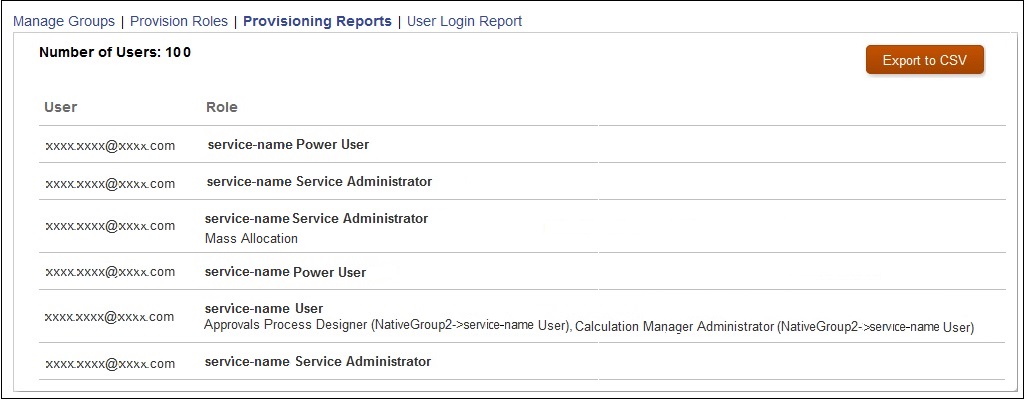
For information on viewing the Provisioning Report, see Generating Provisioning Report in Administering Access Control for Oracle Enterprise Performance Management Cloud.
Enhancements to the Activity Report
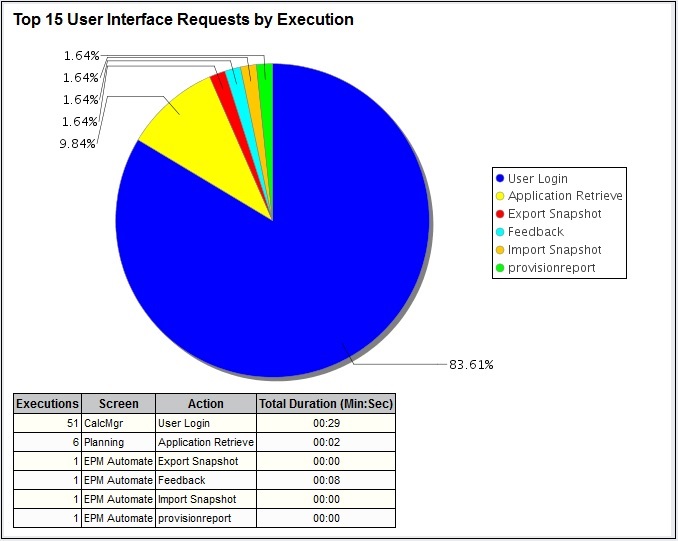
To help understand the processes that may impact the service performance, Oracle has updated the Activity Report, which now contains information on the top 15 user interface requests that took the most time to execute. See “Working with Activity Reports” in Administering Oracle Financial Consolidation and Close Cloud.
You can now use a REST API to copy an application snapshot. See “Copy Application Snapshot” in Oracle Cloud REST API for Oracle Enterprise Performance Management Cloud.
Selecting Identity Domain at Sign In
The sign in process no longer requires you to select an identity domain while accessing the service. To simplify the sign in process, the name of your identity domain is now derived from the URL that you specify.
NOTE: This is an Oracle Cloud enhancement, which may already have been rolled out through Oracle Cloud data centers.
Give Us Documentation Feedback
We welcome your comments and suggestions to improve the content of the What's New document and the product documentation. Please send us your feedback at EPMdoc_ww@oracle.com. State that you are inquiring or providing feedback, and indicate for which EPM Cloud service as well as the monthly patch cycle, in the body or title of the email.
File-Based Integration of Data Management with Oracle Fusion Financials Cloud
Oracle Fusion Financial Cloud Budgetary Control and Encumbrance Accounting is now fully integrated with Data Management.
This enhancement brings the integration of Oracle Fusion Financials Cloud with Oracle Enterprise Performance Management Cloud on par with the current, out of the box, file-based integration. As a result, the file-based integration will be phased out starting the September update to the service.
If you are using file-based integration between Oracle Fusion Financials Cloud and Oracle Enterprise Performance Management Cloud, Oracle recommends that you adopt this new integration as soon as possible.
| Defect |
Description |
|---|---|
| 26649736 |
From the Notifications menu under Tools, users can select whether to receive Close Manager email notifications immediately, every few hours, or daily. |
| 26522684 |
Action menus now work consistently in simple forms that are included in a composite form. |
| 26309094 |
Shared members that are set to include their descendents with IDescendants now correctly include all members in rows and columns, even if the Suppress Missing Blocks option is enabled. |
| 26531423 |
You can now delete children of the member OFS_Adjustment to Revenue. |
| 26445428 |
Forms now display correctly if an attribute name contains “BR”. |
| 25464144 |
Intermittent display issues (for example, flickering) when navigating in forms are resolved. |
| 26357870 |
The browser freezing intermittently when navigating task lists is resolved. |
| 25780133 |
When building reports in Financial Reporting Web Studio, custom text in column headers is now displayed correctly in the report output. |
| 26583972 |
When importing a Financial Reporting report in Smart View as Fully-Formatted, the values for cells which have replacement text that contains both numeric and non-numeric characters are no longer stripped of the non-numeric characters. |
| 26550754 |
Composite forms now properly load when you change the Page selection, and you no longer receive a Java error. |
| 26421993 |
In Financial Reporting Web Studio, when a default member for a prompt is left blank, you no longer receive an "unable to process request" error. |
| 26614891 |
In Financial Reporting, the vertical scroll bar is now displayed correctly in the "Respond to Prompts" popups. |
| 26540610 |
In Financial Reporting Web Studio, if you have a grid with more than 20 columns and you click Save after making a change, you are no longer returned to the far left of the report. |
| 25963632 |
Export step executes even when no data has been imported. |
| 26583972 |
When importing a Financial Reporting report in Smart View as Fully-Formatted, the values for cells which have replacement text that contains both numeric and non-numeric characters are no longer stripped of the non-numeric characters. |
| 26520503 |
After refreshing an aggregate storage (ASO) cube in Smart View, members display as expected. |
CICTA Redirection Account Settings Not Retained After Upgrade
If you assigned an account as a CICTA Redirection Account, after you upgrade to 17.08, the Redirection account attribute that you selected is missing.
When you run the Copy Data process and select Managed Data as the Data Source, the data may not display correctly.
To work around this issue, enter data for the Data Input member of the Data Source dimension. Copy data by selecting Data Input as the Data Source. Make sure that data is copied successfully, and then copy data by selecting Managed Data as the Data Source.
It is strongly recommended that you do not use the Upgrade Application Content settings in this update. Although a new Upgrade screen is available in Daily Maintenance, this feature is not fully functional.
FCCS Amount Override and Rate Override Accounts
If your application does not have any historical accounts defined, there will be no shared members under the seeded FCCS_Amount Override and FCCS_Rate_Override Accounts, which results in errors when refreshing the database.
A workaround is to add placeholder accounts. Under FCCS_Balance Sheet add FCCS_AmountOverride_Placeholder_Account and/or add FCCS_RateOverride_Placeholder_Account. Assign the exchange rate of Historical Amount Override for FCCS_AmountOverride Placeholder Account and Historical Rate Override for FCCS_RateOverride Placeholder Account.
Editing Dates in a Data Collection Period
In a Data Collection Period in Supplemental Data, editing Start, End, and Close Dates may result in an error that the date is outside the valid range.
Entity Member Names/Aliases with ICP Property
When you create an Entity with the ICP property enabled, the maximum length of the member name is 76 characters instead of 80, to allow for the ICP suffix.
Be aware of the following considerations:
- You should not make metadata changes that result in the following:
- Changing a base member to which a journal has been posted into a parent member (other than in the Entity dimension in which journals are valid at a parent entity)
- Deleting a member
- When you use ad hoc grids in Smart View with Financial Consolidation and Close Cloud, do not add a root “Period” member on the grid. Make sure the root “Period” member is removed by either clicking “Remove Only” or selecting periods that are in the application and selecting “Keep Only”. If a Period member is left on the grid, then any changes to data that you make will fail to properly set the impact status of the Entities.
If there are journals or Supplemental Data posted to those members, these changes can cause problems when accessing Journals or importing existing journals.
---

Copyright © 2017, Oracle and/or its affiliates. All rights reserved.
This document is provided for information purposes only, and the contents hereof are subject to change without notice. This document is not warranted to be error-free, nor subject to any other warranties or conditions, whether expressed orally or implied in law, including implied warranties and conditions of merchantability or fitness for a particular purpose. We specifically disclaim any liability with respect to this document, and no contractual obligations are formed either directly or indirectly by this document. This document may not be reproduced or transmitted in any form or by any means, electronic or mechanical, for any purpose, without our prior written permission.
Oracle and Java are registered trademarks of Oracle and/or its affiliates. Other names may be trademarks of their respective owners.
Intel and Intel Xeon are trademarks or registered trademarks of Intel Corporation. All SPARC trademarks are used under license and are trademarks or registered trademarks of SPARC International, Inc. AMD, Opteron, the AMD logo, and the AMD Opteron logo are trademarks or registered trademarks of Advanced Micro Devices. UNIX is a registered trademark of The Open Group.

17.09