
Oracle Financial Consolidation and Close Cloud, June Update
Going forward, this Release Content document will provide information on new functionality and defects fixed.
Oracle plans to apply your monthly service updates to your test environment on the first Friday of every month and to your production environment on the third Friday of every month.
You can update any type of data in the data source by submitting changed data from forms and ad hoc grids. If you make changes while disconnected, you can submit the changes after you reconnect.
No customer defects have been logged to date.
Oracle Financial Consolidation and Close Cloud, July Update
Announcements and New Features
This release applies routine maintenance and infrastructural updates.
Starting in this release, you can use Data Management to integrate file-based data from an Enterprise Resource Planning (ERP) source system into an Enterprise Performance Management (EPM) target application. You can also drill through from the EPM target application and view data in the Enterprise Resource Planning (ERP) source system.
| Defect Number |
|
|---|---|
| 23345271, 23321902 |
When you move to a new release of Financial Consolidation and Close Cloud, POV members may not be carried over to the new release. |
| 23479519 |
When you use the traditional balance sheet approach, FCCS_Total Liabilities |
| 23480781 |
When using Lifecycle Management to import artifacts to an existing application and you import the pre-seeded smart list "Calculation Status," you receive an error "You are trying to modify an object that does not allow modifications. Object:CalculationStatus". This error can be ignored, as the smart list created by the system during application creation and changes need not be imported again. |
Oracle Financial Consolidation and Close Cloud, September Update
Announcements and New Features
Beginning in this release, Financial Consolidation and Close Cloud provides files for you to create a sample application. The sample application enables you to understand the capabilities of FCCS and model your own applications effectively. The sample application is named FCCS and includes pre-loaded metadata, data, and related artifacts.
NOTE: You must define at least one Power User and one Service Administrator in Financial Consolidation and Close prior to creating a sample application. See Managing Users and Roles.
The service now supports direct URL links to forms and dashboards. You can use direct page links to create a URL that points to a specific form or dashboard. If users have appropriate access permissions, they can use the URL to go directly to the form or dashboard to view or update it within Financial Consolidation and Close Cloud. For more information, see Integrating with Oracle Enterprise Performance Management Cloud.
Data Management
Location Security
In this release, Location Security has been enabled under Security Settings. Location security optionally allows a Service Administrator to assign users to specific Data Management Locations through user groups with a view to securing data and mapping rules for a user or a group of users.
For more information, see Administering Data Management for Oracle Enterprise Performance Management Cloud.
The top-level Data Management folder has been renamed to Home. Previously, this folder was named Inbox; it contained inbox and outbox subfolders. With the rename, the Home folder now contains two subfolders: inbox and outbox.
This change does not impact your automation scripts.
Data from Financial Consolidation and Close Cloud can now be loaded directly into Planning and Budgeting Cloud, Enterprise Planning and Budgeting Cloud and Account Reconciliation Cloud. Additionally, you can load data from the Fusion GL Cloud into Financial Consolidation and Close Cloud and Account Reconciliation Cloud. In prior releases data load was supported only for Planning and Budgeting Cloud and Enterprise Planning and Budgeting Cloud.
Text-Based Data Load
The text-based data load feature enables users to load text data, dates, and smart lists to applications that support these data types. Additionally, users can load data files that include multiple balance columns for a selected calendar period.
Considerations
Be aware of the following considerations when working with Data Management:
- After you create an application and use Migration to import an extract, the Data Integration link may not appear in the Navigator after enabling a data load. If you log out and log in again, it will appear.
- When you use Migration to import an application that has a cell attachment in the form, the attachment may not import successfully.
Working with Metadata
Considerations
Be aware of the following considerations when working with Metadata:
- After upgrading an existing application, review any properties for seeded accounts that you made changes to, which may be reset to their default values, and update them if needed. You may also need to lock the seeded members.
- Although in some cases you may be able to, do not make changes of any sort to member properties other than Alias or Exchange Rate Type to seeded accounts. If you have made any property changes to any seeded members other than alias, these changes will revert to the default changes.
- You should not make metadata changes that result in the following:
- Making a base member to whom a journal has been posted a parent member
- Deleting a member
- When you use ad hoc grids in Smart View with Financial Consolidation and Close Cloud, do not add a root "Period" member on the grid. Make sure the root "Period" member is removed by either clicking "Remove Only" or selecting periods that are in the application and selecting "Keep Only". If a Period member is left on the grid, then any changes to data that you make will fail to properly set the impact status of the Entities.
If there are Journals or Supplemental Data posted to those members, these changes can cause problems when accessing Journals or importing existing journals.
Change of Behavior: Planning Admin Extension
When you import a dimension using the Planning Admin Extension in Smart View, a predefined set of dimension metadata member properties is now displayed in the grid, instead of displaying all member properties on the grid. Use the Member Selection dialog box to add other metadata member properties to the grid. For more information, see "Default Metadata Dimension Members" in Oracle Cloud Administering Planning for Oracle Planning and Budgeting Cloud.
Changes to User Interface and Navigation Paths
The Simplified User Interface in release 16.09 includes incremental improvements for navigation and usability.
Oracle Cloud REST API for Oracle Enterprise Performance Management Cloud
Service administrators can use two tools to integrate their environments with Oracle Enterprise Performance Management Cloud: A set of REST APIs and the EPM Automate Utility, a command line tool that is implemented on top of the REST APIs. For more information, see REST API for Oracle Enterprise Performance Management Cloud.
Integrating with Oracle Enterprise Performance Management Cloud
Integration information is now documented in the new Oracle Cloud Integrating with Oracle Enterprise Performance Management Cloud guide. This guide describes how service administrators can integrate their environments with Oracle Financial Consolidation and Close Cloud.
This release includes online Help and guides (Working with EPM Automate for Oracle Enterprise Performance Management Cloud, Administering Migration for Oracle Enterprise Performance Management Cloud, and Administering Data Management for Oracle Enterprise Performance Management Cloud) translated into French, German, Italian, Spanish, Brazilian Portuguese, Japanese, Korean, Traditional Chinese, and Simplified Chinese.
| Defect Number |
|
|---|---|
| 23746126 |
If your UserID contains a quotation mark, unknown errors when querying will occur. |
Oracle Financial Consolidation and Close Cloud, October Update
This guide outlines the announcements and fixed issues in the upcoming Oracle Financial Consolidation and Close Cloud update.
Announcements and New Features
Several additional forms are available on the Forms page, in three new folders: FCCS_Balance Sheet, FCCS_Cash Flow, and FCC_Income Statement. In addition, the Income Statement Dashboard is available under Dashboards.
Smart View Extension for Supplemental Data
A new Smart View extension is available from Downloads. The Smart View Extension for Supplemental Data enables you to manage the data collection process and work with supplemental data forms directly in Smart View.
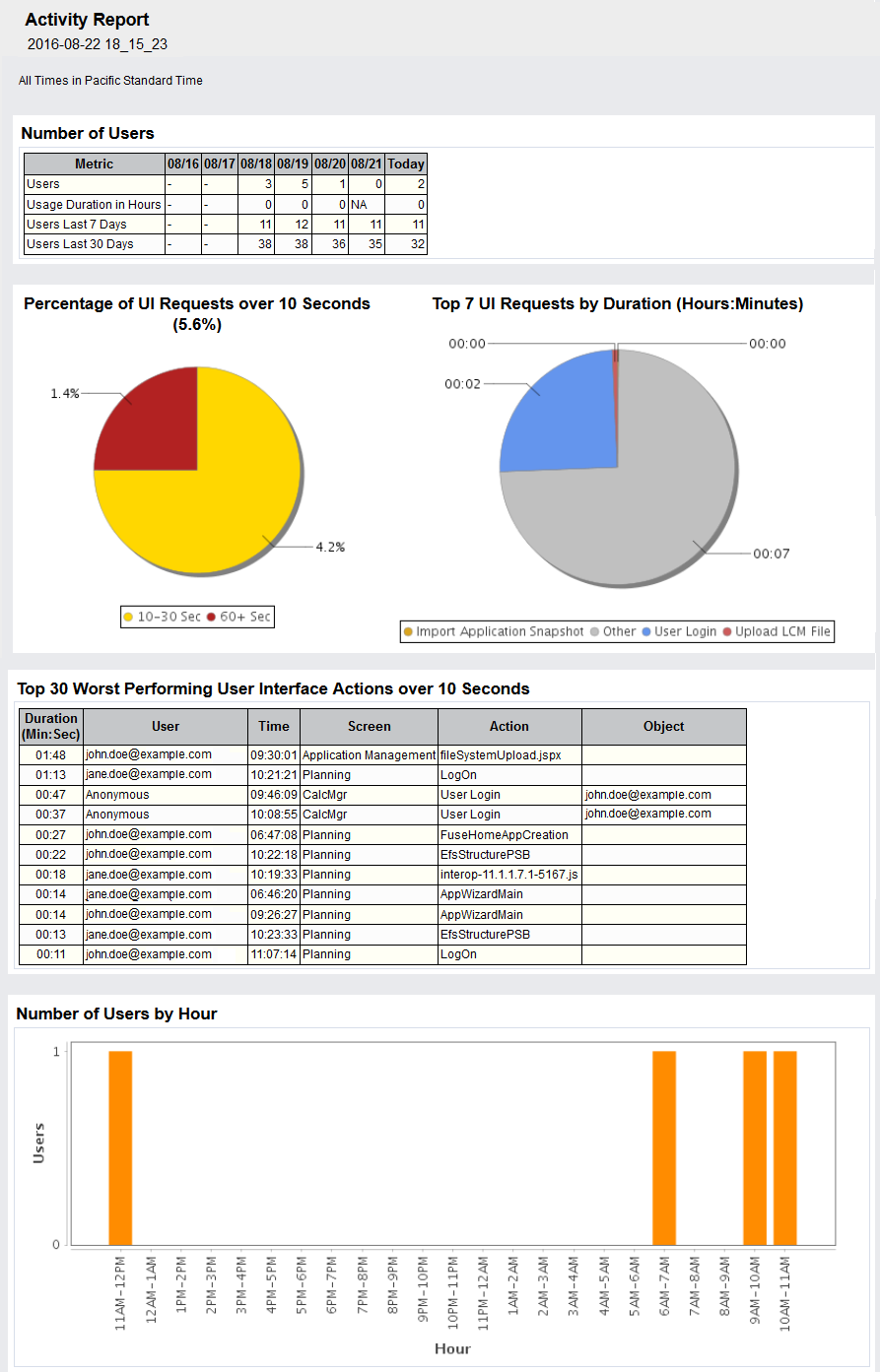
The Activity Report, which is automatically generated every day, enables Service Administrators to understand application usage over a period of five, ten, thirty or sixty days. It helps streamline application design by identifying calculation scripts and user requests that impact application performance. Information contained in this report includes:
- Number of users who signed into the application each day
- Percentage of requests that took more than 10 seconds to complete
- Top seven requests that took the most time to complete
- Top 30 worst performing actions that took over 10 Seconds to complete
- Number of users per hour
- Number of users based on how long they were signed into the application
- Top 10 users based on how long they were signed into the application
- Application design changes that occurred over the reporting period
To view the Activity Report:
- Sign into a service instance.
- Click Application, then Overview, and then Activity.
- For Reports from last, select a report duration (5 days, 10 days, 30 days or 60 days).
- Click a report name.
A new version of the EPM Automate Utility is available with this update. This version supports the following new commands for Data Management:
- importMapping
- exportMapping
- runDMReport
You must install this update to use the new commands. See these sections in Working with EPM Automate for Oracle Enterprise Performance Management Cloud:
- Installation instructions: Installing the Utility
- Instructions to run commands: Command Reference
Importing and Exporting Data Maps and Executing Reports
You can now use EPM Cloud REST APIs to perform these tasks: Import Data Map, Export Data Map, and Execute Report. This allows you to use Data Management to import and export data maps for a selected dimension or all dimensions, and to execute a report. Import member mappings API supports merge and replace modes as well as validate or no validate options for target members.
Updating the Scheduled Maintenance Window Time
You can now use EPM Cloud REST APIs to update the scheduled maintenance window time by performing these tasks: Get Build Version and Maintenance Window Time and Update Maintenance Window Time.
See the Oracle Cloud REST API for Oracle Enterprise Performance Management Cloud guide and the Oracle Cloud Enterprise Performance Management Integration Guide.
Changes to Daily Maintenance Screen
The navigation path to the Daily Maintenance screen where you set the maintenance window start time has changed. Additionally, the Daily Maintenance screen no longer contains the Version number of the current update, which linked to the Release readiness web site.
To open the Daily Maintenance screen:
- Access the service.
- Click or tap Tools, and then Daily Maintenance.
To view update version number and access release readiness information:
- Access the service.
- Click your user name at the top right corner of the screen to open Settings and Actions.
- Select About, and then Version.
- To view readiness information, click Oracle Enterprise Performance Management Release Readiness.
The Enterprise Performance Management Release Readiness web site is displayed. - Click Financial Consolidation and Close and then a document format (HTML, PDF or ePUB).
Ability to Exclude Dynamic Members While Exporting Data
To improve performance during data exports, you can now exclude dynamic members from exported data. The option to exclude dynamic members is available in the Export Data screen. To access the Export data screen:
- Access the service.
- Click or tap Application and then Overview.
- Click Action and then select Export Data.
Export HTML Report to Microsoft Excel
You can now export HTML formatted Financial Reporting reports to Microsoft Excel.
Multi-Column Loading of Numeric Data and Multi-Period Loading of Header Records
Data Management now supports a multi-column load of numeric data for any dimension. Prior to this update, Data Management supported only the loading of multi-period column data. In addition, a multi-period load using the header record is now available.
Email Sender Policy Framework Information
You can now use email sender policy framework to configure your corporate email system to ensure that important Oracle notifications regarding your service are not filtered out by your corporate email filtering system.
Financial Reporting Batch Scheduler Output
You can now store a PDF version of Financial Reporting batch scheduler output in Planning Inbox/Scheduler Output folder. To save the output in this folder, you select the Export to an external directory option when scheduling jobs. You can download and delete the output using Inbox/Outbox Explorer.
To download scheduler output to a local computer:
- Access the service.
- Click or tap Application and then Overview.
- Click Action and then select Inbox/Outbox Explorer.
- In Inbox/Outbox Explorer, select Scheduler Output.
The service, during daily maintenance, automatically creates a backup of data and artifacts. This service replaces the daily backup every time the maintenance is completed.
Set up an automated job using the EPM Automate Utility to download the backup to a local computer. See “Scheduling Maintenance” in Administering Oracle Financial Consolidation and Close Cloud.
Financial Web Studio New Features
Assign Multiple Database Connections to a Grid
You can retrieve data from different database connections and define the database connection for each data row or data column. You can preserve the members selected in the grid for the database connection on a grid row or column. See “Assigning Multiple Database Connections to a Grid” in Designing with Financial Reporting Web Studio for Oracle Enterprise Performance Management Cloud.
Save Report Objects
When you save a report object, you create a link between the source object in the report and the source object in the repository. When you save report object in the repository, you can reuse them as desired. This saves time and allows you to build a library of report objects to use when creating reports. When you save report objects in the repository, only the report object is saved, not the entire report design. See “Saving Report Objects” in Designing with Financial Reporting Web Studio for Oracle Enterprise Performance Management Cloud.
Sort Rows, Columns, and Pages in Grids
You can sort a range of consecutive rows or columns in a grid based on the values in a specific column or row. You can also sort columns, rows, and pages based on their headings. If you select a range of columns, Financial Reporting Web Studio sorts the columns based on the values in a specified row. If you select a range of rows, Financial Reporting Web Studio sorts the rows based on the values in a specified column. If the column or row by which you sort contains multiple members, the sort is based only on the values of the first member.
You can sort columns or rows in ascending or descending order. When you sort in ascending order, the lowest number, the beginning of the alphabet or the earliest date appears first in the sorted list. When you sort in descending order, the highest number, the end of the alphabet or the latest date appears first in the sorted list. See “Sorting Rows, Columns, or Pages in Grid” in Designing with Financial Reporting Web Studio for Oracle Enterprise Performance Management Cloud.
Enhanced Data Integration with Fusion Financials Cloud
The current integration between the Fusion Financials Cloud (GL) and EPM Cloud applications has been enhanced to provide a more seamless integration experience. The updated integration allows users to pick the desired source ledger from the Fusion Financials Cloud, set up a few simple mappings, and then push a button to pull the data into EPM Cloud applications. This integration, which can be run manually or scheduled for a specific time, no longer requires manual steps in Fusion Financials Cloud and EPM Cloud. The updated integration also sets up the drill definition automatically, which eliminates errors that may be caused when manually defining a drill definition.
If you are using an earlier version of the integration, you can continue to use it. You cannot automatically migrate an existing integration to the enhanced version of the integration. You can create a new integration definition with the new method as needed.
This integration is available for customers using Fusion Financials Cloud Release 11 or higher.
In the September 2016 update, this document indicated incorrectly that data from Financial Consolidation and Close Cloud could be used as a source for other Cloud services. This capability will be available in a future update.
Data from Planning and Budgeting Cloud and Enterprise Planning and Budgeting Cloud can be loaded directly into Financial Consolidation and Close Cloud and Account Reconciliation Cloud. Additionally, you can load data from the Fusion GL Cloud into Financial Consolidation and Close Cloud, and Account Reconciliation Cloud. In prior releases data load was supported only for Planning and Budgeting Cloud and Enterprise Planning and Budgeting Cloud.
Service Administrators can now use Data Management to import data into Financial Consolidation and Close Cloud using “Replace” mode.
Considerations
Be aware of the following considerations when working with Data Management:
- After you create an application and use Migration to import an extract, the Data Integration link may not appear in the Navigator after enabling a data load. If you log out and log in again, it will appear.
Considerations
Be aware of the following considerations:
- You should not make metadata changes that result in the following:
- Making a base member to whom a journal has been posted a parent member
- Deleting a member
- When you use ad hoc grids in Smart View with Financial Consolidation and Close Cloud, do not add a root "Period" member on the grid. Make sure the root "Period" member is removed by either clicking "Remove Only" or selecting periods that are in the application and selecting "Keep Only". If a Period member is left on the grid, then any changes to data that you make will fail to properly set the impact status of the Entities.
If there are Journals or Supplemental Data posted to those members, these changes can cause problems when accessing Journals or importing existing journals.
| Defect Number |
|
|---|---|
| 24616442 |
Sample applications cannot be created unless a Power User has been defined in addition to the Service Administrator. |
| 24654659 |
Following a service upgrade, some member formulas no longer appear. |
| 24569520 |
Formulas may fail if you modify a member’s alias. |
| 24660237 |
When three or more intercompany accounts have been defined, data for all the accounts does not always display. |
Oracle Financial Consolidation and Close Cloud, November Update
This guide outlines the announcements and fixed issues in the upcoming Oracle Financial Consolidation and Close Cloud update.
Announcements and New Features
Enabling Close Manager and Supplemental Data Management Only
When you create an application, you can choose to whether to enable the Consolidation feature. You can also choose to enable Supplemental Data Manager. The Close Manager feature is always enabled. If the Consolidation feature is disabled, consolidation rules, Account Balance Sheet hierarchy, the Financials dashboard, and other consolidation-related features are not available. Once the application is created, consolidation and supplemental options can be enabled. See Administering Oracle Financial Consolidation and Close Cloud.
Journal Templates and System Reports
You can use journal templates to post adjustments that have common information. You can create either Standard templates for frequently created journals, or Recurring templates for journals that need to be created for every period.
You can create and manage reports of journal activity that has occurred in the application. You can save report definitions, import report definitions through Migration, and run reports in PDF, HTML, or XLS format. See Working with Oracle Financial Consolidation and Close Cloud.
Loading Journals to Oracle Financial Consolidation and Close Cloud
In Data Management, you can now load journals to Oracle Financial Consolidation and Close Cloud applications. Journals enable you to adjust data after it has been entered or loaded into base level entities. They also provide an audit trail of changes made in the application and indicate which users made adjustments and which accounts, entities, and time periods are affected.
Data Management supports an explicit load method when loading journals to Oracle Financial Consolidation and Close Cloud applications. Journals are loaded by defining a data rule of the type “Journals.” Both Excel and text-based journal loads are supported. See Administering Data Management for Oracle Enterprise Performance Management Cloud.
New EPM Automate Utility Version
A new version of the EPM Automate Utility is available with this update. This version supports the getsubstvar command, which enables you to view the current value of a substitution variable or the value of all variables at the cube or application level.
This version also implements simplified exit codes and detailed error messages that provide specific information in case of command execution failures. The utility now supports these error codes only:
1 to indicate functional errors reported by the REST APIs that the utility uses
6 to indicate that the service is not available
7 to indicate errors caused by the use of invalid command or parameter
9 to indicate failures due to invalid credentials
11 to indicate internal server errors
Error codes 2, 3, 4, 5, 8, and 10 are no longer applicable. If your scripts use these codes, replace them with a new code.
You must install this version of the utility to use the new commands. See these sections in Working with EPM Automate for Oracle Enterprise Performance Management Cloud:
- Installation instructions: Installing the Utility
- Instructions to run commands: Command Reference
- Information on simplified exit codes: Exit Codes
Ability to Filter Members in Smart View Member Selector by Additional Criteria
In the Smart View Member Selection dialog box, you can now filter ad hoc report members by User Defined Attributes (UDA), generation, level, and level 0 descendant members. From the Filter drop-down list in the Member Selection dialog box, these options are now available when Smart View is connected to Financial Consolidation and Close Cloud:
- UDA to display the UDA dialog box, where you select a UDA (available only if the UDA was defined by an administrator)
- Generation to display the Generation dialog box, where you select one generation in the hierarchy of members
- Level to display the Level dialog box, where you select one level in the hierarchy of members
- Level 0 Descendant to display all descendants of the selected member that have no children
Row and Column Template in Financial Reporting Web Studio
Using row and column templates, you can select a contiguous set of rows or columns and save them as an object in the repository to reuse in reports. Row and column templates include one or more row or column definitions.
Same As Option in Financial Reporting Web Studio
The Same As option allows you to create a column or row member selection with the same member selection setting as another column or row.
Considerations
Be aware of the following considerations when working with Data Management:
- After you create an application and use Migration to import an extract, the Data Integration link may not appear in the Navigator after enabling a data load. If you log out and log in again, it will appear.
Considerations
Be aware of the following considerations:
- The replace export option will replace all data for the combination of scenario, year, period, entity and data source member. Make sure that users with the Power User role have access to all data for the combination of these dimensions for which they are loading data.
- You should not make metadata changes that result in the following:
- Making a base member to whom a journal has been posted a parent member
- Deleting a member
- When you use ad hoc grids in Smart View with Financial Consolidation and Close Cloud, do not add a root "Period" member on the grid. Make sure the root "Period" member is removed by either clicking "Remove Only" or selecting periods that are in the application and selecting "Keep Only". If a Period member is left on the grid, then any changes to data that you make will fail to properly set the impact status of the Entities.
If there are Journals or Supplemental Data posted to those members, these changes can cause problems when accessing Journals or importing existing journals.
| Defect |
Description |
|---|---|
| 24803109 |
Financial Consolidation and Close applications should be updated to FCCS and Consolidation, rather than PCBS and Planning. |
| 24797299 |
Overrides only work for data at FCCS_Data Input member of data source |
| 24662901 |
The export process to Financial Consolidation and Close from Data Management takes a long time to complete. |
Oracle Financial Consolidation and Close Cloud, December Update
This guide outlines the announcements and fixed issues in the upcoming Oracle Financial Consolidation and Close Cloud update.
Announcements and New Features
After applying the December updates to the test instances on December 2, 2016, additional testing uncovered a regressive defect that affected the connection between Oracle Smart View for Office and Oracle Enterprise Performance Management Cloud. As a result, the planned update to production instances on Friday, December 16, 2016, has been deferred until the January update cycle when this defect will be corrected. No customer action is required.
You can now use REST APIs to get and set substitution variables. See the Oracle® Cloud REST API for Oracle Enterprise Performance Management Cloud guide available on the Oracle Financial Consolidation and Close Cloud Help Center.
Access Logs that List Daily User Activity
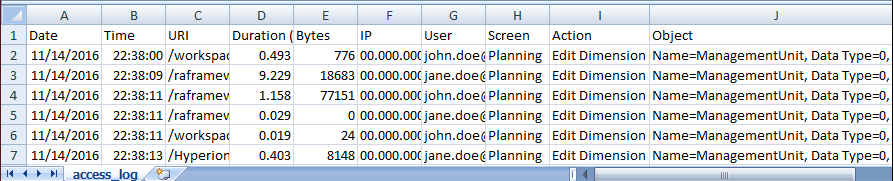
You can now download a daily access log, a Comma Separated Value (CSV) file, which provides detailed information on the resources that users accessed, duration of user activity, the IP addresses from which users connected to the service, and the action that users performed in the service. The access log is generated each day.
To download an Access Log:
- Access the service.
- Click or tap Application, then Overview, and then Activity Reports.
Available Activity Reports and Access Logs for the last 60 days are listed. - Under Access Log, click Download to download the activity log of a day.
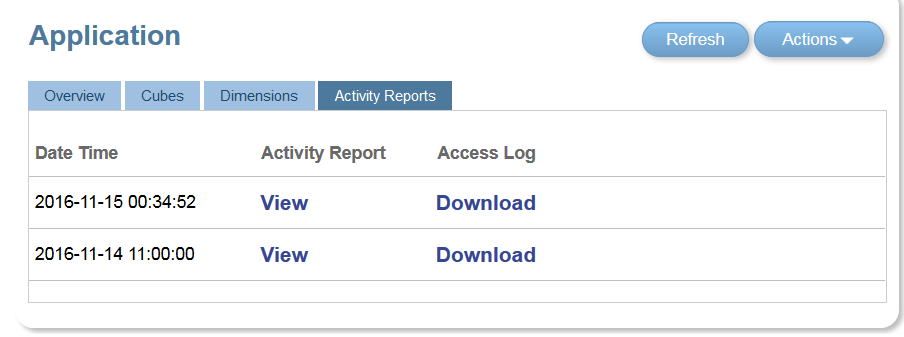
A sample access log:
This update includes support for alternate hierarchies in the Entity dimension. One entity can have multiple parents, and contribute differently to each parent. These members are called “Partial Shared” entities, where only a part of input data is shared across all instances of the entities. See the Oracle Financial Consolidation and Close Cloud Administrator’s Guide.
Currency Translation for Supplemental Data
Administrators and Power Users may now set up currency translation calculations in data sets to allow global companies to enter data in local currency and translate to the currency of the parent company for reporting purposes. See the Oracle Financial Consolidation and Close Cloud Administrator’s Guide.
Move Override Members from Data Source Dimension to Consolidation Dimension
This update provides support for entering different override amounts and rates for different source members. To support this, these members have been added to the Consolidation dimension: FCCS_Overrides, FCCS_Rate Override, and FCCS_Amount Override. See the Oracle Financial Consolidation and Close Cloud Administrator’s Guide.
Administrators and Power Users may now bulk load data directly into data sets. This allows for pre-loading of rows in forms and the data that the rows contain. See the Oracle Financial Consolidation and Close Cloud Administrator’s Guide.
Saved Views in Close Manager and Supplemental Data Manager
Users may now name and save views of dashboards. This includes the column layout, sort order and filters associated with the dashboard. Administrators may publish the saved dashboard views to make them available to all users. See the Oracle Financial Consolidation and Close Cloud User’s Guide.
Validation of Supplemental Data Total
You can validate the supplemental data total against an account balance. This is useful when you are loading account balances from various General Ledger systems into your consolidation system and use Supplemental Data Manager to collect parts or the sum of that account balance. See the Oracle Financial Consolidation and Close Cloud Administrator’s Guide.
Supplemental Data Manager Reassigning Users
The Reassign User capability is now available for Supplemental Data Manager. This feature provides the capability to reassign workflow actions to a different user during the close process. See the Oracle Financial Consolidation and Close Cloud User’s Guide.
Related Content: Financial Reporting Web Studio
Related content in Financial Reporting Web Studio allows designers to set up links to Financial Reporting documents and custom URL links. A user, when viewing a report in HTML in the Explore Repository, can drill into a related content link and execute the linked report or URL. Related content is supported in dynamic and snapshot reports and books.
Hide Grid Lines in Financial Reporting Web Reports
When you create a grid in Financial Reporting Web Studio in grid properties, you can select to hide the grid lines in HTML Preview.
Add a Filter to Repository Items
You can filter the types of objects displayed in the Financial Reporting Web Studio repository panel. For example, you could select to display only reports, saved grids, saved images, saved charts, row and column templates, and so on.
Oracle Financial Consolidation and Close Cloud as Source System
Oracle Financial Consolidation and Close Cloud can be used as a source system in the import format. In this way, you can use Oracle Financial Consolidation and Close Cloud as a source system, and then use a different cloud service (such as Oracle Enterprise Planning and Budgeting Cloud, Oracle Account Reconciliation Cloud, Oracle Planning and Budgeting Cloud, Oracle Profitability and Cost Management Cloud) as a target, and move data from Oracle Financial Consolidation and Close Cloud to these other cloud services.
Additionally, you can pull data from Oracle Financial Consolidation and Close Cloud and push the data to a file for use in another application.
Data Management support of Multiple Periods
Data Management now supports Oracle Financial Consolidation and Close Cloud “Period” dimensions as columns in a data file. If you have data for multiple periods in a single file, then you can include the year and period on each row of the data file that gets loaded to the target application.
Data Management Considerations
Be aware of the following considerations when working with Data Management:
- After you create an application and use Migration to import an extract, the Data Integration link may not appear in the Navigator after enabling a data load. If you log out and log in again, it will appear.
Considerations
Be aware of the following considerations:
- The replace export option will replace all data for the combination of scenario, year, period, entity and data source member. Make sure that users with the Power User role have access to all data for the combination of these dimensions for which they are loading data.
- You should not make metadata changes that result in the following:
- Making a base member to whom a journal has been posted a parent member
- Deleting a member
- When you use ad hoc grids in Smart View with Financial Consolidation and Close Cloud, do not add a root "Period" member on the grid. Make sure the root "Period" member is removed by either clicking "Remove Only" or selecting periods that are in the application and selecting "Keep Only". If a Period member is left on the grid, then any changes to data that you make will fail to properly set the impact status of the Entities.
If there are Journals or Supplemental Data posted to those members, these changes can cause problems when accessing Journals or importing existing journals.
| Defect |
Description |
|---|---|
| 24926908 |
When an account has an account type of Saved Assumption and Time Balance of |
| 24905454 |
Data Entity Input Intersections do not always clear for Parent entities. |
---

Copyright © 2016, 2017, Oracle and/or its affiliates. All rights reserved.
This document is provided for information purposes only, and the contents hereof are subject to change without notice. This document is not warranted to be error-free, nor subject to any other warranties or conditions, whether expressed orally or implied in law, including implied warranties and conditions of merchantability or fitness for a particular purpose. We specifically disclaim any liability with respect to this document, and no contractual obligations are formed either directly or indirectly by this document. This document may not be reproduced or transmitted in any form or by any means, electronic or mechanical, for any purpose, without our prior written permission.
Oracle and Java are registered trademarks of Oracle and/or its affiliates. Other names may be trademarks of their respective owners.
Intel and Intel Xeon are trademarks or registered trademarks of Intel Corporation. All SPARC trademarks are used under license and are trademarks or registered trademarks of SPARC International, Inc. AMD, Opteron, the AMD logo, and the AMD Opteron logo are trademarks or registered trademarks of Advanced Micro Devices. UNIX is a registered trademark of The Open Group.

2016