
- Revision History
- Overview
- Feature Summary
- Profitability and Balance Sheet Management
-
- Cash Flow Engine
- Profitability Management
-
- Enhanced Hierarchy Browser Flavors
- Improved Performance for Profitability Table Drivers
- In-App Analytics to Do Analysis on Business Data
- New Modes of Member Selection for Your Allocation Rule Definitions
- New Registration UI to Configure Working Data Model
- Source Aligned Data Structure with Instruments, Accounts, Transactions, and Ledger
- Support for Top-Down and Bottom-Up Allocation Methodologies
-
This document will continue to evolve as existing sections change and new information is added. All updates appear in the following table:
| Date | Product | Feature | Notes |
|---|---|---|---|
| 11 JUL 2022 | Profitability Management | Updated document. Added new features delivered in 22.6.1. | |
| 28 JUN 2022 | Created initial document. |
 HAVE AN IDEA?
We’re here and we’re listening. If you have a suggestion on how to make our cloud services even better then go ahead and tell us. There are several ways to submit your ideas, for example, through the Ideas Lab on Oracle Customer Connect. Wherever you see this icon after the feature name it means we delivered one of your ideas.
GIVE US FEEDBACK
We welcome your comments and suggestions to improve the content. Please send us your feedback at fsgbu-mrf-communications_in@oracle.com.
DISCLAIMER
The information contained in this document may include statements about Oracle’s product development plans. Many factors can materially affect Oracle’s product development plans and the nature and timing of future product releases. Accordingly, this Information is provided to you solely for information only, is not a commitment to deliver any material, code, or functionality, and should not be relied upon in making purchasing decisions. The development, release, and timing of any features or functionality described remains at the sole discretion of Oracle.
This information may not be incorporated into any contractual agreement with Oracle or its subsidiaries or affiliates. Oracle specifically disclaims any liability with respect to this information. Refer to the Legal Notices and Terms of Use for further information.
Column Definitions:
Report = New or modified, Oracle-delivered, ready to run reports.
UI or Process-Based: Small Scale = These UI or process-based features are typically comprised of minor field, validation, or program changes. Therefore, the potential impact to users is minimal.
UI or Process-Based: Larger Scale* = These UI or process-based features have more complex designs. Therefore, the potential impact to users is higher.
Features Delivered Disabled = Action is needed BEFORE these features can be used by END USERS. These features are delivered disabled and you choose if and when to enable them. For example, a) new or expanded BI subject areas need to first be incorporated into reports, b) Integration is required to utilize new web services, or c) features must be assigned to user roles before they can be accessed.
| Ready for Use by End Users Reports plus Small Scale UI or Process-Based new features will have minimal user impact after an update. Therefore, customer acceptance testing should focus on the Larger Scale UI or Process-Based* new features. |
Customer Must Take Action before Use by End Users Not disruptive as action is required to make these features ready to use. As you selectively choose to leverage, you set your test and roll out timing. |
|||||
|---|---|---|---|---|---|---|
| Feature |
Report |
UI or |
UI or |
|
||
New Modes of Member Selection for Your Allocation Rule Definitions |
||||||
Source Aligned Data Structure with Instruments, Accounts, Transactions, and Ledger |
||||||
Profitability and Balance Sheet Management
Following are the Cash Flow related features in this release:
- Generate account level cash flows using unique payment and repricing characteristics
Cash flow is calculated for each account using their characteristics like payment date, payment frequency, amortization type, interest rate and balance.
- Support for principal and interest payments on different dates and at a different frequency
Payment frequency and dates can be different for interest and principal components of instalment in certain amortization types.
- Daily rate forecasting - unique rate for a given day on repricing
Interest rates is forecasted for 30 years in future and rate on each reprice date is calculated by interpolation.
- Fully auditable cashflow output
Balance, rate, runoff, prepayment, and many other measures are output for each event in the life of an account.
- Calculate cash flows for multiple time horizons
Cash flow of an account can be calculated starting from origination, last reprice or current date to cater to various end-use.
- Multiple accrual basis and compounding methods
Industry standard accrual basis and compounding frequency are used to calculate interest amount
- Inbuilt data validation rules
Engine checks for errors in data and does necessary corrections before calculating cash flows to give an accurate result
- Cash Flow Edits to perform comprehensive quality check on input data
This is a framework to checks errors and inconsistencies in input data before running the engine and optionally carry out corrections.
- Model-specific characteristics using patterns and schedules
Behavior pattern, payment pattern and payment schedules can be used to model cash flows for accounts where payment characteristics like amount, frequency and dates change during the life.
- Amortize one account using multiple methods
Split payment pattern can be used to calculate cash flows using more than one amortization type for the same account
- Incorporate Prepayment and Early Redemption assumptions
Customer behavior related to foreclosure of loan and deposit can be incorporated to have a real-life picture during cash flow calculation
- Amortize premiums and discounts
Premium, Discount, Unamortized fee and cost can be amortized over the life of account to reconcile with book value
- Calculate Market value using multiple discount methods
Present value of cash flows can be calculated by discounting them. Other related measures like duration, modified duration, yield to maturity, convexity and dollar duration are also calculated.
- Apply Business Calendar
Region or location specific holiday calendars can be used during cash flow calculation to accurately model inflows and outflows.
These cash flow enhancements help you to perform a quality check and improve the performance of the application.
Steps to Enable
You don't need to do anything to enable this feature.
Key Resources
Supports Fresh looking application user interfaces with Oracle Redwood theme.
Oracle Redwood theme and design has been used to develop user interfaces giving them a modern look and experience.
Steps to Enable
You don't need to do anything to enable this feature.
Key Resources
Enhanced Hierarchy Browser Flavors
The current offering of the enhanced Hierarchy Browser is designed according to the mode it is called. The Browser is simpler, intuitive, comes with a user friendly built in Search Criteria, and provides selection of Member from the Search Tab directly without the need of further operations.
Provides a selection of Leaf or Node Members from a list of Leaf Members or a Hierarchy.
Steps to Enable
You don't need to do anything to enable this feature.
Key Resources
Improved Performance for Profitability Table Drivers
The application comes with improved generation of the Coefficient Matrix and user-friendly search option.
Users do not need to wait on the Coefficient Tab while the Matrix is still generated while the application takes the User into the Coefficient Tab when the Matrix generation is complete.
Steps to Enable
You don't need to do anything to enable this feature.
Key Resources
In-App Analytics to Do Analysis on Business Data
The Analytics Module comes with a host of analytical capabilities that includes but not limited to Raw Data Analysis, SQL Querying, and Allocation Performance Analysis.
The Analytics Module provides for the analysis needs of the Users and eliminates the need to depend on external Analytical Reporting Utility.
Steps to Enable
You don't need to do anything to enable this feature.
Key Resources
New Modes of Member Selection for Your Allocation Rule Definitions
We offer you four modes of Dimension Member selection in your Source/Driver/Outputs Tabs in Allocation Specification Detail UI namely – Leaf mode, Node mode, Hierarchy Filter mode and Macro mode. This allows typing ahead Member Names while applying constraints on the Source/Driver/Output Dimensions, in addition to selection of Members from the Hierarchy Browser.
Member Selection has become more intuitive and easy for our End Users.
Steps to Enable
You don't need to do anything to enable this feature.
Key Resources
New Registration UI to Configure Working Data Model
Data Model Extension
The PBSMCS Data Model comes with additional Placeholders for Columns, Dimensions and Ledger Tables. We are providing domain Based Placeholder Columns, Placeholders for OFSAA Key Processing Dimensions and Simple Dimensions, and five Placeholder Management Ledger Tables in addition to the regular Management Ledger Table.
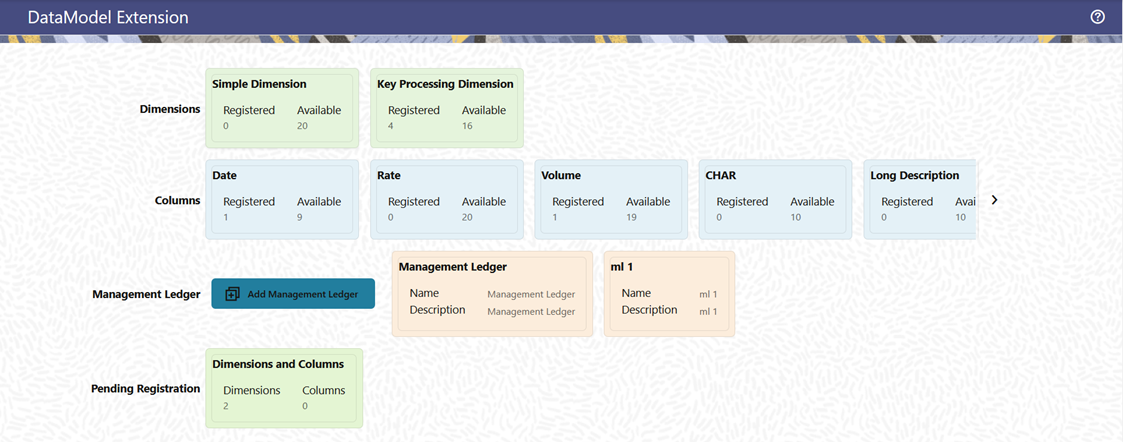
Data Model Extension
Customers can extend their usable Data Model with this utility.
Steps to Enable
You don't need to do anything to enable this feature.
Key Resources
Source Aligned Data Structure with Instruments, Accounts, Transactions, and Ledger
The Data Structure is designed to support ingestion of Data each different Financial Instrument wise, be it Customer Accounts Data or Customer Transaction Data.
Each Table in PBSMCS comes with the required Attributes and processing capabilities that are specific to each Data Set. The Instrument Tables come with the Attributes required for Customer Accounts, while the Management Ledger Tables come with Attributes and Metadata required for a ledger.
Steps to Enable
You don't need to do anything to enable this feature.
Key Resources
Support for Top-Down and Bottom-Up Allocation Methodologies
PFTCS allows us to do top-down Allocations from Ledger to Customer Accounts level, while bottom-up Allocations from Transaction to Customer Account to Ledger Level is also supported.
Customers can do Cost Allocations from Ledger Level to Instrument Level as well as from Transactions Level to Instruments Level.
Steps to Enable
You don't need to do anything to enable this feature.
Key Resources