
- Revision History
- Overview
- Feature Summary
- Profitability and Balance Sheet Management
-
- Funds Transfer Pricing
- Profitability Management
- Profitability Analytics
- Cash Flow Engine
-
- Cash Flow Process UI
- Analytics
- New Configuration Parameters on CFE Configuration UI
- Cash Flow Edits Process UI
- New UI for Behavior Pattern Rule
- Behavior Pattern Rule Option in Forecast Rate
- Payment Pattern
- Data Management Interface
- Discount Method
- Updated Application Preference UI with View Logs Level
- Discount Rate Margin
-
This document will continue to evolve as existing sections change and new information is added. All updates appear in the following table:
| Date | Product | Feature | Notes |
|---|---|---|---|
| 14 SEP 2022 | Cash Flow Engine | Updated document. Added Cash Flow Engine features. |
|
| 09 SEP 2022 | Created initial document. |
 HAVE AN IDEA?
We’re here and we’re listening. If you have a suggestion on how to make our cloud services even better then go ahead and tell us. There are several ways to submit your ideas, for example, through the Ideas Lab on Oracle Customer Connect. Wherever you see this icon after the feature name it means we delivered one of your ideas.
GIVE US FEEDBACK
We welcome your comments and suggestions to improve the content. Please send us your feedback at fsgbu-mrf-communications_in@oracle.com.
DISCLAIMER
The information contained in this document may include statements about Oracle’s product development plans. Many factors can materially affect Oracle’s product development plans and the nature and timing of future product releases. Accordingly, this Information is provided to you solely for information only, is not a commitment to deliver any material, code, or functionality, and should not be relied upon in making purchasing decisions. The development, release, and timing of any features or functionality described remains at the sole discretion of Oracle.
This information may not be incorporated into any contractual agreement with Oracle or its subsidiaries or affiliates. Oracle specifically disclaims any liability with respect to this information. Refer to the Legal Notices and Terms of Use for further information.
Column Definitions:
Report = New or modified, Oracle-delivered, ready to run reports.
UI or Process-Based: Small Scale = These UI or process-based features are typically comprised of minor field, validation, or program changes. Therefore, the potential impact to users is minimal.
UI or Process-Based: Larger Scale* = These UI or process-based features have more complex designs. Therefore, the potential impact to users is higher.
Features Delivered Disabled = Action is needed BEFORE these features can be used by END USERS. These features are delivered disabled and you choose if and when to enable them. For example, a) new or expanded BI subject areas need to first be incorporated into reports, b) Integration is required to utilize new web services, or c) features must be assigned to user roles before they can be accessed.
| Ready for Use by End Users Reports plus Small Scale UI or Process-Based new features will have minimal user impact after an update. Therefore, customer acceptance testing should focus on the Larger Scale UI or Process-Based* new features. |
Customer Must Take Action before Use by End Users Not disruptive as action is required to make these features ready to use. As you selectively choose to leverage, you set your test and roll out timing. |
|||||
|---|---|---|---|---|---|---|
| Feature |
Report |
UI or |
UI or |
|
||
Profitability and Balance Sheet Management
In-App Analytics for Analysis of the Business Data and Execution Results for Rates and Charge or Credits
Module comes with a host of analytical capabilities that includes but not limited to Raw Data Analysis, SQL Query Browser, and Processed Data Insights.
The Analytics Module provides deep data insights/data trends for the selected time duration and processing dimensions, which will enable user to leverage Data visualization/Business Intelligence capabilities for quicker and precise decision making.
Steps to Enable
You don't need to do anything to enable this feature.
Key Resources
Filter creation UI flow is made more intuitive and user friendly. Rather than opening multiple pop-ups for table, column, operation, and range selection. User can now perform all the operation within one single UI itself.
Single UI flow, will reduce lot of operational errors and would be much quicker to define.
Steps to Enable
You don't need to do anything to enable this feature.
Key Resources
User has the ability to define different IRC formats (Rate Format, Compounding Frequency, Accrual, for different term points.
Also, along with defining term points in the traditional way with the unit, and frequency, the user has an option to define date-based term points, based on the respective bond maturity from which the rate has been derived.
User does not need to stick to a single rate format but can use a different format for different term point with a restriction of maximum of two rate formats per interest rate curve.
Steps to Enable
You don't need to do anything to enable this feature.
Key Resources
Transfer Pricing Standard Process Set Up Wizard
Standard process UI flow has been revamped with an organized scenario-based calculation selection.
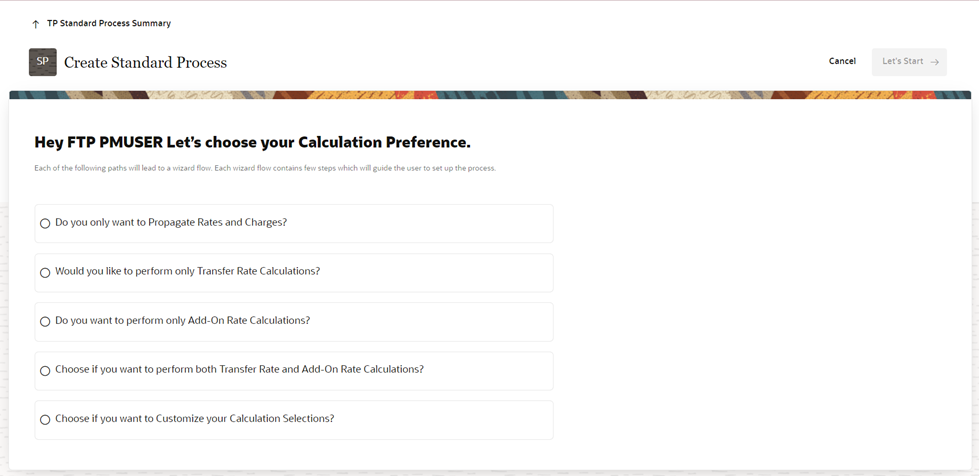
Even a new user would also be able to set up the whole flow as per the selected scenario, as only relevant calculation options are available that too with a guided wizard flow.
Steps to Enable
You don't need to do anything to enable this feature.
Tips And Considerations
Standard process UI flow is revamped with an organized Scenario-based calculations selection
Key Resources
Cash flow edits checks have been organized in various groups and sub-groups and user has flexibility to add new sub-groups, create new checks under those sub-groups.
User can only run the data through selected sub-groups of checks rather than running whole set of available checks. It will enhance the performance and take less time to execute.
Steps to Enable
You don't need to do anything to enable this feature.
Key Resources
Pre-defined Database columns with different Data types are already provided as placeholders, which can be activated and assigned different logical names for further usage, for example, for alternate rate output mapping.
User does not need to stick to seeded column list for various rate, charge/credit calculations but cam enhance the list by registering placeholder columns for any column type Balance, rate, date, simple/key dimension.
Steps to Enable
You don't need to do anything to enable this feature.
Key Resources
All UIs’ have been revamped with Redwood theme, which is giving a fresh look to whole application. And from UI components positioning perspective also, frequently used buttons and text fields are kept at the top for easy accessibility.
User can easily access and navigate through various modules without any product specific training.
Steps to Enable
You don't need to do anything to enable this feature.
Key Resources
Standard Allocation Models are useful to assemble a logical grouping of allocation rules into a single executable rule.
More than one allocation rule can be executed at one time; a set of rules can be executed as a single unit of work at one go.
Steps to Enable
You don't need to do anything to enable this feature.
Key Resources
New Feature in Allocation Rule Definition
Two distinct tab views are introduced to separately view the active set and the passive set of dimensions in source/driver/output of an allocation rule.
The separation of dimensions into shorter Active and Passive list was introduced to solve the problem of a long list of dimensions to choose from while in Edit mode. The dimensions list would be long when all the placeholder KPD’s are registered and user would need to search through the list to find the KPD he wants to apply constraint to.
Steps to Enable
You don't need to do anything to enable this feature.
Key Resources
The Execution History comes with the capability to undo a previously executed allocation rule or a Management Ledger load, and to view the inline reports of data generated by an allocation rule's Source, Driver and Output.
Users can view the allocation rule definitions in effect when the allocation rule was executed, and can undo the impact of a rule execution or a ledger load.
Steps to Enable
You don't need to do anything to enable this feature.
Key Resources
Next Generation Business Intelligence Platform
Profitability Analytics Cloud leverages the Oracle Business Intelligence Suite, Data Visualization (DV) platform—a next-generation analytics platform.
The DV reports provide customers ability to do interactive analysis across canvases with scope for self Service analytics, resulting in a great user experience.
Steps to Enable
You don't need to do anything to enable this feature.
Key Resources
This application ingests data from the bank’s Management Ledger with other allocated line items, such as expenses, to provide a comprehensive view of financial performance across multiple dimensions, including – but not limited to – Product, Legal Entity, Region, and Organization Unit.
Users can accurately identify the most profitable products, lines of business, and organization units. They can also assess risk-adjusted metrics such as return on assets (ROTA), risk-adjusted return on capital (RAROC), and other key performance indicators such as top 10 products by balance growth, and so on.
Steps to Enable
You don't need to do anything to enable this feature.
Key Resources
Instrument Level Profitability Insights
Targeted at a different persona base, data aggregated up from Instrument summary tables provide a bottom-up view of financial performance across multiple dimensions.
Account level computations with accurate aggregations provide banks the capability to slice and dice data on the fly for insights on defined and profitable customer sets.
Steps to Enable
You don't need to do anything to enable this feature.
Key Resources
Full Integration with PFTCS and PBSMCS Base
The entire data movement to the Profitability Analytics service happens from Profitability Management Cloud. The PBSMCS Data Model comes with additional Placeholders for Columns, Dimensions and Ledger Tables.
Profitability Analytics Service directly leverages Top Down expense/cost allocation outputs from PFTCS for Income statements and other financial metric calculations.
Steps to Enable
You don't need to do anything to enable this feature.
Key Resources
Export of cash flow output can be triggered from Execution Details UI after cash flow process gets completed.
This creates csv file for selected Execution Id from FSI_O_CFE_OUTPUT_HIST table and stores it in Object Store.
Steps to Enable
You don't need to do anything to enable this feature.
Key Resources
Two new reports showing details cash flow output and cash flow edits messages are available.
Report are:
- Data Insights
- Processed Data Insights
Steps to Enable
You don't need to do anything to enable this feature.
Key Resources
New Configuration Parameters on CFE Configuration UI
Added two new configuration parameters.
- CASH_FLOW_PROCESS_PARALLEL_REQUESTS
This parameter defines the Number of Parallel batches executed by each executor. This is a performance tuning parameter for Cash Flow Engine.
- CASH_FLOW_PROCESS_PARALLEL_THREADS
This parameter allows you to set the Number of threads created by the executor for each batch. This is a performance tuning parameter for Cash Flow Engine. This defines how much memory can be used by the different components of the process such as the stack, data and text segments.
Steps to Enable
You don't need to do anything to enable this feature.
Key Resources
Messages logged by Cash Flow Edits process can be downloaded from Execution Details UI in csv file.
This will help you to understand errors found in instrument data.
Steps to Enable
You don't need to do anything to enable this feature.
Key Resources
New UI for Behavior Pattern Rule
Behavior Pattern can be assigned at the portfolio level (Product, Currency) and used to generate cash flows.
This is an alternative way to assigning Behavior Pattern to each account.
Steps to Enable
You don't need to do anything to enable this feature.
Key Resources
Behavior Pattern Rule Option in Forecast Rate
Now the Behavior Pattern Rule option is available in Forecast Rate UI.
This allows you to map an existing Behavior Pattern Rule to the current forecast scenario.
Steps to Enable
You don't need to do anything to enable this feature.
Key Resources
The User-defined payment patterns allow you to define custom repayment patterns for products in your portfolio.
You can include a payment pattern while generating cash flows by entering the payment pattern code for the instrument.
Steps to Enable
You don't need to do anything to enable this feature.
Key Resources
New interface for Data Management.
This is a new tool to design data entry forms to view and edit data in database tables.
Steps to Enable
You don't need to do anything to enable this feature.
Key Resources
Enhanced Discount Method for Effective Interest Rate.
Effective Interest Rate of account can be used to discount cash flows to calculate market value and related measures.
Steps to Enable
You don't need to do anything to enable this feature.
Key Resources
Updated Application Preference UI with View Logs Level
A parameter is added to Application Preferences to define View level of the Log.
There are three levels available:
- Information
- Debug
- Off
Steps to Enable
You don't need to do anything to enable this feature.
Key Resources
Margin or spread to be added to rate derived from Interest Rate Curve can now be given as input in Price form in addition to current Rate form.
Cash Flow Engine internally converts Price to a Rate and uses to calculate market value.
Steps to Enable
You don't need to do anything to enable this feature.
Key Resources