
This document will continue to evolve as existing sections change and new information is added. All updates appear in the following table:
| Date | Product | Feature | Notes |
|---|---|---|---|
| 28 FEB 2022 | Created initial document. |
 HAVE AN IDEA?
We’re here and we’re listening. If you have a suggestion on how to make our cloud services even better then go ahead and tell us. There are several ways to submit your ideas, for example, through the Ideas Lab on Oracle Customer Connect. Wherever you see this icon after the feature name it means we delivered one of your ideas.
GIVE US FEEDBACK
We welcome your comments and suggestions to improve the content. Please send us your feedback at omcdocumentation_ca@oracle.com.
DISCLAIMER
The information contained in this document may include statements about Oracle’s product development plans. Many factors can materially affect Oracle’s product development plans and the nature and timing of future product releases. Accordingly, this Information is provided to you solely for information only, is not a commitment to deliver any material, code, or functionality, and should not be relied upon in making purchasing decisions. The development, release, and timing of any features or functionality described remains at the sole discretion of Oracle.
This information may not be incorporated into any contractual agreement with Oracle or its subsidiaries or affiliates. Oracle specifically disclaims any liability with respect to this information. Refer to the Legal Notices and Terms of Use for further information.
Column Definitions:
Report = New or modified, Oracle-delivered, ready to run reports.
UI or Process-Based: Small Scale = These UI or process-based features are typically comprised of minor field, validation, or program changes. Therefore, the potential impact to users is minimal.
UI or Process-Based: Larger Scale* = These UI or process-based features have more complex designs. Therefore, the potential impact to users is higher.
Features Delivered Disabled = Action is needed BEFORE these features can be used by END USERS. These features are delivered disabled and you choose if and when to enable them. For example, a) new or expanded BI subject areas need to first be incorporated into reports, b) Integration is required to utilize new web services, or c) features must be assigned to user roles before they can be accessed.
| Ready for Use by End Users Reports plus Small Scale UI or Process-Based new features will have minimal user impact after an update. Therefore, customer acceptance testing should focus on the Larger Scale UI or Process-Based* new features. |
Customer Must Take Action before Use by End Users Not disruptive as action is required to make these features ready to use. As you selectively choose to leverage, you set your test and roll out timing. |
|||||
|---|---|---|---|---|---|---|
| Feature |
Report |
UI or |
UI or |
|
||
Infinity Behavioral Intelligence
Whether you choose recommendations for Web or Email, or use the Recommendations API, our new self-serve inventory management ensures the list of items to be recommended is always accurate and up to date. You can:
- Import inventory files in different formats (comma-separated values, or use other delimiters such as tab, pipe, semi-colon, and more),
- Select scheduling options (upload inventory files once a day, or as frequently as once every four hours),
- Map the inventory attributes of your feed file to the attributes on our Recommendations engine, and
- Preview the import.
These enhancements make it easier for you to manage your Recommendations inventory.
Steps to Enable
You don't need to do anything to enable this feature.
Key Resources
Improved User Experience for Adding Recommendations Widgets
With this update, you will experience the following improvements for adding Recommendations widgets to your web sites:
- Navigation button left/right
- Navigation block by block
- Auto-scroll
Recommendations can increase cross-sells and up-sells in a retail environment, or engagement in the case of content, by helping customers find what they need or new items they would not have otherwise found themselves.
Steps to Enable
You don't need to do anything to enable this feature.
Key Resources
New 1-1 Algorithms and Advanced Filtering Capabilities
While adding a Recommendations widget to your web page or email campaign, or through the Recommendations API, you can now choose from a set of new recommendation models. These models include upgraded Visitor Affinity, Trending, Last Viewed, This…That, and Popularity models.
Along with the new set of recommendation models, you can now choose from a wide variety of smart operands (including Boolean, And/Or, Equal to/Not equal to, Greater/Less Than…, Match/Does not match, and more). For example, if you would like to recommend only those items which are in stock, you can create a filter of “Items with Stock Levels Greater than 10”.
The new recommendation models and filter criteria allow for greater targeting and segmentation for your customers, which helps support various business and campaign objectives.
Steps to Enable
You don't need to do anything to enable this feature.
Key Resources
You can deliver personalized recommendations to digital third-party platforms (for example, e-Commerce platforms) and internet-enabled devices (such as mobile phones, kiosks, and so on) by integrating with the Recommendations API. From the Recommendations Home page, you can access a user interface that enables you to configure recommendations strategies. The library of Recommendations algorithms (including 1-1, This...That, Popularity and Trending) and advanced filter logic cover a wide variety of use cases to drive up conversion and/or engagement.
Displaying personalized recommendations through digital third-party systems and internet-enabled devices, such as mobile phones and kiosks, can help drive conversion and engagement metrics.
Steps to Enable
You don't need to do anything to enable this feature.
Key Resources
Role Information
This feature is intended for Digital Marketing Managers.
Recommendations for Oracle Responsys Emails
If you have access to both Oracle Responsys and Oracle Infinity IQ/Marketing Recommendations, you can now add personalized product or content recommendations to email messages created using the Responsys Email Message Designer. As you design your email campaign message, you can add the Oracle Marketing Recommendations widget and easily configure the content and layout of the recommendations block. The library of Recommendations algorithms (including 1-1, This...That, Popularity and Trending) and advanced filter logic cover a wide variety of use cases to drive up conversion and/or engagement. The email recommendations are generated at open time, which means that item recommendations are always populated when recipients open the email, ensuring ever accurate recommendations.
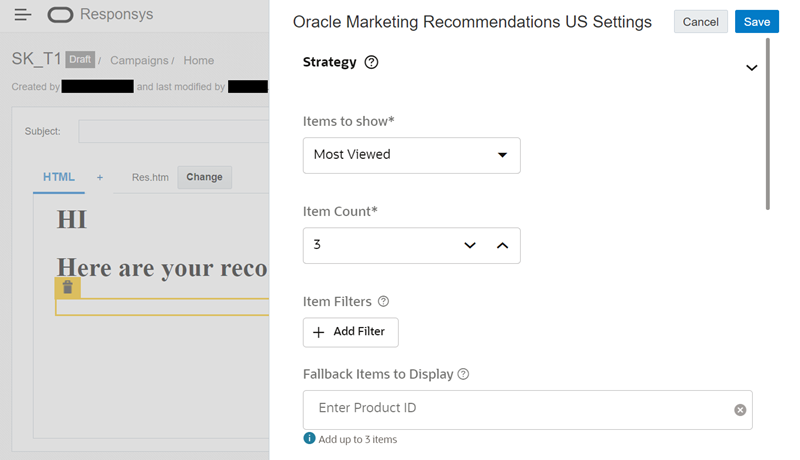
Adding Recommendations to an Email Campaign in Responsys
Including personalized content recommendations in your email campaigns can improve your engagement and conversion metrics.
Steps to Enable
You don't need to do anything to enable this feature.
Key Resources
Role Information
In Responsys, the following roles are required:
- A user with the Account Administrator role must install and configure the Oracle Marketing Recommendations app.
- To create email campaigns that use the Oracle Marketing Recommendations widget, a user must have one of the following roles:
- Email Marketing Producer
- Email Marketing Manager
- Email Marketing Director
- Super User
- Account Administrator
Oracle Infinity IQ User Parameters enable you to build digital behavioral user profiles in Infinity, which you can then use for triggering and payload augmentation, cross-session and cross-device.
With this feature, you can enable cross-session and cross-device targeting & augmentation at the user level. You can :
- Build digital behavioral user profiles
- Trigger & augment payloads across sessions and devices
- Leverage Infinity Digital ID Matching
Steps to Enable
This feature is currently under measured deployment and will be rolled out over time.
Key Resources
Infinity Home Dashboard - Improved Card Interface
The Connections, Data Collections, and Actions cards on the Infinity Home dashboard are updated to show you more information. After you have set up Connections, Data Collections, and Actions, you will see at a glance what you have configured. The cards will also show you any errors that need your attention.
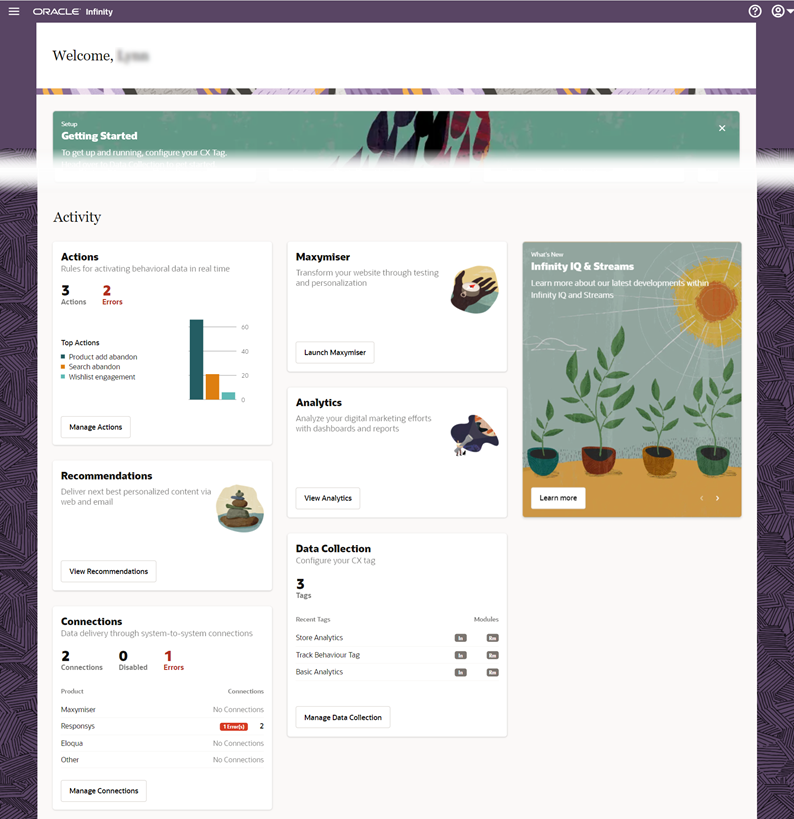
Activity Cards on the Infinity Home Dashboard
These improvements improve your efficiency by giving you relevant details in a single page.
Steps to Enable
You don't need to do anything to enable this feature.
Key Resources