
- Revision History
- Overview
- Feature Summary
- Account Reconciliation (NSAR)
-
- EPM Cloud Platform
-
- New Look and Feel for Help Center Books and Tutorials
- OCI Migration: Oracle-Managed Migration Continues; Customer-Managed Migration Not Available Any Longer
- Announcement: Data Management Feature Migration to Data Integration
- Renaming of Manage Public Filters and Lists and Reconciliation Manage Public Filters and Lists Roles
- Information on EPM Cloud HTTP Security Headers
- Updates to the Activity Report
-
- Account Reconciliation
-
- Enhancements to Views in Account Reconciliation
- Custom Dashboards for Reconciliation Compliance and Transaction Matching
- Increased Limit on Number of Transactions Exported from Transaction Matching
- Single Calculated Amount for all Currencies in a Bucket
- Manage Dashboards Application Role is Assignable to Users
- Support for camt.053 Bank Statements in Transaction Matching
- Requesting Increased Default Governor Limits in Account Reconciliation
-
This document will continue to evolve as existing sections change and new information is added. All updates appear in the following table:
| Date | Module | Feature | Notes |
|---|---|---|---|
| 30 JUN 2023 | Created initial document. |
 HAVE AN IDEA?
We’re here and we’re listening. If you have a suggestion on how to make our cloud services even better then go ahead and tell us. There are several ways to submit your ideas, for example, through the Ideas Lab on Oracle Customer Connect. Wherever you see this icon after the feature name it means we delivered one of your ideas.
GIVE US FEEDBACK
We welcome your comments and suggestions to improve the content. Please send us your feedback at oracle_fusion_applications_help_ww_grp@oracle.com.
DISCLAIMER
The information contained in this document may include statements about Oracle’s product development plans. Many factors can materially affect Oracle’s product development plans and the nature and timing of future product releases. Accordingly, this Information is provided to you solely for information only, is not a commitment to deliver any material, code, or functionality, and should not be relied upon in making purchasing decisions. The development, release, and timing of any features or functionality described remains at the sole discretion of Oracle.
This information may not be incorporated into any contractual agreement with Oracle or its subsidiaries or affiliates. Oracle specifically disclaims any liability with respect to this information. Refer to the Legal Notices and Terms of Use for further information.
Column Definitions:
Report = New or modified, Oracle-delivered, ready to run reports.
UI or Process-Based: Small Scale = These UI or process-based features are typically comprised of minor field, validation, or program changes. Therefore, the potential impact to users is minimal.
UI or Process-Based: Larger Scale* = These UI or process-based features have more complex designs. Therefore, the potential impact to users is higher.
Features Delivered Disabled = Action is needed BEFORE these features can be used by END USERS. These features are delivered disabled and you choose if and when to enable them. For example, a) new or expanded BI subject areas need to first be incorporated into reports, b) Integration is required to utilize new web services, or c) features must be assigned to user roles before they can be accessed.
| Ready for Use by End Users Reports plus Small Scale UI or Process-Based new features will have minimal user impact after an update. Therefore, customer acceptance testing should focus on the Larger Scale UI or Process-Based* new features. |
Customer Must Take Action before Use by End Users Not disruptive as action is required to make these features ready to use. As you selectively choose to leverage, you set your test and roll out timing. |
|||||
|---|---|---|---|---|---|---|
| Feature |
Report |
UI or |
UI or |
|
||
Announcement: Data Management Feature Migration to Data Integration |
||||||
Renaming of Manage Public Filters and Lists and Reconciliation Manage Public Filters and Lists Roles |
||||||
Custom Dashboards for Reconciliation Compliance and Transaction Matching |
||||||
Increased Limit on Number of Transactions Exported from Transaction Matching |
||||||
Support for camt.053 Bank Statements in Transaction Matching |
||||||
Requesting Increased Default Governor Limits in Account Reconciliation |
||||||
Test Environments: Oracle will apply this monthly update during the first daily maintenance that occurs at or after 22:00 UTC on Friday, July 7, 2023.
Production Environments: Oracle will apply this monthly update during the first daily maintenance that occurs at or after 22:00 UTC on Friday, July 21, 2023.
NOTE: The monthly update will not be applied to any environment for which this monthly update is requested to be skipped using the EPM Automate skipUpdate command or service request to Oracle.
NOTE: Backing up the daily maintenance snapshot and restoring the environment as needed are self-service operations. Oracle strongly recommends that you download the maintenance snapshot every day to a local server.
The Oracle Help Center provides access to updated documentation. The updates will be available in the Help Center on Friday, July 7, 2023.
NOTE: Some of the links to new feature documentation included in this readiness document will not work until after the Oracle Help Center update is complete.
Documentation Updates Available One Week After Readiness Documents
Updated documentation is published on the Oracle Help Center on the first Friday of each month, coinciding with the monthly updates to Test environments. Because there is a one week lag between the publishing of the readiness documents (What's New and New Feature Summary) and Oracle Help Center updates, some links included in the readiness documents will not work until the Oracle Help Center update is complete.
https://docs.oracle.com/en/cloud/saas/epm-cloud/index.html
Fixed Issues and Considerations
Software issues addressed each month and considerations are posted to a knowledge article on My Oracle Support. Click here to review. You must have a My Oracle Support login to access the article.
NOTE: Fixed issues for EPM Cloud Platform components (Smart View for Office, EPM Automate, REST API, Migration, Access Control, Data Management/Data Integration, Reports, Financial Reporting, and Calculation Manager) are available in a separate document on the My Oracle Support “Release Highlights” page.
This provides visibility into EPM Cloud release contents.
Business Benefit: These resources can help you optimize your EPM implementation and user experience by providing valuable information and user assistance.
New Look and Feel for Help Center Books and Tutorials
A new look and feel for Oracle Help Center books and some tutorials is live now. For example, see Getting Started with Oracle Enterprise Performance Management Cloud for Administrators. The new template incorporates feedback from customers, follows page design industry standards, and continues to lead the way for an extensive technical search.
Key features include:
- Simplified layout: Increased visual priority on the content area of the page.
- Wider pages: If you have a wide screen, your content area will expand to fill more of your screen.
- Visual design updates: Updated user interface consistent with Oracle's brand design.
- New features: Several new features including social sharing, prominent call to action buttons, and display of publication metadata.
Tip: if you experience issues accessing links to books on the Help Center, it could be related to this change. Clearing your browser cache should resolve this.
Business Benefit: The new look and feel improves the user experience and makes the content more readily available.
OCI Migration: Oracle-Managed Migration Continues; Customer-Managed Migration Not Available Any Longer
One of Oracle's latest advancements, Oracle Cloud Infrastructure (OCI) is the foundation of Oracle's second generation cloud. OCI, a purpose-built, best-in-class platform for running enterprise applications, is engineered from the ground up to run mission-critical databases, workloads, and applications while providing end-to-end security. Oracle's data centers around the globe are standardizing on the new OCI architecture which will deliver even greater performance and reliability. There are a lot of EPM Cloud features that are available only in OCI. See Features Available only in OCI EPM Cloud Environments in Getting Started with Oracle Enterprise Performance Management Cloud for Administrators.
Oracle plans to migrate all Classic Commercial environments to OCI by the end of 2023 using monthly migration waves.
Oracle is sending notifications for Oracle-managed migrations. When your environments are scheduled for migration, you will get notification specifying the migration schedule. Follow the instructions in the notification.
For customers whose environments were included in Wave 4 (April 2023 Migration Notification): The migration of application data and users from Classic to OCI environments and the DNS configuration change to route the existing Classic service URLs to OCI environments will occur in the 23.07 (July) monthly update. If you prefer not to have the migration take place in the 23.07 monthly update, please run the skipUpdate EPM Automate command to skip the 23.07 update.
- If your environments are included in Wave 5 (May 2023 Migration Notification), you must already have received your OCI environments. You should go through the optional migration steps, which include setting up SSO and IP Allowlist, and testing based on your requirements. See these information sources:
- Oracle-Managed Migration in Oracle Enterprise Performance Management Cloud Operations Guide
- Tasks to Perform After Cloning Environments in Administering Migration for Oracle Enterprise Performance Management Cloud
- If your environments are included in Wave 6 (June 2023 Migration Notification), you will receive your OCI environments in July 2023. Because your OCI environments may be provisioned at different times, you may not receive notification emails for all the environments at the same time.
- If your environments are included in Wave 7, you will be notified on July 3, 2023.
For Migration waves schedule information, see EPM Cloud Classic to OCI Migration Schedule in Oracle Enterprise Performance Management Cloud Operations Guide.
Oracle is no longer accepting any service request for Customer-Managed Migration. If only some of your environments were migrated using Customer-Managed Migration, the remaining environments will be migrated using Oracle-Managed Migration.
NOTE: At this time, the environments hosted in US-Gov and UK-Gov data centers are not eligible for migration to OCI.
Business Benefit: OCI provides you a purpose-built, best-in-class platform that is engineered from the ground up to run mission-critical databases, workloads, and business processes while providing end-to-end security. This new architecture delivers greater performance and reliability, and a number of EPM Cloud features that are not available in Classic EPM Cloud.
Steps to Enable
Review and follow instructions: EPM Cloud Classic to Oracle Cloud Infrastructure (OCI) Migration in Oracle Enterprise Performance Management Cloud Operations Guide
Key Resources
- EPM Cloud Classic to Oracle Cloud Infrastructure (OCI) Migration in Oracle Enterprise Performance Management Cloud Operations Guide
- Features Available only in OCI EPM Cloud Environments in Getting Started with Oracle Enterprise Performance Management Cloud for Administrators
Announcement: Data Management Feature Migration to Data Integration
Starting with the September (23.09) update, the user interface pages listed in the table below will no longer be available in Data Management, but will be available in Data Integration. Data Integration is available now from the Data Exchange card from the home screen in the Cloud EPM Business Process, and users can access these features in the current Cloud EPM update. Data Management is not going away in 23.09 – we are only moving a few features now that have 100% parity with Data Integration. REST APIs are not impacted by this change.
| Data Management | Data Integration | Data Integration Navigation Path |
|---|---|---|
| Source System |
Configure Connections |
From the Data Integration UI, select the Actions drop down, and then Applications. In Applications, there is an icon next to the drop down labeled Configure Connections. |
| Target Application |
Applications |
From the Data Integration UI, select the Actions drop down, and then Applications. |
| Period Mapping |
Period Mapping |
From the Data Integration UI, select the Actions drop down, and then Period Mapping. |
| Category Mapping |
Category Mapping |
From the Data Integration UI, select the Actions drop down, and then Category Mapping. |
Data Integration is the next generation of the Data Management user interface, enabling users to easily build and manage Cloud EPM integrations. As feature parity between Data Integration and Data Management becomes complete, Data Management features will be turned off, and users will use the new Data Integration user interface instead.
This transition will be gradual; future What's New documents will include information about the first set of planned changes as well as updates about additional changes planned for the future.
All Data Integration features discussed in this document are currently generally available in the Cloud EPM business processes.
Integration definitions built with Data Management are also visible in Data Integration, which enables an easy transition. (Data Integration is a new user interface on the Data Management data model and does not require migration of content from Data Management to Data Integration).
Please note that additional new integration features will only be included in Data Integration, and will not be back-ported to Data Management. Critical bug fixes and security fixes will still be made to Data Management until all features are fully migrated. In addition, all features from Data Management will be migrated to Data Integration with the exception of the following:
- The batch feature will be replaced by the new Pipeline feature. The Pipeline feature was available in the June (23.06) update.
- The Report Definition feature will not be migrated, only the Report Execution feature. Please note that Account Reconciliation and Financial Consolidation and Close provide a feature to report against the Data Integration relational tables using a custom SQL and a BI Publisher report template.
For reference, please see the Data Integration guide available from the documentation library for your specific EPM business process. Select the desired business process, then Books, and then scroll down to the Administering Data Integration for Oracle Enterprise Performance Management Cloud documentation link.
Business Benefit: Data Integration is the next generation of the Data Management user interface. It enables users to build and manage EPM Cloud integrations more easily.
Key Resources
Renaming of Manage Public Filters and Lists and Reconciliation Manage Public Filters and Lists Roles
The Manage Public Filters and Lists and Reconciliation Manage Public Filters and Lists roles have been renamed to align their names with similar roles in other EPM business processes.
The Manage Public Filters and Lists (Planning) and Reconciliation Manage Public Filters and Lists (Account Reconciliation) roles have been renamed as follows:
Old Name: Task Manager - Manage Public Filters and Lists
New Name: Task Manager - Manage Public Filters and Views
Old Name: Reconciliation Manage Public Filters and Lists
New Name: Reconciliation Manage Public Filters and Views
Business Benefit: The renaming of roles affecting public filters and lists aligns their names with similar roles in other business processes.
Key Resources
- Managing Role Assignments at the Application Level in Administering Access Control for Oracle Enterprise Performance Management Cloud
Information on EPM Cloud HTTP Security Headers
The Getting Started with Oracle Enterprise Performance Management Cloud for Administrators guide has been updated with information on all secure HTTP request and response headers used in OCI (Gen 2) EPM Cloud environments.
Business Benefit: Secure HTTP Headers enhance security compliance by protecting EPM Cloud (Gen 2) data communication.
Key Resources
- Understanding EPM Cloud Security Compliance Features in Getting Started with Oracle Enterprise Performance Management Cloud for Administrators
Updates to the Activity Report
The Activity Report has been enhanced to provide better navigation within the report using tabs that take you to the beginning of important sections. The information in the report is color coded to help you understand the type of information you are viewing currently. Additionally, the Activity Report has been enhanced to display Supplemental Data Manager design and runtime metrics.
Tabs in the Activity Report
The Activity Report has been enhanced with the User Interface, Hourly, Runtime, Application, Operational, and Usage tabs to help you navigate within the report. The information available in the report is color coded to match the color of these tabs to help you understand the type of information that is currently displayed.
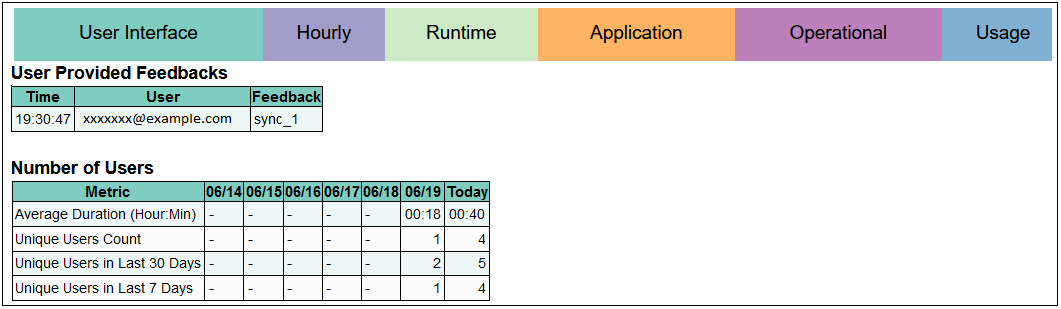
Color Coded Tabs in the Activity Report
- User Interface: Information about users who accessed the service such as number of users, top 7 user interface requests, and top 15 user interface requests based on execution time.
- Hourly: Hourly metrics including those on average response time by hour, number of Essbase operations, and the number of user requests by hour.
- Runtime: Runtime metrics for the application in your environment such as top 10 calculation scripts by average duration, top 10 most run calculations, and Essbase runtime metrics.
- Application: Application design metrics including Essbase design metrics, application size, Essbase BSO and ASO cubes statistics.
- Operational: Operational Metrics such as Daily Maintenance Duration in minutes.
- Usage: Usage metrics including lists of most and least active users, and the Smart View and Microsoft Excel versions being used.
Supplemental Data Manager Design and Runtime Metrics
Two new tables listing Supplemental Data Manager runtime and design metrics are available in the Activity Report. These tables are illustrated in the following image:
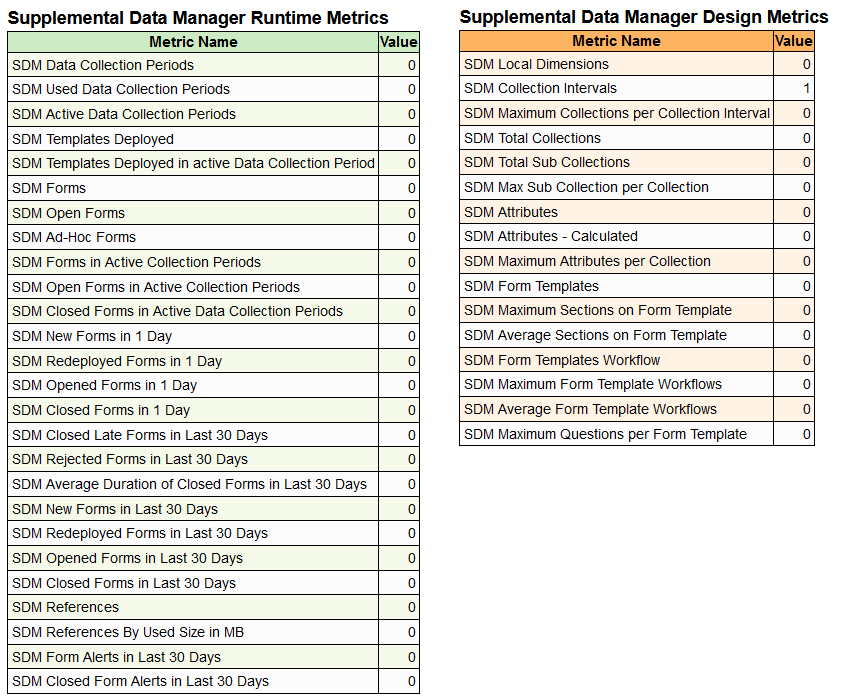
Supplemental Data Manager Runtime and Design Metrics tables
Business Benefits: Tabs help you navigate to the beginning of important sections within the Activity Report. New Supplemental Data Manager metrics help you understand the runtime and design parameters, which can be used to optimize your application.
Key Resources
- Getting Started with Oracle Enterprise Performance Management Cloud for Administrators
Enhancements to Views in Account Reconciliation
Account Reconciliation provides a new type of view and enhancements to the existing views.
- New type of view named Chart View
- Reconciliations
- Transactions
- Detail Balances
- Profiles
- Alerts
- Pivot views
- Lists are renamed to List Views
- Saved Lists are renamed to Saved Views
Business Benefit: The enhanced views allow better visualization and insight into your reconciliations.
Key Resources
- Working with Pivot Views in Administering Account Reconciliation
- Working with Chart Views in Administering Account Reconciliation
- Saving Views in Administering Account Reconciliation
Custom Dashboards for Reconciliation Compliance and Transaction Matching
New custom dashboards provide greater visibility into your reconciliations. You can design your own custom dashboards on reconciliations, profiles, transactions, detail balances, match types, and alerts. Each dashboard can contain up to four different views and each view can have a different design and layout based on the requirement. You can combine different types of data in a single dashboard. For example, you can have two views for reconciliations, one view for transactions, and one view for profiles all within a single dashboard.
Business Benefit: Custom dashboards help you visualize key performance indicators of your reconciliation process, track your process with greater ease, and provide on-demand visibility and insights.
Key Resources
- Managing Custom Dashboards in Administering Account Reconciliation
Increased Limit on Number of Transactions Exported from Transaction Matching
The number of transactions that that can be exported from the Transactions tab in Transaction Matching has been increased to 5,000,000 for the .csv format and 1,048,576 for the Microsoft Excel format.
Business Benefit: This feature enables users to export a higher number of transactions from Transaction Matching.
Key Resources
- Searching Transactions in Transaction Matching in Reconciling Accounts with Transaction Matching
Single Calculated Amount for all Currencies in a Bucket
When defining currency buckets, Service Administrators can choose how the balance attributes will be displayed. In addition to the existing balance attributes, Service administrators can choose to display numeric balance attributes that provide a single calculated amount for all currencies in a bucket. These numeric balance attributes will appear as amounts without currency codes and can be used in the reconciliation list and profile list. Additionally, they can also be included in pivot views, chart views, and dashboards.
Business Benefit: This feature provides ease of use when exporting balances to Microsoft Excel since currency code is not included with the balance. This allows users to easily perform numeric computations on exported balances.
Key Resources
- Defining Currency Buckets in Setting Up and Configuring Account Reconciliation
Manage Dashboards Application Role is Assignable to Users
The Service Administrator can assign the Manage Dashboards application role to other users. This role enables users to create and manage custom dashboards.
Business Benefit: This feature allows any user with the role to manage custom dashboards.
Key Resources
-
Managing Custom Dashboards in Administering Account Reconciliation
Support for camt.053 Bank Statements in Transaction Matching
You can use camt.053 format bank statements when importing transactions and balances from Data Integration or Data Management into Transaction Matching.
Business Benefit: This feature provides additional options when importing transactions or balances into Transaction Matching.
Key Resources
Account Reconciliation
- About Using Data Integration and Data Management in Administering Account Reconciliation
Data Integration
- Integrating BAI and SWIFT MT940 Format Bank File Transactions and Balances in Administering Data Integration for Oracle Enterprise Performance Management Cloud
Data Management
- Integrating BAI and SWIFT MT940 Format Bank File Transactions and Balances in Administering Data Management for Oracle Enterprise Performance Management Cloud
Requesting Increased Default Governor Limits in Account Reconciliation
In some cases, default governor limits may be increased at customer’s request. Before you submit a technical service request to increase governor limits, Oracle requires you to test the impact of this change on the overall performance of your application.
Business Benefit: This feature provides flexibility to manage governor limits based on your business requirement.
Key Resources
Requesting an Increase in Account Reconciliation Governor Limits in Oracle Enterprise Performance Management Cloud Operations Guide
Setting Governor Limits in Account Reconciliation in Setting Up and Configuring Account Reconciliation