March 2024 Update
Revision History
This document will continue to evolve as existing sections change and new information is added. All updates appear in the following table:
| Date | Module | Feature | Notes |
|---|---|---|---|
| 01 MAR 2024 | IMPORTANT Actions and Considerations | Account Reconciliation, Additional Execution Sequencing Routines for Reconciliation Compliance and Transaction Matching Jobs |
Updated document. Added a consideration. |
| 23 FEB 2024 | Created initial document. |
Overview
 HAVE AN IDEA?
We’re here and we’re listening. If you have a suggestion on how to make our cloud services even better then go ahead and tell us. There are several ways to submit your ideas, for example, through the Ideas Lab on Oracle Customer Connect. Wherever you see this icon after the feature name it means we delivered one of your ideas.
GIVE US FEEDBACK
We welcome your comments and suggestions to improve the content. Please send us your feedback at oracle_fusion_applications_help_ww_grp@oracle.com.
DISCLAIMER
The information contained in this document may include statements about Oracle’s product development plans. Many factors can materially affect Oracle’s product development plans and the nature and timing of future product releases. Accordingly, this Information is provided to you solely for information only, is not a commitment to deliver any material, code, or functionality, and should not be relied upon in making purchasing decisions. The development, release, and timing of any features or functionality described remains at the sole discretion of Oracle.
This information may not be incorporated into any contractual agreement with Oracle or its subsidiaries or affiliates. Oracle specifically disclaims any liability with respect to this information. Refer to the Legal Notices and Terms of Use for further information.
Feature Summary
Column Definitions:
Features Delivered Enabled
Report = New or modified, Oracle-delivered, ready to run reports.
UI or Process-Based: Small Scale = These UI or process-based features are typically comprised of minor field, validation, or program changes. Therefore, the potential impact to users is minimal.
UI or Process-Based: Larger Scale* = These UI or process-based features have more complex designs. Therefore, the potential impact to users is higher.
Features Delivered Disabled = Action is needed BEFORE these features can be used by END USERS. These features are delivered disabled and you choose if and when to enable them. For example, a) new or expanded BI subject areas need to first be incorporated into reports, b) Integration is required to utilize new web services, or c) features must be assigned to user roles before they can be accessed.
| Ready for Use by End Users Reports plus Small Scale UI or Process-Based new features will have minimal user impact after an update. Therefore, customer acceptance testing should focus on the Larger Scale UI or Process-Based* new features. |
Action is Needed BEFORE Use by End Users Not disruptive as action is required to make these features ready to use. As you selectively choose to leverage, you set your test and roll out timing. |
|||||
|---|---|---|---|---|---|---|
| Feature |
Report |
UI or |
UI or |
|
||
Requests to Block or Allow Connections from Specific Countries No Longer Accepted |
||||||
Share Current Page URL Option Now Available for Cards, Tabs, and Subtabs |
||||||
Specify the Frequencies for Performing Amortization/Accretion |
||||||
Include Currencies that May be Added in the Future to Filter Conditions |
||||||
New Reports to Display Configuration Settings for All Data Sources and All Match Rules |
||||||
Account Reconciliation (NSAR)
Monthly Update Schedule
Test Environments: Oracle will apply this monthly update during the first daily maintenance that occurs at or after 22:00 UTC on Friday, March 1, 2024.
Production Environments: Oracle will apply this monthly update during the first daily maintenance that occurs at or after 22:00 UTC on Friday, March 15, 2024.
NOTE: The monthly update will not be applied to any environment for which this monthly update is requested to be skipped using the EPM Automate skipUpdate command or service request to Oracle. The monthly update will also not be applied to any environment on a one-off patch where the fix for the underlying issue is not in this monthly update.
NOTE: Backing up the daily maintenance snapshot and restoring the environment as needed are self-service operations. Oracle strongly recommends that you download the maintenance snapshot every day to a local server.
The Oracle Help Center provides access to updated documentation. The updates will be available in the Help Center on Friday, March 1, 2024.
NOTE: Some of the links to new feature documentation included in this readiness document will not work until after the Oracle Help Center update is complete.
Helpful Information
Documentation Updates Available One Week After Readiness Documents
Updated documentation is published on the Oracle Help Center on the first Friday of each month, coinciding with the monthly updates to Test environments. Because there is a one week lag between the publishing of the readiness documents (What's New and New Feature Summary) and Oracle Help Center updates, some links included in the readiness documents will not work until the Oracle Help Center update is complete.
https://docs.oracle.com/en/cloud/saas/epm-cloud/index.html
Fixed Issues and Considerations for EPM Cloud Platform
Software issues addressed each month and considerations are posted to a knowledge article on My Oracle Support. Click here to review. You must have a My Oracle Support login to access the article.
NOTE: Fixed issues for EPM Cloud Platform components (Smart View for Office, EPM Automate, REST API, Migration, Access Control, Data Management/Data Integration, Reports, Financial Reporting, and Calculation Manager) are available in a separate document on the My Oracle Support “Release Highlights” page.
This provides visibility into EPM Cloud release contents.
Business Benefit: These resources can help you optimize your EPM implementation and user experience by providing valuable information and user assistance.
EPM Cloud Platform
Oracle Cloud Infrastructure
Domain-based Message Authentications, Reporting, and Conformance (DMARC) Support for EPM Cloud OCI (Gen 2) Environments
Oracle Enterprise Performance Management Cloud OCI (Gen 2) environments now create DMARC-compliant emails. These emails pass SPF authentication and SPF alignment as well as DKIM authentication and DKIM alignment.
Business Benefit: This enhancement satisfies the requirement of DMARC support.
Key Resources
- DMARC Support for EPM Cloud OCI (Gen 2) Environments in Getting Started with Oracle Enterprise Performance Management Cloud for Administrators
Requests to Block or Allow Connections from Specific Countries No Longer Accepted
Oracle has decided to no longer accept the following requests until further notice since the implementation of these requests is not scalable:
- Blocking of connections originating in specific countries
- Allow only connections originating in specific countries
You are encouraged to use the IP AllowList functionality to give restricted access to your environments.
Business Benefit: By not accepting these requests, Oracle can concentrate on creating a more scalable solution for these features.
Key Resources
- SetIPAllowList EPM Automate command in Working with EPM Automate for Oracle Enterprise Performance Management Cloud
- Update the IPAllowList REST API in REST API for Oracle Enterprise Performance Management Cloud
Redwood Theme Notification for Service Administrators
Starting with this update, a notification will be displayed in the home page of Service Administrators. This notice lets the Service Administrators know about the new and streamlined Redwood experience that will be implemented in the April Update (24.04), which will make available these three new Redwood themes: Oracle, Custom Dark, and Custom Light.
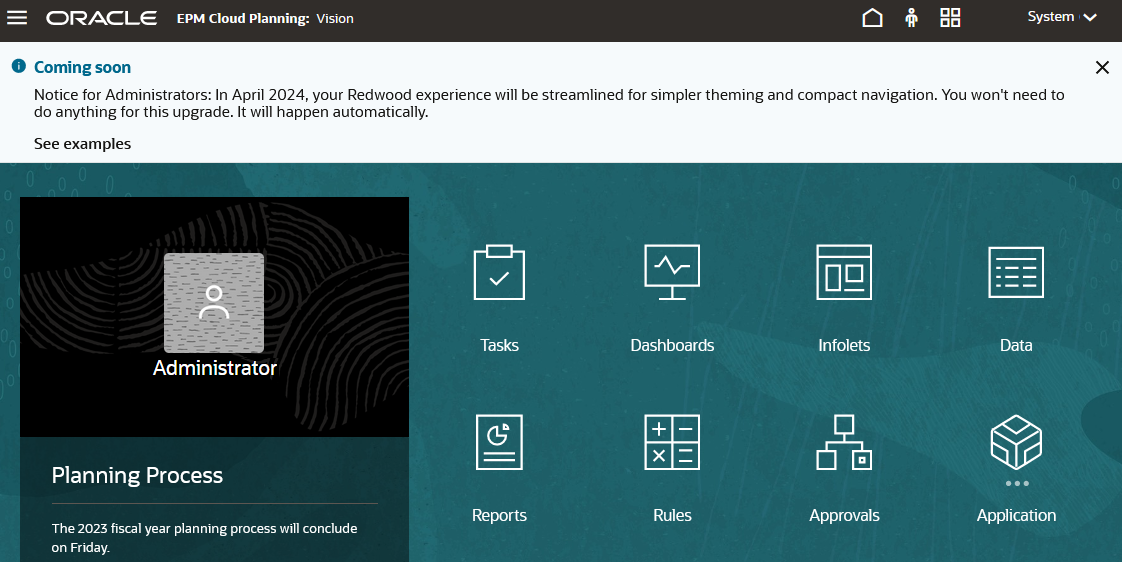
The Notification About the New, Streamlined Redwood Themes
You can snooze this announcement for seven days by clicking the close icon (x) in the message panel. To view examples of the different themes, click See Examples.
The Oracle theme will be the default Redwood theme for all new environments and existing environments wherein the theme has not been customized. The Custom Dark theme will be used as the theme for customers who have already implemented theme customizations. Customers who have not yet enabled the Redwood Experience will remain on their existing themes.
This update requires access to Oracle CDN (static.oracle.com), which provides image files, JavaScript, and other static content for the Redwood Experience. The switch over to the new themes will be automatic and will occur when the 24.04 updates are applied to your environments.
Business Benefit: By supporting simpler theming and compact navigation, the new Redwood themes improve user experience.
Key Resources
- About Redwood Experience in Getting Started with Oracle Enterprise Performance Management Cloud for Administrators
Vanity URLs Examples
Additional information with examples to create Vanity URLs is now available in the Getting Started with Oracle Enterprise Performance Management Cloud for Administrators guide.
Business Benefit: Customers can learn about ways to create Vanity URLs to access EPM Cloud, Smart View, and EPM Automate.
Steps to Enable
Using Vanity URLs in Getting Started with Oracle Enterprise Performance Management Cloud for Administrators
Key Resources
- Using Vanity URLs in Getting Started with Oracle Enterprise Performance Management Cloud for Administrators
Security & Access
EPM Access Control Support of IDCS Groups
EPM Cloud Access Control now recognizes the Identity Cloud Service (IDCS) groups that customers can create in the Oracle Cloud Identity Console. You can view them in Access Control and assign them to application roles and EPM groups. You can use the IDCS groups to grant access permissions to application artifacts such as forms, rules, and dashboards.
Business Benefit: Customers can now not only maintain all users and groups centrally in the Identity Management System of choice such as Azure AD, Okta, or Oracle Cloud Identity Console, but also control their EPM access using IDCS groups.
Steps to Enable
If your source identity console is Oracle Identity Cloud, see Using SCIM to Synchronize Users and Groups on Oracle Identity Cloud (for OCI (Gen 2) Only)
Key Resources
- Manage Groups in Administering Access Control for Oracle Enterprise Performance Management Cloud
Daily Maintenance
Generic Daily Clone Scripts
Generic Windows and Linux/UNIX scripts that help you automate the cloning of EPM Cloud environments on a daily basis are now available in the Working with EPM Automate for Oracle Enterprise Performance Management Cloud guide. If you have a disaster recovery standby environment, you can customize these scripts to keep it up to date with the primary environment soon after the daily maintenance of the primary environment is complete.
Business Benefit: These generic scripts allow you to automate the process of cloning EPM Cloud environments on a daily basis to ensure that your standby environment is updated soon after the daily maintenance of the primary production environment is completed.
Key Resources
- Clone from Primary to Secondary Environment Daily After Daily Maintenance is Complete on the Primary Environment in Working with EPM Automate for Oracle Enterprise Performance Management Cloud
Clone Environment - Change of Behavior
Starting with this update, the daily maintenance of the source environment will be prioritized over the clone environment process to ensure that the maintenance snapshot of the environment is created. Previously, the clone environment process, whether run from the user interface, using the REST API or using EPM Automate, was prioritized over the daily maintenance process resulting in the latter being terminated or prevented from being initiated by the cloning process. With this change in behavior, the clone environment process, if any, on the source environment will be terminated when the daily maintenance starts. If the cloning of your environment takes a long time, reschedule the daily maintenance start time on the source environment to avoid the cloning process from being terminated.
Business Benefit: Prioritizing the Daily Maintenance process over the Clone Environment process ensures that snapshots are created every day.
Key Resources
- Working with EPM Automate for Oracle Enterprise Performance Management Cloud
-
Cloning EPM Cloud Environments in Administering Migration for Oracle Enterprise Performance Management Cloud
-
Clone an Environment in REST API for Oracle Enterprise Performance Management Cloud
Daily Maintenance Start Time – Change of Behavior
Starting with this update, you can randomize the starting of the Daily Maintenance process by specifying the start time in HH:MM format. Previously, the start time was set in HH:00 format so that the Daily Maintenance process could only start at the top of the specified hour in UTC.
Business Benefit: The change in the time format allows you to stagger Daily Maintenance start time by controlling when it starts.
Key Resources
- Working with EPM Automate for Oracle Enterprise Performance Management Cloud
- REST API for Oracle Enterprise Performance Management Cloud
- Setting the Maintenance Start Time for an Environment in Getting Started with Oracle Enterprise Performance Management Cloud for Administrators
EPM Automate & REST APIs
REST API to Get Available Roles
The Get Available Roles REST API returns all the application roles that are visible along with predefined roles that are available for an EPM Cloud service.
Business Benefit: This REST API dynamically gets a full list of predefined and application roles for programmatic query of these roles.
Steps to Enable
Review the REST service definition in the REST API guides to leverage (available from the Oracle Help Center > your apps service area of interest > APIs & Schema). If you are new to Oracle's REST services you may want to begin with the Quick Start section.
Tips And Considerations
Benefit from the implementation best practices for EMP Cloud REST APIs in REST API for Oracle Enterprise Performance Management Cloud.
Key Resources
- Get Available Roles in REST API for Oracle Enterprise Performance Management Cloud
Access Requirements
- Service Administrators
Synchronous REST API to Generate a User Group Report
A new version 2 User Group Report REST API generates a User Group Report of users in the system. This report lists the direct or indirect membership of users assigned to an EPM group. The API is synchronous and returns the outcome of the operation in the response.
Business Benefit: The v2 version of this rest API has functionally that is identical to the v1 version but is synchronous and uses json payload for input and output.
Steps to Enable
Review the REST service definition in the REST API guides to leverage (available from the Oracle Help Center > your apps service area of interest > APIs & Schema). If you are new to Oracle's REST services you may want to begin with the Quick Start section.
Tips And Considerations
Benefit from the implementation best practices for EPM Cloud REST APIs in REST APIs for Oracle Enterprise Performance Management Cloud.
Key Resources
- User Group Report (v2) in REST API for Enterprise Performance Management Cloud
Access Requirements
- Service Administrators
Settings & Actions Menu
Share Current Page URL Option Now Available for Cards, Tabs, and Subtabs
The Share Current Page URL option gives you the ability to copy the URL of the currently displayed card, tab, or subtab and share it with other users.
URLs can be copied and then shared with other users in an email, Slack, or any other messaging application. Also, copied URLs can be used in a slide show presentation such as PowerPoint. Note that users can only access cards, tabs, or subtabs if they are authorized to access them.
When the copied URL is launched the page will be rendered with the full header, meaning they will be able to navigate to all of the pages to which they have access within the navigation flow. If the user launching the URL is not logged in, they will be redirected to a login page, then after login the URL page will open.
To copy a URL for sharing:
- Navigate to the page (card, tab, or subtab) in your application that you want to copy.
- Click the down arrow next to your user name (upper right corner of the screen).
- On the Settings and Actions menu, select Share Current Page URL.
- Select the displayed URL and copy it by pressing Ctrl+C. After pasting it into a browser, the URL will enable direct access to the current page in the application.
Business Benefit: This feature allows you to easily share a URL for a card, tab, or subtab with other users.
Key Resources
- Account Reconciliation
- Administering Account Reconciliation
- Planning, Planning Modules
- Administering Planning
Account Reconciliation
Specify the Frequencies for Performing Amortization/Accretion
You can now configure the frequencies and therefore which periods are eligible for amortization or accretion. When defining a frequency, use the Enable Amortization/Accretion option to specify if amortization or accretion can be performed at that frequency.
Business Benefit: This feature allows customers to amortize monthly when daily periods for daily reconciliations are configured.
Key Resources
- Creating Frequencies in Setting Up and Configuring Account Reconciliation
- Creating Amortizing or Accreting Transactions Manually in Administering Account Reconciliation
Include Currencies that May be Added in the Future to Filter Conditions
When you select All while creating a filter condition for the currency attribute, any currencies that are added in the future will automatically be included in the filter condition.
Business Benefit: This feature simplifies the usage of conditions in format rules and filters.
Key Resources
- Working with Format Rules in Setting Up and Configuring Account Reconciliation
- Creating a New Filter in Reconciling Accounts with Account Reconciliation
New Reports to Display Configuration Settings for All Data Sources and All Match Rules
The Match Type Data Source Configuration report shows the configuration settings for all data sources within a match type. If no match type is specified, the report is generated for all match types defined in the system.
The Match Type Rule Configuration report shows the configuration settings for all match rules within a match type. If no match type is specified, the report is generated for all match types in the system.
Business Benefit: These reports enable users to easily view the configuration details of all data sources or all match rules in a single report.
Key Resources
- Working with Predefined Reports in Transaction Matching in Administering Account Reconciliation
IMPORTANT Actions and Considerations
One-Week Lag Between Readiness Documents Live and Help Center Live
Because Oracle readiness documents (What's New and New Feature Summary) are live one week before the monthly update is applied to Test environments, some links to documentation included in the readiness documents will not work until after the Oracle Help Center update is complete when the monthly update is applied to Test environments.
This update includes Important Actions and Considerations for:
- EPM Cloud Platform
- Account Reconciliation
EPM CLOUD PLATFORM
Randomization of the Daily Maintenance Start Time
Starting with the April Update (24.04), the daily maintenance start time of EPM Cloud environments will be updated by assigning a random minute at which the maintenance process will start. Currently, the daily maintenance starts at the top of the hour, for example at 2:00 p.m. UTC (14.00 on a 24 hour clock). This change will modify the start time by adding a value for minute (for example, 2:24 p.m. UTC (14.24 on a 24 hour clock) so that the daily maintenance load on EPM Cloud infrastructure is distributed throughout the hour.
After this change is implemented, a Service Administrator can change the daily maintenance start time to a more desirable minute. If you have any questions about this change, please open a service request.
For more information, see these information sources:
- setDailyMaintenanceStartTime in Working with EPM Automate for Oracle Enterprise Performance Management Cloud
- Setting the Daily Maintenance Time in REST API for Oracle Enterprise Performance Management Cloud
- Managing Daily Maintenance in Getting Started with Oracle Enterprise Performance Management Cloud for Administrators
Allow access to static.oracle.com
Customers are reminded to allow access to static.oracle.com. For the Oracle Redwood Experience to work, Customers must allow access to static.oracle.com, which provides image files, JavaScript, and other static content.
See About Redwood Experience in Getting Started with Oracle Enterprise Performance Management Cloud for Administrators.
Change in the Default Format When Exporting to Microsoft Excel
In a future update, the default format for exporting table data to Microsoft Excel from Task Manager, Supplemental Data Manager, and Enterprise Journals will be changed to .XLSX instead of .XLS.
Plan to Discontinue Support for Non-Redwood Experience Themes
Oracle's Redwood UX Design is helping organizations improve user productivity, reduce training costs, and increase user satisfaction. As such, it has gained wide adoption across our Oracle Cloud user base.
Within Cloud EPM the Redwood Theme has had significant adoption, and major new platform innovations over the past few years have primarily been released only within the Redwood theme.
Going forward, future innovations in Cloud EPM and Redwood UX Design patterns are likewise targeted to be available within the Redwood theme only. Customers are encouraged to deploy their applications using Redwood theme only.
Starting with the April Update (24.04), the Redwood Experience will offer a default Oracle theme and these two additional appearance options: Custom Light and Custom Dark. The appearance of all EPM Cloud environments that currently use the Redwood Experience will automatically be shifted to either the default Oracle theme or the Custom Dark theme based on currently deployed background appearance of these environments.
NOTE: These themes are available starting in the March Update (24.03) for Enterprise Data Management only.
In a later update planned for the second quarter of 2024, Oracle will automatically convert non-Redwood theme environments to the Redwood Experience.
If you're a customer and you're not already using Redwood Experience, you're encouraged to move to the Redwood Experience as soon as possible to take advantage of its user experience advantages.
Customers are encouraged to watch the Cloud Customer Connect session in April 2023: EPM – Why You Should Be Using The Redwood Theme in EPM Cloud
This session covers why users should be adopting the Redwood theme, customizations available within the theme (such as company logo), and the future plans around non-Redwood themes for Cloud EPM.
Transition from Identity Cloud Service (IDCS) to Identity and Access Management (IAM)
EPM Cloud environments on OCI (Gen 2) are transitioning from Identity Cloud Service (IDCS) to Identity and Access Management (IAM) domains. For information on IAM, see Overview of Identity and Access Management.
After this transition, existing IDCS administration and My Profile functionalities remain the same, but are hosted on Oracle Cloud Console. The Oracle Cloud sign-in page has an updated design to match the latest Oracle Cloud design guidelines. To learn more on what to expect with this transition, see Introducing OCI IAM Identity Domains: What customers need to know.
Announcement: Data Management Feature Migration to Data Integration
The user interface pages listed in the table below are no longer available in Data Management, but are available in Data Integration. Data Integration is available from the Data Exchange card from the home screen in the Cloud EPM Business Process, and users can access these features in the current Cloud EPM update. Data Management is not going away – we are only moving a few features now that have 100% parity with Data Integration. Profitability and Cost Management customers are not affected by the migration and do not see a change in their Data Management user interface. REST APIs are not impacted by this change.
| Data Management | Data Integration | Data Integration Navigation Path |
|---|---|---|
| Source System |
Configure Connections |
From the Data Integration UI, select the Actions drop down, and then Applications. In Applications, there is an icon next to the drop down labeled Configure Connections. |
| Target Application |
Applications |
From the Data Integration UI, select the Actions drop down, and then Applications. |
| Period Mapping |
Period Mapping |
From the Data Integration UI, select the Actions drop down, and then Period Mapping. |
| Category Mapping |
Category Mapping |
From the Data Integration UI, select the Actions drop down, and then Category Mapping. |
Data Integration is the next generation of the Data Management user interface, enabling users to easily build and manage Cloud EPM integrations. As feature parity between Data Integration and Data Management becomes complete, Data Management features will be turned off, and users will use the new Data Integration user interface instead.
This transition is gradual; future What's New documents will include information about the first set of planned changes as well as updates about additional changes planned for the future.
All Data Integration features discussed in this document are currently generally available in the Cloud EPM business processes.
Integration definitions built with Data Management are also visible in Data Integration, which enables an easy transition. (Data Integration is a new user interface on the Data Management data model and does not require migration of content from Data Management to Data Integration).
Please note that additional new integration features will only be included in Data Integration, and will not be back-ported to Data Management. Critical bug fixes and security fixes will still be made to Data Management until all features are fully migrated. In addition, all features from Data Management will be migrated to Data Integration with the exception of the following:
- The batch feature will be replaced by the new Pipeline feature. The Pipeline feature was available in the June (23.06) update.
- The Report Definition feature will not be migrated, only the Report Execution feature. Please note that Account Reconciliation, Financial Consolidation and Close, Planning and Tax Reporting provide a feature to report against the Data Integration relational tables using a custom SQL and a BI Publisher report template via Task Manager.
- The ability to create new Custom Applications in Data Management will no longer available, and customers should use the “Data Export to File” application type instead. (Existing integrations using a custom application will not be impacted.) See Custom Application in Data Management under EPM Cloud Platform in the Important Actions and Considerations section of this document.
For reference, please see the Data Integration guide available from the documentation library for your specific EPM business process. Select the desired business process, then Books, and then scroll down to the Administering Data Integration for Oracle Enterprise Performance Management Cloud documentation link.
See Administering Data Integration for Oracle Enterprise Performance Management Cloud for more information.
Removal of Support for Custom Application in Data Management
Since the September (23.09) update, custom target applications can no longer be added in Data Management. (Existing integrations that use a custom target application will not be impacted, and will still run without any changes.) This type of application was used to extract data from the EPM Cloud, and then the data was pushed into a flat file instead of being loaded to an EPM Cloud application. The custom application was superseded by the Data Export to File feature in an earlier update. The Data Export to File feature has enhanced functions and capabilities.
If you still have a custom target application, it is recommended that you use the Upgrade Custom Applications option to migrate your existing custom target application to a data export to file application. For more information, see Upgrade Custom Applications at: https://docs.oracle.com/en/cloud/saas/enterprise-performance-management-common/erpia/upgrade_custom_applications_100x438d5119.html.
The migration converts existing file formats from the custom target application to the file formats used in the data export to file option and retains all the existing setup. When the custom target application has been converted, you can run same integration as before. Data export file applications are available both in Data Management and Data Integration.
Oracle Financial Reporting Statement of Direction
Please refer to the Statement of Direction for Oracle Financial Reporting:
Oracle Support Document 2910806.1 (EPM Cloud Financial Reporting Statement of Direction)
Please note that the Oracle Financial Reporting tentative deprecation dates have been moved to mid-to-late CY24.
For more information:
- See Appendix B in the Designing with Reports Guide: Migrating Reports from Financial Reporting.
- On June 8, the most recent Oracle Cloud Customer Connect event, Migrating Your Financial Reporting to Reports, was presented. There is a presentation, an event recording, and an FAQ sheet accessible. In order to view the event recording and documentation, you must log in to Cloud Customer Connect.
ACCOUNT RECONCILIATION
Additional Execution Sequencing Routines for Reconciliation Compliance and Transaction Matching Jobs
In a future update, Reconciliation Compliance and Transaction Matching jobs will include additional execution sequencing routines to ensure application and data integrity. When potential conflicting jobs are executed simultaneously, the service will sequence the jobs to ensure application integrity. While the individual job’s execution times will not be impacted, the job’s start time may be delayed due to the optimization sequencing.
Limit the Number of Transactional Attachments
In a future update, the number of Transactional Attachments that appear in the Reconciliation Attachment drawer will be capped at 100. This is to prevent display issues with certain browsers.
Change to Options in the Rules Tab of the Add Attribute Assignment Dialog
Starting in the February (24.02) update, in the Transaction Detail section of a format, the option Do Not Display – Anywhere is not available when you specify access details by adding a rule on the Rules tab of the Add Attribute Assignment dialog. However, you can use the Do Not Display – Anywhere option when specifying access details using the Properties tab of the Add Attribute Assignment dialog.
Change in the Default Format When Exporting to Microsoft Excel
In a future update, the default format for exporting the table data to Microsoft Excel will be changed to .XLSX instead of .XLS.