
- Revision History
- Overview
- Feature Summary
- Planning and Budgeting (NSPB)
-
- CPM Common
-
- OCI Migration: Oracle-Managed Migration Continues; Customer-Managed Migration Not Available Any Longer
- Announcement: Data Management Feature Migration to Data Integration
- Virus Scan on Uploaded Files in OCI (Gen 2) Environments
- EPM Automate Updates
- REST APIs for Virus Scan in OCI (Gen 2) Environments
- REST API Updates Adding and Removing Users from an Identity Domain
- New EPM Center of Excellence Web Page
- Pipeline Feature in Data Integration
- All Data Type Data Load Using Jobs Option in Data Management
- Updated EPM Books Extension for Smart View
- Data Exchange Integration Type and Task Type in Task Manager
-
- Financials
-
- New Financials Module and Deployment Process
- New Version Builder Feature for "What-If" Planning
- New Task Manager Feature
- New In-application Instructions for Forms and Reports
- New Documentation for NetSuite Planning and Budgeting
- Trend-based Revenue Planning Models Enhancement
- New Variance Report Forms Available for Budgeting
- Combined Income Statement and Balance Sheet Data Now Available in Planning and Budgeting Financials and Smart View
- Simplified Navigation Flow Comes Standard
- Optimized Business Rules With Updated Naming Convention
- Updated Substitution Variables for NetSuite Planning and Budgeting
- Updated User Variables for NetSuite Planning and Budgeting
- Prefixes Added to Artifacts in Planning and Budgeting Financials Module
- Hybrid Block Storage Option Enabled
- Planning and Budgeting Financials Sync Now Available in SuiteApp Marketplace
-
- CPM Common
This document will continue to evolve as existing sections change and new information is added. All updates appear in the following table:
| Date | Module | Feature | Notes |
|---|---|---|---|
| 13 JUN 2023 | Financials | Combined Income Statement and Balance Sheet Data Now Available in Planning and Budgeting Financials and Smart View | Updated document. Delivered new feature in June 2023 update. |
| 02 JUN 2023 | CPM Common | Virus Scan on Uploaded Files in OCI (Gen 2) Environments | Updated document. Revised feature description. |
| 02 JUN 2023 | CPM Common | EPM Automate Updates | Updated document. Revised feature description. |
| 25 MAY 2023 | Created initial document. |
 HAVE AN IDEA?
We’re here and we’re listening. If you have a suggestion on how to make our cloud services even better then go ahead and tell us. There are several ways to submit your ideas, for example, through the Ideas Lab on Oracle Customer Connect. Wherever you see this icon after the feature name it means we delivered one of your ideas.
GIVE US FEEDBACK
We welcome your comments and suggestions to improve the content. Please send us your feedback at epmdoc_ww@oracle.com.
DISCLAIMER
The information contained in this document may include statements about Oracle NetSuite’s product development plans. Many factors can materially affect Oracle NetSuite’s product development plans and the nature and timing of future product releases. Accordingly, this Information is provided to you solely for information only, is not a commitment to deliver any material, code, or functionality, and should not be relied upon in making purchasing decisions. The development, release, and timing of any features or functionality described remains at the sole discretion of Oracle NetSuite.
This information may not be incorporated into any contractual agreement with Oracle or its subsidiaries or affiliates. Oracle specifically disclaims any liability with respect to this information. Refer to the Legal Notices and Terms of Use for further information.
Column Definitions:
Report = New or modified, Oracle-delivered, ready to run reports.
UI or Process-Based: Small Scale = These UI or process-based features are typically comprised of minor field, validation, or program changes. Therefore, the potential impact to users is minimal.
UI or Process-Based: Larger Scale* = These UI or process-based features have more complex designs. Therefore, the potential impact to users is higher.
Features Delivered Disabled = Action is needed BEFORE these features can be used by END USERS. These features are delivered disabled and you choose if and when to enable them. For example, a) new or expanded BI subject areas need to first be incorporated into reports, b) Integration is required to utilize new web services, or c) features must be assigned to user roles before they can be accessed.
| Ready for Use by End Users Reports plus Small Scale UI or Process-Based new features will have minimal user impact after an update. Therefore, customer acceptance testing should focus on the Larger Scale UI or Process-Based* new features. |
Customer Must Take Action before Use by End Users Not disruptive as action is required to make these features ready to use. As you selectively choose to leverage, you set your test and roll out timing. |
|||||
|---|---|---|---|---|---|---|
| Feature |
Report |
UI or |
UI or |
|
||
Announcement: Data Management Feature Migration to Data Integration |
||||||
REST API Updates Adding and Removing Users from an Identity Domain |
||||||
All Data Type Data Load Using Jobs Option in Data Management |
||||||
Data Exchange Integration Type and Task Type in Task Manager |
||||||
Updated Substitution Variables for NetSuite Planning and Budgeting |
||||||
Prefixes Added to Artifacts in Planning and Budgeting Financials Module |
||||||
Planning and Budgeting Financials Sync Now Available in SuiteApp Marketplace |
||||||
OCI Migration: Oracle-Managed Migration Continues; Customer-Managed Migration Not Available Any Longer
One of Oracle's latest advancements, Oracle Cloud Infrastructure (OCI) is the foundation of Oracle's second generation cloud. OCI, a purpose-built, best-in-class platform for running enterprise applications, is engineered from the ground up to run mission-critical databases, workloads, and applications while providing end-to-end security. Oracle's data centers around the globe are standardizing on the new OCI architecture which will deliver even greater performance and reliability. There are a lot of EPM Cloud features that are available only in OCI. See Features Available only in OCI EPM Cloud Environments in Getting Started with Oracle Enterprise Performance Management Cloud for Administrators.
Oracle plans to migrate all Classic Commercial environments to OCI by the end of 2023 using monthly migration waves.
Oracle is sending notifications for Oracle-managed migrations. When your environments are scheduled for migration, you will get notification specifying the migration schedule. Follow the instructions in the notification.
For customers whose environments were included in Wave 3 (March 2023 Migration Notification): The migration of application data and users from Classic to OCI environments and the DNS configuration change to route the existing Classic service URLs to OCI environments will occur in the 23.06 (June) monthly update. If you prefer not to have the migration take place in the 23.06 monthly update, please run the skipUpdate EPM Automate command to skip the 23.06 update.
- If your environments are included in Wave 4 (April 2023 Migration Notification), you must already have received your OCI instances. You should go through the optional migration steps, which include setting up SSO and IP Allowlist, and testing based on your requirements. See these information sources:
- Oracle-Managed Migration in Oracle Enterprise Performance Management Cloud Operations Guide
- Tasks to Perform After Cloning Environments in Administering Migration for Oracle Enterprise Performance Management Cloud
- If your environments are included in Wave 5 (May 2023 Migration Notification), you will receive your OCI instances in June 2023.
- If your environments are included in Wave 6, you will be notified on June 5, 2023.
For Migration waves schedule information, see EPM Cloud Classic to OCI Migration Schedule in Oracle Enterprise Performance Management Cloud Operations Guide.
Oracle is no longer accepting any service request for customer-managed migration. If only some of your environments were migrated using Customer-Managed Migration, the remaining environments will be migrated using Oracle-Managed Migration.
NOTE: At this time, the environments hosted in US-Gov and UK-Gov data centers are not eligible for migration to OCI.
Business Benefit: OCI provides you a purpose-built, best-in-class platform that is engineered from the ground up to run mission-critical databases, workloads, and business processes while providing end-to-end security. This new architecture delivers greater performance and reliability, and a number of EPM Cloud features that are not available in Classic EPM Cloud.
Steps to Enable
Review and follow instructions: EPM Cloud Classic to Oracle Cloud Infrastructure (OCI) Migration in Oracle Enterprise Performance Management Cloud Operations Guide
Key Resources
- EPM Cloud Classic to Oracle Cloud Infrastructure (OCI) Migration in Oracle Enterprise Performance Management Cloud Operations Guide
- Features Available only in OCI EPM Cloud Environments in Getting Started with Oracle Enterprise Performance Management Cloud for Administrators
Announcement: Data Management Feature Migration to Data Integration
Starting with the August (23.08) update, the user interface pages listed in the table below will no longer be available in Data Management, but will be available in Data Integration. Data Integration is available now from the Data Exchange card from the home screen in the Cloud EPM Business Process, and users can access these features in the current Cloud EPM update. Data Management is not going away in 23.08 – we are only moving a few features now that have 100% parity with Data Integration. REST APIs are not impacted by this change.
| Data Management | Data Integration | Data Integration Navigation Path |
|---|---|---|
| Source System |
Configure Connections |
From the Data Integration UI, select the Actions drop down, and then Applications. In Applications, there is an icon next to the drop down labeled Configure Connections. |
| Target Application |
Applications |
From the Data Integration UI, select the Actions drop down, and then Applications. |
| Period Mapping |
Period Mapping |
From the Data Integration UI, select the Actions drop down, and then Period Mapping. |
| Category Mapping |
Category Mapping |
From the Data Integration UI, select the Actions drop down, and then Category Mapping. |
Data Integration is the next generation of the Data Management user interface, enabling users to easily build and manage Cloud EPM integrations. As feature parity between Data Integration and Data Management becomes complete, Data Management features will be turned off, and users will use the new Data Integration user interface instead.
This transition will be gradual; future What's New documents will include information about the first set of planned changes as well as updates about additional changes planned for the future.
All Data Integration features discussed in this document are currently generally available in the Cloud EPM business processes.
Integration definitions built with Data Management are also visible in Data Integration, which enables an easy transition. (Data Integration is a new user interface on the Data Management data model and does not require migration of content from Data Management to Data Integration).
Please note that additional new integration features will only be included in Data Integration, and will not be back-ported to Data Management. Critical bug fixes and security fixes will still be made to Data Management until all features are fully migrated. In addition, all features from Data Management will be migrated to Data Integration with the exception of the following:
- The batch feature will be replaced by the new Pipeline feature. The Pipeline feature is available in this update (23.06).
- The Report Definition feature will not be migrated, only the Report Execution feature. Please note that Account Reconciliation provides a feature to report against the Data Integration relational tables using a custom SQL and a BI Publisher report template.
For reference, please see the Data Integration guide available from the documentation library for your specific EPM business process. Select the desired business process, then Books, and then scroll down to the Administering Data Integration for Oracle Enterprise Performance Management Cloud documentation link.
Business Benefit: Data Integration is the next generation of the Data Management user interface. It enables users to build and manage Cloud EPM integrations more easily.
Key Resources
Virus Scan on Uploaded Files in OCI (Gen 2) Environments
Service Administrators can now enable virus scan on the files being uploaded to OCI (Gen 2) environments using the new EPM Automate command or REST API introduced in this update. Scanning files before they are uploaded prevents the possibility of uploading viruses to the environment.
In any EPM Cloud business processes there are user-initiated procedures that require file upload, attachment, importing, or saving.
Some examples are:
- Uploading a file to load data into the application
- Attaching a file to a cell in a Planning form
- Uploading a doclet to a report package in Narrative Reporting
- Saving a file to the Library folders under Documents in Profitability and Cost Management
- Importing tasks into templates in Task Manager
- Uploading a photo image in User Preferences in any EPM Cloud business process
When virus scan is enabled, and a virus is detected in a file during an applicable supported operation, the file is not saved in the environment.
Business Benefit: Enabling virus scanning helps you enhance the security of your OCI (Gen 2) environment by ensuring that no one can upload infected files to the environment.
Steps to Enable
EPM Cloud service administrators enable virus scan using the new EPM Automate or REST API commands described in EPM Automate Updates and REST APIs for Virus Scan in OCI (Gen 2) Environments.
Key Resources
- Virus Scan on Uploaded Files in OCI (Gen 2) Environments in Getting Started with Oracle Enterprise Performance Management Cloud for Administrators
- Working with EPM Automate for Oracle Enterprise Performance Management Cloud
- REST API for Oracle Enterprise Performance Management Cloud
A new version of EPM Automate is now available. This version introduces the getVirusScanOnFileUploads and setVirusScanOnFileUploads commands. These commands provide additional security during file uploads in OCI (Gen 2) environments by allowing you to turn on virus scan on the files being uploaded. Scanning files before they are uploaded prevents the possibility of uploading viruses to the environment. Additionally, a new optional parameter messageType has been added to the validateModel command to record validation status. Also, commands that perform Access Control functions (assignRole, addUsertoGroups, addUserstoGroup, createGroups, deleteGroups, removeUserFromGroups, removeUsersFromGroup, roleAssignmentReport, unassignRole, and userGroupReport) have been enhanced so that they can be run also by users assigned to the Access Control Manager application role, which is a new role available only for Oracle Enterprise Data Management Cloud at this time.
getVirusScanOnFileUploads Command
This command lists whether the virus scan on uploaded files is enabled on your OCI (Gen 2) environment.
setVirusScanOnFileUploads Command
This command enables the virus scan before a file is uploaded to an OCI (Gen 2) environment. Only virus free files are uploaded to the environment. By default, the virus scan is disabled.
New messageType for validateModel Command
The validateModel command for Enterprise Profitability and Cost Management has been enhanced with the messageType optional parameter. This parameter enables you to capture model validation status in the validation output file.
Updates to Access Control Group and Role Management Commands
The assignRole, addUsertoGroups, addUserstoGroup, createGroups, deleteGroups, removeUserFromGroups, removeUsersFromGroup, roleAssignmentReport, unassignRole, and userGroupReportand commands have been enhanced so that they can also be run by a user assigned to the Access Control Manager application role. This is a new role introduced in this monthly update only for Enterprise Data Management Cloud.
Business Benefit: The getVirusScanOnFileUploads and setVirusScanOnFileUploads commands help you enhance the security of your OCI (Gen 2) environment by ensuring that no one can upload infected files to the environment. Update to the validateModel command brings its behavior in line with screen-based model validation. Changes to the Access Control group and role management commands provide for delegation of duties so that a user who is not assigned to the Service Administrator predefined role can manage groups and roles.
Key Resources
- Working with EPM Automate for Oracle Enterprise Performance Management Cloud:
REST APIs for Virus Scan in OCI (Gen 2) Environments
Two new REST APIs are available to provide additional security during file uploads in OCI (Gen 2) environments by allowing you to turn on virus scan on the files being uploaded. Scanning files before they are uploaded prevents the possibility of uploading viruses to the environment.
- Set Virus Scan on File Upload enables/disables the virus scan on a file upload.
- Get Virus Scan on File Upload returns true or false depending on whether a virus scan on file upload has been enabled.
Business Benefit: The Set Virus Scan on File Upload and Get Virus Scan on File Upload REST APIs help you enhance the security of your OCI (Gen 2) environment by ensuring that no one can upload infected files to the environment.
Steps to Enable
Review the REST service definition in the REST API guides to leverage (available from the Oracle Help Center > your apps service area of interest > APIs & Schema). If you are new to Oracle's REST services you may want to begin with the Quick Start section.
Key Resources
- REST API for Oracle Enterprise Performance Management Cloud
Access Requirements
- Service Administrators
REST API Updates Adding and Removing Users from an Identity Domain
Two new version 2 REST APIs are available for adding and removing users from an Identity Domain. Version 2 REST APIs contain all parameters in the payload and do not require URL encoding while calling the REST APIs. Version 2 REST APIs are backward compatible, so no changes are needed for existing REST APIs.
- Add Users to an Identity Domain (v2) adds users that are provided in the request payload.
- Remove Users from an Identity Domain (v2) removes the identity domain accounts that are provided in the request payload.
Business Benefit: The new version of the REST APIs is easier to use, and does not require URL encoding.
Steps to Enable
Review the REST service definition in the REST API guides to leverage (available from the Oracle Help Center > your apps service area of interest > APIs & Schema). If you are new to Oracle's REST services you may want to begin with the Quick Start section.
Key Resources
- Rest API for Oracle Enterprise Performance Management Cloud
Access Requirements
- Service Administrators
New EPM Center of Excellence Web Page
Visit the new EPM Center of Excellence web page to see the benefits of creating and running an EPM Center of Excellence (CoE), which promotes the most effective use of an EPM platform and helps you deliver better business results. Organizations, including many of our customers, have been adopting this CoE approach to ensure that they continue to get more value out of their investment in Cloud Enterprise Performance Management (EPM).
Learn more:
- Use the checklist to create an EPM CoE.
- Understand the benefits and value proposition of a CoE.
- Build your business strategy.
Business Benefit: A CoE drives transformation in business processes related to performance management and the use of technology-enabled solutions.

Tips And Considerations
Use the EPM CoE checklist to get started.
Key Resources
- Visit the Oracle EPM Center of Excellence page.
- Watch the webinars on Cloud Customer Connect:
- Watch the videos: Overview: EPM Center of Excellence and Creating an EPM Center of Excellence .
- Get best practices, guidance, and strategies for your own EPM CoE: Creating and Running an EPM Center of Excellence.
Pipeline Feature in Data Integration
In Data Integration, a Pipeline feature is now available to orchestrate a series of jobs as a single process. In addition, you can orchestrate EPM cloud jobs across instances from one location. Using the Pipeline, you get better control and visibility of full extended data integration process of preprocessing, data loading and post processing jobs.
A Pipeline contains multiple stages each of which includes jobs that can be run in serial or parallel. A Pipeline can include the following job types for multiple target application:
- integrations
- business rules
- business rulesets
- open batches (by file, location, and name)
- objects to and from the Object Store
- substitution variables
Pipeline is available from the Data Integration home page by clicking the Add icon and then selecting the Pipeline option.
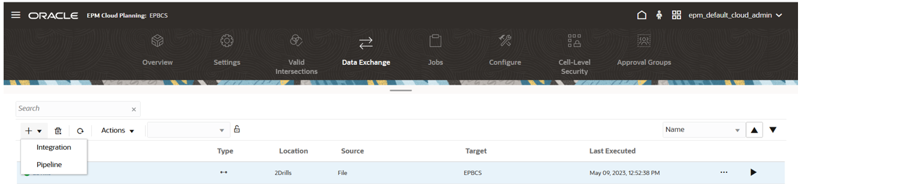
Pipeline Option on the Data Integration Home Page
A Pipeline job is identified with a  icon on the Data Integration home page. You can also search for pipeline jobs by searching for the word "pipeline" or a part of the word from Search.
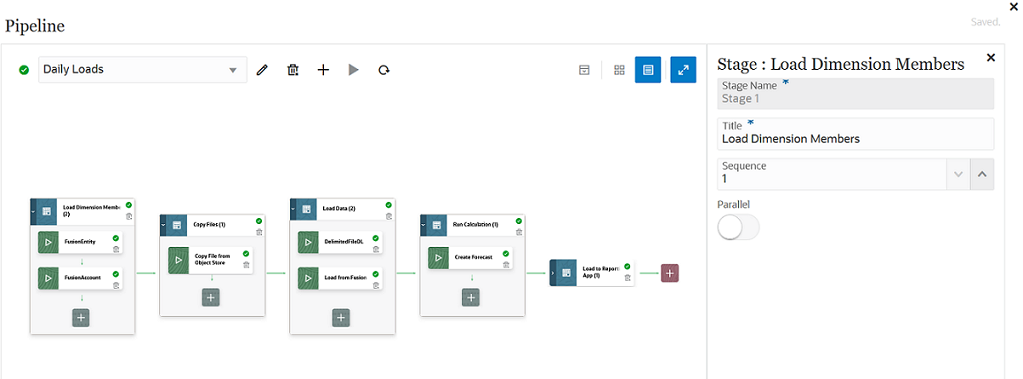
Pipeline Page
A Run Pipeline option is available from the Data Integration home page enabling you to execute the jobs in the Pipeline, send emails, and attach logs. When the Pipeline is running, it shows the status. Customers can also see the status of the Pipeline running in Process Details. Each individual job in the Pipeline is submitted separately and creates a separate job log in Process Details.
Business Benefit: The Pipeline provides customers with a framework to combine multiple and different jobs type as a single process instead of a series of processes. Previously customers had to use the Batch option in Data Management, which restricted the types of jobs that could be included in the batch.
Key Resources
- Using the Pipeline in Administering Data Integration for Oracle Enterprise Performance Management Cloud
All Data Type Data Load Using Jobs Option in Data Management
In Data Management, when you execute a data load and the load method is “All Data Type with Security” for the export step (the step to load data to the EPM Cloud), a new job is created on the Jobs page in Planning, which is the current default behavior.
To use the old method for loading the data, select No for the All Data Type Load Using Jobs option in System Settings. The option to load without creating a job will be removed in a later update. The new option is provided for backward compatibility during the transition period.
Business Benefit: An application administrator now has visibility to all the data loads being performed.
Updated EPM Books Extension for Smart View
An updated EPM Books extension for Oracle Smart View for Office is now available to download and install. This update includes general improvements and defect fixes.
Business Benefit: Downloading and installing the latest EPM Books extension for Smart View gives you access to the latest features, improvements, and defect fixes.
Steps to Enable
To take advantage of the features, improvements, and defect fixes in the EPM Books extension:
- From within Smart View, in the Options dialog, Extensions tab, click the Check for Updates, New Installs, and Uninstalls link.
- Select your business process instance, then follow the prompts.
Key Resources
- Working with Oracle Smart View for Office
Data Exchange Integration Type and Task Type in Task Manager
Task Manager is enhanced with a new end user integration and task type called Data Exchange that allows you to streamline the data exchange integration tasks with the monthly close process. This integration is available for:
- Local and remote Financial Consolidation and Close, Tax Reporting, and Planning connections
- Remote Enterprise Profitability and Cost Management
Business Benefit: You can run integrations defined in Data Exchange from Task Manager. This allows the integration of data loads defined in Data Exchange easily into the monthly processing schedule.
Key Resources
- Financial Consolidation and Close
- Administering Financial Consolidation and Close
- Tax Reporting
- Administering Tax Reporting
- Planning
- Administering Planning
New Financials Module and Deployment Process
NetSuite Planning and Budgeting is offered to customers through a module framework. These modules are managed for provisioning, deployment, and updates. This means that new features, enhancements, and upgrades are deployed automatically to your environment.
The first module available for NetSuite Planning and Budgeting is NSPB Financials. The NSPB Financials module is a fully configurable financials framework that comes standard for financial statements modeling. This module reduces implementation time and gets customers operational within a matter of weeks.
Furthermore, the deployment process for Planning and Budgeting has been simplified with deployment pages that are guided.
- The simplified modules are pre-built to improve organizational financial and operational performance. This approach means a faster application with better usability.
- The deployment process is streamlined and is less prone to error.
- Customers receive automatic fixes and updates to their environment.
Steps to Enable
To enable the NSPB Financials module:
- From the NetSuite Planning and Budgeting Home page, click Tools > Configure.
- On the Configure: NSPB Financials page, click Enable Features.
- In the popup window, select the features you want to enable.
Key Resources
- Planning and Budgeting Financials in the Oracle Help Center (NetSuite Applications Suite)
New Version Builder Feature for "What-If" Planning
You can now use the new Version Builder feature. This feature makes it easier and faster for users to model different forecast versions to respond to market changes. Version Builder automates the effort of users to:
- Identify potential business opportunities and risks.
- Make faster and smarter business decisions.
- Understand the potential impact of business variables.
You can create multiple forecast versions to:
- Model different possibilities, such as Best Case, Worst Case, and "What-if" scenarios.
- Manage how you share your plan data to internal and external stakeholders.
- Have multiple iterations on a plan.
Steps to Enable
To enable Version Builder, go to Application > Configure. On the Configure: NSPB Financials page, click Enable Features, and then check the boxes for NSPB Financials and Version Builder. For more information, see Enabling Planning and Budgeting Financials in the Oracle Help Center (Planning and Budgeting Integration Guide).
To access Version Builder, click Versions from the Home page.
Key Resources
- "What-if" Planning with Version Builder in the Planning and Budgeting Financials User Guide.
Access Requirements
Best practice is to have only users with the Administrator role perform database refreshes after Version Builder is used.
You can now use the Task Manager feature to perform centralized monitoring of all tasks and business processes. Task Manager has replaced the Maintenance Essentials card, and it can be used instead of Task Lists (the Task card).
Task Manager has multiple controls and functionalities that enable you to:
- Define the tasks and schedule to ensure the most efficient task flow.
- Automate the business process, track status, and provide notifications and alerts.
- Notify users by email for delinquencies, due dates, status changes.
- Monitor business process status from a dashboard.
- Act quickly to fix errors and delays.
- Analyze the effectiveness of the business process.
To access Task Manager, from the Home page, go to Applications > Task Manager.
Task Manager helps you to define, execute, and report on the interdependent activities of a business process. It provides centralized monitoring of all tasks and provides a visible, automated, repeatable system of record for running a business process.
Steps to Enable
You can only enable Task Manager at the time that you create the application.
Tips And Considerations
The Task Flow Type options are mutually exclusive. For example, Task Lists remains available for you to use in the application, but if you enable the EPM Task Manager, you cannot use the Task List. For more information about task workflows, see Planning with Tasks in the Oracle Help Center.
New In-application Instructions for Forms and Reports
In forms and reports on Planning and Budgeting, you can now see instructions on how to perform basic tasks. To view the instructions, click the information (i) icon.
Note that these instructions are a simplified version of the instructions you can find in the Planning and Budgeting User Guide.
The step-by-step instructions provide accessible information to users without the user having to navigate away from the Planning and Budgeting application.
New Documentation for NetSuite Planning and Budgeting
The following new guides are available:
- Planning and Budgeting Integration Guide (available in HTML)
- Planning and Budgeting Financials Administrator Guide (available as a PDF)
- Planning and Budgeting Financials User Guide (available as a PDF)
These guides can be found in the Table of Contents in the NetSuite Planning and Budgeting product area, under Planning and Budgeting Financials. To access the NetSuite Help Center, you must have a NetSuite account.
The help topics within the guides provide conceptual information and step-by-step instructions that help users to complete day-to-day activities within NetSuite Planning and Budgeting. Users have access to all these enhanced help topics in a single location.
Tips And Considerations
These guides can be also found in the NetSuite Help Center in the NetSuite Planning and Budgeting product area, under Planning and Budgeting Financials. To access the NetSuite Help Center, you must have a NetSuite account.
Key Resources
- Planning and Budgeting Integration Guide in the Oracle Help Center (NetSuite Applications Suite)
- Planning and Budgeting Financials Administrator Guide
- Planning and Budgeting Financials User Guide
Trend-based Revenue Planning Models Enhancement
The revenue models that support trend-based planning now comes standard in the Planning and Budgeting Financials module.
Additionally, NetSuite Planning and Budgeting can now inherit the customer's revenue structure from NetSuite ERP, with the option to leverage Functional Roll-ups.
- Customers can determine the structure of the revenue planning model that the application uses.
- Trend-based revenue planning allows businesses to make informed decisions based on past trends, resulting in more accurate revenue forecasts. This can help businesses better plan for the future, allocate resources, and make informed business decisions.
- Save time compared to other planning and forecasting methods, as it relies on data that is readily available and easy to analyze.
- Trend-based revenue planning can provide valuable insights into how changes in the market or industry might impact revenue in the future. This can help businesses make more informed decisions about investments, expansions, and other strategic initiatives.
New Variance Report Forms Available for Budgeting
You can now use the variance report templates that comes standard in Planning and Budgeting Financials for budgeting purposes. The new forms enable you to review Actuals against the Budget Scenario for different time periods. Variances between Actuals and Budget are available as a value and percentage. Additionally, you can enter comments about the variances that you see to call out or explain outliers.
To access these new forms, from the Home page of your application, click the Reporting and Analytics card. Then, click the 2 tab on the left-hand side to go to Budget Variance Reports. You can switch between forms by clicking the tabs at the bottom of the page.
The Budget variance reports enable you to view the projected Budget against Actuals so that you can evaluate the original Budget and optimize your financial operations with accurate data. Finance can get ongoing visibility into expenses versus budget targets so they can better manage spend.
Key Resources
- Reporting and Analytics section in the Planning and Budgeting Financials User Guide.
Combined Income Statement and Balance Sheet Data Now Available in Planning and Budgeting Financials and Smart View
In Planning and Budgeting Financials and in Oracle Smart View for Office, Income Statement and Balance Sheet data are now available for viewing in combined formats.
You can now see Income Statement values (Income, Cost of Sales, Gross Profit, Expense, and Net Income) and Balance Sheet values (Total Assets and Total Liabilities and Equity) on the versions that you create in Version Builder. Additionally, Income Statement and Balance Sheet forms now have unified intersections at the total level (such as Total Department, Total Relationship, etc.). You can also create new forms that include both Income Statement and Balance Sheet Data.
Previously, users could not view Income Statement and Balance Sheet data in one place because they had different intersections. In Planning and Budgeting and Smart View, the forms had to be opened in different tabs. Now, users can see balances and other values for the Income Statement and Balance Sheet in one place.
Simplified Navigation Flow Comes Standard
A default NSPB navigation flow now comes standard in NetSuite Planning and Budgeting that includes all Clusters, Cards, and artifacts that can be enabled during feature enablement.
Additionally, the Clusters and Cards on the Home page for this navigation flow are organized in an order that reflects the user experience when they analyze and forecast within the application.
This enhancement to the UI provides users with a better user experience.
Tips And Considerations
- Users with the Service Administrator role can customize the navigation flow configuration for the application based the user needs. For more information, see Viewing and Working with Navigation Flows in the Oracle Help Center (Administering Planning).
- If you plan to modify the navigation flows, Oracle recommends that you make a copy of the predefined navigation flows and work in the copy, not the original. During content updates, Oracle applies the update to the original navigation flows and leaves your modified navigation flows unchanged.
Key Resources
- Understanding Navigation Flows in the Oracle Help Center (Administering Planning)
Access Requirements
Your assigned role determines which cards and clusters you see.
Optimized Business Rules With Updated Naming Convention
The following optimizations have been made to business rules:
- Multiple business rules have been consolidated, updated, or removed to streamline application workflow.
- The business rules now use member names instead of member aliases.
- For easy identification of out-of-the-box business rules, prefixes have been added.
The optimizations provides users with a better user experience and make it faster to execute business rules.
- If users change their member aliases, the business rules are not impacted.
- The optimizations aligns to the Oracle Best Practices for Improved Performance.
Updated Substitution Variables for NetSuite Planning and Budgeting
The substitution variables that comes standard with Planning and Budgeting Financials have been substantially changed. For a full list of substitution variables, see Values for Substitution Variables in the Oracle Help Center (Planning and Budgeting Financials Integration Guide).
To set the value of a substitution variable in NetSuite Planning and Budgeting, click the Navigator icon, and select Variables. On the Variables page, click the Substitution Variables tab, and then enter the new value in the Value column.
Substitution variables are variables that serves as a placeholder for specific members that change regularly. The changes to the substitution variables enhance the user's ability to configure their NetSuite Planning and Budgeting environment.
Updated User Variables for NetSuite Planning and Budgeting
The following user variables are no longer functionally useful within NetSuite Planning and Budgeting, and therefore, have been removed:
- Account
- Class
- NSP_FIN_ComparativeVersion
- Currency
- Department
- Subsidiary
The user variables available are prefixed with "NSP_FIN_" for their artifact labels.
- NSP_FIN_Item Type
- NSP_FIN_Reporting Period
- NSP_FIN_Customer Category
- NSP_FIN_SetVersion
To set the user variables, click the Navigator icon, and select Variables.
User variables help to facilitate managing the planning and budgeting process.
Key Resources
- Member Values for User Variables in the Oracle Help Center (NetSuite Applications Suite).
Prefixes Added to Artifacts in Planning and Budgeting Financials Module
Prefixes have been added to all artifacts of the following types:
- Members
- Calculation Manager (Rulesets, Rules, Templates, and Scripts)
- Substitution Variables
- Smart Lists
- Action Menus
- Forms
- Dashboards
The prefix that is used for artifacts and that are shared across all modules is: NSP_. The module-specific prefix for NSPB Financials is: NFS_.
The prefixes help users to identify which seeded artifacts come standard. Additionally, these seeded artifacts can receive enhancements and upgrades automatically.
Key Resources
- Setting Values for Substitution and User Variables in the Oracle Help Center (Planning and Budgeting Integration Guide).
Hybrid Block Storage Option Enabled
NetSuite Planning and Budgeting is deployed with an Essbase version that supports Hybrid Block Storage Option (BSO) Cubes to leverage its hybrid capabilities.
- Hybrid BSO improves calculation times.
- A reduction in the size of the database and application due to the use of dynamic dimensions. This results in overall performance and usability improvements within the application.
Tips And Considerations
The NetSuite Planning and Budgeting application has Hybrid BSO Cubes enabled by default.
Key Resources
- About Essbase in EPM Cloud in the Oracle Help Center (Getting Started with Oracle Enterprise Performance Management Cloud for Administrators).
Planning and Budgeting Financials Sync Now Available in SuiteApp Marketplace
Planning and Budgeting Financials Sync version 2023.1 is now available for installation in the SuiteApp Marketplace as a shared and managed SuiteApp.
Planning and Budgeting Financials Sync delivers default configurations to integrate NetSuite and Planning and Budgeting Financials. This enables you to load data and metadata from NetSuite saved searches to Planning and Budgeting Financials.
Steps to Enable
To install and set up Planning and Budgeting Financials Sync, you must have the Administrator role. For more information about how to install and set up the SuiteApp, see Planning and Budgeting Financials Sync Installation and Setup in the Oracle Help Center (NetSuite Applications Suite).
Key Resources
- Planning and Budgeting Financials Sync SuiteApp
- Planning and Budgeting Financials Sync Version Notes