
- Revision History
- Overview
- Feature Summary
-
- Recruiting
-
- Send Job Posting Notifications Automatically to Matching Candidates
- Allow Posted Jobs to Synchronize to LinkedIn as Private (Recruiter System Connect)
- Language Label Updates for Traditional and Simplified Chinese
- Update Configuration Pages to Support Additional Browsers
- Update Indeed API to New OAuth Standards
-
- Recruiting
This document will continue to evolve as existing sections change and new information is added. All updates appear in the following table:
| Date | Product | Feature | Notes |
|---|---|---|---|
| 13 AUG 2021 | Created initial document. |
This guide outlines the information you need to know about new or improved functionality in this update.
GIVE US FEEDBACK
We welcome your comments and suggestions to improve the content. Please send us your feedback at talent_acquisition_doc_feedback_ww_grp@oracle.com.
Column Definitions:
Report = New or modified, Oracle-delivered, ready to run reports.
UI or Process-Based: Small Scale = These UI or process-based features are typically comprised of minor field, validation, or program changes. Therefore, the potential impact to users is minimal.
UI or Process-Based: Larger Scale* = These UI or process-based features have more complex designs. Therefore, the potential impact to users is higher.
Features Delivered Disabled = Action is needed BEFORE these features can be used by END USERS. These features are delivered disabled and you choose if and when to enable them. For example, a) new or expanded BI subject areas need to first be incorporated into reports, b) Integration is required to utilize new web services, or c) features must be assigned to user roles before they can be accessed.
| Ready for Use by End Users Reports plus Small Scale UI or Process-Based new features will have minimal user impact after an update. Therefore, customer acceptance testing should focus on the Larger Scale UI or Process-Based* new features. |
Customer Must Take Action before Use by End Users Not disruptive as action is required to make these features ready to use. As you selectively choose to leverage, you set your test and roll out timing. |
|||||
|---|---|---|---|---|---|---|
| Feature |
Report |
UI or |
UI or |
|
||
Send Job Posting Notifications Automatically to Matching Candidates |
||||||
Allow Posted Jobs to Synchronize to LinkedIn as Private (Recruiter System Connect) |
||||||
Language Label Updates for Traditional and Simplified Chinese |
||||||
Send Job Posting Notifications Automatically to Matching Candidates
You can send job posting notifications automatically to matching candidates. When you're on the Sourcing tab and select a Career Section to post a requisition to, you'll find a checkbox under the Career Sections section named, Automatically invite when posting starts. Checking this will automatically send job posting notifications to the matching candidates when the requisition is posted.
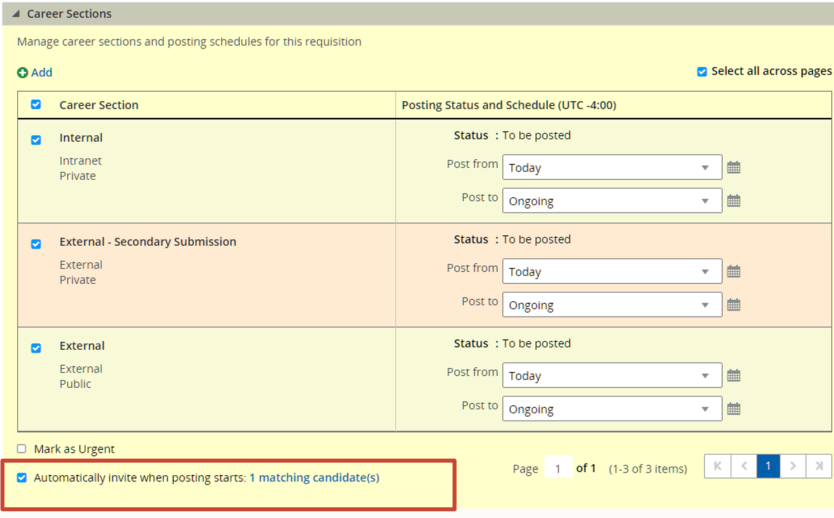
Prior to posting, you can edit the list of matching candidates that will receive the notifications by clicking on the matching candidate(s) link to the right of the checkbox. This brings you to the list of matched candidates. Only the candidates you select here will receive automatic notifications.
Allows recruiters to send job posting notifications automatically to matching candidates when they post a requisition.
Steps to Enable
You don't need to do anything to enable this feature.
Tips And Considerations
The default status at upgrade of the Automicatlly invite when posting starts checkbox is determined by whether you have your Email Jobs Matching Candidates setting enabled or disabled; they will mimic one another. You can change these settings at any time.
Allow Posted Jobs to Synchronize to LinkedIn as Private (Recruiter System Connect)
You can choose whether requisitions posted to external and public career sections are posted to the LinkedIn job board as a limited listing using the new Synchronize requisitions as Public (posted to LinkedIn jobs site) setting.
When the setting is enabled, all requisitions posted to a career section that is both external and public are posted to LinkedIn as a limited listing. The job synchronization with LinkedIn sends this value of public which drives this posting behavior.
When the setting is disabled, all requisitions are sent and synchronized as private.
Offers customers control on whether or not the jobs are posted on the LinkedIn job board.
Steps to Enable
You don't need to do anything to enable this feature.
Tips And Considerations
Recruiter System Connect must be in inactive status to make this configuration change.
For zones that have the RSC partner service active, the setting is enabled at upgrade. For zones that have the RSC partner service inactive, the setting is disabled at upgrade.
Although this feature is automatically available, the path to this new setting is given below.
- Go to Configuration and select Administration from Recruiting.
- Select Recruiting Services from Integration.
- Click on LinkedIn Recruiter System Connect.
- If active click Inactivate.
- Click Edit next to Properties.
- In the Data Synchronization section, check or uncheck the Synchronize requisitions as Public (posted to LinkedIn jobs site) setting.
- Wait for approximately 10 minutes and then click Activate.
Key Resources
- If more information is needed, we recommend referring to LinkedIn's documentation.
Language Label Updates for Traditional and Simplified Chinese
Traditional Chinese and Simplified Chinese languages are activated and available in Scheduling Center and Evaluation Management. You select either of these languages and the field labels and content are appropriately translated.
Updates and corrects language labels from Chinese (Taiwan) to Traditional Chinese and Chinese (China) to Simplified Chinese in Scheduling Center and Evaluation Management to improve the user experience.
Steps to Enable
You don't need to do anything to enable this feature.
Update Configuration Pages to Support Additional Browsers
This feature ensures that most Recruiting Configuration pages render and perform on browsers other than Internet Explorer such as Google Chrome and Mozilla Firefox.
The actions available in the updated configuration pages include:
- Creating and editing corporate sources and events
- Creating and translating) requisition UDFs
- Creating and translating offer UDFs
- Adding UDFs to the offer field layout
- Creating and translating candidate UDFs
- Creating and translating small and custom selection lists
- Creating candidate requisition user-defined files
- Creating merge forms
- Creating and translating department UDFs
- Adding UDFs to the department field layout
- Configuring the conditions for duplicate check
- Configuring list formats
- Building application flows in a career section
- Creating and editing departments
Provides a consistent user experience in the Recruiting Configuration pages no matter the browser.
Steps to Enable
You don't need to do anything to enable this feature.
Tips And Considerations
This is Phase 1 of this feature. The second phase is expected in Release 21D and will update the configuration pages that weren't covered in this first phase.
Update Indeed API to New OAuth Standards
To continue to seamlessly use the Profile Import from Indeed, you need to update your Indeed integration to the new OAuth API standard, the OAuth 2.0 protocol. Indeed implemented this new protocol and to continue integration you need to add a redirection URL to complete the protocol migration.
This integration was updated to redirect API URLs to the new protocol.
You need to sign in to your Indeed account and add the URL as an allowed redirect URL. The URL format needs to be as follows, manipulating it only to reflect your own zone.
https://(your zone).taleo.net/careersection/careersection/candidateacquisition/indeedAuthorizationRedirect.jsf
Continued ability to import profiles from Indeed.
Steps to Enable
You need to add a redirection URL in your Indeed account.
Key Resources
- If more information is needed, we recommend referring to Indeed's documentation.