
November Maintenance Pack 21D.1
This document will continue to evolve as existing sections change and new information is added. All updates appear in the following table:
| Date | Product | Feature | Notes |
|---|---|---|---|
| 08 DEC 2021 | Created initial document. |
 HAVE AN IDEA?
We’re here and we’re listening. If you have a suggestion on how to make our cloud services even better then go ahead and tell us. There are several ways to submit your ideas, for example, through the Ideas Lab on Oracle Customer Connect. Wherever you see this icon after the feature name it means we delivered one of your ideas.
GIVE US FEEDBACK
We welcome your comments and suggestions to improve the content. Please send us your feedback at oracle_fusion_applications_help_ww_grp@oracle.com.
DISCLAIMER
The information contained in this document may include statements about Oracle’s product development plans. Many factors can materially affect Oracle’s product development plans and the nature and timing of future product releases. Accordingly, this Information is provided to you solely for information only, is not a commitment to deliver any material, code, or functionality, and should not be relied upon in making purchasing decisions. The development, release, and timing of any features or functionality described remains at the sole discretion of Oracle.
This information may not be incorporated into any contractual agreement with Oracle or its subsidiaries or affiliates. Oracle specifically disclaims any liability with respect to this information. Refer to the Legal Notices and Terms of Use for further information.
Column Definitions:
Report = New or modified, Oracle-delivered, ready to run reports.
UI or Process-Based: Small Scale = These UI or process-based features are typically comprised of minor field, validation, or program changes. Therefore, the potential impact to users is minimal.
UI or Process-Based: Larger Scale* = These UI or process-based features have more complex designs. Therefore, the potential impact to users is higher.
Features Delivered Disabled = Action is needed BEFORE these features can be used by END USERS. These features are delivered disabled and you choose if and when to enable them. For example, a) new or expanded BI subject areas need to first be incorporated into reports, b) Integration is required to utilize new web services, or c) features must be assigned to user roles before they can be accessed.
| Ready for Use by End Users Reports plus Small Scale UI or Process-Based new features will have minimal user impact after an update. Therefore, customer acceptance testing should focus on the Larger Scale UI or Process-Based* new features. |
Customer Must Take Action before Use by End Users Not disruptive as action is required to make these features ready to use. As you selectively choose to leverage, you set your test and roll out timing. |
|||||
|---|---|---|---|---|---|---|
| Feature |
Report |
UI or |
UI or |
|
||
Consider Onboarding Processes Before Deleting Candidates
Determines whether or not candidates are permanently deleted based on the existence of related onboarding processes. Ultimately, the configuration value determines if, based on the existence of onboarding processes, a candidate and their relevant processes are to be soft-deleted or permanently deleted in both Recruiting and Onboarding.
Note that, contrary to Recruiting, soft-deleted candidate processes and tasks continue to be displayed in the Onboarding product.
A new setting, Consider Onboarding processes before deleting candidates, enables customers to decide how the deletion of candidates is handled with regard to related Onboarding processes. There are 2 values available to select for configuring this setting. They are:
- Permanently delete candidates if no related Onboarding processes exist. Soft delete candidates otherwise.
- This is the default at upgrade.
- Permanently deletes candidates only if they were never involved in an Onboarding process. Otherwise, regardless if the Onboarding process is still in process or has become canceled or completed.
- In Recruiting:
- Candidate is soft-deleted (no longer visible).
- In Onboarding
- Process name (in the process list) is appended with (Deactivated Candidate).
- Tasks are marked as To be Deleted and are no longer functional and no longer displayed using the Opened Tasks filters.
- In Recruiting:
- Delete candidates even if Onboarding processes are not yet Completed or Canceled.
- Permanently deletes candidates in Recruiting and, if applicable, in Onboarding, regardless if they were involved in Onboarding processes or not.
- For those candidates that are or were involved in Onboarding, those processes and their tasks are also deleted and no longer displayed in the Onboarding Center.
Allows the complete and permanent deletion of candidates even if they are or were involved in an Onboarding process.
Steps to Enable
You don't need to do anything to enable this feature.
Tips And Considerations
While there aren't any steps required to enable this feature, to take advantage of this new setting:
-
Go to Configuration.
-
Click Settings under Recruiting.
-
Do a search by name and enter Onboarding.
-
Click Consider Onboarding processes before deleting candidates.
-
Click Edit.
-
Make your selection for the Value field and click Save.
This document will continue to evolve as existing sections change and new information is added. All updates appear in the following table:
| Date | Product | Feature | Notes |
|---|---|---|---|
| 08 NOV 2021 | Created initial document. |
HAVE AN IDEA?
We’re here and we’re listening. If you have a suggestion on how to make our cloud services even better then go ahead and tell us. There are several ways to submit your ideas, for example, through the Ideas Lab on Oracle Customer Connect. Wherever you see this icon after the feature name it means we delivered one of your ideas.
GIVE US FEEDBACK
We welcome your comments and suggestions to improve the content. Please send us your feedback at oracle_fusion_applications_help_ww_grp@oracle.com.
DISCLAIMER
The information contained in this document may include statements about Oracle’s product development plans. Many factors can materially affect Oracle’s product development plans and the nature and timing of future product releases. Accordingly, this Information is provided to you solely for information only, is not a commitment to deliver any material, code, or functionality, and should not be relied upon in making purchasing decisions. The development, release, and timing of any features or functionality described remains at the sole discretion of Oracle.
This information may not be incorporated into any contractual agreement with Oracle or its subsidiaries or affiliates. Oracle specifically disclaims any liability with respect to this information. Refer to the Legal Notices and Terms of Use for further information.
Column Definitions:
Report = New or modified, Oracle-delivered, ready to run reports.
UI or Process-Based: Small Scale = These UI or process-based features are typically comprised of minor field, validation, or program changes. Therefore, the potential impact to users is minimal.
UI or Process-Based: Larger Scale* = These UI or process-based features have more complex designs. Therefore, the potential impact to users is higher.
Features Delivered Disabled = Action is needed BEFORE these features can be used by END USERS. These features are delivered disabled and you choose if and when to enable them. For example, a) new or expanded BI subject areas need to first be incorporated into reports, b) Integration is required to utilize new web services, or c) features must be assigned to user roles before they can be accessed.
| Ready for Use by End Users Reports plus Small Scale UI or Process-Based new features will have minimal user impact after an update. Therefore, customer acceptance testing should focus on the Larger Scale UI or Process-Based* new features. |
Customer Must Take Action before Use by End Users Not disruptive as action is required to make these features ready to use. As you selectively choose to leverage, you set your test and roll out timing. |
|||||
|---|---|---|---|---|---|---|
| Feature |
Report |
UI or |
UI or |
|
||
Determine Product Origin of Message Templates in OBI Reports |
||||||
Display Submission Lists with 50 Submissions per Page
View more than 15 submissions per Submission List page.
A new setting, Number of items listed per configurable list page, is introduced that allows this configuration. Your System Administrator can configure whether 15 or 50 submissions display on Submission List pages. The default at upgrade is 15.
When scrolling up and down and left to right on your desktop, key information, options and navigation elements remain displayed for your use.
Provides a more flexible user experience by providing the option to view 50 submissions per Submission List page.
Steps to Enable
You don't need to do anything to enable this feature.
Tips And Considerations
While there are no steps necessary to enable this feature your System Administrator can configure the new setting to show you 50 submissions instead of the default 15.
System Administrator should follow the steps below to access and edit the new setting.
- Go to Configuration and click Administration under the Recruiting section.
- Click Settings under General Configuration.
- Find the Number of items listed per configurable list page setting and click on the name of the setting to open it.
- Click Edit and select 50 as the value.
- Click Save.
Determine Product Origin of Message Templates in OBI Reports
Create reports including correspondence template data to show information based on the product from which the templates originated.
When you're creating reports that have to do with correspondence template data, you're now able to determine the product from which the template originates. This allows you to report on correspondence template usage in light of the product from which they originate.
To accomplish this a new Correspondence Template Module presentation column was added Correspondence Templates in the Administration subject area. If you include this new Correspondence Template Module as a column or a filter in your analysis, you're able to filter message templates ensuring that your report includes only relevant data.
Available template modules are:
- Onboarding (Legacy)
- Onboarding (Transitions)
- Performance Management
- Recruiting
- Security
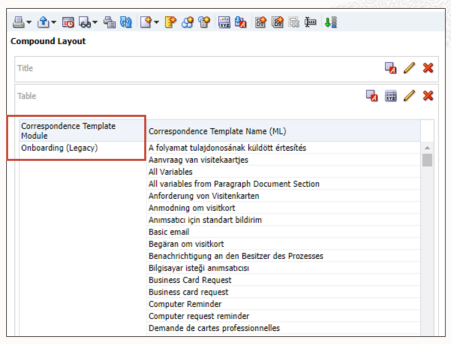
Resulting Analysis Using the Correspondence Template Module
Create reports including correspondence template data to show information based on the product from which the templates originate.
Steps to Enable
You don't need to do anything to enable this feature.
Configure TEE to Support Additional Browsers (Continued)
This feature ensures that all Recruiting Configuration pages render and perform on browsers other than Internet Explorer such as Google Chrome and Mozilla Firefox.
The actions available in the updated configuration pages in this release include:
-
Managing agencies and agents
-
Contextualizing the OLF of CSWs
-
Defining the matching candidate filters
-
Creating large custom selection lists
-
Activating and configuring automated tasks
-
Configuring the default Candidate Search page
Provides a consistent user experience in the Recruiting Configuration pages on all supported browsers.
Steps to Enable
You don't need to do anything to enable this feature.