
This document will continue to evolve as existing sections change and new information is added. All updates appear in the following table:
| Date | Feature | Notes |
|---|---|---|
| 28 JUN 2019 | Created initial document. |
This guide outlines the information you need to know about new or improved functionality in Oracle Transportation & Global Trade Management Cloud Update 19C. Each section includes a brief description of the feature, the steps you need to take to enable or begin using the feature, any tips or considerations that you should keep in mind, and the resources available to help you.
For existing clients who are migrating from 19A to 19C - you should review the What's New documents for both 19B and 19C to understand the complete list of features available in the 19C update.
GIVE US FEEDBACK
We welcome your comments and suggestions to improve the content. Please send us your feedback at otm-doc_us@oracle.com. Please indicate you are inquiring or providing feedback regarding the Oracle Transportation & Global Trade Management What’s New in Update 19C.
Column Definitions:
Report = New or modified, Oracle-delivered, ready to run reports.
UI or Process-Based: Small Scale = These UI or process-based features are typically comprised of minor field, validation, or program changes. Therefore, the potential impact to users is minimal.
UI or Process-Based: Larger Scale* = These UI or process-based features have more complex designs. Therefore, the potential impact to users is higher.
Customer Action Required = You MUST take action before these features can be used by END USERS. These features are delivered disabled and you choose if and when to enable them. For example, a) new or expanded BI subject areas need to first be incorporated into reports, b) Integration is required to utilize new web services, or c) features must be assigned to user roles before they can be accessed.
| Ready for Use by End Users Reports plus Small Scale UI or Process-Based new features will have minimal user impact after an update. Therefore, customer acceptance testing should focus on the Larger Scale UI or Process-Based* new features. |
Customer Must Take Action before Use by End Users Not disruptive as action is required to make these features ready to use. As you selectively choose to leverage, you set your test and roll out timing. |
|||||
|---|---|---|---|---|---|---|
| Feature |
Report |
UI or |
UI or |
Customer Action Required |
||
PC*MILER|Web Services - Use Custom Road Speeds Parameter Added |
||||||
This feature provides you with the next chapter in Oracle's adoption of REST APIs.
This REST Services feature provides you with an additional set of REST resources:
| Resource |
Operations |
| Tracking Event |
POST, GET, PATCH, DELETE |
| Order Release |
POST, GET, PATCH |
| Shipment |
POST, GET, PATCH, PATCH to shipment child tables, POST to shipment child tables |
| SShipUnit |
POST, GET, PATCH, PATCH to sShipUnits child tables, POST to sShipUnits child tables |
This feature also provides you with updated REST API Documentation that is available on docs.oracle.com.
Steps to Enable
Review the REST service definition in the REST API guides, available from the Oracle Help Center > your apps service area of interest > REST API. If you're new to Oracle's REST services you may want to begin with the Quick Start section.
Indexes have been added to the objects listed to improve performance.
- Created an index on the INSERT_DATE column of the following tables.
- SHIPMENT
- ITEM
- INVOICE
- GTM_TRANSACTION
- WORK_INVOICE
- P_BID, ORDER_RELEASE
- OB_ORDER_BASE
- DM_TRANSACTION
- ITINERARY
- VOUCHER
- Created an index on START_DATE of INVOICE table.
- Created an index on LATE_DELIVERY_DATE of ORDER_RELEASE.
Steps to Enable
You don't need to do anything to enable this feature.
Additional Parameter Added to Integration Command
An additional parameter - PersistOnly - has been added to the IntCommand for the PropagateShipUnitChanges option for the ActualShipment interface.
Using this parameter will bypass the shipment actual logic for ship unit changes and persist the ActualShipment as received in the payload/XML. This setup can be used when the Shipment Actuals logic should not be triggered for the changes coming in the XML. For example, this option is ideal for adding/updating a shipment reference number (or remark) - in this scenario there is no need to propagate these changes.
Below is an example of this parameter should be used in Shipment Actual XML:
<ShipmentGid>
<Gid>
<DomainName>GUEST</DomainName>
<Xid>12345</Xid>
</Gid>
</ShipmentGid>
<IntCommand>
<IntCommandName>PropagateShipUnitChanges</IntCommandName>
<IntArg>
<ArgName>Type</ArgName>
<ArgValue>PersistOnly</ArgValue>
</IntArg>
</IntCommand>
Steps to Enable
Within the Actualshipment schema you will use the XML element IntCommand to specify the PersistOnly option for PropagateShipUnitChanges special instruction.
Below is an example of the required setup for the IntCommand:
IntCommand>
<IntCommandName>PropagateShipUnitChanges</IntCommandName>
<IntArg>
<ArgName>Type</ArgName>
<ArgValue>PersistOnly</ArgValue>
</IntArg>
</IntCommand>
Enabled SMTP in BI Publisher for Sending Reports Via Email
A default SMTP email server will now be configured as part of all new POD provisioning starting with 19C. The new default SMTP email server will also be configured as part of the migration to 19C for existing clients. This new default setup will allow you to schedule and email reports directly from BI Publisher.
Steps to Enable
You don't need to do anything to enable this feature.
The three.js library has been upgraded to r104. Three.js is a cross-browser JavaScript library and Application Programming Interface used to create and display animated 3D computer graphics in a web browser. This library is used with the 3D load configuration action view and in the Workbench view.
Steps to Enable
You don't need to do anything to enable this feature.
Oracle Transportation Management (Base)
Shipment Actual Processing Agent Actions
This feature provides you with an agent action that you can use to process shipment actuals updates that OTM receives from other systems.
- Shipment Actual Processing - This is a pre-persist agent action with two input flags as described below:
- Remove Planned S Ship Units: Default: false. When true, the planned ship units would be deleted based on the planning parameters FIELD NAME FOR SSU ACTUAL RECEIVED and FIELD VALUE FOR SSU ACTUAL RECEIVED. These need to specify the field and the value on the S_SHIP_UNIT table. Shipment Ship Units (SSUs) that match the field/value with in a shipment will be kept and the SSUs that do not match the field/value will be removed, including from the database. If these parameters are not set, the field RECEIVED_SHIP_UNIT_COUNT would be used for this purpose. Ship units that do not have the value 1 would be deleted when this flag is checked.
- Execute Shipment Actual: Default false. When false, none of the business logic would be executed and the payload would be persisted as is. This is equivalent to sending in the IntCommand with "Persist Only" in the XML. When true, the shipment actuals business logic would be executed.
Steps to Enable
- Create a shipment agent and configure that agent to use the pre-persist agent action Shipment Actual Processing.
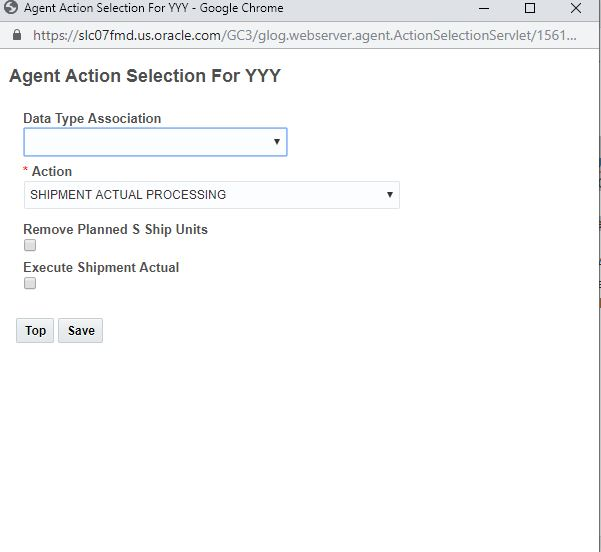
Shipment Actual Processing Agent
- Set the field name and value parameter fields that are used with the Removed Planned S Ship Units option. These parameters are found under the SHIPMENT ACTUAL group and the parameters are FIELD NAME FOR SSU ACTUAL RECEIVED and FIELD VALUE FOR SS ACTUAL RECEIVED.

Field Name and Value Parameters for SSU Actual Received
Tips And Considerations
These new agent actions have been provided to help clients who have shipment actuals cleanup logic in their middleware layer (including ICS) move that logic into base product.
Web Service Connection Type for External Service Engine
This feature provides you with a new External Service Engine (ESE) Connection Type option of Web Service. The Web Service option will allow you to develop an integration to any web service enabled external service engine.
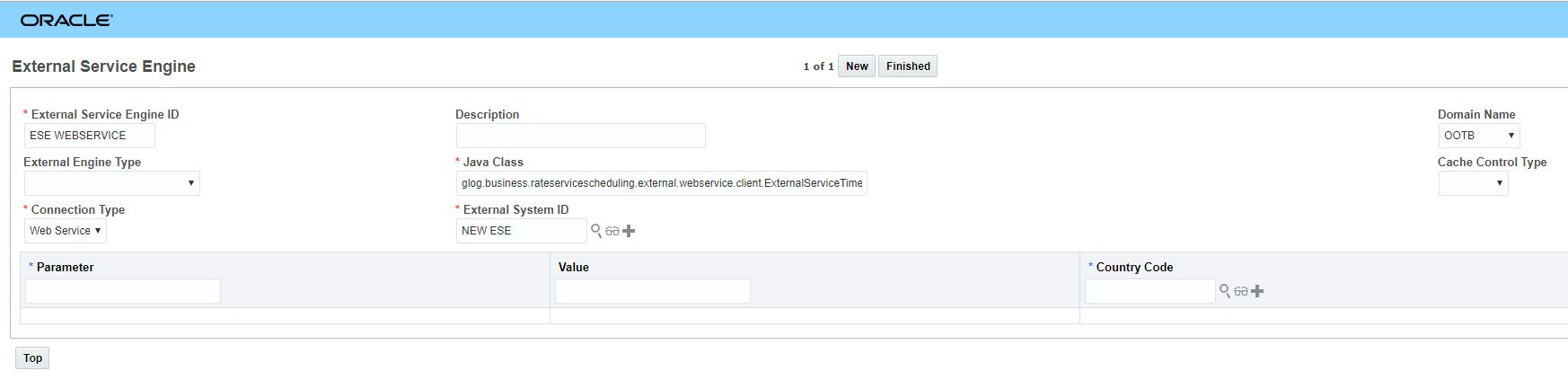
External Service Engine Web Service Connection Type
Steps to Enable
To add a new External Service Engine using the new Connection Type of Web Service:
- Enter a new External Service Engine ID.
- If needed, enter additional information about the engine in the Description field.
- Leave the External Engine Type blank this will allow you to configure your own External Service Engine.
- For the Cache Control Type, you can leave it blank or select "Cache Off". If "Cache Off" is selected, OTM makes the call to External Service Engine without caching any result in the in-memory App-Tier caches (i.e., the RateServiceCache and associated caches). This option is needed for a situation where parameters to ESE change (such as weight, volume etc) for each call, even when the source/destination attributes are fixed.
- Select the Connection Type options of Web Service.
- Enter the required External System ID and information for your External Service Engine.
This feature provides clients who are using the SMC³ CarrierConnect XL 1.0 product with the changes required to upgrade to the 3.0 version of CarrierConnect XL.
Please note that the upgrade to CarrierConnect XL 3.0 is a mandatory upgrade - SMC³ is moving CarrierConnect XL 1.0 to end-of-life status on December 31, 2019.
Your OTM configuration for the call to RsateWare XL and CarrierConnect (RATEWAREXL WITH CARRIERCONNECT) does not need to change to support this upgrade. You will, however, need to contact SMC³'s Support organization to update your license key to accommodate the upgrade from CarrierConnect XL 1.0 to CarrierConnect XL 3.0.
SMC³ Support:
- Phone Number – 1-800-845-8090
- Email – CustomerSupport@smc3.com
While your configuration in OTM does not need to change with the upgrade - the process used to call RateWareXL and CarrierConnect XL 3.0 is significantly different from the process that was supported with CarrierConnect XL 1.0.
With the Carrier Connect XL1.0 integration CarrierConnect XL and Rateware XL were called from OTM using a single combined call. With the combined call solution Rateware XL would receive the request from OTM, and then Rateware XL would internally make a call to Carrier Connect XL 1.0 to receive the transit days and the service provided on the lane - Indirect or Direct.
With the new CarrierConnect XL 3.0 integration the combined call is no longer supported - now the call to the CarrierConnect XL 3.0 and Rateware XL are handled as two independent calls. OTM now makes one call to Carrier Connect XL 3.0 to obtain the transit time and the service details ( (Indirect or Direct), then OTM makes a second call to RatewareXL with the correct information based on the call to CarrierConnect XL 3.0.
Steps to Enable
Your OTM configuration for the call to RateWare XL and CarrierConnect XL does not need to change to support this upgrade, however, you will need to contact SMC3’s Support organization to obtain new license keys for RateWare XL and CarrierConnect XL to support the fact that the upgrade now requires separate calls to these two products vs the combined call.
Once you receive the required credentials from SMC3 – username, password and the new license keys for CarrierConnect XL and RateWare XL – the following proprieties need to be set with the new information:
- glog.RatingEngine.RatewareXL.Username
- glog.RatingEngine.RatewareXL.Password
- glog.RatingEngine.RatewareXL.License
- glog.RatingEngine.CarrierConnectXL.License
NOTE: Your user name and password will be the same for both RateWare XL and CarrierConnect XL – this is why there are only two properties for these values, but the license keys will be different hence the reason why there are two different properties for the license keys.
SMC3 Customer Support
- Phone Number: 1-800-845-8090 | Monday – Friday 8:00 a.m. – 5:15 p.m. ET
- Email: CustomerSupport@smc3.com
Key Resources
The link below will provide you with additional information about the transition from CarrierConnect XL 1.0 to CarrierConnect XL 3.0.
PC*MILER|Web Services - Use Custom Road Speeds Parameter Added
This feature provides clients using the PC*MILER|Web Services external distance engine with a Use Custom Road Speeds parameter that can be used to turn on and off any customs road speeds that have been configured for the client's PC*MILER|Web Services API key.
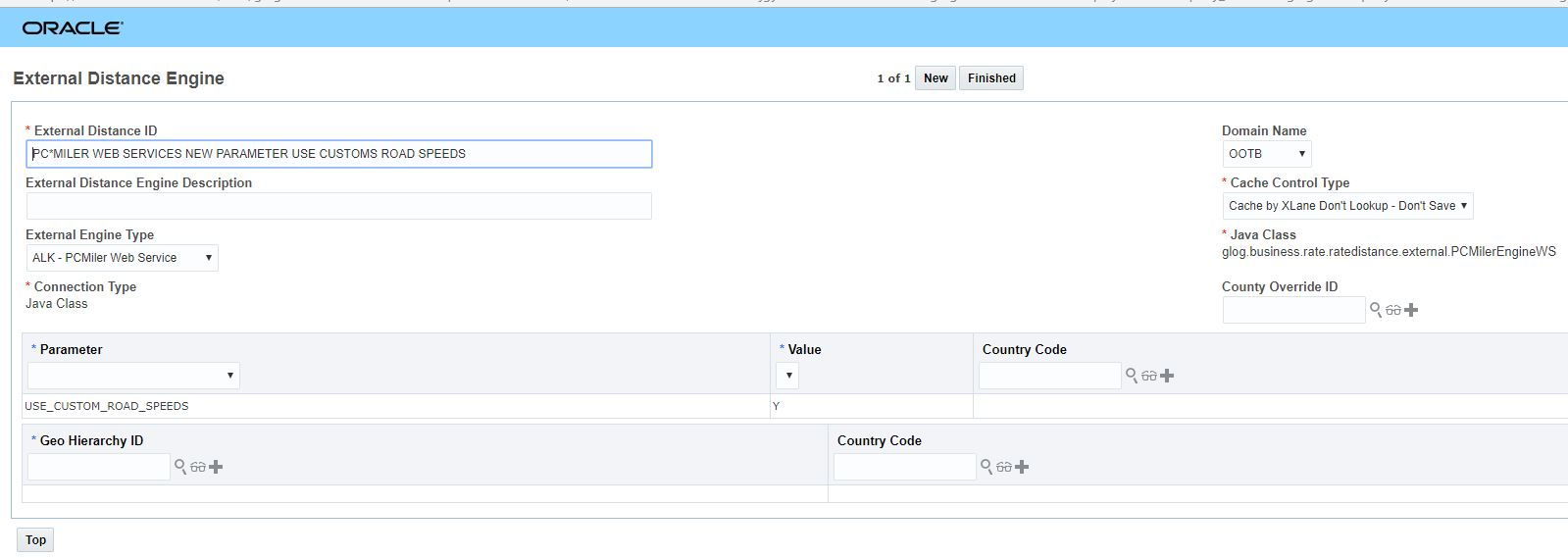
ALK - PCMiler Web Service Use Custom Road Speeds Parameter
Steps to Enable
To enable this feature - once the necessary custom road speeds configuration has been completed for your API key, you will need to add the Use Custom Road Speeds parameter to your ALK - PCMiler Web Service External Distance Engine configuration.
If you want to use the custom road speeds configured with your PC*MILER|Web Services API Key:
- Select the Use Custom Road Speeds from the parameter drop down
- Set the Value = Yes
- Click Save.
OTM-WMS Integration Sample Data Content Provided
This feature provides you with sample data content in support of the OTM-Oracle Warehouse Management Cloud (WMS) integration. The type of sample data content includes sample external statuses, saved conditions, agents, and reference number qualifiers. This new sample content is available in the the FA domain.
Sample content provided in the FA domain:
EXTERNAL STATUS
- For Shipment in FA domain, status type FA.SHIP UNIT ACTUALS with values FA.SHIP UNIT ACTUALS_NOT STARTED (default), FA.SHIP UNIT ACTUALS_IN PROGRESS, FA.SHIP UNIT ACTUALS_SHIP COMPLETE and FA.SHIP UNIT ACTUALS_CLEANUP PROCESSED
SAVED CONDITIONS
- FA.IS_CLEANUP_PROCESSED - Checks to see if the external status for status type FA.SHIP UNIT ACTUALS is FA.SHIP UNIT ACTUALS_CLEANUP PROCESSEDFA.IS_IN_PROGRESS - Checks to see if the external status for status type FA.SHIP UNIT ACTUALS is FA.SHIP UNIT ACTUALS_IN PROGRESSFA.IS_SHIP_COMPLETE - Checks to see if the external status for status type FA.SHIP UNIT ACTUALS is FA.SHIP UNIT ACTUALS_SHIP COMPLETEFA.IS_STARTED - Checks to see if the external status for status type FA.SHIP UNIT ACTUALS is FA.SHIP UNIT ACTUALS_NOT STARTED
AGENTS
Pre-persist agent - FA.SHIPMENT ACTUALS SHIP UNIT PROCESSING - listens to SHIPMENT - MODIFIED with the following flow
- IF: IS_SHIP_COMPLETE
- SHIPMENT ACTUAL PROCESSING - both flags checked
- SET STATUS: SHIP UNIT ACTUALS_CLEANUP PROCESSED
- ELSEIF: IS_STARTED
- SHIPMENT ACTUAL PROCESSING - only "Execute Shipment Actual" checked
- SET STATUS: SHIP UNIT ACTUALS_IN PROGRESS
- ELSEIF: IS_IN_PROGRESS
- SHIPMENT ACTUAL PROCESSING - only "Execute Shipment Actual" checked
- ASSIGN VARIABLE: $PLANNED-SSU-COUNT, PLANNED-SSU-COUNT
- ASSIGN VARIABLE: $RECEIVED-SSU-COUNT, RECEIVED-SSU-COUNT
- IF: $PLANNED-SSU-COUNT=$RECEIVED-SSU-COUNT
- SHIPMENT ACTUAL PROCESSING - only "Remove Planned S Ship Units" checked
- SET STATUS: SHIP UNIT ACTUALS_CLEANUP PROCESSED
- ENDIF
- ELSEIF: IS_CLEANUP_PROCESSED
- SHIPMENT ACTUAL PROCESSING - none of the flags checked
Post persist agent - FA.SHIPMENT ACTUALS CLEANUP - listens to SHIPMENT STATUS - CHANGED, specifically for SHIP UNIT ACTUALS_SHIP COMPLETE status and calls the agent action Remove Planned S Ship Units and sets the status to SHIP UNIT ACTUALS_CLEANUP PROCESSED. This agent is to be used if a manual clean up needs to be initiated from the UI. The user would set the status of the shipment to be ship complete and that would trigger this agent and clean up the planned s ship units.
ORDER RELEASE LINE REFNUM QUALIFIERS
- FA.ORDER NUMBERFA.ORDER LINE NUMBER
- FA.FULFILLMENT LINE NUMBER
- FA.EXT FULFILLMENT LINE NUMBER
Steps to Enable
You don't need to do anything to enable this feature.
Transportation Operational Planning
Multistop Dynamic Clustering Solution Improvement
This enhancement provides clients who are using Dynamic Clustering with the following optimization improvements:
-
Dynamic clustering can now consider constraints that restrict routing decisions like mode, via locations, must ship direct, etc.
-
The routing decision optimization logic can now take more multi-stop(direct combinations) routing options into consideration, and in so doing can potentially improve solution quality.
The multistop Dynamic Clustering solutions draws its inspiration from the concepts related to cross-leg consolidations where the multistop logic recognizes that both direct shipments and the line haul to the x-dock may be a multistop shipment.
Steps to Enable
You don't need to do anything to enable this feature.
Tips And Considerations
You can increase the number of routing options considered by setting the following parameters in multi-stop logic configuration.
- MULTISTOP CONSOLIDATION ALGORITHM TYPE = iterative saving
- MULTISTOP COLGEN NUMBER OF ITERATIONS >= 2
NOTE: A larger value of MULTISTOP COLGEN NUMBER OF ITERATIONS, means there are more options inputted into routing decision optimization logic, which should provide you with better solution quality, but will - potentially - require more computation run-time.
This feature provides you with an error message that will be displayed in the UI when you attempt to start a second ETL run when one is already running, This change will prevent locking issues that were possible when running multiple ODI sessions in parallel.
Now - when you attempt to run ODI when an ODI session is already running you will see the a error message:
"ETL cannot be triggered as an ETL session with session ID #number is already running."
Steps to Enable
You don't need to do anything to enable this feature.
---