
Oracle Profitability and Cost Management Cloud, January Update
Announcements and Known Issues
Known Issue: Groups and Data Grants
Note that native (user-defined) groups are currently not enabled for use with Data Grants. Groups available at startup, such as Users and Viewers, are supported.
Oracle Profitability and Cost Management Cloud, February Update
Announcements and Known Issues
This release includes the user interface translated into Danish, German, Spanish, Finnish, French, Italian, Japanese, Korean, Dutch, Polish, Portuguese (Brazilian), Russian, Swedish, Turkish, Simplified Chinese, and Traditional Chinese.
Use Native Groups with Data Grants
Native (user-defined) groups are now enabled for use with Data Grants. See Chapter 2 of Administering Profitability and Cost Management Cloud for details.
Use Expanded Custom Calculation Rule Functionality
Formula syntax is changed in these ways:
- Members and tuples are no longer surrounded by </ /> special characters.
- The Result (left-hand) and Target (right-hand) parts of the formula are separated by :=.
- Members must be enclosed in square brackets, [ ], and tuples in parentheses, ( ).
- Tuples with one or more members can be used on the Result side of the formula as well as the Target side.
- Formulas now support any MDX operation allowed in Essbase as well as basic math and conditional operations.
- Formulas end in semicolon ;.
- A Rule dimension or member must be used in the Target side of the formula for arithmetic operations.
See Chapter 5 of Administering Profitability and Cost Management Cloud for details.
Use New Dimension Member Text Entry to Simplify Calculation Rule Creation
You can now paste dimension-member combinations from Microsoft Excel into the Dimensions area of the following Rule Definition screen tabs: Source, Destination, and Driver Basis. This feature reduces the keystrokes needed to create new rules or modify existing rules. It is helpful for cases where users manually generate rules, for example, by using a spreadsheet.
To use this feature, click Text Entry in the Dimensions area. Then, copy and paste dimension-member combinations for that tab into the Dimension Member Editor box using the following format:
"DimensionName", "MemberName"
Use one row per member. You can include combinations for multiple dimensions in the same box. When entries are complete, click OK.
If you try to input a dimension or member that does not exist or one that is not available for that tab, an error message is displayed.
Note that you must use the Member Selection area to remove dimension-member combinations created by pasting.
Include or Exclude Attributes in Query Definitions
Profitability and Cost Management Cloud query results display in Smart View grids. In the following cases, users may not want to include attribute dimensions:
- When a user should not see them or be allowed to select them
- When the query would result in invalid cells, especially in cases where the members of the base dimension do not all have attributes assigned
- When the query will be used for data entry in Smart View
By default, attribute dimensions are excluded from query results. To include them, select Include Attribute Dimensions on the Dimensions tab of the Queries Definition screen. (See “Creating Custom Queries in Applications” in Chapter 11 of Administering Profitability and Cost Management Cloud.)
Set Rounding Precision for Allocation Calculation Results
You can set decimal precision for allocation calculations, from +7 to -6 places. The default is 2. For details, see “Editing an Application’s Description and Default Dimension Settings” in Chapter 4 of Administering Profitability and Cost Management Cloud.
Set Member Solve Order When Updating Dimension Properties by Importing Files
In Essbase, the solve order number determines the order by which members are evaluated in the dimension. You can now include the MEMBER SOLVE ORDER property in flat files for updating dimensions. For details, see “About Flat File Properties” in Chapter 4 of Administering Profitability and Cost Management Cloud.
Single Sign-On with Oracle Fusion Applications
Starting this update, you can configure single sign-on access between Oracle Enterprise Performance Management Cloud and Oracle Fusion Applications Cloud. Configuring SSO requires you to configure SAML 2.0 Identity Provider (IdP) between Oracle EPM Cloud and Oracle Fusion Applications Cloud.
See Managing Single Sign-On in Administering Oracle Cloud Identity Management for information on configuring the SSO process to work with Oracle Fusion Applications Cloud.
New EPM Automate Utility Version
A new version of the EPM Automate Utility is available with this update. This version enhances the importsnapshot command to allow the import of identity domain artifacts from application snapshots. This enhancement simplifies the cloning of a service instance by avoiding the step of manually importing users and roles into the identity domain.
The activities that you can complete using importsnapshot command depend on your role.
- Service Administrators can import only application artifacts into a service instance.
- Identity Domain Administrators can import only identity domain artifacts.
If a user who is not in the identity domain is referenced in the snapshot being imported, the utility creates a user in the identity domain and assigns the default password that you specify in the command. - Service Administrators who are also assigned the Identity Domain Administrator role can import application content into the service instance and identity domain artifacts (users and their role assignments) into the identity domain of the service instance.
You must install this version of the utility to use the enhanced command. See these sections in Working with EPM Automate for Oracle Enterprise Performance Management Cloud:
- Installation instructions: Installing the Utility
- Instructions to run commands: Command Reference
New Smart View Version with Support for Alternate Hierarchy
Smart View for Office Release 11.1.2.5.620 is now available. This release contains new features such as Smart Form support for some Smart View functions, qualified name support for alternate hierarchies, Excel filter retention during ad hoc analysis, selectively deleting connections, and the ability to sort files and folders in the Smart View Panel, among other features. The Smart View 11.1.2.5.620 Readme, available on the Help Center, contains a complete list of new features in this release.
You must install this release to ensure compatibility with the February 2017 update features and to access the new functionalities. See “Installing Clients” in Getting Started with Oracle Profitability and Cost Management Cloud for Administrators or Getting Started with Oracle Profitability and Cost Management Cloud for Users for instructions.
Indicator in Grid Cells for Related Content
Starting with this release, reports opened in Financial Reporting Web Studio now display a red indicator at the top right corner of cells that have related content.
Oracle Profitability and Cost Management Cloud, March Update
Announcements and Known Issues
View and Manage Dimensions and Members
You can use the Dimension Management feature of Oracle Profitability and Cost Management Cloud to view members for business, attribute, and point of view dimensions within an application. You can also download each of these dimension types as a .CSV file. Then you can load it into Microsoft Excel for member analysis. You can also load it into a text editor to create a new flat file for adding or updating a dimension. See “Viewing and Managing Dimensions and Members” in Chapter 4 of Administering Oracle Profitability and Cost Management Cloud.
NOTE: An attribute dimension can now have 1000 members. There can be up to 150,000 attribute associations within an application.
Upload Photos and Images to the Home Page
You can now upload a photo or image to the Welcome area of your Oracle Profitability and Cost Management Cloud Home page. For instructions, see “Setting User Preferences” in Chapter 10 of Administering Oracle Profitability and Cost Management Cloud and Chapter 5 of Working with Oracle Profitability and Cost Management Cloud.
Set Rounding Precision for Exporting Query Results
When exporting queries, you now can set decimal precision for exported results, from +7 to -6 places. The default is 2. For details, see “Running Queries from the Intelligence Panel” in Chapter 10 of Administering Oracle Profitability and Cost Management Cloud and Chapter 5 of Working with Oracle Profitability and Cost Management Cloud.
You can also set precision when exporting query results with EPM Automate and the EPM REST APIs.
Activity Report Now Includes Smart View Version Information
The Application Activity Report, which presents information on application usage, has been enhanced to include information on the versions of Oracle Smart View that are used to access the application. The report lists Oracle Smart View versions older than 11.1.2.620 as Unknown Version. This enhancement allows users, especially Service Administrators, to ensure that they are using the newest version of Oracle Smart View which incorporates new features and bug fixes.
See “Viewing Performance Activity Reports” in Chapter 2 of Administering Oracle Profitability and Cost Management Cloud for more information on these reports.
Oracle Profitability and Cost Management Cloud Supports Smart View Private Connections
Currently, Oracle Profitability and Cost Management Cloud supports only Private Connections with Smart View. For details, see “Accessing Smart View” in Chapter 2 of Getting Started with Oracle Profitability and Cost Management for Administrators and Getting Started with Oracle Profitability and Cost Management for Users.
Avoid Special Characters in Artifact Names, Including Calculation Rules
Oracle Profitability and Cost Management Cloud does not allow special characters in artifact names, including calculation rules. If you are migrating an application from on-premise Profitability and Cost Management, you must remove any special characters from rule names before you perform the migration.
ApplicationUserPreferences Artifact Cannot Be Used with Earlier Versions
The ApplicationUserPreferences migration artifact type is new for Oracle Profitability and Cost Management in 17.03. When using Migration to move an application from a 17.03 Test POD to a 17.02 Production POD, you must not select the ApplicationUserPreferences artifact on export or on import to ensure a successful migration.
Oracle Profitability and Cost Management Cloud, April Update
Announcements and Known Issues
Translated Help and Guides Are Now Available
The on-line Help and guides are now translated into French, German, Italian, Spanish, Brazilian Portuguese, Japanese, Korean, Traditional Chinese, and Simplified Chinese. You can see the translated guides on the Translated Books tab of the Oracle Profitability and Cost Management Cloud Help Center. Please note that the translated documentation covers all features up to January 30, 2017.
New Smart View for Office Version
Smart View for Office 11.1.2.5.700 will be available in early April, 2017. This version will contain new features such as PowerPoint chart support for forms, and a new HsAlias function. The Smart View 11.1.2.5.700 Readme, available on the Help Center, contains a complete list of new features in this version.
You must install this version to ensure compatibility with the April 2017 update of Profitability and Cost Management Cloud and to access the new features. See “Installing Clients” in Getting Started with Oracle Profitability Cost Management Cloud for Administrators and Getting Started with Oracle Profitability Cost Management Cloud for Users.
Starting this update, you can configure single sign-on (SSO) access between Oracle Enterprise Performance Management Cloud and NetSuite. Configuring SSO requires you to configure SAML 2.0 between Oracle Cloud and NetSuite.
See “Configuring Single Sign-On” in Getting Started with Oracle Profitability Cost Management Cloud for Administrators for information on configuring the SSO process to work with NetSuite.
Improved Smart View Cell Formatting
Oracle Profitability and Cost Management launches into Smart View from the Rule Balancing screen, the Trace screen, and when running a query. The first time that Smart View is used with Profitability and Cost Management Cloud, default cell styles specific to Profitability and Cost Management are applied to analysis results in Smart View. You can use the Cell Styles tab of the Smart View Options page to view and change these defaults. This rich set of formatting options makes Smart View data easier to read and present. For more information, see “Formatting Query Results in Smart View” in Administering Oracle Profitability and Cost Management Cloud and “Cell Styles” in the Oracle Smart View for Office User's Guide.
Enhancements to Profitability and Cost Management Cloud System Reports
Profitability and Cost Management Cloud system reports are enhanced in these ways:
- Custom calculation rules now appear in tabular form as well as raw XML when Program Documentation reports are run with Detail Report selected. This is similar to the way allocation rules are shown.
- To assist with support diagnostics, the application hostname now displays in the footer at the bottom of each page of Execution Statistics and Dimension Statistics reports.
Improved Support for Outline Order and Solve Order
By default, applications calculate according to the order that dimensions occur in the underlying Essbase outline. You can change this order using the Actions menu for the application selected in the Applications page of Profitability and Cost Management Cloud. You can also include the MEMBERSOLVEORDER property in flat files for updating dimensions. For more information, see “Working with an Application in the Profitability Applications Console” and “About Flat File Properties” in Administering Oracle Profitability and Cost Management Cloud.
Beginning with the April 2017 update, you can now enter a solve order number at the dimension level as well as the member level. If the default solve order is changed, that change is reflected when migrating data by exporting and importing template files or using the Migration feature of Profitability and Cost Management Cloud.
Dimension Management Improvements
The Dimension Management feature of Oracle Profitability and Cost Management Cloud is useful for viewing and managing members for Business, Attribute, and Point of View dimensions. That feature now is enhanced to show Gen1 (top-level) dimension members as well as lower-level members. This enables you to view dimension properties as well as member properties for the current dimension. Only properties relevant for Essbase aggregate storage (ASO) cubes are displayed. For details, see “Viewing and Managing Dimensions and Members” in Administering Oracle Profitability and Cost Management Cloud.
Activity Report Now Contains Information on Long Running Reports
The Activity Report now includes Financial Reporting report generation activities in the list of activities considered for inclusion in the section titled Top 30 Worst Performing User Interface Actions over 10 Seconds. The report identifies the long running user action and the corresponding report object to help you fine tune your reports.
Changing Financial Reporting Server Values in Financial Reporting Web Studio
Service Administrators can now change the following Financial Reporting Server values in Financial Reporting Web Studio:
- MissingValuesAreZeroInFormulas
- Filter By Security
- MaximumCalculationIterations
To edit these values in Web Studio, select File, then Preferences, and then the MBeans tab.
NOTE: This feature is not available for Report Designers.
Activity Report Now Includes Smart View Version Information
The Application Activity Report, which presents information on application usage, has been enhanced to include information on the versions of Oracle Smart View that are used to access the application. The report lists Oracle Smart View versions older than 11.1.2.620 as Unknown Version. This enhancement allows users, especially Service Administrators, to ensure that they are using the newest version of Oracle Smart View which incorporates new features and bug fixes.
See “Viewing Performance Activity Reports” in Chapter 2 of Administering Oracle Profitability and Cost Management Cloud for more information on these reports.
Oracle Profitability and Cost Management Cloud Supports Smart View Private Connections
Currently, Oracle Profitability and Cost Management Cloud supports only Private Connections with Smart View. For details, see “Accessing Smart View” in Chapter 2 of Getting Started with Oracle Profitability and Cost Management for Administrators and Getting Started with Oracle Profitability and Cost Management for Users.
Avoid Special Characters in Artifact Names, Including Calculation Rules
Oracle Profitability and Cost Management Cloud does not allow special characters in artifact names, including calculation rules. If you are migrating an application from on-premise Profitability and Cost Management, you must remove any special characters from rule names before you perform the migration.
Oracle Profitability and Cost Management Cloud, May Update
Announcements and Known Issues
Support for Larger Outlines When Copying POVs
You can now copy partial Point of View (POV) data for applications with larger underlying Essbase outlines. To do this, you must now select a model view, which enables you to define a portion of the POV data to be copied. The Allocated Values and Adjustment Values copy options are removed. Equivalent parameters are added to and removed from the Copy ML POV Data REST API resource and the copypov EPM Automate operation.
Customized Home Page Background Color
Service Administrators can now replace the default background color with a different color theme. For instructions, see “Customizing Home Page Appearance” in Administering Oracle Profitability and Cost Management Cloud.
Oracle Profitability and Cost Management Cloud Supports Smart View Private Connections
Currently, Oracle Profitability and Cost Management Cloud supports only Private Connections with Smart View. For details, see “Accessing Smart View” in Chapter 2 of Getting Started with Oracle Profitability and Cost Management for Administrators and Getting Started with Oracle Profitability and Cost Management for Users.
Avoid Special Characters in Artifact Names, Including Calculation Rules
Oracle Profitability and Cost Management Cloud does not allow special characters in artifact names, including calculation rules. If you are migrating an application from on-premise Profitability and Cost Management, you must remove any special characters from rule names before you perform the migration.
Oracle Profitability and Cost Management Cloud, June Update
Announcements and Known Issues
Add Queries as Favorites to Your Home Page
You now can add queries listed on the Queries screen to your Profitability and Cost Management Cloud Home page as Favorites. Then, you can run them directly from the Home page. For instructions, see “Running Queries from the Intelligence Panel” in Administering Oracle Profitability and Cost Management Cloud and Working with Oracle Profitability and Cost Management Cloud.
Preview a Photo to Upload to Your Home Page
You now can preview a photo before uploading it to your Profitability and Cost Management Cloud Home page. For instructions, see “Setting User Preferences” in Administering Oracle Profitability and Cost Management Cloud and Working with Oracle Profitability and Cost Management Cloud.
Improve Performance with NONEMPTYTUPLE in Custom Calculation Rules
If you use custom calculation rules in Profitability and Cost Management Cloud, Oracle recommends that you optimize performance with a new property clause, NONEMPTYTUPLE. Using NONEMPTYTUPLE in calculation formulas indicates that if the cell value that has been tagged is empty, the calculation will be skipped for that empty cell. Skipping empty cells during formula calculations can yield significant time savings with large data sets. For more information and examples, see Appendix B, “Syntax for Custom Calculation Rule Formulas,” in Administering Oracle Profitability and Cost Management Cloud.
Oracle Profitability and Cost Management Cloud Supports Smart View Private Connections
Currently, Oracle Profitability and Cost Management Cloud supports only Private Connections with Smart View. For details, see “Accessing Smart View” in Chapter 2 of Getting Started with Oracle Profitability and Cost Management for Administrators and Getting Started with Oracle Profitability and Cost Management for Users.
Avoid Special Characters in Artifact Names, Including Calculation Rules
Oracle Profitability and Cost Management Cloud does not allow special characters in artifact names, including calculation rules. If you are migrating an application from on-premise Profitability and Cost Management, you must remove any special characters from rule names before you perform the migration.
New EPM Automate Utility Version
A new version of the EPM Automate Utility is available with this update. This version includes the updated importsnapshot command, which now provides the resetPassword option. This option determines whether the default password assigned to Identity Domain users who are created while importing snapshots into an instance must be changed after the users sign in for the first time.
You must install this version of the utility to use the updated command. See these sections in Working with EPM Automate for Oracle Enterprise Performance Management Cloud:
- Installation instructions: Installing the Utility
- Instructions to run commands: Command Reference
Activity Report Now Shows Database Query Performance Data
An enhanced Activity Report, which provides visibility into database query performance by providing the following information, is available with this update:
- Worst performing database queries over 15 seconds, which lists top 10 queries that took more than 15 seconds to finish.
- Top 10 database queries by duration, which lists top 10 queries that took the most time to execute.
- Top 10 database queries by execution, which lists the top 10 queries that users executed.
Upload Custom Fonts to Financial Reporting
You now can upload custom fonts to Financial Reporting. When you upload a custom font, the following restrictions apply: only TrueType fonts (.tff) are supported, you can only upload one font at a time, the font's embeddability property must be set to "installable." When uploading custom fonts, you are responsible for meeting the Terms of Service for the fonts, and you should license them accordingly. Oracle does not guarantee that an uploaded font will work, and Oracle is not liable if a font is misused. See "Uploading Custom Fonts" in Designing with Financial Reporting Web Studio for Oracle Enterprise Performance Management Cloud for more information.
| Defect |
Description |
|---|---|
| 26030365 |
With update 17.05, the Copy POV feature became unusable for existing applications that were present prior to the update. New applications created in that update were not affected. The workaround was to export the application, delete it, then import it. With the 17.06 update, Copy POV is functional again for all applications. |
Oracle Profitability and Cost Management Cloud, July Update
Announcements and Known Issues
Translated Help and Guides Update
The on-line Help and guides are translated into French, German, Italian, Spanish, Brazilian Portuguese, Japanese, Korean, Traditional Chinese, and Simplified Chinese, and cover all features up to May 2017, except for Working with Smart View for Enterprise Performance Management Cloud, which covers features up to April 2017. Additionally, the Oracle Smart View for Office User’s online Help and guide is translated to Dutch. See the Oracle Cloud Help Center Translated Books tab for Oracle Profitability and Cost Management Cloud at Translated Books tab.
The overview video closed captions are translated into French, German, Italian, Spanish, Brazilian Portuguese, Japanese, Korean, Traditional Chinese, and Simplified Chinese.
NOTE: Tutorial video closed captions are not translated.
The Provisioning Report has been redesigned to include the number of unique users provisioned with Oracle Enterprise Performance Management Services roles. The report now identifies the total number of provisioned users.
For Calculation jobs, you can now run the Execution Statistics system report directly from the Oracle Profitability and Cost Management job library. For more information, see Administering Oracle Profitability and Cost Management Cloud.
Ability to Hide Financial Reports
You can now hide reports that appear on the Profitability and Cost Management Cloud Reports screen. For example, you can reduce the size of the list by showing only primary reports and hiding related detail reports that can be accessed by “drilling down.” For more information, see “Working With Oracle Profitability and Cost Management Cloud Financial Reports” in Administering Oracle Profitability and Cost Management Cloud.
Export a Grid Design in Financial Reporting Web Studio to Microsoft Excel
Starting in update 17.07, you can export a report’s grid design information as it appears while viewing the grid in Financial Reporting Web Studio to Excel.
Oracle Profitability and Cost Management Cloud Supports Smart View Private Connections
Currently, Oracle Profitability and Cost Management Cloud supports only Private Connections with Smart View. For details, see “Accessing Smart View” in Chapter 2 of Getting Started with Oracle Profitability and Cost Management for Administrators and Getting Started with Oracle Profitability and Cost Management for Users.
Avoid Special Characters in Artifact Names, Including Calculation Rules
Oracle Profitability and Cost Management Cloud does not allow special characters in artifact names, including calculation rules. If you are migrating an application from on-premise Profitability and Cost Management, you must remove any special characters from rule names before you perform the migration.
Oracle Profitability and Cost Management Cloud, August Update
Announcements and Known Issues
Important Change to the Profitability and Cost Management Clous User Role
Starting with this release, if users are assigned the User role and their Data Grant assignments give them read access to a data slice, then those users are able to edit data using Smart View for cells within that data slice.
IMPORTANT! If users are assigned to the User role who should NOT have write access to their assigned data slice, you need to remove them from the User role and reassign them to the Viewer role. Users with the Viewer role continue to have only read access to their assigned data slice.
To enable the new write capability for existing users assigned to the User role, perform the Repair Data Grants operation from the Application screen.
NOTE: Deploying the data cube also redeploys the Data Grant filters for each user, so this new functionality is enabled by default the next time you run the Deploy Cube job.
Support for Editing in Dimension Management
You now can edit Business, Attribute, and Point of View dimensions in the Dimension Management feature of Profitability and Cost Management Cloud. Available edits include adding child members, copying members, moving members under new parents, editing member properties, and deleting members.
While major updates are best accomplished using flat files, the ability to make small edits in a direct way is convenient for managing dimension changes after the initial build’s bulk load.
NOTE: Following a dimension update performed by running the Update Dimensions job, you must log out of Oracle Profitability and Cost Management Cloud and then log in again to see the updates in Dimension Management or elsewhere in the service.
Also note that editing any dimension using the Dimension Editor disables the application and it must be revalidated. After your editing session is complete, run the Validate and Enable action from the Application Actions menu to reenable the application.
User Preference Settings Support Multiple Alias Tables
When setting user preferences, you can choose whether to show dimension aliases in the user interface. Now, you can select which alias table to use. For more information, see “Setting User Preferences” in Administering Oracle Profitability and Cost Management Cloud and Working with Oracle Profitability and Cost Management Cloud.
Processing Oracle General Ledger Adjustment Periods in Data Management
Data Management now has the option to include adjustment periods from an Oracle General Ledger source system in the Oracle Financials Cloud when loading balances to an EPM Cloud application.
Oracle Profitability and Cost Management Cloud Supports Smart View Private Connections
Currently, Oracle Profitability and Cost Management Cloud supports only Private Connections with Smart View. For details, see “Accessing Smart View” in Chapter 2 of Getting Started with Oracle Profitability and Cost Management for Administrators and Getting Started with Oracle Profitability and Cost Management for Users.
Avoid Special Characters in Artifact Names, Including Calculation Rules
Oracle Profitability and Cost Management Cloud does not allow special characters in artifact names, including calculation rules. If you are migrating an application from on-premise Profitability and Cost Management, you must remove any special characters from rule names before you perform the migration.
New Smart View for Office Version
Smart View for Office 11.1.2.5.710 will be available by mid-August. This version fixes a number of defects. The Smart View 11.1.2.5.710 Readme, available on the Help Center at the time of release, contains a complete list of the defects addressed in this version.
You must install this version to ensure compatibility with the August 2017 update features and to access the new functionalities. See “Installing Clients” in Getting Started with Oracle Profitability and Cost Management for Administrators and Getting Started with Oracle Profitability and Cost Management for Users for instructions.
Oracle Profitability and Cost Management Cloud, September Update
Announcements and New Features
Integrated Business Process Navigation Flows
Service Administrators can set up connections that enable users to navigate across Oracle Enterprise Performance Management Cloud subscriptions to create unified business process flows across multiple subscriptions, which can belong to any combination of EPM subscriptions. The following subscriptions are supported within this feature:
- Oracle Planning and Budgeting Cloud
- Oracle Enterprise Planning and Budgeting Cloud
- Oracle Financial Consolidation and Close Cloud
- Oracle Tax Reporting Cloud
- Oracle Account Reconciliation Cloud
- Oracle Profitability and Cost Management Cloud
- Oracle Enterprise Performance Reporting Cloud
Considerations:
- Connections can be created using any of the following services as a source for the connection:
- Oracle Planning and Budgeting Cloud
- Oracle Enterprise Planning and Budgeting Cloud
- Oracle Financial Consolidation and Close Cloud
- Oracle Tax Reporting Cloud
- All EPM service subscriptions can be connected into from these source connections. Connections can also be created between subscriptions of the same service type. Following connections are supported with this feature:
- Connections where services are in the same domain within the data center
- Connections across multiple subscriptions when services are within different domains and different data centers if an identity provider is set up for federated SSO
Connection across multiple subscriptions when services are in different domains within the same data center will be supported in a future update.
For detailed information about connecting EPM Cloud services and navigating across applications, see “Connecting Subscriptions in EPM Cloud” in the Administrator’s Guide of the source service.
Automatic Application Snapshot Uploads to Facilitate Troubleshooting
While submitting feedback, Service Administrators can consent to submit the last maintenance snapshot of the instance to Oracle to expeditiously troubleshoot the issue and test fixes.
Oracle uses the submitted application snapshot for testing purposes only; no changes will be made to the application or data. If you consent to submit the maintenance snapshot, Oracle automatically encrypts and copies the log files and maintenance snapshot to Oracle Support. For detailed instructions, see “Providing Feedback to Oracle” in Getting Started with Oracle Profitability and Cost Management for Administrators.
Support for Single Sign-on Using Oracle Identity Cloud Services (IDCS)
You can configure single sign-on (SSO) access to Oracle Enterprise Performance Management Cloud using Oracle Identity Cloud Services (IDCS), which provides a comprehensive cloud-based identity management and security platform that supports a universal set of access controls, permissions, and password security constraints.
Configuring SSO requires you to configure a SAML 2.0 link between Oracle Identity Cloud Services and Oracle Enterprise Performance Management Cloud. See “Configuring Single Sign-On” in Administering Oracle Profitability and Cost Management Cloud for information on configuring SSO using IDCS.
This release includes an enhanced Provisioning Report that provides a concise view of the roles assigned to each user. In addition to providing the number of provisioned users, the enhanced report presents information on each provisioned user in one row so as to provide a comprehensive view of all assigned roles.

For information on viewing the Provisioning Report, see Generating Provisioning Report in Administering Access Control for Oracle Enterprise Performance Management Cloud.
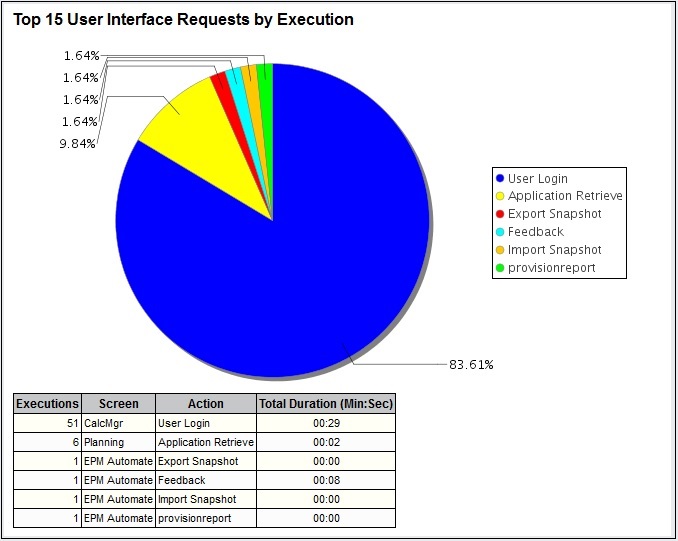
Enhancements to the Activity Report
To help you understand the processes that may impact the service performance, Oracle has updated the Activity Report, which now contains information on the top 15 user interface requests that took the most time to execute.
You can now use a REST API to copy an application snapshot. See “Copy Application Snapshot” in Oracle Cloud REST API for Oracle Enterprise Performance Management Cloud.
The sign in process no longer requires you to select an identity domain while accessing the service. To simplify the sign in process, the name of your identity domain is now derived from the URL that you specify.
NOTE: This is an Oracle Cloud enhancement, which may already have been rolled out through Oracle Cloud data centers.
Support for Deleting Dimensions in Dimension Management
You now can delete dimensions from within the Dimension Management feature of Profitability and Cost Management Cloud. Dimensions can be deleted only in the early stages of model development, before any calculation rules or analytic artifacts are created. If you create a few rules and decide you need to delete a dimension, you must delete those calculation rules (and any analytic artifacts) first.
Following any dimension updates, you must log out of Oracle Profitability and Cost Management Cloud and then log in again to see the updates in Dimension Management or elsewhere in the service.
Note that editing any dimension using Dimension Management disables the application because when you modify the dimension metadata, the application must be revalidated. After your editing session is complete, run the Validate and Enable action from the Application Actions menu to enable the application again.
Support for Editing Multiple Alias Tables in Dimension Management
You now can edit aliases for more than one alias table if the application has multiple alias tables. When a member is selected in the Dimension Management feature of Profitability and Cost Management Cloud, all aliases for that member are displayed in the properties pane. You can enter a separate alias in each edit box. For more information, see “Viewing Application Dimensions” in Administering Oracle Profitability and Cost Management Cloud.
NOTE: The previous note about updating dimensions applies here as well. You must log in and out to see the updates and you must run the Validate and Enable action from the Application Actions menu to re-enable the application.
Sorting Rows and Columns in Analysis Views
You can use analysis views as simple reports. To make this more convenient, you now can sort rows and columns separately by database outline order, ascending alphabetical order, or descending alphabetical order. For details, see “Creating and Editing Analysis Views” in Administering Oracle Profitability and Cost Management Cloud.
Making Multiple Copies of Rules
You now can use a spinner control in the Copy Rule screen to select how many copies of the rule to make, up to 100 copies at a time. For more information, see “Managing Rules” in Administering Oracle Profitability and Cost Management Cloud.
Oracle Profitability and Cost Management Cloud Supports Smart View Private Connections
Currently, Oracle Profitability and Cost Management Cloud supports only Private Connections with Smart View. For details, see “Accessing Smart View” in Chapter 2 of Getting Started with Oracle Profitability and Cost Management for Administrators and Getting Started with Oracle Profitability and Cost Management for Users.
Avoid Special Characters in Artifact Names, Including Calculation Rules
Oracle Profitability and Cost Management Cloud does not allow special characters in artifact names, including calculation rules. If you are migrating an application from on-premise Profitability and Cost Management, you must remove any special characters from rule names before you perform the migration.
Give Us Documentation Feedback
We welcome your comments and suggestions to improve the content of the What's New document and the product documentation. Please send us your feedback at EPMdoc_ww@oracle.com. State that you are inquiring or providing feedback, and indicate for which EPM Cloud service as well as the monthly patch cycle, in the body or title of the email.
File-Based Integration of Data Management with Oracle Fusion Financials Cloud
Oracle Fusion Financial Cloud Budgetary Control and Encumbrance Accounting is now fully integrated with Data Management.
This enhancement brings the integration of Oracle Fusion Financials Cloud with Oracle Enterprise Performance Management Cloud on par with the current, out of the box, file-based integration. As a result, the file-based integration will be phased out starting the September update to the service.
If you are using file-based integration between Oracle Fusion Financials Cloud and Oracle Enterprise Performance Management Cloud, Oracle recommends that you adopt this new integration as soon as possible.
| Defect |
Description |
|---|---|
| 26614891 |
In Financial Reporting, the vertical scroll bar is now displayed correctly in the "Respond to Prompts" popups. |
| 26583972 |
When importing a Financial Reporting report in Smart View as Fully-Formatted, the values for cells which have replacement text that contains both numeric and non-numeric characters are no longer stripped of the non-numeric characters. |
| 26550929 |
In Profitability and Cost Management, navigation improvements within the Calculation screen have produced performance gains. |
| 26540610 |
In Financial Reporting Web Studio, if you have a grid with more than 20 columns and you click Save after making a change, you are no longer returned to the far left of the report. |
| 26421993 |
In Financial Reporting Web Studio, when a default member for a prompt is left blank, you no longer receive an "unable to process request" error. |
| 25780133 |
When building reports in Financial Reporting Web Studio, custom text in column headers is now displayed correctly in the report output. |
Oracle Profitability and Cost Management Cloud, October Update
Announcements and New Features
New EPM Automate Utility Version
A new version of the EPM Automate Utility is available with this update. This version includes updates to the login command, which now accepts internet proxy server domain, user name, and password as optional parameters. This enhancement enables you to use the EPM Automate utility in corporate network environments with internet proxy server configuration that require users to authenticate with the proxy server before establishing communication with resources outside the corporate network.
You must install this version of the utility to use the updated command. See these sections in Working with EPM Automate for Oracle Enterprise Performance Management Cloud:
- Installation instructions: Installing the Utility
- Instructions to run commands: Command Reference
Express Editing for Calculation Rules
You can use the new Rules Express Editing screen to do the following:
- Replace or remove members in multiple rules with one Find and Replace action
- Add members to dimensions in a tab for multiple rules
By acting on multiple rules at once, these features enable you to create models more efficiently. For more information, see “Express Editing for Rules” in Administering Profitability and Cost Management Cloud.
Using Aliases in Program Documentation Reports
You now can choose whether to show dimension member names or aliases in Program Documentation Reports. For instructions, see “Generating Oracle Profitability and Cost Management Cloud System Reports” in Administering Profitability and Cost Management Cloud.
Shared Dimension Members Are Visible in Dimension Management
The names of shared dimension members now display in the Dimension screen in italic font. You can also create new shared members as long as they are Level0. You cannot add members as children of shared members by reparenting. For details, see “Viewing and Editing Dimensions with Dimension Management” in Administering Profitability and Cost Management Cloud.
Applications Are Always Enabled
Before the 17.10 refresh of Profitability and Cost Management Cloud, dimension changes and updates caused the application to enter a disabled state. To reenable it, you needed to validate it and redeploy it. Now, applications are always enabled. Following dimension updates, you must redeploy the application. Validation is included in the deployment. If the application fails validation, the error is displayed in the Job Library and you cannot proceed with deployment until any errors are fixed.
Set All Dimensions for a Point of View at One Time
In Financial Reporting Web Studio, you can now set all the dimensions for a point of view at one time without having to open and close multiple windows.
Check this list again for the latest information when the update is applied to your test environment.
| Defect |
Description |
|---|---|
| 26718035 |
Dashboards in the Oracle Cloud My Services portal now correctly display the size of the service instance data on the disc |
| 26784648 |
When importing a Financial Reporting report in Smart View as Fully-Formatted, the values for cells which have replacement text that contains both numeric and non-numeric characters are no longer stripped of the non-numeric characters. |
| 25559995 |
In Smart View, The error, "Member does not exist for the specified cube," no longer occurs when performing drill-through to FDMEE sources. |
| 26393289 |
You no longer receive an error when selecting the members of each dimension in Financial Reporting Web Studio. |
| 26774110 |
In Profitability and Cost Management Cloud, those with the User role now can submit data with Smart View but those with the Viewer role cannot. |
| 26681448 |
When updating an attribute dimension member using dimension management in Profitability and Cost Management Cloud, the modified data is now updating correctly. |
Oracle Profitability and Cost Management Cloud, November Update
Announcements and New Features
Express Editing for Calculation Rules
You can use the new Rules Express Editing screen to do the following:
- Replace or remove members in multiple rules with one Find and Replace action
- Add members to dimensions in a tab for multiple rules
- Copy rules
- Enable and disable rules
By acting on multiple rules at once, these features enable you to create models more efficiently. For more information, see “Express Editing for Rules” in Administering Profitability and Cost Management Cloud.
Adding Alias Tables with Dimension Management
You now can add alias tables with a new Aliases tab in the Dimension Management screen. For instructions, see “Adding Alias Tables” in Administering Profitability and Cost Management Cloud.
A New REST API Automatically Generates Program Documentation Reports
A new REST API, Generate Program Documentation Report, generates this report in the Profitability and Cost Management Cloud outbox. The API description is as follows:
| Description |
Use this operation to generate Program Documentation reports for a given Profitability and Cost Management application. This generates a report with the name HPCMMLProgramDocumentationReport_{ApplicationName)_{POV}.pdf in the profitoutbox folder that can be downloaded from the outbox folder using File Explorer. fileType is an optional parameter. It is not given. By default, pdf is used and files are generated in PDF format. useAlias is an optional parameter. It is not given. By default, false is used and the report does not include aliases. |
| Action Type |
GET |
| Request URI |
https://<SERVICE_NAME>-<TENANT_NAME>.<dcX>.oraclecloud.com/epm/rest/{api_version}/applications/{application}/povs/{pov}/ programDocumentationReport?queryParameter={"fileType":"PDF","useAlias":"true"} |
| Example Request Payload |
https://<SERVICE_NAME>-<TENANT_NAME>.<dcX>.oraclecloud.com/epm/rest/v1/applications/BksML30/povs/2016_January_Actual/programDocumentationReport?queryParameter={"fileType":"PDF","useAlias":"true"} |
| Response |
{ "type": "Profitability", "status": 0, "statusMessage": "Success", "details": " HPCMMLProgramDocumentationReport_BksML30_2016_January_Actual.pdf generated successfully in the outbox folder.", "links": [{ "href": " https:// <SERVICE_NAME>-<TENANT_NAME>.<dcX>.oraclecloud.com/epm/rest/v1/applications/BksML30/povs/2016_January_Actual/programDocumentationReport", "rel": "self", "data": { "useAlias": false }, "action": "GET" }] } |
| Process Type |
Synchronous |
REQUEST PARAMETERS
| Parameter |
Description |
Example |
| application |
Application Name |
|
| pov |
POV member group |
FY14_JUN_Actual_Working |
| fileType (Optional) |
File Extension |
PDF, XML, WORD, EXCEL, HTML |
| useAlias (Optional) |
Boolean value to specify whether to useAlias |
true, false |
For more information about using REST APIs, see REST API for Oracle Enterprise Performance Management Cloud.
Check this list again for the latest information when the update is applied to your test environment.
| Defect |
Description |
|---|---|
| 26789795 |
Profitability and Cost Management Cloud trace allocation reports are now generated as expected. |
| 26754786 |
Aliases now are displaying correctly in model views and rule set contexts. |
| 26753971 |
You can now load multiple dimension files with EPM Automate. |
Oracle Profitability and Cost Management Cloud, December Update
Announcements and New Features
You can now create a dimension and set its properties in Dimension Management. To do this, select Application, then Dimension Management, and then click +. For more information, see "Creating Dimensions with Dimension Management" in Administering Oracle Profitability and Cost Management Cloud.
View Dimension Properties on the Dimension Management Page
To quickly view the properties of a dimension, a new Inspect button has been added to the Dimension Management page which expands the Properties pane. To expand the Properties pane, highlight or select a dimension on the Dimension Management page, and then click Inspect. For more information, see "Viewing Application Dimensions" in Administering Oracle Profitability and Cost Management Cloud.
Add Multiple Dimension Members Using the Rules Express Editing Screen
You can now add multiple members to a rule using the Rules Express Editing screen. You can select members in the Express Add Member dialog by typing the member names, selecting them from the list which displays as you type, or pressing enter on an exact match; or click the search icon to use the member selector. Selected members are displayed in the box above the search box. You can also select members for deletion from the list so they are not added to the rule. For more information, see “Adding Members to Rules” in Administering Oracle Profitability and Cost Management Cloud.
Inspect Rule Detail Enhancement
When using Rules Express Editing, you can now inspect the detail of a rule by highlighting it, and then clicking the Inspect icon. The Inspect region stays open and refreshes as you highlight a different rule.
The new option Stop After Rule calculation rule option enables you to specify a stopping point for a calculation job. All rules up to and including the specified rule will run and the calculation will stop at that point. For more information, see “Performing Oracle Profitability and Cost Management Cloud Calculations” in Administering Oracle Profitability and Cost Management Cloud.
New Smart View for Office Version
Smart View for Office 11.1.2.5.720 will be available by early December. This version includes new features such as:
- Support using a connection string with HypUIConnect, instead of a friendly name. Friendly names are still supported (all services)
- Enhanced extension update workflow, allowing you to select a server or service from which to check for updated extension downloads
- Support for additional data types with HsGetValue: Smart Lists, text, and date
- Option to automatically resize column width and row height on cells in forms and ad hoc grids
This release also fixes a number of defects.
The Smart View 11.1.2.5.720 Readme, available on the Help Center at the time of release, contains a complete list of features and defects addressed in this version. You must install this version to ensure compatibility with the December 2017 update features and to access the new functionalities. See "Downloading and Installing Clients" in Getting Started with Oracle Enterprise Performance Management Cloud for Users for instructions.
New EPM Getting Started Guides
Starting with this update, Service Administrator and end user “getting started” information for all EPM Cloud Services is available from these new guides:
- Getting Started with Oracle Enterprise Performance Management Cloud for Administrators
- Getting Started with Oracle Enterprise Performance Management Cloud for Users
Getting Started with Oracle Enterprise Performance Management Cloud for Administrators contains information on the tasks that Service Administrators can perform with EPM Cloud Services. This guide, which provides common administrative information for all EPM Cloud services, is now your primary source for tasks related to EPM Cloud administration, including managing users and roles, setting up single sign-on, and backing up and restoring environments. This guide replaces these guides:
- Using Oracle Planning and Budgeting Cloud
- Getting Started with Oracle Financial Consolidation and Close Cloud
- Getting Started with Account Reconciliation Cloud for Administrators
- Getting Started with Oracle Profitability and Cost Management Cloud for Administrators
- Getting Started with Oracle Tax Reporting Cloud
- Getting Started for Administrators for Oracle Enterprise Performance Reporting Cloud
Getting Started with Oracle Enterprise Performance Management Cloud for Users introduces end users to Oracle EPM Cloud and provides information that enables them to quickly become proficient. This guide replaces these guides:
- Getting Started with Account Reconciliation Cloud for Users
- Getting Started with Oracle Profitability and Cost Management Cloud for Users
- Getting Started for Users for Oracle Enterprise Performance Reporting Cloud
Links in the Cloud Help Center and Oracle Learning Library have been modified to direct users to these guides. Please change your personal bookmarks and shortcuts so that they point to these new guides.
Check this list again for the latest information when the update is applied to your test environment.
| Defect |
Description |
|---|---|
| 26980895 |
The Dimension Editor now allows more than 1000 characters in the Formula field. |
| 26789795 |
Profitability and Cost Management Cloud trace allocation reports are now generated as expected when shared members are present. |
| 25985928 |
Dynamic ranges on graphs now work the same in both the Cloud and on-premises versions of Financial Reporting Web Studio. (Previously, reports set to vary the y-axis range based on the data set resulted in graphs with too wide or too narrow of a data range.) |
| 26478186 |
Custom fonts uploaded with Financial Reporting Web Studio are now correctly stored |
| 26719130 |
The problem with security when running a report from the Explore Repository in Financial Reporting Web Studio has been fixed. (Previously, if you had "Apply Application Security to FR POV and Prompt" set to "true", you were still able to see the entire hierarchy) |
| 26759004 |
You can now add labels to charts in Financial Reporting Web Studio. |
| 26975317 |
When you export multiple reports from Financial Reporting Web Studio into Excel, and then view the reports in HTML, an error no longer occurs and the reports display correctly. |
| 26995802 |
In Financial Reporting Web Studio, selecting an account using the member selection now works correctly. |
| 27045036 |
The HTML preview of a Financial Reporting report with multiple grids now displays correctly. |
| 27084462 |
Importing an application no longer fails due to calculation rules and model views that have a dimension without any member selections. |
| 27132200 |
The Artifact Snapshot backup taken during the Automated Maintenance Window (AMW) now always includes all calculation rules in the exported snapshot. |
---

Copyright © 2017, Oracle and/or its affiliates. All rights reserved.
This document is provided for information purposes only, and the contents hereof are subject to change without notice. This document is not warranted to be error-free, nor subject to any other warranties or conditions, whether expressed orally or implied in law, including implied warranties and conditions of merchantability or fitness for a particular purpose. We specifically disclaim any liability with respect to this document, and no contractual obligations are formed either directly or indirectly by this document. This document may not be reproduced or transmitted in any form or by any means, electronic or mechanical, for any purpose, without our prior written permission.
Oracle and Java are registered trademarks of Oracle and/or its affiliates. Other names may be trademarks of their respective owners.
Intel and Intel Xeon are trademarks or registered trademarks of Intel Corporation. All SPARC trademarks are used under license and are trademarks or registered trademarks of SPARC International, Inc. AMD, Opteron, the AMD logo, and the AMD Opteron logo are trademarks or registered trademarks of Advanced Micro Devices. UNIX is a registered trademark of The Open Group.

2017