
Revision History
This document will continue to evolve as existing sections change and new information is added. All updates are logged below, with the most recent updates at the top.
| Date |
What’s Changed |
Notes |
|---|---|---|
| 15 JUL 2016 |
Track Person Number in the Chart of Accounts |
Removed feature that was not part of the release. |
| 08 JUN 2015 |
Initial Document Creation |
This guide outlines the information you need to know about new or improved functionality in Oracle Project Portfolio Management Cloud Release 10. Each section includes a brief description of the feature, the steps you need to take to enable or begin using the feature, any tips or considerations that you should keep in mind, and the resources available to help you.
We welcome your comments and suggestions to improve the content. Please send us your feedback at oracle_fusion_applications_help_ww_grp@oracle.com.
Some of the new Release 10 features are automatically available to users after the upgrade and some require action from the user, the company administrator, or Oracle.
The table below offers a quick view of the actions required to enable each of the Release 10 features.

Oracle Fusion Project Foundation includes common components that are shared across products within Oracle Project Portfolio Management cloud. It includes the basic project plan structure and components such as resource breakdown structures, rate schedules, pricing, burdening, and cross-charge processing.
Simplified Reference Role Model
Simplified role definitions for security reference implementation make security role administration and customization easier. Roles were simplified to achieve these objectives:
- Have roles only when multiple jobs share a common set of 5 or more related privileges.
- Use the same job roles and abstract roles as release 9.
- Use the set of privileges for each job and abstract role as release 9.
- Reduce the number of levels between a job and its privileges.
The following are examples of role simplification for the Project Execution Management and Project Financial Management offerings.
In Project Execution Management release 9, the Resource Manager job role had one duty called Project Resource Management Duty. This duty had privileges that allowed the resource manager to perform tasks such as managing project resource requests, assigning and managing project resource assignments, monitoring the utilization of resources and resource pools, and reviewing analytics. With role simplification, all privileges of the Project Resource Management Duty are now directly assigned to the Resource Manager job role and the duty is removed.
In Project Financial Management release 9, various privileges for setup tasks were organized by product-based duty roles such as the Project Costing Administration Duty, Project Foundation Billing Administration Duty, and Project Foundation Costing Administration Duty. After role simplification, these administrative duty roles are consolidated into the Project Financial Application Administration Duty. In addition, this new administration duty maps directly to the configuration offering.
Steps to Enable
Execute the steps in the Migrating to the Simplified Reference Role Model section of the Upgrade Guide for Oracle Cloud Applications Security white paper.
Tips and Considerations
The upgrade is not applied to customized roles to ensure that authorizations in your environment do not change.
Key Resources
- Upgrade Guide for Oracle Cloud Applications Security white paper.
- Security Reference Manual (Release 10).
- Release Training for Oracle Fusion Applications Release 10 related to role simplification.
- Oracle Fusion Applications Security reports that are available from the Applications Security Console.
Track Project Number in the Chart of Accounts
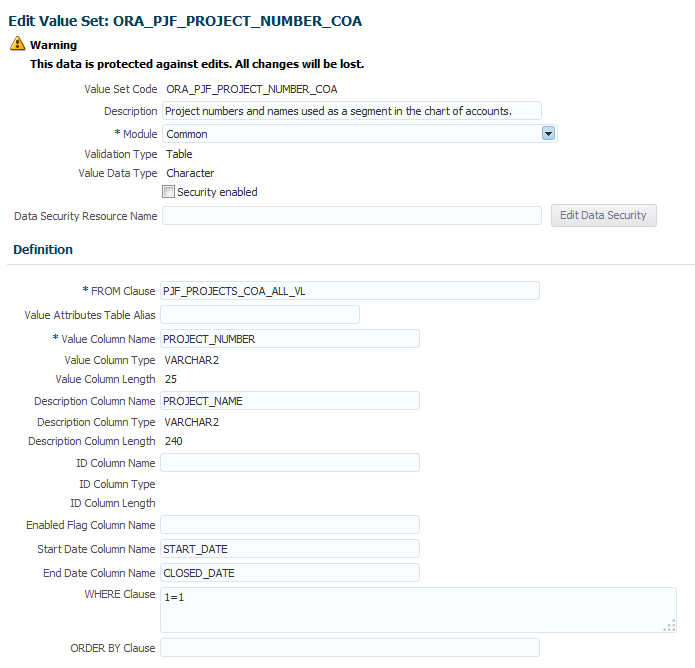
You can add a project segment in your chart of accounts using the table-validated value set Project Number for Chart of Accounts. You don’t need to create and maintain an independent value set because the project number is selected directly from the project tables.
The screen capture below shows the definition of the table-validated value set.
Steps to Enable
This feature is enabled by default.
Tips and Considerations
- Using table-validated value sets in your chart of accounts prevents you from utilizing the full chart of accounts functionality, such as data security, reporting, and account hierarchy integration.
- Project information may be too detailed to track in the general ledger. When defining the chart of accounts, consider using alternatives such supporting references for project information.
Key Resources
- Release Training for Oracle Fusion Applications Release 10: Oracle Fusion Project Foundation Enhancements.
- Applications Help: Chart of Accounts Values Sets: Critical Choices
- Applications Help: Creating a Value Set for Your Chart of Accounts: Example
- Applications Help: Chart of Accounts: How Its Components Fit Together
Oracle Fusion Project Costing captures commitments and costs from across the Fusion applications as well as supporting third-party integrations. The unique cost collection and processing needs of different sources are streamlined to provide timely insight into validated project costs.
Analyze Capital Assets Using Oracle Transactional Business Intelligence
Project accountants can use the Project Costing - Assets Real Time subject area in Oracle Transaction Business Intelligence to review and analyze capital projects. Use the subject area to:
- Identify possible exceptions by comparing expensed and capitalizable costs.
- Review asset details and see how the assets are assigned to project and tasks.
- Track capitalizable costs as they are grouped into asset lines, assigned to assets, transferred to Oracle Fusion Assets, and capitalized.
- Analyze amounts charged to construction-in-progress accounts and drill down to the project, task, asset line, expenditure item, and cost distribution line details.
The following screen capture illustrates the Project Costing - Assets Real Time subject area:
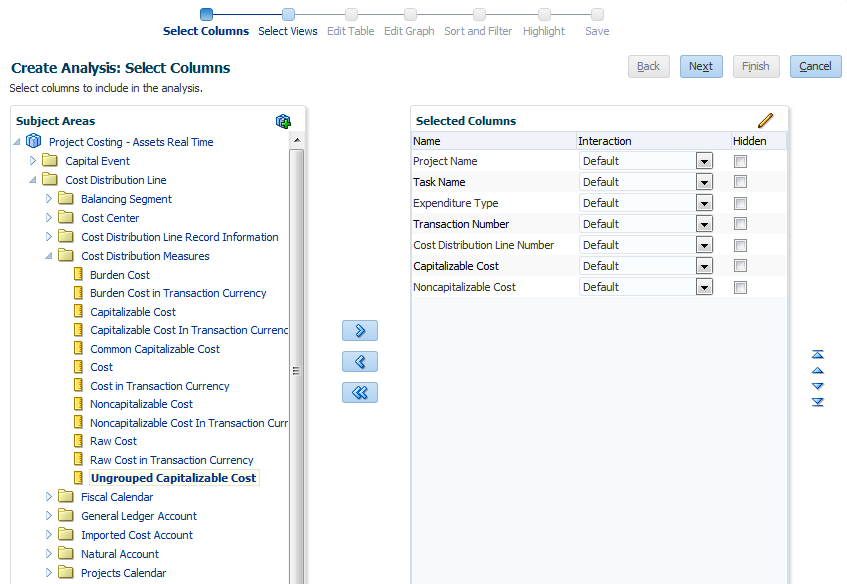
Project Costing - Assets Real Time Subject Area
Project accountants can use these sample reports to assist in creating their own custom reports:
- Uncapitalized Cost for Capitalizable Tasks: Review charges that are expensed for capitalizable tasks to ensure that costs are classified correctly and that expenses charged to the task are appropriate.
- Capital Assets: Review the assets created for a project. For example, the project accountant may need to ensure that all assets are defined and that the asset attributes are correct.
- Capital Asset Assignments: Review how capitalized costs for a project are collected and capitalized.
- Capital Asset Lines: Perform detailed analysis to determine which expenditure items and cost distribution lines are allocated and assigned to an asset in a given period.
- Capital Expenditures: View and understand where expenditures are in the capitalization process. This information helps identify activities that must be performed or issues that must be addressed.
Steps to Enable
This feature is enabled by default.
Tips and Considerations
- You can find the reports in the catalog: Shared Folders > Projects > Project Financials Sample Reports.
- The data in Oracle Transaction Business Intelligence is secured by business unit. You must have the Project Accountant role for the selected business unit to access the asset information.
Key Resources
- Creating Analytics and Reports: http://docs.oracle.com/cloud/latest/projectcs_gs/FACRA/toc.htm
- Using Analytics and Reports: http://docs.oracle.com/cloud/latest/projectcs_gs/FAUAR/toc.htm
Oracle Fusion Project Billing enables organizations to bill and recognize revenue from their contract customers in an efficient and accurate manner. Invoices are generated automatically based on the specified billing cycle and project managers can quickly review their respective project invoices and approve them over e-mail. Both revenue and invoice amounts are calculated accurately using bill rates specified on the contract. Native integration with Oracle Fusion Financials allows for greater control over revenue accounting and unbilled receivables.
Analyze Billed and Unbilled Project Cost by Contract Using Oracle Transactional Business Intelligence
Enterprise contract information is now added as a dimension to the Project Costing - Actual Cost Real Time subject area to provide the ability to join the Project Costing and Billing Real Time subject areas. This feature enables you to build reports to:
- Monitor billable project cost that was not billed, or, had revenue recognized for it.
- Analyze expenditure items and billing events that are billed.
- Analyze contract funding limits by reviewing unbilled billable cost.
- Review margin by comparing revenue against cost for a particular project task.
The following screen capture illustrates the Project Costing - Actual Cost Real Time subject area.

Project Costing - Actual Cost Real Time Subject Area
Steps to Enable
This feature is enabled by default.
Tips and Considerations
The data in Project Costing - Actual Cost Real Time subject area in Oracle Transaction Business Intelligence is secured by business unit. You must have the Project Accountant role for the selected business unit to access the cost and contract information.
Key Resources
Release Training for Oracle Fusion Applications Release 10.
Project Financial Management applications provide the ability to analyze project performance using Oracle Smart View for Microsoft Office. Project accountants and project managers can perform data analysis on real-time project data.
Analyze Project Performance Using Oracle Smart View for Office
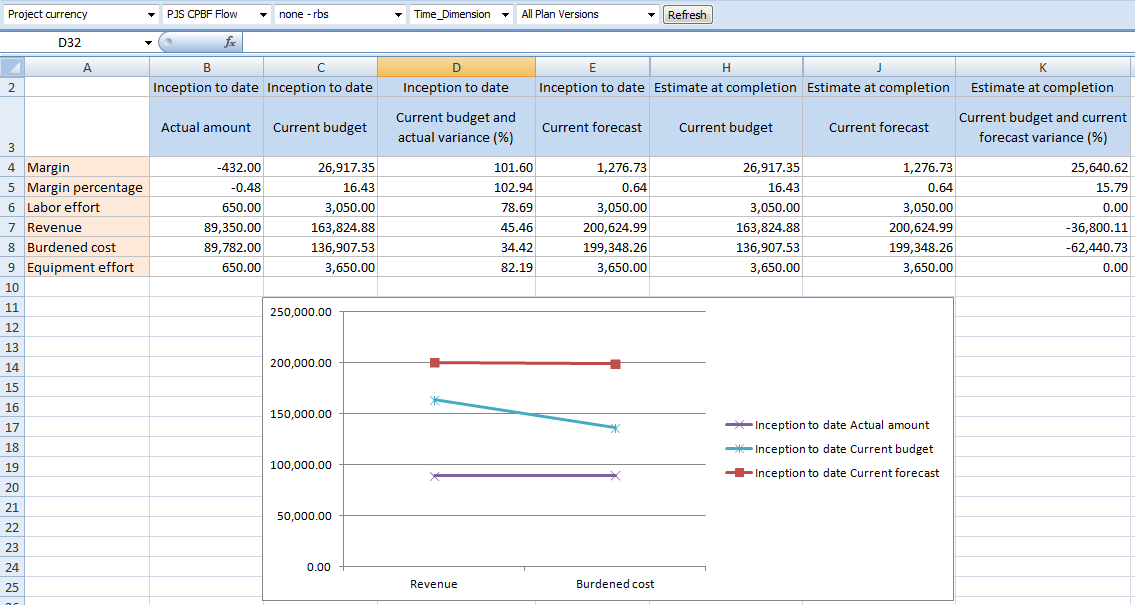
Perform data analysis in real time using Oracle Smart View for Office in Project Financial Management applications. Analyze project, task, and resource assignment data by period for planned and actual costs.
The integration with Microsoft Office leverages the capabilities of Microsoft Excel to perform real-time data analysis.
Create custom reports, save as templates, and share with stakeholders.
The screen capture below represents a simple report to compare the budget and actual cost for each task of a project.
Steps to Enable
To install and configure the Smart View client, you must have Oracle Essbase installed and configured to accept Smart View connections. You can get the Smart View shared connection URL and the login credentials from your system administrator.
- Download and install Oracle Smart View for Office from http://www.oracle.com/technetwork/middleware/epm/downloads/smart-view-1112x-1594693.html
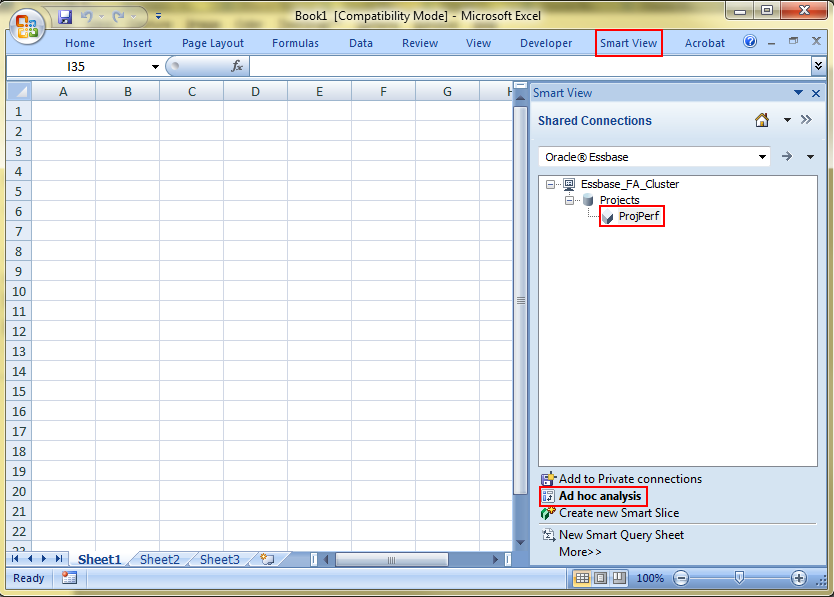
- Open Microsoft Excel and verify that you can see the Smart View tab in the ribbon.
- In the Smart View tab, click Options.
- Enter the Smart View shared connection URL in the Shared Connections URL field. For example, https://<host>:<port>/workspace/SmartViewProviders.
- Click OK.
- In the Smart View tab, click Panel. This opens the Smart View panel.
- In the Smart View panel, click Shared Connections.
- Sign in with the user name and password provided by your administrator.
- In the Smart View panel, select Oracle Essbase from the Shared Connections list.
- Click the Expand to expand the Essbase_FA_Cluster node.
- Then expand the Projects application.
- Click ProjPerf to display the connection options at the bottom of the panel.
- Click Connect to display the list of reporting options.
- Click Ad hoc analysis to populate the default dimensions in Smart View.
Tips and Considerations
You must have the Project Accountant or Project Manager roles. The data is secured by project and expenditure business unit.
Key Resources
- Creating Analytics and Reports: http://docs.oracle.com/cloud/latest/projectcs_gs/FACRA/toc.htm
- Using Analytics and Reports: http://docs.oracle.com/cloud/latest/projectcs_gs/FAUAR/toc.htm
Oracle Fusion Project Management extends project planning, management, and scheduling capabilities to all individuals within the enterprise who are required to manage project-based work. Project managers can engage with team members to develop tasks, resolve issues, report progress, and monitor the status of the project to ensure that objectives are realized.
Integrate Project and Team Member Events Using a Web Service
Integrate project and team member events that are tracked in other applications with Project Execution Management applications. Use web services to create, update, delete, and view project-specific events or nonproject calendar events such as training and paid time off.
For example, if resources enter their upcoming absences in a third-party application, then you can use the services to transfer the absence information to Oracle Fusion Project Management. Project managers can see upcoming team member events on the project calendar. These resource events also reduce the available capacity for the resources to fulfill future project assignments and appear in the schedule view when resource managers search for and evaluate resources.
The Project and Resource Calendar Event service has the following operations:
- createCalendarEvent: Use this operation to create project or resource calendar events.
- readCalendarEvent: Use this operation to read project or resource calendar event information.
- deleteCalendarEvent: Use this operation to delete a project or resource calendar event information.
- updateCalendarEvent: Use this operation to update project or resource calendar events.
The following screen capture illustrates reviewing the Project and Resource Calendar Event service information in the Oracle Enterprise Repository.
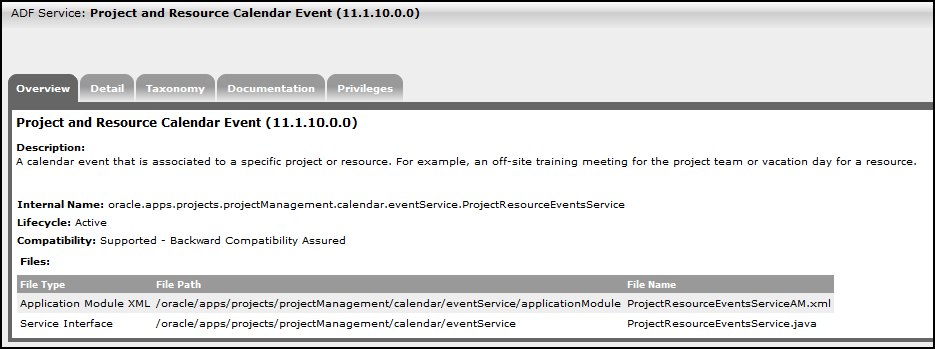
Viewing Information in the Oracle Enterprise Repository
Steps to Enable
Review information regarding the service in the Oracle Enterprise Repository to learn more about how to use the service:
- Access the Oracle Enterprise Repository.
- Enter Project and Resource Calendar Event as the search term.
- Select ADF Service as the type.
- Click Search.
- Select the row with the service.
- Review the service details.
The service is secured with the Manage Project Resource Calendar Events Service privilege (PJT_MANAGE_PROJECT_RESOURCE_CALENDAR_EVENTS_SERVICE). The privilege rolls up to the Project Management Administration Duty (PJT_PROJECT_MANAGEMENT_ADMINISTRATION_DUTY).
Key Resources
Oracle Enterprise Repository > ADF Service > Project and Resource Calendar Event
Analyze Project Plans with Sample Reports in Oracle Transactional Business Intelligence
Analyze project plans with sample reports that you can use as a model for custom reports. The sample reports display planned, actual, and remaining costs for projects filtered by project manager.
The following sample reports are available for the Project Management - Project Planning Real Time subject area:
- Actual Project Labor Margin: Displays the actual hours, actual cost, billed amount, margin, and margin percentage for the selected project.
- Planned and Actual Project Labor Comparison: Displays the planned and actual margin, margin percentage, and margin variance for the selected project.
- Project Cost Variance: Displays the labor, expense, and total planned cost, actual cost, and cost variance by task for the selected project.
The following screen capture illustrates the Project Cost Variance sample report.
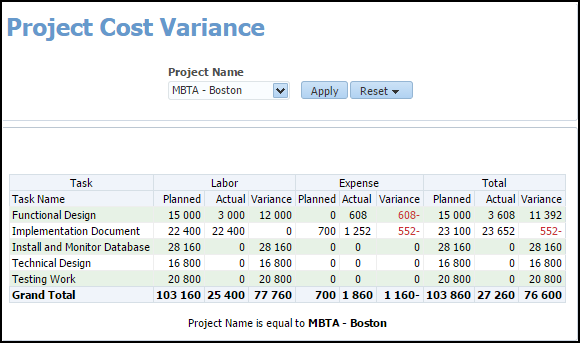
Example of a Sample Report: Project Cost Variance
Steps to Enable
This feature is enabled by default.
Tips and Considerations
- You must have the Project Execution role and be the project manager on a project to view information about projects on these sample reports.
- You can find the reports in the catalog: Shared Folders > Projects > Project Execution Sample Reports.
Key Resources
- Release Training for Oracle Fusion Applications Release 10: Oracle Fusion Project Management Enhancements: Project Execution Reporting.
- Creating Analytics and Reports: http://docs.oracle.com/cloud/latest/projectcs_gs/FACRA/toc.htm
- Using Analytics and Reports: http://docs.oracle.com/cloud/latest/projectcs_gs/FAUAR/toc.htm
Analyze Project Work Items Using Oracle Transactional Business Intelligence
Use the Project Management - Project Work Items Real Time subject area to analyze and report on work items and deliverables associated with project tasks. For example, report on work items for a project manager or track past-due deliverables. View real-time work item information by using dimensions such as project, task, task hierarchy, and work item details such as creator, owner, priority, status, and type.
The following screen capture illustrates the Project Work Items Real Time subject area.
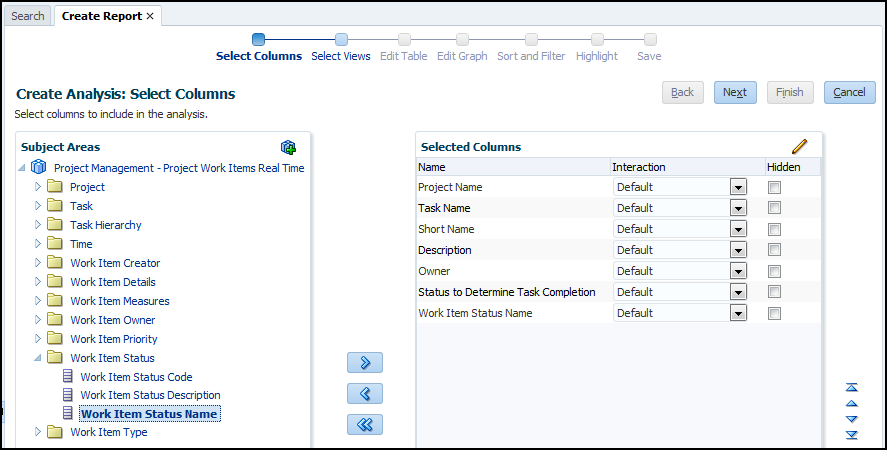
Project Work Items Real Time Subject Area
Steps to Enable
This feature is enabled by default.
tips and considerations
This subject area provides the ability to report on project deliverables, as well as work items associated with proposals, concepts, and requirement specifications in Oracle Fusion Innovation Management.
Key Resources
- Release Training for Oracle Fusion Applications Release 10: Oracle Fusion Project Management Enhancements: Project Execution Reporting.
- Creating Analytics and Reports: http://docs.oracle.com/cloud/latest/projectcs_gs/FACRA/toc.htm
- Using Analytics and Reports: http://docs.oracle.com/cloud/latest/projectcs_gs/FAUAR/toc.htm
Analyze Work Items and Deliverables with Sample Reports in Oracle Transactional Business Intelligence
Analyze work items and deliverables with sample reports that you can use as a model for custom reports. The sample reports display outstanding work items and project deliverables by age to help you prioritize and escalate work and follow up with owners.
The following sample reports are available for the Project Management - Project Work Items Real Time subject area:
- All Work Items in My Projects Analysis: Displays all work items for the projects managed by the project manager.
- Deliverables Not Started in My Project Analysis: Displays all project deliverables that are yet to start for the projects managed by the project manager.
- Deliverables Due in My Projects Analysis: Displays project deliverables that are overdue or due in the immediate future for projects managed by the project manager.
The following screen capture illustrates the Deliverables Not Started in My Project Analysis sample report.

Example of a Sample Report: Deliverables Not Started in My Projects Analysis
Steps to Enable
This feature is enabled by default.
Tips and Considerations
- You must have the Project Execution role and be the project manager on a project to view information about work items and project deliverables on these sample reports.
- You can find the reports in the catalog: Shared Folders > Projects > Project Execution Sample Reports.
Key Resources
- Release Training for Oracle Fusion Applications Release 10: Oracle Fusion Project Management Enhancements: Project Execution Reporting.
- Creating Analytics and Reports: http://docs.oracle.com/cloud/latest/projectcs_gs/FACRA/toc.htm
- Using Analytics and Reports: http://docs.oracle.com/cloud/latest/projectcs_gs/FAUAR/toc.htm
Analyze the Project Hierarchy with Sample Reports in Oracle Transactional Business Intelligence
Analyze the project hierarchy with sample reports that you can use as a model for custom reports. The sample reports display the enterprise project structure in a hierarchical layout with the planned and actual cost variances.
The following sample reports are available for the Project Management - Project Planning Real Time subject area:
- Remaining Project Hours: Displays the effort in hours, actual hours, and remaining hours for all projects using the project hierarchy.
- Total and Actual EPS Node Cost: Displays the actual and total costs for the nodes under the enterprise project structure.
- Total Project Hours: Displays the planned labor hours for the primary resource roles in the project hierarchy.
The following screen capture illustrates the Remaining Project Hours sample report.
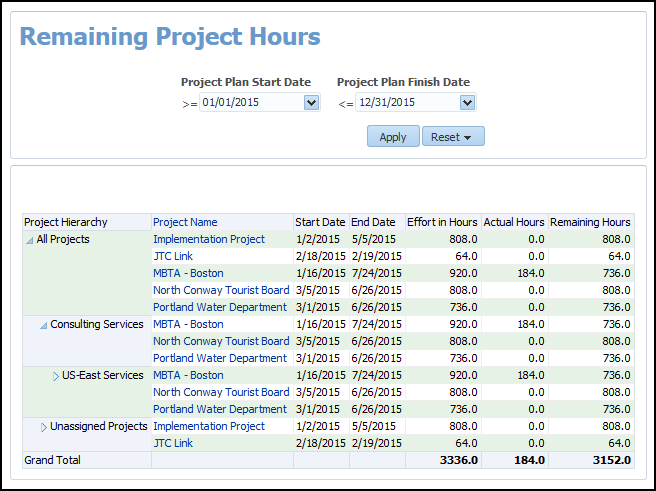
Example of a Sample Report: Remaining Project Hours
Steps to Enable
This feature is enabled by default.
Tips and Considerations
- You must have the Project Executive role to see information about projects on these sample reports.
- You can find the reports in the catalog: Shared Folders > Projects > Project Execution Sample Reports.
Key Resources
- Release Training for Oracle Fusion Applications Release 10: Oracle Fusion Project Management Enhancements: Project Execution Reporting.
- Creating Analytics and Reports: http://docs.oracle.com/cloud/latest/projectcs_gs/FACRA/toc.htm
- Using Analytics and Reports: http://docs.oracle.com/cloud/latest/projectcs_gs/FAUAR/toc.htm
Analyze Project Resources Using Oracle Transactional Business Intelligence
Use the Project Management - Project Resources Real Time subject area to analyze and report on project resource details such as resource assignment dates, allocation percentage, and bill and cost rates. View real-time project resource information by using dimensions such as resource class, resource assignment status, and project role.
The following screen capture illustrates the Project Resources Real Time subject area.
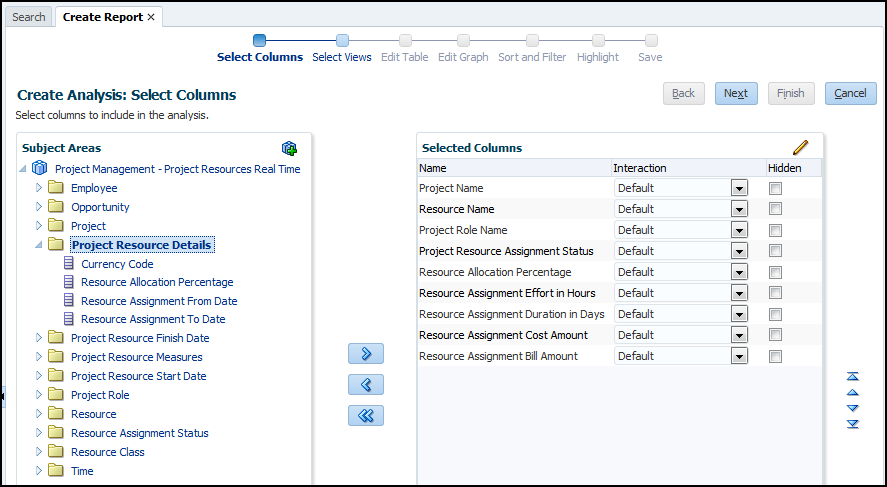
Project Resources Real Time Subject Area
Steps to Enable
This feature is enabled by default.
Tips and Considerations
None.
Key Resources
- Release Training for Oracle Fusion Applications Release 10: Oracle Fusion Project Management Enhancements: Project Execution Reporting.
- Creating Analytics and Reports: http://docs.oracle.com/cloud/latest/projectcs_gs/FACRA/toc.htm
- Using Analytics and Reports: http://docs.oracle.com/cloud/latest/projectcs_gs/FAUAR/toc.htm
Analyze Project Resources with Sample Reports in Oracle Transactional Business Intelligence
Analyze project resources with sample reports that you can use as a model for custom reports. The sample reports display resources that are allocated to the project, compare resource allocation to their task assignments, and display tasks with dates outside the resource assignment dates on the project.
The following sample reports are available for the Project Management - Project Resources Real Time subject area:
- Resources Currently on My Projects: Displays all resources who are currently assigned to projects managed by the project manager.
- Placeholder Resources on My Projects: Displays all placeholder or temporary resources who are listed on projects managed by the project manager.
- Resource Allocation and Task Assignment Comparison by Week: Displays the weekly comparison of allocated and total task assignment hours for the project resources.
- Tasks Scheduled Outside of Resource Assignment Dates: Displays the project tasks that are scheduled outside the assignment dates of the project resources.
The following screen capture illustrates the Resource Allocation and Task Assignment Comparison by Week sample report.
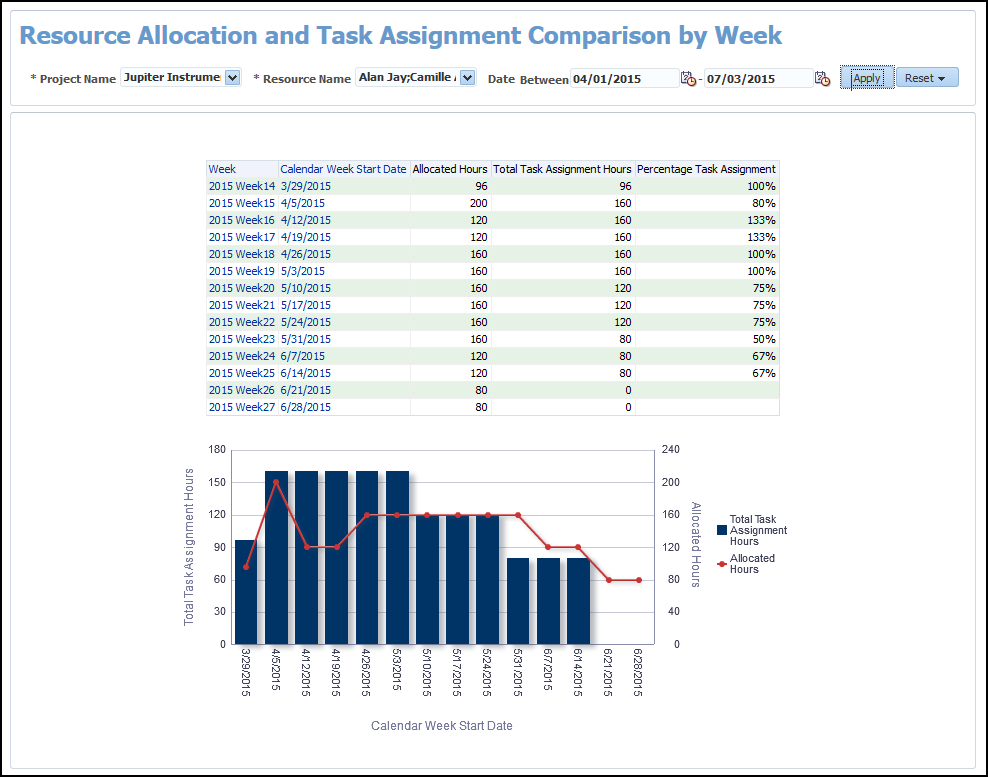
Example of a Sample Report: Resource Allocation and Task Comparison by Week
Steps to Enable
This feature is enabled by default.
Tips and Considerations
- You must have the Project Execution role and be the project manager on a project to view project information on these sample reports.
- You can find the reports in the catalog: Shared Folders > Projects > Project Execution Sample Reports.
Key Resources
- Release Training for Oracle Fusion Applications Release 10: Oracle Fusion Project Management Enhancements: Project Execution Reporting.
- Creating Analytics and Reports: http://docs.oracle.com/cloud/latest/projectcs_gs/FACRA/toc.htm
- Using Analytics and Reports: http://docs.oracle.com/cloud/latest/projectcs_gs/FAUAR/toc.htm
Oracle Fusion Task Management enables organizations to manage all work and related interactions in a single location. Team members, challenged by the quantity of tasks they own, no longer have to track administrative and project work in different places since all tasks are managed in a single view.
Analyze Tasks Using Oracle Transactional Business Intelligence
Use the Project Management - Task Management Real Time subject area to analyze and report on all tasks. For example, analyze all assigned project tasks, personal to-do tasks, and action items that are due in the next two weeks. View real-time task information by using dimensions such as issue, milestone, project, progress status, and task details such as creator, dates, measures, owner, and type.
The following screen capture illustrates the Task Management Real Time subject area.
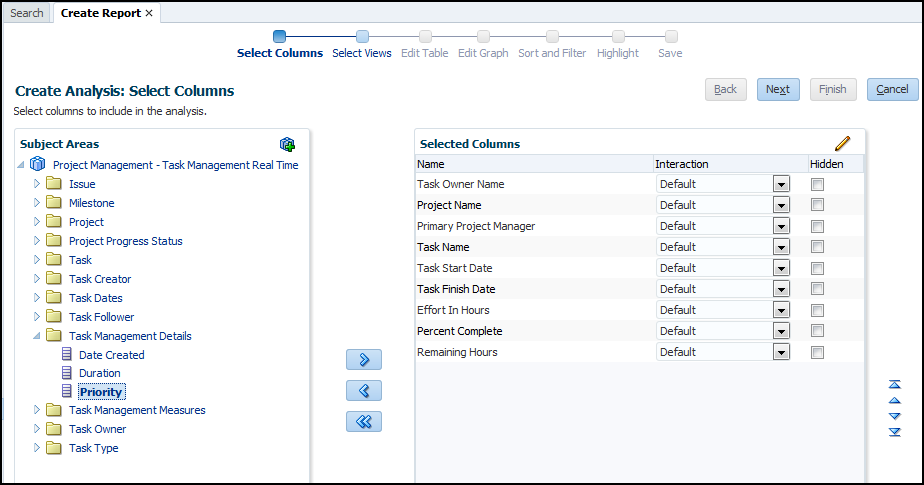
Task Management Real Time Subject Area
Steps to Enable
This feature is enabled by default.
Tips and Considerations
Task owners and creators view all their tasks at a single location. For example, they can view project tasks, milestones, to-do tasks, and action items.
Key Resources
- Release Training for Oracle Fusion Applications Release 10: Oracle Fusion Project Management Enhancements: Project Execution Reporting.
- Creating Analytics and Reports: http://docs.oracle.com/cloud/latest/projectcs_gs/FACRA/toc.htm
- Using Analytics and Reports: http://docs.oracle.com/cloud/latest/projectcs_gs/FAUAR/toc.htm
Analyze Tasks with Sample Reports in Oracle Transactional Business Intelligence
Analyze tasks with sample reports that you can use as a model for custom reports. The sample reports display work coming due on to-do tasks, action items, project tasks, and milestones to help resources who manage, own, create, or follow tasks.
The following sample reports are available for the Project Management - Task Management Real Time subject area:
- Project Work Coming Due: Displays the project tasks, milestones, and action items that are due for a selected project.
- My Upcoming Tasks: Displays the task names, task start and finish dates, and percentage of work complete by task type for incomplete tasks that are due within a specified number of days.
The following screen captures illustrate the My Upcoming Tasks sample report.

Example of a Sample Report: My Upcoming Tasks
Steps to Enable
This feature is enabled by default.
Tips and Considerations
- You must have the Project Collaboration role and be the task owner or task creator to view task information on these sample reports.
- You can find the reports in the catalog: Shared Folders > Projects > Project Execution Sample Reports.
Key Resources
- Release Training for Oracle Fusion Applications Release 10: Oracle Fusion Project Management Enhancements: Project Execution Reporting.
- Creating Analytics and Reports: http://docs.oracle.com/cloud/latest/projectcs_gs/FACRA/toc.htm
- Using Analytics and Reports: http://docs.oracle.com/cloud/latest/projectcs_gs/FAUAR/toc.htm
Collaborate on Tasks Using the Oracle Social Network Mobile Application
Collaborate socially on tasks by directly navigating from the task details to the conversation in the Oracle Social Network mobile application. Team members can comment, assign flags to other followers for attention, attach photos, and view documents.
The following screen capture illustrates how to open a task conversation.
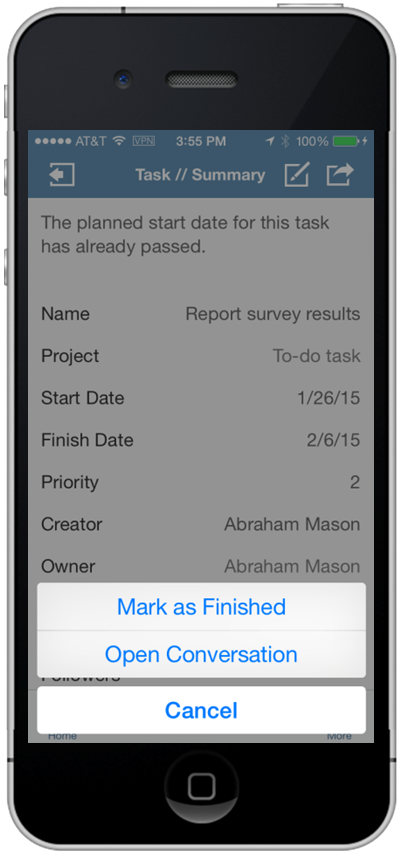
Action to Open a Task Conversation in the Oracle Social Network Mobile Application
Steps to Enable
This feature is enabled by default.
Tips and Considerations
- The Open Conversation link only appears for tasks shared in Oracle Social Network. Clicking the link takes you to the conversation page in the Oracle Social Network mobile application.
- You need to download Oracle Social Network from the Apple App Store to use this feature.
Key Resources
- Release Training for Oracle Fusion Applications Release 10: Oracle Fusion Task Management Enhancements: Enhanced Mobile Task Management.
- Creating Analytics and Reports: http://docs.oracle.com/cloud/latest/projectcs_gs/FACRA/toc.htm
- Using Analytics and Reports: http://docs.oracle.com/cloud/latest/projectcs_gs/FAUAR/toc.htm
Convert To-Do Tasks to Project Tasks Using Team Member Mobile
Convert a to-do task to a project task by associating it with a project. You can edit or enter progress for project tasks including marking them as started or complete.
The following screen captures illustrate converting a to-do task to a project task.
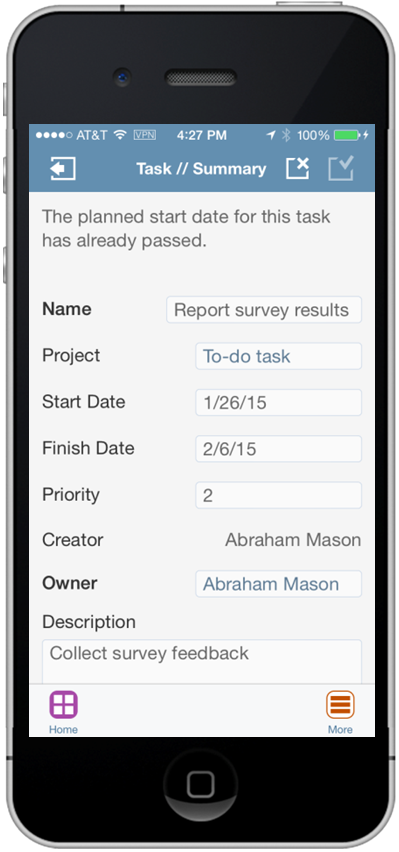
Open the Task Details and Select the Project Field
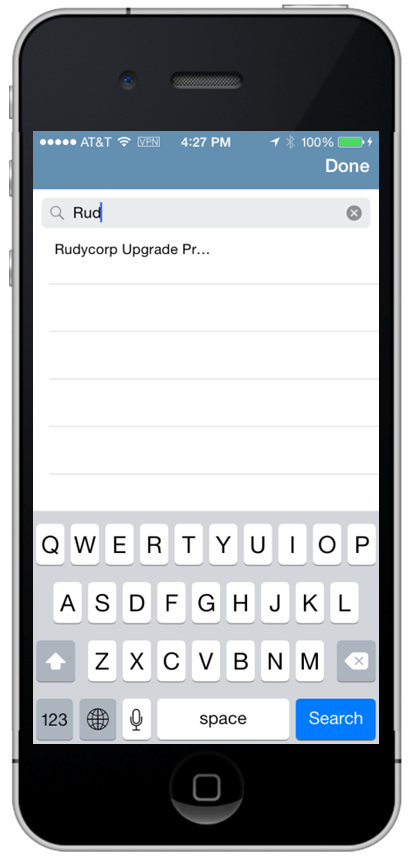
Use the List of Values to Select the Project for the Task
Steps to Enable
This feature is enabled by default.
Tips and Considerations
- You must be listed as a team member on the Manage Project Resources page of a project to assign a task to the project.
- You can’t associate a to-do task with more than one project.
- You can mark the project task as started or update the task completion percentage.
Key Resources
Release Training for Oracle Fusion Applications Release 10: Oracle Fusion Task Management Enhancements: Enhanced Mobile Task Management.
Enhanced Task Filters for Team Member Mobile
Enhancements include task list filters for projects and exceptions.
The following screen captures illustrate how to view the exception for a task after you filtered for task with exceptions.
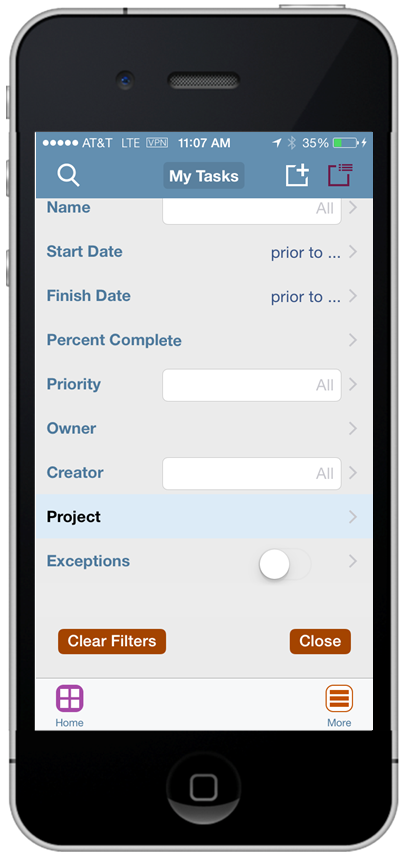
Setting Task Filters Including Project and Exceptions
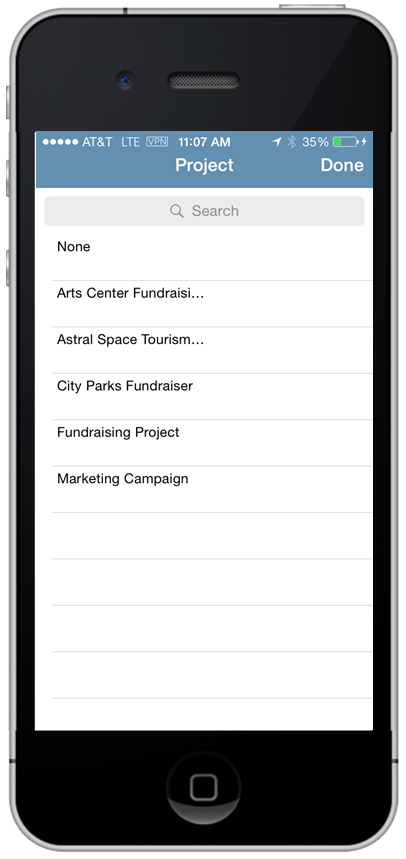
Selecting a Project Task Filter
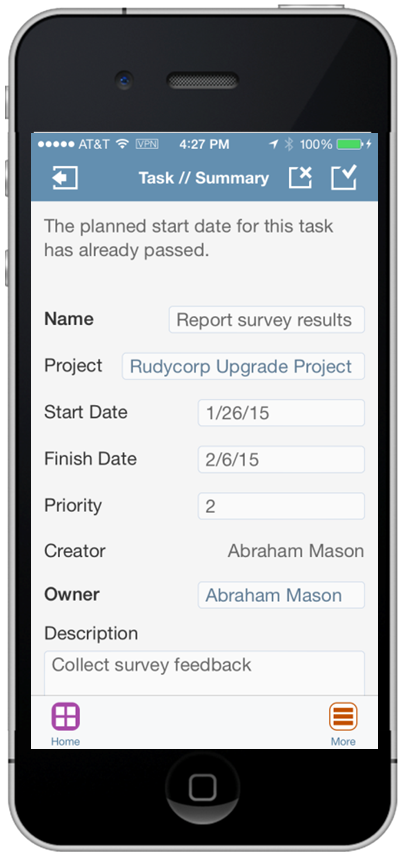
Viewing Details for a Task with an Exception
Steps to Enable
This feature is enabled by default.
Tips and Considerations
- Filter tasks that you own or follow by project name to view tasks in that project.
- Turn on the Exception filter to view tasks with exceptions.
- In the Task Details page you can review details about each task exception.
Key Resources
Release Training for Oracle Fusion Applications Release 10: Oracle Fusion Task Management Enhancements: Enhanced Mobile Task Management.
View Followed Tasks Using Team Member Mobile
View active and recently-completed tasks that you follow. Search or filter your list of followed tasks and view task details such as start and finish dates, priority, creator, progress, and exceptions.
The following screen captures illustrate viewing followed tasks using Team Member Mobile.
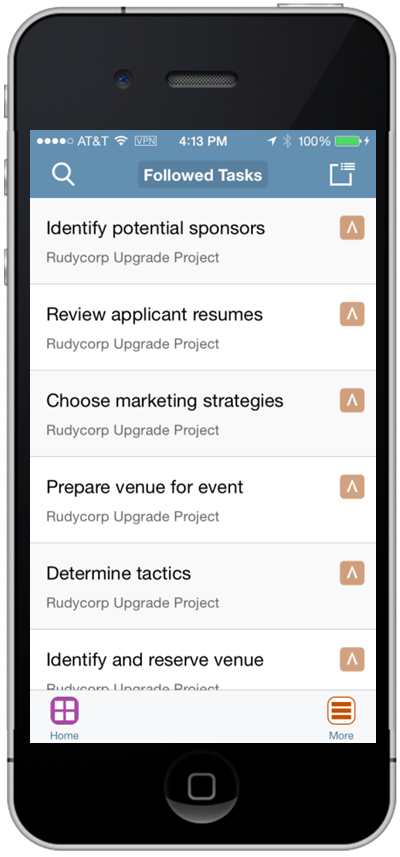
View the List of Active Followed Tasks
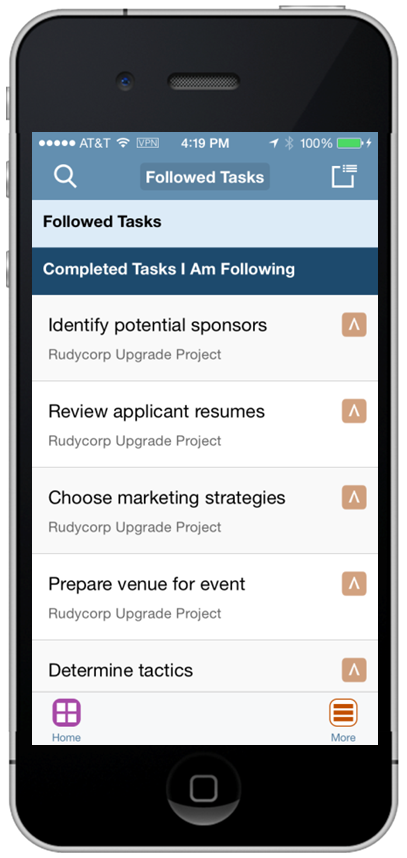
View the List of Completed Followed Tasks
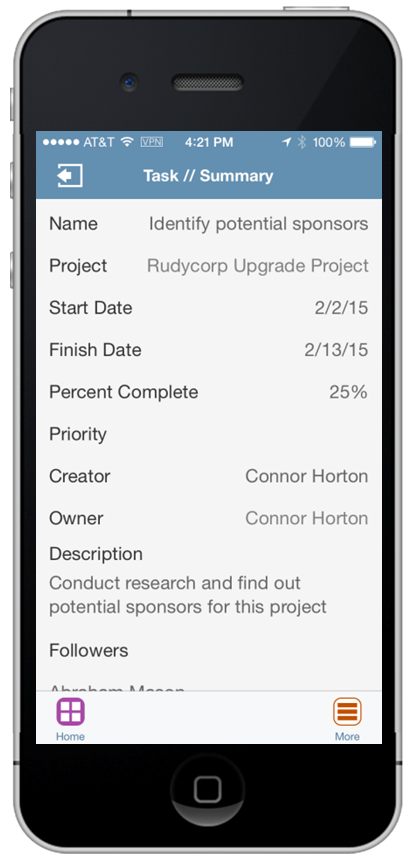
Review Details for Followed Tasks
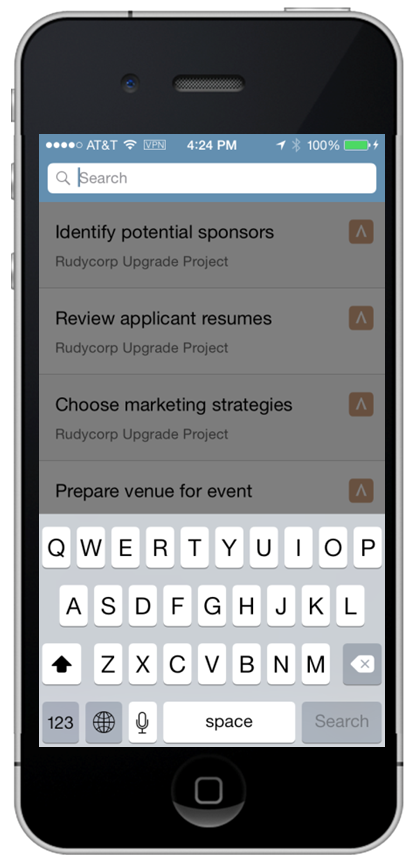
Search for a Followed Task
Steps to Enable
This feature is enabled by default.
Tips and Considerations
- Navigate to Followed Task to view the list of active followed tasks. Optionally, see a list of recently completed tasks that you followed.
- Filter and search for followed tasks.
Key Resources
Release Training for Oracle Fusion Applications Release 10: Oracle Fusion Task Management Enhancements: Enhanced Mobile Task Management.
View and Add Task Followers Using Team Member Mobile
Add followers to tasks that you own. View the list of followers on tasks that you own or follow.
The following screen captures illustrate the feature and its benefits.
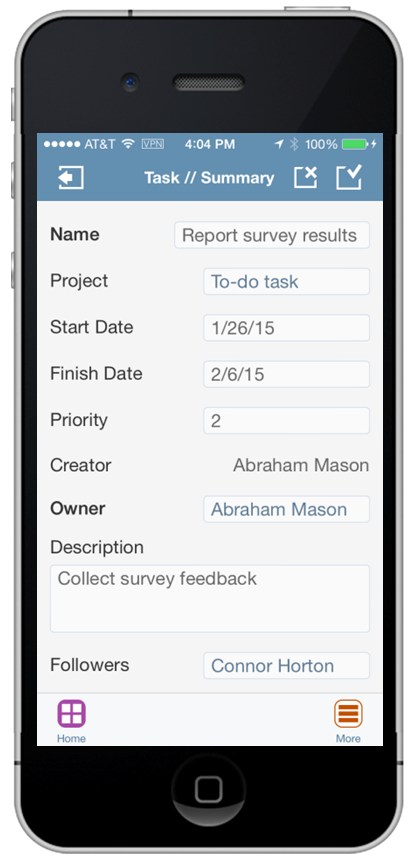
View Task Followers
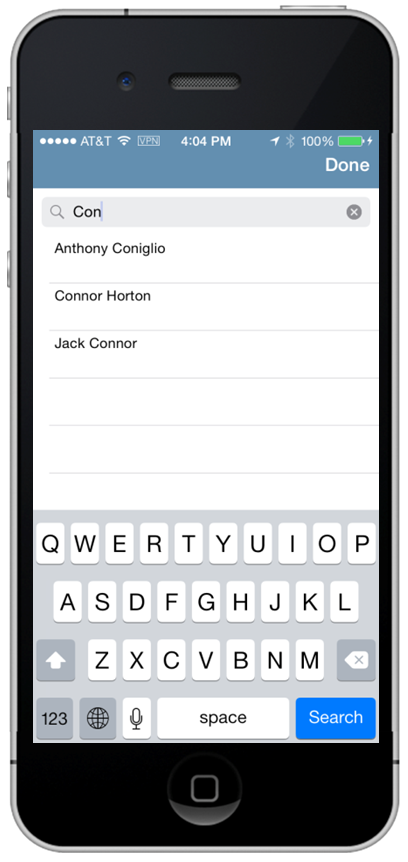
Add Followers to Tasks
Steps to Enable
This feature is enabled by default.
Tips and Considerations
View a list of followers on tasks that you own or follow. You can add new followers for tasks you own, so that you facilitate task collaboration and raise cross-team visibility.
Key Resources
Release Training for Oracle Fusion Applications Release 10: Oracle Fusion Task Management Enhancements: Enhanced Mobile Task Management.
Using Oracle Fusion Project Resource Management organizations can optimize the allocation and utilization of their most precious resource: their people. Innovative and intuitive tools let resource managers and project managers ensure that the best-fit resource is identified and placed on each and every project assignment, to the benefit of the organization, the project resource, and the end customer, whether it be for internal or external billable projects.
Review Resource Resume When Evaluating Resources to Fulfill Requests
Streamline the evaluation of resources for a project resource request. Access a resource's resume directly from the Resource Details page. View resumes from the Compare Resources page while evaluating resources to fulfill project resource requests.
The following screen capture illustrates reviewing resource resumes.
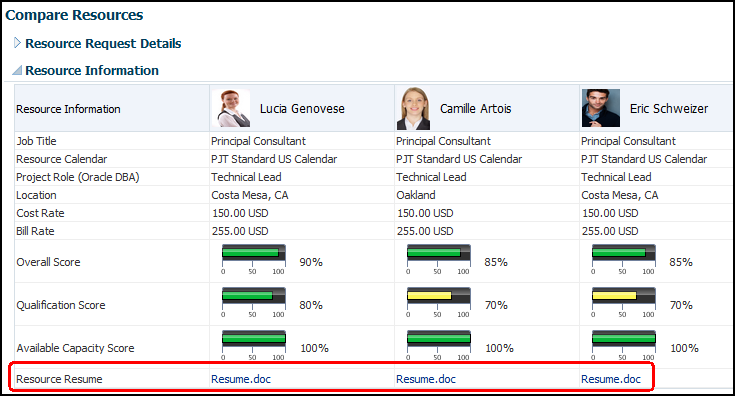
Review Resumes when Comparing Resources
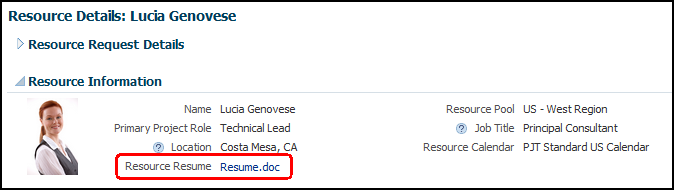
Review Resumes when Reviewing Resource Details
Steps to Enable
This feature is enabled by default.
Tips and Considerations
- Resources can upload their resume from the My Profile region of the Team Member Dashboard.
- The project application administrator can upload resumes for resources from the Manage Project Enterprise Resources page.
- If a resource has multiple resumes, then only the most recent resume is indexed and considered for keyword matches.
- You must run the Maintain Project Resource Search Index job set periodically to accommodate new and revised resumes. If you revise a resume attachment, and don't run the process, then the application displays the new resume even though the search index still contains the old resume.
Key Resources
- Applications Help: Resource Qualification Score: How It's Calculated
- Applications Help: When are resume attachments included in a search for resource qualifications?
Analyze Resource Supply, Demand, and Utilization with Sample Reports in Oracle Transactional Business Intelligence
Analyze resource supply, demand, and utilization with sample reports that you can use as a model for custom reports. The sample reports display the requested resource forecast revenue, capacity planning, resource utilization, and potential revenue loss.
The following sample reports are available for the Project Management - Project Resources Real Time subject area:
- Project Resource Request Forecast Revenue: Displays the cost, revenue, and margin forecasts for requests in Open and Resource Proposed status for a specific date range.
- Projected Revenue Shortfall by Resource: Displays target hours, projected hours, variance hours, and projected revenue shortfall for resources that are not meeting their target utilization in a specific resource pool.
- Resource Capacity Planning by Project Role: Displays requested, capacity, assigned, and remaining capacity hours, and the capacity surplus or shortfall for project roles for a specific date range.
- Resource Pool Actual Utilization by Resource and Month: Displays monthly actual hours and utilization percentage for a resource pool and specific date range.
- Resource Pool Projected and Actual Utilization by Resource: Displays resource pool projected hours and utilization percentage, actual hours and utilization percentage, and variance hours by resource for a specific date range.
The following screen capture illustrates the Resource Capacity Planning by Project Role sample report.
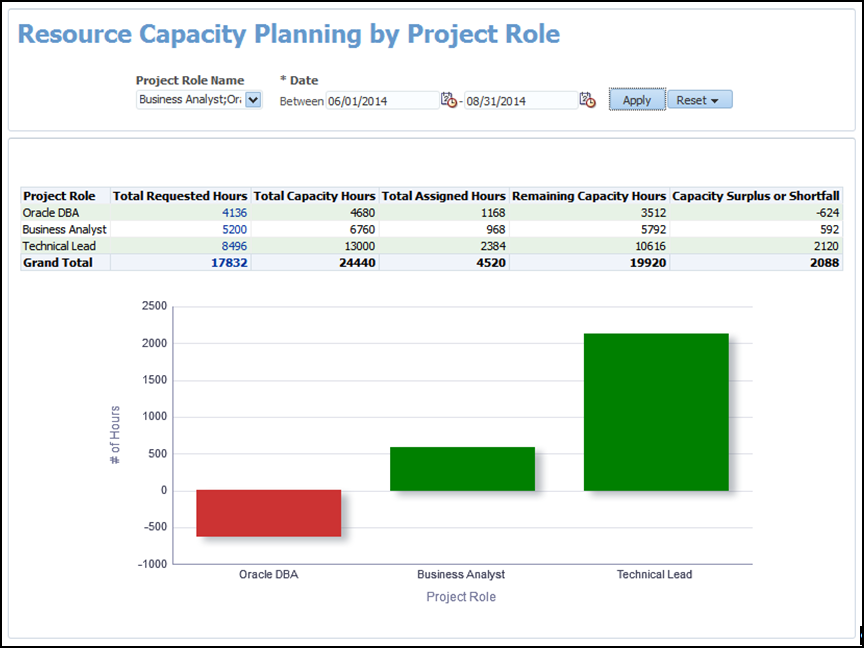
Example of a Sample Report: Resource Capacity Planning by Project Role
Steps to Enable
This feature is enabled by default.
Tips and Considerations
- You must have the Resource Manager role to see information about projects on these sample reports.
- You can find the reports in the catalog: Shared Folders > Projects > Project Execution Sample Reports.
Key Resources
- Release Training for Oracle Fusion Applications Release 10: Oracle Fusion Project Management Enhancements: Project Execution Reporting.
- Creating Analytics and Reports: http://docs.oracle.com/cloud/latest/projectcs_gs/FACRA/toc.htm
- Using Analytics and Reports: http://docs.oracle.com/cloud/latest/projectcs_gs/FAUAR/toc.htm
---

Copyright © 2016, Oracle and/or its affiliates. All rights reserved.
This document is provided for information purposes only, and the contents hereof are subject to change without notice.This document is not warranted to be error-free, nor subject to any other warranties or conditions, whether expressed orally or implied in law, including implied warranties and conditions of merchantability or fitness for a particular purpose. We specifically disclaim any liability with respect to this document, and no contractual obligations are formed either directly or indirectly by this document. This document may not be reproduced ortransmitted in any form or by any means, electronic or mechanical, for any purpose, without our prior written permission.
Oracle and Java are registered trademarks of Oracle and/or its affiliates. Other names may be trademarks of their respective owners.
Intel and Intel Xeon are trademarks or registered trademarks of Intel Corporation.All SPARC trademarks are used under license and are trademarks or registered trademarks of SPARC International, Inc. AMD, Opteron, the AMD logo, and the AMD Opteron logo are trademarks or registered trademarks of Advanced Micro Devices. UNIX is a registered trademark of The Open Group.

PB10.19