
This document will continue to evolve as existing sections change and new information is added. All updates are logged below, with the most recent updates at the top.
| Date |
What's Changed |
Notes |
|---|---|---|
| 30 JAN 2018 |
Updated document. Added new feature. |
|
| 05 DEC 2016 |
Created initial document. |
At Oracle, delivering products that reflect a superior and secure user experience is the result of an enormous investment. To understand your pain points, we spent countless hours examining how people like you actually work and use our enterprise applications. We then work closely with product management, security experts, strategy, and development to design innovative applications that help you to be more productive, secure, efficient, and effective.
Oracle’s focus on providing an exceptional user experience pervades the Oracle Applications Cloud. Creating a compelling, pleasing user interface (UI) that provides only what you need, when you need it is of the highest priority.
End User Personalization of the Navigator and SpringBoard
Personalize the Navigator and springboard to show or hide the Navigator menu items or springboard icons for navigation. Personalizations impact only the user making the change while preserving these changes across sessions.
Enhance the home page experience by embedding full page Business Intelligence dashboards into it. You can use these additional dashboard pages for a specific role, enhanced analytics insight, and so on.
Preview your announcements before posting them to the Announcements panel on the home page.
Enhance your bell notifications dialog box to include custom and system actions.
Archive and Purge Workflow Tasks
Workflow tasks with a final status, such as Completed and Expired, are archived and purged based on a set schedule, without any action from you. Archived task data can be used for various purposes, and purging tasks declutters the worklist for users.
Configuring the user experience is easier than ever, with Oracle's modern cloud extensibility tools.
Choose to select small or large springboard icons with this new option.
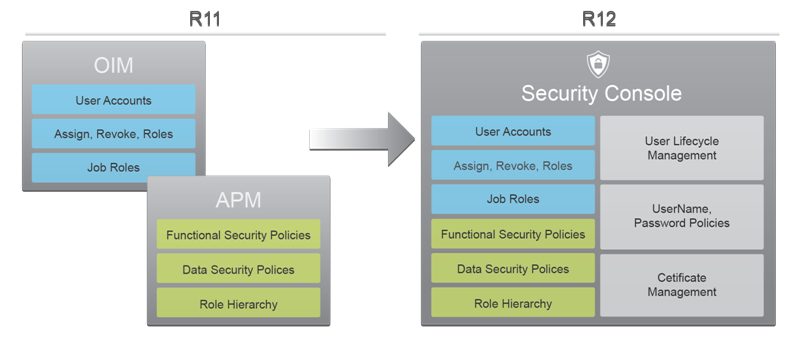
Oracle Fusion Applications Security provides a single console where IT Security Managers and Administrators can perform various functions including user lifecycle management, role definition, security policy management (both functional and data), role hierarchy maintenance, username and password policy administration, and certificate management. The console also enables users to simulate the effect of security changes, to run security reports, and download a connector for integration with Microsoft Active Directory.
In Release 12, Oracle Fusion Applications Security offers several new capabilities that offer customers the following benefits:
- A Simplified User Experience for the IT Security Manager - Prior to Release 12, security administration functions were distributed across Oracle Identity Management (OIM) and Authorization Policy Manager (APM). In Release 12, these functions are delivered through a single interface – the Security Console. OIM and APM are no longer available in R12.
- Easy Integration with Identity and Access Management (IDM/IAM) Systems - New capabilities to synchronize user account information with Identity and Access Management (IDM/IAM) systems. This synchronization enables the delivery of a Single Sign-On experience through these systems.
- An Upgrade-Safe Reference Role Model - Starting in Release 12, pre-defined roles that are shipped with Oracle Applications Security will be locked down. Customers will not be able to modify the functional and data security policies that are associated with these roles. They can, however, add new data security policies to these pre-defined roles. In addition, privileges and resources are protected. Users cannot create or modify these artifacts
- Enhanced Set of Self-Service Capabilities - Administrators are able to manage the entire user lifecycle. They can customize how notifications are generated and sent for various user lifecycle events including user account creation, and password management.
For Microsoft Active Directory (AD) and Oracle Identity Management (OIM), customers can download and install connectors that will automatically synchronize user account information between Oracle Fusion Applications and these IDM systems. As in Release 11, customers must continue to log a Service Request (SR) to set up federated Single Sign-On (SSO) between these systems. Once federation is enabled, the connectors will synchronize the information.
Release 12 also delivers a REST API based on the SCIM (System for Cross-Domain Identity Management) standard. Customers can use this API to create user accounts, modify user attributes (e.g. email), enable/disable users, and fetch user account and role information.
Locking down these security artifacts enables safe upgrades to pre-defined roles, since the possibility of conflict with customer introduced changes to these roles is now eliminated. This, in turn enables customers to safely adopt new enhancements that may be delivered with pre-defined roles in future releases. As in Release 11, customers can make copies of pre-defined roles and freely customize these copies.
Administrators can also tailor username and password generation by choosing from a list of shipped policies.
Create, manage, and assign user accounts using the Security Console. You can also search, retrieve, and manage user accounts automatically created for employees, contingent workers, supplier contacts, or partner contacts.
Administrator Password Management
Manage passwords of other user accounts as an administrator. You can auto-generate or manually enter a password for a user account. You can also define password lifecycle and complexity policies. Passwords will be automatically validated against these policies.
User Password Management (Self-Service)
Manage your own user account password. Your password will be automatically validated against the defined password lifecycle and complexity policies.
Lock user accounts as an administrator. If you lock a user account, you will be temporarily preventing the user from logging in with that user account. You can also unlock a locked user account.
View only certain components of a role in the graphic visualizer. You can view only the privileges, aggregate privileges or roles assigned to a role. You can also view the graphic visualizer in full screen mode and pan over a specific region in the graph.
For complex roles, these features enable you to reduce the amount of information visualized and to focus on the area within the role hierarchy that requires your attention.
View role hierarchies in a tabular view. You can switch between the graphic visualizer view and the tabular view. You can also export the data you view in the tabular view.
Search in Role Hierarchy Visualization
Search and quickly locate security artifacts (nodes) in the role hierarchy visualization. You can search for privileges, roles or users in the visualization.
Define user name generation rules that will be used to auto-generate the user name when a user is created. You can define user name generation rules to be based on the user’s first and last names, first initial plus last name, e-mail or person or party number. You can also choose to use a system generated user name if the rule fails to generate a user name.
Define policies for password management. These policies can define the duration for various password lifecycle events like password expiration and password warning generation. You can also set the complexity of generated passwords by choosing from a pre-defined list of rules.
Define custom notification templates for your user account life cycle events. You can also use pre-defined notification templates. These templates will be used to generate notifications for events like user account created, user password reset and user password expiry warning.
Upgrade-Safe Management of Factory Shipped Roles
Identify a predefined (factory shipped) Oracle role when viewing the role. Predefined Oracle roles are locked and you cannot customize the Oracle delivered functional and data security policies associated with these roles. You can, however, add data security policies to these roles.
Bridge for Microsoft Active Directory
Simplify Single Sign-On with Microsoft Active Directory by downloading and installing the Active Directory Bridge from the Security Console. Automatically synchronize user account information between Oracle Fusion Applications Security and Microsoft Active Directory.
User Password Changes Audit Report
Generate a report that lists password changes made by users. The report can be generated for changes made by specific users or for all changes made during a specific period.
Integrate Custom Identity Management Solution
Integrate optionally with your Identity Management solution for user and role management using industry standard System for Cross-domain Identity Management (SCIM) REST APIs and ATOM feeds.
Enhanced password reset flow. Now a notification email will be sent to the user who requests a password reset. The user will be required to click on this link within a specific period of time to change the password. This replaces the previous flow where users were required to answer a series of challenge questions to reset the password.
Streamline use of some of the functionality that you have used in the past with the Security Console. The Security Console now includes the following functionality:
- User Account information such as password, lock and unlock are managed in the security console.
- Roles are now managed directly in the Security Console and are no longer managed within Oracle Identity Manager or Authorization Policy Manager.
- Privileges are predefined by Oracle and are no longer created or managed by the user.
- You can now view, create or change roles without first selecting an application.
Resources are now granted through privilege and are no longer granted directly to Roles.
Functional Setup Manager (FSM)
Oracle Functional Setup Manager provides a new simplified UI in Release 11 that improves user experience by streamlining the Offering setup process.
The new Setup and Maintenance landing page presents your subscribed Offerings by default. However, you still have the choice to browse all other available Offerings. In addition, all relevant documents that will help you to plan for an Offering implementation are directly available from this page.
Task Pane has been removed from the new UI to give it a streamlined look and feel. However, the entries previously found in the Task Pane are still easily accessible from the navigation drawer located at the top right corner of the page.
Navigation through setup process has been enhanced to make it more intuitive to the user. At the same time, the new flow increased user efficiency by requiring fewer clicks to navigate through the end-to-end setup process.
Configure page has a new look and feel as well. Offerings are presented one at a time based on user’s selection to give the page a cleaner look. Furthermore, as you enable Offerings and Functional Areas, your selections are saved automatically.
Offering and Functional Area Based Setup
To setup an Offering by Functional Areas is an alternative approach to using Implementation Projects. It allows managing setup of an Offering – during initial implementation as well as for maintaining setup over time – in a modular fashion so that you can complete setup and begin transaction in the functional areas that are most relevant to you immediate business needs without performing setup of the entire Offering.
In the new Setup page, the Functional Areas and the tasks necessary to set up each of them are presented next to each other giving higher visibility to setup requirements of each Functional Area as well as reducing the number of clicks necessary to navigate to the tasks.
Offering and Functional Area Based Export and Import
From the new Setup page, a simplified export and import flow now supports migration of setup data without creating Configuration Packages. You may choose to export and import setup data of the entire Offering or select specific Functional Areas for incremental migration.
In addition, the new flow presents a list of relevant business objects that can be used during export to filter setup data by default and thereby, gives you better visibility to what’s available.
Offering Configuration Migration
When exporting and importing setup data, you have a new option to migrate the Offering configuration as well.
Use this functionality to synchronize the Functional Area and Feature selections between two instances.
Oracle Social Network is a secure enterprise collaboration and social networking solution for business. With Oracle Social Network, individuals can stay informed of business activities and drive productivity with purposeful social networking. Oracle Social Network provides a unique experience that includes integration with enterprise applications and business process that drives adoption and participation for increased productivity.
Web Client Replaced by Social PlugIn
The Oracle Social Network web client has been replaced by the Social Plugin. This is the same user interface that is used in Oracle Applications Cloud. The Social Plugin also works well on mobile devices, so that users do not necessarily need to download the Oracle Social Network mobile app to use social features on their phones or tablets.
---

Copyright © 2016, 2018, Oracle and/or its affiliates. All rights reserved.
This document is provided for information purposes only, and the contents hereof are subject to change without notice. This document is not warranted to be error-free, nor subject to any other warranties or conditions, whether expressed orally or implied in law, including implied warranties and conditions of merchantability or fitness for a particular purpose. We specifically disclaim any liability with respect to this document, and no contractual obligations are formed either directly or indirectly by this document. This document may not be reproduced or transmitted in any form or by any means, electronic or mechanical, for any purpose, without our prior written permission.
Oracle and Java are registered trademarks of Oracle and/or its affiliates. Other names may be trademarks of their respective owners.
Intel and Intel Xeon are trademarks or registered trademarks of Intel Corporation. All SPARC trademarks are used under license and are trademarks or registered trademarks of SPARC International, Inc. AMD, Opteron, the AMD logo, and the AMD Opteron logo are trademarks or registered trademarks of Advanced Micro Devices. UNIX is a registered trademark of The Open Group.

12.14