
This document will continue to evolve as existing sections change and new information is added. All updates are logged below, with the most recent updates at the top.
| Date |
What’s Changed |
Notes |
|---|---|---|
| 17 JAN 2017 |
Initial Document Creation |
This guide outlines the information you need to know about new or improved functionality, including support for Plan to Produce business flow, in Oracle Supply Chain Management Cloud Release 12. Each section includes a brief description of the feature, the steps you need to take to enable or begin using the feature, any tips or considerations that you should keep in mind, and the resources available to help you.
We welcome your comments and suggestions to improve the content. Please send us your feedback at oracle_fusion_applications_help_ww_grp@oracle.com.
Some of the new Release 12 features are automatically available to users after the upgrade and some require action from the user, the company administrator, or Oracle.
The following table provides a quick view of the actions required to enable each of the Release 12 features.
| Action Required to Enable Feature |
||||
|---|---|---|---|---|
| Feature |
Automatically Available |
End User Action Required |
Administrator Action Required |
Oracle Service Request Required |
| Manufacturing |
||||
|
|
||||
|
|
||||
|
|
||||
|
|
||||
| Planning Central |
||||
|
|
||||
|
|
||||
|
|
||||
|
|
||||
|
|
||||
| Inventory Management |
||||
|
|
||||
|
|
||||
|
|
||||
|
|
||||
|
|
||||
|
|
||||
|
|
||||
| Collaboration Messaging Framework |
||||
|
|
||||
| Advanced Fulfillment |
||||
|
|
||||
| Create and Update Internal Material Transfers Using and Open Interface |
|
|||
|
|
||||
| Application Security |
||||
|
|
||||
|
|
||||
|
|
||||
|
|
||||
|
|
||||
|
|
||||
|
|
||||
|
|
||||
|
|
||||
|
|
||||
|
|
||||
|
|
||||
|
|
||||
|
|
||||
|
|
||||
|
|
||||
|
|
||||
|
|
||||

The plan-to-produce business flow provides an end-to-end solution to enable you to plan, schedule, and manage your discrete manufacturing operations and optimize your supply chain. Advanced fulfillment features, such as contract manufacturing and back-to-back shipments, optimize the flow of your organization’s transactions and enable you to capture and analyze landed costs. A simplified setup helps you quickly set up supply chain common components, as well as basic features of inventory, manufacturing, and cost management.
Oracle Manufacturing Cloud delivers a broad set of discrete manufacturing capabilities. These capabilities allow you to efficiently set up, manage, and operate your production operations for a variety of in-house and contract manufacturing modes. Manufacturing is fully integrated with other functionality of the Oracle Supply Chain Management (SCM) Cloud, and with the other Oracle Cloud Applications.
Automatically Generate Work Definitions
Some kitting and light assembly manufacturing environments do not require shop floor control and capacity requirements planning. In these situations, a simple, single-level item structure (that is, bill of materials) with standard costs and an overhead charge may be sufficient for executing and costing production. With this release, you can select an item’s primary structure to initiate a system-generated work definition to use when creating a standard work order for execution. From that point forward, all changes to the item structure will be automatically reflected in the work definition, eliminating the explicit maintenance of work definitions and streamlining the production process with an accurate, up-to-date components list from the item structure.
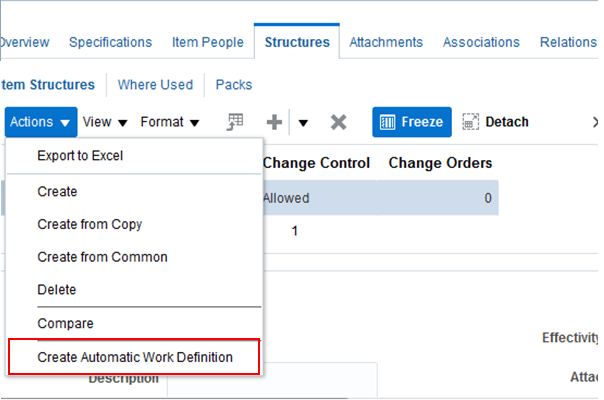
Create Automatic Work Definition Action from Item Structure
Steps to Enable
No steps are required to enable this feature.
Tips and Considerations
If you are going to use an automatic work definition for an item, ensure that you don’t create manual work definitions prior to creating an automatic work definition. This is because when the system creates an automatic work definition, it is created with production priority 1. If a manual work definition already exists with production priority 1, the automatic work definition creation will fail.
Use the Supervisor Mobile Application
As a production supervisor, you require immediate access to critical shop floor execution status to take quick actions on the go. The supervisor mobile application allows the production supervisor to access work order execution status and take actions using a smart phone, such as an iPhone or any Android phone.
Using the supervisor mobile application, you can review and monitor several key work order metrics. After logging in, you will be provided with a count of work orders that are starting today, completing today, are past due, or on hold. You can drill into any of the metrics to see a detailed list of work orders in any of those statuses, or you can search for a specific work order. From there, you can further drill to view the all the operation details, including materials, resources, reservations against a sales order, and so on. You can also take a one-click action to put a work order on hold, cancel the work order, or e-mail the details to other stakeholders.
The supervisor mobile application gives you a complete handle on the health of your plant in the palm of your hand - not only to review, but also to take action.
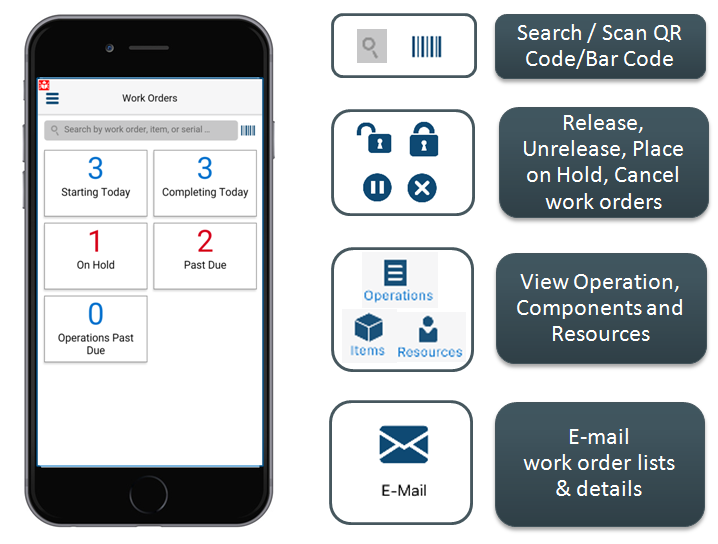
Supervisor Mobile Application Home Screen
Steps to Enable
No steps are required to enable this feature.
If you have licensed the Oracle Manufacturing Cloud, you can download the Manufacturing Supervisor Mobile application from Apple App Store for iOS or from the Google Play Store for Android.
When logging into the mobile application for the first time, provide the URL of the server where Oracle Manufacturing Cloud is deployed.
Seamlessly Integrate Between External Systems
All enterprises have multiple applications to run multiple business functions that form the foundation of the enterprise. It’s no surprise, therefore, that organizations want to integrate applications to ensure that people across the enterprise have access to the critical information required to perform their tasks.
You now have greater flexibility to integrate your Oracle Manufacturing Cloud applications with other enterprise systems and extensions running on Oracle Platform as a Service (PaaS). Several additional representational state (REST) web services are also available. From any external application, you can use the Get / Update actions for work area, work center, work order header, work order details, material transactions, resource transactions, operation transactions, dispatch list, and so on. This gives you complete control of your integration between applications.
Steps to Enable
No steps are required to enable this feature.
Production activities on the shop floor do not always go as planned. You may experience unplanned events (exceptions), such as equipment malfunctions that need to be reported and then tracked for correction and analysis. With this release, you can report an exception, automatically notify key stakeholders, and manage and close exceptions after they are resolved.
With this release, you can quickly record any unexpected shop floor events, which will notify and inform stake holders who can take action to resolve the issue. You can record the exceptions related to work area, work center, materials, resources, or other details, and an exception can automatically be associated to the job you were working on when you found the issue.
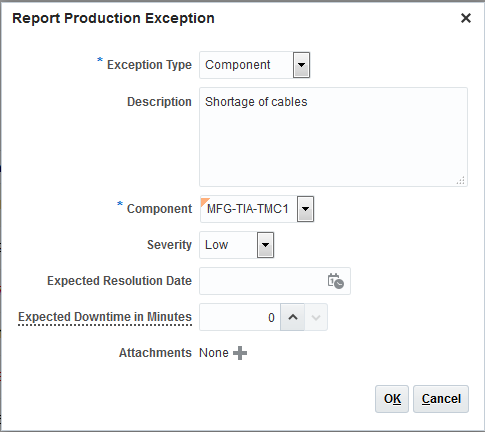
Report an Exception
To ensure shop floor efficiency, all key stakeholders must be notified as soon as a shop floor exception occurs. With this feature, you can set up notification rules based on exception attributes to automatically notify one or more key stakeholders as soon as an exception is logged. The recipient of the notification can drill down to the exception details to review and take action. In addition, if the exception is associated with a work order, an icon will appear on both the Manage Work Orders page and on the dispatch list, alerting the supervisor and production operator to the fact that an exception exists. Clicking on the icon enables you to drill into the exception to review and take action.
This easy-to-use notification enables a production supervisor to expedite resolution of an exception by engaging with additional stakeholders as soon as the problem occurs.

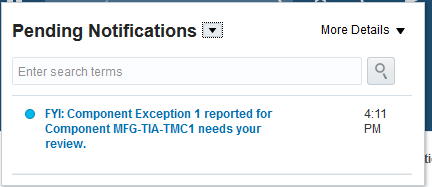
Send Exception Notifications
As a supervisor, you need keep an eye on all unplanned activities in addition to managing planned activities. Use the Manage Exceptions page to get a quick overview of all the exceptions for the manufacturing plant, filtered by search criteria of your choice. You are able to get a bird’s-eye view of all the exceptions in the plant represented graphically through infotiles. These infotiles not only give you a summary; they also help you filter the exception list by clicking on a specific infotile. For example, you can review only the list of open exceptions, or review exceptions filtered by exception type, severity, or the date that the exception was reported.
In addition, you can use the detailed search panel to find a specific exception for timely and directed action. You are also able to drill into a specific exception and quickly identify whether it might affect other work orders on the shop floor. If so, you can associate the exception with all of the impacted work orders with a single click. You are also able to close multiple exceptions with a single click.
On the Manage Exceptions page, you can access a specific exception to review the details of the exception. After reviewing the exception details, you can put all the impacted work orders on hold or reschedule them due to the issue that was found.
The Manage Exceptions page gives you a complete handle on all your shop floor exceptions and helps you review and take quick action to resolve them.
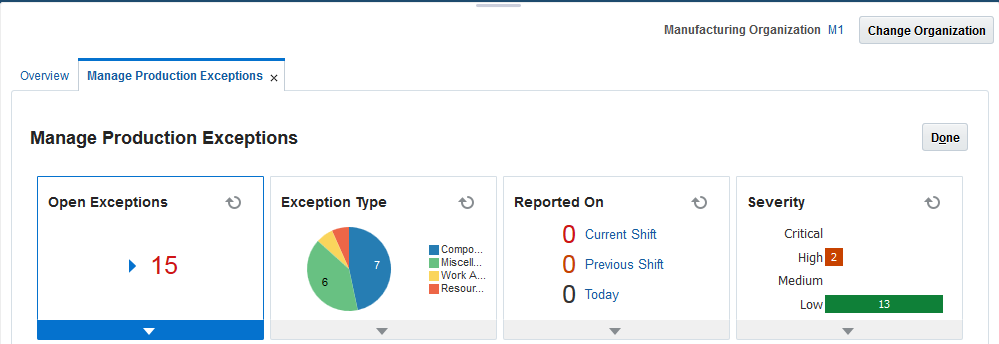
Manage Exceptions
Steps to Enable
No steps are required to enable this feature.
Customize Pages for Optimized User Experience
With this enhancement, administrators can customize Manufacturing page layouts as follows:
- Hide infrequently used attributes.
- Change the default widths of columns and panels.
- Reorder the columns in a table.
- Rearrange the tab layout on a page.
You can manage page customization using Oracle Page Composer, a run-time page editor that supports simple user interface edits. Adapting the Manufacturing pages to the specific needs of your organization can improve end-user efficiency and accuracy.
Oracle Planning Central Cloud is an integrated demand and supply chain planning solution that combines forecasting, inventory, and supply planning with a multi-dimensional analytics framework. This enables you to simultaneously balance supply and demand and derive management insight for your extended supply chain.
This release features important additions to better monitor and respond to changing conditions in the supply chain and enhanced integration with execution.
Configure the User Interface More Extensively
To further simplify the user experience and increase productivity, you can extensively personalize the user interface. You can change and update the style of field labels, adjust column sorting in tables, and show or hide fields. For example, you can change the label on a field from “Item” to “SKU,” or hide certain plan options so that planners can’t select them. The resulting user experience is tailored to your enterprise standards and processes, which improves accuracy, efficiency, and user acceptance.
- Acquire the “Supply Chain Application Administrator” role.
Tips and Considerations
- Enable customizations at Site level only.
- You can use this feature to customize pivot tables and graphs, but the customizations will affect all pivot tables or graphs and not just the currently selected one. To customize individual pivot tables and graphs, use the standard configuration capability for embedded analytics provided by Planning Central.
Key Resources
For more information, refer to Oracle Supply Chain Management Cloud: Using Planning Central, available from the Oracle Help Center.
Manage By Exception More Efficiently
Taking rapid action on the most important exceptions in the plan is critical to an effective response. You are now able to prioritize actions by quickly identifying high-impact exceptions at an aggregate level, and drilling down to explore detailed plan information related to an exception. This enhancement includes the following capabilities:
- Planners can efficiently pinpoint where and when planning exceptions are occurring using summarized reports of exceptions on items, resources, suppliers, and customers. You can drill from these reports to the Material Plan page, the detailed Supplies and Demands page, or to the Exception Details page to further investigate.
- You can configure your tables and graphs to access more specific information related to the exception you are interested in by drilling down to the Material Plan page, the Supplies and Demands page, or the Exception Details page.
This enhancement results in increased productivity by allowing planners to access all data related to critical problems, and to take quick action to resolve those problems.
No steps are required to enable this feature.
Tips and Considerations
- You can edit the levels at which exceptions are summarized to suit your business needs. For example, you can change the default time dimension aggregation level from Period to Week.
- You can change the default exception measure that is shown (exception count) to other available exception measures such as exception value to align with the business motivation of the exceptions analysis that you are performing.
- You can drill down directly from the exceptions summary tables to see the details of the supplies and demands underlying the exceptions or the Material / Resource plan for the item / resource underlying the exception. You are not required to first drill to the Exception details screen.
Key Resources
For more information, refer to Oracle Supply Chain Management Cloud: Using Planning Central, available from the Oracle Help Center.
Integrate with Global Order Promising More Closely
Providing accurate promise dates to customers at the time of order entry is one of the most important components of customer satisfaction. Oracle Global Order Promising Cloud maintains a real-time picture of all available sources of supply. As orders arrive, it selects the best fulfillment location based on current and future supply availability. Future supply can also include planned manufacturing work orders or planned purchase orders that have not yet been released or executed. Planning Central now provides this information to Global Order Promising to enable full visibility, thus increasing the accuracy of the provided promise date.
STEPS TO ENABLE
- Save a Planning Central plan to the database using the “Save Plan to Database” planner action within Planning Central. Plan data is visible to Global Order Promising only after it has been saved.
- Specify the Planning Central plan in the new attribute “Plan Names” in the existing ESS request “Refresh and Start the Order Promising Server”.
TIPS AND CONSIDERATIONS
- You can select multiple plans to be published to Global Order Promising, but you must ensure that these plans are functionally distinct. If common Items and Organizations exist across multiple plans, Global Order Promising will aggregate their Planned Order supply.
- Ensure that Planned Orders in a Planning Central Plan are feasible before publishing them as supply to Global Order Promising.
KEY RESOURCES
For more information, refer to Oracle Supply Chain Management Cloud: Using Planning Central, available from the Oracle Help Center.
Analyze Plan Recommendations More Effectively
A key task in a planner’s daily activities is to understand the recommendations provided by Planning Central and to prioritize actions based on those recommendations. Planning Central provides numerous infographics to aid in making good decisions related to planning. To further help the planner prioritize actions on plan recommendations, this release includes a new predefined graph called Plan Recommendations. This graph shows the orders to be rescheduled in, out, or canceled in various time buckets. The recommendation can then be acted on by drilling down into the Supplies and Demands page. This ability to identify the most time-sensitive orders allows planners to prioritize the orders to be worked on.
Steps to Enable
No steps are required to enable this feature.
Tips and Considerations
- Drill to the Supplies and Demands table using the context from the Plan Recommendations graph to focus on the orders with the specific exceptions.
- Select one of the bars on the graph, and use a right-mouse click to open the Supplies and Demands table with the context of the selected bar.
Key Resources
For more information, refer to Oracle Supply Chain Management Cloud: Using Planning Central, available from the Oracle Help Center.
Load External Data Into Planning Central
Most enterprises have a variety of demand fulfillment systems they must plan; some of these may be from systems other than the Oracle SCM Cloud. To enable Planning Central to include visibility to this data coming from other enterprise systems, this release allows you to load external data using flat files.
Key data that you can load from other systems includes:
- Reference Data: Organizations, currencies, units of measure, calendars, and shipping networks.
- Demand Planning Data: Booking and shipment history, price lists, causal factors, and external forecasts.
- Manufacturing Data: Collect routings, resources, work orders, and related manufacturing data.
- Inventory Data: On-hand inventory and transfer orders between locations.
- Purchasing Data: Suppliers, supplier sites, item suppliers, purchase orders, and purchase requisitions.
This enhancement allows enterprises to support a variety of execution systems and consolidate the data in Planning Central for planning.
STEPS TO ENABLE
- Ensure that the organizations in external systems are modeled in Oracle SCM Cloud as item organizations.
- Enable each external system as a collection source via the Manage Planning Source Systems page.
- From the Planning Central Work Area, select Load Planning Data from Flat Files.
TIPS AND CONSIDERATIONS
- All organizations planned within a single Planning Central plan must belong to a single source instance.
- Even if you are planning all external organizations, you must maintain item and customer related data in Oracle Cloud, and perform order management via Oracle Order Management Cloud.
KEY RESOURCES
For more information, refer to Oracle Supply Chain Management Cloud: Using Planning Central, available from the Oracle Help Center.
Oracle Inventory Management Cloud offers a complete materials management solution that allows your company to successfully manage the flow of goods: inbound, within the warehouse, and outbound. This functionality optimizes the flow of material so that it meets customer demand in a cost-effective manner.
Expense Internal Material Transfers
Employees or departments that need materials may use inventory from another location before purchasing additional quantities. When transferring material between facilities, the location providing the material needs to generate shipping documents and the location accepting the material needs to receive the material when it arrives.
In this release, when you use transfer orders to transfer goods between facilities, you can expense material to a destination for those cases where materials are not tracked on-hand. This is common for goods received directly by employees or departments that use the goods immediately.
This enhancement provides full shipping and receiving support for moving material between parts of an enterprise expensed at the destination. In particular, automatically generating shipping documents for outbound shipments significantly increases productivity and reduces errors.
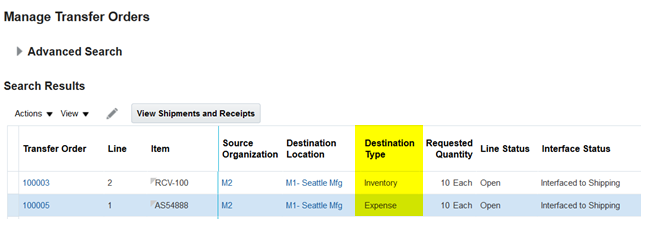
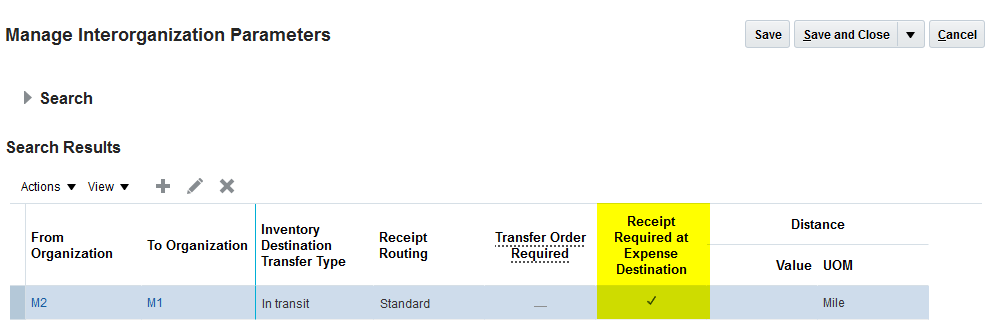
The steps listed below will enable you to configure the interorganization parameter receipt required at expense destination:
- From the Main Menu Navigator, select Setup and Maintenance.
- Enter Manage Interorganization Parameters in the Search field.
- Click the Manage Interorganization Parameters task.
- Enable the Receipt Required at Expense Destination parameter.
- Click Save and Close.
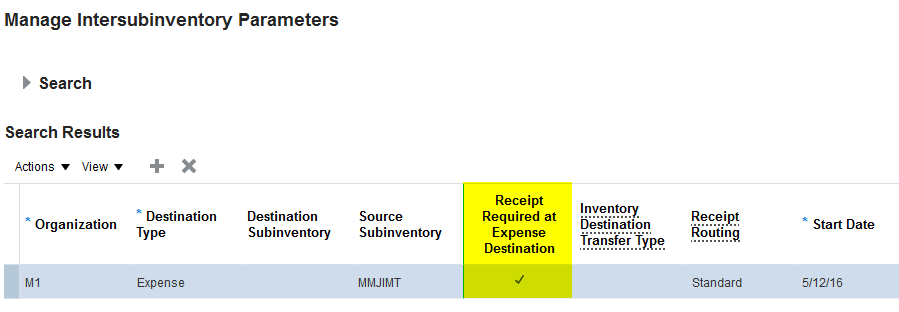
The steps listed below will enable you to configure the intersubinventory parameter receipt required at expense destination:
- From the Main Menu Navigator, select Setup and Maintenance.
- Enter Manage Intersubinventory Parameters in the search field.
- Click the Manage Intersubinventory Parameters task.
- Enable the Receipt Required at Expense Destination parameter.
- Click Save and Close.
Not available.
KEY RESOURCES
- Oracle Supply Chain Management Cloud: Implementing Manufacturing and Supply Chain Materials Management, available at Oracle Help Center
Enhance Collaboration Using Oracle Social Network
Real-time communication between fulfillment personnel helps to rapidly identify and resolve problems and explore alternate solutions, thereby increasing customer satisfaction. The Oracle Social Network is an embedded, central method of capturing interactions between users. It associates these “conversation threads” with specific transactions (such as a receipt or shipment) or specific parties (such as a supplier, customer, or carrier).
With this feature, users can:
- Stream updates on Oracle Social Network.
- Collaborate through real time conversations.
- Participate in Oracle Social Network conversations on a mobile device.
- Receive e-mail and mobile phone-based alerts and notifications.
With Oracle Social Network enabled for Inventory Management, all users involved in the order to cash process, such as order managers, warehouse managers, billing managers, and end customers, have a forum to discuss sales orders and make business decisions efficiently – and keep the conversation linked to the associated content for easy reference.
Oracle Fusion Inventory Management Cloud has enabled frequently-used business objects for use within Oracle Social Network. The business objects transfer order, receipt, inbound shipment, and outbound shipment are enabled for use in Oracle Social Network. For example, the business object transfer order can be configured in Oracle Social Network allowing user interactions to be captured for specific transactions. Fulfillment personnel can communicate with each other in the context of a specific inventory transaction. Inventory Management user interfaces such as the Edit Transfer Order provide access to Oracle Social Network.
The following user interface shows how warehouse personnel can collaborate using real-time conversations in Oracle Social Network. The use case depicts a transaction received against a purchase order. The receiving agent uses Oracle Social Network to communicate to the buyer that the receipt transaction was received in full and all items have been inspected. Additionally, attributes on the receiving transaction, such as the receipt number and supplier name, are captured in Oracle Social Network. This allows the receiving agent and buyer to view the receiving transaction attributes within Oracle Social Network. In the event there was an exception against the receiving transaction, such as a damaged or missing material, the buyer receives updates in real time and can take corrective action. The integration between Oracle Fusion Inventory Management and Oracle Social Network enables warehouse personnel to monitor and communicate details related to materials management transactions.
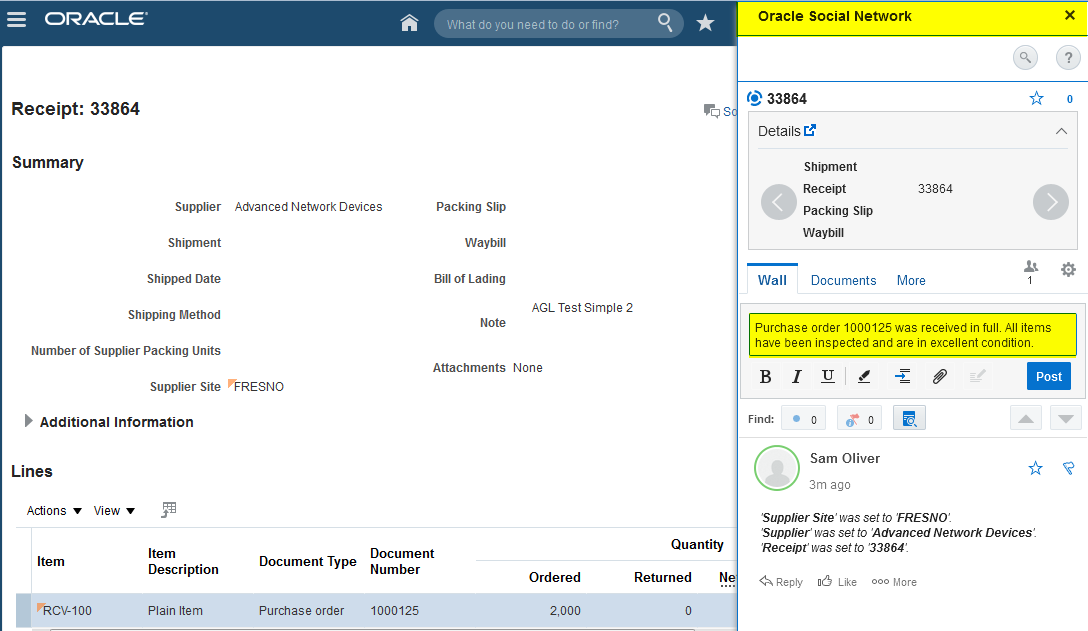
The steps listed below will enable you to configure Oracle Social Network Objects for Supply Chain Management:
- From the Main Menu Navigator, select Setup and Maintenance.
- Enter Manage Oracle Social Network Objects for Supply Chain Management in the Search field.
- Click on the Manage Oracle Social Network Objects for Supply Chain Management task.
- Click the Enable Object button.
- In the detail section, enable selected Business Object Attributes.
- Click Save.
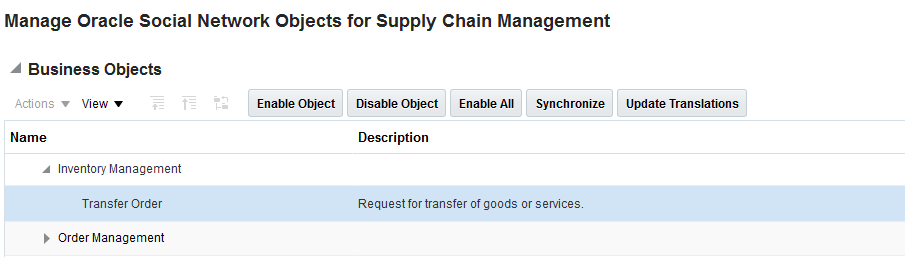
Tips and Considerations
Not available.
- Oracle Supply Chain Management Cloud: Implementing Manufacturing and Supply Chain Materials Management, available at Oracle Help Center
Integrate and Enrich Your Materials Management Processes
One of the key benefits of working in the cloud is rapid implementation. Inventory Management provides a rich set of web services that you can use to integrate with other Oracle, third-party cloud, and on-premise applications that support your supply chain.
New integration features in this release include:
- Additional web services. Use web services to integrate to and/or enrich your inventory operations. Examples include expanded mobile inventory services, par replenishment support, and internal ordering.
- Support Oracle Integration Cloud Service. Take advantage of Oracle’s Integration Cloud Service as one of your options for integrating Inventory Management to other cloud applications or on-premises solutions.
- Support B2B electronic messaging. Communicate with business partners via electronic messaging for your order-to-cash processes, including sending an outbound advanced shipment notice.
The ability to support a wider variety of web services and integration methods reduces integration costs and implementation times to external systems.
Inventory Management is introducing a comprehensive set of web services to support setup and core transactions in Inventory Management and Receiving. The web services support real-time validation and editing needs of partner and PAAS (Platform as a Service). For example, values entered for a lot attribute can be restricted to a list of valid lots for that item in that organization.
Alternatively, you can create material transactions such as receipts, inspections, returns, and cycle counts. Resources to post transactions provide the same behavior as the corresponding SOAP services except for providing the results back to the clients synchronously. REST resources can also be used to view lines to receive, lines to inspect, lines to put away, pick slips, cycle count sequences, and so on. This help to collect related transactions beforehand and can be used to achieve additional operational efficiencies, such as bulk picking, and building into a pallet while using a warehouse management system.
No steps are required to enable this feature.
Not available.
- Oracle Supply Chain Management Cloud: Implementing Manufacturing and Supply Chain Materials Management, available at Oracle Help Center
Support Oracle Integration Cloud Service
Oracle Integration Cloud Service simplifies how you use the Cloud for integration, letting you connect securely to applications and services both in the cloud and on-premises. Users can enable the receipt advice flow for external systems to make it available in Oracle Integration Cloud Service. Users have flexibility to control publishing of events for various receiving transactions. A new receiving parameter “Publish transactional business events” allows users to publish events for various receiving transactions. Receiving events, such as create ASN, cancel ASN, create receipt, create correction, and create put away, can be published.
The steps listed below must be performed to enable collaboration messaging.
- From the Main Menu Navigator, select Setup and Maintenance.
- Enter Manage Receiving Parameters in the Search field.
- Select the Manage Receiving Parameters task.
- Enable the Publish transactional business events parameter.
- Select the Message Storage attributes.
- Enter the Outbound Sender details.
- Click Save and Close.
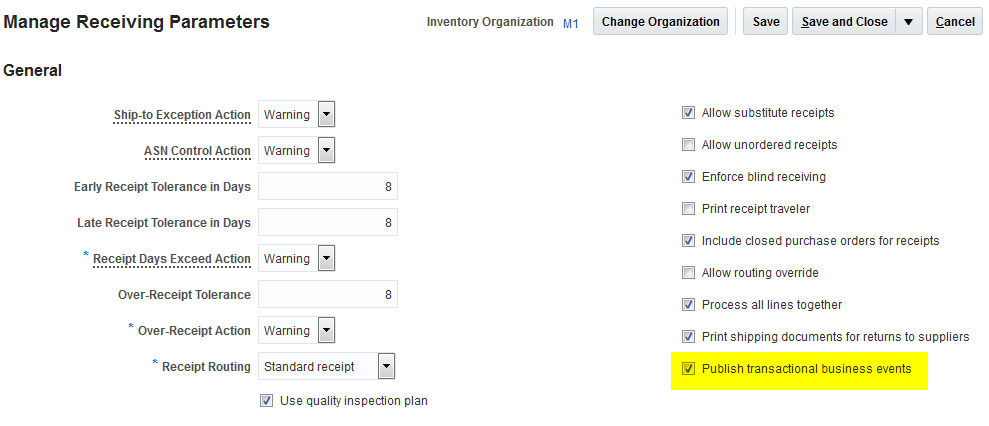
Not available.
- Oracle Supply Chain Management Cloud: Implementing Manufacturing and Supply Chain Materials Management, available at Oracle Help Center
Support B2B Electronic Messaging
Support is available for B2B electronic messaging for communication with business partners for order-to-cash and procure-to-pay business process flows. Users can manage supply chain business collaboration messaging across both internal applications of an enterprise as well as external business partners. External collaboration messaging includes both customers and suppliers. For example, the ASN (Advance Shipment Notice) is integrated with Fusion Collaboration Messaging Framework to produce an electronic message to communicate outbound shipment information to a customer. Supply chain administrators have the ability to manage collaboration messages including managing undelivered messages and reviewing messaging history.
The following Inventory Management document types are supported:
- Process Receipt Advice Outbound
- Process Receipt Acknowledgment Inbound
- Process Shipment Inbound
- Process Shipment Outbound
Steps to Enable
The task Manage Collaboration Messaging Configuration allows users to enable the trading partner and associated collaboration business process collaboration messaging. For example, electronic messaging can be enabled for the procure-to-pay collaboration business process for a given supplier.
The steps listed below must be performed to enable collaboration messaging.
- From the Main Menu Navigator, select Setup and Maintenance.
- Enter Manage Collaboration Messaging Configuration in the Search field.
- Select the Manage Collaboration Messaging Configuration task.
- Select the Collaboration Business Process.
- Select the Message Storage attributes.
- Enter the Outbound Sender details.
- Click Save and Close.
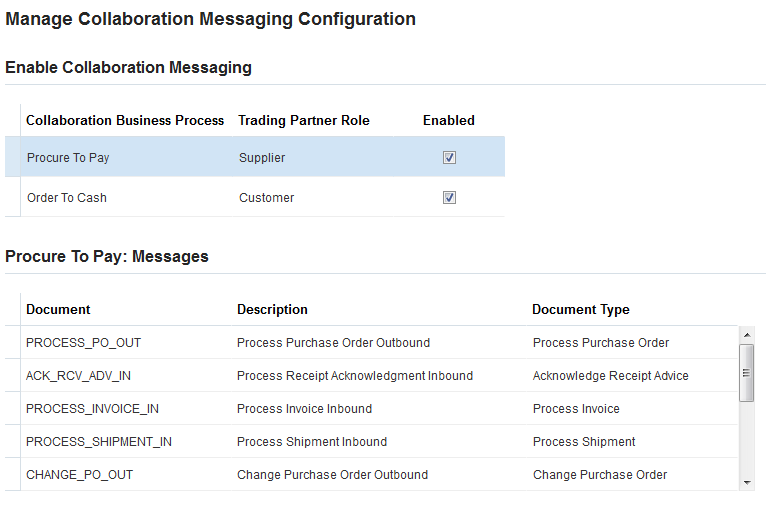
Not available.
Key Resources
- Oracle Supply Chain Management Cloud: Implementing Manufacturing and Supply Chain Materials Management, available at Oracle Help Center
Your company materials management and manufacturing operations require careful cost management when running operations in the cloud. Oracle Cost Management Cloud provides a comprehensive set of capabilities that enable you to effectively manage cost planning, landed cost, and product costing activities.
Oracle Cost Management Cloud is included with the Oracle Inventory Management Cloud subscription.
Cost Expense-Based Internal Material Transfers
This release adds support for internal material transfers delivered to expense destinations. Such transfers – with and without explicit receipts – are costed and may be analyzed in the In-Transit Inventory Valuation Report. In addition, when you enter internal freight charges on an internal shipment, the freight charges are now expensed and accounted in the sending inventory organization, allowing you to charge for the freight cost incurred for shipments.
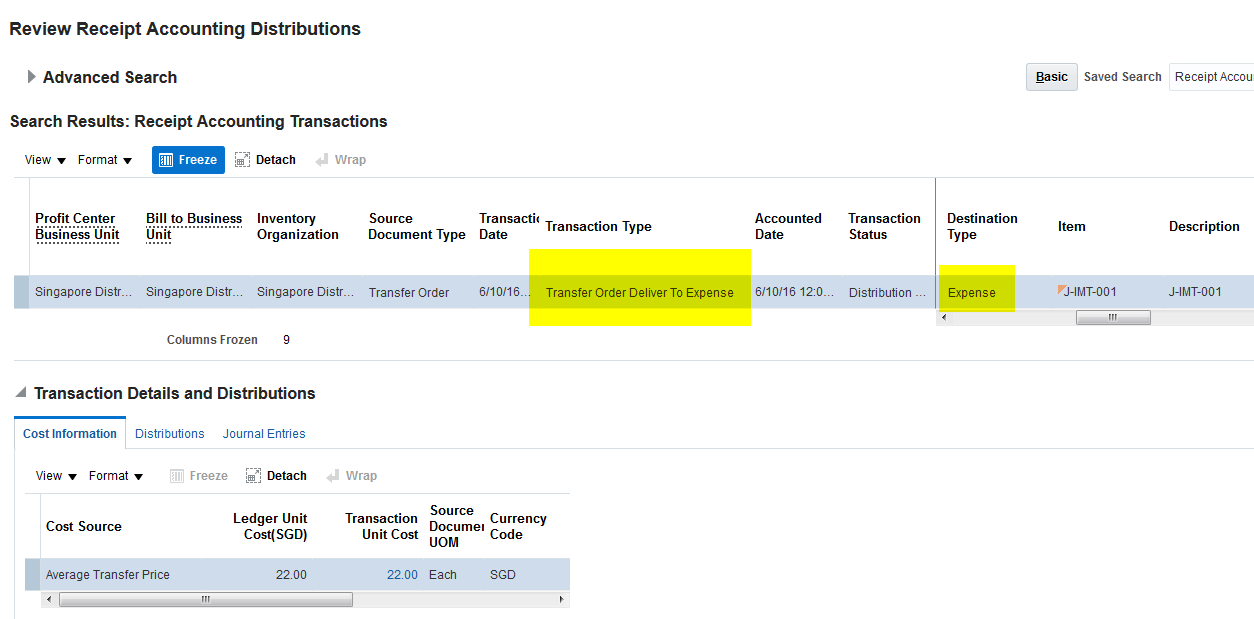
Steps to Enable
The steps listed below will enable you to map the internal freight charges coming on shipment to a cost element in Costing:
- From the Main Menu Navigator, select Setup and Maintenance.
- Enter Manage Cost Component Mappings in the Search field.
- Select the Manage Cost Component Mappings task.
- Search for and select Cost Component Group used in the Cost Profile definition.
- Go to the Cost Component Codes tab and provide a mapping for the predefined INTER_ORG_FREIGHT cost component code with a cost element.
- Click Save and Close.
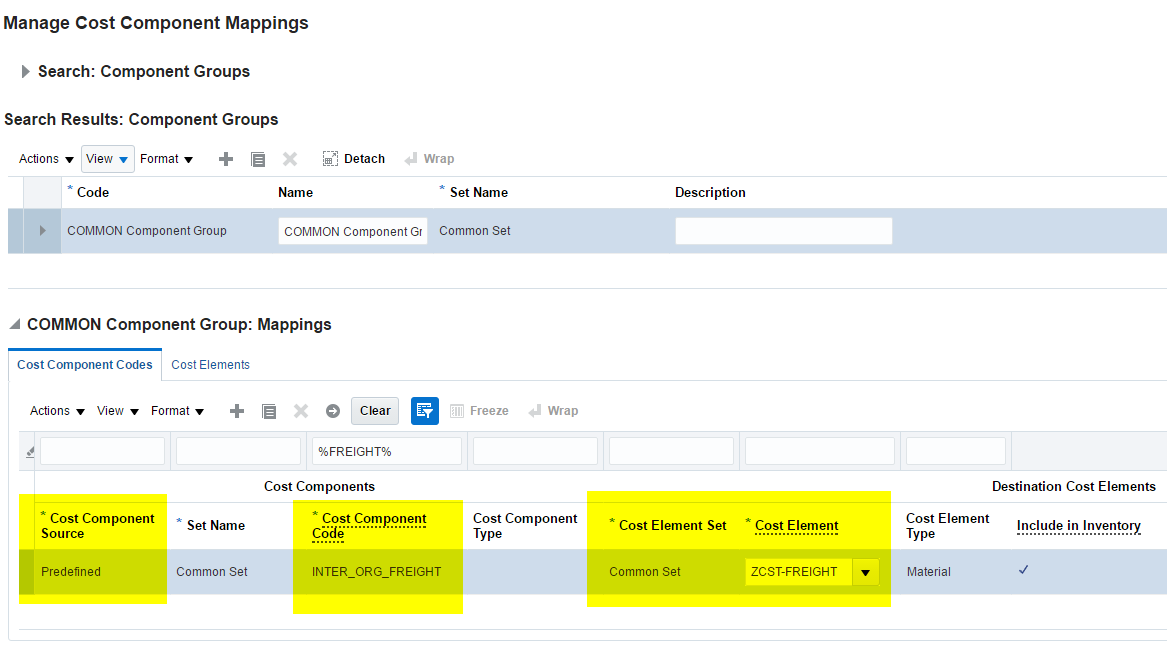
Tips and Considerations
Creation of mapping is required if freight cost is to be tracked through the item cost structure.
Key Resources
- Oracle Supply Chain Management Cloud: Implementing Cost Management
- Oracle Supply Chain Management Cloud: Using Cost Management, available at Oracle Help Center
Simplify Your Standard Cost Updates
Prior to this release, the tasks related to the entry and rollup of standard costs for manufactured items were performed in separate application pages. All standard cost entry tasks are consolidated and are now performed directly in the Manage Cost Scenario page. When creating a cost scenario for a cost organization/cost book combination, you specify the applicable standard costs at the cost element level for materials, resources and overheads. Then you perform and view the results of a cost rollup. Finally, you publish the standard costs to accounting.
You can define standard costs on the Manage Cost Scenario page at one of the following valuation unit levels:
- Cost organization: Standard costs are defined for a cost organization, and these costs are shared with the cost organization’s associated inventory organizations/plants.
- Inventory organization or plant: Standard costs are defined for each inventory organization or plant associated with a cost organization.
- Combination cost organization and plant: Standard costs for an inventory organization/plant may be individually defined or defaulted from the parent cost organization.
A new process is now available that allows you to undo the previously published costs in a scenario, and to revise and republish them after a prior cost update. The consolidation of standard cost tasks into a single page allows you to more efficiently enter and publish your standard costs.
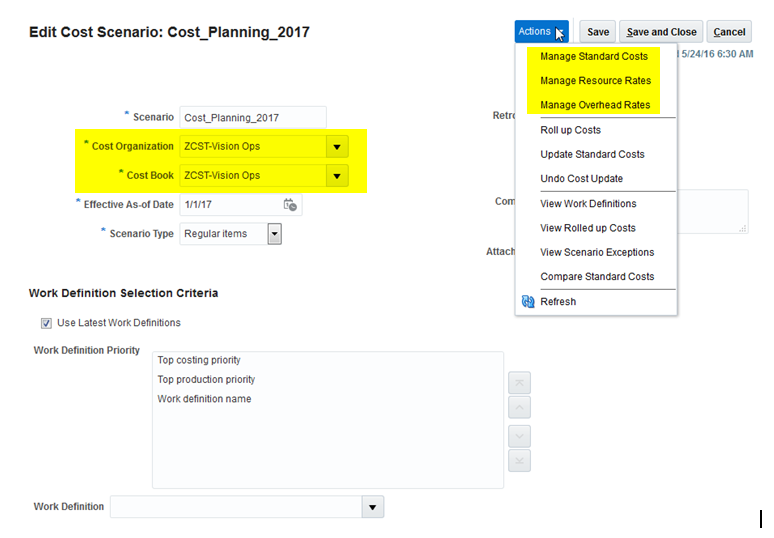
Steps to Enable
No steps are required to enable this feature.
Tips and Considerations
Use separate Cost scenarios for planning costs of regular and configured items.
Key Resources
- Oracle Supply Chain Management Cloud: Implementing Cost Management
- Oracle Supply Chain Management Cloud: Using Cost Management, available at Oracle Help Center
Define Retroactive Standard Cost Effectivities
Standard costs occasionally need an effectivity date that is in the past. This occurs when a new standard costed item is created and immediately transacted in inventory or manufacturing without a defined standard cost. You can now enter standard costs for items whose effectivity date is in the past. This capability allows you to more quickly address raised exceptions due to missing standard costs in transactions.
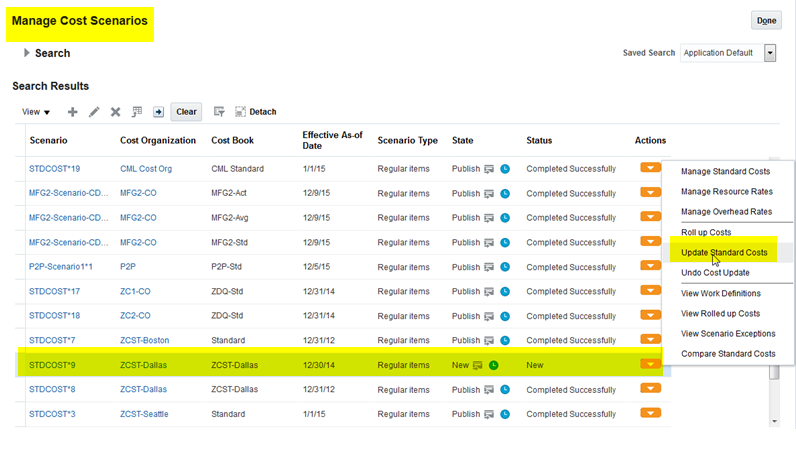
steps to enable
No steps are required to enable this feature.
Tips and Considerations
Use the Undo cost update process to reverse the effects of unintended cost updates.
Key Resources
- Oracle Supply Chain Management Cloud: Implementing Cost Management
- Oracle Supply Chain Management Cloud: Using Cost Management, available at Oracle Help Center
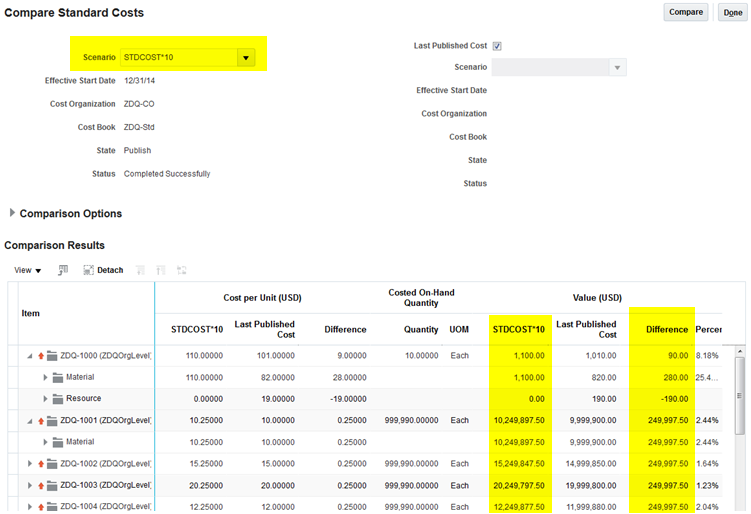
Preview Standard Cost Impact on Inventory Valuation
Unless care is taken, mass changes of component and assembly standard costs can create unexpected and adverse impacts in the reported amounts of inventories in corporate financial statements. Entry errors when revising item standard costs or work definitions can lead to incorrect transaction costs and on-hand inventory valuations.
Before publishing standard costs to accounting, you can preview the financial impact of standard cost changes to on-hand inventory valuations. The Compare Standard Costs page now displays the pending inventory valuation changes when revising standard costs in a cost scenario. Analyzing the results of the preview of pending changes in standard cost allows you to easily detect and proactively eliminate unintended changes to cost.
Steps to Enable
No steps are required to enable this feature.
Tips and Considerations
Not available.
Key Resources
- Oracle Supply Chain Management Cloud: Implementing Cost Management
- Oracle Supply Chain Management Cloud: Using Cost Management, available at Oracle Help Center
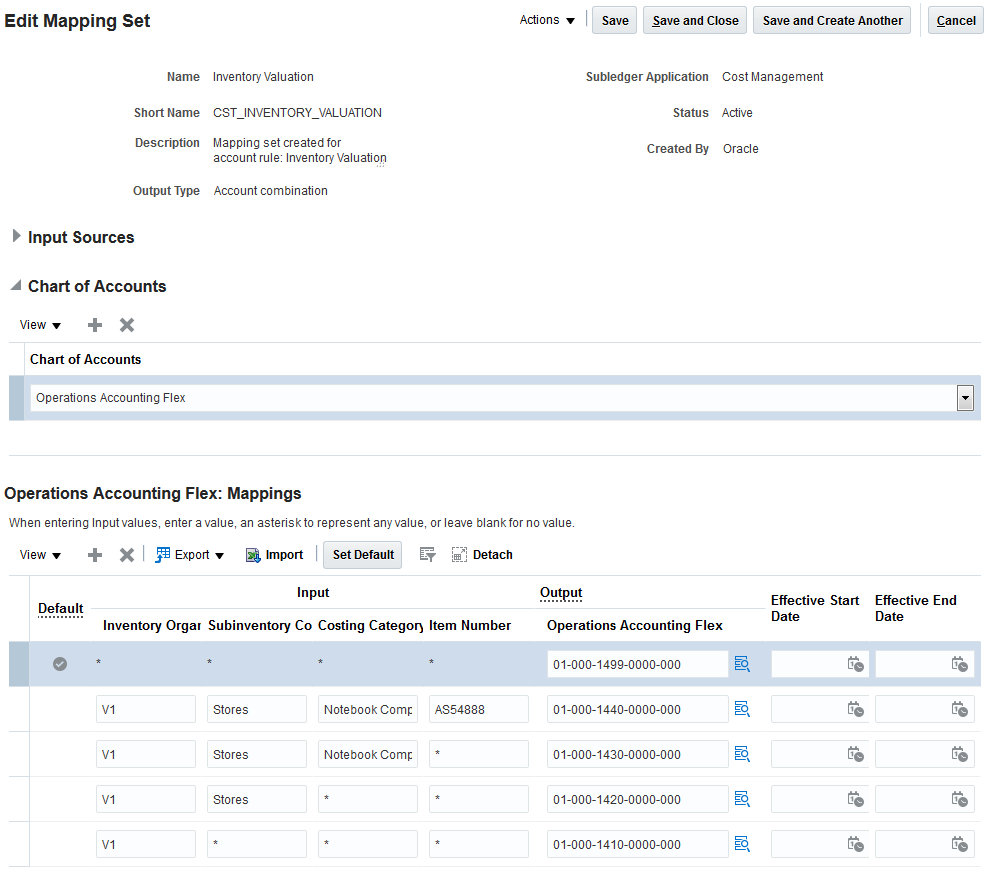
Use Mapping Sets to Simplify Setups in Subledger Accounting
The Subledger Accounting application provides you with increased flexibility, control, and accuracy for generating accounting entries by allowing you to configure account defaulting rules based on key attributes of a transaction. However, for more complex customer implementations, setting up Subledger Accounting rules is time intensive. To facilitate the setup and maintenance of account rules for inventory and manufacturing transactions, seeded mapping sets provide you with an efficient way to define a segment or account combination value. This value can be for one or more transaction values or reference attributes.
This release adds predefined mapping sets for each of the more than 60 accounting line types that Cost Accounting and Receipt Accounting support.
Steps to Enable
- Assign one or more chart of accounts to the mapping sets.
- Choose an account combination for each of the assigned chart of accounts.
Tips and Considerations
Predefined mapping sets use 3 to 5 transaction attributes for each mapping set. If you have a business need to use flexible rules that require more than the transaction attributes available in the seeded mapping rules, create custom account rules or mapping sets to use the 600+ transaction attributes available in Cost Accounting and Receipt Accounting.
Key Resources
- Oracle Supply Chain Management Cloud: Implementing Cost Management
- Oracle Supply Chain Management Cloud: Using Cost Management, available at Oracle Help Center
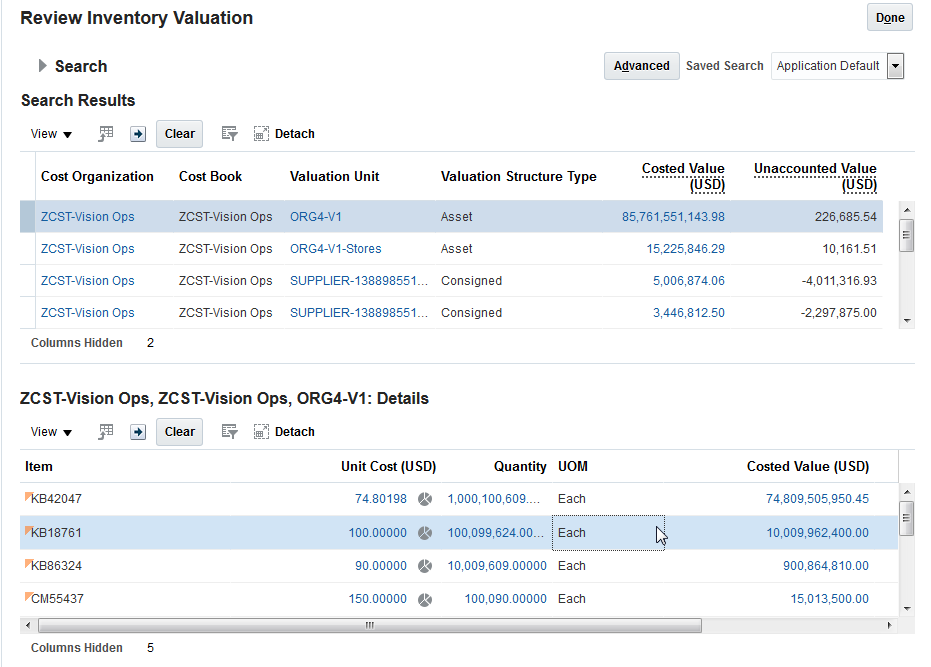
Easily Analyze On-Hand Inventory Valuation
Excess levels of inventory expose your company to financial liabilities in the form of obsolete stock as well as excess levels of working capital investment. To facilitate the monitoring of your investment in inventory you can now query and view on-hand inventory valuation on the Review Inventory Valuation page. You can view and analyze the on-hand costed quantities, unit costs, and valuations as of a current or past date.
Steps to Enable
No steps are required to enable this feature.
Tips and Considerations
Not available.
Key Resources
- Oracle Supply Chain Management Cloud: Implementing Cost Management
- Oracle Supply Chain Management Cloud: Using Cost Management, available at Oracle Help Center
Supply Chain Financial Orchestration
Trade that occurs between internal parties requires complex financial relationships. Oracle Fusion Supply Chain Financial Orchestration is a configurable application that manages these relationships. This functionality allows you to separate your physical flow of goods from the financial accounting of these goods.
Oracle Supply Chain Financial Orchestration Cloud is included with the Oracle Inventory Management Cloud subscription.
Calculate Transfer Price Using Pricing Strategy
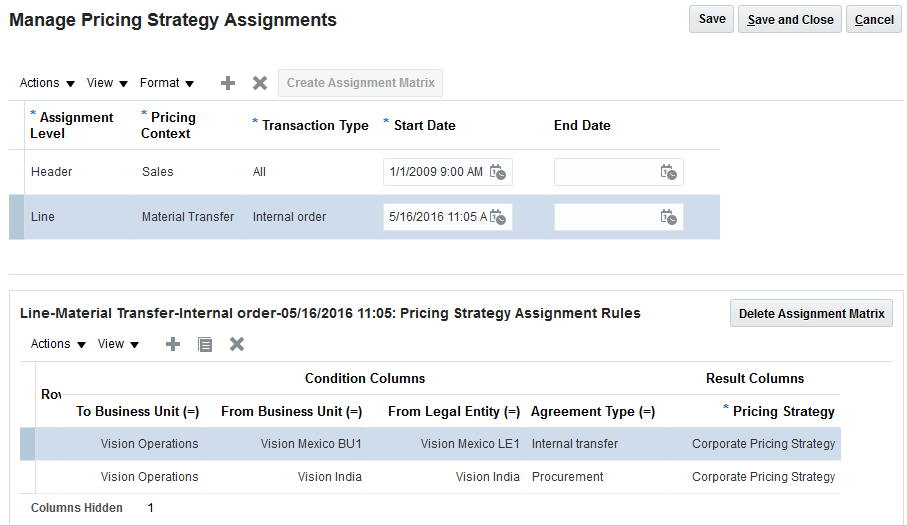
Transfer pricing rules can be complex. Further, the way that the price is calculated can vary by many attributes, such as the parties or item category involved in the sale. Prior to this release, users with a lot of variation or a lot of complexity needed to use a third party pricing engine to accommodate more complex internal pricing scenarios. With this release, users can now choose to use the advanced pricing capabilities of Oracle Fusion Pricing to calculate the transfer prices on any financial route.
Business attributes of financial orchestration transactions can be modeled as dimensions on the pricing strategy assignment. This allows the system to derive the optimal pricing strategy for transfer price calculations.
The base price in Pricing can be a price list, a cost list, the price in the purchase order line, or the price in the sales order line for which the financial orchestration is applicable. The transactions’ business attributes can also be used to specify rules. For example, a rule can be created to derive one or more price charges that can be applied over the base price.
The following screenshot depicts assigning a pricing strategy for financial orchestration with the Internal Transfer pricing context.
The following screenshot depicts defining a source document price based charge in a price list:
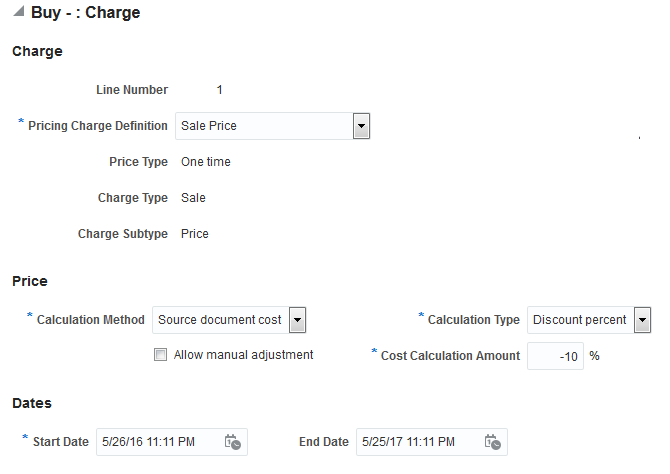
No steps are required to enable this feature.
Tips and Considerations
Not applicable.
Define Enhanced Financial Orchestration Qualifiers
Often, the financial path that a given transaction must take can vary based on attributes of the transaction, such as item number, ship from, or ship to address. You can use financial orchestration qualifiers in Supply Chain Financial Orchestration to determine the applicability of the financial flow to a business transaction. This feature is now enhanced with set of advanced business attributes to provide more flexibility in identification of financial orchestration flow pertaining to a business flow.
The following new business attributes are available now for the different business process types of a financial orchestration flow:
|
|
Shipment |
Procurement |
Internal Transfers |
Drop Ship |
| Item Number |
Y |
Y |
Y |
Y |
| Item Class |
Y |
Y |
Y |
Y |
| User Item Type |
Y |
Y |
Y |
Y |
| Destination Type (Expense/Inventory) |
Y |
Y |
||
| Ship-to Party Number |
Y |
Y |
||
| Ship-to Address |
Y |
Y |
||
| Ship-to Country |
Y |
Y |
||
| Sold-to Party Number |
Y |
Y |
||
| Supplier Number |
Y |
|||
| Supplier Site Code |
Y |
|||
| Supplier Country |
Y |
No separate steps are required to enable this feature.
Tips and Considerations
Not Applicable.
Use Dual View of Supply Chain Financial Orchestration Flow
Prior to this release, the financial orchestration flow pages were optimized for primary routes that have multiple financial flows (multi-node). This result in the page showing three different objects in a hierarchy: the financial orchestration flow header, the primary routes, and the financial routes. This may be a complex user interface in a simple implementation where no financial intermediary organizations are involved.
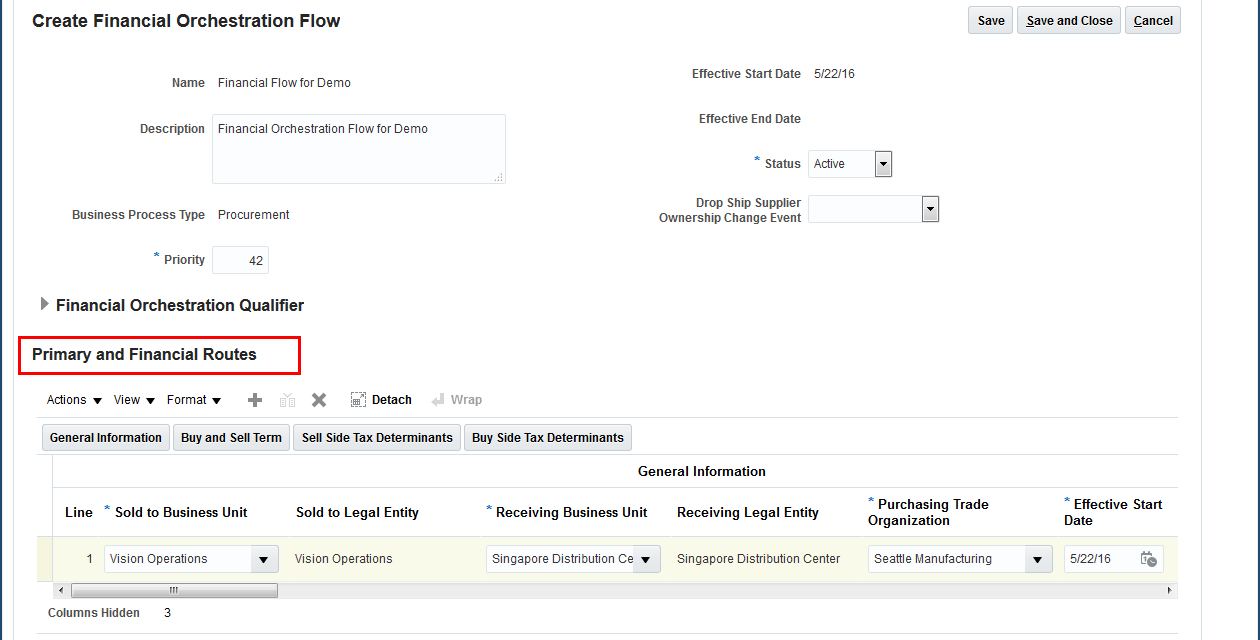
The new feature will provide a simplified, more intuitive view of the financial orchestration flow for simple implementations where the financial orchestration flows do not have multiple financial routes.
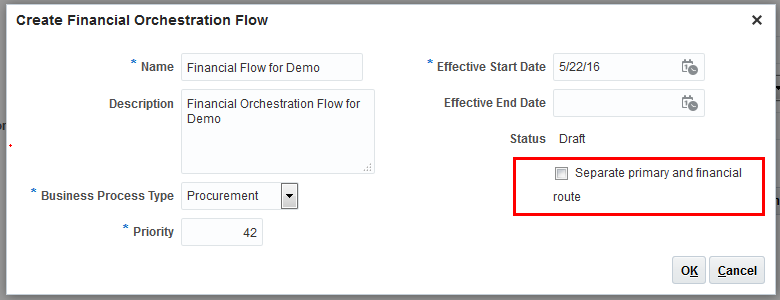
When a new financial orchestration flow is created, the user will determine if multiple financial routes are allowed for the flow. The financial orchestration flows in which multiple financial routes are allowed will continue to use same behavior as in prior releases. However, single-node financial routes will now show only the financial routes directly under the financial orchestration flow header.
When created, the financial flow will always be shown in the single-node view or multi-node view for both viewing and updating. This enables you to keep the single node flows simple while preserving the ability to define more complex flows when needed. The financial orchestration flow cannot be switched from single-node view to multi-node view or vice versa.
Steps to Enable
No steps are required to enable this feature.
Tips and Considerations
While creating the financial orchestration flow uncheck the Separate primary and financial route check box to enable a simplified view of the primary and financial route.
Support Expense Destination Transfer Orders
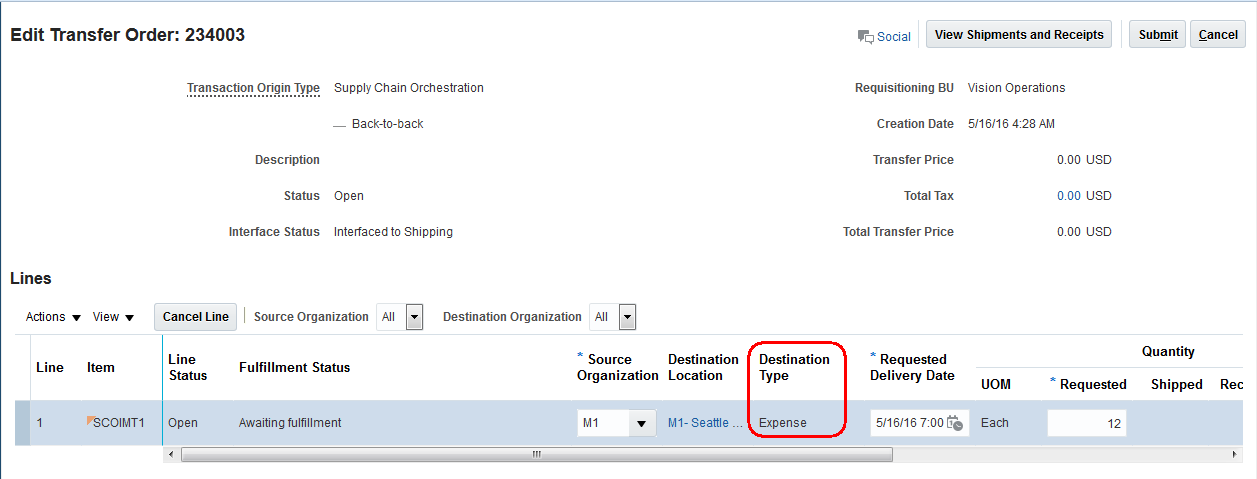
Companies need to be able to price internal transfers even when the material is expensed in the receiving organization. Financial orchestration for expense destination transfer orders is now supported. Unlike inventory destination transfers, a transfer order shipped to an expense destination may or may not be “received” at the destination.
When a receipt is not required for a transfer order shipment, the financial orchestration is executed at the time of shipment irrespective of the ownership transfer event specified in the documentation accounting rules of the financial orchestration flow.
Steps to Enable
No steps are required to enable this feature.
Tips and Considerations
Not Applicable.
Collaboration Messaging Framework
You can use a common business-to-business (B2B) messaging framework to enable the automated flow of B2B messages for business processes such as order to cash. Oracle Collaboration Messaging Framework Cloud is tightly integrated with all SCM Cloud products to deliver a single, consistent B2B experience for Oracle customers and implementers of B2B messaging.
All B2B messages are implemented using a global, industry-standard XML format: OAGIS 10.1. Pre-built integration with B2B service providers allows trading partners to maintain their existing B2B processes (and existing B2B format, such as EDI) to provide a complete, end-to-end B2B solution.
Oracle Collaboration Messaging Framework Cloud is included with all Oracle SCM Cloud and Oracle Procurement Cloud subscriptions.
Define B2B Trading Partners and B2B Messaging Configuration
The Collaboration Messaging Framework allows you to define customers as trading partners and select which B2B messages apply for the trading partner. If a B2B service provider is used, you can select which B2B service provider is used by the trading partner.
Order to cash B2B messages are:
| Functional Name |
OAGIS B2B Message |
Other B2B Standards |
|---|---|---|
| Inbound Order |
ProcessPurchaseOrder |
EDI ANSI ASC X12 850 EDI UN/EDIFACT ORDERS |
| Outbound Order Acknowledgement |
AcknowledgePurchaseOrder |
EDI ANSI ASC X12 855 EDI UN/EDIFACT ORDRSP |
| Inbound Change Order |
ChangePurchaseOrder |
EDI ANSI ASC X12 860 EDI UN/EDIFACT ORDCHG |
| Outbound Change Order Acknowledgment |
AcknowledgeChangePurchaseOrder |
EDI ANSI ASC X12 865 |
| Inbound Cancel Order |
CancelPurchaseOrder |
|
| Outbound ASN |
ProcessShipmentNotice |
EDI ANSI ASC X12 856 EDI UN/EDIFACT DESADV |
You can use the following page to enable business-to-business messaging for the Order to Cash flow:
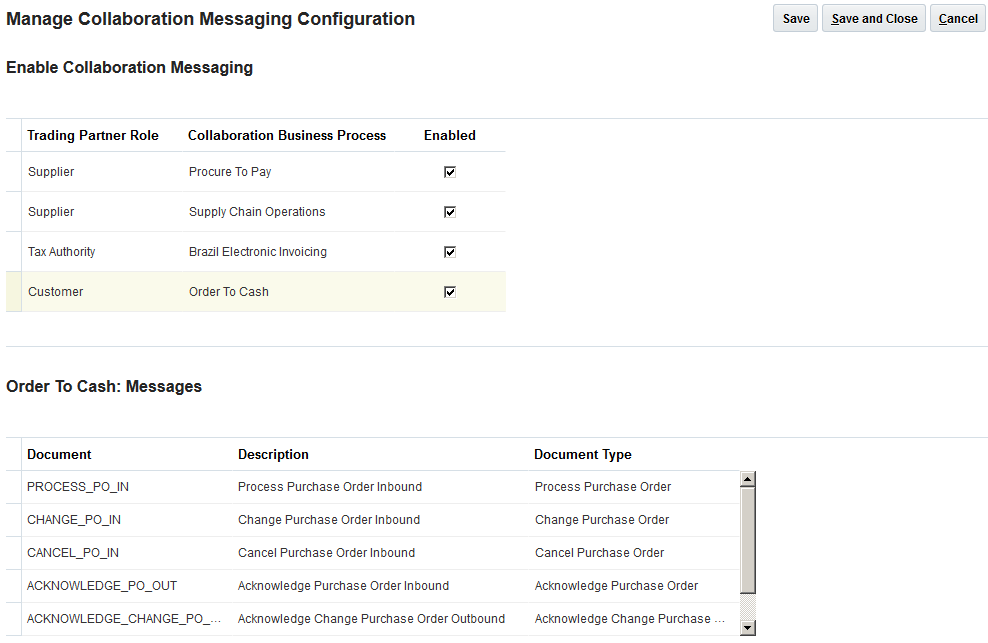
Use the following page to manage service provider configuration if a service provider is used. You must configure the delivery method details for the service provider and select the messages that the service provider supports:
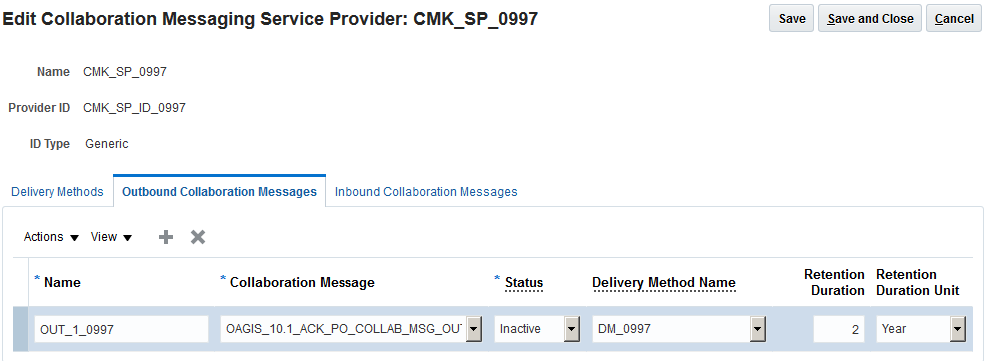
Use the following page to manage trading partner, including configuring the web service connector to the trading partner and selecting messages that the trading partner is capable of exchanging with you as the supplier:
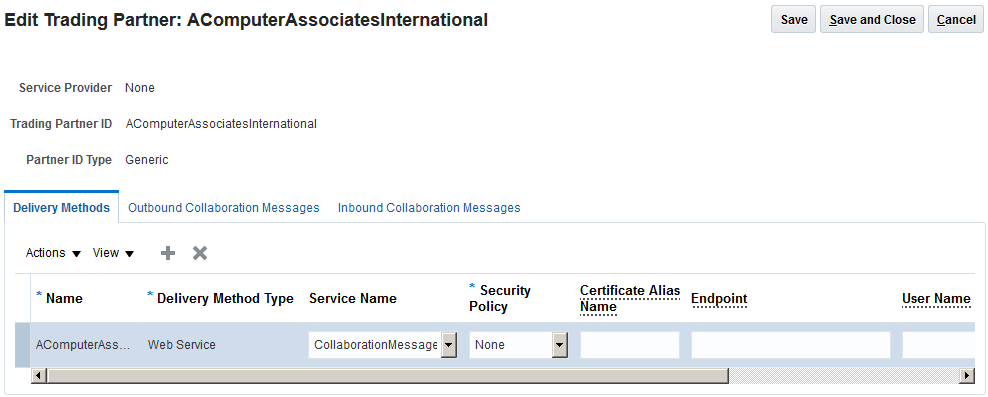
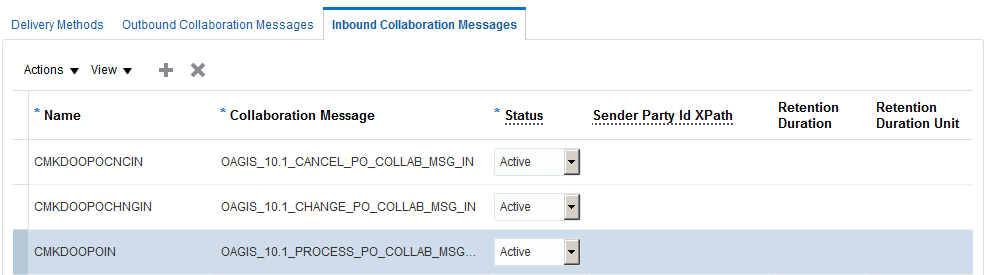
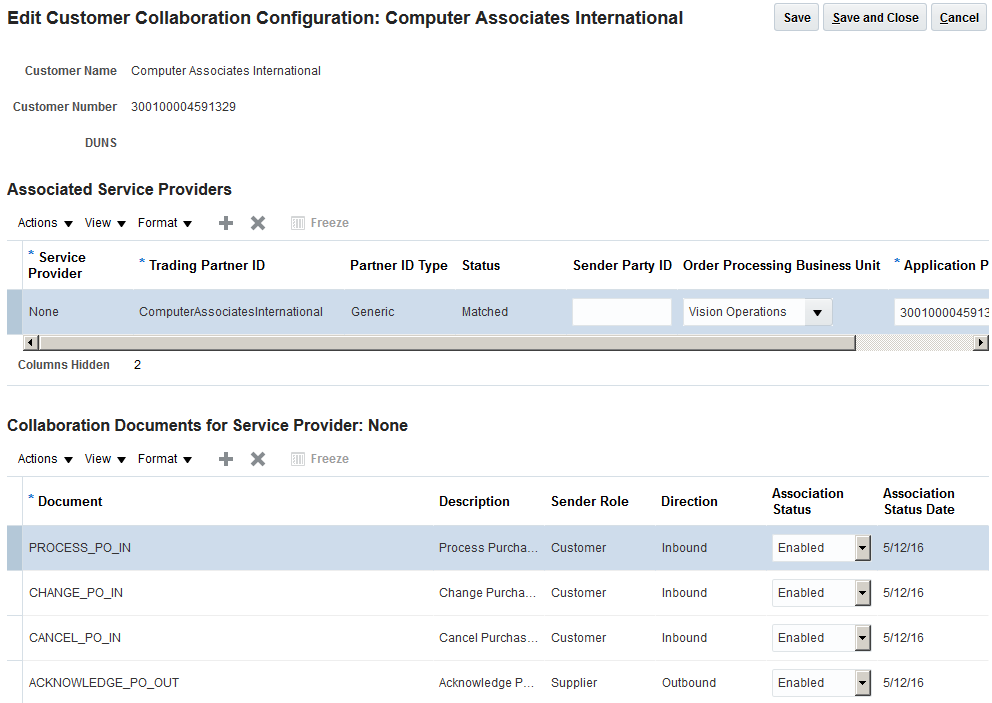
Use the following page to manage customer collaboration configuration. You can select the customers with whom you want to enable business-to-business collaboration. You must then associate the trading partner definition that was defined earlier to the customer, and select and enable the Open Applications Group Integration Specification (OAGIS) documents that you want to exchange with the customer:
Steps to Enable
- Enable the Order to Cash flow for business-to-business messaging.
- Manage service providers if applicable.
- Manage trading partners.
- Manage customer collaboration configuration.
Role Information
The following function security privilege is required for this feature:
| Privilege Name and Code |
Job Role Name and Code |
|---|---|
| Manage B2B Trading Partners CMK_B2B_TRADING_PARTNERS |
B2B Administrator ORA_CMK_B2B_ADMINISTRATOR |
| Manage B2B Customer Trading Partners CMK_B2B_CUSTOMER_TRADING_PARTNERS |
B2B Administrator ORA_CMK_B2B_ADMINISTRATOR |
| Manage B2B Supplier Trading Partners CMK_B2B_SUPPLIER_TRADING_PARTNERS |
B2B Administrator ORA_CMK_B2B_ADMINISTRATOR |
Key Resources
- Oracle Supply Chain Management Cloud: Implementing Collaboration Messaging Framework
To reduce cycle times, deliver an excellent customer experience, and increase revenues, Oracle Supply Chain Management (SCM) Cloud supports advanced fulfillment strategies. These strategies include configure-to-order, drop-ship, back-to-back, and internal material transfer flows. Fueled by a powerful and innovative supply orchestration architecture, Oracle SCM Cloud has unsurpassed fulfillment capabilities.
Use Internal Material Transfer Flows
Internal material transfer is an end-to-end solution that orchestrates transfers according to business rules. It can also orchestrate across multiple supply chains. You can manage transfers separately, and you can combine them with sales orders to improve customer service.
New features in this release include the following
- Transfer to expense destinations. Transfer materials to an expense destination and perform associated costing.
- Create and update internal material transfers using an open interface. On-premise users can request the creation and update of internal material transfers in the cloud.
- Additional Transfer costs. Support additional transfer costs or charges at the transfer order line level.
Using internal material transfers, you can centrally manage internal inventory transfers across Oracle SCM Cloud to improve efficiency in your supply chain and to optimize working capital.
Steps to Enable
No steps are required to enable this feature.
Transfer to Expense Destinations
Employees or departments that need materials may use inventory from another location before purchasing additional quantities. When transferring material between facilities, the location providing the material needs to generate shipping documents and the location accepting the material needs to receive the material when it arrives.
In this release, when you use transfer orders to transfer goods between facilities, you can expense material to a destination for cases where materials are not tracked on-hand. This is common for goods received directly by employees or departments that use the goods immediately.
This enhancement provides full shipping and receiving support for moving material between parts of an enterprise expensed at the destination. In particular, automatically generating shipping documents for outbound shipments significantly increases productivity and reduces errors.
The steps listed below will enable you to configure the interorganization parameter receipt required at expense destination:
- From the Main Menu Navigator, select Setup and Maintenance.
- Enter Manage Interorganization Parameters in the Search field.
- Select the Manage Interorganization Parameters task.
- Enable the Receipt Required at Expense Destination parameter.
- Click Save and Close.
The steps listed below will enable you to configure the intersubinventory parameter receipt required at expense destination:
- From the Main Menu Navigator, select Setup and Maintenance.
- Enter Manage Intersubinventory Parameters in the search field.
- Select the Manage Intersubinventory Parameters task.
- Enable the Receipt Required at Expense Destination parameter.
- Click Save and Close.
Not available.
- Oracle Supply Chain Management Cloud: Implementing Manufacturing and Supply Chain Materials Management, available at Oracle Help Center
Create and Update Internal Material Transfers Using an Open Interface
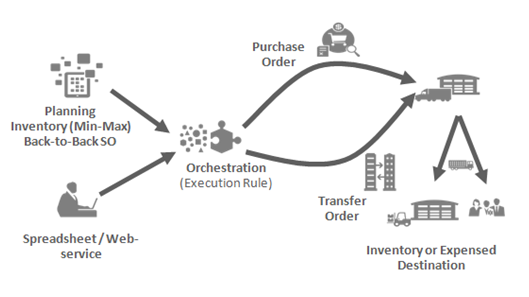
In this release, support is provided to create, update, and cancel internal material transfers via spreadsheet or web service. Both the spreadsheet and the web service support expense destination transfers and additional transfer order charges. The import supply order file-based data import template has been extended to support the update and cancel supply operations, in addition to the create supply operation which was introduced in the prior release. The Integration Cloud Service (ICS) enabled web service is new in this release. The web service provides comprehensive support allowing the ability to create, update, and delete internal material transfers. Spreadsheet and web service support streamline integration to external systems and reduce integration costs.
Steps to Enable
No steps are required to enable this feature.
Tips and Considerations
Not available.
- Oracle Supply Chain Management Cloud: Implementing Manufacturing and Supply Chain Materials Management, available at Oracle Help Center
Support Additional Transfer Costs
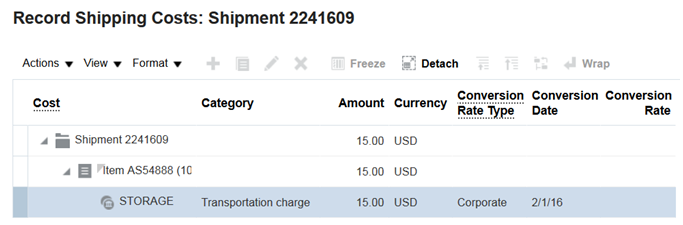
Additional transfer order charges can be applied to transfer orders. The charges are automatically interfaced to Oracle Fusion Cost Management Cloud when inventory shipping transactions are processed. The Spreadsheet and web service support is provided to create, update, and delete additional transfer order charges at the transfer order line level. Transfer order charges are supported for both expense and inventory destination transfer orders. The existing shipping cost functionality has been extended to support transfer order charges. Charges can be viewed, updated, and canceled within Oracle Fusion Shipping Cloud.
The steps listed below will enable you to configure the intersubinventory parameter receipt required at expense destination:
- From the Main Menu Navigator, select Setup and Maintenance.
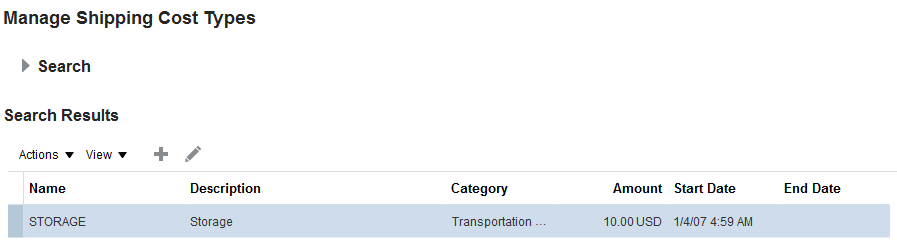
- Enter Manage Shipping Cost Types in the Search field.
- Select the Manage Shipping Cost Types task.
- Click Save and Close.
Not available.
- Oracle Supply Chain Management Cloud: Implementing Manufacturing and Supply Chain Materials Management, available at Oracle Help Center
Oracle Supply Chain Orchestration Cloud provides the backbone infrastructure that delivers end-to-end supply execution and management across Oracle SCM Cloud. Supporting various business processes and flows, Supply Chain Orchestration receives supply requests from multiple Oracle SCM Cloud products. You can run business process steps and tasks across the Oracle SCM Cloud according to predefined orchestration flows. Supply Chain Orchestration provides visibility and alerts when exceptions or jeopardy conditions occur. It improves the efficiency of the supply chain and helps to reduce the cycle time that is required to get supply where it is needed so that it meets demand. Supply Chain Orchestration allows you to create both standard and configured products.
Oracle Supply Chain Orchestration Cloud is included with the Oracle Inventory Management Cloud, Oracle Manufacturing Cloud, Oracle Order Management Cloud, and Oracle Procurement Cloud subscriptions.
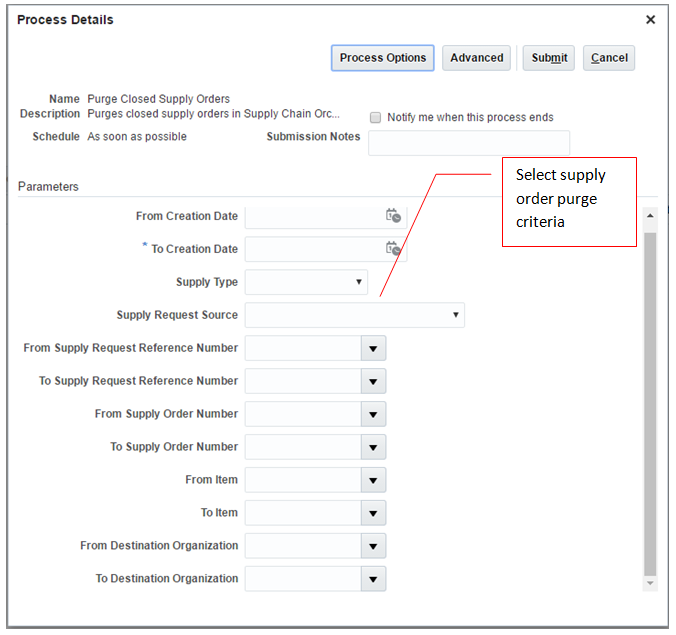
Purging old, legacy, or unwanted data improves both application performance and user productivity, as applications reduce the working set data and users do not see data that’s not relevant. This feature provides the capability to:
- Purge data based on closed supply orders or other selections such as order source, order type (make, buy, or transfer), destination organization, order lifecycle event dates, and so on.
- Publish the results of purge operation for reference or error correction.
Steps to enable
No steps are required to enable this feature.
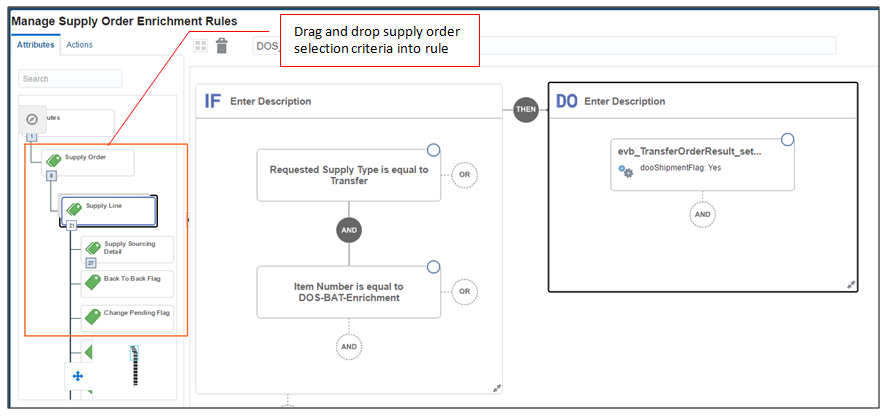
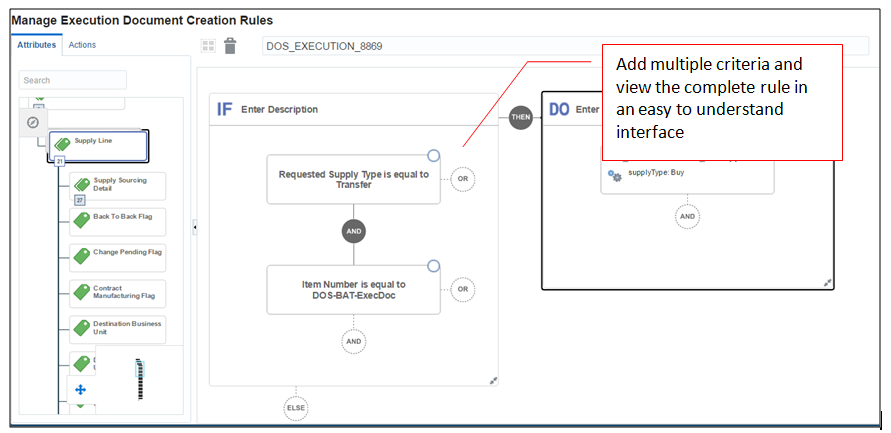
Create Business Rules Using Visual Editor
The ability to configure business rules is a key driver of the flexibility of Supply Chain Orchestration. This feature allows business users to create rules without technical assistance using the intuitive Rules Builder page. The new rules builder improves the quality of process flow definitions, reduces errors, and saves both implementation time and cost.
At Oracle, delivering products that reflect a superior and secure user experience is the result of an enormous investment. To understand your pain points, we spent countless hours examining how people like you actually work and use our enterprise applications. We then work closely with product management, security experts, strategy, and development to design innovative applications that help you to be more productive, secure, efficient, and effective.
Oracle Fusion Applications Security provides a single console where IT Security Managers and Administrators can perform various functions including user lifecycle management, role definition, security policy management(both functional and data), role hierarchy maintenance, username and password policy administration, and certificate management. The console also enables users to simulate the effect of security changes, to run security reports, and download a connector for integration with Microsoft Active Directory.
In Release 12, Oracle Fusion Applications Security offers several new capabilities that offer customers the following benefits:
- A Simplified User Experience for the IT Security Manager - Prior to Release 12, security administration functions were distributed across Oracle Identity Management (OIM) and Authorization Policy Manager (APM). In Release 12, these functions are delivered through a single interface – the Security Console. OIM and APM are no longer available in R12.
- Easy Integration with Identity and Access Management (IDM/IAM) Systems –New capabilities to synchronize user account information with Identity and Access Management (IDM/IAM) systems. This synchronization enables the delivery of a Single Sign-On experience through these systems.
- Upgrade-Safe Reference Role Model - Starting from Release 12, pre-defined roles that are shipped with Oracle Applications Security will be locked down. Customers will not be able to modify the functional and data security policies that are associated with these roles. They can, however, add new data security policies to these pre-defined roles. In addition, privileges and resources are protected. Users cannot create or modify these artifacts
- Enhanced Self-Service Capabilities - Administrators are able to manage the entire user lifecycle. They can customize how notifications are generated and sent for various user lifecycle events including user account creation, and password management.
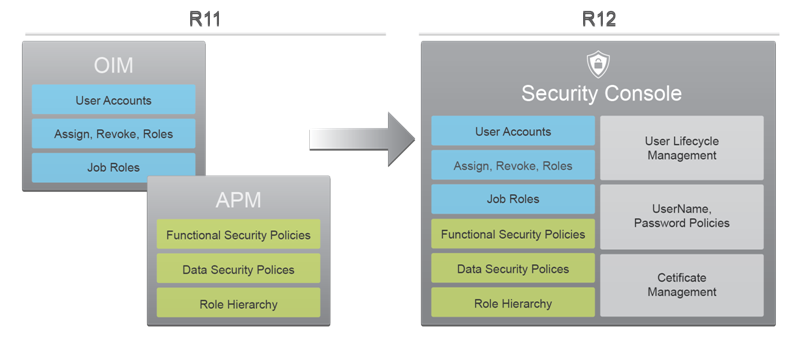
For Microsoft Active Directory (AD) and Oracle Identity Management (OIM), customers can download and install connectors that will automatically synchronize user account information between Oracle Fusion Applications and these IDM systems. As in R11, customers must continue to log a Service Request (SR) to set up federated Single Sign-On (SSO) between these systems. Once the federation is enabled, the connectors will synchronize information.
Release 12 also delivers a REST API based on the SCIM (System for Cross-Domain Identity Management) standard. Customers can use this API to create user accounts, modify user attributes (e.g. email), enable/disable users, and fetch user account and role information.
Locking down these security artifacts enables safe upgrades to pre-defined roles, since the possibility of conflict with customer introduced changes to these roles is now eliminated. This, in turn enables customers to safely adopt new enhancements that may be delivered with pre-defined roles in future releases. As in R11, customers can make copies of pre-defined roles and freely customize these copies.
Please refer to the Upgrading Applications Security in Oracle ERP and SCM Cloud for any steps that may be required to prepare for and adopt this feature.
Administrators can also tailor username and password generation by choosing from a list of shipped policies.
Please refer to the Upgrading Applications Security in Oracle ERP and SCM Cloud for any steps that may be required to prepare for and adopt this feature.
A new data security model was introduced in Release 11 that only applied to new Oracle ERP Cloud customers. In Release 12 all users will now be assigned to the appropriate data sets using the new Manage Data Access for Users page, without the need for assigning data roles generated from data role templates. Since data roles are no longer used, they will no longer be automatically generated upon the creation of a new data security element, such as a new business unit, a new ledger, etc.
While customers who started using Oracle ERP Cloud in Release 11 have been introduced to this new model, customers who were using Oracle ERP Cloud prior to Release 11 have continued to use the data role based data security in Release 11. In Release 12, the usage of generated data roles for data security will be discontinued, and customers who are using the data role based model will be upgraded to use the new user-role-data assignment model.
To access the Manage Data Access for Users page, you must navigate to Setup and Maintenance > Manage Data Access for Users task.
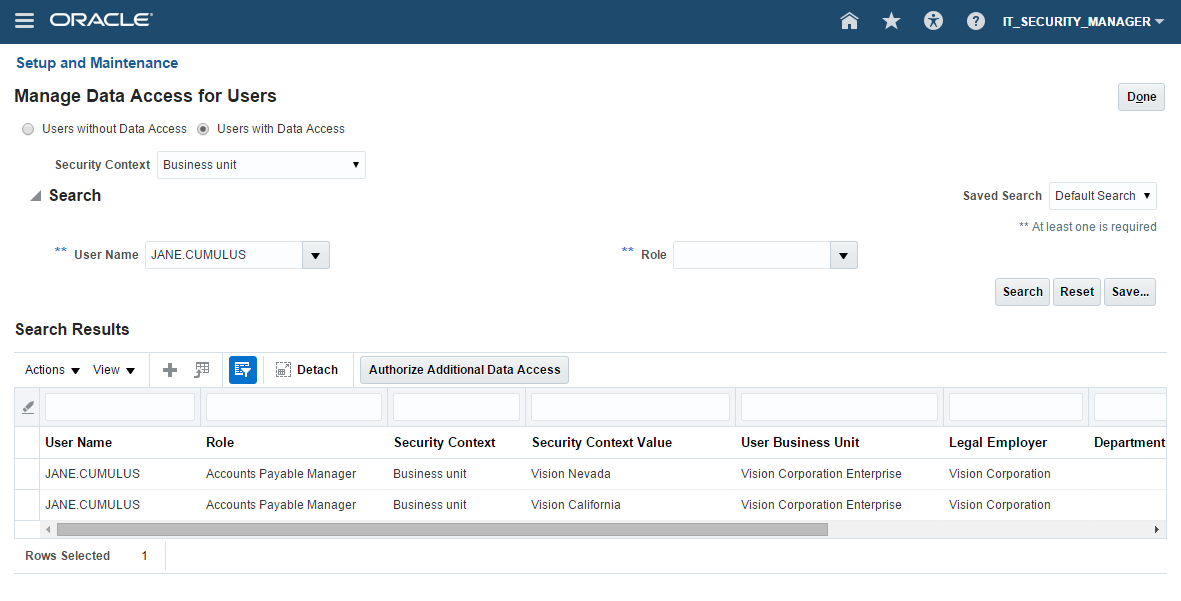
Manage Data Access for Users Page
TIPS AND CONSIDERATIONS
As data assignments are specific to a role, a user must first be assigned to a role before data assignments can be created in the Manage Data Access for Users page. When selecting a role, the selection is limited to the roles that are currently assigned to the selected user.
Only data roles generated from seeded data role templates will be upgraded, as the user-role-data assignment records require associated data security policies against the roles in order to drive data security, and the required data security policies will only be present against the corresponding seeded roles. Instructions to manually upgrade custom data roles will be provided in a separate upgrade document.
You can now create and manage implementation user accounts within Oracle Fusion Applications Security. You can assign roles to these user accounts using the following navigation: Tools > Security Console > User tab. You can also search, retrieve, and manage user accounts automatically created for employees, contingent workers, supplier contacts, or partner contacts.
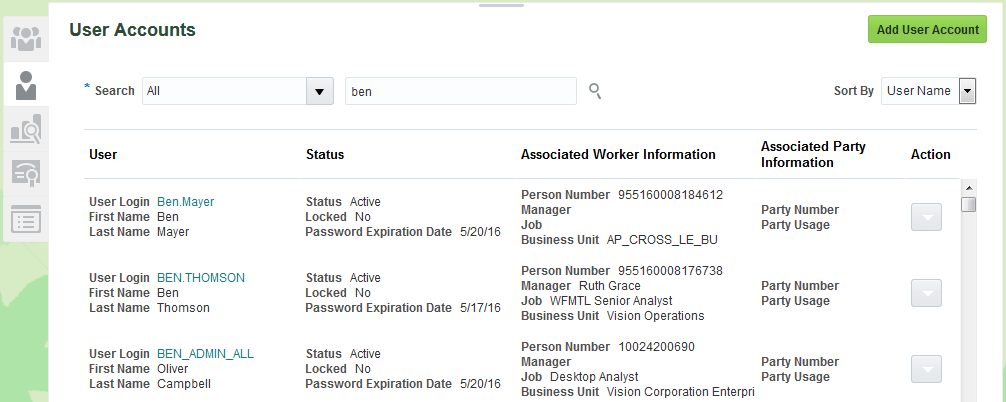
Search User Accounts Page
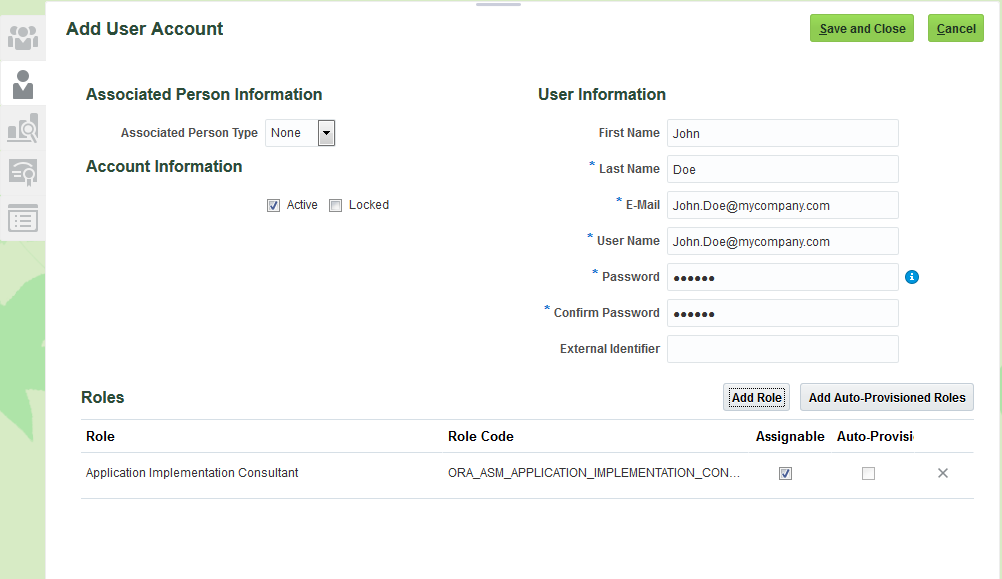
Add User Account Page
Steps to Enable
There are no steps necessary to enable this feature.
Role Information
The following function security privileges are required for this feature.
| Privilege Name and Code |
Job Role Name and Code |
|---|---|
| Create User Account ASE_CREATE_USER_ACCOUNT_PRIV |
IT Security Manager ORA_FND_IT_SECURITY_MANAGER_JOB |
| Delete User Account ASE_DELETE_USER_ACCOUNT_PRIV |
IT Security Manager ORA_FND_IT_SECURITY_MANAGER_JOB |
| Edit User Account ASE_EDIT_USER_ACCOUNT_PRIV |
IT Security Manager ORA_FND_IT_SECURITY_MANAGER_JOB |
| View User Account ASE_VIEW_USER_ACCOUNT_PRIV |
IT Security Manager ORA_FND_IT_SECURITY_MANAGER_JOB |
Key Resources
For more information on the Security Console, go to the Help Center for the following guide:
- Security Oracle HCM Cloud
Administrator Password Management
As an administrator, you can manage passwords of other users using the Security Console. You can auto-generate or manually enter a password for a user account. You can also define password lifecycle and complexity policies. Passwords will be automatically validated against these policies.
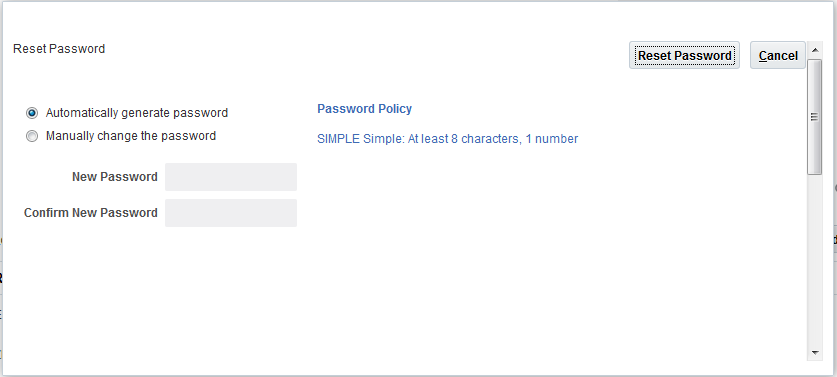
Administrator’s Reset Password Page
Steps to Enable
There are no steps necessary to enable this feature.
Key Resources
For more information on the Security Console, go to the Help Center for the following guide:
- Security Oracle HCM Cloud
User Password Management (Self-Service)
You can now manage your own user account password using the Security Console. The password will be automatically validated against the defined password lifecycle and complexity policies.
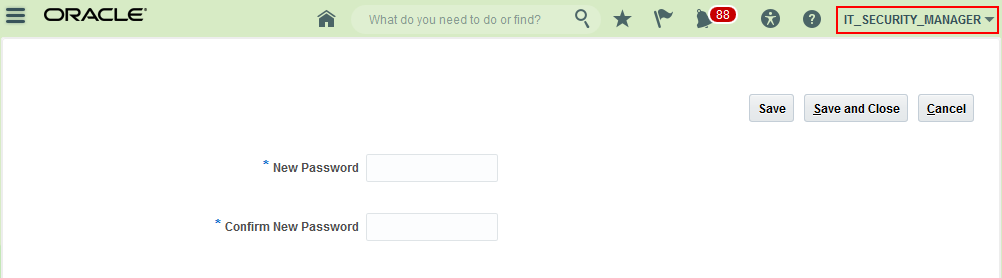
Self-Service Password Reset Page
Steps to Enable
There are no steps necessary to enable this feature.
As an administrator, you can now lock user accounts. If you lock a user account, you will be temporarily preventing the user from logging in with that user account. You can also unlock a locked user account.
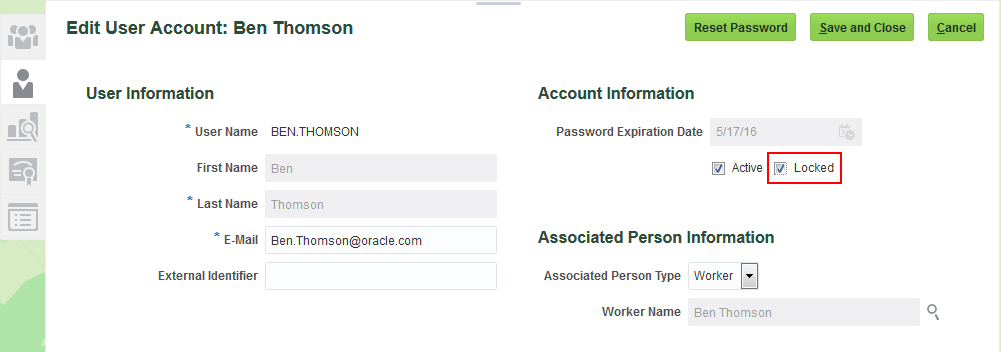
Lock User Account in Edit User Account Page
Steps to Enable
There are no steps necessary to enable this feature.
You can now view only certain components of a role in the graphic visualizer. You can view only the privileges, aggregate privileges or roles assigned to a role. You can also view the graph in full screen mode and pan over a specific region in the graph.
For complex roles, these features enable you to reduce the amount of information visualized and to focus on the area within the role hierarchy that requires your attention.
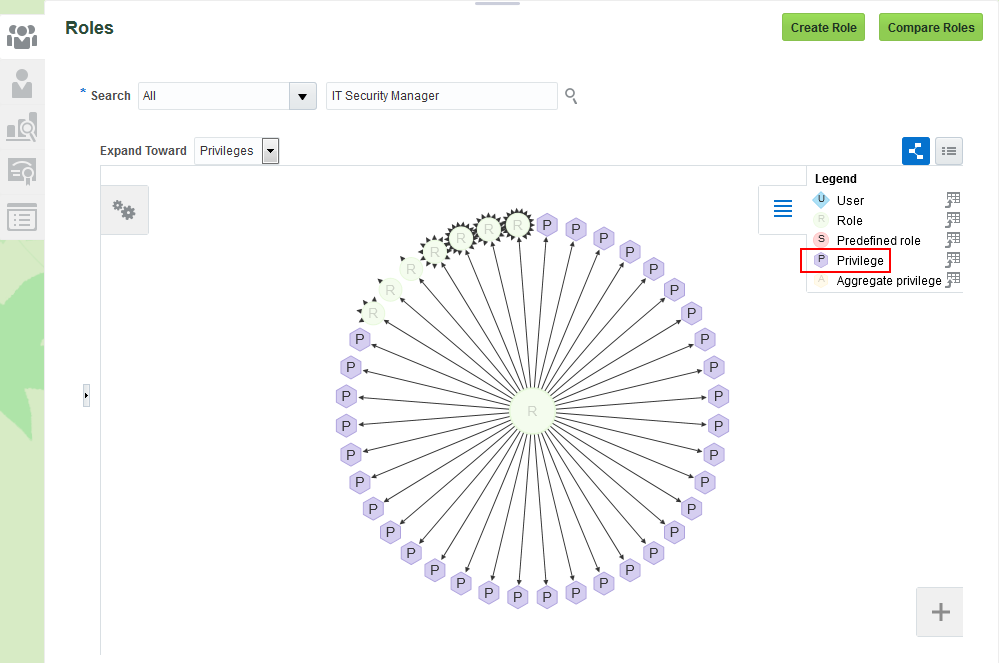
View Only the Privileges for a Role
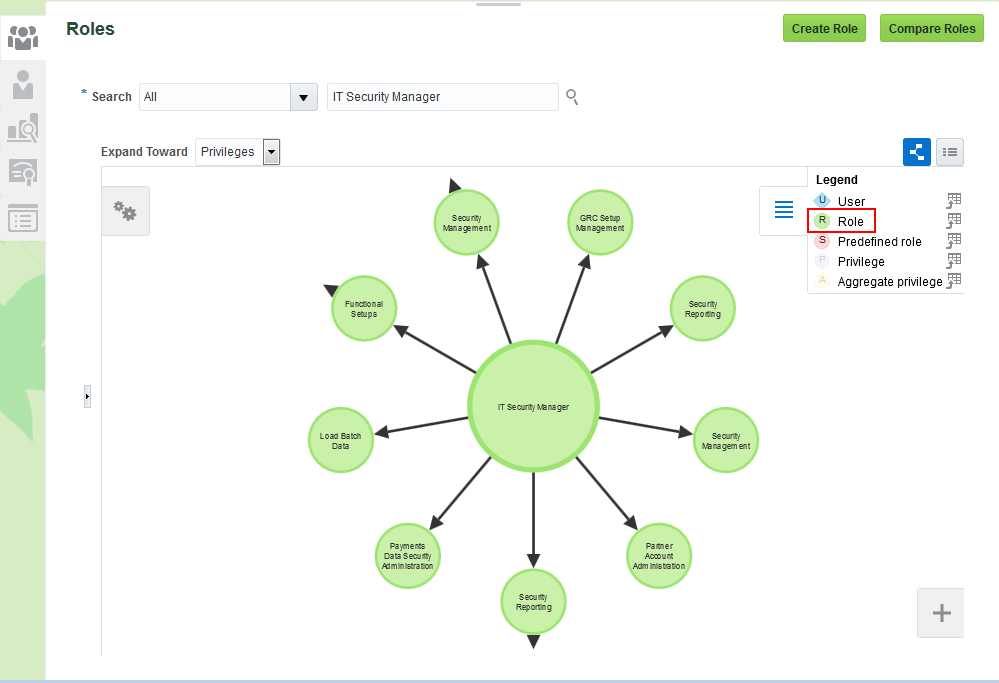
View Only the Inherited Roles for a Role
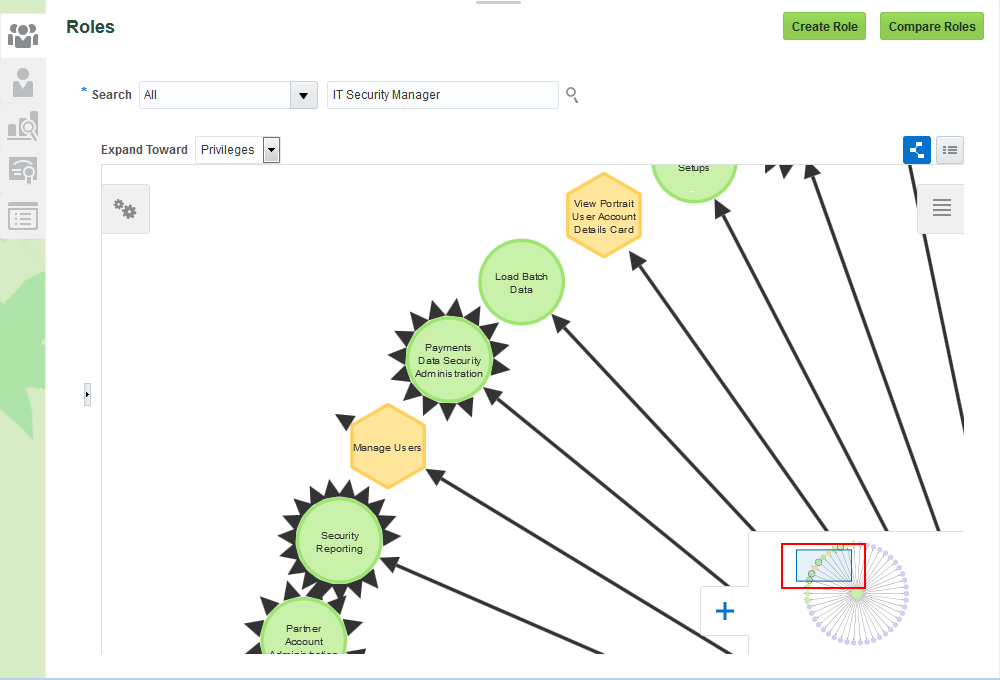
Pan and View Top Left Region of the Graph
Steps to Enable
There are no steps necessary to enable this feature.
You can now view role hierarchies in a tabular view. You can switch between the graphic visualizer view and the tabular view. You can also export the date displayed in the tabular view.
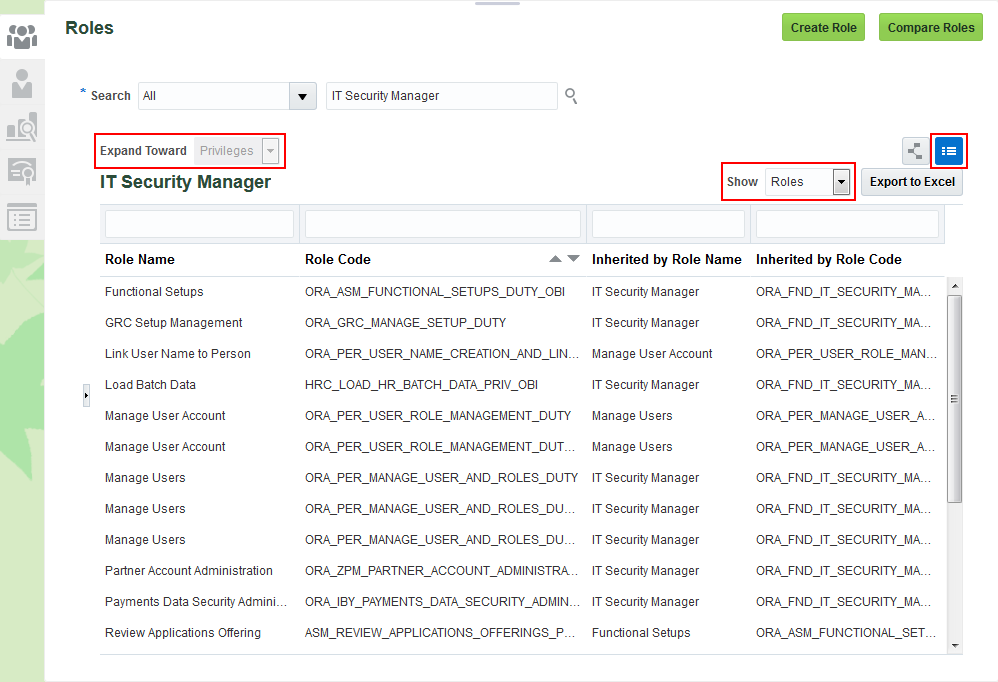
Tabular View of Direct and Indirectly Inherited Roles for a Role
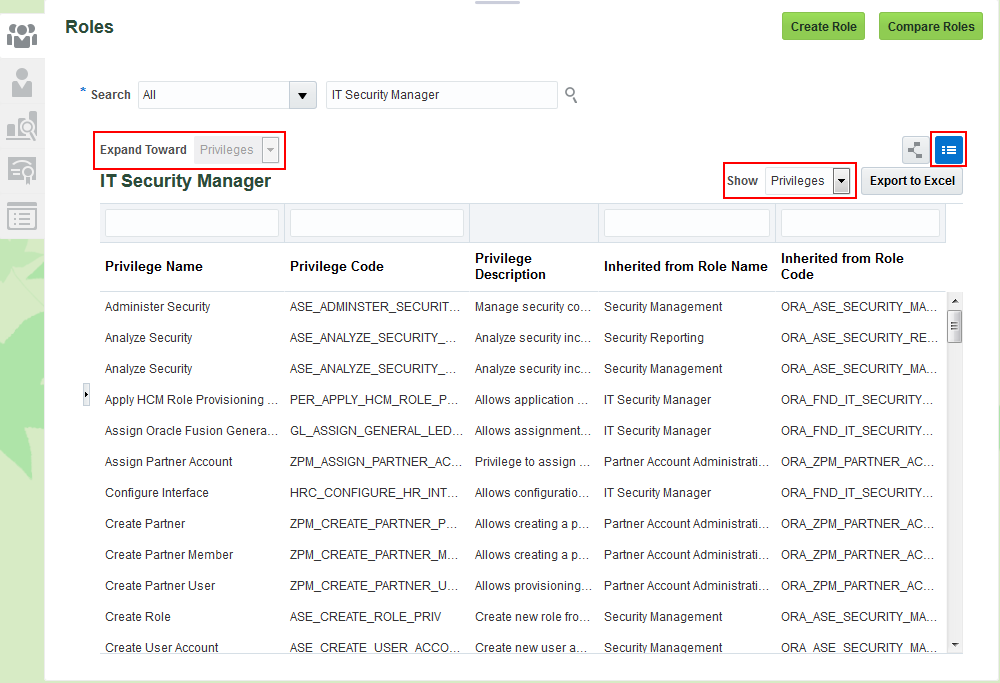
Tabular View of Direct and Indirectly Assigned Privileges for a Role
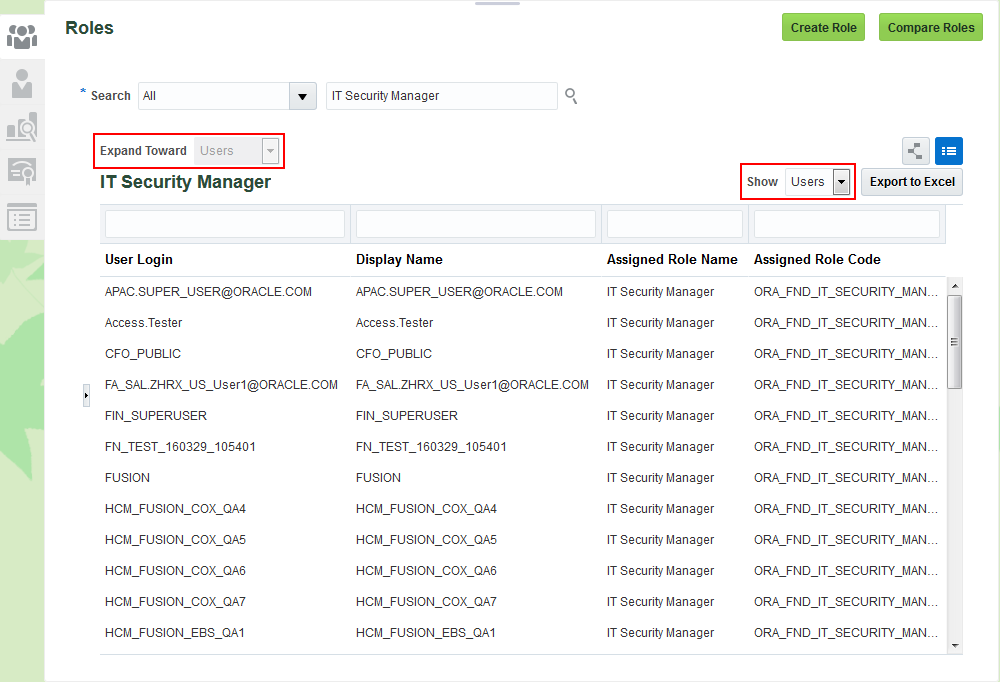
Tabular View of Direct and Indirectly Assigned Users for a Role
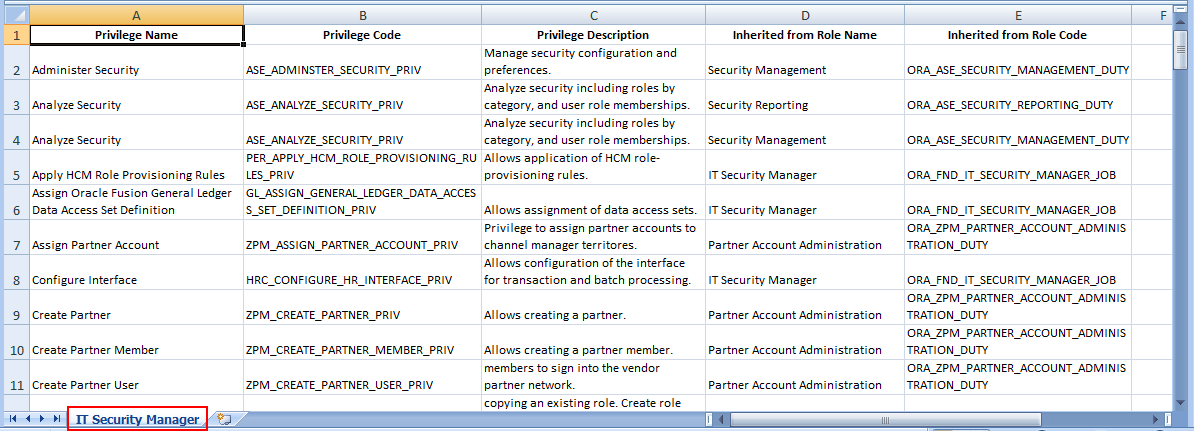
Export of Direct and Indirectly Inherited Privileges for a Role
Steps to Enable
There are no steps necessary to enable this feature.
Search in Role Hierarchy Visualization
You can now search and quickly locate security artifacts (nodes) in the role hierarchy visualization. You can search for privileges, roles or users in the visualization.
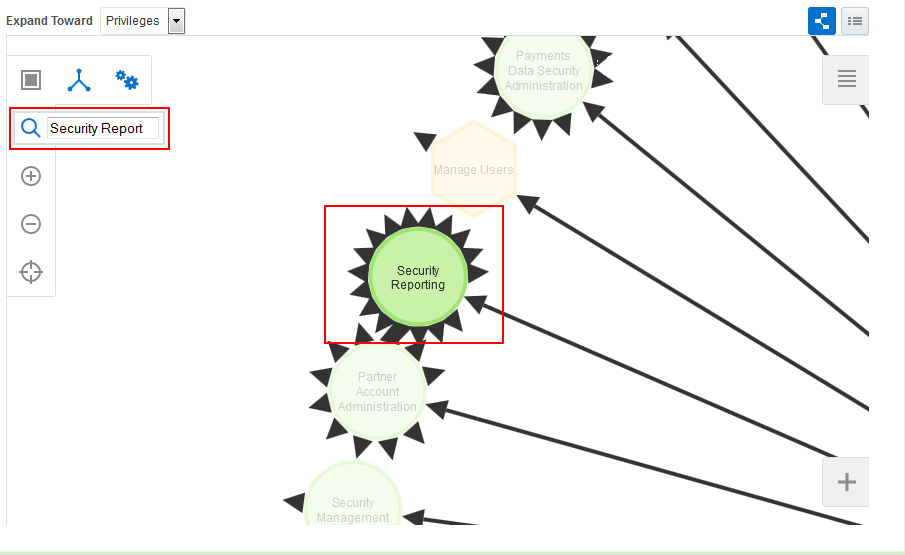
Search in Role Hierarchy Graph
Steps to Enable
There are no steps necessary to enable this feature.
You can now define the user name generation rules used to auto-generate the user name in Oracle Fusion Applications Security. User name generation rules can be based on the user’s first and last names, e-mail or person number. You can also choose to use a system generated user name if the rule fails to generate a user name.
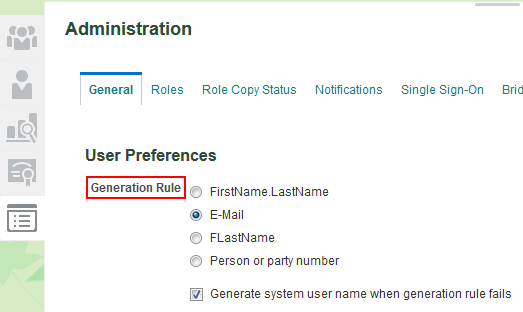
User Name Generation Rules Region in the Administration Page
Steps to Enable
There are no steps necessary to enable this feature.
Tips and Considerations
If your company submitted a service request for Oracle to set up a custom username generation rule, review the Validate User Lifecycle Settings topic in the Upgrade Guide for Oracle ERP and SCM Cloud Security.
You can now define policies for password management. These policies can define the duration for various password lifecycle events like password expiration and password warning generation. You can also set the complexity of generated passwords by choosing from a pre-defined list of rules.
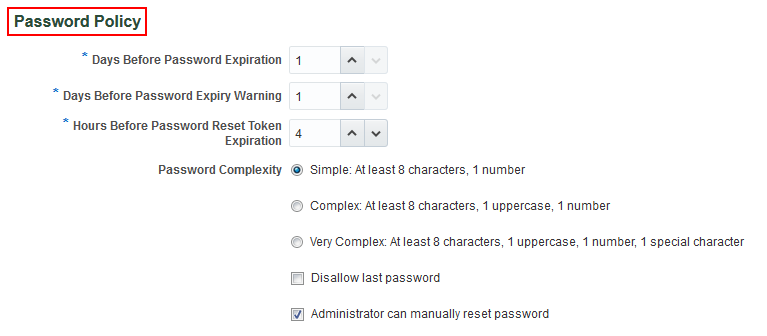
Password Policy Region in the Administration Page
Steps to Enable
There are no steps necessary to enable this feature.
Tips and Considerations
If your company submitted a service request for Oracle to set up a custom password policy, review the Validate User Lifecycle Settings topic in the Upgrade Guide for Oracle ERP and SCM Cloud Security.
Role Information
The following function security privilege is required for this feature:
| Privilege Name and Code |
Job Role Name and Code |
|---|---|
| Run Password Expiry Job ASE_PASSWORD_EXPIRY_ESS_JOB_PRIV |
IT Security Manager ORA_FND_IT_SECURITY_MANAGER_JOB |
You can now define custom notification templates for user account life cycle events. You can also use pre-defined notification templates.
These templates will be used to generate notifications for events like user account created, user password reset and user password expiry warning.
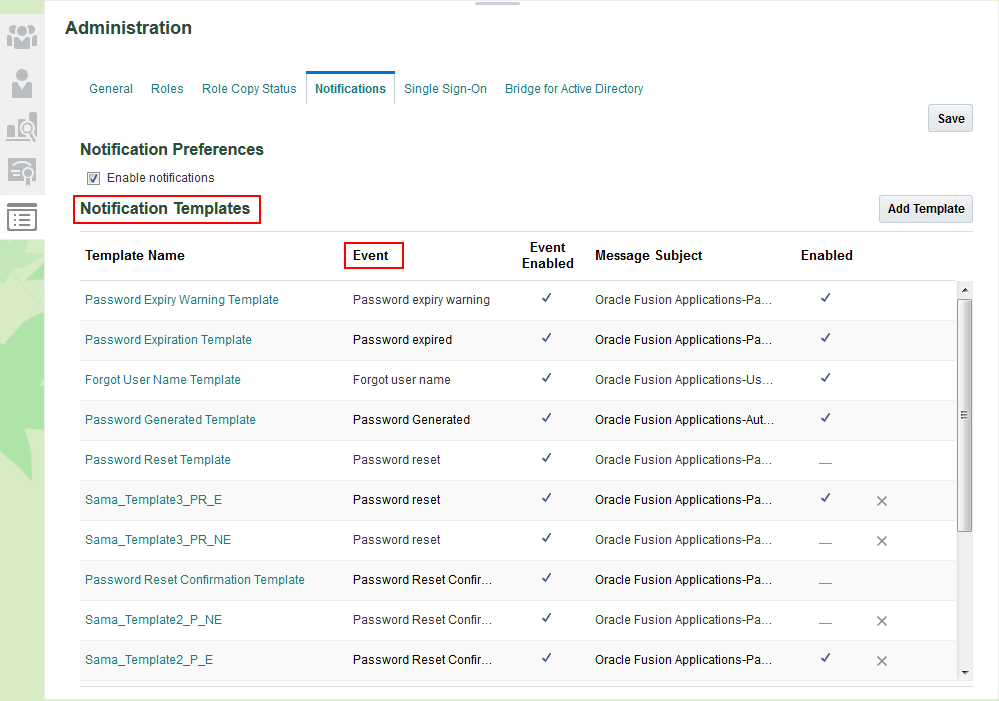
Notification Templates Region in the Administration Page
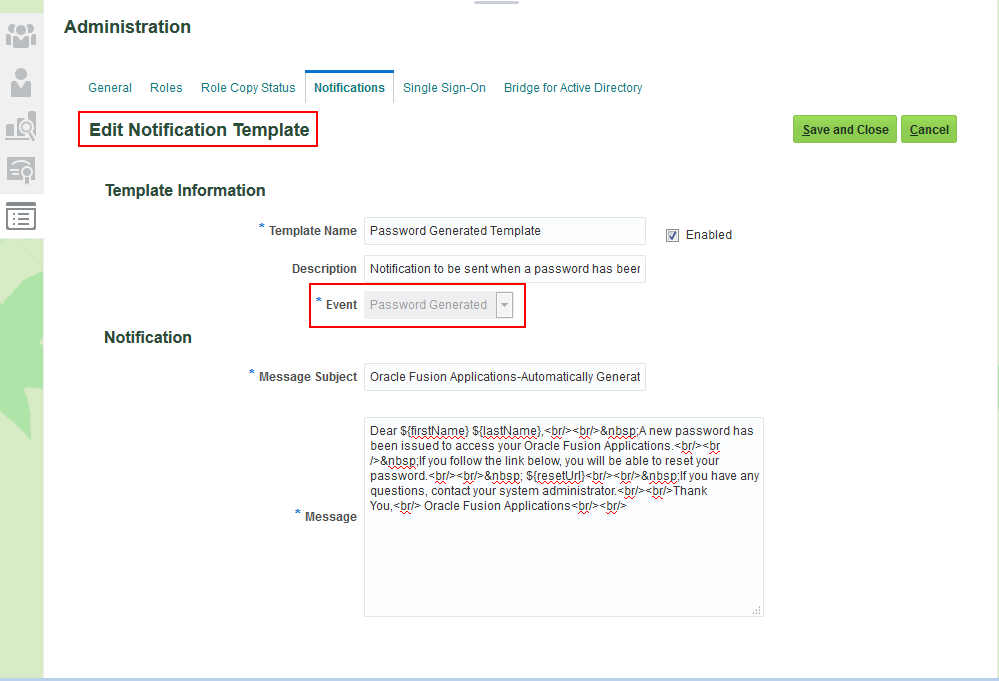
Edit Notification Template Page
Steps to Enable
There are no steps necessary to enable this feature.
Tips and Considerations
If your company submitted a service request for Oracle to set up a custom notification template, review the Validate User Lifecycle Settings topic in the Upgrade Guide for Oracle ERP and SCM Cloud Security.
Upgrade-Safe Management of Factory Shipped Roles
You can now identify a predefined (factory shipped) Oracle role when viewing the role. Predefined Oracle roles are locked and you cannot customize the Oracle delivered functional and data security policies associated with these roles. You can, however, add data security policies to these roles.
Predefined Oracle roles are displayed in a different color in the graph visualizer.
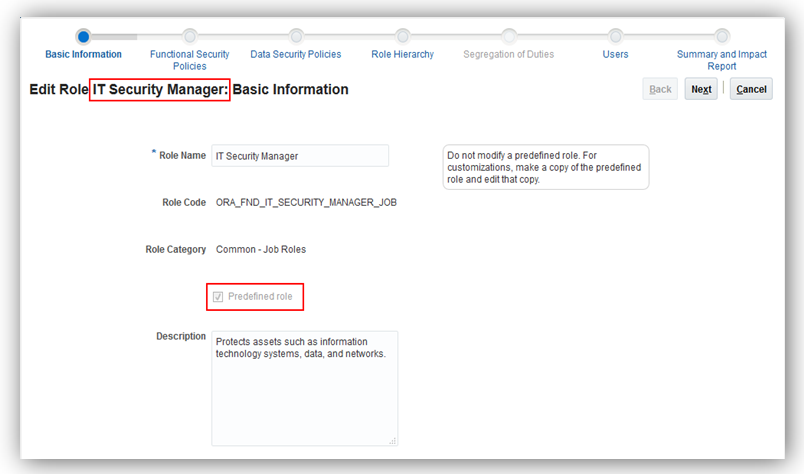
Predefined Role Indicator in the Edit Role Page
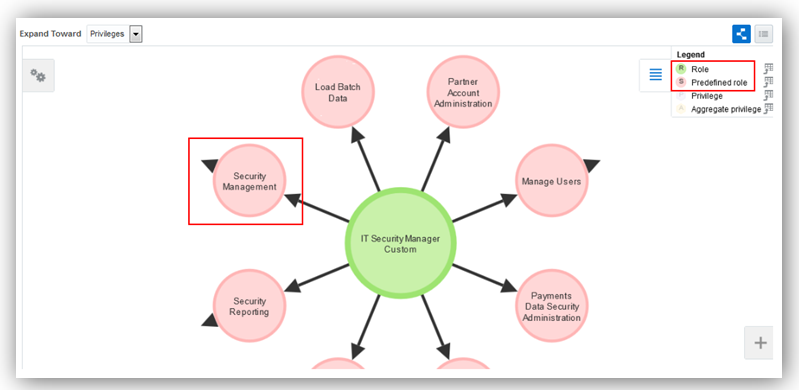
Predefined Role Indicator in the Role Hierarchy Graph
Steps to Enable
There are no steps necessary to enable this feature.
Bridge for Microsoft Active Directory
Simplify Single Sign-On with Microsoft Active Directory by downloading and installing the Active Directory Bridge from the Security Console. Automatically synchronize user account information between Oracle Fusion Applications Security and Microsoft Active Directory.
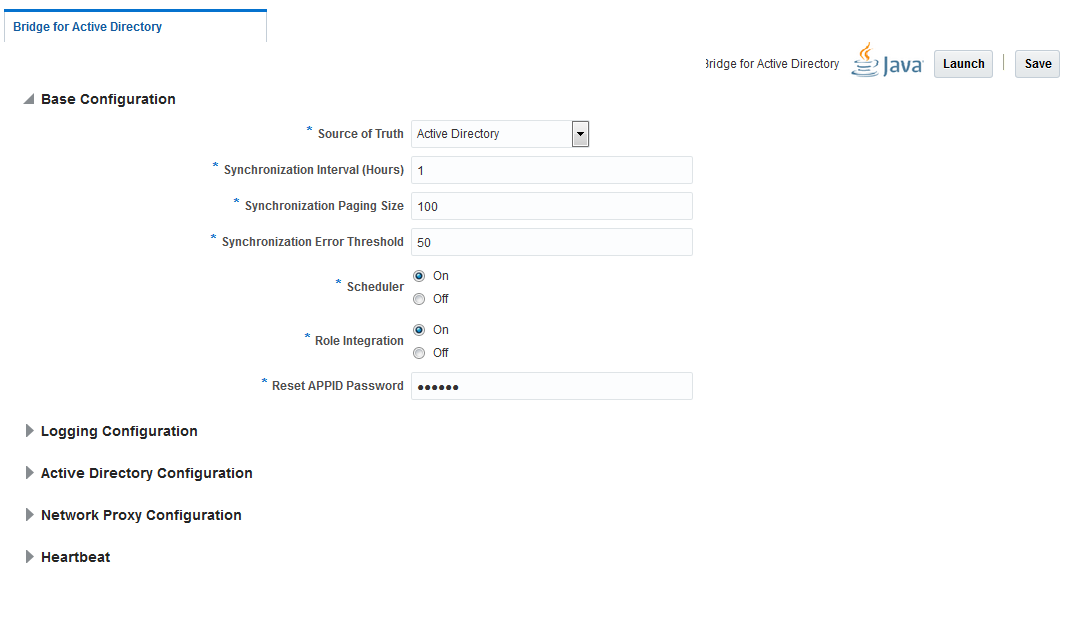
Active Directory Bridge Base Configuration Page
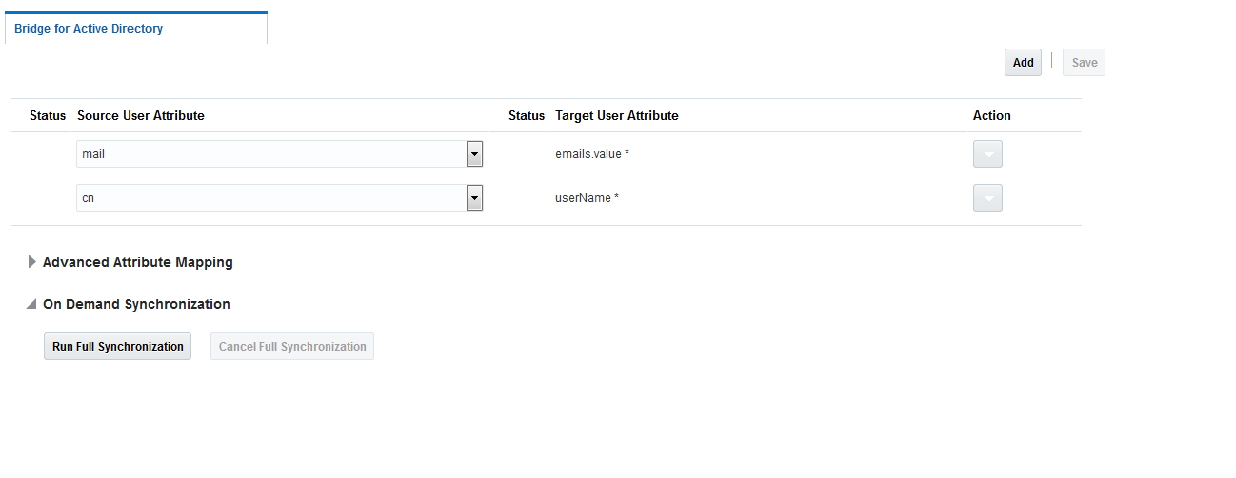
Active Directory Bridge User Attribute Mappings Page
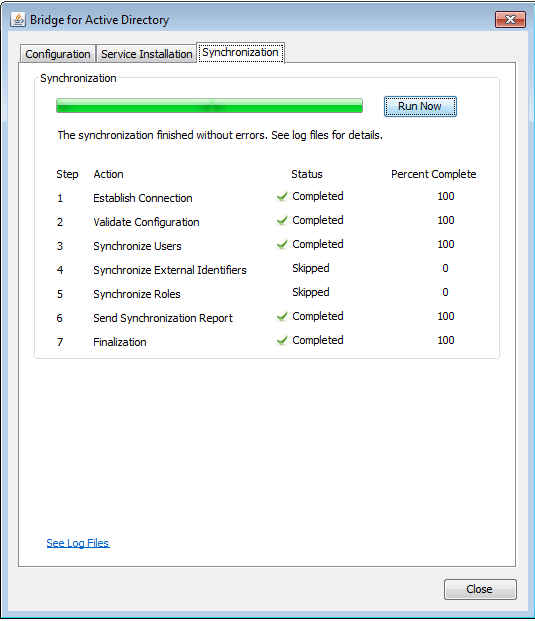
Active Directory Bridge Synchronization Status Page
Steps to Enable
There are no steps necessary to enable this feature.
User Password Changes Audit Report
You can now generate a report that lists password changes made by users. The report can be generated for changes made by specific users or for all changes made during a specific period. 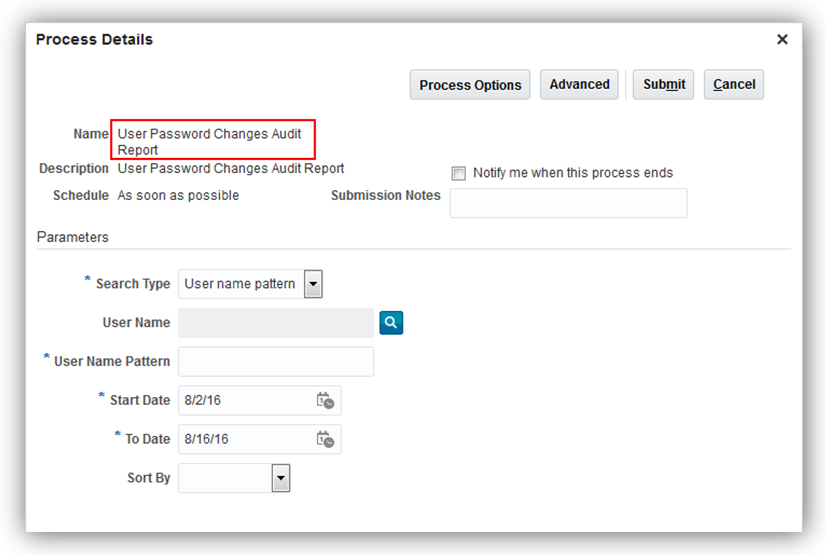
User Password Changes Audit Report Process Details Page
Steps to Enable
There are no steps necessary to enable this feature.
Role Information
The following function security privilege is required for this feature:
| Privilege Name and Code |
Job Role Name and Code |
|---|---|
| Run User Password Changes Audit Report ASE_USER_PASSWORD_CHANGES_AUDIT_REPORT_PRIV |
IT Security Manager ORA_FND_IT_SECURITY_MANAGER_JOB |
Steps to Enable
There are no steps necessary to enable this feature.
Integrate Custom Identity Management Solution
You can now optionally Integrate with your Identity Management solution for user and role management using industry standard System for Cross-domain Identity Management (SCIM) REST APIs and ATOM feeds.
Steps to Enable
There are no steps necessary to enable this feature.
The password reset flow has been changed in Release 12. A notification email will be sent to the user who requests a password reset. The user will be required to click on this link, within a specific period of time, to change the password. This replaces the previous flow where users were required to answer a series of challenge questions to reset the password.
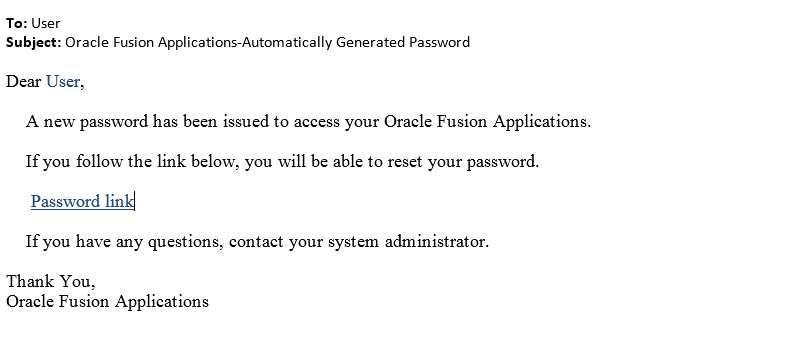
Email Notification to Reset Password
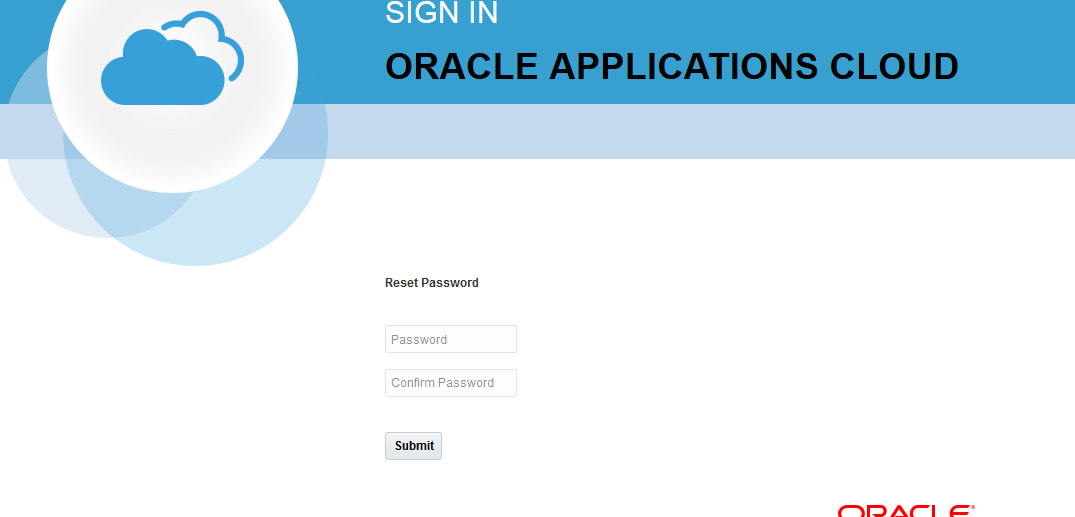
User Reset Password Page
Steps to Enable
There are no steps necessary to enable this feature.
The unified security administrator interface, combined with the ability to safely upgrade the reference security implementation will result in the following changes in functionality in the Security Console.
- All User Account information including password changes and lock/unlock status are managed in the security console.
- Roles are now managed directly in the Security Console and are no longer managed within Oracle Identity Manager or Authorization Policy Manager.
- Users can view, create or modify roles without first selecting an application.
- Users cannot create or modify privileges. They can continue to grant privileges to roles
- Users cannot create or modify resources.
- Users cannot grant resources directly to role. Resources are now only granted to privileges.
Steps to Enable
There are no steps necessary to enable this feature.
New Function Security Privileges for Applications Security
This section provides product-specific information that you need when implementing new Release 12 features in your existing roles.
If you are not using the predefined reference roles, then you need to add the function security privilege to relevant custom job roles.
This table identifies the required function security privilege and the predefined role that automatically inherits the privileges during the upgrade.
| Privilege Name and Code |
Job Role Name |
|---|---|
| Create User Account ASE_CREATE_USER_ACCOUNT_PRIV |
IT Security Manager |
| Delete User Account ASE_DELETE_USER_ACCOUNT_PRIV |
IT Security Manager |
| Edit User Account ASE_EDIT_USER_ACCOUNT_PRIV |
IT Security Manager |
| View User Account ASE_VIEW_USER_ACCOUNT_PRIV |
IT Security Manager |
| Enable Database Resource Management ASE_ENABLE_DATABASE_RESOURCE_MGMT_PRIV |
IT Security Manager |
| Run Password Expiry Job ASE_PASSWORD_EXPIRY_ESS_JOB_PRIV |
IT Security Manager |
| Run User Password Changes Audit Report ASE_USER_PASSWORD_CHANGES_AUDIT_REPORT_PRIV |
IT Security Manager |
Appendix A: Function Security Privileges and Aggregate Privileges for Release 12
This appendix provides security information that you need when implementing new Release 12 features in your custom job roles.
The following tables identify the reference job role to which each privilege is assigned. We recommend that you do not modify the reference security model. If you have created custom job roles, then you can add new privileges to those custom roles as needed.
Table A-1 Function Security Privileges for Manufacturing
| Privilege Name and Code |
Job Role Name and Code |
|---|---|
| Report Work Order Transactions by Service WIP_REPORT_TRANSACTIONS_SERVICE |
Production Operator ORA_WIE_PRODUCTION_OPERATOR Production Supervisor ORA_WIE_PRODUCTION_SUPERVISOR Production REST Services ORA_WIE_MANUFACTURING_PRODUCTION_SERVICE_DUTY |
| Get Work Orders by Service WIP_GET_WORK_ORDERS_SERVICE |
Production Operator ORA_WIE_PRODUCTION_OPERATOR Production Supervisor ORA_WIE_PRODUCTION_SUPERVISOR Production REST Services ORA_WIE_MANUFACTURING_PRODUCTION_SERVICE_DUTY |
| Update Work Orders by Service WIP_UPDATE_WORK_ORDERS_SERVICE |
Production Supervisor ORA_WIE_PRODUCTION_SUPERVISOR Production REST Services ORA_WIE_MANUFACTURING_PRODUCTION_SERVICE_DUTY |
| WIS_GET_MFG_PLANT_SETUP_SERVICE Get Manufacturing Plant Set Up Data by Service |
Production Operator ORA_WIE_PRODUCTION_OPERATOR Production Supervisor ORA_WIE_PRODUCTION_SUPERVISOR Production REST Services ORA_WIE_MANUFACTURING_PRODUCTION_SERVICE_DUTY |
| Report Production Exceptions WIP_REPORT_PRODUCTION_EXCEPTIONS |
Production Operator ORA_WIE_PRODUCTION_OPERATOR Production Supervisor ORA_WIE_PRODUCTION_SUPERVISOR |
| Manage Production Exceptions WIP_MANAGE_PRODUCTION_EXCEPTIONS |
Production Supervisor ORA_WIE_PRODUCTION_SUPERVISOR |
| View Production Exceptions WIP_VIEW_PRODUCTION_EXCEPTIONS |
Production Operator ORA_WIE_PRODUCTION_OPERATOR Production Supervisor ORA_WIE_PRODUCTION_SUPERVISOR |
Table A-2 Function Security Privileges for Planning Cloud
| Privilege Name and Code |
Job Role Name and Code |
|---|---|
| Maintain Planning Tables MSC_MAINTAIN_PLANNING_TABLES |
Materials Planner MSC_MATERIALS_PLANNER |
| Load Planning Reference Data MSC_LOAD_PLANNING_REFERENCE_DATA |
|
| Load Planning Transaction Data MSC_LOAD_PLANNING_TRANSACTION_DATA |
|
| Perform Order Orchestration and Planning Data Load MSP_PERFORM_ORDER_ORCHESTRATION_AND_PLANNING_DATA_LOAD |
|
| Customize SCM UI RCS_CUSTOMIZE_SCM_UI |
Supply Chain Application Administrator ORA_RCS_SUPPLY_CHAIN_APPLICATION_ADMINISTRATOR |
| View Administration Link FND_VIEW_ADMIN_LINK |
Table A-3 Function Security Privileges for Inventory Management
| Privilege Name and Code |
Job Role Name and Code |
|---|---|
| View Inventory Transaction List of Values by Web Service INV_VIEW_INVENTORY_TRANSACTION_LOV_WEB_SERVICE |
Warehouse Manager ORA_INV_WAREHOUSE_MANAGER Inventory Manager ORA_INV_INVENTORY_MANAGER Warehouse Operator ORA_INV_WAREHOUSE_OPERATOR Receiving Agent ORA_RCV_RECEIVING_AGENT Shipping Manager ORA_WSH_SHIPPING_MANAGER Shipping Agent ORA_WSH_SHIPPING_AGENT |
| Generate Item Serial by Web Service INV_GENERATE_SERIAL_WEB_SERVICE |
Warehouse Manager ORA_INV_WAREHOUSE_MANAGER Inventory Manager ORA_INV_INVENTORY_MANAGER Warehouse Operator ORA_INV_WAREHOUSE_OPERATOR Receiving Agent ORA_RCV_RECEIVING_AGENT Shipping Manager ORA_WSH_SHIPPING_MANAGER Shipping Agent ORA_WSH_SHIPPING_AGENT |
| Create Inventory Transaction by Web Service INV_CREATE_INVENTORY_TRANSACTION_WEB_SERVICE |
Warehouse Manager ORA_INV_WAREHOUSE_MANAGER Inventory Manager ORA_INV_INVENTORY_MANAGER Warehouse Operator ORA_INV_WAREHOUSE_OPERATOR |
| Generate Item Lot by Web Service INV_GENERATE_LOT_WEB_SERVICE |
Warehouse Manager ORA_INV_WAREHOUSE_MANAGER Inventory Manager ORA_INV_INVENTORY_MANAGER Warehouse Operator ORA_INV_WAREHOUSE_OPERATOR Receiving Agent ORA_RCV_RECEIVING_AGENT Shipping Manager ORA_WSH_SHIPPING_MANAGER Shipping Agent ORA_WSH_SHIPPING_AGENT |
| View Item Lot and Item Serial List of Values by Web Service INV_VIEW_LOT_SERIAL_LOV_WEB_SERVICE |
Warehouse Manager ORA_INV_WAREHOUSE_MANAGER Inventory Manager ORA_INV_INVENTORY_MANAGER Warehouse Operator ORA_INV_WAREHOUSE_OPERATOR Receiving Agent ORA_RCV_RECEIVING_AGENT Shipping Manager ORA_WSH_SHIPPING_MANAGER Shipping Agent ORA_WSH_SHIPPING_AGENT |
| View Country of Origin List of Values by Web Service INV_VIEW_COUNTRY_ORIGIN_LOV_WEB_SERVICE |
Warehouse Manager ORA_INV_WAREHOUSE_MANAGER Inventory Manager ORA_INV_INVENTORY_MANAGER Warehouse Operator ORA_INV_WAREHOUSE_OPERATOR Receiving Agent ORA_RCV_RECEIVING_AGENT Shipping Manager ORA_WSH_SHIPPING_MANAGER Shipping Agent ORA_WSH_SHIPPING_AGENT |
| View Owning Party Site List of Values by Web Service INV_VIEW_OWNING_PARTY_SITE_LOV_WEB_SERVICE |
Warehouse Manager ORA_INV_WAREHOUSE_MANAGER Inventory Manager ORA_INV_INVENTORY_MANAGER Warehouse Operator ORA_INV_WAREHOUSE_OPERATOR Receiving Agent ORA_RCV_RECEIVING_AGENT Shipping Manager ORA_WSH_SHIPPING_MANAGER Shipping Agent ORA_WSH_SHIPPING_AGENT |
| Record Cycle Count by Web Service INV_RECORD_CYCLE_COUNT_WEB_SERVICE |
Warehouse Manager ORA_INV_WAREHOUSE_MANAGER Inventory Manager ORA_INV_INVENTORY_MANAGER Warehouse Operator ORA_INV_WAREHOUSE_OPERATOR |
| View Available Item Quantity by Web Service INV_VIEW_AVAILABLE_ITEM_QUANTITY_WEB_SERVICE |
Warehouse Manager ORA_INV_WAREHOUSE_MANAGER Inventory Manager ORA_INV_INVENTORY_MANAGER Warehouse Operator ORA_INV_WAREHOUSE_OPERATOR |
| Perform Pick Transaction by Web Service INV_PERFORM_PICK_TRANSACTION_WEB_SERVICE |
Warehouse Manager ORA_INV_WAREHOUSE_MANAGER Inventory Manager ORA_INV_INVENTORY_MANAGER Warehouse Operator ORA_INV_WAREHOUSE_OPERATOR |
| View Pick Slip Details by Web Service INV_VIEW_PICK_SLIP_DETAILS_WEB_SERVICE |
Warehouse Manager ORA_INV_WAREHOUSE_MANAGER Inventory Manager ORA_INV_INVENTORY_MANAGER Warehouse Operator ORA_INV_WAREHOUSE_OPERATOR |
| View Subinventory and Locator List of Values by Web Service INV_VIEW_SUBINVENTORY_LOCATOR_LOV_WEB_SERVICE |
Warehouse Manager ORA_INV_WAREHOUSE_MANAGER Inventory Manager ORA_INV_INVENTORY_MANAGER Warehouse Operator ORA_INV_WAREHOUSE_OPERATOR Receiving Agent ORA_RCV_RECEIVING_AGENT Shipping Manager ORA_WSH_SHIPPING_MANAGER Shipping Agent ORA_WSH_SHIPPING_AGENT |
Table A-4 Function Security Privileges for Receiving
| Privilege Name and Code |
Job Role Name and Code |
|---|---|
| View Item Lot and Item Serial to Return List of Values by Web Service RCV_VIEW_LOT_SERIAL_RETURN_LOV_WEB_SERVICE |
Warehouse Manager ORA_INV_WAREHOUSE_MANAGER Inventory Manager ORA_INV_INVENTORY_MANAGER Warehouse Operator ORA_INV_WAREHOUSE_OPERATOR Receiving Agent ORA_RCV_RECEIVING_AGENT Shipping Manager ORA_WSH_SHIPPING_MANAGER Shipping Agent ORA_WSH_SHIPPING_AGENT |
| View Return Material Authorization List of Values by Web Service RCV_VIEW_RMA_LOV_WEB_SERVICE |
Warehouse Manager ORA_INV_WAREHOUSE_MANAGER Inventory Manager ORA_INV_INVENTORY_MANAGER Warehouse Operator ORA_INV_WAREHOUSE_OPERATOR Receiving Agent ORA_RCV_RECEIVING_AGENT Shipping Manager ORA_WSH_SHIPPING_MANAGER Shipping Agent ORA_WSH_SHIPPING_AGENT |
| View Return Material Authorization Restricted Lot and Serial List of Values by Web Service RCV_VIEW_RETURN_RMA_RESTRICTED_LOT_SERIAL_LOV_WEB_SERVICE |
Warehouse Manager ORA_INV_WAREHOUSE_MANAGER Inventory Manager ORA_INV_INVENTORY_MANAGER Warehouse Operator ORA_INV_WAREHOUSE_OPERATOR Receiving Agent ORA_RCV_RECEIVING_AGENT Shipping Manager ORA_WSH_SHIPPING_MANAGER Shipping Agent ORA_WSH_SHIPPING_AGENT |
| View Receiving Receipt Lines to Put Away by Web Service RCV_VIEW_RECEIVING_RECEIPT_PUT_AWAY_WEB_SERVICE |
Warehouse Manager ORA_INV_WAREHOUSE_MANAGER Warehouse Operator ORA_INV_WAREHOUSE_OPERATOR |
| View Advance Shipment Notice List of Values by Web Service RCV_VIEW_ASN_LOV_WEB_SERVICE |
Warehouse Manager ORA_INV_WAREHOUSE_MANAGER Inventory Manager ORA_INV_INVENTORY_MANAGER Warehouse Operator ORA_INV_WAREHOUSE_OPERATOR Receiving Agent ORA_RCV_RECEIVING_AGENT Shipping Manager ORA_WSH_SHIPPING_MANAGER Shipping Agent ORA_WSH_SHIPPING_AGENT |
| View Inbound Shipment Item Lot and Item Serial List of Values by Web Service RCV_VIEW_INBOUND_SHIPMENT_LOT_SERIAL_LOV_WEB_SERVICE |
Warehouse Manager ORA_INV_WAREHOUSE_MANAGER Inventory Manager ORA_INV_INVENTORY_MANAGER Warehouse Operator ORA_INV_WAREHOUSE_OPERATOR Receiving Agent ORA_RCV_RECEIVING_AGENT Shipping Manager ORA_WSH_SHIPPING_MANAGER Shipping Agent ORA_WSH_SHIPPING_AGENT |
| View Inbound Shipment List of Values by Web Service RCV_VIEW_INBOUND_SHIPMENT_LOV_WEB_SERVICE |
Warehouse Manager ORA_INV_WAREHOUSE_MANAGER Inventory Manager ORA_INV_INVENTORY_MANAGER Warehouse Operator ORA_INV_WAREHOUSE_OPERATOR Receiving Agent ORA_RCV_RECEIVING_AGENT Shipping Manager ORA_WSH_SHIPPING_MANAGER Shipping Agent ORA_WSH_SHIPPING_AGENT |
| Create Receiving Receipt by Web Service RCV_CREATE_RECEIVING_RECEIPT_WEB_SERVICE |
Warehouse Manager ORA_INV_WAREHOUSE_MANAGER Receiving Agent ORA_RCV_RECEIVING_AGENT |
| Perform Receiving Receipt Transaction by Web Service RCV_PERFORM_RECEIVING_RECEIPT_TRANSACTION_WEB_SERVICE |
Warehouse Manager ORA_INV_WAREHOUSE_MANAGER Inventory Manager ORA_INV_INVENTORY_MANAGER Warehouse Operator ORA_INV_WAREHOUSE_OPERATOR Receiving Agent ORA_RCV_RECEIVING_AGENT Shipping Manager ORA_WSH_SHIPPING_MANAGER Shipping Agent ORA_WSH_SHIPPING_AGENT |
| View Item Lot and Item Serial to Issue List of Values by Web Service RCV_VIEW_LOT_SERIAL_ISSUE_LOV_WEB_SERVICE |
Warehouse Manager ORA_INV_WAREHOUSE_MANAGER Inventory Manager ORA_INV_INVENTORY_MANAGER Warehouse Operator ORA_INV_WAREHOUSE_OPERATOR Receiving Agent ORA_RCV_RECEIVING_AGENT Shipping Manager ORA_WSH_SHIPPING_MANAGER Shipping Agent ORA_WSH_SHIPPING_AGENT |
| View Item Lot and Item Serial to Receive List of Values by Web Service RCV_VIEW_LOT_SERIAL_RECEIVE_LOV_WEB_SERVICE |
Warehouse Manager ORA_INV_WAREHOUSE_MANAGER Inventory Manager ORA_INV_INVENTORY_MANAGER Warehouse Operator ORA_INV_WAREHOUSE_OPERATOR Receiving Agent ORA_RCV_RECEIVING_AGENT Shipping Manager ORA_WSH_SHIPPING_MANAGER Shipping Agent ORA_WSH_SHIPPING_AGENT |
| View Purchase Order to Receive List of Values by Web Service RCV_PURCHASE _ORDER_RECEIVE_LOV_WEB_SERVICE |
Warehouse Manager ORA_INV_WAREHOUSE_MANAGER Inventory Manager ORA_INV_INVENTORY_MANAGER Warehouse Operator ORA_INV_WAREHOUSE_OPERATOR Receiving Agent ORA_RCV_RECEIVING_AGENT Shipping Manager ORA_WSH_SHIPPING_MANAGER Shipping Agent ORA_WSH_SHIPPING_AGENT |
| View Transfer Order List of Values to Receive by Web Service RCV_VIEW_TRANSFER_ORDER_RECEIVE_LOV_WEB_SERVICE |
Warehouse Manager ORA_INV_WAREHOUSE_MANAGER Inventory Manager ORA_INV_INVENTORY_MANAGER Warehouse Operator ORA_INV_WAREHOUSE_OPERATOR Receiving Agent ORA_RCV_RECEIVING_AGENT Shipping Manager ORA_WSH_SHIPPING_MANAGER Shipping Agent ORA_WSH_SHIPPING_AGENT |
| View Receiving Option by Web Service RCV_RECEIVING_OPTION_WEB_SERVICE |
Warehouse Manager ORA_INV_WAREHOUSE_MANAGER Inventory Manager ORA_INV_INVENTORY_MANAGER Warehouse Operator ORA_INV_WAREHOUSE_OPERATOR Receiving Agent ORA_RCV_RECEIVING_AGENT Shipping Manager ORA_WSH_SHIPPING_MANAGER Shipping Agent ORA_WSH_SHIPPING_AGENT |
Table A-5 Function Security Privileges for Supply Chain Orchestration
| Privilege Name and Code |
Job Role Name and Code |
|---|---|
| Manage Supply Orchestration Web Services DOS_MANAGE_SUPPLY_ORCHESTRATION_WEB_SERVICES |
Web Services Application Identity (SCM) FUSION_APPS_SCM_SOA_APPID |
| Purge Supply Order Interface Data DOS_PURGE_SUPPLY_ORDER_INTERFACE |
Supply Chain Operations Manager ORA_DOS_SUPPLY_CHAIN_OPERATIONS_MANAGER |
Table A-6 Function Security Privileges for Applications Security
| Privilege Name and Code |
Job Role Name |
|---|---|
| Create User Account ASE_CREATE_USER_ACCOUNT_PRIV |
IT Security Manager |
| Delete User Account ASE_DELETE_USER_ACCOUNT_PRIV |
IT Security Manager |
| Edit User Account ASE_EDIT_USER_ACCOUNT_PRIV |
IT Security Manager |
| View User Account ASE_VIEW_USER_ACCOUNT_PRIV |
IT Security Manager |
| Enable Database Resource Management ASE_ENABLE_DATABASE_RESOURCE_MGMT_PRIV |
IT Security Manager |
| Run Password Expiry Job ASE_PASSWORD_EXPIRY_ESS_JOB_PRIV |
IT Security Manager |
| Run User Password Changes Audit Report ASE_USER_PASSWORD_CHANGES_AUDIT_REPORT_PRIV |
IT Security Manager |
| Create User Account ASE_CREATE_USER_ACCOUNT_PRIV |
IT Security Manager |
| Delete User Account ASE_DELETE_USER_ACCOUNT_PRIV |
IT Security Manager |
---

Copyright © 2017, Oracle and/or its affiliates. All rights reserved.
This document is provided for information purposes only, and the contents hereof are subject to change without notice.This document is not warranted to be error-free, nor subject to any other warranties or conditions, whether expressed orally or implied in law, including implied warranties and conditions of merchantability or fitness for a particular purpose. We specifically disclaim any liability with respect to this document, and no contractual obligations are formed either directly or indirectly by this document. This document may not be reproduced ortransmitted in any form or by any means, electronic or mechanical, for any purpose, without our prior written permission.
Oracle and Java are registered trademarks of Oracle and/or its affiliates. Other names may be trademarks of their respective owners.
Intel and Intel Xeon are trademarks or registered trademarks of Intel Corporation.All SPARC trademarks are used under license and are trademarks or registered trademarks of SPARC International, Inc. AMD, Opteron, the AMD logo, and the AMD Opteron logo are trademarks or registered trademarks of Advanced Micro Devices. UNIX is a registered trademark of The Open Group.
