

This document will continue to evolve as existing sections change and new information is added. All updates appear in the following table:
| Date | Update Version | Notes |
|---|---|---|
| 01 OCT 2018 | Update 18C | Revised update 18C. |
| 06 APR 2018 | Update 18B | Delivered new features in update 18B. |
| 12 JAN 2018 | Update 18A | Delivered new features in update 18A. |
This document will continue to evolve as existing sections change and new information is added. All updates appear in the following table:
| Date | Feature | Notes |
|---|---|---|
| 01 OCT 2018 | Related Value Sets | Updated document. The Related Value Sets feature was originally targeted for delivery in 18C, but it is currently postponed to a future release. |
| 07 SEP 2018 | Created initial document. |
This guide outlines the information you need to know about new or improved functionality in this update.
DISCLAIMER
The information contained in this document may include statements about Oracle’s product development plans. Many factors can materially affect Oracle’s product development plans and the nature and timing of future product releases. Accordingly, this Information is provided to you solely for information only, is not a commitment to deliver any material, code, or functionality, and should not be relied upon in making purchasing decisions. The development, release, and timing of any features or functionality described remains at the sole discretion of Oracle.
This information may not be incorporated into any contractual agreement with Oracle or its subsidiaries or affiliates. Oracle specifically disclaims any liability with respect to this information. Refer to the Legal Notices and Terms of Use for further information.
Common Technology and User Experience
You can now use Approval Groups Report to view details about approval groups defined in Oracle Business Process Management (BPM). This report provides all details about approval group including the group name, the approvers, and sequence in which the approvers appear in the approval group.
Oracle Financials Cloud currently supports audit history on several key business objects. You can individually configure and enable auditing of each business object. With this release, we have expanded the list of supported business objects.
Oracle Financials Cloud currently supports automatic provisioning of roles to users. As data security assignment is an integral part of the security model in Oracle Financials Cloud, with this release you will now be able to automatically assign data security contexts to users at the same time as roles are automatically provisioned to users. These automatic assignments are based on rules similar to role mappings.
Simplified Workflow Rules Configuration
With the Simplified Workflow Rules Configuration feature, you can now create workflow rules for Payables Invoice Approval and General Ledger Journal Approval workflows using spreadsheets. Download the easy to use templates using the Manage Workflow Rules in Spreadsheet task to create and manage workflow rules as per your approval policies.
You can now use the Workflow Rules Report to view the workflow rules configured in Oracle Business Process Management (BPM) for Payables Invoice Approval, General Ledger Journal Approval, and Expense Report Approval workflows. You can also use this report to obtain details of rule conditions and approval routing for each rule.
REST APIs for Collections Strategy
Use the Collections Strategy REST API resource to create and manage strategies assigned to customers, such as updating strategies and tasks based on external requests.
Rest API for Banks integrates with external systems to create and manage banks using the REST API resources. You can retrieve bank information, create, modify, and delete banks.
REST API for Bank Accounts integrates with external systems to create and manage bank accounts using REST API resources. You can retrieve bank account information, create, modify, and inactivate bank accounts.
REST API for Bank Branches integrates with external systems to create and manage bank branches using the REST API resources. You can retrieve bank branch information, create, modify, and delete bank branches.
REST APIs for External Cash Transactions
REST API for External Cash Transactions integrates with external systems to create and manage external cash transactions using REST API resources. You can retrieve details, create, modify, and void external cash transactions.
Implement company-specific expense reporting requirements and integrate with external systems using Expenses REST API resources. You can create and manage expense reports and expense items with these REST services.
Integrate with external systems to access payment details using REST API resources. You can retrieve payment information and invoice details related to that payment, in addition to voiding a payment.
REST APIs for Supplier Invoices
Integrate with external systems to create and manage payables unmatched supplier invoices using REST API resources. In addition, you can construct integrations based on your PaaS application requirements, such as for retainage or reverse factoring arrangements and placing invoices on hold.
REST APIs for Receivables Invoices
Integrate a deploying company's order fulfillment and external billing systems with Receivables using REST API resources. You can create customer invoices for both goods delivered and services rendered.
REST APIs for Standard Receipts
Integrate a deploying company's order fulfillment and external payment processing systems with Receivables using REST API resources. You can record payments from customers against their open invoices.
Assignment of Collections Activities to Collector Groups
You can use the Assignment of Collections Activities to Collector Groups feature to create collector groups. A collector group consists of a primary collector and one or more individual collectors. You can use the collector group to perform collection activities as a team.
Automatically Initiate or Fulfill Collections Tasks in Third Party Systems
Automatically initiate or fulfill Collections tasks in third party applications, such as updating strategies and tasks based on external requests, assigning strategies to customers without delinquencies, and migrating strategies with in-progress tasks.
Send Invoices with Collections Dunning Letters
Send printed invoice copies together with Collections dunning letters. The Store Printed Receivables Transactions as Attachments feature needs to be enabled as a prerequisite.
Search by Project Asset Name While Preparing Source Lines in Fixed Assets
Sort asset lines for projects by Project Asset Name when performing Mass Addition on the Prepare Source Lines page.
Asset Cost and Depreciation Report
The Asset Cost and Reserve Report list the asset cost and depreciation reserve balances at the asset level. The report sorts and totals by category, asset type, asset cost account, and cost center.
Audit Budgetary Control Setup Changes
Track changes for budgetary control setup objects by using the Audit Policies feature. Enable audit policies for the business objects of these pages and view the Audit report to monitor setup attribute changes. The audit information is stored without any intervention of the user or any explicit user action. The following tasks can be audited:
- Manage Budgetary Control
- Manage Encumbrance Accounting
- Manage Control Budget
Cash to General Ledger Reconciliation Report
The Cash to General Ledger Reconciliation Report can now be generated based on multiple periods.
This report compares the GL cash account balances against the bank account balance, and displays the unreconciled GL cash account journal entries and unreconciled bank statement lines that help identify the discrepancies between the balances. The Cash to General Ledger Reconciliation report can now be submitted based on multiple periods to properly match items from prior periods to the current bank statement.
Create External Transaction for Foreign Exchange Gain or Loss
The Create External Transactions for Exchange Gain or Loss feature is used to automatically create separate external transactions for reconciliation differences arising from exchange differences and bank charges.
Overdue Invoices in Cash Forecast
The Overdue Invoices in Cash Forecast feature allows you to better estimate your cash position by providing information about your Payables and Receivables overdue invoices. You can ensure the right level of liquidity is represented and that you are considering all aspects of your cash outflows.
Control spending and enforce expense policies by requiring spend authorizations for high value expenses. Spend authorizations allow managers to ensure that the expenditures are within their budget and prevent unauthorized or excessive expenses before they are incurred. Compare approved authorizations against incurred expenses by requiring employees to attach spend authorizations to expense reports. You can enable spend authorizations for your entire company or for specific business units.
Import and Update Account Combinations
Use the Import Account Combinations file-based data import to create account combinations as well as update existing account combinations.
Use the Match in Full feature to quickly create an invoice by matching in full to the purchase order. An invoice can now easily be created by entering minimum number of fields of the purchase order number, invoice number, and invoice date. This feature is useful for efficiently processing invoices, such as a supplier sending one invoice for the total amount of all items ordered in one purchase order.
Two new Accounts Payables job roles are delivered to enhance compliance with the segregation of duties. The new Accounts Payable Invoice Supervisor job role enables access to invoices only. The new Accounts Payable Supervisor job role enables access to payments only.
Usability Enhancements on Invoice Pages
Scanned invoice images now open in a new separate window. This window automatically refreshes as you move from invoice to invoice. The window also automatically closes when you exit the Invoice page. The new scanned image window replaces the contextual region in the Invoice pages, and invoice status details now appear next to the invoice actions. This improves user experience by displaying only the invoice header, lines, and totals sections.
Derive Bank Account Number from IBAN
When you create an external bank account, you must provide a bank account number. For countries where the IBAN (International Bank Account Number) is used according to SWIFT (Society for Worldwide Interbank Financial Telecommunication) guidelines, you can now create an external bank account by entering only the IBAN instead of both the bank account number and the IBAN. When you save the external bank account, the bank account number will automatically be derived from the IBAN and populates the Account Number field.
Pricing and Billing for Subscriptions
You can now automate your entire subscription billing process and post billing activities using the new integration with Subscription Management Cloud. Generate invoices or credits for new, renewed, amended, or terminated subscriptions and usage-based products sold to customers.
Print Attachments Along with Receivables Transactions
The Print Receivables Transactions process can now print attachments to Receivables transactions, such as original purchase orders and supporting expense reports, along with the transactions.
Processing of Late Charges by Legal Entity
The Create Late Charges Batch process can now generate separate late charge interest invoices for each legal entity associated with an overdue transaction and assign the correct balancing segment value to the interest invoice distribution.
Receivables Invoice Delivery in Universal Business Language 2.1 XML Format
You can now generate Receivables XML invoices in Universal Business Language (UBL) 2.1 format. The UBL 2.1 format is now required for business-to-government electronic invoicing in certain European countries.
Segregated Roles for Receivables
The existing Accounts Receivable Manager and Specialist roles are designed to optimize deployment efficiencies. The following new Receivables roles are now available to provide segregation of access:
- Accounts Receivable Manager Segregated Role
- Accounts Receivable Specialist Segregated Role
- Billing Manager Segregated Role
- Billing Specialist Segregated Role
- Customer Account Administrator Segregated Role
Structured Payment Reference on Receivables Transactions and Receipts
Use this feature to capture a structured payment reference on Receivables transactions and receipts. Include this reference on customer invoices as text and matrix bar code. Your customers can provide this reference with their payments, improving the receipt application process and receipt reconciliation to bank statements.
Support Transition to ASC 606 / IFRS 15
You can now specify when to transition revenue recognition from Receivables to Revenue Management by using the Support transition to ASC 606 / IFRS 15 feature.
This feature provides the following functions to enable this transition:
- Designate the date when revenue recognition of revenue management-enabled transactions ends in Receivables and begins in Revenue Management. On the date you designate, Revenue Management begins managing revenue recognition, based on your policies, that reflect the new ASC 606 and IFRS 15 accounting standard.
- Configure subledger accounting rules to end revenue accounting in Receivables and begin revenue accounting in Revenue Management.
- Disable manual adjustments of revenue management-enabled transactions in the Receivables Revenue Adjustments and Transactions Work Bench - Billing Adjustments user interfaces.
Clear Residual Account Balances on Fully Satisfied Contracts
You can now identify and write off residual account balances in accounting contracts that meet the following conditions:
- All performance obligations must be fully satisfied.
- The contract must have been terminated early (not naturally expired) with an immaterial change.
Import Additional Satisfaction Events for Period-Based Revenue Contracts
You now have improved control over satisfaction events for period-based revenue contract lines, such as the ability to suspend, reverse, and reinstate them.
Revenue Management for Subscriptions
You can now automate your entire revenue recognition process using the new integration with Subscription Management Cloud based on your policies reflecting the new ASC 606 and IFRS 15 accounting standard.
Segregation of Duty Between Transfer to and Posting in General Ledger in Subledger Accounting
You can now segregate the duties for subledger users of transferring to general ledger and posting in general ledger without creating user-defined job roles.
Purchase Order Inclusive Tax Calculation
In some countries, the tax authority guidelines require that the transaction taxes are calculated and displayed as a part of the overall purchase price. The Purchase Order Inclusive Tax Calculation feature enables you to implement inclusive tax calculation on purchase orders processed in Oracle ERP Cloud.
Tax Partner Calculation for Non-Financial Applications
The Tax Partner Calculation for Non-Financial Applications feature enables you to implement a tax partner calculation application for requisition, purchase order, sales order, and fiscal document transaction capture. This feature applies to tax partners that have the supporting infrastructure available to integrate correctly with Oracle ERP Cloud for these types of transaction tax calculations.
Transactional Business Intelligence for Financials
Enhancements to OTBI Expenses Subject Areas
OTBI Expenses subject areas now include attendee information, cash advance details, cash advance history, and descriptive flexfields.
New OTBI Subject Area for Cash Advances Reporting
Use the Expenses - Cash Advances Real Time subject area to review cash advances details, cash advance applications and cash advance history information. Use this subject area to analyze cash advances across business units, compare current and previous period cash advances, and identify the expense reports a cash advance has been applied to.
Drill Down from OTBI General Ledger Reports to General Ledger Journals
You now have the ability to drill down from OTBI General Ledger ad hoc reports to General Ledger journal details.
Journal Approver Name Available in GL Journals Real Time Subject Area
To monitor who is approving journals and what volumes of journals they are approving, journal approver name has been added to General Ledger - Journals Real Time subject area.
Quarter-To-Date, Year-To-Date and Entered Currency Balance Metrics Added to the General Ledger Transactional Balances Subject Area
Quarter-To-Date (QTD), Year-To-Date (YTD) and entered currency metrics for GL transactional balances are now available in the General Ledger - Transactional Balances Real Time subject area.
Include Non-Qualified Segments for Distribution in Payables Invoices Transactions
The OTBI Payables Invoices - Transactions Real Time subject area now includes, under Invoice Distribution folder, chart of account non-qualified segments.
Support Notes in OTBI Receivables Subject Areas
Customer and internal notes entered in the Review Transaction pages are now available in the OTBI Receivables subject areas.
Cross-Pillar Reporting Between SLA and Projects
You now have the ability to perform cross-pillar reporting between Subledger Accounting and Projects.
Regional and Country-Specific Features
Computation of GST Tax Liability on Receipt of Payment in Advance
You can now use the Computation of GST Tax Liability on Receipt of Payment in Advance feature to add receipt lines, attach tax determinants, and calculate tax by UI or ADFdi. You can also generate appropriate tax accounting for all receipt events.
Document Numbering for Receivables Transaction and Advance Receipt
The Document Numbering for Receivables Transaction and Advance Receipt feature enables you to:
- Generate the tax fiscal documents prescribed by the tax authorities in India.
- Generate a receipt voucher for receiving transactions and tax invoices for receivables transactions and bill-only flows.
- Generate sequences based on the business needs. You are provided with ADFdi spreadsheets that supporting sequence generation based on Business Units, Document Classes (Invoice, CM, DM), Document Category (Transaction Type), and Third Party Registration Status (registered, non-registered, domestic, foreign customers, etc.).
Thailand Withholding Tax Certificate Report and Sequence Numbering
With the Thailand Withholding Tax Certificate Report and Document Numbering feature, you can now generate a withholding tax certificate report for a supplier when the company withholds the tax from the supplier.
This document will continue to evolve as existing sections change and new information is added. All updates appear in the following table:
| Date | Feature | Notes |
|---|---|---|
| 06 APR 2018 | Created initial document. |
This guide outlines the information you need to know about new or improved functionality in this update.
DISCLAIMER
The information contained in this document may include statements about Oracle’s product development plans. Many factors can materially affect Oracle’s product development plans and the nature and timing of future product releases. Accordingly, this Information is provided to you solely for information only, is not a commitment to deliver any material, code, or functionality, and should not be relied upon in making purchasing decisions. The development, release, and timing of any features or functionality described remains at the sole discretion of Oracle.
This information may not be incorporated into any contractual agreement with Oracle or its subsidiaries or affiliates. Oracle specifically disclaims any liability with respect to this information. Refer to the Legal Notices and Terms of Use for further information.
Common Technology and User Experience
Enhanced Data Segregation for Third-Party Service Providers
In Oracle Financials Cloud many transactions, such as payables invoices, payment requests, assets, and expense reports, include references to employees or persons. We allow any employees or persons defined in Oracle Financials Cloud to be referenced in these transactions. For third-party service providers who may be managing business processes from multiple entities, additional restrictions on employees may be required. With this enhancement, we have enabled data security to these references.
Configurable Workflow Notifications
Additional configurable email notification templates are provided for various flows in Expenses and for Budgetary Control override requests. You can use either the predefined templates as delivered, or modify them according to your business requirements using Oracle Business Intelligence Publisher.
For the Flexible Routing and Approval of Receivables Credit Request feature you can now configure both email and in-app notifications.
The budget transfer feature provides a quick and simple way to transfer budget to and from one or more budget accounts without having to fill out a budget spreadsheet. While reviewing budget balances in the Review Budgetary Control Balances page, build your Budget Transfer Request by selecting the budget accounts for transfer. Enter the transfer amount and justification for the budget transfer before initiating your budget transfer request. Receive a notification when the budget transfer is complete.
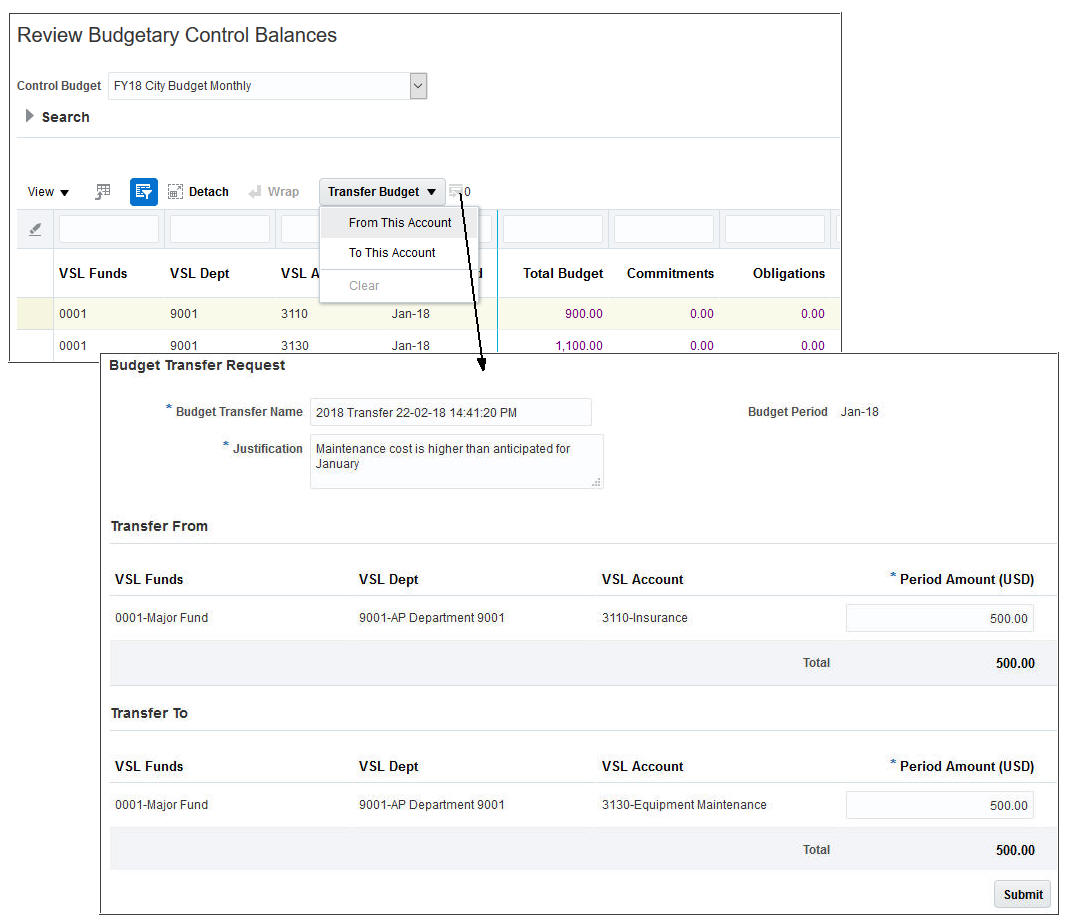
Budget Transfer Request
Disable Scan Option on Mobile Expenses
You can now control the Scan option on Fusion Expenses mobile application.
Itemization of Meals Expense Categories
Capture breakdown of meal expenses, such as tips, by enabling itemization.
Configure Auditable Setup Attributes and View Audit Report
You can now enable the audit of selected setup and configuration attributes and view the report to improve control over important enterprise processes:
- Monitor access to the setup attributes that impact important business decisions and processes.
- Maintain a reliable enterprise transaction system that supports day-to-day business operations.
The following business setup objects are enabled for audit in General Ledger:
- Account Combinations
- Accounting Automation
- Allocations and Periodic Entries
- Accounting and Reporting Sequences
- AutoPost Criteria Sets
- Chart of Accounts Mapping
- Daily Conversion Types
- Encumbrance Types
- Encumbrance Carry Forward Rules
- Intercompany Processing Rules
- Journal Categories
- Journal Sources
- Journal Reconciliation Rules
- Journal Reversal Criteria Sets
- Ledgers
- Revaluations
- Suspense Accounts
Streamlined Payment Processing
This feature simplifies installments selection to ensure that selected installments are compatible with the internal bank account and the payment process profile specified on the payment process request. Excluding nonmatching installments during selection reduces rejections during later stages of the payment process request, which results in a streamlined payment process.
Flexible Routing and Approval of Receivables Credit Request
You can now configure Oracle Business Rules to determine whether a credit request against a Receivables transaction requires a manual review to create a credit memo. The notification process informs users of any required actions. Users will also be able to capture additional information on the credit request or on subsequent workflow notifications.
Ability to Clear Balances for Zero Price Transaction Line Without Bill
You can now automatically create a zero billing line upon full satisfaction of a zero priced transaction line. The zero bill line that is created by Revenue Management generates the appropriate accounting entries to clear out the relevant amounts on the contract asset and allocation discount accounts.
Assign Standalone Selling Prices Through Revenue Basis Data Import FBDI
You now have option to provide the unit standalone selling price of the sold item or memo line for a transaction as you import the source document line into Revenue Management through Revenue Basis Data Import File-based data import process.
Automatic Renewal of Revenue Contracts
You can now automatically renew customer contracts when the initial service term ends without receiving a new order (revenue) line for each renewal. You can either renew the original accounting contract or convert it to new periodic accounting contract, such as a month-to-month contract.
Revenue Management creates a new accounting contract for designated services for the period and amount, as indicated on the initial accounting contract. A new accounting contract is created at the end of each service period until terminated.
Changes to Allocated Revenue on Open Performance Obligations Due to Immaterial Changes
For immaterial changes on a contract, you can now reallocate revenue on open performance obligations on the current and future periods only, without impacting revenue that has been recognized.
Devolve Performance Obligations Associated with Revenue Contracts
You can now devolve a performance obligation into a series of performance obligations over time for service-based revenue contract lines.
View Consolidated Account Activity for Revenue Contract Group
You can now view the consolidated accounting activities associated with all revenue contracts within a contract group or for an individual contract.
Assign contracts to a contract group by enabling the Use as Contract Group Number attribute on the Create Contract Identification Rule page or by enabling the Automatic Renewal of Revenue Contracts feature. Once your contracts are assigned to a contract group, you can use the View Contract Activity action on the Manage Customer Contract page to generate the Contract Activity Detail report, which displays the account balances and accounting events for each performance obligation and promised detail in the contracts within the selected group.
Transactional Business Intelligence for Financials
Drill Down From OTBI Payables Reports to AP Transaction Details
You now have the ability to drill down from OTBI Payables ad-hoc reports to AP transaction details.
Expose Description Columns in Essbase for Non-Qualified Segments
This release includes enhancements to the General Ledger - Balances Real Time Subject Area to expose the description columns for non-qualified segments.
Improved Cross-Pillar Reporting Between Projects and Receivables
OTBI for Receivables now supports receivables reporting by project contracts. The Receivables - Transactions Real Time subject area, 'Transaction Details' > 'Project Contract Header Details' folder now includes information on project contracts. Users with the appropriate Projects subject area access can access the Projects information in the Receivables subject area.
New OTBI Subject Area for Asset Balances Reporting
Use the Fixed Assets - Asset Balances Real Time subject area to review balances for Cost, CIP Cost, Depreciation Reserve, Bonus Depreciation Reserve, Impairment Reserve, and Revaluation Reserve balance sheet accounts.
Regional and Country-Specific Features
Mexican Electronic Accounting Version 1.3
The Mexican Electronic Accounting feature has been updated to comply with the XML reporting version 1.3. In addition, the feature now provides the ability to include expense report accounting entries as part of the Journal Entries report and the ability to capture CFDI Fiscal Unique Identifier and Taxpayer ID information for manually entered or imported journals.
Tax Point Date Adjustment Using Spreadsheet
The Tax Point Date Adjustment feature now enables you to select and download Payables and Receivables transactions to a spreadsheet, provide the new tax point dates to be applied, then upload and process the new tax point dates. This feature is currently limited to use in Poland.
This document will continue to evolve as existing sections change and new information is added. All updates appear in the following table:
| Date | Feature | Notes |
|---|---|---|
| 12 JAN 2018 | Created initial document. |
This guide outlines the information you need to know about new or improved functionality in this update.
DISCLAIMER
The information contained in this document may include statements about Oracle’s product development plans. Many factors can materially affect Oracle’s product development plans and the nature and timing of future product releases. Accordingly, this Information is provided to you solely for information only, is not a commitment to deliver any material, code, or functionality, and should not be relied upon in making purchasing decisions. The development, release, and timing of any features or functionality described remains at the sole discretion of Oracle.
This information may not be incorporated into any contractual agreement with Oracle or its subsidiaries or affiliates. Oracle specifically disclaims any liability with respect to this information. Refer to the Legal Notices and Terms of Use for further information.
Configurable Email Notifications
Additional configurable email notification templates are provided for various flows in Expenses, Payables and Intercompany. You can use either the predefined templates as delivered, or modify them according to your business requirements using Oracle Business Intelligence Publisher.
Fixed Assets Capitalization Thresholds
You can enforce the capitalization threshold limit automatically for all of your asset additions. Optionally, specify the low value threshold limit for each asset category so that these low value assets are fully reserved using the specified method and life.
Streamline the reconciliation and reporting of your lease liability balances using the Asset Lease Liability Report.
Reporting Currency Conversion for Asset Leases
Report your leases in any currency other than your ledger currency. Using reporting currencies, you can maintain and report lease accounting and balances in more than one currency. Convert right-of-use asset balances at historical rates and lease liability balances at the current rate. Load your asset lease terminations or reassessments in bulk using the supplied File-based data import templates.
Control Display of Fields by Expense Type
Simplify expense entry by enabling only applicable fields for each expense type. You can now enable fields, such as Description, Merchant, Expense Location, and Number of Days, by expense type.
Shortcuts for Attendee Selection
Improve usability with new attendee shortcut actions, such as Direct Reports, Favorites, and Recent Attendees, which are now available for selection on the Create Expense Item page.
Accounting Automation streamlines and automates your end-to-end accounting and transaction processes, including Import Daily Rates, Create Accounting, Import Journals and Posting, greatly reducing manual work and time lags in your business operations. The data flows through all of the required processing steps with no user intervention, while making it easy to involve the right people at the right time to resolve exceptions. This ensures the continuous availability of the most accurate and up-to-date financial information.
Invoice Routing for Account Coding
The Invoice Routing for Account Coding feature enables customers to route invoices to business users for entering accounting information. Invoices requiring accounting information are automatically routed to the designated users based on routing rules. With this feature, the Payables department can assign the responsibility of entering the accounting information to the appropriate business users. This feature enables customers to streamline the process of recording unmatched invoices and improve the overall efficiency of the Payables department.
Additional Attributes for Credit Checking Service
This feature provides descriptive flexfields as additional input parameters to the credit checking service. Use this feature to integrate with third-party providers, such as legacy service contract applications.
Order Level Credit Recommendation
This feature creates a new credit case folder for every order that fails a credit check. Use this feature to support the recommendation to accept or decline credit requests at the order level.
Receivables Invoice Delivery in Open Applications Group Integration Specification 10.1 XML Format
Use this feature to generate and deliver Receivables XML invoices in the latest Open Applications Group Integration Specification (OAGIS) 10.1 format. Include invoice header attachments during delivery, and receive inbound acknowledgements from your trading partners. The new OAGIS 10.1 format allows you to include unlimited additional user-defined attributes in the standard user area of the XML message.
Store Printed Receivables Transactions as Attachments
Use this feature to access a copy of the original printed Receivables transaction to appear as an attachment on the transaction.
Web Service to Create Reference Accounts for Customers
Use this feature to create reference account combinations for a customer bill-to site, using the new Customer Bill-to Site Reference Accounts Service Data Object (SDO) in the Customer Profile web service. The reference account combinations that you create are used to derive account combinations for distributions on Receivables transactions, when AutoAccounting is set up to derive account combinations based on Bill-to Site.
Transactional Business Intelligence for Financials
Replace Business Unit Views for Improved Performance
To improve query performance in Financial subject areas, Business Unit views were replaced with more optimized ones.
Subledger Accounting - Journals Real Time Subject Area Enhancements
The Payables Transaction Details folder in the Subledger Accounting - Journals Real Time subject area has been synchronized with similar folders in the Payables subject areas, for better usability.
Regional and Country-Specific Features
Online VAT Reporting for Spain
Spanish companies, with an annual turnover of more than 6 million Euros, can now use the Online VAT Reporting for Spain to electronically deliver VAT registers to the Spanish Tax Authorities. Use Online VAT Register Reporting Confirmation for Spain process to reflect the acceptance status on the financial documents reported to the Tax Authorities. Corrected financial documents can be resubmitted.
---

Copyright © 2018, Oracle and/or its affiliates. All rights reserved.
This document is provided for information purposes only, and the contents hereof are subject to change without notice.This document is not warranted to be error-free, nor subject to any other warranties or conditions, whether expressed orally or implied in law, including implied warranties and conditions of merchantability or fitness for a particular purpose. We specifically disclaim any liability with respect to this document, and no contractual obligations are formed either directly or indirectly by this document. This document may not be reproduced or transmitted in any form or by any means, electronic or mechanical, for any purpose, without our prior written permission.
Oracle and Java are registered trademarks of Oracle and/or its affiliates. Other names may be trademarks of their respective owners.
Intel and Intel Xeon are trademarks or registered trademarks of Intel Corporation.All SPARC trademarks are used under license and are trademarks or registered trademarks of SPARC International, Inc. AMD, Opteron, the AMD logo, and the AMD Opteron logo are trademarks or registered trademarks of Advanced Micro Devices. UNIX is a registered trademark of The Open Group.
