
This document will continue to evolve as existing sections change and new information is added. All updates appear in the following table:
| Date | Module | Feature | Notes |
|---|---|---|---|
| 28 JUL 2023 | Absence Management |
Enter Repeating Absences | Updated document. Revised feature information. |
| 29 APR 2022 | Absence Management | Multiple Plan Support for Leave Agreements | Updated document. Revised feature information. |
| 28 JAN 2022 | Absence Management |
Multiple Plan Support for Leave Agreements | Updated document. Feature delivered in update 21D. |
| 24 NOV 2021 | HCM Common/ HCM Common Architecture |
Enhancements to Approvals and Notifications |
Updated document. Revised feature information. |
| 29 OCT 2021 | Absence Management | Enter Repeating Absences | Updated document. Revised feature information. |
| 03 SEP 2021 | Created initial document. |
HCM Cloud applications have two types of patches you can receive that are documented in this What’s New:
- Release Updates (21A, 21B, 21C, and 21D)
- Optional Monthly Maintenance Packs to each update
It is important for you to know what Release Update your environment is on. You can find this in your Cloud Portal.
____________________
 HAVE AN IDEA?
We’re here and we’re listening. If you have a suggestion on how to make our products better, please let us know. To enter an idea go to the Ideas Lab on Oracle Customer Connect. In this document wherever you see the light bulb icon after the feature name it means we delivered one of your ideas.
____________________
Suggested Reading for all HCM Products:
- Human Resources What’s New – In the Global Human Resources section you will find features on the base application in which other application are built upon.
NOTE: Not all Global Human Resource features are available for Talent and Compensation products.
- Oracle Human Capital Management Cloud Functional Known Issues and Maintenance Packs (Document ID 1554838.1). These documents identify bug fixes and possible known issues. You will also need to review these documents based in the release update version you are currently on or will be moving to.
- Oracle Help Center – Here you will find guides, videos and searchable help.
- Release Readiness – New Feature Summary, What’s New, Feature Listing Spreadsheet, Spotlights and Release Training
GIVE US FEEDBACK
We welcome your comments and suggestions to improve the content. Please send us your feedback at oracle_fusion_applications_help_ww_grp@oracle.com. Indicate you are inquiring or providing feedback regarding the HCM Cloud What’s New in the body or title of the email.
Column Definitions:
Report = New or modified, Oracle-delivered, ready to run reports.
UI or Process-Based: Small Scale = These UI or process-based features are typically comprised of minor field, validation, or program changes. Therefore, the potential impact to users is minimal.
UI or Process-Based: Larger Scale* = These UI or process-based features have more complex designs. Therefore, the potential impact to users is higher.
Features Delivered Disabled = Action is needed BEFORE these features can be used by END USERS. These features are delivered disabled and you choose if and when to enable them. For example, a) new or expanded BI subject areas need to first be incorporated into reports, b) Integration is required to utilize new web services, or c) features must be assigned to user roles before they can be accessed.
| Ready for Use by End Users Reports plus Small Scale UI or Process-Based new features will have minimal user impact after an update. Therefore, customer acceptance testing should focus on the Larger Scale UI or Process-Based* new features. |
Customer Must Take Action before Use by End Users Not disruptive as action is required to make these features ready to use. As you selectively choose to leverage, you set your test and roll out timing. |
|||||
|---|---|---|---|---|---|---|
| Feature |
Report |
UI or |
UI or |
|
||
Oracle Absence Management is a configurable and flexible global solution that enables organizations to manage absences of their workforce. The framework provides ability to define both complex and diverse absence plans. It integrates with the Oracle Cloud Global Payroll and Time and Labor products and provides dedicated work areas for the roles of Administrator and Employees. Simplified user interface is provided for employees’ absence data entry.
Multiple Assignment Support for Qualification Plans
When an employee with multiple assignments submits an absence that consumes from a qualification plan, the absence processing now calculates the plan consumption independently for each assignment of the employee. It considers all absences taken within a rolling backwards, rolling forwards, or calendar year plan term. To calculate the available entitlement the application subtracts the entitlement used by way of earlier absences within the plan period from the overall entitlement.
This change impacts only the employees with multiple active assignments as of the absence start date for the current absence, or as of any period during the plan-term period. If the employee always had a single assignment, the existing behavior will continue.
However, if you want to retain the previously existing processing behavior, you can do so by adding the ANC_QUAL_PERSON_LEVEL_PLAN_USE lookup code to the user-extensible lookup type ANC_PROC_CONFIGS.
Calculate absence plan consumption accurately for employees with multiple assignments.
Steps to Enable
You don't need to do anything to enable this feature.
Tips And Considerations
-
This enhancement doesn’t impact employees who have only a single active assignment, or who don’t have multiple assignments within the plan term period.
-
The application will continue supporting overlap rules for rolling backwards periods.
-
This enhancement works for absences entered at person-level or at assignment-level. The plan term period for each assignment could be different, especially if you are entering absences at assignment-level.
-
Qualified entitlement for each assignment doesn’t have to be the same. You can use qualification matrix or the associated formulae to grant qualified entitlement to each assignment independently.
You can now schedule repeating absences. For example, if you need to schedule absences for weekly doctor appointments, use the new Repeat option during absence entry. Employees and managers can use this option from the Add Absence responsive page in the Time and Absences work area under Me tab. This option will be visible to you when you select an absence start date. You can choose to repeat the absence, daily or weekly for a specific number of days or weeks.

Basic Mode in the Add Absence Page
Use the Stop Repeat option to end the repeating pattern either on a specific day or after a certain number of occurrences. You can repeat single day absences daily or weekly, whereas you can repeat multiple day absences only weekly.

Stop Repeat Option in the Add Absence Page
The option is available for both the basic and the advanced absence entry mode in the Add Absence page.
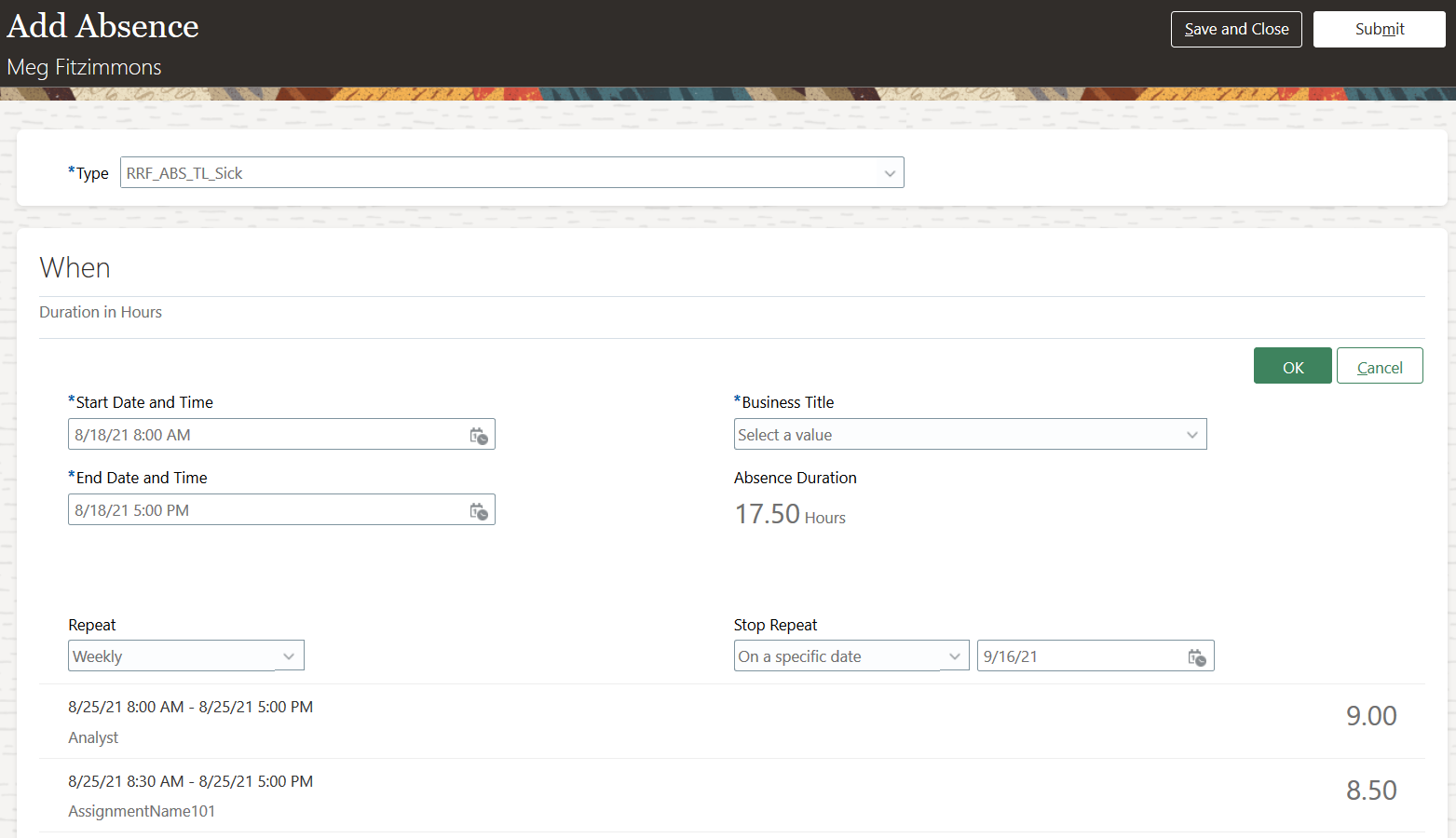
Advanced Absence Entry Mode in the Add Absence Page
Schedule repeating absences using the new repeat option during absence entry.
Steps to Enable
- Click the HCM Experience Design Studio quick action in My Client Groups. This will automatically create a sandbox.
- Click the Transaction Design Studio tab.
- Select Absences in the Action list and click Add.
-
Enter the desired name and description. Other customizations like Legal Employer and Business Unit aren't currently supported. Enable the Active check box.
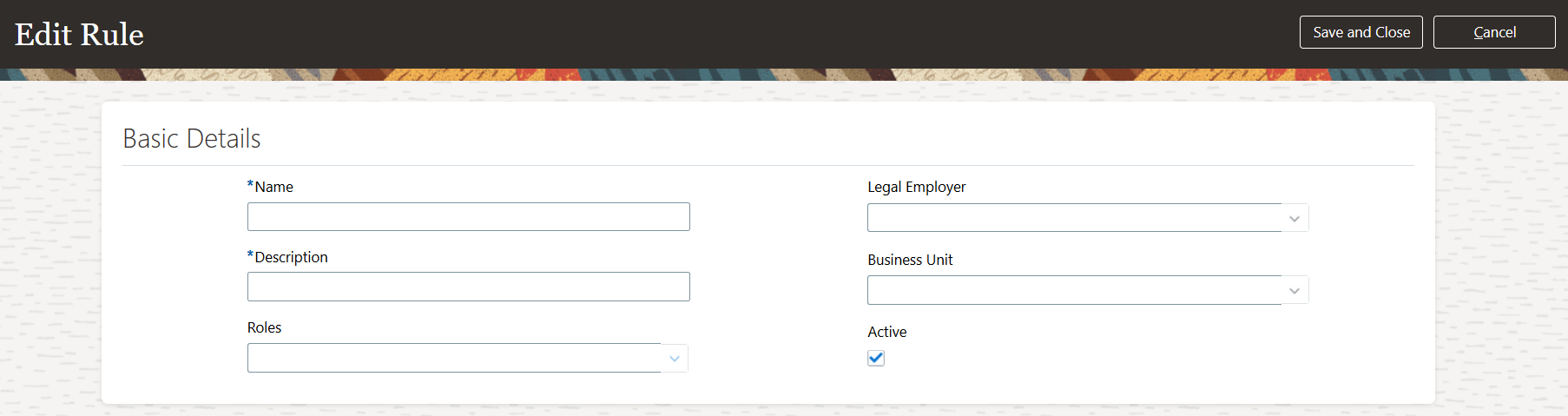
Edit Rule Page
-
Select Add Absence from the Region list in the Page Attributes section.
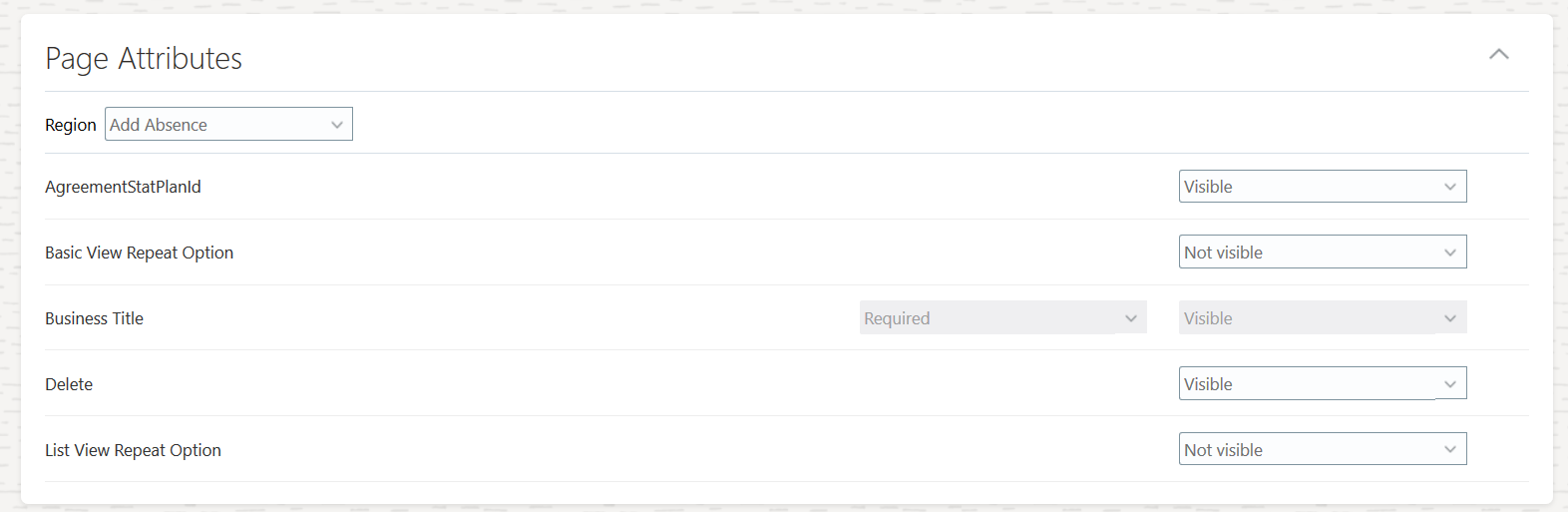
Page Attributes Section of the Edit Rule Page
- Set the Basic View Repeat Option attribute and the List View Repeat Option attribute to Visible.
- Click Save and Close.
- Once the rule is created, you need to publish the sandbox. Click Publish.
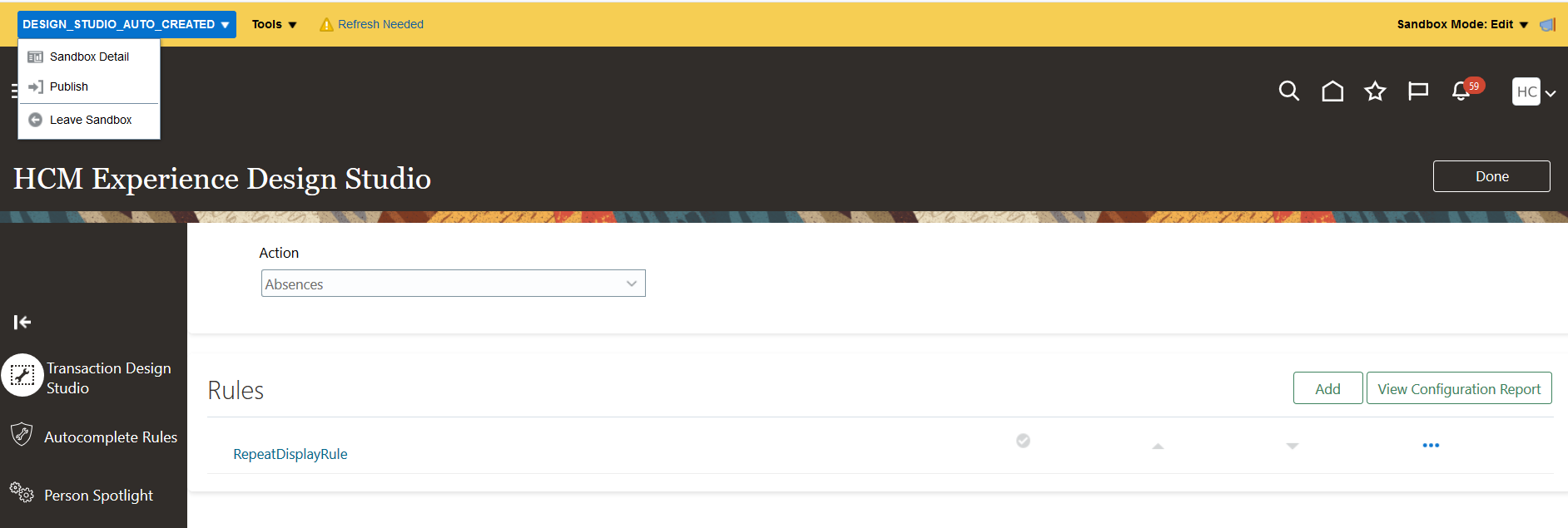
Publish the Sandbox
-
Click Publish. Then, click Yes in the Sandbox Details page to publish the sandbox
. 
Sandbox Details Page
Tips And Considerations
- Ensure that advanced entry is enabled for the absence type that you want to configure repeating absences for.
- The application can repeat a multiple-day absence only if the absence duration is 7 days or less.
- When you enter an absence for a specific assignment, the repeat option impacts only that assignment.
- Absences can be repeated only until the date on which the assignment it was entered for is active.
- This new feature has no impact on REST services.
- The repeat option isn’t enabled for open-ended absences.
- If an absence type is configured to schedule absences for non-working days, the application creates a zero duration entry for any non-working day that falls in the repeating pattern.
- If an employee with varying work shifts enters a repeating absence and the absence type is configured to allow partial rule and override daily duration, the application will modify absence entries to align with the work schedule.
Multiple Plan Support for Leave Agreements
The enhanced user interface now displays leave agreement details in a more organized and coherent format. You can now view both the occupational and statutory plans on the same page. A new column has been added to the Target Plan Entitlements section called Allocated. This column displays the amount of entitlement given to the employee associated with the agreement.
Additionally, two columns in Target Plan Entitlements section have been renamed for greater clarity. The details are as follows:
| Old Column Name | New Column Name | Description |
|---|---|---|
| Available Entitlement |
Available | The amount of entitlement available within the agreement. It it’s converted entitlement, it means it’s the original maternity/adoption entitlement minus what was consumed by the source absence. |
| Partner Allocation | Shared | The amount of entitlement shared with the partner. |
If there are other occupational plans that fall in the same time period as the employee’s statutory entitlement, you now have the option to manage them in a single agreement.
The occupational payment for the shared parental leave of the mother or primary adopter can continue only when the occupational and statutory plans are concurrently consumed. Maternity and adoption leaves accomplish this by using concurrent qualification plans associated with an absence type. When those leaves are converted to shared parental leave for the new mother or lead adopter, all remaining entitlements are transferred to the agreement and can be for two plans.
You can now view the original entitlement of a new mother under the maternity leave and the amount of the entitlement used by the maternity leave in the shared parental leave agreement. You can make adjustments to the available entitlement. Finally, you can allocate entitlement to the new mother and record the entitlement shared with the partner. The same applies for a primary adopter and adoption leave.
Similarly, you can record the available entitlement and document the allocation to a parenting partner, as well as record the amount of entitlement the new mother or primary adopter has shared to themselves.
You can enable concurrent entitlements for agreements for the following cases:
-
If a new mother or lead adopter qualifies for both occupational and statutory maternity/adoption leave, and wants to convert both occupational and statutory entitlements into a single agreement. Both the entitlements can be managed in the same agreement.
-
If a new mother or primary adopter allocates statutory shared parental leave to their parenting partner, and the partner qualifies for occupational shared parental leave from the employer. The two entitlements can be managed in the same agreement.
Make absence processing easier by using a single leave agreement to manage both the occupational and statutory shared parental leaves and pay plans.
Steps to Enable
You don't need to do anything to enable this feature.
IMPORTANT Actions and Considerations for Absences
REPLACED OR REMOVED FEATURES
From time to time, Oracle replaces existing Cloud service features with new features or removes existing features. When a feature is replaced the older version may be removed immediately or at a future time. As a best practice, you should use the newer version of a replaced feature as soon as the newer version is available.
| Product |
Removed Feature |
Target Removal |
Replacement Feature |
Replaced In |
Additional Information |
|---|---|---|---|---|---|
| Nothing at this time. |
_________________________
ORACLE DECOMMISSIONED THE HCM CLASSIC SIMPLIFIED USER INTERFACE IN UPDATE 20B
The HCM Responsive User Experience has been available and promoted as our standard since Update 18B. If you are still using the older HCM Classic Simplified User Interface, you must transition to the HCM Responsive User Experience, as these older pages will no longer be supported.
For consolidated information on generic setup information you can refer to My Oracle Support Document ID 2399671.1 - HCM Responsive User Experience Setup Information.
_________________________
KNOWN ISSUES / MONTHLY AND STATUTORY MAINTENANCE PACK
Oracle publishes a Known Issues document for every Update to make customers are aware of potential problems they could run into and the document provides workarounds if they are available.
Oracle also publishes Maintenance Pack and Statutory Maintenance Pack documentation of bugs that are fixed in the monthly or statutory patching.
To review these documents you must have access to My Oracle Support:
Oracle Human Capital Management Cloud Functional Known Issues and Maintenance Packs (Document ID 1554838.1)