
This document will continue to evolve as existing sections change and new information is added. All updates appear in the following table:
| Date | Module | Feature | Notes |
|---|---|---|---|
| 22 SEP 2023 |
Web Chat for Fusion Service Support for 23.08 Client | Updated document. Delivered new feature in update 23D. |
|
| 22 SEP 2023 |
Embedded Service 23D Enhancements | Updated document. Delivered new feature in update 23D. |
|
| 22 SEP 2023 |
Upgradable DCS Knowledge Components | Updated document. Replaced Upgradable Knowledge Article View Component feature. |
|
| 22 SEP 2023 |
Upgradable Knowledge Article View Component |
Removed feature from 23D |
|
| 22 SEP 2023 |
Digital Customer Service Support for Dynamic Links in Knowledge Articles | Updated document. Revised feature information. |
|
| 08 SEP 2023 | Created initial document. |
 HAVE AN IDEA?
We’re here and we’re listening. If you have a suggestion on how to make our cloud services even better then go ahead and tell us. There are several ways to submit your ideas, for example, through the Ideas Lab on Oracle Customer Connect. Wherever you see this icon after the feature name it means we delivered one of your ideas.
GIVE US FEEDBACK
We welcome your comments and suggestions to improve the content. Please send us your feedback at oracle_fusion_applications_help_ww_grp@oracle.com.
DISCLAIMER
The information contained in this document may include statements about Oracle’s product development plans. Many factors can materially affect Oracle’s product development plans and the nature and timing of future product releases. Accordingly, this Information is provided to you solely for information only, is not a commitment to deliver any material, code, or functionality, and should not be relied upon in making purchasing decisions. The development, release, and timing of any features or functionality described remains at the sole discretion of Oracle.
This information may not be incorporated into any contractual agreement with Oracle or its subsidiaries or affiliates. Oracle specifically disclaims any liability with respect to this information. Refer to the Legal Notices and Terms of Use for further information.
Column Definitions:
Report = New or modified, Oracle-delivered, ready to run reports.
UI or Process-Based: Small Scale = These UI or process-based features are typically comprised of minor field, validation, or program changes. Therefore, the potential impact to users is minimal.
UI or Process-Based: Larger Scale* = These UI or process-based features have more complex designs. Therefore, the potential impact to users is higher.
Features Delivered Disabled = Action is needed BEFORE these features can be used by END USERS. These features are delivered disabled and you choose if and when to enable them. For example, a) new or expanded BI subject areas need to first be incorporated into reports, b) Integration is required to utilize new web services, or c) features must be assigned to user roles before they can be accessed.
| Ready for Use by End Users Reports plus Small Scale UI or Process-Based new features will have minimal user impact after an update. Therefore, customer acceptance testing should focus on the Larger Scale UI or Process-Based* new features. |
Customer Must Take Action before Use by End Users Not disruptive as action is required to make these features ready to use. As you selectively choose to leverage, you set your test and roll out timing. |
|||||
|---|---|---|---|---|---|---|
| Feature |
Report |
UI or |
UI or |
|
||
Digital Customer Service Support for Dynamic Links in Knowledge Articles |
||||||
Digital Customer Service Support for Dynamic Links in Knowledge Articles
The Digital Customer Service Reference Template supports that the end-user can view and click in addition to a URL, also various custom link types in a knowledge article (e.g. Jira, bug, etc).
A dynamic link is a URL that has a variable parameter in it and links to third party applications. You can configure Knowledge Management to allow Authors to use dynamic links in articles. The Digital Customer Service Reference Portal Template doesn't require additional steps to enable dynamic links as it displays the content created in the article by the Knowledge Author.
Benefits for End-user:
- Directly click a relevant link in an article and open it in the same or a new tab
Benefits for Knowledge Author and Administrator:
- Insert dynamic links inline within the content of an article from the rich text editor, provided your Knowledge Administrator has defined a dynamic link type.
- Only insert the ID value for the link when editing the article and the dynamic link is automatically generated
- Possibility to link to an internal or external URL
- Easy to set up and works directly on the digital customer service portal template
Steps to Enable
You don't need to do anything to enable this feature.
Tips And Considerations
The Knowledge Administrator has to define a dynamic link object type and it's pattern via Setup and Maintenance. After creating the dynamic link object, as a Knowledge Administrator, you must enable the dynamic link in the rich text editor. Refer to the knowledge documentation below for more information on how to set up and use dynamic links.
Key Resources
Documentation for the Knowledge Administrator:
- Implementing Knowledge Management with the Redwood User Experience - Manage Dynamic Links
Documentation for the Knowledge Author:
-
Using Knowledge Management in the Redwood User Experience - Insert Dynamic Links in an Article
Access Requirements
Your Knowledge Administrator and Knowledge Author needs to right roles and permissions to set up dynamic links and author articles. Refer to the Knowledge Management documentation.
Web Chat for Fusion Service Support for 23.08 Client
What's New:
- Conditional Launch Button - You can now set conditions to show the launch button by polling for agent availablity.
What's improved:
- Additional launch button customization - The launch button can now include text and is fully customizable with CSS.
- End conversation custom message - The iframe message can now be positioned below the conversation.
- Message Splitting - Long messages can be split. With one click the entire message can be displayed.
- Wait queue message delay - To avoid the flicker of the wait queue message a delay has been added before showing it.
- ODA feedback system component - The ODA feedback system component is now supported (ODA 23.10 or higher is required).
Business Enablement:
- Reduce end-user frustration by hiding the launch button if a connection with a human agent can't be established.
- Comply with your corporate branding requirements by customizing the chat launch button with text, icon, color etc.
- Possibilities to measure satisfaction for the chat interaction by displaying an iframe message under the conversation (eg. to display a survey across full width) and support for the ODA feedback system component.
- Improve readability of the bot conversation for long messages by splitting them with a button to read more or less of the full text.
Steps to Enable
Login to Engagement Engine
- Navigate to Settings - Web Chat tab
- Create new component and choose the latest version
- Configure your desired attributes and publish
- Activate the component with the latest version in your rule(s)
Tips And Considerations
The Web Chat for Service 23.08 client and new features are available via the Engagement Engine Editor.
Key Resources
Oracle Digital Customer Service Documentation (see Chapter Implement Web Chat).
If you are licensed for Oracle Digital Assistant and you want to learn how to set up Digital Assistant as an Agent to use a chatbot in your Fusion Service implementation, please refer to the Oracle Fusion Service Documentation.
Once Engagement Engine has been enabled, see the Oracle Engagement Engine Cloud Service Documentation for complete steps for configuring, testing, deploying, and best practices for Engagement Engine (see Chapter Integrating Engagement Engine with Web Chat for Service).
Access Requirements
If Engagement Engine has not been enabled on your site, please submit a Service Request.
Embedded Service 23D Enhancements
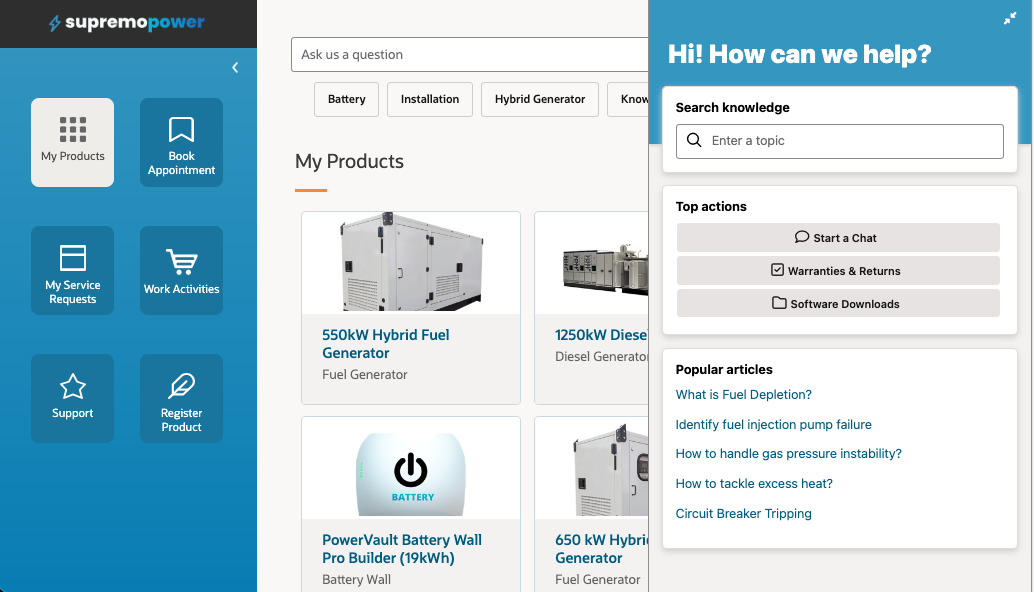
Embedded Service is a syndicated widget that you can deploy on your Digital Customer Service application or any web page through the Engagement Engine single tag. Embedded Service provides multi-functional help at the point of need and allows you to insert a full support experience in any page with modular components like Search Knowledge, Popular Articles, Top Actions, Digital Assistant as an Agent (ODA), and Live Chat with a human agent.
Engagement Engine is a point and click user interface that allows you to configure the functionality and visual design of the Embedded Service widget to meet your brand and business needs. Engagement Engine actions can trigger the Embedded Service experience based on one or more conditions regarding visitor or webpage criteria to create a proactive and personalized self-service experience.
Embedded Service natively embeds a modern Web Chat experience by combining assisted service by a human agent with a self-service chatbot to increase chat automation and put less strain on your human agent teams for recurring questions. The setup of Digital Assistant as an Agent requires Oracle Digital Assistant which is an optional add-on.
Embedded Service has some enhancements in 23D.
- The chat pre-launch form now supports updating visible and hidden fields at runtime to pass context through Chat Server for eg. improved queue routing or launching the right chatbot intent.
- Embedded Service is now available in all Fusion supported languages. The locale can be set explicitly or be inherited from the host page.
- Persistence of the widget when the end-user navigates away and back or reloads the page to make sure that the connection with Chat is not lost but automatically re-established.
- Top actions now supports 2 types of actions, buttons and links. These can point to 2 types of targets, to an Embedded Service screen or to an external URL.
- Drive More Deflection: Enable richer, more flexible and contextual self-service options at the point of need.
- Non-intrusive customer experience: Embedded Service can be made dynamically available when needed to improve the support experience
- Business Agility: Easily meet changing business requirements while enabling highly personalized user experiences
- Low code: Make available on any page with single tag deployment
- Simplified Administration: Centralized administration in Engagement Engine offers complete configuration and branding options via a point and click interface
- Multi-lingual support experience for global support organizations
Steps to Enable
- Request Engagement Engine with the “Embedded Service” feature via Service Request against Digital Customer Service
- Create a new Embedded Service component in the Settings area of Engagement Engine
- Create a new Site in Engagement Engine where you want to enable Embedded Service
- Create a new Rule in Engagement Engine to ”load Embedded Service” on your website
- Optionally configure and test connection to DA as Agent in Oracle Digital Assistant (if you are using ODA)
- Setup Engagement Engine tag on your website
Tips And Considerations
You will need the Engagement Engine Editor to set up Embedded Service.
Key Resources
Embedded Service
Access Requirements
Request Engagement Engine with the “Embedded Service” feature via Service Request against Digital Customer Service.
Upgradable DCS Knowledge Components
The Knowledge Article View, Knowledge Popular Article List, Knowledge Article Rating and Knowledge Search components that are available for developing your Digital Customer Service application in Oracle Visual Builder are now upgradable and continue to support customization. See component documentation in Visual Builder.
You can find these components in the oj-dcs JET Pack:
- Tag Name <oj-dcs-km-article-view> or Display Name <Knowledge Article View> to display the article detail view
-
Tag Name <oj-dcs-km-popular-article-list> or Display Name <Knowledge Popular Article List> to display a list of popular articles
-
Tag Name <oj-dcs-km-article-rating-view> or Display Name <Knowledge Article Rating View> to display an article rating
-
Tag Name <oj-dcs-km-article-rating-submit> or Display Name <Knowledge Article Rating Submit> to submit an article rating
-
Tag Name <oj-dcs-km-search> or Display Name <Knowledge Search> to provide search and filter functionality
Business Enablement:
- Upgradable component
- Leverage any bug fixes and added features
Steps to Enable
You don't need to do anything to enable this feature.
Tips And Considerations
Using our latest Digital Customer Service Reference Template, this feature is automatically available. See component documentation in Visual Builder.
Key Resources
Learn more about the Digital Customer Service components that are available when developing your application in Oracle Visual Builder in the Implementing Digital Customer Service documentation (chapter Components). See detailed component documentation in Visual Builder.
Access Requirements
Sign in to the Oracle Visual Builder editor as a user with the Developer role.