Update 24B
Revision History
This document will continue to evolve as existing sections change and new information is added. All updates appear in the following table:
| Date | Module | Feature | Notes |
|---|---|---|---|
| 29 MAR 2024 | Digital Customer Service | Upgradable DCS Work Order Component | Updated document. Revised feature information. |
| 29 MAR 2024 | Digital Customer Service |
Embedded Service 24B Enhancements | Updated document. Revised feature information. |
| 01 MAR 2024 | Created initial document. |
The table includes a chronological listing of document changes.
Overview
 HAVE AN IDEA?
We’re here and we’re listening. If you have a suggestion on how to make our cloud services even better then go ahead and tell us. There are several ways to submit your ideas, for example, through the Ideas Lab on Oracle Customer Connect. Wherever you see this icon after the feature name it means we delivered one of your ideas.
GIVE US FEEDBACK
We welcome your comments and suggestions to improve the content. Please send us your feedback at oracle_fusion_applications_help_ww_grp@oracle.com.
DISCLAIMER
The information contained in this document may include statements about Oracle’s product development plans. Many factors can materially affect Oracle’s product development plans and the nature and timing of future product releases. Accordingly, this Information is provided to you solely for information only, is not a commitment to deliver any material, code, or functionality, and should not be relied upon in making purchasing decisions. The development, release, and timing of any features or functionality described remains at the sole discretion of Oracle.
This information may not be incorporated into any contractual agreement with Oracle or its subsidiaries or affiliates. Oracle specifically disclaims any liability with respect to this information. Refer to the Legal Notices and Terms of Use for further information.
Feature Summary
Column Definitions:
Report = New or modified, Oracle-delivered, ready to run reports.
UI or Process-Based: Small Scale = These UI or process-based features are typically comprised of minor field, validation, or program changes. Therefore, the potential impact to users is minimal.
UI or Process-Based: Larger Scale* = These UI or process-based features have more complex designs. Therefore, the potential impact to users is higher.
Features Delivered Disabled = Action is needed BEFORE these features can be used by END USERS. These features are delivered disabled and you choose if and when to enable them. For example, a) new or expanded BI subject areas need to first be incorporated into reports, b) Integration is required to utilize new web services, or c) features must be assigned to user roles before they can be accessed.
| Ready for Use by End Users Reports plus Small Scale UI or Process-Based new features will have minimal user impact after an update. Therefore, customer acceptance testing should focus on the Larger Scale UI or Process-Based* new features. |
Customer Must Take Action before Use by End Users Not disruptive as action is required to make these features ready to use. As you selectively choose to leverage, you set your test and roll out timing. |
|||||
|---|---|---|---|---|---|---|
| Feature |
Report |
UI or |
UI or |
|
||
Digital Customer Service
Digital Customer Service
Upgradable DCS Work Order Component
In 24A, we delivered the possibility to create a Work Order from the user's registered product page. 24B brings an upgradable component for the Work Order Creation that can be added to any page when developing your Digital Customer Service application in Oracle Visual Builder. The upgradable component continues to support customization and you can leverage any bug fixes and added features. See component documentation in Visual Builder.
You can find these components in the oj-dcs JET Pack:
- Tag Name <oj-dcs-work-order-create> or Display Name <Work Order Create> to display a form that is comprised of a header, 3 form sections and an appointment time slot selector. The image below shows what the component will look like but is subject to change.
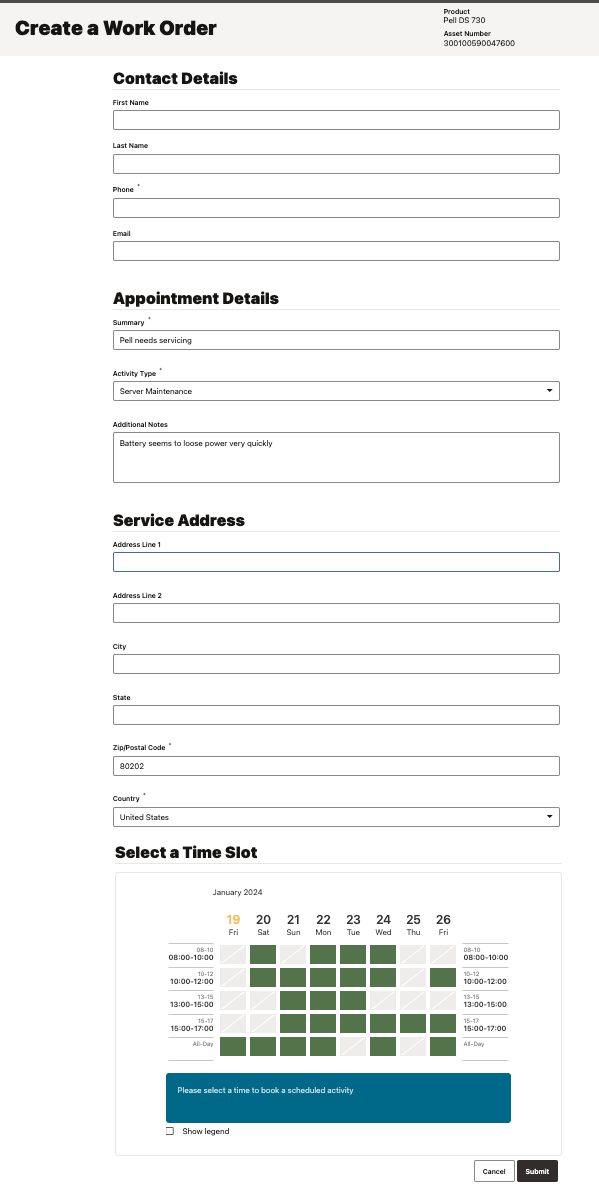
Image of the create Work Order component that allows to enter contact and appointment details, service address and select the preferred time slot
Business Benefit:
- Upgradable component
- Leverage any bug fixes and added features
- Speed up your Digital Customer Service portal implementation with out-of-the-box flows
- Reuse pre-integrated asset based service flows with Oracle Field Service
- Directly create or update a field service activity (or Work Order) in Oracle Field Service without first creating a Service Request
Steps to Enable
Steps to enable Create Work Order in Portal:
Set up your OFS instance
- Create a connection for your Fusion Service, see for Register a New Application, note the Client ID and secret
- Validate your connection, see Manage Service to Field Service Integration
- Get your Activity Types, click on Activity Types in the Resources and note the ones to list.
Set Activity Types in your DCS application
- On Visual Builder, open your application and navigate to dcs --> Variables
- Select workOrderActivityTypes
- Set Default Value to a list of Activity Types, each in double quotas and separated by commas
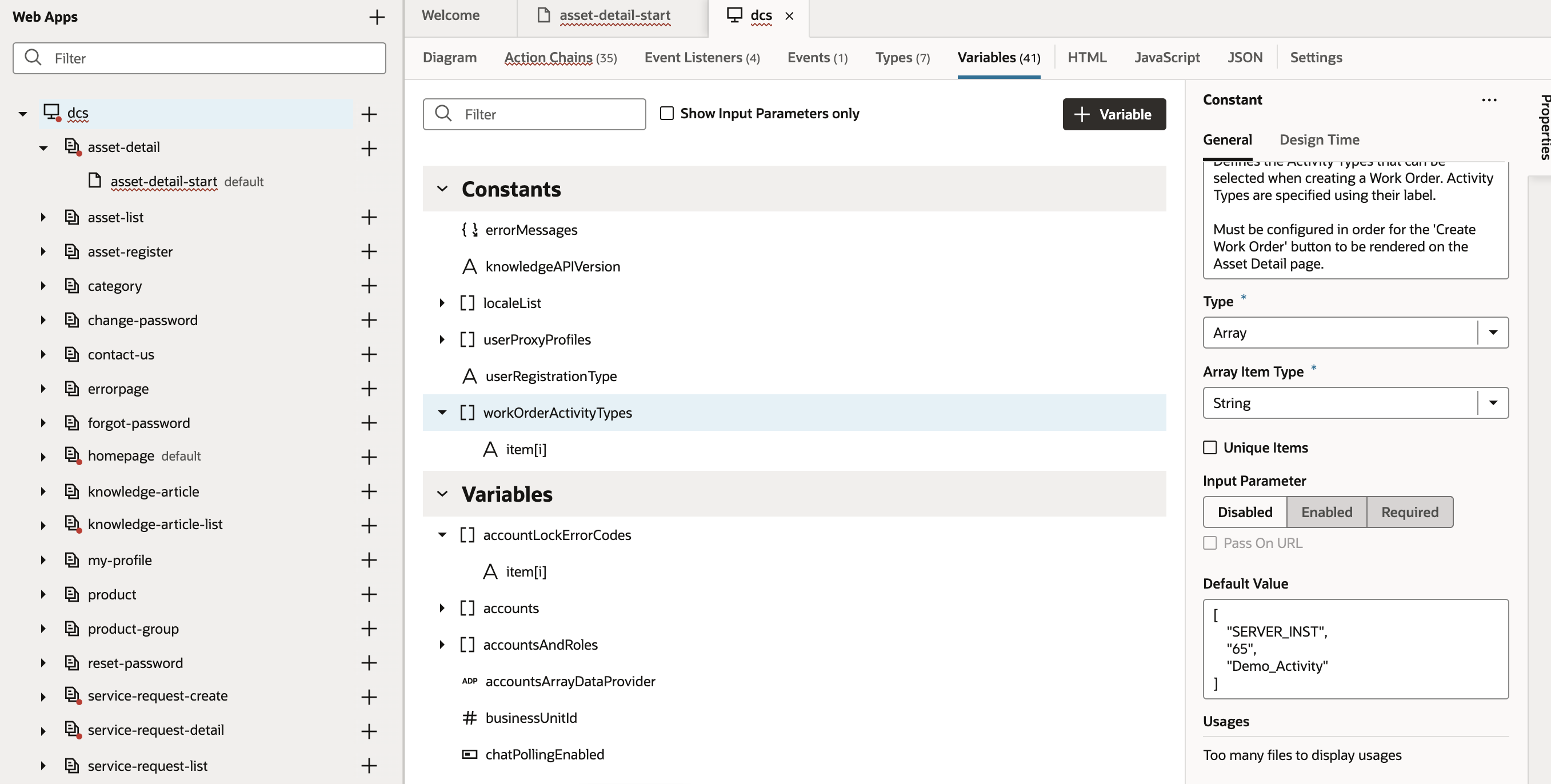
Set Default Value to a list of Activity Types in your DCS application
Update OFS Connection in your DCS application
- Open Service Connections --> ofsCapacityRestApi --> Servers
- Edit Server and configure the following for your OFS instance:
- ofsHost: <hostname>
- Client ID from Registered New App: my_fs_rest@ofsc-c999999.test
- Client Secret from Registered New App: 39298233063084df94cc9a526657d3b1f9a220fdfdfe56a36d329X
- Token URL: https://<OFS hostname>/rest/oauthTokenService/v2/token
Note: the DCS steps above do not include all the setup for Oracle Field Service (OFS) which will be mandatory before Create Work Order can be enabled in the DCS portal. Please refer to OFS information and documentation link in Key Resources below.
Tips And Considerations
Using our latest Digital Customer Service Reference Template, this feature is automatically available. See component documentation in Visual Builder.
Key Resources
Learn more about the Digital Customer Service components that are available when developing your application in Oracle Visual Builder in the Implementing Digital Customer Service documentation (chapter Components). See detailed component documentation in Visual Builder.
Please refer to the Oracle Field Service Help Center page for more information and documentation.
Access Requirements
Sign in to the Oracle Visual Builder editor as a user with the Developer role.
Embedded Service 24B Enhancements
Embedded Service is a syndicated widget that you can deploy on your Digital Customer Service application or any web page through the Engagement Engine single tag. Embedded Service provides multi-functional help at the point of need and allows you to insert a full support experience in any page with modular components like Search Knowledge, Popular Articles, Top Actions, Create Service Request, Digital Assistant as an Agent (ODA) and Live Chat with a human agent (Web Chat for Service).
Embedded Service has some enhancements in 24B. Embedded Service is now the default Chat component in Digital Customer Service Portal.
- Web Chat for Fusion Service 24.04 client version
- The widget can show a Post Conversation Message when disconnecting from chat. When ending a conversation it is now possible to print the transcript which opens a save to PDF in the end user's browser. You can also show a text message, a link or an iframe. A popular use case for this is showing a survey at the end of the chat.
- Web Chat now supports bi-directional file sharing between the end-user and the service agent during a chat conversation in Fusion Service.
- The name of the agent can be removed or customized in the conversation.
- Improvement in custom web chat specific icons, avatars and system message icons now have default values.
- Embedded Service will support navigation of KM article links from agents.
- Engagement Engine
- You can add optional header and footer strings to the Chat launch and Service Request forms to show eg. a disclaimer text with optional links. The new stings support plain text and links in markdown format.
- New Rules Action in EE for update of any Embedded Service property.
- The loading of an Embedded Service component now makes use of a smart reset where possible.
Request Engagement Engine with the “Embedded Service” feature via Service Request against Digital Customer Service.
Business Benefit:
- Drive More Deflection: Enable richer, more flexible and contextual self-service options at the point of need.
- Design chat experience: Adapt the behavior of Web Chat to your desired customer experience.
- Business Agility: Easily meet changing business requirements while enabling highly personalized user experiences
- Low code: Make available on any page with single tag deployment.
- Simplified Administration: Centralized administration in Engagement Engine offers complete configuration and branding options via a point and click interface.
Steps to Enable
- Request Engagement Engine with the “Embedded Service” feature via Service Request against Digital Customer Service
- Create a new Embedded Service component in the Settings area of Engagement Engine
- Create a new Site in Engagement Engine where you want to enable Embedded Service
- Create a new Rule in Engagement Engine to ”load Embedded Service” on your website
- Optionally configure and test connection to DA as Agent in Oracle Digital Assistant (if you are using ODA)
- Setup Engagement Engine tag on your website
Tips And Considerations
You will need the Engagement Engine Editor to set up Embedded Service.
Key Resources
Check out the Playbook How do I implement Embedded Service?
If you are licensed for Oracle Digital Assistant and you want to learn how to set up Digital Assistant as an Agent to use a chatbot in your Fusion Service implementation, please refer to the Oracle Fusion Service Documentation.
Access Requirements
Request Engagement Engine via Service Request against Digital Customer Service.