Update 24A
Revision History
This document will continue to evolve as existing sections change and new information is added. All updates appear in the following table:
| Date | Module | Feature | Notes |
|---|---|---|---|
| 18 JAN 2024 | Authoring |
Insert Fusion Interviews | Updated document. Delivered new feature in update 24A. |
| 01 DEC 2023 | Created initial document. |
Overview
 HAVE AN IDEA?
We’re here and we’re listening. If you have a suggestion on how to make our cloud services even better then go ahead and tell us. There are several ways to submit your ideas, for example, through the Ideas Lab on Oracle Customer Connect. Wherever you see this icon after the feature name it means we delivered one of your ideas.
GIVE US FEEDBACK
We welcome your comments and suggestions to improve the content. Please send us your feedback at oracle_fusion_applications_help_ww_grp@oracle.com.
DISCLAIMER
The information contained in this document may include statements about Oracle’s product development plans. Many factors can materially affect Oracle’s product development plans and the nature and timing of future product releases. Accordingly, this Information is provided to you solely for information only, is not a commitment to deliver any material, code, or functionality, and should not be relied upon in making purchasing decisions. The development, release, and timing of any features or functionality described remains at the sole discretion of Oracle.
This information may not be incorporated into any contractual agreement with Oracle or its subsidiaries or affiliates. Oracle specifically disclaims any liability with respect to this information. Refer to the Legal Notices and Terms of Use for further information.
Feature Summary
Column Definitions:
Report = New or modified, Oracle-delivered, ready to run reports.
UI or Process-Based: Small Scale = These UI or process-based features are typically comprised of minor field, validation, or program changes. Therefore, the potential impact to users is minimal.
UI or Process-Based: Larger Scale* = These UI or process-based features have more complex designs. Therefore, the potential impact to users is higher.
Features Delivered Disabled = Action is needed BEFORE these features can be used by END USERS. These features are delivered disabled and you choose if and when to enable them. For example, a) new or expanded BI subject areas need to first be incorporated into reports, b) Integration is required to utilize new web services, or c) features must be assigned to user roles before they can be accessed.
| Ready for Use by End Users Reports plus Small Scale UI or Process-Based new features will have minimal user impact after an update. Therefore, customer acceptance testing should focus on the Larger Scale UI or Process-Based* new features. |
Customer Must Take Action before Use by End Users Not disruptive as action is required to make these features ready to use. As you selectively choose to leverage, you set your test and roll out timing. |
|||||
|---|---|---|---|---|---|---|
| Feature |
Report |
UI or |
UI or |
|
||
Knowledge Management
Authoring
Embed Media in Articles
Authors can embed videos hosted by other services into knowledge base articles. You can use the insert media button from the toolbar, or you can paste a URL directly into the content, and it will be automatically embedded.
•Quickly embed videos hosted by other services in your content.
•Reduce complexity for authors updating individual articles.
•Ensure a consistent look and feel for media across your knowledge base
Steps to Enable
You don't need to do anything to enable this feature.
Tips And Considerations
- We currently support media from the following providers:
- youtube
- vimeo
- otube
- videohub.oracle.com
Key Resources
Once this feature is generally available, a demo will be found on Oracle Video Hub.
Access Requirements
No new permissions are required.
Replace Content
Automatically update content of multiple knowledge articles across your knowledge base in one action with the Replace Content feature.
•Reduce time and effort authors spend updating individual articles.
•Ensure changes are applied consistently and accurately across all articles.
•Minimize the risk of human error that can occur during manual editing.
Steps to Enable
You don't need to do anything to enable this feature.
Key Resources
Once this feature is generally available, a demo will be found on Oracle Video Hub.
Access Requirements
Users will need the following privileges to replace content:
Create Knowledge Mass Updates CSO_CREATE_KNOWLEDGE_MASS_UPDATES
Replace Text in Knowledge Articles via Mass Updates GLOBAL_SEARCH_AND_REPLACE
The Knowledge Manager is given this functional privilege by default.
Insert Fusion Interviews
Authors can insert native Fusion Interviews into a knowledge article.
Provides interactive guidance to agents or end users.
Authoring of interviews and articles are both directly within Fusion.
Enables business experts to quickly and independently create troubleshooting flows that can be inserted into articles.
Steps to Enable
This feature is only available in Redwood Authoring and the Fusion Interview feature must first be enabled.
Tips And Considerations
In 24A, It will only be possible to view interviews in knowledge articles in My Knowledge with the Redwood Experience for Service.
In 24B, Fusion interviews will be available in Service Center with the Redwood Experience and Help Desk.
Key Resources
How do I get started with Interviews in Fusion Service?
What's New in Fusion Interviews?
Access Requirements
Agent Experience
Auto-complete in My Knowledge
Why wait until you have typed your entire question to try to locate the information you need? This feature will cause articles to be suggested as you type in the search box on My Knowledge. A list of articles will be presented directly below the box you are typing in. If you see an article of interest in the list just click on it and you will be taken directly to the article.
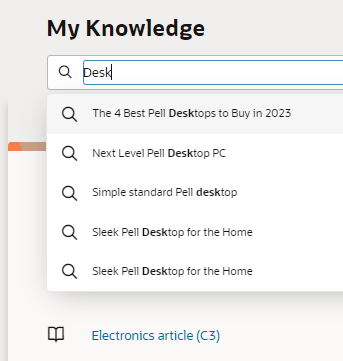
When you are looking for answers, whether it is as an employee trying to locate the right form to apply for a visa or as a contact center representative trying to help a customer, you want to get to that answer quickly. Now you can explore the KB as you type, no need to wait for a search results page to be returned or a complete idea of what you are looking for. As you type you can nearly immediately see the sort of articles that are being returned, either showing you just what you need, or giving you ideas about how you might refine your question based on what is in the knowledgebase.
Steps to Enable
This feature is only available for customers that have already enabled Fusion Knowledge with the Redwood User Experience and only in Redwood UIs such as My Knowledge with the Redwood User Experience for Service or HR Help Desk. Additionally the profile option ORA_CSO_ENABLE_KM_AUTOCOMPLETE will need to be set to Yes.
Tips And Considerations
As is the case in all search-related tools, the more precise and complete your question is, the better the results you will receive. In other words, the auto-complete values returned for part of a single word may not be as helpful as the articles returned once you have entered more unique, descriptive text related to what you are looking for.