
- Revision History
- Overview
- Feature Summary
- B2B Service Center
-
- Service Request Management
-
- View Updates to Service Requests Secured Using Access Groups in Near Real-Time
- Define Access Group-Based Data Security Policies for SR Messages
- Define Access Group-Based Data Security Policies for Service Categories
- Improve Related Objects with Unique Business-Driven Behaviors
- Select Business Unit Specific SmartText Entries
- Support Flexfields in SR Attachments
- Configure Email Templates to Control When to Include Past Conversations
- Define Notifications for Custom Objects Using Notification Preference Manager
- Adaptive Intelligence for Service - SR Similarity
-
- Service Analytics
- Service Request Management
This document will continue to evolve as existing sections change and new information is added. All updates appear in the following table:
| Date | Product | Feature | Notes |
|---|---|---|---|
| 19 NOV 2021 | Service Request Management | Create Draft Knowledge Articles from Actions and Plans |
Removed feature from update 21D. |
| 17 SEP 2021 | Created initial document. |
 HAVE AN IDEA?
We’re here and we’re listening. If you have a suggestion on how to make our cloud services even better then go ahead and tell us. There are several ways to submit your ideas, for example, through the Ideas Lab on Oracle Customer Connect. Wherever you see this icon after the feature name it means we delivered one of your ideas.
GIVE US FEEDBACK
We welcome your comments and suggestions to improve the content. Please send us your feedback at oracle_fusion_applications_help_ww_grp@oracle.com.
DISCLAIMER
The information contained in this document may include statements about Oracle’s product development plans. Many factors can materially affect Oracle’s product development plans and the nature and timing of future product releases. Accordingly, this Information is provided to you solely for information only, is not a commitment to deliver any material, code, or functionality, and should not be relied upon in making purchasing decisions. The development, release, and timing of any features or functionality described remains at the sole discretion of Oracle.
This information may not be incorporated into any contractual agreement with Oracle or its subsidiaries or affiliates. Oracle specifically disclaims any liability with respect to this information. Refer to the Legal Notices and Terms of Use for further information.
Column Definitions:
Report = New or modified, Oracle-delivered, ready to run reports.
UI or Process-Based: Small Scale = These UI or process-based features are typically comprised of minor field, validation, or program changes. Therefore, the potential impact to users is minimal.
UI or Process-Based: Larger Scale* = These UI or process-based features have more complex designs. Therefore, the potential impact to users is higher.
Features Delivered Disabled = Action is needed BEFORE these features can be used by END USERS. These features are delivered disabled and you choose if and when to enable them. For example, a) new or expanded BI subject areas need to first be incorporated into reports, b) Integration is required to utilize new web services, or c) features must be assigned to user roles before they can be accessed.
| Ready for Use by End Users Reports plus Small Scale UI or Process-Based new features will have minimal user impact after an update. Therefore, customer acceptance testing should focus on the Larger Scale UI or Process-Based* new features. |
Customer Must Take Action before Use by End Users Not disruptive as action is required to make these features ready to use. As you selectively choose to leverage, you set your test and roll out timing. |
|||||
|---|---|---|---|---|---|---|
| Feature |
Report |
UI or |
UI or |
|
||
View Updates to Service Requests Secured Using Access Groups in Near Real-Time |
||||||
Define Access Group-Based Data Security Policies for SR Messages |
||||||
Define Access Group-Based Data Security Policies for Service Categories |
||||||
Improve Related Objects with Unique Business-Driven Behaviors |
||||||
Configure Email Templates to Control When to Include Past Conversations |
||||||
Define Notifications for Custom Objects Using Notification Preference Manager |
||||||
View Updates to Service Requests Secured Using Access Groups in Near Real-Time
You can access service requests (SRs) that are secured using access groups in near real-time. When an SR is created or updated, users can access the new or updated SR immediately. You don't need to run the Perform Object Sharing Rule Assignment Processing scheduled process for users to access the SRs.
.
Users get access to new or updated service requests faster than before.
Steps to Enable
To implement near-real-time processing for service requests, you must enable the following profile options:
- Near Real-Time Transaction Tracking for Access Groups Enabled (ORA_ZCA_ACCESS_GROUPS_NEAR_REAL-TIME_TRACKING_ENABLED): This profile option is enabled at the site level by default.
- Common CRM Signals Active (ORA_ZCA_ENABLE_SIGNALS): This profile option is disabled by default.
Key Resources
- See the "Users and Security" chapter in the Implementing B2B Service guide.
Role Information
- Sales Administrator
- Customer Relationship Management Application Administrator
Define Access Group-Based Data Security Policies for SR Messages
You can define access group-based data security policies on SR messages. Access groups are an alternative way of granting data permissions to users compared to SQL-based data security policies. Instead of creating security policies using SQL, you can use object-sharing rules in the Sales and Service Access Management UI to define your visibility criteria.
You can create custom data security policies on service request messages by using a user-friendly administration UI. You don’t need to know SQL to create these policies.
Steps to Enable
Complete the following tasks:
- Create a new access group if you don't want to use an existing access group.
- Add members to the access group.
- Create an object-sharing rule to grant access to SR messages for all the access group members.
Key Resources
- See the "Users and Security" chapter in the Implementing B2B Service guide.
Role Information
- Sales Administrator
- Customer Relationship Management Application Administrator
Define Access Group-Based Data Security Policies for Service Categories
You can define access group-based data security policies on service categories. Access groups are an alternative way of granting data permissions to users as compared to the SQL-based data security policies. Instead of creating security policies using SQL, you can use object-sharing rules in the Sales and Service Access Management UI to define your visibility criteria.
You can create custom data security policies on service categories by using a user-friendly administration UI. You don't need to know SQL to create these policies.
Steps to Enable
Complete the following tasks:
- Create a new access group if you don’t want to use an existing access group.
- Add members to the access group.
- Create an object-sharing rule to grant the access group members access to service categories.
Key Resources
- See the "Users and Security" chapter in the Implementing B2B Service guide.
Role Information
- Sales Administrator
- Customer Relationship Management Application Administrator
Improve Related Objects with Unique Business-Driven Behaviors
Your administrators can now extend Related Objects with custom Relationship Types, custom fields, object workflows, and the automatic creation of Relationships to Action Plan objects.
Meet your organization's unique data and workflow needs through unique Relationship types, business-driven custom attributes and custom workflows.
Steps to Enable
Leverage Application Composer to expose and adjust page layout and attributes. To learn more about extending your application using Application Composer, visit Oracle Help Center > your apps service area of interest > Books > Configuration and Extension.
Custom Relationship Types, custom fields, and object workflows can be configured in Application Composer. The automatic creation of Relationships to Action Plan objects can be enabled in the 'Manage Action Plan Profile Options' task.
Key Resources
- For more information see the Implementing B2B Service and the Implementing Service Center guides.
Role Information
Custom Relationship Types, custom fields, and object workflows can be configured by an authorized developer. The automatic creation of Relationships to Action Plan objects can be enabled by an authorized Action Plan administrator.
Select Business Unit Specific SmartText Entries
You can author SmartText entries for each Business Unit when the Multi-BU functionality is enabled. This lets each Service organization to define verbiage that is aligned to its business practices. The application now provides a list of SmartText entries specific to the Business Unit associated with the service request you're working on.
Business Unit enables customers to deploy more than one service center within a single instance of their service application.
Steps to Enable
You don’t need to do anything to enable this feature.
Tips And Considerations
- When the Multi Business Unit feature is enabled, the end user agent UI will always filter the available SmartTexts by the user's BU. Make sure that any pre-existing SmartTexts are re-published to each appropriate BU when enabling the Multi BU feature. Any SmartTexts that were created before this release and SmartTexts created before Multi BU is enabled, are stamped with the CRM Default BU. You can use import/export if you wish to modify the BU on the existing SmartTexts.
- To make a SmartText available to all agents across BUs, associate the SmartText with 'No Business Unit' when authoring.
Key Resources
- See the "Set Up Service Business Units" chapter in the Implementing B2B Service guide.
Role Information
- Service Administrator
- Service Representative
Support Flexfields in SR Attachments
You can extend the Service Request (SR) Attachment and SR Message Attachment business objects to support flexfields. This feature lets users provide additional information about the attachments when uploading them or editing them on the SR.
If your company wants to capture additional information about the attachment, you can use flexfields to capture this type of information.
Steps to Enable
Complete the following tasks:
- If you want the fiexfield to be visible in all the attachment categories, then create a global segment.
- If you want the flexfield to be visible in some of the attachment categories, then create a contextual segment.
- Deploy the flexfields so that they are visible to the users when uploading attachments to a service request or SR messages.
Key Resources
- See the "Extend B2B Service" chapter in the Implementing B2B Service guide.
Role Information
- Sales Administrator
- Customer Relationship Management Application Administrator
Configure Email Templates to Control When to Include Past Conversations
Control whether to include past conversations in an outbound email. If you want to include the past conversations in email messages, you can add the past conversation tag to the email template. You can also configure which channel-type messages to include in the past conversations.
You can communicate more effectively with your customers by leaving out unwieldy conversation threads, which results in more succinct and focused communication.
Steps to Enable
To include past conversations only in selected emails of your choice, perform the following steps:
- Set the SVC_EMAIL_ENABLE_PAST_CONVERSATIONS profile option to Y.
- Set the ORA_SVC_EMAIL_DEFAULT_PAST_CONVERSATIONS_IN_OUTBOUND_MSGS profile option to N.
- Add the tag #PastConversation# in your email templates for messages where you want to include past conversations.
If you want to include messages from only one or more specific channels in past conversations:
- Set the value of the ORA_SVC_EMAIL_PAST_CONVERSATION_CHAN_TYPES profile option to a comma-separated list of those specific channel types.
Tips And Considerations
- If you don't want to include past conversations in an email message, you can achieve this by not including the #PastConversation# tag in your email template.
- You can configure the application for the past conversation section of an SR message to include messages of only certain channel types such as Email.
Key Resources
- See the "Email Channels" chapter in the Implementing B2B Service guide.
Role Information
- Sales Administrator
- Customer Relationship Management Application Administrator
Define Notifications for Custom Objects Using Notification Preference Manager
Use the Notification Preference Manager to define notifications for custom objects. Administrators can use Application Composer to create triggers on the custom objects that they want to set user notifications for, then use the Notification Preference Manager to set the notification recipients and delivery channels for the objects.
This functionality lets administrators quickly and easily define notifications for custom objects. Administrators can use the Notification Preference Manager to define the the recipient and delivery channels for notifications triggered off of custom objects.
Steps to Enable
You don’t need to do anything to enable this feature.
Tips And Considerations
In this release, SmartText to define the message for the notification is not available. As an administrator, you should define the notification message as part of the groovy trigger code.
Key Resources
- For additional information on setting up notifications, or defining notification triggers using groovy scripting, see the "Configure Notifications" chapter in the Implementing B2B Service guide.
Role Information
Service Administrator, Sales Administrator.
Adaptive Intelligence for Service - SR Similarity
SR Similarity helps your agents resolve service requests (SRs) faster by automatically finding similar SRs that your service organization has previously encountered and solved. This is particularly relevant for newly emergent issues that are not yet covered by the curated knowledge base, such as when new product/services are introduced.
When a new SR is reported, an agent can use SR Similarity to automatically identify SRs that may have relevant solutions, and can access that information for faster troubleshooting. Adaptive Intelligence (AI) capabilities including Natural Language Processing (NLP) are used behind the scenes to find likely matches based on key SR information such as title, problem description, associated category or product. As a result, you can shorten time to resolution and improve agents' efficiency by reducing ad-hoc searching and unnecessary troubleshooting.
The feature is currently available only in the English language.
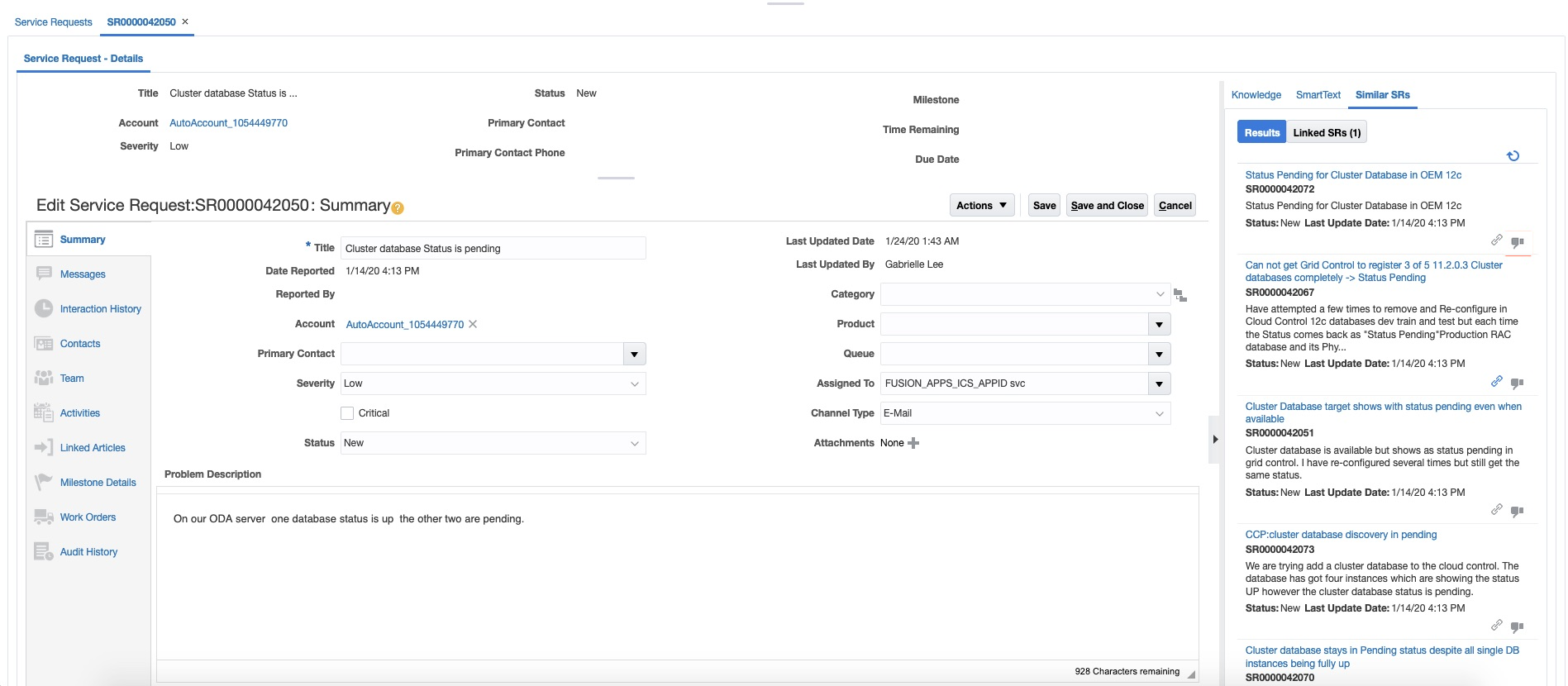
Similar SRs in the Agent UI
Using Similar SRs results in improved agent efficiency, reduced SR resolution times, and improved customer satisfaction
Steps to Enable
Use the Opt In UI to enable this feature. For instructions, refer to the Optional Uptake of New Features section of this document.
Offering: Service
You must perform setup steps in both the B2B Service application and the Oracle Adaptive Intelligence (AI) platform. The setup process extracts SR data in bulk from the service application into the AI platform, which performs text analysis. Agents can view Similar SRs on a dedicated region of the SR Details page. An SR Similarity RESTful web service is also available.
Tips And Considerations
- SR Similarity is currently available only in the English language
- SR Similarity was previously released as a Beta feature. It is now generally available to all Sales and B2B Service Enterprise and Premium customers.
Key Resources
- See the "Configure Service Request Similarity" chapter in the Implementing B2B Service guide.
Role Information
Sales Administrator
Analyze Service Request Transfers
The "Service - CRM Service Requests Real Time" subject area has been enhanced to add transfer related folders and columns.New metrics such as the average number of SR transfers and % of SRs transferred together with attributes such as transfer reasons and dates added to the Service Request dimension, help you build compelling custom reports to measure and monitor transfers.

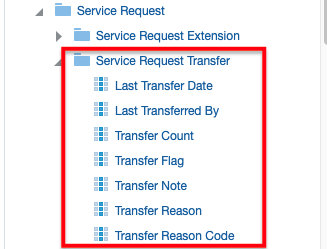
New SR Transfer Metrics New SR Transfer Attributes
In addition, out of box reports to view transfer summaries and viewing long pending service requests with transfers help you obtain transfer insights from day one.
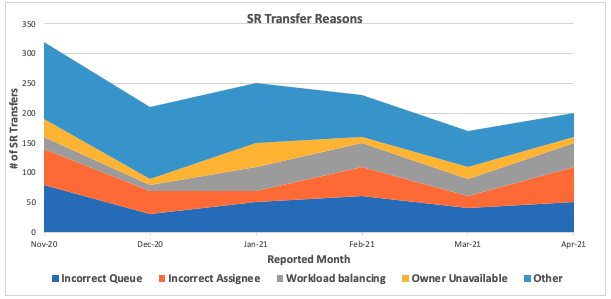
Report showing a monthly trend of SR transfers and reasons for the same
Enable your managers to know how often service requests are being handed off between agents and queues, the reasons for the transfers, and the extent to which they contribute to resolution delays, so the organization can take steps to adjust the process to mitigate any negative impact. The insights provide a sound basis for you to plan remediation efforts such as adjusting queue assignment rules, identifying training needs, correcting workload imbalances and the like.
Steps to Enable
You don't need to do anything to enable this feature.
Key Resources
- See the "Subject Areas" chapter in the Subject Areas for Transactional Business Intelligence guide.