
March Maintenance Pack for 23A
This document will continue to evolve as existing sections change and new information is added. All updates appear in the following table:
| Date | Module | Feature | Notes |
|---|---|---|---|
| 24 FEB 2023 | Created initial document. |
HCM Cloud applications have two types of patches you can receive that are documented in this What’s New:
- Release Updates (23A, 23B, 23C, and 23D)
- Optional Monthly Maintenance Packs to each update
It is important for you to know what Release Update your environment is on. You can find this in your Cloud Portal.
____________________
 HAVE AN IDEA?
We’re here and we’re listening. If you have a suggestion on how to make our products better, please let us know. To enter an idea go to the Ideas Lab on Oracle Customer Connect. In this document wherever you see the light bulb icon after the feature name it means we delivered one of your ideas.
____________________
Suggested Reading for all HCM Products:
- HCM Common What's New - In this What's New you will find feature that are used across applications.
- Human Resources What’s New – In the Global Human Resources section you will find features on the base application in which other application are built upon.
NOTE: Not all Global Human Resource features are available for Talent and Compensation products.
- Oracle Human Capital Management Cloud Functional Known Issues and Maintenance Packs (Document ID 1554838.1). These documents identify bug fixes and possible known issues. You will also need to review these documents based in the release update version you are currently on or will be moving to.
- Oracle Help Center – Here you will find guides, videos and searchable help.
- Release Readiness – New Feature Summary, What’s New, Feature Listing Spreadsheet, Spotlights and Release Training
GIVE US FEEDBACK
We welcome your comments and suggestions to improve the content. Please send us your feedback at oracle_fusion_applications_help_ww_grp@oracle.com. Indicate you are inquiring or providing feedback regarding the HCM Cloud What’s New in the body or title of the email.
Column Definitions:
Report = New or modified, Oracle-delivered, ready to run reports.
UI or Process-Based: Small Scale = These UI or process-based features are typically comprised of minor field, validation, or program changes. Therefore, the potential impact to users is minimal.
UI or Process-Based: Larger Scale* = These UI or process-based features have more complex designs. Therefore, the potential impact to users is higher.
Features Delivered Disabled = Action is needed BEFORE these features can be used by END USERS. These features are delivered disabled and you choose if and when to enable them. For example, a) new or expanded BI subject areas need to first be incorporated into reports, b) Integration is required to utilize new web services, or c) features must be assigned to user roles before they can be accessed.
| Ready for Use by End Users Reports plus Small Scale UI or Process-Based new features will have minimal user impact after an update. Therefore, customer acceptance testing should focus on the Larger Scale UI or Process-Based* new features. |
Customer Must Take Action before Use by End Users Not disruptive as action is required to make these features ready to use. As you selectively choose to leverage, you set your test and roll out timing. |
|||||
|---|---|---|---|---|---|---|
| Feature |
Report |
UI or |
UI or |
|
||
Data Security Policies in Self-Service Benefits and Benefit Service Center |
||||||
Oracle Benefits is a complete, configurable and flexible global solution that enables organizations to successfully evolve and adapt to the unique needs of their workforce. The solution enables setup of traditional 'one-size fits all' plans to highly complex plans that selectively target different workforce segments with different benefit packages. Self-service capabilities present the user with an out of the box intuitive guided enrollment process with contextual information and embedded analytics.
Data Security Policies in Self-Service Benefits and Benefit Service Center
The self-service tasks and Benefit Service Center tasks are now more secure with the data security policies.
Here’s the list of data security policies and the tasks that are secured with those policies in self-service Benefits. If you are using custom roles, you need to add these data security policies to your custom role.
| Data Security Policy | UI Tasks or Actions |
|---|---|
| Review Benefit Participant Enrollment Result on Benefit Participant Enrollment Result |
|
| Manage Person Life Event on Benefit Person Life Event |
Confirmation is secured using the Review Benefit Participant Enrollment Result privilege of the Benefit Participant Enrollment Result data security policy. |
| Manage Benefit Relation on Benefit Relation |
|
|
Before You Enroll: People (Contacts) Region and Add Button Note: The Before You Enroll task will not be visible if the View Person Contact Details grants are missing. The tile is secured using FNDDS__PER_VIEW_PERSON_CONTACT_DETAILS_DATA__PER_ALL_PEOPLE_F If the View Person Contact Details grants are missing, you need to create a data security policy with the following details:
|
|
|
Here’s the list of data security policies and the tasks that are secured with those policies in Benefits Service Center. If you are using custom roles, you need to add these data security policies to your custom role.
| Data Security Policy | UI Tasks or Actions |
|---|---|
| Review Benefit Participant Enrollment Result on Benefit Participant Enrollment Result |
|
| Manage Person Life Event on Benefit Person Life Event |
|
| Manage Person Contact Details on Person Detail (for Admin Role) View Person Contact Details on Person Detail (for Employee Role) |
People to Cover: Contacts Region and Add Button |
| Manage Person on Person Detail (for Admin Role) View Person on Person Detail (for Employee Role) |
People to Cover: Beneficiary Organization Region and Add Button |
| Manage Benefit Relation on Benefit Relation |
Benefit Summary (Benefit Relation dropdown list) |
If seeded roles are not working, you might have to regenerate the grants individually by editing them on the Manage Data Roles and Security Profiles page.
Alternatively, to regenerate one or more roles, you can run the Regenerate Data Security Grants process. The Regenerate Data Security Profiles and Grants job streamlines the regeneration of HCM data roles, abstract roles, and security profiles.
This enhancement adds more security to the Benefits pages and tasks.
Steps to Enable
You don't need to do anything to enable this feature.
Key Resources
For more information see the following:
- Overview of Securing Oracle HCM Cloud
- Overview of Security Reference
- Run the Regenerate Data Security Grants Process
This document will continue to evolve as existing sections change and new information is added. All updates appear in the following table:
| Date | Module | Feature | Notes |
|---|---|---|---|
| 24 FEB 2023 | Benefits | Improved Benefits Person Electable Choice Diagnostic Test | Updated document. Revised feature information. |
| 27 JAN 2023 | Benefits | Improved Benefits Person Electable Choice Diagnostic Test | Updated document. Revised feature information. |
| 02 DEC 2022 | Created initial document. |
HCM Cloud applications have two types of patches you can receive that are documented in this What’s New:
- Release Updates (23A, 23B, 23C, and 23D)
- Optional Monthly Maintenance Packs to each update
It is important for you to know what Release Update your environment is on. You can find this in your Cloud Portal.
____________________
HAVE AN IDEA?
We’re here and we’re listening. If you have a suggestion on how to make our products better, please let us know. To enter an idea go to the Ideas Lab on Oracle Customer Connect. In this document wherever you see the light bulb icon after the feature name it means we delivered one of your ideas.
____________________
Suggested Reading for all HCM Products
- HCM Common What's New - In this What's New you will find feature that are used across applications.
- Human Resources What’s New – In the Global Human Resources section you will find features on the base application in which other application are built upon.
NOTE: Not all Global Human Resource features are available for Talent and Compensation products.
- Oracle Human Capital Management Cloud Functional Known Issues and Maintenance Packs (Document ID 1554838.1). These documents identify bug fixes and possible known issues. You will also need to review these documents based in the release update version you are currently on or will be moving to.
- Oracle Help Center – Here you will find guides, videos and searchable help.
- Release Readiness – New Feature Summary, What’s New, Feature Listing Spreadsheet, Spotlights and Release Training
GIVE US FEEDBACK
We welcome your comments and suggestions to improve the content. Please send us your feedback at oracle_fusion_applications_help_ww_grp@oracle.com. Indicate you are inquiring or providing feedback regarding the HCM Cloud What’s New in the body or title of the email.
Column Definitions:
Report = New or modified, Oracle-delivered, ready to run reports.
UI or Process-Based: Small Scale = These UI or process-based features are typically comprised of minor field, validation, or program changes. Therefore, the potential impact to users is minimal.
UI or Process-Based: Larger Scale* = These UI or process-based features have more complex designs. Therefore, the potential impact to users is higher.
Features Delivered Disabled = Action is needed BEFORE these features can be used by END USERS. These features are delivered disabled and you choose if and when to enable them. For example, a) new or expanded BI subject areas need to first be incorporated into reports, b) Integration is required to utilize new web services, or c) features must be assigned to user roles before they can be accessed.
| Ready for Use by End Users Reports plus Small Scale UI or Process-Based new features will have minimal user impact after an update. Therefore, customer acceptance testing should focus on the Larger Scale UI or Process-Based* new features. |
Customer Must Take Action before Use by End Users Not disruptive as action is required to make these features ready to use. As you selectively choose to leverage, you set your test and roll out timing. |
|||||
|---|---|---|---|---|---|---|
| Feature |
Report |
UI or |
UI or |
|
||
Prepare for the Removal of the Classic Pages in Benefits Service Center and Self-Service Benefits |
||||||
Oracle Benefits is a complete, configurable and flexible global solution that enables organizations to successfully evolve and adapt to the unique needs of their workforce. The solution enables setup of traditional 'one-size fits all' plans to highly complex plans that selectively target different workforce segments with different benefit packages. Self-service capabilities present the user with an out of the box intuitive guided enrollment process with contextual information and embedded analytics.
Improved Benefits Person Electable Choice Diagnostic Test
The following sections of the Benefits Person Electable Choice Diagnostic Test report are updated as part of this enhancement:
Eligible Dependent Details
-
Certification required status
-
Enrollment overridden through date
Eligible Covered Dependent Details
-
Overridden status
-
Coverage pending status
-
Enrollment overridden through date
-
Program update date
Beneficiary Enrollment Details
-
Ended person life event ID
-
Certification required status

Benefits Person Electable Choice Diagnostic Test Report
This enhancement allows administrators to review dependent details, covered dependent details, and beneficiary enrollment details.
Steps to Enable
You don't need to do anything to enable this feature.
Key Resources
-
Watch Enhanced Benefits Administrative and Participant Features Readiness Training
- For more information refer to: Benefits Person Electable Choice Report
Role And Privileges
Application Diagnostics Administrator
Allocate Credits on Billing Page
You can now apply credits to participants against any outstanding bill when you review their existing credit balances.
For example, the benefits administrator generates health coverage charges of $500 for June. The participant overpays $1000 and expects the excess credit of $500 to be used for the July bill. You can use the new Pay with Credits option on the Billing page of Benefits Service Center to apply the credits. Previously, a subsequent payment was needed for you to apply the excess amount. For multiple credit adjustments, you can use the Upload Billing Payments workbook available in the Person Data Loaders tab of the Evaluation and Reporting work area.
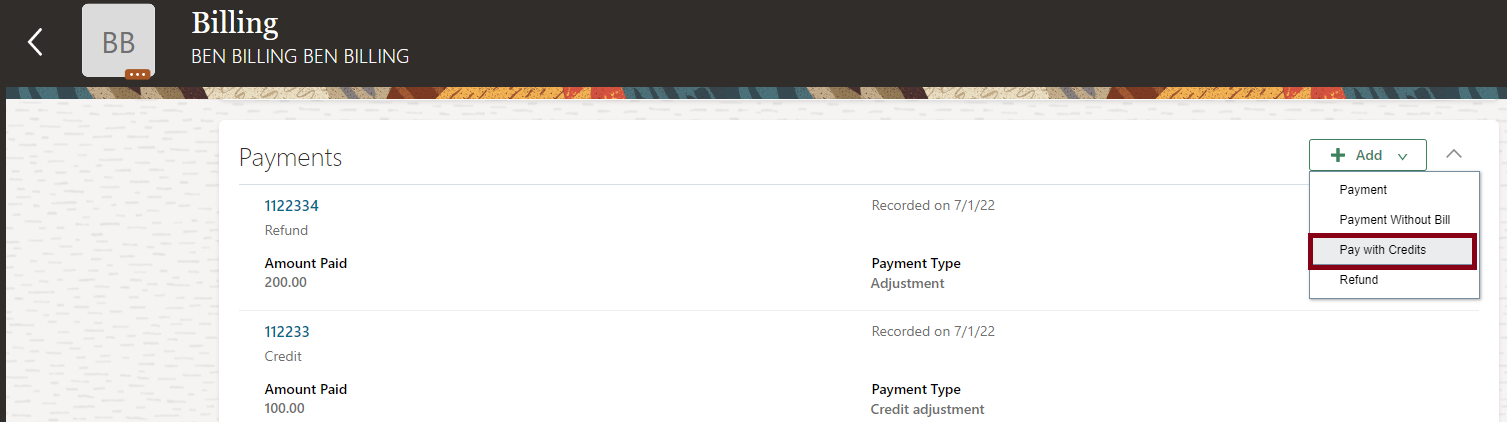
Pay with Credits Option
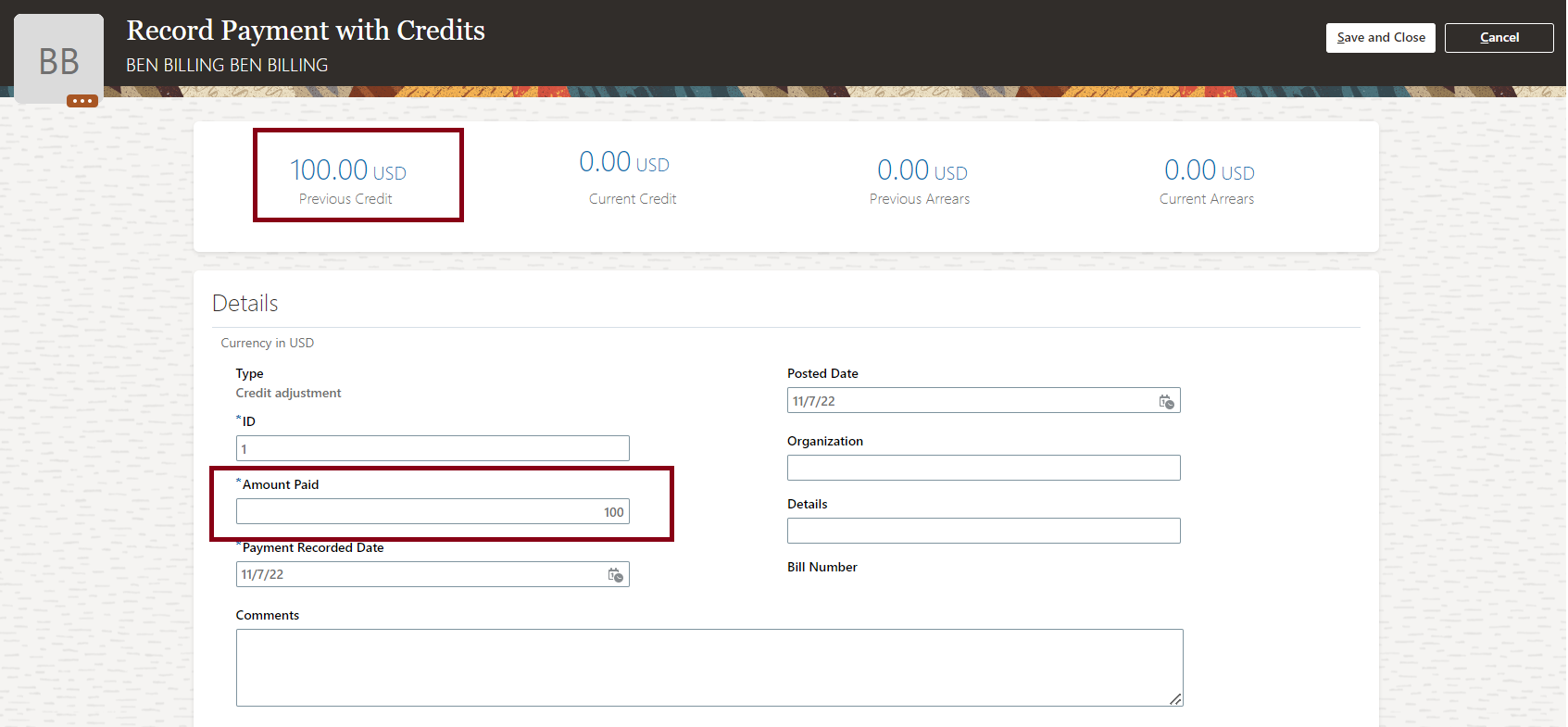
Record Payments with Credits
Here’s how you apply credits to participants through Benefits Service Center:
-
On the Home Page, click Benefits Administration > Enrollment.
-
Search for the participant.
-
Select the Billing task from the side panel.
-
In the Payments section, select Add, and click Pay with Credits.
-
Follow the prompts to apply credits. You can apply only the amount that is less than or equal to the previous credits. The balance amount after applying the credit appears as current credit.
-
Click Save and Close.
This enhancement helps you effectively process single or multiple requests for credit allocation.
Steps to Enable
You don't need to do anything to enable this feature.
Key Resources
-
Watch Enhanced Benefits Administrative and Participant Features Readiness Training
- For more information refer to: Upload Bill Payments Using the Integrated Workbook
You can now refund the excess credit amount against any bill. The refund amount should be less than or equal to the available credit. Refunds will be processed only if outstanding bills are all fully paid.
For example, a participant was planning to take an approved long-term unpaid leave of absence and overpays some amount for the upcoming bills. The participant later decides not to take their unpaid leave and requests a refund of the extra amount that they had paid. You can use the new Refund option on the Billing page of Benefits Service Center to refund excess credits. To refund multiple participants, you can use the Upload Billing Payments workbook available in the Person Data Loaders tab of the Evaluation and Reporting work area.
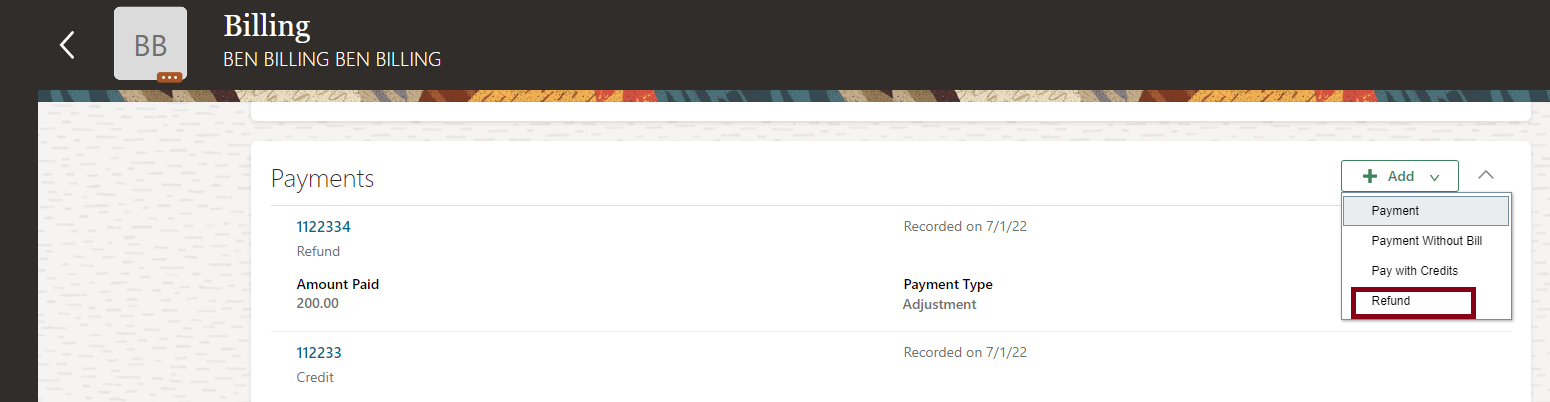
Refund Option

Record Refund Page
Here’s how you refund the excess credit amount:
- On the Home Page, click Benefits Administration > Enrollment.
- Search for the participant.
- Select the Billing task from the side panel.
- In the Payments section, select Add, and click Refund.
- Follow the prompts to refund the excess credits. The refund amount should be less than or equal to the previous credits. The balance amount after the refund appears as current credit.
- Click Save and Close.
This enhancement helps you effectively process single or multiple refund requests.
Steps to Enable
You don't need to do anything to enable this feature.
Key Resources
-
Watch Enhanced Benefits Administrative and Participant Features Readiness Training
- For more information refer to: Upload Bill Payments Using the Integrated Workbook
Benefits Removed or Replaced Features
From time to time, Oracle replaces existing features with new features, or removes existing features.
Replaced features may be put on a path of removal, the features below will let you know what update you will have to have moved to the newer feature. As a best practice, you should move to the newer feature as soon as possible for full support and to stay up with the latest updates that the product offers.
Any feature that is removed, will have an Update in which that feature is no longer available. Please make necessary plans to move off the feature by the Update indicated, as it will no longer be available.
Prepare for the Removal of the Classic Pages in Benefits Service Center and Self-Service Benefits
Prepare for the removal of the classic pages starting in the 23A Update. With the redesigned benefits service center and employee self-service pages being in place for several releases now, you can no longer switch back to the classic pages.
We’ve taken the benefits service center and employee self-service pages to the next level by redesigning them to look and behave the same on desktop and mobile devices. We’ve also changed the look and feel of the pages to provide a better experience for end users. Pages and messages look more modern and use simpler, more conversational language so that you can more easily read and understand content across all devices. The pages are clutter-free and clean and display only those fields that are required to complete the task. You can personalize the pages and add more fields that are hidden by default.
The following profile options are now read-only and defaulted to Yes:
- BEN_ENROLLMENT_RESPONSIVE_ENABLED
- BEN_ADMINSTRATIVE_ENROLLMENT_RESPONSIVE_ENABLED
This enhancement allows the HCM Responsive User Experience to be the default user interface.
Steps to Enable
You don't need to do anything to enable this feature.
Key Resources
IMPORTANT Actions and Considerations for Benefits
REPLACED OR REMOVED FEATURES
From time to time, Oracle replaces existing Cloud service features with new features or removes existing features. When a feature is replaced the older version may be removed immediately or at a future time. As a best practice, you should use the newer version of a replaced feature as soon as the newer version is available.
| Product |
Removed Feature |
Target Removal |
Replacement Feature |
Replaced In |
Additional Information |
|---|---|---|---|---|---|
| Benefits | Prepare for the Removal of the Classic Pages in Benefits Service Center and Self-Service Benefits | 23A | Responsive Pages | See Decommission Notice below. |
_________________________
Decommission Notice
In Update 23A of Oracle Fusion Cloud Human Resources Benefits, we will decommission the classic user interfaces of Benefits Service Center and Employee Self-Service
The redesigned HCM responsive user experience has been available and promoted as our standard since the 18B release. If you’re still using the older HCM classic simplified pages, you must begin transitioning to the HCM responsive pages. The older pages won’t be supported any longer starting with Update 23A.
For more information on the responsive features, see the HCM Common What's New for Update 18B and 18C.
The redesigned features are under a heading named Redesigned User Experience and have groupings by product. Features that have come out from 19A onwards are in the Benefits What's New.
For consolidated generic setup information, refer to the My Oracle Support document HCM Responsive User Experience Setup Information (Document ID 2399671.1)
Highlights of the Responsive Pages:
- The employee and manager self-service pages are redesigned to look and behave the same on desktop and mobile devices. The new look and feel of the pages provides you a better experience.
- The pages and messages look more modern and use simpler and more conversational language so that you can more easily read and understand content across all devices.
- The pages are clutter-free and clean and display only those fields that are required to complete the task.
- You can personalize the pages and add more fields that are hidden by default. For more information, see Use Transaction Design Studio to Configure Field Displays and Displayed and Hidden Responsive Benefits Fields.
_________________________
KNOWN ISSUES / MAINTENANCE PACK SPREADSHEETS
Oracle publishes a Known Issues document for every Update to make customers are aware of potential problems they could run into and the document provides workarounds if they are available.
Oracle also publishes Maintenance Pack and Statutory Maintenance Pack documentation of bugs that are fixed in the monthly or statutory patching.
To review these documents you must have access to My Oracle Support:
Oracle Human Capital Management Cloud Functional Known Issues and Maintenance Packs (Document ID 1554838.1)