
This document will continue to evolve as existing sections change and new information is added. All updates appear in the following table:
| Date | Feature | Notes |
|---|---|---|
| 20 DEC 2019 | Created initial document. |
This guide outlines the information you need to know about new or improved functionality in this update, and describes any tasks you might need to perform for the update. Each section includes a brief description of the feature, the steps you need to take to enable or begin using the feature, any tips or considerations that you should keep in mind, and the resources available to help you.
GIVE US FEEDBACK
We welcome your comments and suggestions to improve the content. Please send us your feedback at oracle_fusion_applications_help_ww_grp@oracle.com.
Column Definitions:
Report = New or modified, Oracle-delivered, ready to run reports.
UI or Process-Based: Small Scale = These UI or process-based features are typically comprised of minor field, validation, or program changes. Therefore, the potential impact to users is minimal.
UI or Process-Based: Larger Scale* = These UI or process-based features have more complex designs. Therefore, the potential impact to users is higher.
Features Delivered Disabled = Action is needed BEFORE these features can be used by END USERS. These features are delivered disabled and you choose if and when to enable them. For example, a) new or expanded BI subject areas need to first be incorporated into reports, b) Integration is required to utilize new web services, or c) features must be assigned to user roles before they can be accessed.
| Ready for Use by End Users Reports plus Small Scale UI or Process-Based new features will have minimal user impact after an update. Therefore, customer acceptance testing should focus on the Larger Scale UI or Process-Based* new features. |
Customer Must Take Action before Use by End Users Not disruptive as action is required to make these features ready to use. As you selectively choose to leverage, you set your test and roll out timing. |
|||||
|---|---|---|---|---|---|---|
| Feature |
Report |
UI or |
UI or |
|
||
Transfer Attachments from Duplicates to Master Record During a Merge |
||||||
Configure Group, Organization, and Person Work Areas in Application Composer |
||||||
Test Duplicate Resolution Requests
You can submit duplicate resolution requests in Test mode. Test mode requests help you:
- Run test requests immediately with no dependency on the Request Dispatcher scheduled task.
- Enable iterative review of the merge processing logic without changing the application data.
- Repeatedly re-submit the requests for immediate processing to enable easy iterative testing of your configured merge logic.
To submit a test-mode merge request, you use the normal Create Resolution Request task flow:
- Navigate to the Duplication Resolution page.
- Activate the page's task slide menu.
- Click the Create Resolution Request task.
- Select the duplicate records and click the Create Request button.
- Select the Test Merge option on the Create Request: Select Type dialog box.
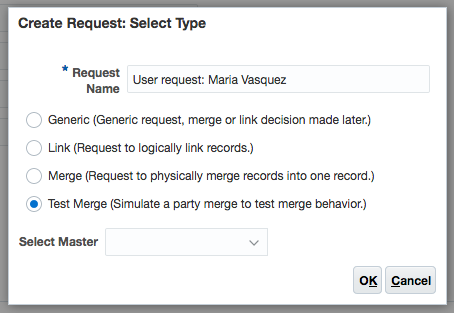
Create Request Dialog Box with Test Mode Option
Steps to Enable
You don't need to do anything to enable this feature.
Tips And Considerations
Consider the following points when using Test mode merge requests:
- Test mode merge requests don't change your customer data.
- Using the duplicate resolution override flow is a great way to examine the details of your merge processing logic, but any changes made to a test merge in the override flow are not saved and do not affect any subsequent merges for the relevant customer records.
- If you change your customer data model by adding new fields with Application Composer, you must run the Request Dispatcher process to update the duplicate resolution metadata. Test merge requests do not automatically refresh the metadata.
- The first run of a test mode merge request caches the merge rules and logic, thus may take a little longer to run than subsequent tests.
- The actions available from the duplicate resolution list page's action menu do not apply to test merges.
Role Information
Test mode merges are available to users with the Customer Data Steward, Data Steward Manager, or Master Data Management Application Administrator job roles.
Transfer Attachments from Duplicates to Master Record During a Merge
Use data quality merges to transfer sales account attachments and party attachments from duplicate records to the master record.
Steps to Enable
You don't need to do anything to enable this feature.
Role Information
You need Customer Data Steward, Data Steward Manager, or Master Data Management Application Administrator role to run data quality merges.
Configure Group, Organization, and Person Work Areas in Application Composer
New Customer Data Management deployments allow the configuration of Group, Organization, and Person work areas in Application Composer by default.
Steps to Enable
You don't need to do anything to enable this feature.
Role Information
The Master Data Management Application Administrator job role allows access to Application Composer.