
- Revision History
- Overview
- Feature Summary
-
- Customer Data Management
-
- Use Import and Export Management to Create, Update, Delete, and Export Source System References for Parent and Child Customer Data
- Reprocess Merge Requests
- Use Import and Export Management to Create, Update, Delete, and Export Generic Organization Records
- Use Import and Export Management to Import Enriched Data
- Cascade the Inactivation of Master Records to Related Merged Duplicate Contacts
-
- Customer Data Management
This document will continue to evolve as existing sections change and new information is added. All updates appear in the following table:
| Date | Product | Feature | Notes |
|---|---|---|---|
| 19 JUN 2020 | Created initial document. |
This guide outlines the information you need to know about new or improved functionality in this update, and describes any tasks you might need to perform for the update. Each section includes a brief description of the feature, the steps you need to take to enable or begin using the feature, any tips or considerations that you should keep in mind, and the resources available to help you.
GIVE US FEEDBACK
We welcome your comments and suggestions to improve the content. Please send us your feedback at oracle_fusion_applications_help_ww_grp@oracle.com.
Column Definitions:
Features Delivered Enabled
Report = New or modified, Oracle-delivered, ready to run reports.
UI or Process-Based: Small Scale = These UI or process-based features are typically comprised of minor field, validation, or program changes. Therefore, the potential impact to users is minimal.
UI or Process-Based: Larger Scale* = These UI or process-based features have more complex designs. Therefore, the potential impact to users is higher.
Features Delivered Disabled = Action is needed BEFORE these features can be used by END USERS. These features are delivered disabled and you choose if and when to enable them. For example, a) new or expanded BI subject areas need to first be incorporated into reports, b) Integration is required to utilize new web services, or c) features must be assigned to user roles before they can be accessed.
| Ready for Use by End Users Reports plus Small Scale UI or Process-Based new features will have minimal user impact after an update. Therefore, customer acceptance testing should focus on the Larger Scale UI or Process-Based* new features. |
Action is Needed BEFORE Use by End Users Not disruptive as action is required to make these features ready to use. As you selectively choose to leverage, you set your test and roll out timing. |
|||||
|---|---|---|---|---|---|---|
| Feature |
Report |
UI or |
UI or |
|
||
Use Import and Export Management to Create, Update, Delete, and Export Generic Organization Records |
||||||
Cascade the Inactivation of Master Records to Related Merged Duplicate Contacts |
||||||
Use Import and Export Management to Create, Update, Delete, and Export Source System References for Parent and Child Customer Data
Create, update, delete, and export source system reference assignments for all available parent and child customer record types. With this enhancement, you can directly manage source system references for many types of parent and child entities.
Steps to Enable
You don't need to do anything to enable this feature.
Tips And Considerations
Customer Data Management needs to be able to make updates and create and delete records based on the Source System IDs of child and parent records. This enhancement brings parity with the file-based data import framework and lets you move to the Import and Export Management functionality.
Key Resources
See the section, Import Your Hub Source System Reference Data, in the Import Your Data chapter in the Understanding Import and Export Management guide.
Role Information
Data Stewards and those authorized to do import and export have this feature available to them.
Use the reprocess merge requests functionality while reviewing merge requests to interactively refresh their information. Refreshing the information helps you to be sure that the merge information reflects the most up-to-date customer data attributes available. You can refresh individual merge requests from the Review Merge Request page, or you can select multiple merge requests on the Duplicate Resolution list page and resubmit them for processing. Reprocessing merge requests is helpful in scenarios when the customer records in a given merge's duplicate set may have significantly changed during the period between when the merge request was created and when the data steward is reviewing the request.
To reprocess a single merge request, drill into the merge request from the Duplicate Resolution landing page and then click Reprocess Merge from the Actions menu. This action immediately reprocesses the merge request.
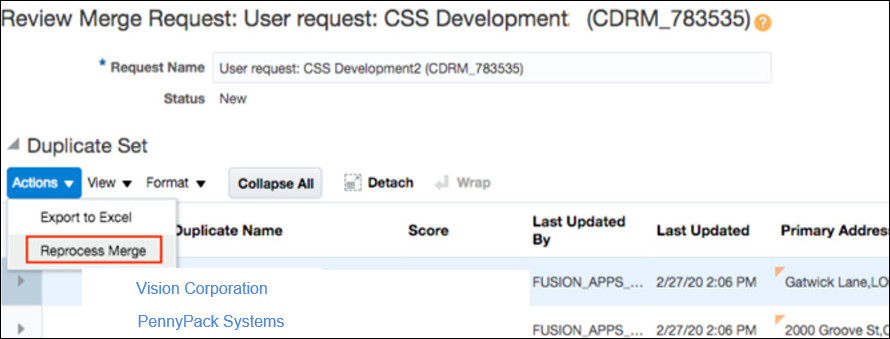
Reprocess a Single Merge Request
To reprocess multiple merge requests, select multiple rows from the Duplicate Resolution list page and click Reset from the Actions menu. This action resets the selected merge requests to a status of Pending, and they're reprocessed by the next run of the Request Dispatch scheduled process.
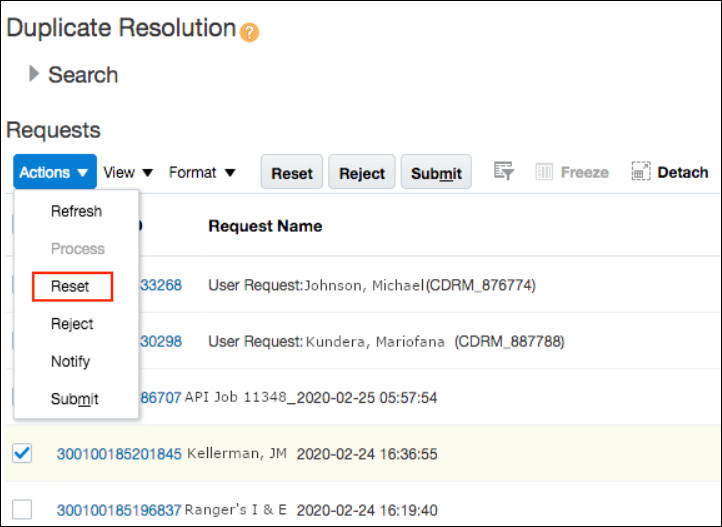
Reprocess Multiple Merge Requests
Steps to Enable
You don't need to do anything to enable this feature.
Tips And Considerations
To identify requests that have been queued for data steward review for long periods of time, you can query the Duplicate Resolution list page based on the last updated date of the resolution requests.
Key Resources
See these guides available on Oracle Help Center:
- Resolve Duplicates chapter in Using Customer Data Management for CX Sales and B2B Service
- Resolve Duplicates chapter in Using Customer Data Management (for standalone Customer Data Management Cloud)
Role Information
The Reprocess Merge Requests feature is available to users with the Customer Data Steward, Customer Data Steward Manager, or Master Data Management Application Administrator job roles.
Use Import and Export Management to Create, Update, Delete, and Export Generic Organization Records
Create, update, delete, and export comprehensive organization profiles, which are used as the common basis for many types of organization entities, such as Partners, Competitors, or Financial Accounts. With this enhancement, you can use a single import or export format to manage the generic organization profile information shared by multiple organization object types.
Steps to Enable
You don't need to do anything to enable this feature.
Tips And Considerations
Customer Data Management needs to be able to import and export all types of party objects, not just the Account object. This enhancement expands the scope of the standard import and brings parity to the file-based import functionality. Customer Hub integration processing can handle all types of party entities with this enhancement.
Key Resources
See the section, Import Your Organization Data, in the Import Your Data chapter in the Understanding Import and Export Management guide.
Role Information
Data Stewards and those authorized to do import and export have this feature available to them.
Use Import and Export Management to Import Enriched Data
Use the Import and Export Management framework to import account and contact data files enriched using Oracle Data as a Service. Data enrichment has been enhanced to support the new Import and Export Management framework. The new framework improves processing time, error handling, and performance capabilities for importing data files enriched using Oracle Data as a Service.
Steps to Enable
You don't need to do anything to enable this feature.
Key Resources
See the following guides on Oracle Help Center:
- Data Enrichment chapter in Using Customer Data Management for CX Sales and B2B Service
- Data Enrichment chapter in Using Customer Data Management (for standalone Customer Data Management Cloud)
- Use DaaS chapter in Using Data as a Service
Role Information
- Master Data Management Application Administrator
- Sales Administrator
Cascade the Inactivation of Master Records to Related Merged Duplicate Contacts
Enhance the Contact Purge capability by linking the inactivation of merged duplicates with the inactivation of their corresponding master records. You can now use the Contact Purge capability to purge inactive master party records and all related merged duplicate contacts.
Steps to Enable
You don't need to do anything to enable this feature.
Tips And Considerations
Customers may notice a change in the result set information on the Resolution Request List Page after a hard delete has occurred. The Master Record and its associated Party Type no longer display a value, since the Master Record was physically deleted from the system. Additionally, the Resolution Request Review Page will not list an entry that has been hard deleted, as the record no longer exists. This is a minor change in the display value and is expected.
Key Resources
See the following guides available on Oracle Help Center:
- Resolve Duplicates chapter in Using Customer Data Management for CX Sales and B2B Service
- Resolve Duplicates chapter in Using Customer Data Management (for standalone Customer Data Management Cloud)
Role Information
The feature impacts the Customer Data Management administrator who's typically given the role of Data Steward.