
- Revision History
- Overview
- Feature Summary
- Industries Framework Common
- Buying Experience
-
- Buying Experience
-
- Generate and Retrieve Contract Document for Subscribers
- Enhanced Product Order Cancellation with Order Management
- Configure Business Function Setup
- New User Registration
- New Outbound Events for User Registration
- Digital Experience for Communications Storefront and Self-Care - Internationalization Support
- Digital Experience for Communications Storefront - Plan Details
-
- Buying Experience
This document will continue to evolve as existing sections change and new information is added. All updates appear in the following table:
| Date | Product | Feature | Notes |
|---|---|---|---|
| 06 SEP 2022 | Digital Experience for Communications Storefront and Self-Care - Internationalization Support | Updated document. Revised feature information. | |
| 06 SEP 2022 | Digital Experience for Communications Storefront - Plan Details | Updated document. Revised feature information. | |
| 17 JUN 2022 | Created initial document. |
Digital Experience for Communications Buying Experience provides an API first approach to support digital omni-channel subscription buying and ordering solution for communication and media service providers. The solution simplifies the overall buying process by delivering pre-built and pre-integrated capabilities that covers every aspect of the customers buying journey from unified product catalogs to alignment of commerce experience to subscription management. The comprehensive industry specific processes support both assisted and unassisted buying. Key capabilities include:
- Modern and personalized user experience: Supports contextual customer acquisition journey, personalized catalogs for different markets, and data-driven user experience.
- Digital omni-channel buying experience: Enables consistency across channel journeys, allows subscriber channel hopping, and introduces both traditional and new digital channels.
- Customer 360 and subscription management: Provides context-aware customer 360 dashboards and guided subscription buying experiences.
- Adaptive customer data mastering: Maintains data consistency across applications in a deployment and enables agility.
- TMF Open Digital Architecture: Drives channel engagements and system integrations efficiently and effectively.
This guide outlines the information you need to know about new or improved functionality in this update, and describes any tasks you might need to perform for the update. Each section includes a brief description of the feature, the steps you need to take to enable or begin using the feature, any tips or considerations that you should keep in mind, and the resources available to help you.
 HAVE AN IDEA?
We’re here and we’re listening. If you have a suggestion on how to make our cloud services even better then go ahead and tell us. There are several ways to submit your ideas, for example, through the Ideas Lab on Oracle Customer Connect. Wherever you see this icon after the feature name it means we delivered one of your ideas.
GIVE US FEEDBACK
We welcome your comments and suggestions to improve the content. Please send us your feedback at oracle_fusion_applications_help_ww_grp@oracle.com.
DISCLAIMER
The information contained in this document may include statements about Oracle’s product development plans. Many factors can materially affect Oracle’s product development plans and the nature and timing of future product releases. Accordingly, this Information is provided to you solely for information only, is not a commitment to deliver any material, code, or functionality, and should not be relied upon in making purchasing decisions. The development, release, and timing of any features or functionality described remains at the sole discretion of Oracle.
This information may not be incorporated into any contractual agreement with Oracle or its subsidiaries or affiliates. Oracle specifically disclaims any liability with respect to this information. Refer to the Legal Notices and Terms of Use for further information.
Column Definitions:
Report = New or modified, Oracle-delivered, ready to run reports.
UI or Process-Based: Small Scale = These UI or process-based features are typically comprised of minor field, validation, or program changes. Therefore, the potential impact to users is minimal.
UI or Process-Based: Larger Scale* = These UI or process-based features have more complex designs. Therefore, the potential impact to users is higher.
Features Delivered Disabled = Action is needed BEFORE these features can be used by END USERS. These features are delivered disabled and you choose if and when to enable them. For example, a) new or expanded BI subject areas need to first be incorporated into reports, b) Integration is required to utilize new web services, or c) features must be assigned to user roles before they can be accessed.
| Ready for Use by End Users Reports plus Small Scale UI or Process-Based new features will have minimal user impact after an update. Therefore, customer acceptance testing should focus on the Larger Scale UI or Process-Based* new features. |
Customer Must Take Action before Use by End Users Not disruptive as action is required to make these features ready to use. As you selectively choose to leverage, you set your test and roll out timing. |
|||||
|---|---|---|---|---|---|---|
| Feature |
Report |
UI or |
UI or |
|
||
Digital Experience for Communications Storefront and Self-Care - Internationalization Support |
||||||
Digital Experience for Communications Storefront - Plan Details |
||||||
CX Industries Framework serves as a platform for seamless integration of applications. You can use this platform to integrate your application with other Oracle applications and third-party applications, which includes cloud services and on-premise systems. In addition, you can leverage data from various sources, use TM Forum Open APIs and REST APIs to configure and extend tailored experiences.
CX Industries Framework supports both synchronous and asynchronous interactions between the integrated applications. It hosts all the TM Forum Open APIs on Oracle Cloud Infrastructure API Gateway to secure and optimize the API interactions. It also ensures high availability and resiliency by using the Oracle Cloud Infrastructure Load Balancing service.
CX Industry Framework allows tenants and system integrators to provide routing rules based on the context provided or determined at runtime. In situations when the context is not passed with the request, and there is more than one option for CX Industry Framework to route the request, in those situations, the CX Industry Framework determines the context and applies the routing rules accordingly.
In some situations, simple static routing rules are not sufficient to meet business needs. Tenants and SIs need the ability to define the context that can help CX Industry Framework to determine where the request should be routed, based on information provided in the payload/header.
In other situations, when the context is not passed with the request, and there is more than one option for CX Industry Framework to route the request to, in those situations, CX Industry Framework determines the context and applies routing rules accordingly.
Contextual Routing is a key capability our customers need in our CX Industry Solutions to support routing in their global heterogeneous ecosystem.
Steps to Enable
You don't need to do anything to enable this feature.
Role And Privileges
- DX4C_System_Administrator
- DX4C_System_Configuration_Viewer
- DX4C_TMF_Specialist
Generate and Retrieve Contract Document for Subscribers
You can create contract templates with specific placeholder tags in docx format and get these stored in Oracle Content and Experience (OCE) Cloud. There are new APIs (Non-TMF) to upload, update and download these templates.
You can create and update the placeholder variables with specific TMF specification attributes.
You can generate a contract document in PDF format once the order is completed and allow this to be downloaded by subscribers or agents using new APIs introduced in this release.
The contract documents are available as Related documents under the Agreement management resource.
The business benefit of this feature is that there is support for a formal contract document with terms and conditions for contracted products and services.
Steps to Enable
You don't need to do anything to enable this feature.
Role And Privileges
- Contract Administrator role is required to be provisioned to use this feature.
Enhanced Product Order Cancellation with Order Management
You can allow for customer orders to be cancelled subject to this being allowed by the downstream order management system and accurately track status of the base product order cancellation based on response from Order Management system.
The TMF622 resource, cancelProductOrder,and a new Orchestration listener API are introduced to support this flow. The cancelProductOrder entity gets created once a cancellation request is placed on the product order. The productOrder life-cycle states get updated in accordance with the cancelProductOrder life-cycle states as the cancellation request is processed by the downstream order management system.
The business benefit of this feature is that it ensures that the product order states reflect the cancellation processing more accurately in tune with the downstream order management system.
Steps to Enable
You don't need to do anything to enable this feature.
Configure Business Function Setup
You can use the new Configuration API (Non-TMF) to set up information that would drive your business.
You can use the configuration API to define, update and retrieve placeholder mappings and templates for Contract management. You can also specify the folder IDs to store contract templates and contract documents in Oracle Content and Experience (OCE) cloud.
You can also configure setup related to outbound events, shopping cart abandonment, and purge using the configuration API.
You can retrieve the list of existing configurations using this API.
With this feature, you will now be able to centrally manage all the business setup related information.
Steps to Enable
You don't need to do anything to enable this feature.
Role And Privileges
- Back Office Specialist role is required to be provisioned to use this feature.
You will now be able to onboard new users during the shopping cart checkout process using our new user-registrations APIs (Non-TMF).
This initiates an email for user registration through an encrypted code for security.
This feature allows user creation in a seamless manner as part of guest checkout process.
Steps to Enable
You don't need to do anything to enable this feature.
New Outbound Events for User Registration
The following events are introduced in this release:
- UserRegistrationEmailEvent is triggered when the shopping cart is checked out by an anonymous user.
- UserRegistrationCreateEvent is triggered when a self-service user is created when the anonymous user completes the user registration process.
You can use these events to notify the listeners about new user registration.
Steps to Enable
You don't need to do anything to enable this feature.
Digital Experience for Communications Storefront and Self-Care - Internationalization Support
DX4C Digital Storefront now supports the internationalization of the Storefront. It enables the Customers to render the storefront in their user's language.
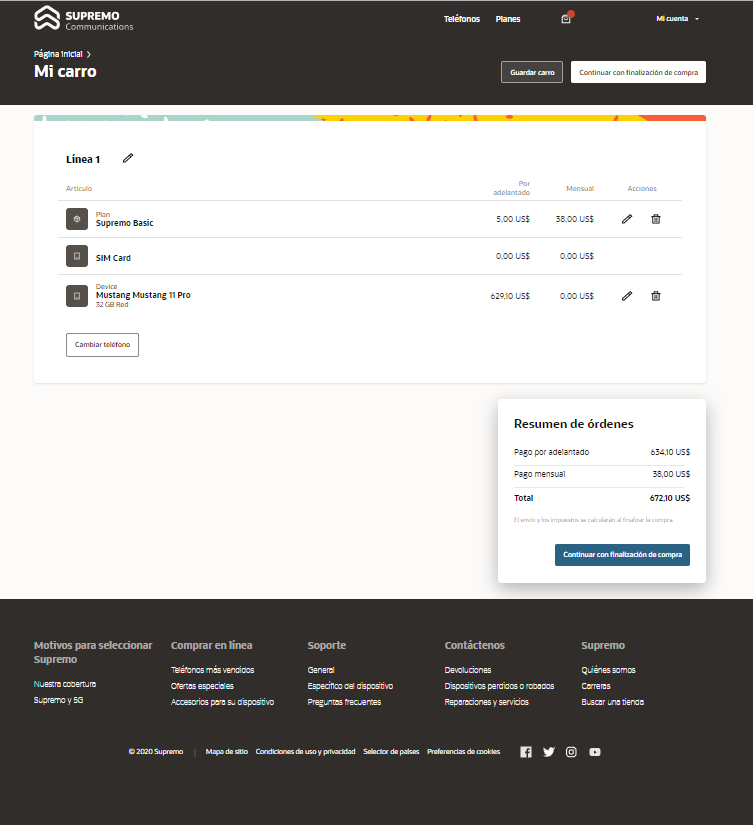
Cart - Spanish
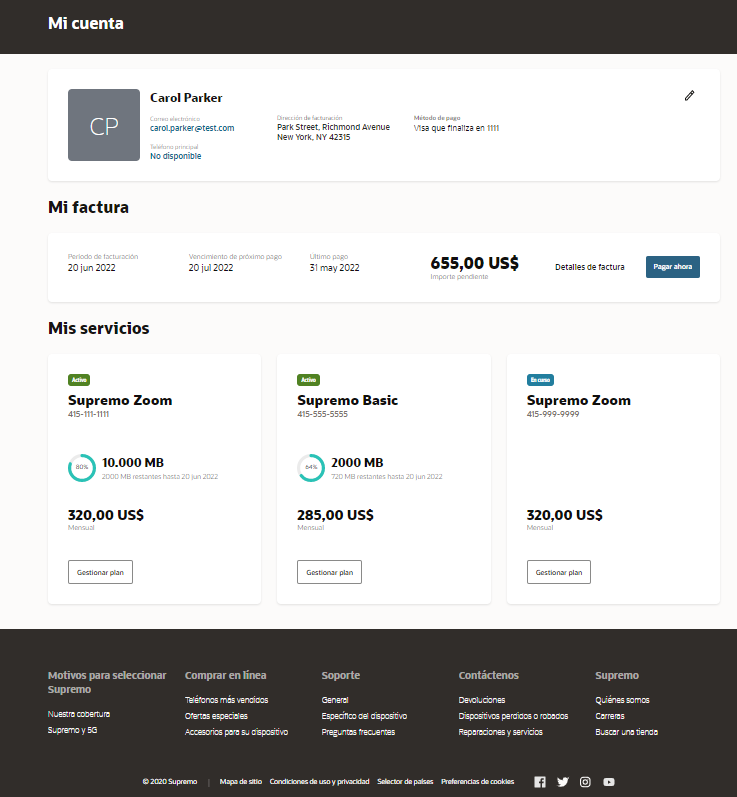
My Account - Spanish
Support for internationalization or location is one of the key features asked by Customers, so that they can render the storefront in language best understood by their customers.
Steps to Enable
You don't need to do anything to enable this feature.
Digital Experience for Communications Storefront - Plan Details
Digital Storefront now supports Plan details that includes various details of the plan including:
- Plan name
- Plan description
- Plan price
- Plan badges
- Plan marketing features
- title
- description
- Add-ons included in the plan, and so on.
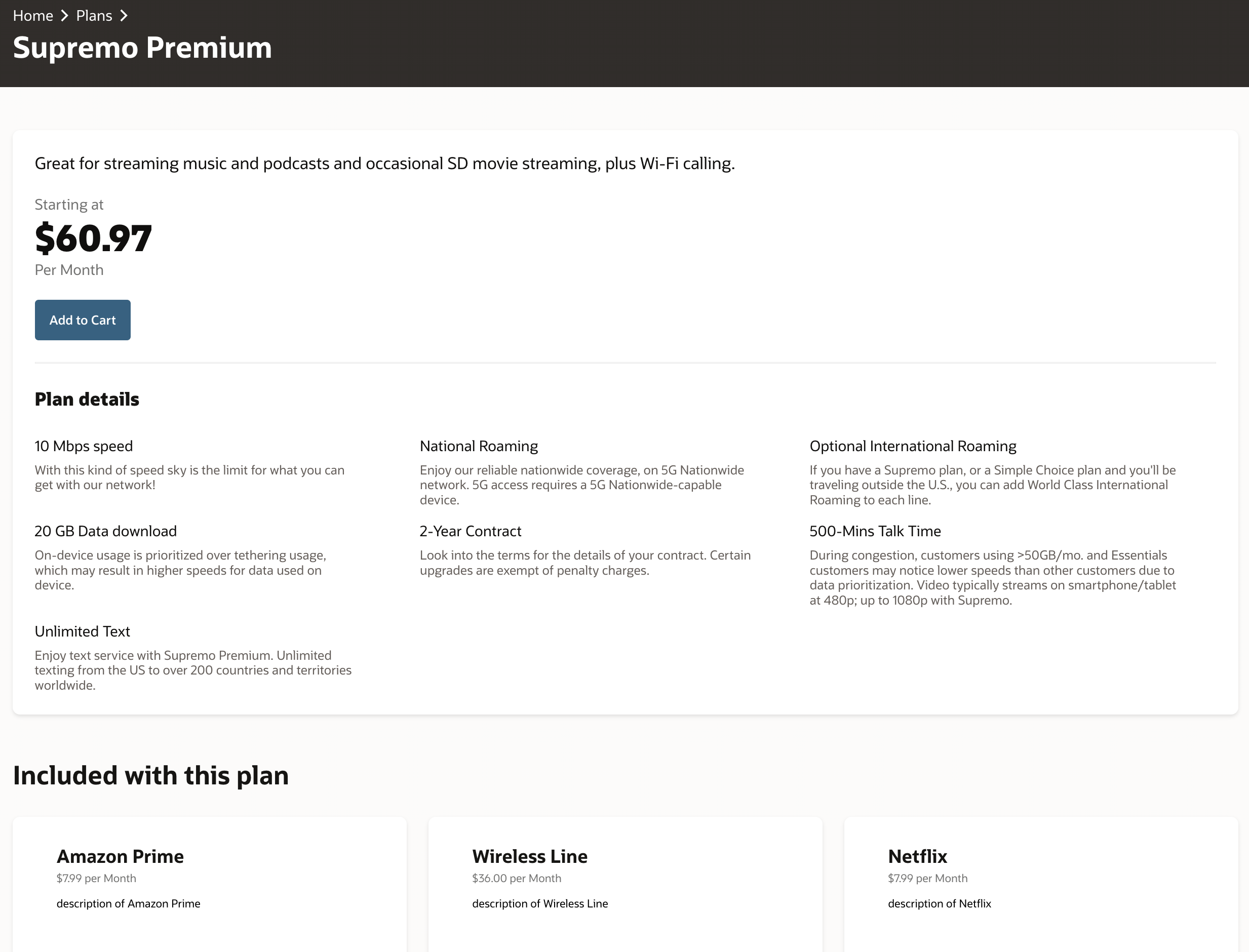
Plan Details
It enables customers to render more information about a plan to users, so that users can take decision in a much better way.
Steps to Enable
You don't need to do anything to enable this feature.