
- Revision History
- Overview
- Feature Summary
- Industries Framework Common
- Buying Experience
-
- Buying Experience
-
- Manage Omnichannel SKU Inventory
- Document Attachment for Party
- Party Account Enhancements
- Family Plan - Ownership change
- Manual Price Overrides at Package and Bundle level
- Pre-order enhancements
- After Market Extensibility Enhancements
- Bulk migration of Assets
- Shopping Cart - Business Logic Extensibility
- Storefront Dynamic Offer Configuration Experience
- Add and Configure Accessories
- Location based eligibility check
-
- Buying Experience
This document will continue to evolve as existing sections change and new information is added. All updates appear in the following table:
| Date | Module | Feature | Notes |
|---|---|---|---|
| 26 JUN 2023 | Industries Framework | Stock Response | Updated document. Delivered feature in update 23C. |
| 02 JUN 2023 | Created initial document. |
Digital Experience for Communications Buying Experience provides an API first approach to support digital omni-channel subscription buying and ordering solution for communication and media service providers. The solution simplifies the overall buying process by delivering pre-built and pre-integrated capabilities that covers every aspect of the customers buying journey from unified product catalogs to alignment of commerce experience to subscription management. The comprehensive industry specific processes support both assisted and unassisted buying. Key capabilities include:
- Modern and personalized user experience: Supports contextual customer acquisition journey, personalized catalogs for different markets, and data-driven user experience.
- Digital omni-channel buying experience: Enables consistency across channel journeys, allows subscriber channel hopping, and introduces both traditional and new digital channels.
- Customer 360 and subscription management: Provides context-aware customer 360 dashboards and guided subscription buying experiences.
- Adaptive customer data mastering: Maintains data consistency across applications in a deployment and enables agility.
- TMF Open Digital Architecture: Drives channel engagements and system integrations efficiently and effectively.
This guide outlines the information you need to know about new or improved functionality in this update, and describes any tasks you might need to perform for the update. Each section includes a brief description of the feature, the steps you need to take to enable or begin using the feature, any tips or considerations that you should keep in mind, and the resources available to help you.
 HAVE AN IDEA?
We’re here and we’re listening. If you have a suggestion on how to make our cloud services even better then go ahead and tell us. There are several ways to submit your ideas, for example, through the Ideas Lab on Oracle Customer Connect. Wherever you see this icon after the feature name it means we delivered one of your ideas.
GIVE US FEEDBACK
We welcome your comments and suggestions to improve the content. Please send us your feedback at oracle_fusion_applications_help_ww_grp@oracle.com.
DISCLAIMER
The information contained in this document may include statements about Oracle’s product development plans. Many factors can materially affect Oracle’s product development plans and the nature and timing of future product releases. Accordingly, this Information is provided to you solely for information only, is not a commitment to deliver any material, code, or functionality, and should not be relied upon in making purchasing decisions. The development, release, and timing of any features or functionality described remains at the sole discretion of Oracle.
This information may not be incorporated into any contractual agreement with Oracle or its subsidiaries or affiliates. Oracle specifically disclaims any liability with respect to this information. Refer to the Legal Notices and Terms of Use for further information.
Column Definitions:
Report = New or modified, Oracle-delivered, ready to run reports.
UI or Process-Based: Small Scale = These UI or process-based features are typically comprised of minor field, validation, or program changes. Therefore, the potential impact to users is minimal.
UI or Process-Based: Larger Scale* = These UI or process-based features have more complex designs. Therefore, the potential impact to users is higher.
Features Delivered Disabled = Action is needed BEFORE these features can be used by END USERS. These features are delivered disabled and you choose if and when to enable them. For example, a) new or expanded BI subject areas need to first be incorporated into reports, b) Integration is required to utilize new web services, or c) features must be assigned to user roles before they can be accessed.
| Ready for Use by End Users Reports plus Small Scale UI or Process-Based new features will have minimal user impact after an update. Therefore, customer acceptance testing should focus on the Larger Scale UI or Process-Based* new features. |
Customer Must Take Action before Use by End Users Not disruptive as action is required to make these features ready to use. As you selectively choose to leverage, you set your test and roll out timing. |
|||||
|---|---|---|---|---|---|---|
| Feature |
Report |
UI or |
UI or |
|
||
CX Industries Framework serves as a platform for seamless integration of applications. You can use this platform to integrate your application with other Oracle applications and third-party applications, which includes cloud services and on-premise systems. In addition, you can leverage data from various sources, use TM Forum Open APIs and REST APIs to configure and extend tailored experiences.
CX Industries Framework supports both synchronous and asynchronous interactions between the integrated applications. It hosts all the TM Forum Open APIs on Oracle Cloud Infrastructure API Gateway to secure and optimize the API interactions. It also ensures high availability and resiliency by using the Oracle Cloud Infrastructure Load Balancing service.
Tenants now have the ability to configure Stock Response for any API call that comes to CXIF.
Stock Response can be configured at various level:
- API
- Resource
- Operation
Such capability provides many business benefits to improve reliability of ecosystem. For example:
- Tenant can provide stock response back to client application for DELETE operation to prevent any accidental data loss.
- Tenant can provide stock response back to client application for any WRITE operations while Spoke System is in maintenance mode.
Steps to Enable
You don't need to do anything to enable this feature.
Tips And Considerations
The following code sample shows the syntax for providing a Stock Response for the DELETE operation of an API:
API Call - https://<API-GW-URL>/admin/stockResponses (POST Operation)
{
"stock-api-selection": [
{
"api-id": "tmf-632",
"api-version": "v4",
"resources": [
{
"resource-ids": [
"organization"
],
"supported-http-methods": [
"DELETE"
],
"method-stock-responses": [
{
"http-method": "DELETE",
"stock-response": {
"response-code": 204,
"response": "{\"data\":\"from 632 Organization Delete\"}"
}
}
]
}
]
}
]
}
Access Requirements
- DX4C_System_Administrator
- DX4C_System_Configuration_Viewer
- DX4C_TMF_Specialist
Manage Omnichannel SKU Inventory
You can create or update different Stock Keeping Unit (SKU) channels (DIGITAL or STORE) and the SKU Inventory data for those channels. You can view Channel details including the available SKU inventory. You can query for STORE Channels for a given combination of SKU and location.
You can also define global configuration for Inventory threshold. Events are generated based on the configuration and notifications of the events are raised via CX Industries Framework.
SKU definition and updates for Device and Accessories are synced into Buy service from Launch experience.
The business benefit of this feature is that it provides a streamlined management of omnichannel inventory for devices and accessories.
Steps to Enable
You don't need to do anything to enable this feature.
Access Requirements
Inventory Management Specialist role is required to be provisioned to use this feature.
You can now attach documents against Party (Individual) to support use cases such as individual identification documents.
To support this feature, the Party API (TMF632) AttachmentRefOrValue sub-resource has been leveraged.
The file type that is supported in this release is PDF. These documents are stored in Oracle Content Management after virus-scan.
Once the document is created, it can be updated and retrieved. Both Subscriber and Support Specialist roles can access this feature. Support Specialist are able to perform these operations for multiple subscribers. A subscriber can do these operations only for his or her own document.
The business benefit of this feature is that the CSPs can use the identification documents to validate individuals before engaging with them for transactions.
Steps to Enable
You don't need to do anything to enable this feature.
You can validate if the party account is mapped to a valid account type that is part of the business configuration.
In addition, you can support the lifecycle state of 'Suspended' for party account as part of Account Management (TMF666) API with associated validations that are in place for lifecycle state changes.
The business benefit of this feature is that party accounts are appropriately tagged to different valid account types that could be used for various business policy decisions such as eligibility rules, contract template management etc. In addition, the new lifecycle state for Account provides additional flexibility to the CSPs to handle party accounts depending upon the business needs.
Steps to Enable
You don't need to do anything to enable this feature.
Family Plan - Ownership change
You can now allow your customers to transfer the complete ownership or change Billing and/or Service Accounts that are part of Family Plan Account Hierarchy.
The complete ownership (i.e. Legal entity) can be changed for a given service or device. Additionally, the service ownership can be transferred from one account in the hierarchy to another. Similarly, the Billing ownership can be changed to reflect the rightful bill payee.
The business benefit of this feature is that it gives flexibility to manage the ownership of the services/devices in the family plan.
Steps to Enable
You don't need to do anything to enable this feature.
Manual Price Overrides at Package and Bundle level
The Price of a package can now be overridden in Shopping Cart (TMF663) and Product Order (TMF622) using this feature.
Enable this feature in Launch Experience. Only those offers that are enabled for Manual Price Override can have the price overridden in Shopping cart or Product Order.
Overrides can be applied in 3 ways:
- Manual Override Price - This will be the final price of the offer
- Manual Discount Amount - This discount amount will be applied on the Item price
- Manual Discount % - This discount % will be applied on the Item price
The business benefit of this feature is that the Support Specialist will now have the ability to provide additional discounts or price overrides as per business discretion, thereby improving customer satisfaction.
Steps to Enable
You don't need to do anything to enable this feature.
Access Requirements
Only Support specialist role will have the ability to override prices.
You can update the Market Release Date (MRD) on pre-orders even after pre-orders are submitted to Fulfillment, depending upon the business needs. Operations Specialists are entitled to update the MRD in bulk, Support Specialists are entitled to update the MRD on individual orders.
In addition, you can also allow for pre-orders to be created directly using the Product Order (TMF622) API.
The business benefit of this feature is that there is additional flexibility in pre-order processing to handle special business scenarios.
Steps to Enable
You don't need to do anything to enable this feature.
Access Requirements
Bulk update to Market Release Date (MRD) on multiple pre-orders is provisioned for Operations Specialist role. Individual pre-order update for MRD can be done by Support Specialist role.
After Market Extensibility Enhancements
You can now add extensions to the following entities as listed below:
- Shopping Cart: TMF663 + Oracle Extensions
- Product Order: TMF622 + Oracle Extensions
These extensions can be across the various levels of the entity hierarchy.
The business benefit of this feature is that you can extend various entities in line with your business requirements on top of the corresponding TMF specifications and Oracle extensions.
Steps to Enable
You don't need to do anything to enable this feature.
Access Requirements
Support Specialist role is required to be provisioned to use this feature.
You can now migrate asset data from a legacy application into Dx4C Buying Experience in bulk.
New APIs (Non-TMF) are available to manage the migration job. You can create a migration job to migrate the asset-related data into a staging table with key validations in place. Subsequently, the staging table data can then be processed to complete the migration into Buy service.
Event notifications are generated when the job status changes. You will be able to track the status at different levels such as job and files being processed as part of the job. In case of errors, there is information on the records that are part of those files so that corrective actions can be taken to ensure migration is complete.
The business benefit of this feature is that you can migrate the asset data into your Buying Experience from legacy applications to support enhanced customer buying experience for the digital channels.
Steps to Enable
You don't need to do anything to enable this feature.
Access Requirements
Bulk Job Administrator role is required to be provisioned to use this feature.
Shopping Cart - Business Logic Extensibility
You can now define business logic external to Dx4C and trigger the business logic through Shopping Cart (TMF663 + Oracle Extensions). The business logic can be simple, or a more complex validation, algorithm, or calculation.
Each Business Logic Extension Hook (BLEH) can be triggered based on combination of an entity action (Create, Modify, Delete etc.) and appropriate conditions.
Examples for BLEH are:
-
Based on the Cart price, calling a promotion calculation system and getting available promotional discounts for the cart. Based on the discount, the cart price is updated.
-
Shipping address is added to the header or items. As the address is added, tax gets calculated from an external system based on the address.
The business benefit of this feature is that you can access and honor business logic that is already available in existing eco system (E.g., Pricing, Shipping Cost Calculation) and access other 3rd-party or Oracle applications to perform certain validations or calculations.
Steps to Enable
You don't need to do anything to enable this feature.
Storefront Dynamic Offer Configuration Experience
Storefront now supports dynamic product configuration based on the catalog definition of optional components that are defined in the package. This would enable our tenants to create bundled offering with optional components for any type of service and support the product configuration experience on dx4c digital storefront. Anonymous shoppers, prospects and customers can now add and configure packages for any service (for e.g., Mobile, Internet, TV, Streaming Services, Communication Services, etc.). The storefront experience will guide the user through configuration process of selecting a package, configuring optional services, devices and accessories and making a purchase. The feature supports configuration of service add-ons, device add-ons and accessories add-ons.
Communication service providers often to create new packages to include optional add-ons to increase the ARPU and the average deal size (order value). This feature enables a zero touch commerce buying experience for new bundles thereby reducing the time to market. Marketing managers can use Launch Experience to define the commerce product configuration experience for any type of service by creating packages with mandatory and optional add-ons. Storefront will deliver a dynamic product configuration experience for users by interpreting the product catalog definition.
Steps to Enable
You don't need to do anything to enable this feature.
Tips And Considerations
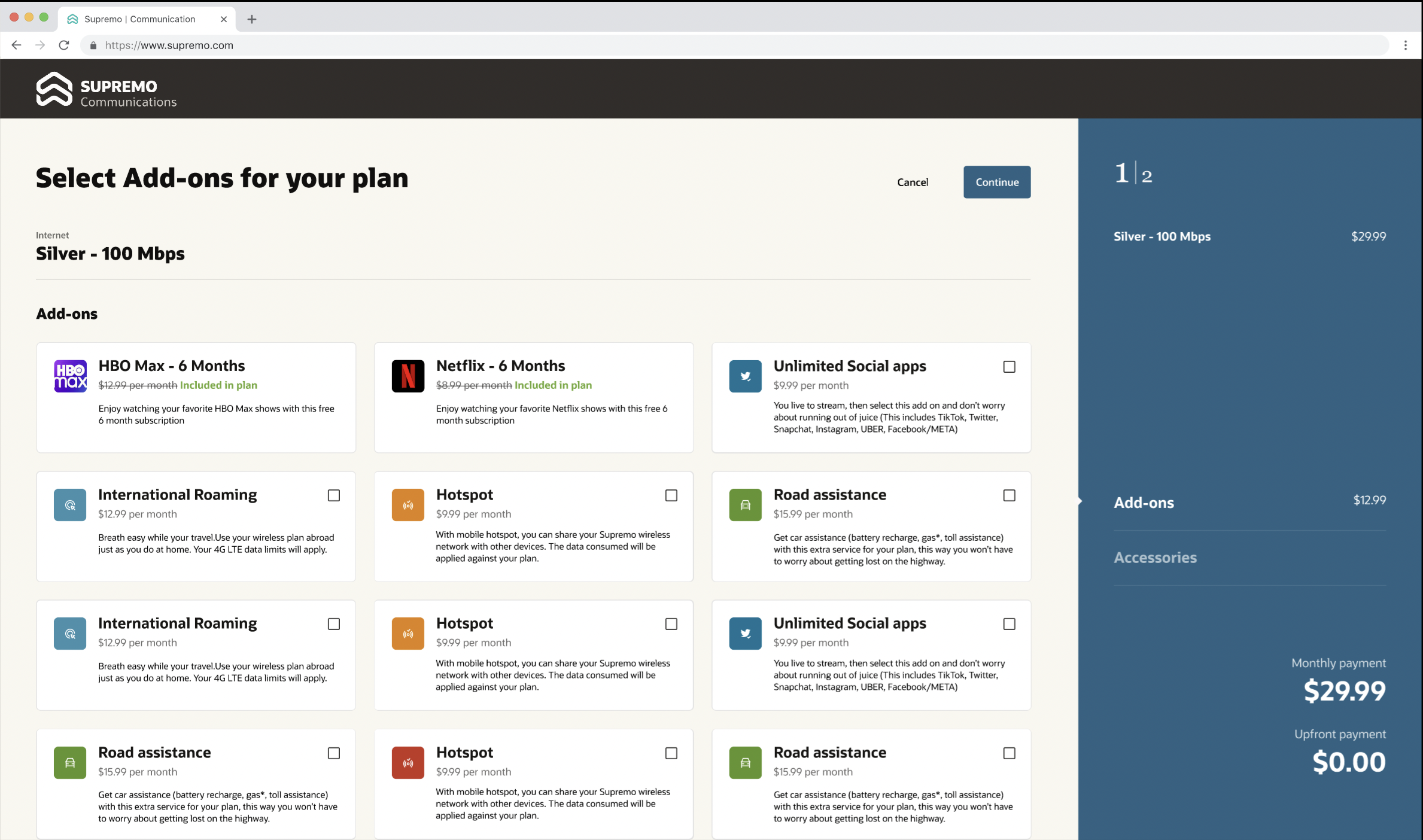
Dynamic Configuration - Show Add-ons & Acessories
Storefront Experience now supports the purchase and the configuration of accessories. In Launch Experience, tenants can use the product specification SKU definition to define the user-configurable attributes for an accessory, such as color, capacity, or size. During the purchasing experience of an accessory, storefront will read the SKU metadata and expose the user configuration options for the accessory. The storefront purchasing experience for accessories is based on the catalog definition, so tenants can define what accessories should be sold along with a package for any service. Users will be recommended accessories based on their product selection, and they will be guided through the process of adding an accessory to the shopping cart, configuring it by selecting from available configurations options, and complete their purchase.
Most communication service providers cross-sell accessories with packages to increase the average deal size (order value). Storefront now enables our tenants to define accessory cross-sell rules for simple offers and packages. Based on the business needs, product marketing managers can define selling rules to cross-sell accessories and the storefront configuration experience will expose these as recommendations to users during their purchasing journey.
Steps to Enable
A new business configuration has been introduced within salesCatalog tenant configuration to drive the configuration experience for accessories
- Parameter 'accessoryConfig' that enables tenant to define the user experience for configuring an accessory. The parameter supports display of SKU attributes as either 'Color Palette' or 'Selection Button'. Tenant then specifies the value for each user configurable SKU attribute. For example, the 'Supremo Magento Watch' comes in different colors, sizes, and capacity. If Color needs to be displayed as a color palette and Size and Capacity needs to be displayed as selection button in the user experience, then the parameter values would be as shown below
- Name 'Color' , Value 'Color Palette'
- Name 'Size' , Value 'Selection Button'
- Name 'Capacity' , Value 'Selection Button'
Tips And Considerations
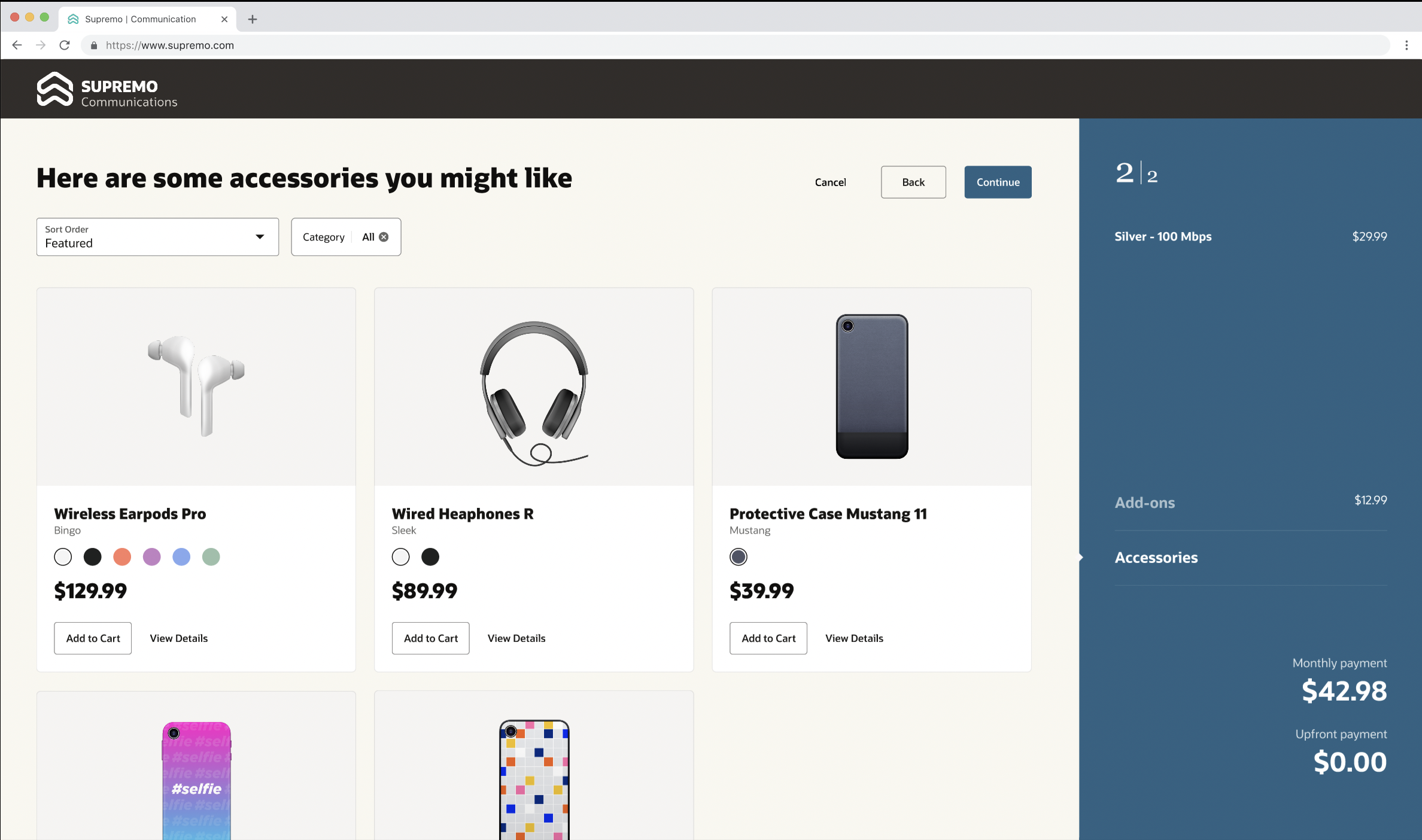
Accessory Recommendation
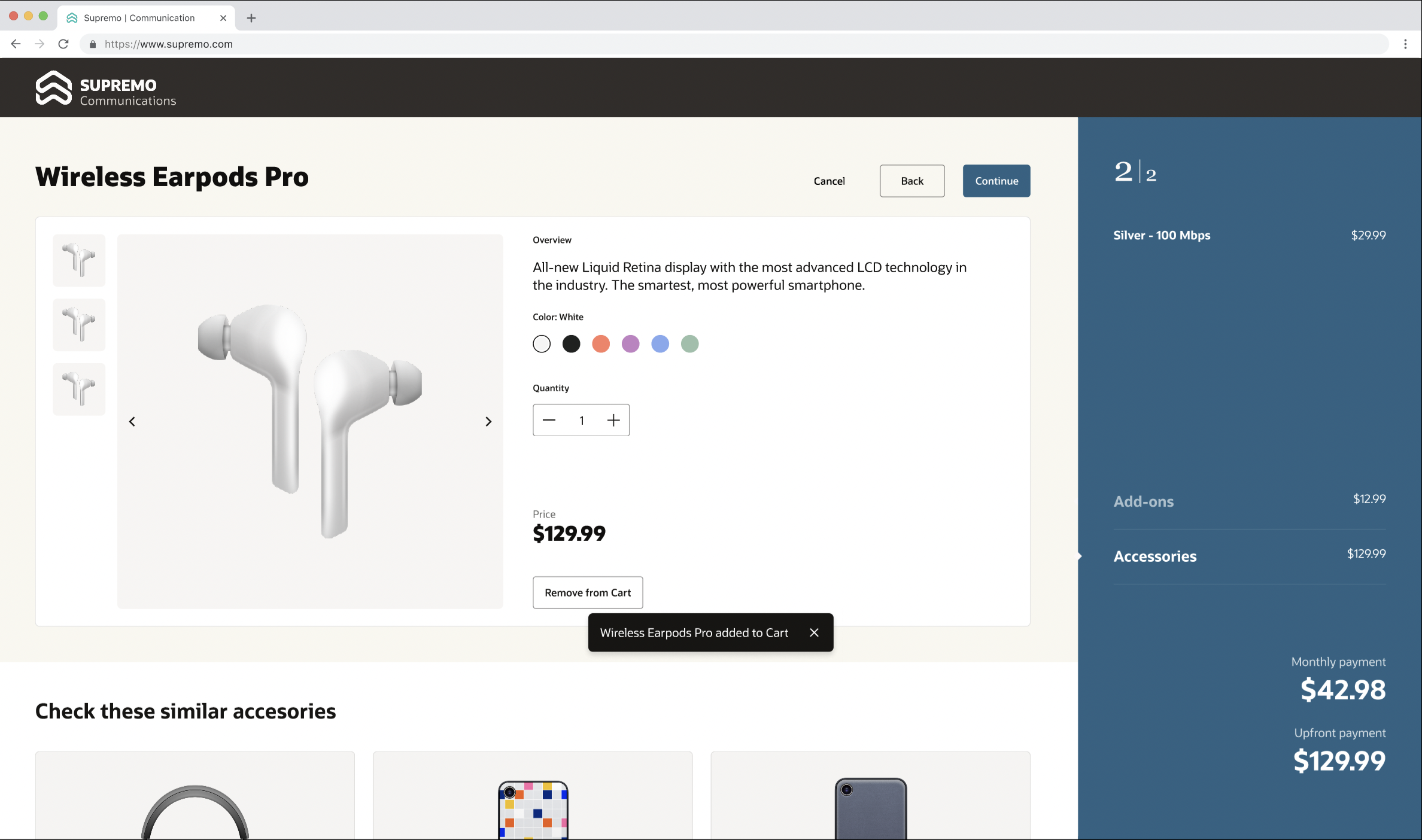
Configure and Add-to-cart
Location based eligibility check
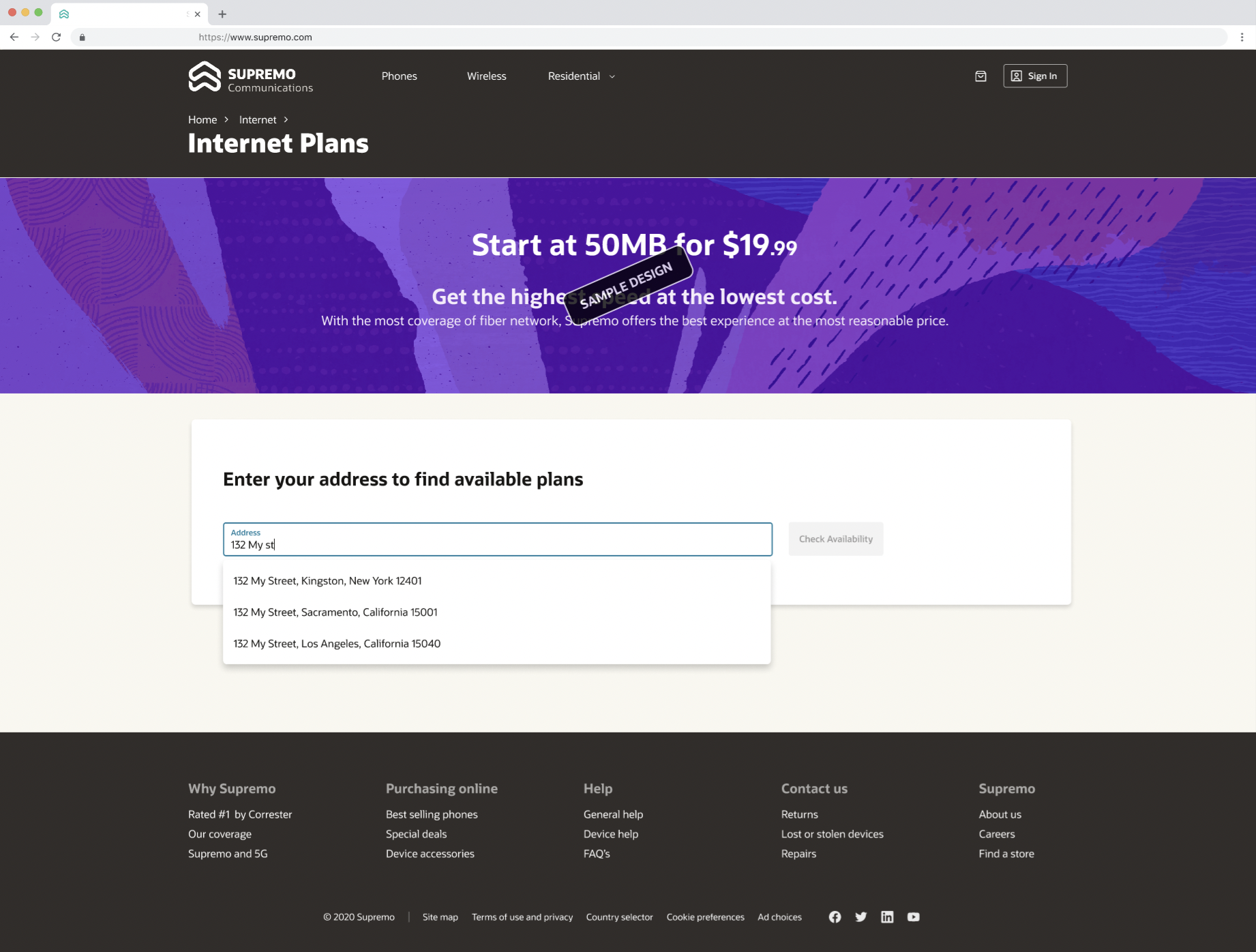
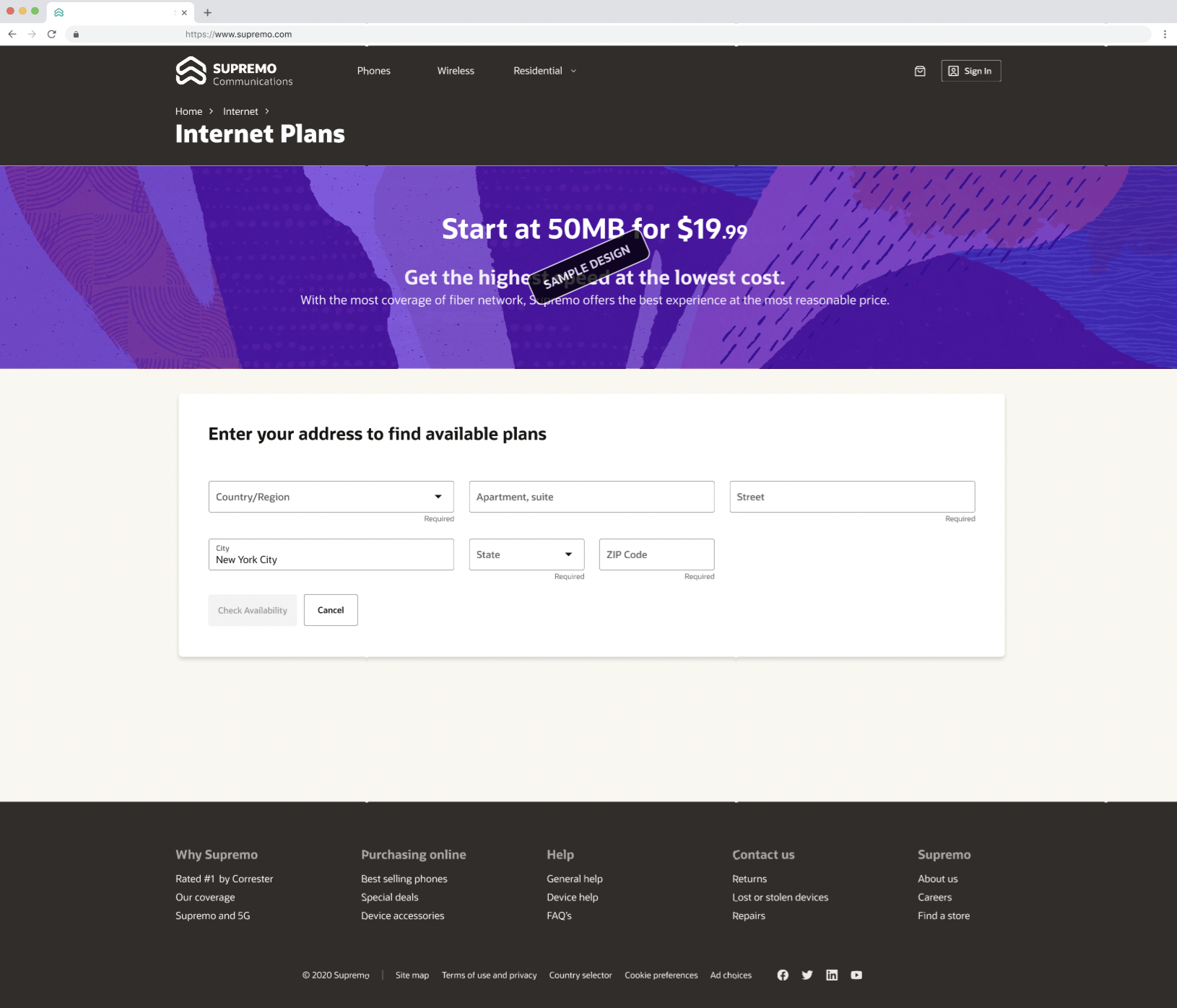
Storefront Experience now supports the filtering of products based on a shopper's geographic location. Tenants will have the ability to configure whether a service requires a location-based eligibility check and define location eligibility profiles for products within the service. For example, Supremo offers Fiber internet to residential customers. Fiber internet is only available in select locations. Not all Fiber plans are available at all location. The location eligibility profile defined for the package dictates from where certain packages can be purchased (Supremo Internet GIG is only available in US, Texas, Zip 75013 and Supremo Internet 800MB is available in US, Texas). For services that are enabled for location eligibility, Storefront initiates a workflow for capturing the address of the user. The user-entered address will be compared against the location eligibility profile of the package to filter out ineligible packages and only show packages available at the specified address.
Storefront provides integration to Oracle DaaS Address Validation (AV) service to perform real-time address verification when a user enters their address. The AV service recommends matching the user's address based on the input, reducing user error while entering addresses. The user can pick an address from the available list. If an address match is not found, users can enter the address manually.
Communication Service Providers (CSPs) sell connectivity services that may only be available in select locations. For example, Fiber internet may only be available in certain zip codes. For such services, a location-based eligibility check needs to be done to make sure only available plans are shown to a user. DX4C Storefront will provide an experience that prompts a prospect or user to enter their address for services that require location-based eligibility checks. Users are only able to purchase available plans thereby eliminating the chances of order fallout and customer dissatisfaction as a result of it.
Steps to Enable
A new tenant business configuration 'daas' has been introduced under 'salesCatalog' for the location-based eligibility feature. This configuration has three parameters as described below:
- Parameter 'enableDaaS' is introduced for real-time address verification. If the configuration is turned on (set to true) then Storefront performs real-time address verification with Oracle DaaS Address Verification. Tenants can turn this off by setting the value of the configuration parameter to 'false'.
-
Parameter 'locationBasedServices' is introduced that enables tenant to list the services for which location-based eligibility check needs to be performed.
-
Parameter 'defaultCountry' is introduced that enables tenant to define the country for address display on storefront. By default the value is set to 'United States'.
Here is how you can update the tenant business configuration
- Modify your tenantConfig.json file to include the new 'daas' configuration and set the parameter values to what is desired for your business needs
- Make a PUT request to https://<Fabric_API_GWY_URL>/admin/tenantConfigurations
Let's assume you want to turn off the real-time address validation, perform location-based eligibility check for Fiber plans and set the country locale to United States. The tenant configuration 'daas' section will look like what is shown below
The following code snippet is intended solely for reference purposes. To perform a put method, please use the tenantConfiguration.json file from your environment and make changes to that.
{
"name": "daas",
"configurations":
[
{ "name": "enableDaas", "value": "false" },
{ "name": "locationBasedServices", "value": "Fiber" },
{ "name": "defaultCountry", "value": "United%20States" }
]
}
Tips And Considerations
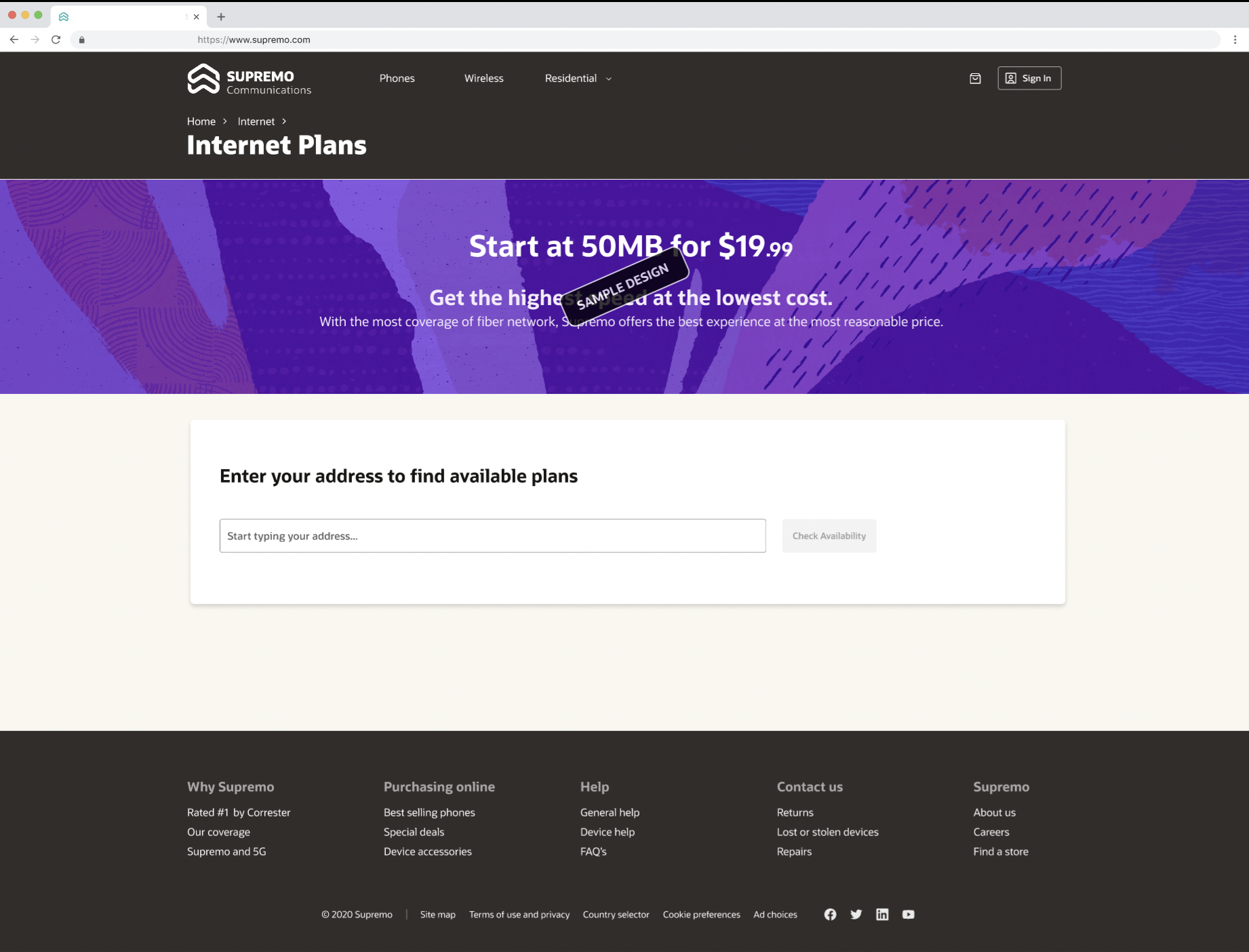
Capture User Address
Realtime Address Validation
Manual Address