
- Revision History
- Overview
- Feature Summary
- Industries Framework Common
- Launch Experience
-
- Launch Experience
-
- Use Migration Rules
- Use Recommendations Rules
- Model Device Trade-In Programs
- Migrating Catalogs
- Reuse price alterations
- Use general ledger ID and tax code in bundle alteration
- Override default value selection of an Option Group at package level
- Validations enforced based on entity validity
- Support of Type for Pricelist
- Design Time Dynamic Offer Approvals
- Extensible User Experience
-
- Launch Experience
This document will continue to evolve as existing sections change and new information is added. All updates appear in the following table:
| Date | Product | Feature | Notes |
|---|---|---|---|
| 23 DEC 2021 | Created initial document. |
The Launch Experience application encapsulates the entire lifecycle of catalog definitions, from ideation to conceptualization to design to launch to retirement. This enables the Customer Service Providers to achieve a faster time-to-market in launching offers. The application includes these functionalities:
- Centralized Design Time Experience for Sales, Billing, and Provisioning Catalogs supporting both traditional and digital offerings, and same-day introduction of new offers.
- Business Persona-grade UX to design new offers. It provides simplified bundling experience to assemble and launch offers thereby empowering the business users.
- Publishing to Oracle Sales, Billing, and Provisioning Catalogs and Open API for non-Oracle catalogs.
- Import Utility support to import third-party catalogs.
- TM Forum Standards based unified language.
This guide outlines the information you need to know about new or improved functionality in this update, and describes any tasks you might need to perform for the update. Each section includes a brief description of the feature, the steps you need to take to enable or begin using the feature, any tips or considerations that you should keep in mind, and the resources available to help you.
 HAVE AN IDEA?
We’re here and we’re listening. If you have a suggestion on how to make our cloud services even better then go ahead and tell us. There are several ways to submit your ideas, for example, through the Ideas Lab on Oracle Customer Connect. Wherever you see this icon after the feature name it means we delivered one of your ideas.
GIVE US FEEDBACK
We welcome your comments and suggestions to improve the content. Please send us your feedback at oracle_fusion_applications_help_ww_grp@oracle.com.
DISCLAIMER
The information contained in this document may include statements about Oracle’s product development plans. Many factors can materially affect Oracle’s product development plans and the nature and timing of future product releases. Accordingly, this Information is provided to you solely for information only, is not a commitment to deliver any material, code, or functionality, and should not be relied upon in making purchasing decisions. The development, release, and timing of any features or functionality described remains at the sole discretion of Oracle.
This information may not be incorporated into any contractual agreement with Oracle or its subsidiaries or affiliates. Oracle specifically disclaims any liability with respect to this information. Refer to the Legal Notices and Terms of Use for further information.
Column Definitions:
Report = New or modified, Oracle-delivered, ready to run reports.
UI or Process-Based: Small Scale = These UI or process-based features are typically comprised of minor field, validation, or program changes. Therefore, the potential impact to users is minimal.
UI or Process-Based: Larger Scale* = These UI or process-based features have more complex designs. Therefore, the potential impact to users is higher.
Features Delivered Disabled = Action is needed BEFORE these features can be used by END USERS. These features are delivered disabled and you choose if and when to enable them. For example, a) new or expanded BI subject areas need to first be incorporated into reports, b) Integration is required to utilize new web services, or c) features must be assigned to user roles before they can be accessed.
| Ready for Use by End Users Reports plus Small Scale UI or Process-Based new features will have minimal user impact after an update. Therefore, customer acceptance testing should focus on the Larger Scale UI or Process-Based* new features. |
Customer Must Take Action before Use by End Users Not disruptive as action is required to make these features ready to use. As you selectively choose to leverage, you set your test and roll out timing. |
|||||
|---|---|---|---|---|---|---|
| Feature |
Report |
UI or |
UI or |
|
||
Override default value selection of an Option Group at package level |
||||||
CX Industries Framework serves as a platform for seamless integration of applications. You can use this platform to integrate your application with other Oracle applications and third-party applications, which includes cloud services and on-premise systems. In addition, you can leverage data from various sources, use TM Forum Open APIs and REST APIs to configure and extend tailored experiences.
CX Industries Framework supports both synchronous and asynchronous interactions between the integrated applications. It hosts all the TM Forum Open APIs on Oracle Cloud Infrastructure API Gateway to secure and optimize the API interactions. It also ensures high availability and resiliency by using the Oracle Cloud Infrastructure Load Balancing service.
You can configure API-level timeouts for the read operation to avoid unnecessary delay caused by slow or unresponsive client applications. You can configure it using the API and Routing Configuration section in the Topology Manager UI.
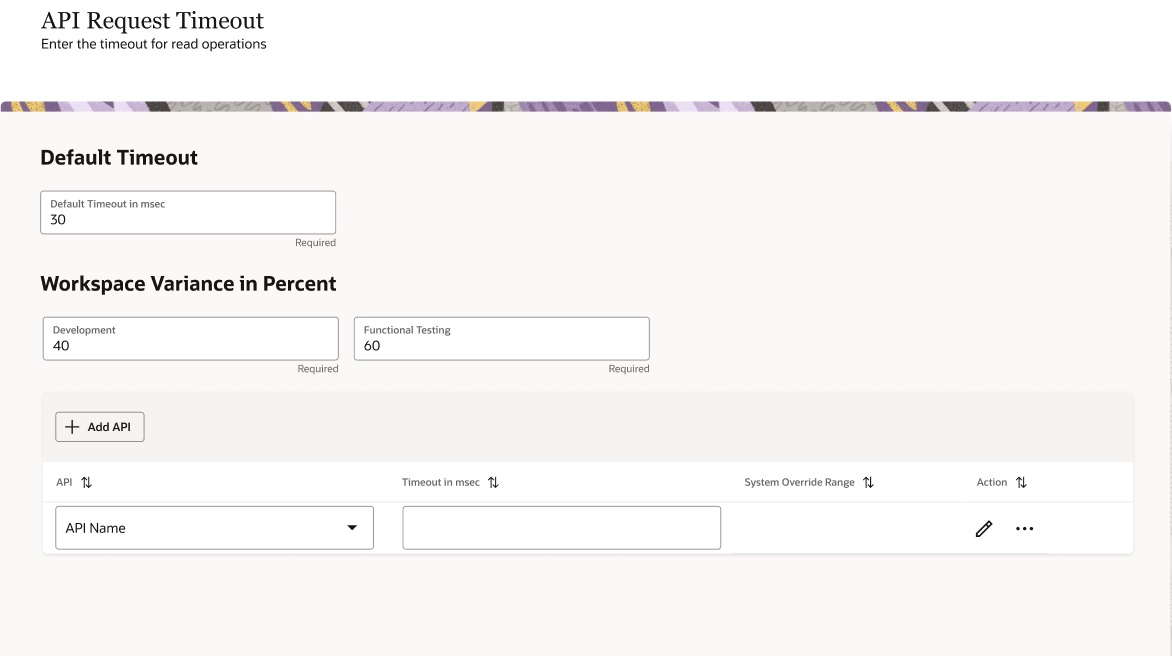
Improves user experience and make the system more fluid by timing out API calls to avoid delay by slow or unresponsive applications.
Steps to Enable
You don't need to do anything to enable this feature.
Role Information
- DX4C Configuration API Timeouts
You can now manage Migration Rules as a separate top-level resource. You use these rules to define upgrade or downgrade path between bundle offers along with the applicable penalty and contract implications.
The following figure shows how you can create these rules between two sellable bundles like Commercial, Service, or Package using different effective periods.
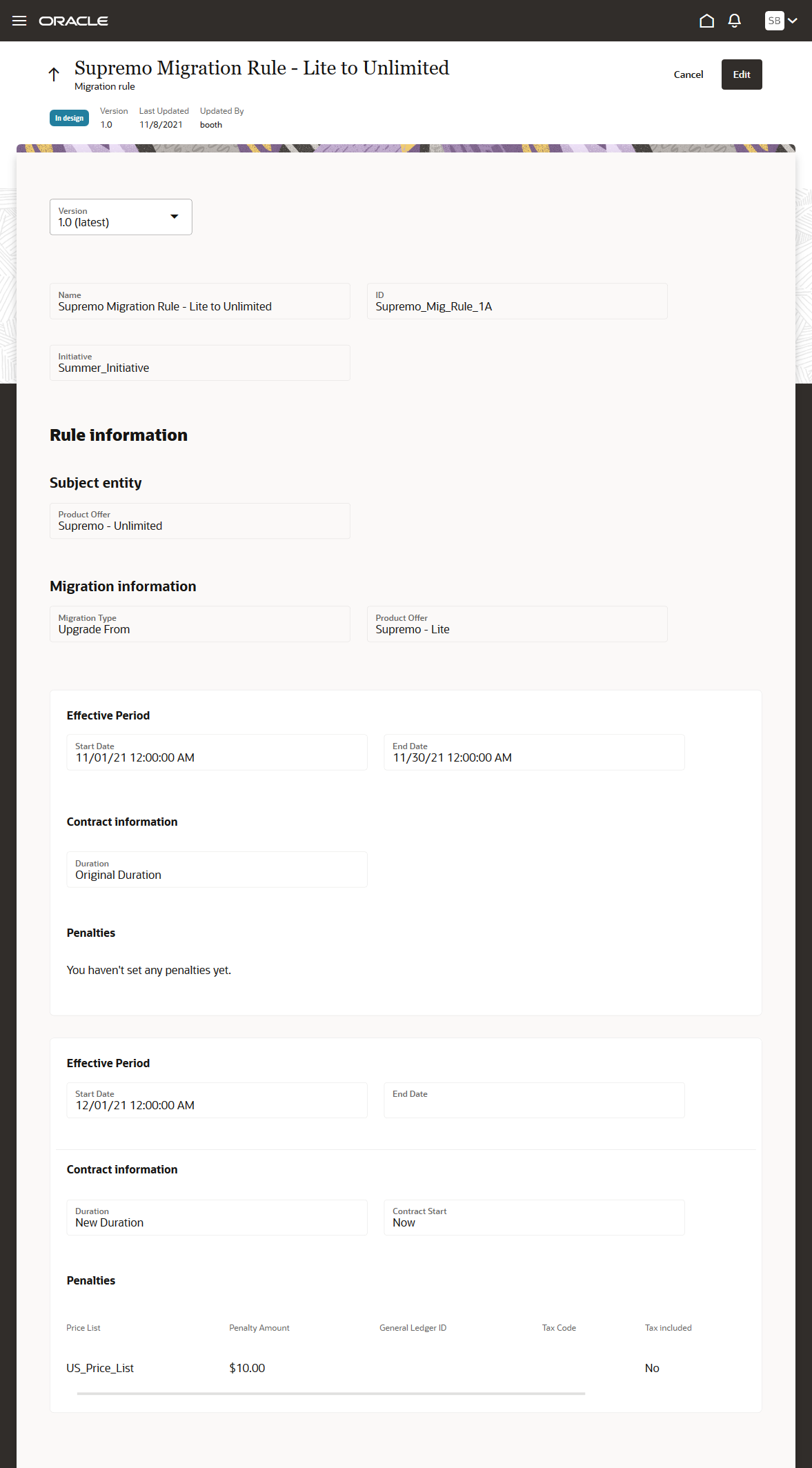
Migration Rule
Migration rules help you define upgrade and downgrade paths for Package type product offerings without causing much revisions.
Steps to Enable
You don't need to do anything to enable this feature.
Role Information
- Communications Marketing Manager
- Communications Catalog Administrator
You can now manage Recommendation Rules as a separate top-level resource. You use these rules to define up-sell and cross-sell recommendations for all types of offers with the recommendation reason. You can also assign a relative score to indicate the rank of the recommendation.
The following figure shows how you can create this rule for a product offering using different effective periods.
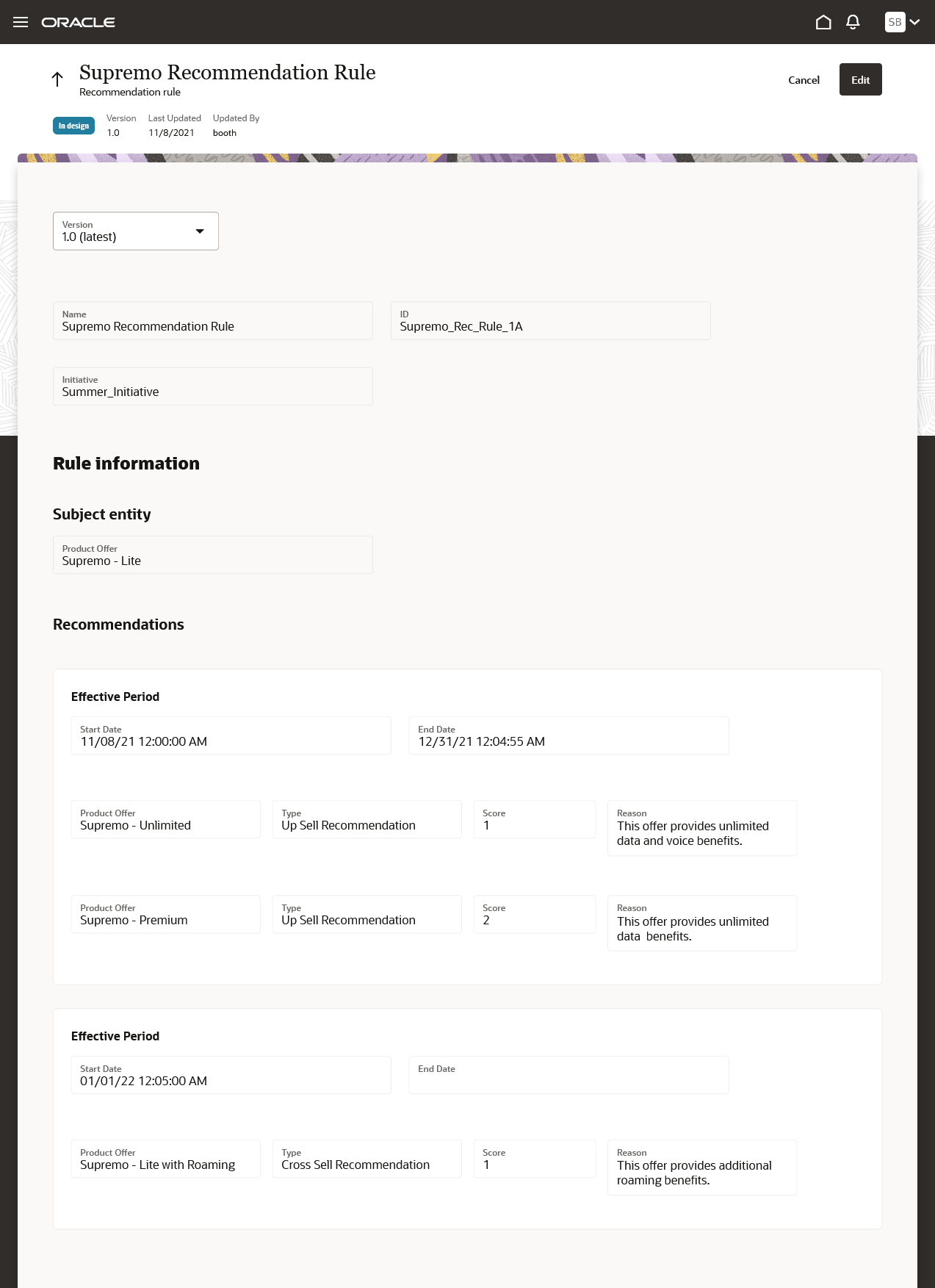
Recommendation Rule
The business benefit of this feature is that it allows users to configure recommendation rules and most importantly modify them without requiring any revision to the underlying offers involved in the rule.
Steps to Enable
You don't need to do anything to enable this feature.
Role Information
- Communications Marketing Manager
- Communications Catalog Administrator
Model Device Trade-In Programs
You can now manage Device Trade-in programs to define the trade-in programs for all devices or collated at product line or category level. Additionally, you can specify device qualifier questions, return checklists, exchange questions (as a trade-in profile specification), and collaterals to help your customers trade-in their old devices for a value. This value can be in form of redemption like discount, voucher, donation, and so on.
The following figure shows how you can create trade-in program.
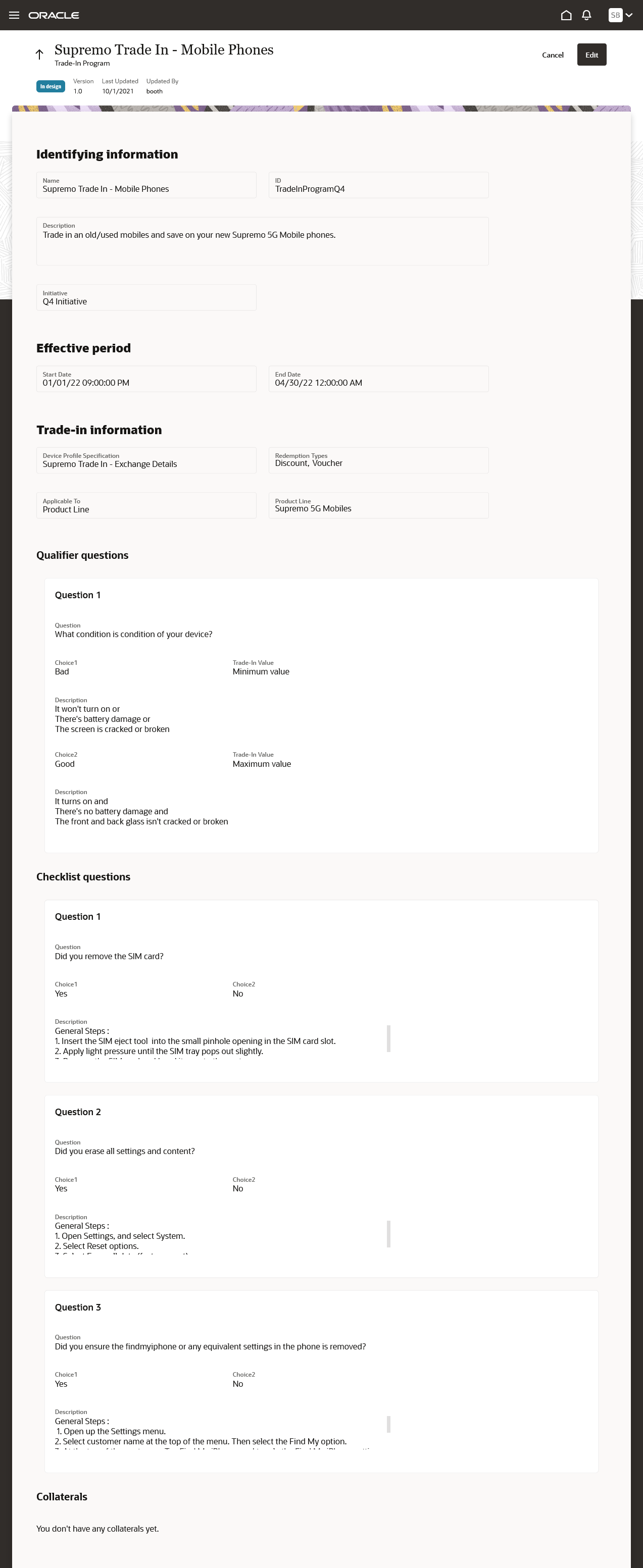
Device Trade-In Program
The business benefit of this feature is that it allows the CSPs to define trade-in programs that can help their prospects and/or customers get credit in one or other forms that can be used to offset the purchase price of a new mobile device.
Steps to Enable
You don't need to do anything to enable this feature.
Role Information
- Communications Catalog Administrator
You can now integrate your Launch application with Siebel CRM to migrate Siebel CRM catalog definitions into Launch Experience. Some of the definitions include but not limited to are product specification (product class), pricelists, catalog and categories, and eligibility and compatibility rules.
The following figure shows how you can create or initiate the migration job for any specific entities from Siebel CRM.
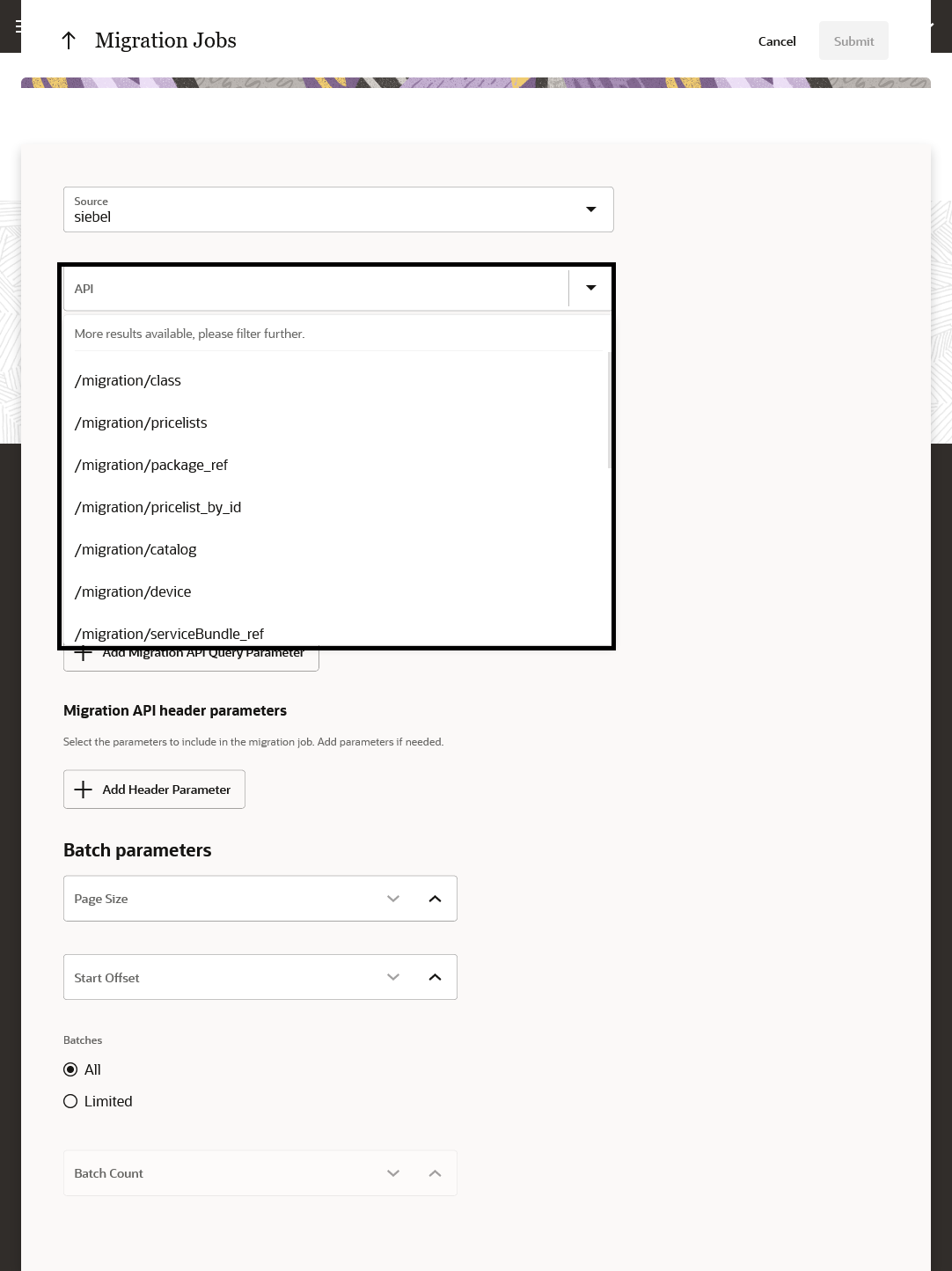
Migrating Catalogs
The business benefit of this feature is that it allows the coexistence of Launch application with Siebel CRM while mastering the design time entities in the Launch application.
Steps to Enable
Please refer to the implementation guide for the prerequisite steps to be followed to enable this feature.
Role Information
- Communications Catalog Administrator
You can now reuse the existing price alterations on atomic offers to avoid price proliferation.
The following figure shows how you can select and configure the existing price alterations against the atomic offers.
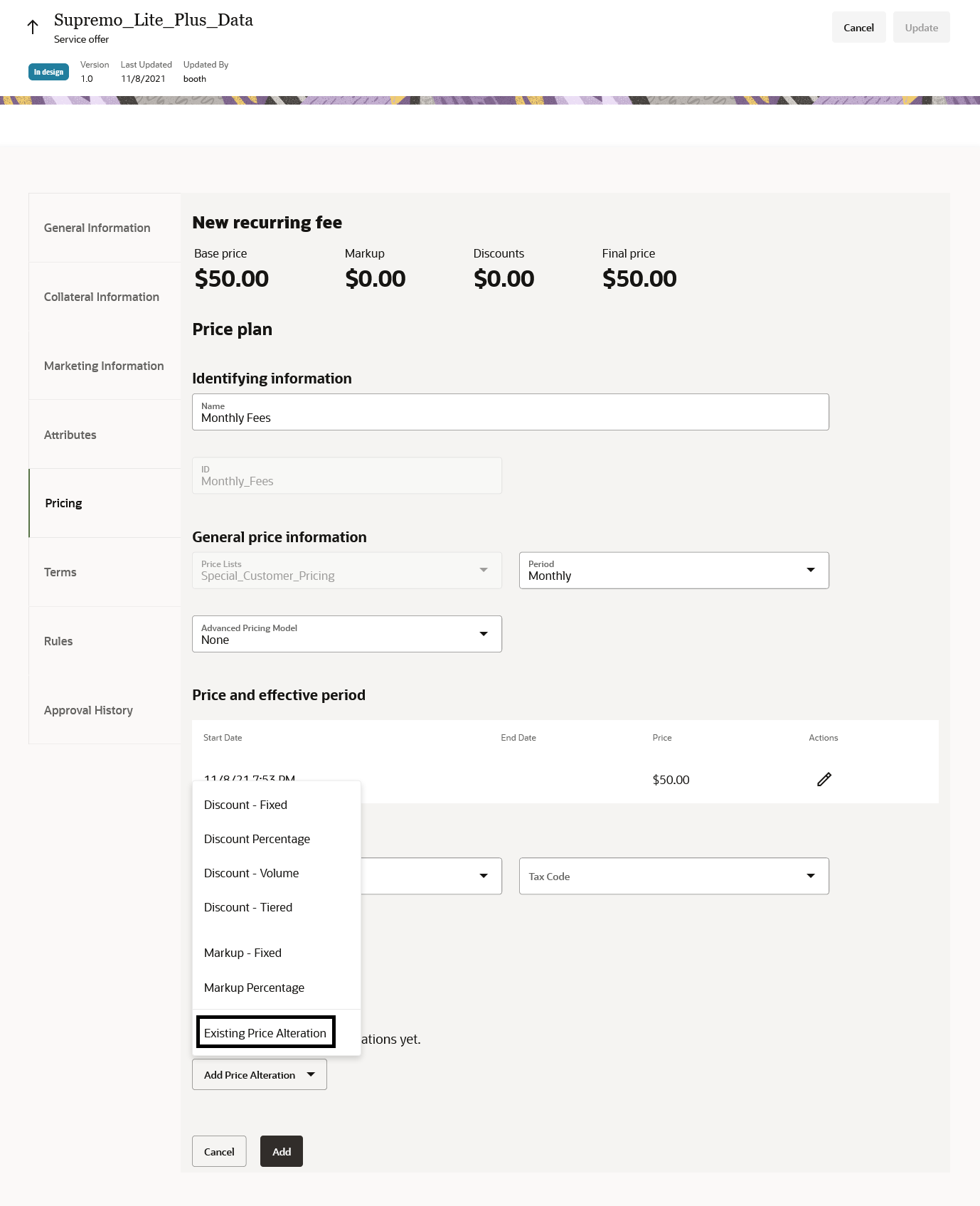
Existing Price Alteration
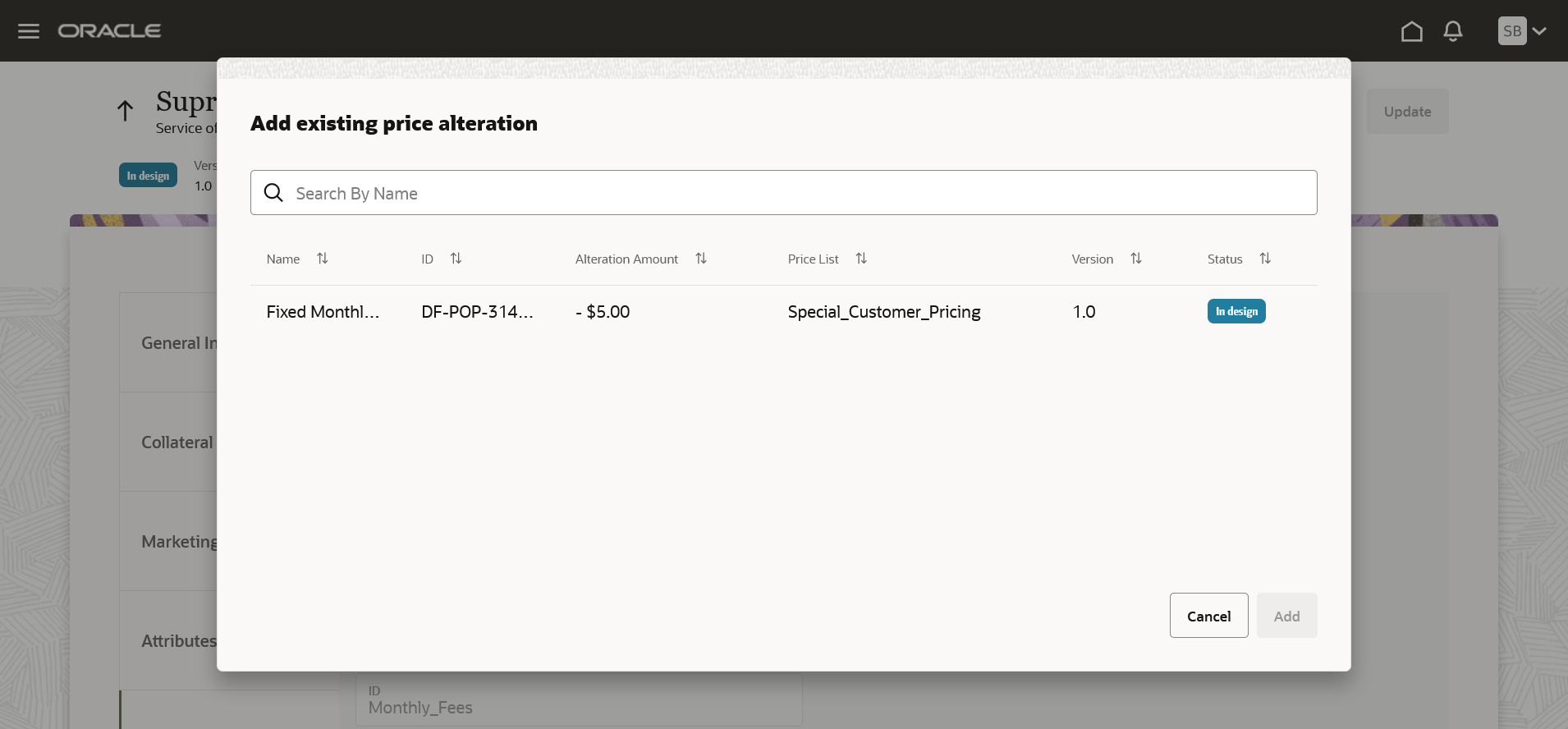
Selection of Existing Price Alteration
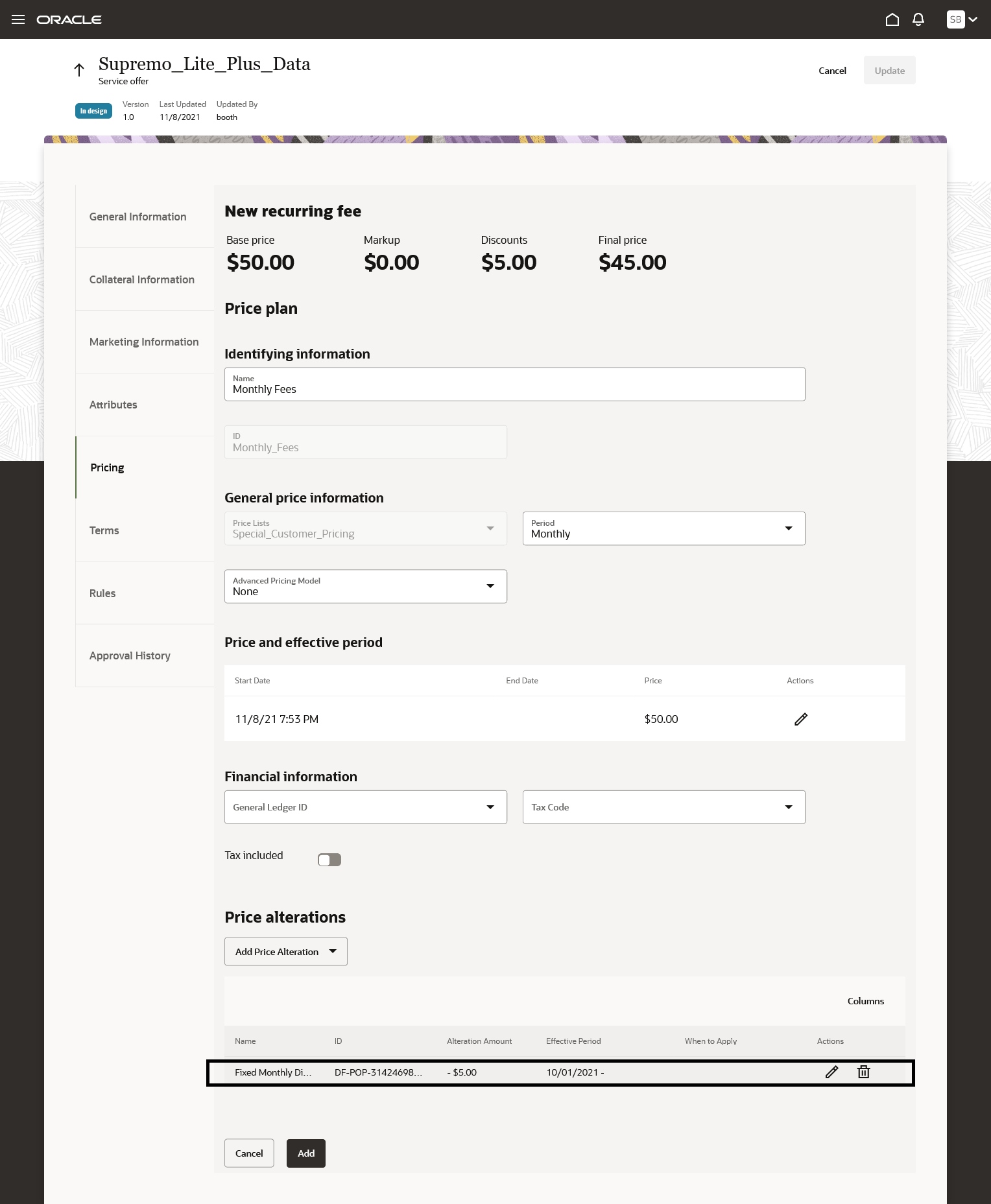
Existing Price Alteration Selected
The business benefit of this feature is that it allows the re-use of the discount plans across atomic offers.
Steps to Enable
You don't need to do anything to enable this feature.
Role Information
- Communications Catalog Product Manager
Use general ledger ID and tax code in bundle alteration
You can now capture general ledger ID, tax code, and also specify tax inclusion or exclusion in bundle alterations.
The following figure shows how you can record the details against a bundle.
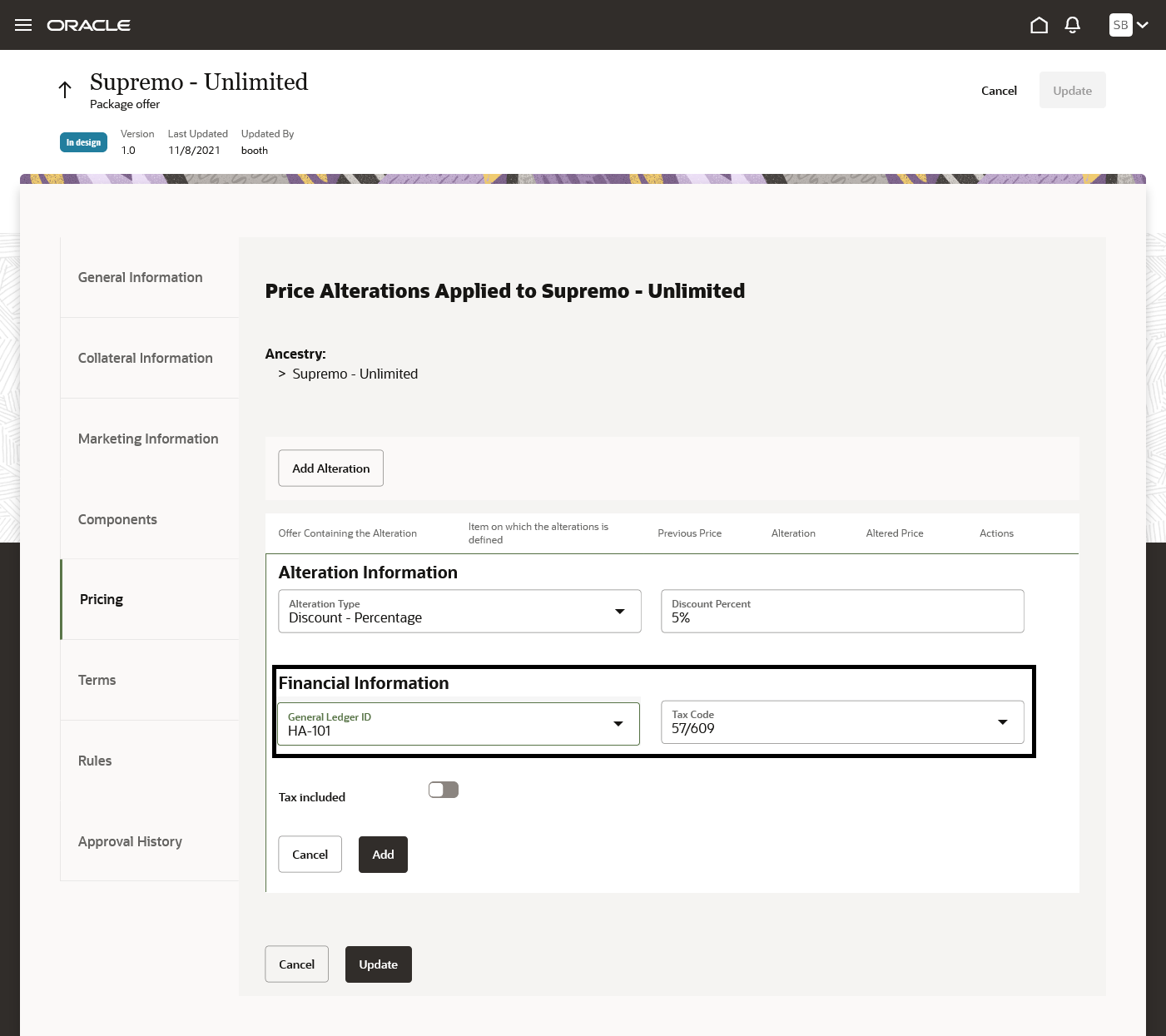
GLID and Tax Code
The business benefit of this feature is that it enables the downstream system to apply appropriate revenue recognition and taxation.
Steps to Enable
You don't need to do anything to enable this feature.
Role Information
- Communications Catalog Product Manager
Override default value selection of an Option Group at package level
You can now override the default value of an option group at a package level. This enables you to set a different default value within the context of a package and avoid bundle-offer proliferation.
The following figure shows how you can modify the option group.
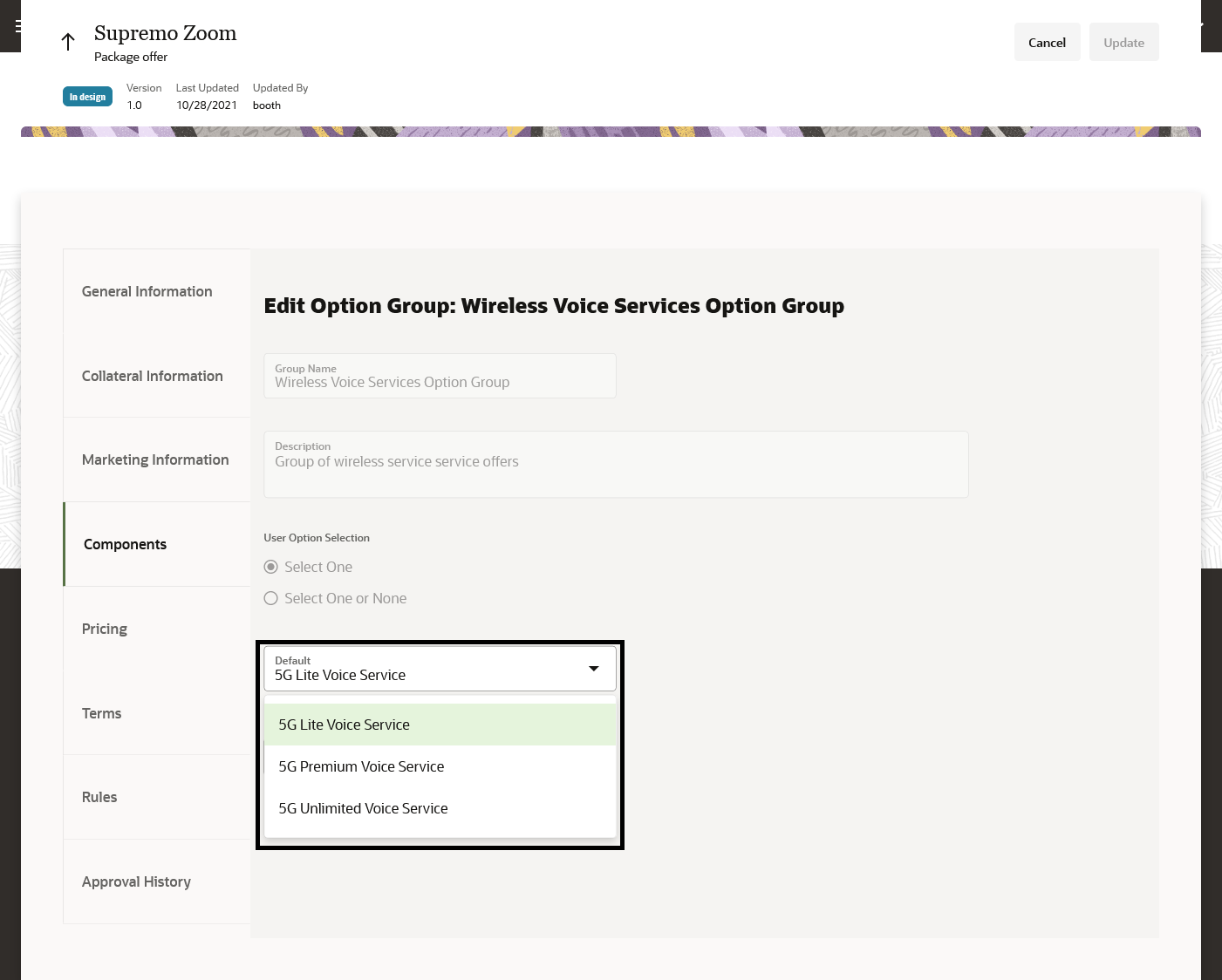
Change Option Group Default
The business benefit of this feature is that it provides the flexibility to set different default value of an option group within the context of a package.
Steps to Enable
You don't need to do anything to enable this feature.
Role Information
- Communications Catalog Product Manager
Validations enforced based on entity validity
Validations are in place for top-level entities to ensure that the referenced or included resources are valid during the effective period of the top-level resource. For example, a product specification valid from Oct 1, 2021 to Dec 31, 2021 cannot be used to create an offer with a validity ranging from Nov 1, 2021 to Mar 30, 2022. The validity of the offer must be within the validity period of the related product specification.
The following figure shows the listing of the product specification with the valid dates.
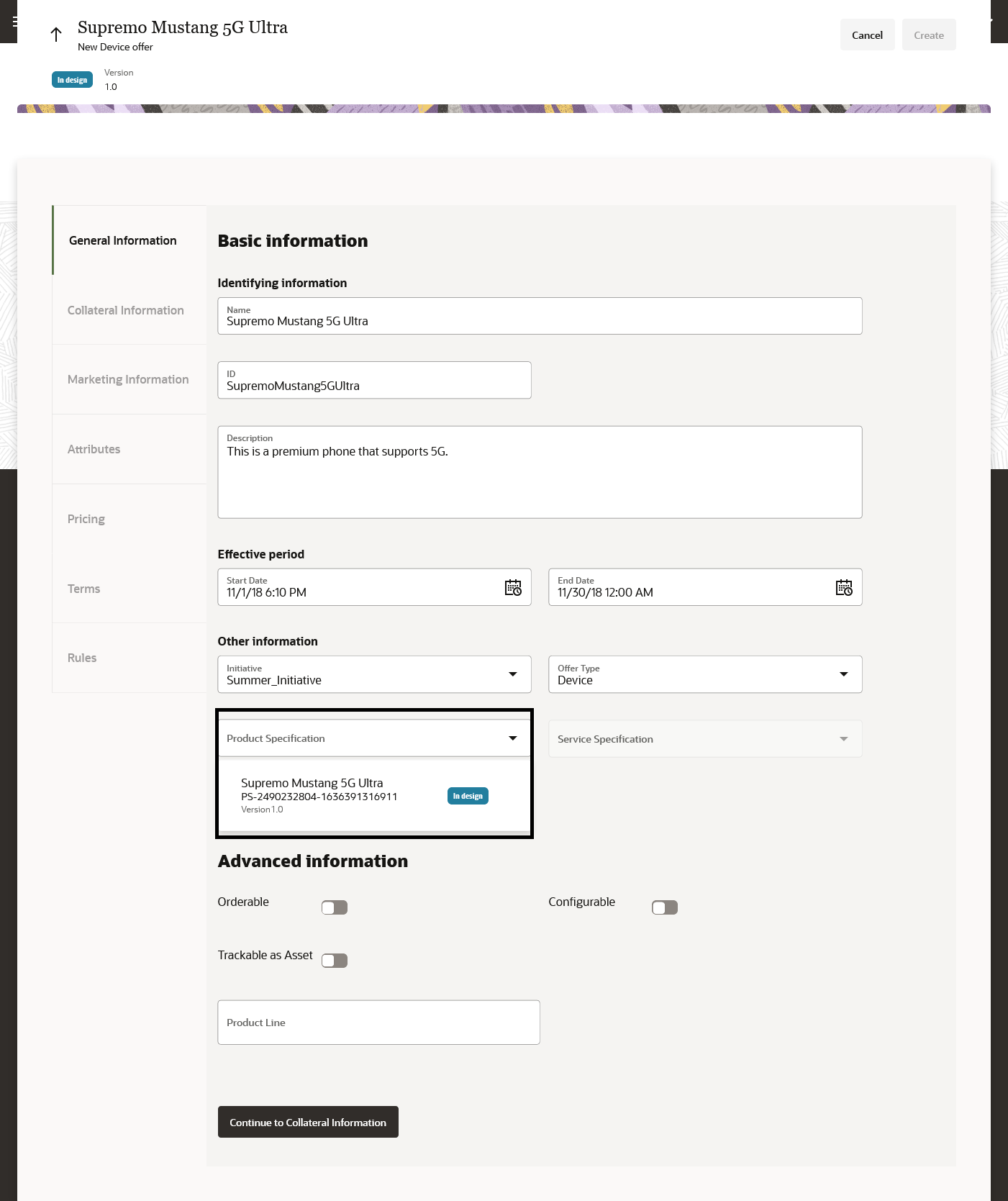
Validation on Referenced Entity Validity
The business benefit of this feature is that it ensures the referenced entities are always valid for the duration of the entity that references it.
Steps to Enable
You don't need to do anything to enable this feature.
Role Information
- All User Roles
You can now define the type attribution for a pricelist based on customer segment, location, or any logical extensible value. For example a price list type can be residential, business, and so on.
The following figure shows how you can select and configure the price list type against the price list.
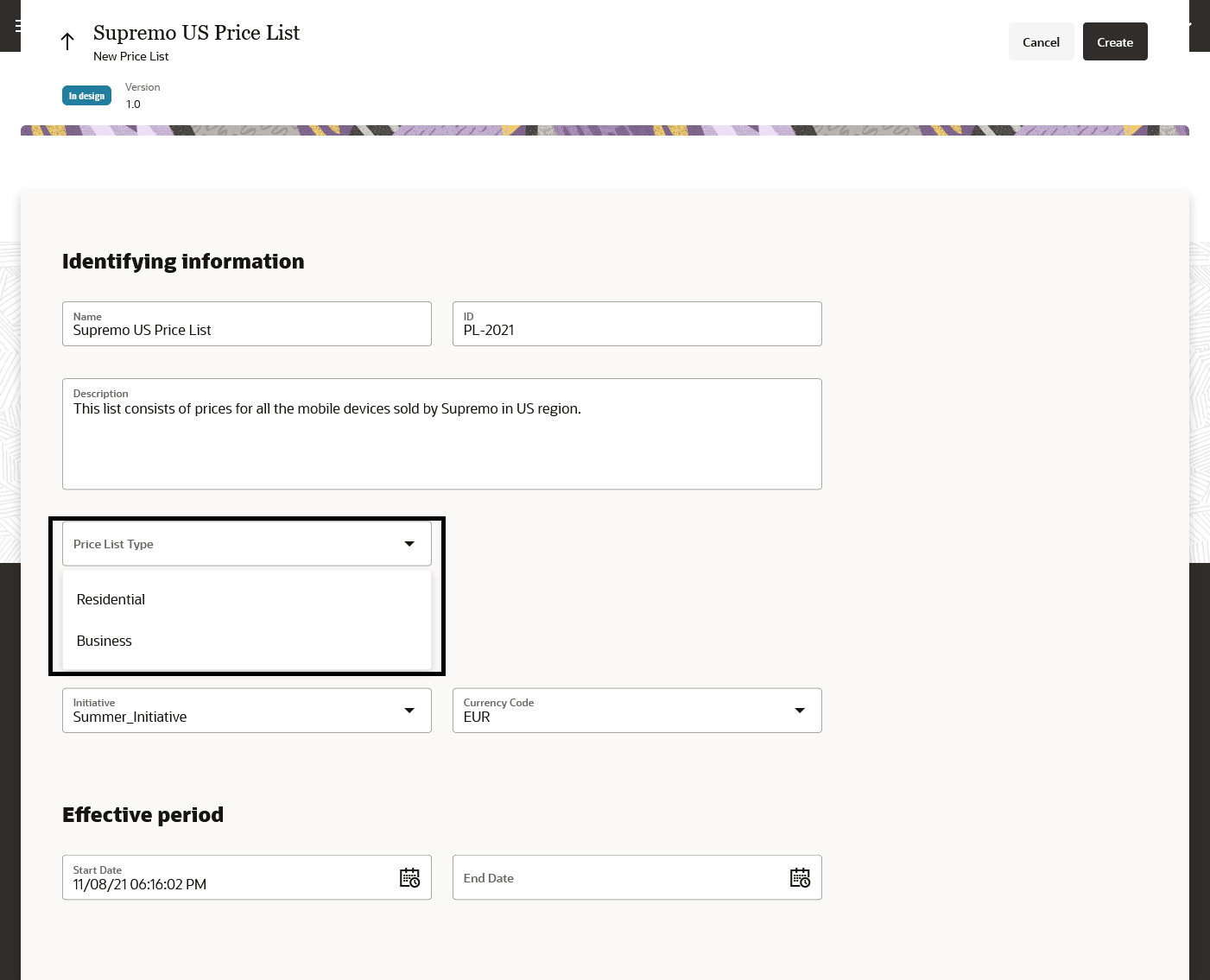
Pricelist Type
The business benefit of this feature is that it allows users to differentiate and manage the pricelist based on the operational model or market segments.
Steps to Enable
You don't need to do anything to enable this feature.
Role Information
- Communications Catalog Administrator
- Communication Catalog Product Manager
Design Time Dynamic Offer Approvals
You can now use the flexible approval process for offers. Product managers can designate their managers as the default approvers and can define additional approvers to approve or reject an offer design.
The following figure shows how you can manage dynamic offer approvals.
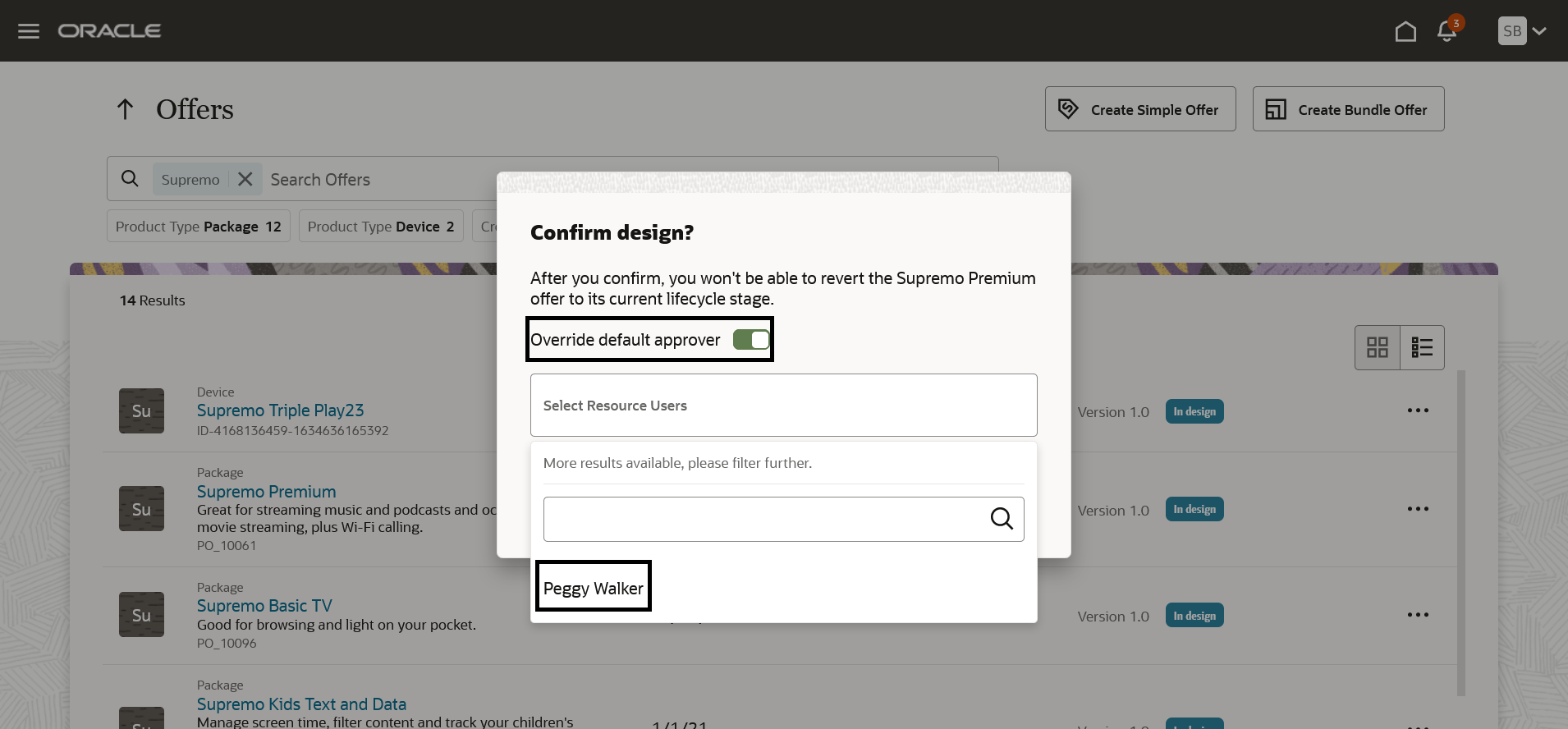
Dynamic Offer Approvals
The business benefit of this feature is that it provides dynamic capability of sequential or parallel approvals during the offer approval flow. You can also override the existing approver or add additional users as approvers. This caters to different needs of organizational collaboration around reviewing and releasing a particular offer to the market.
Steps to Enable
You don't need to do anything to enable this feature.
Role Information
- Communications Catalog Product Manager
You can now extend your Launch UI for the extensions that you do in the API/schema layer to cater to your business requirements.
The following figure shows a sample page layout for the extensions. When you select the extended schema, the additional attribute appears. In the example below, the Product Offering extension shows the Lease Supported attribute.
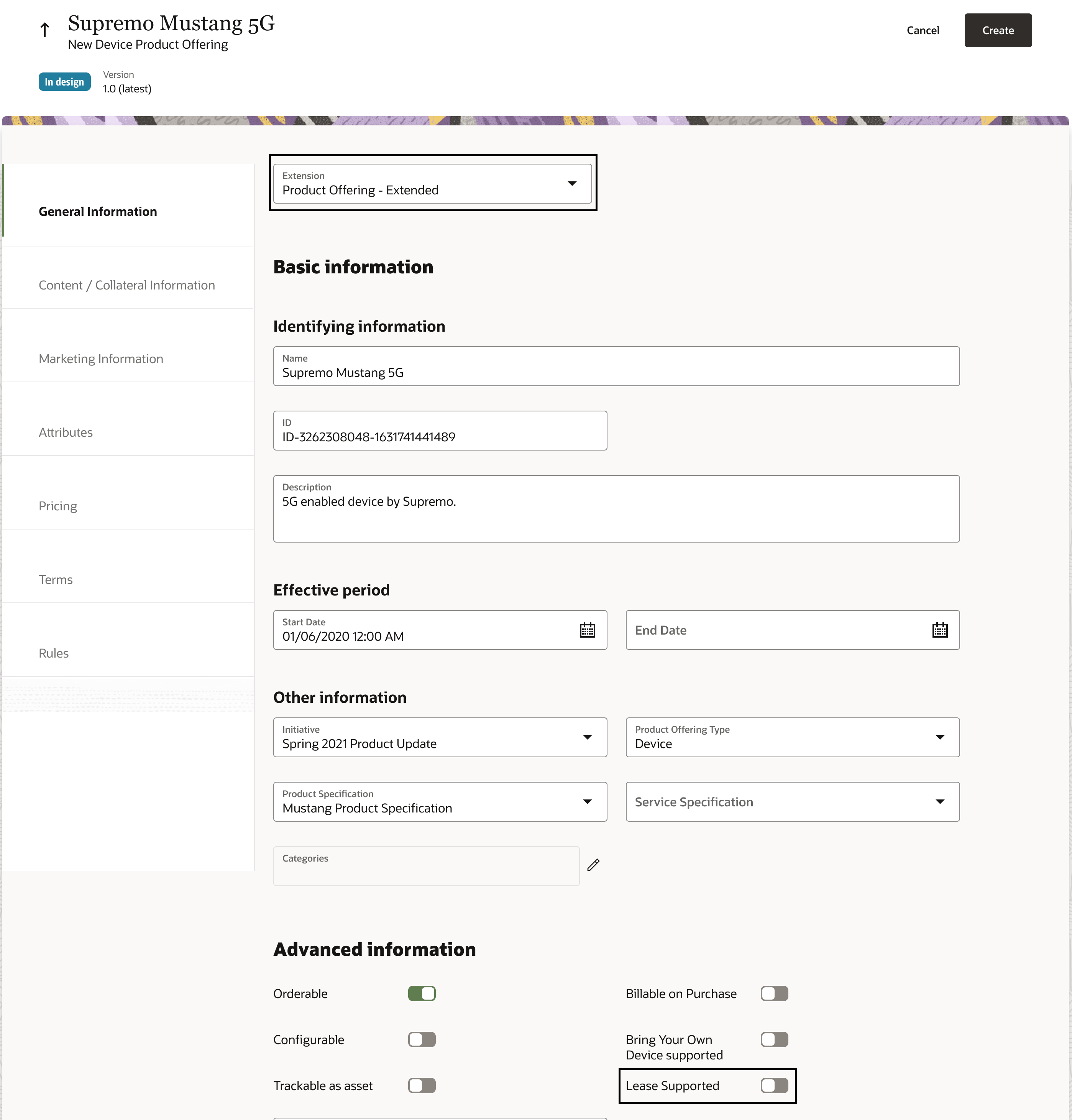
Extended User Experience
The business benefit of this feature is that it enhances the user experience through extensibility.
Steps to Enable
Leverage Application Composer to expose and adjust page layout and attributes. To learn more about extending your application using Application Composer, visit Oracle Help Center > your apps service area of interest > Books > Configuration and Extension.
Role Information
- Communications Catalog Product Manager
- Communications Technical Specialist